door lock FIAT IDEA 2009 1.G User Guide
[x] Cancel search | Manufacturer: FIAT, Model Year: 2009, Model line: IDEA, Model: FIAT IDEA 2009 1.GPages: 210, PDF Size: 3.62 MB
Page 24 of 210
23
SAFETY
STARTING
AND DRIVING
WARNING
LIGHTS AND
MESSAGES
IN AN
EMERGENCY
MAINTENANCE
AND CARE
TECHNICAL
SPECIFICATIONS
ALPHABETICAL
INDEX
DASHBOARD
AND CONTROLS
fig. 28F0H0781m
MULTIFUNCTIONAL
DISPLAY
(on three-line comfort
panel)
The car can be equipped with the multi-
function display for showing useful infor-
mation necessary when driving according
to settings.
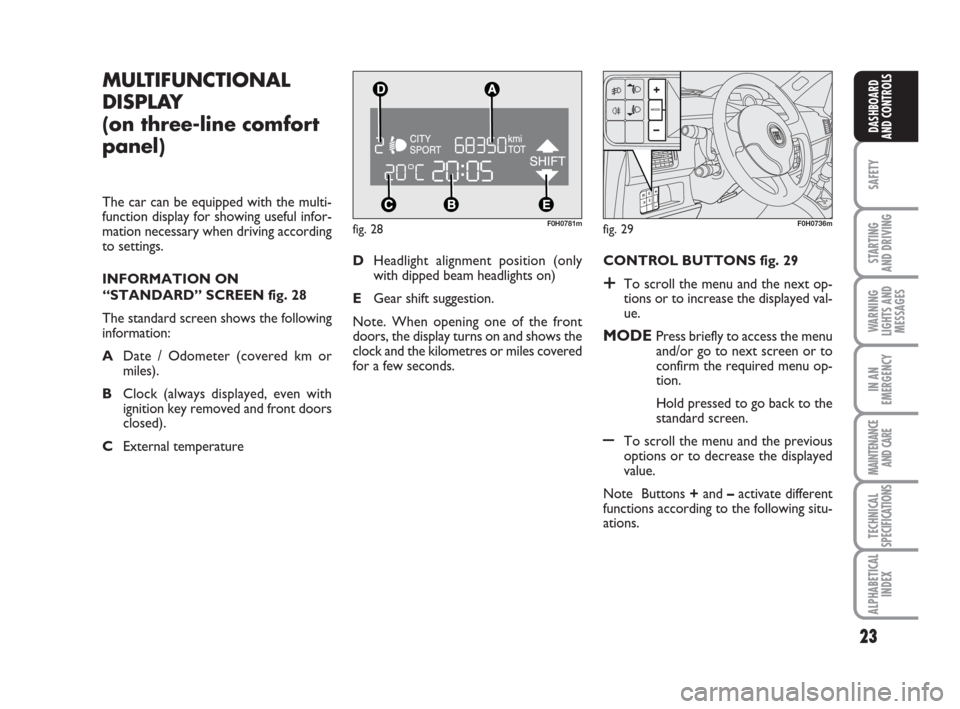
INFORMATION ON
“STANDARD” SCREEN fig. 28
The standard screen shows the following
information:
ADate / Odometer (covered km or
miles).
BClock (always displayed, even with
ignition key removed and front doors
closed).
CExternal temperature CONTROL BUTTONS fig. 29
+To scroll the menu and the next op-
tions or to increase the displayed val-
ue.
MODEPress briefly to access the menu
and/or go to next screen or to
confirm the required menu op-
tion.
Hold pressed to go back to the
standard screen.
–To scroll the menu and the previous
options or to decrease the displayed
value.
Note Buttons +and –activate different
functions according to the following situ-
ations. DHeadlight alignment position (only
with dipped beam headlights on)
EGear shift suggestion.
Note. When opening one of the front
doors, the display turns on and shows the
clock and the kilometres or miles covered
for a few seconds.
fig. 29F0H0736m
Page 29 of 210
28
SAFETY
STARTING
AND DRIVING
WARNING
LIGHTS AND
MESSAGES
IN AN
EMERGENCY
MAINTENANCE
AND CARE
TECHNICAL
SPECIFICATIONS
ALPHABETICAL
INDEX
DASHBOARD
AND CONTROLS
Unlocking the doors and the
tailgate (key)
This function is used to: unlock the front
and rear doors, unlock the driver’s side
door or all the doors including the tailgate.
Proceed as follows to set:
– briefly press button MODE: “Open
doors”, “Open driver”, “Open all”;
– press button +or –to select. The se-
lected item will blink.
– briefly press button MODEto go back
to the menu screen or press the button
for a prolonged time to go back to the
standard screen without storing the set-
tings. – briefly press button MODE: “day” will
start flashing on the display;
– press button +or –to set;
– briefly press button MODE: “day” will
start flashing on the display;
– press button +or –to set.
Note The setting will increase or decrease
by one unit each time +or –is pressed.
Hold the button pressed to in-
crease/decrease the setting rapidly. When
the desired value is reached, end adjust-
ment with a single press.
– briefly press button MODEto go back
to the menu screen or press the button
for a prolonged time to go back to the
standard screen without storing the set-
tings. 12h/24h clock mode
This function is used to select 12h or 24
h display.
To carry out the adjustment, proceed as
follows:
– briefly press MODE: either 12h or 24h
will start flashing on the display (accord-
ing to the previous setting);
– press button +or –for setting;
– briefly press button MODEto go back
to the menu screen or press the button
for a prolonged time to go back to the
standard screen without storing the set-
tings.
Set date
This function is used to set the date (year
– month – day).
Proceed as follows to update:
– briefly press button MODE: “year” will
start flashing on the display;
– press button +or –to set;
Page 51 of 210
50
SAFETY
STARTING
AND DRIVING
WARNING
LIGHTS AND
MESSAGES
IN AN
EMERGENCY
MAINTENANCE
AND CARE
TECHNICAL
SPECIFICATIONS
ALPHABETICAL
INDEX
DASHBOARD
AND CONTROLS
❒turn ring Eto -or to position ƒif the windows are not demisted.
IMPORTANT The climate control system
is very useful for demisting the windows:
simply pressDto operate the system and
demist the windows.
HEATED REAR WINDOW AND
DOOR MIRROR
DEMISTING/DEFROSTING
(where provided)
Press button C-fig. 61to activate the
function. The LED in the button will light
up when the function is on.
The function is timed and automatically
deactivated by the system after a given
time. Press Cagain to switch it off before.
IMPORTANT Do not apply stickers on
the inside of the rear window over the
heating filaments to avoid damage that
might cause it to stop working properly.AIR CONDITIONING
(cooling and dehumidifying)
Proceed as follows:
❒turn the ring B-fig. 61to the blue
sector to select the temperature;
❒turn knob Ato the required speed;
❒turn the ring Eto «;
❒turn the knob Fto …
❒press button D√(the LED on the but-
ton will light up).
Cooling
Proceed as follows:
❒stop internal air recirculation by turn-
ing knob F-fig. 61to
Ú.
❒turn ring Bclockwise to increase the
temperature;
❒turn knob Aanticlockwise to reduce
the fan speed.
LOOKING AFTER THE SYSTEM
Run the climate control system for at least
10 minutes every month during the win-
ter. Have the system inspected at a Fiat
Dealership before the summer.
Page 54 of 210
53
SAFETY
STARTING
AND DRIVING
WARNING
LIGHTS AND
MESSAGES
IN AN
EMERGENCY
MAINTENANCE
AND CARE
TECHNICAL
SPECIFICATIONS
ALPHABETICAL
INDEX
DASHBOARD
AND CONTROLS
Manual intervention is only required for
the following functions during fully auto-
matic operation.
❒MONOto uniform the temperature
and the air distribution on front pas-
senger or rear passenger zones to the
driver’s zone;
❒…air recirculation, to keep it always
on or off;
❒-to speed up demisting/defrosting of
windscreen, side windows, rear window
and door mirrors;
❒(to demist/defrost the heated rear
window and the external rearview
mirrors.
During completely automatic system op-
eration, you can vary the set temperature,
the air distribution and the fan speed us-
ing the corresponding buttons or knobs
at any time: the system will automatically
change settings to adapt to the new re-
quest.
During fully automatic operation (FULL
AUTO), the word FULLwill dissapear
if the air distribution, air speed, compres-
sor and/or recirculation settings are
changed. In this way, the functions will
switch from automatic to manual control until AUTOis pressed again. The fan
speed is the same in all the zones of the
passenger compartment.
With on or more manually set functions,
the introduced air temperature is still
managed automatically by the system, ex-
cept for when the compressor is off: in the
case, the air introduced into the passen-
ger compartment cannot be cooler than
the outside air.
CONTROLS FOR
H-N air
temperature setting
knobs
Turn the knobs clock-
wise or anticlockwise to
turn the temperature up
or down in the front left
zone (knob N) and the
right zone (knob H) of
the passenger compart-
ment respectively.
The system manages two passenger com-
partment zones: the driver and passen-
ger can therefore select different tem-
peratures. The maximum difference be-
tween the two zones is 7°C.
The set temperature is shown on the dis-
play near the knobs.Press A(MONO) to automatically align
the temperature in the front passenger
zone to the driver’s side temperature. The
same temperature can be set in both
zones by turning knob N on driver’s side.
This function is used to adjust the tem-
perature in the passenger compartment
when the driver only is in the car.
To go back to separate air and tempera-
ture distribution in the two zones of the
passenger compartment, simply turn the
knobs H or press (A-MONO) when the
LED on the button is on.
Turn the knobs either all to the right or
all to the left to the extreme HIor LO
positions to use the maximum heating or
maximum cooling functions:
❒HIfunction (maximum heating):
select by turning the temperature knob
clockwise over the maximum value
(32 °C). It can be operated from either
by the driver or by the front passenger
(by selecting the MONOfunction).
This function may be used to cool down
the passenger compartment as fast as
possible and exploit the system potential
to the maximum. The function uses the
Page 66 of 210
65
SAFETY
STARTING
AND DRIVING
WARNING
LIGHTS AND
MESSAGES
IN AN
EMERGENCY
MAINTENANCE
AND CARE
TECHNICAL
SPECIFICATIONS
ALPHABETICAL
INDEX
DASHBOARD
AND CONTROLS
fig. 77F0H0078mfig. 78F0H0079m
fig. 79F0H0254m
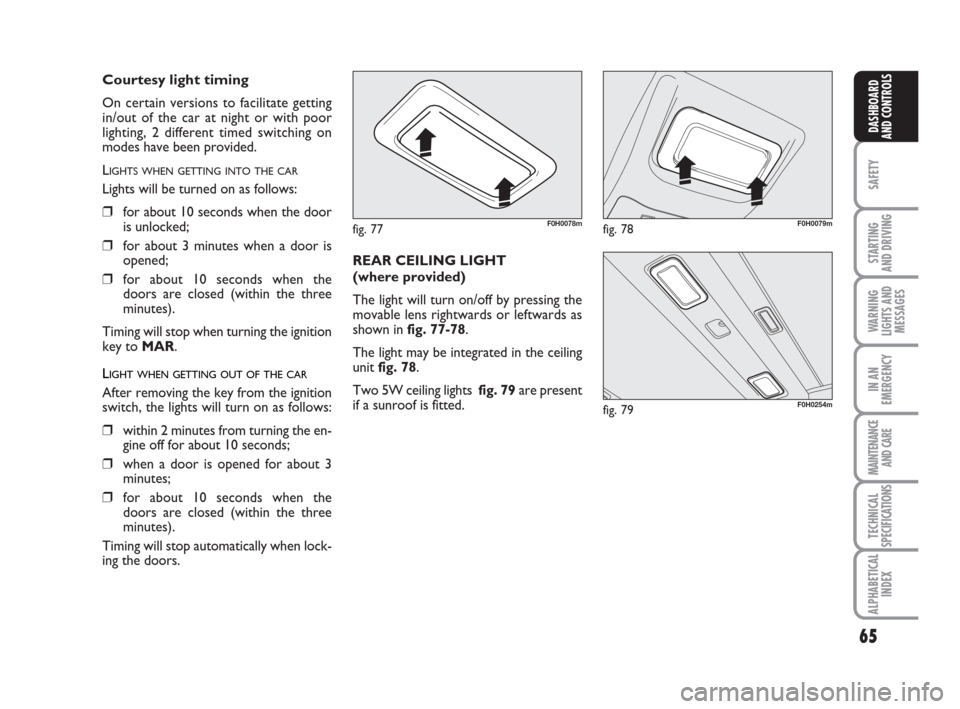
REAR CEILING LIGHT
(where provided)
The light will turn on/off by pressing the
movable lens rightwards or leftwards as
shown in fig. 77-78.
The light may be integrated in the ceiling
unit fig. 78.
Two 5W ceiling lights fig. 79are present
if a sunroof is fitted.
Courtesy light timing
On certain versions to facilitate getting
in/out of the car at night or with poor
lighting, 2 different timed switching on
modes have been provided.
L
IGHTS WHEN GETTING INTO THE CAR
Lights will be turned on as follows:
❒for about 10 seconds when the door
is unlocked;
❒for about 3 minutes when a door is
opened;
❒for about 10 seconds when the
doors are closed (within the three
minutes).
Timing will stop when turning the ignition
key to MAR.
LIGHT WHEN GETTING OUT OF THE CAR
After removing the key from the ignition
switch, the lights will turn on as follows:
❒within 2 minutes from turning the en-
gine off for about 10 seconds;
❒when a door is opened for about 3
minutes;
❒for about 10 seconds when the
doors are closed (within the three
minutes).
Timing will stop automatically when lock-
ing the doors.
Page 77 of 210
76
SAFETY
STARTING
AND DRIVING
WARNING
LIGHTS AND
MESSAGES
IN AN
EMERGENCY
MAINTENANCE
AND CARE
TECHNICAL
SPECIFICATIONS
ALPHABETICAL
INDEX
DASHBOARD
AND CONTROLS
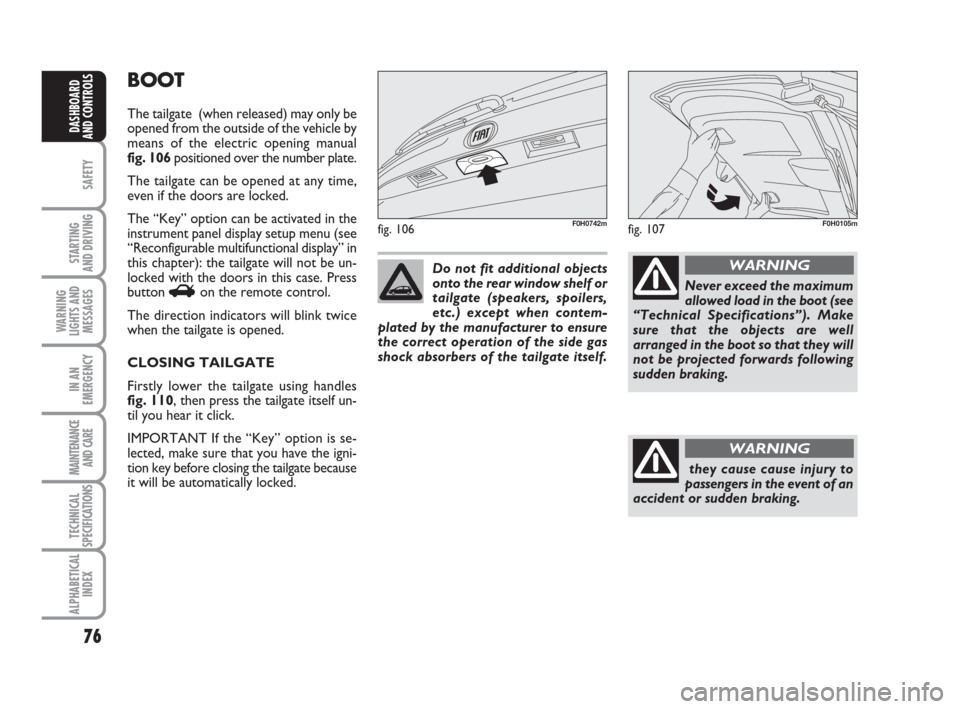
BOOT
The tailgate (when released) may only be
opened from the outside of the vehicle by
means of the electric opening manual
fig. 106 positioned over the number plate.
The tailgate can be opened at any time,
even if the doors are locked.
The “Key” option can be activated in the
instrument panel display setup menu (see
“Reconfigurable multifunctional display” in
this chapter): the tailgate will not be un-
locked with the doors in this case. Press
button
Ron the remote control.
The direction indicators will blink twice
when the tailgate is opened.
CLOSING TAILGATE
Firstly lower the tailgate using handles
fig. 110, then press the tailgate itself un-
til you hear it click.
IMPORTANT If the “Key” option is se-
lected, make sure that you have the igni-
tion key before closing the tailgate because
it will be automatically locked.
fig. 106F0H0742m
Do not fit additional objects
onto the rear window shelf or
tailgate (speakers, spoilers,
etc.) except when contem-
plated by the manufacturer to ensure
the correct operation of the side gas
shock absorbers of the tailgate itself.
Never exceed the maximum
allowed load in the boot (see
“Technical Specifications”). Make
sure that the objects are well
arranged in the boot so that they will
not be projected forwards following
sudden braking.
WARNING
they cause cause injury to
passengers in the event of an
accident or sudden braking.
WARNING
fig. 107F0H0105m
Page 92 of 210
91
SAFETY
STARTING
AND DRIVING
WARNING
LIGHTS AND
MESSAGES
IN AN
EMERGENCY
MAINTENANCE
AND CARE
TECHNICAL
SPECIFICATIONS
ALPHABETICAL
INDEX
DASHBOARD
AND CONTROLS
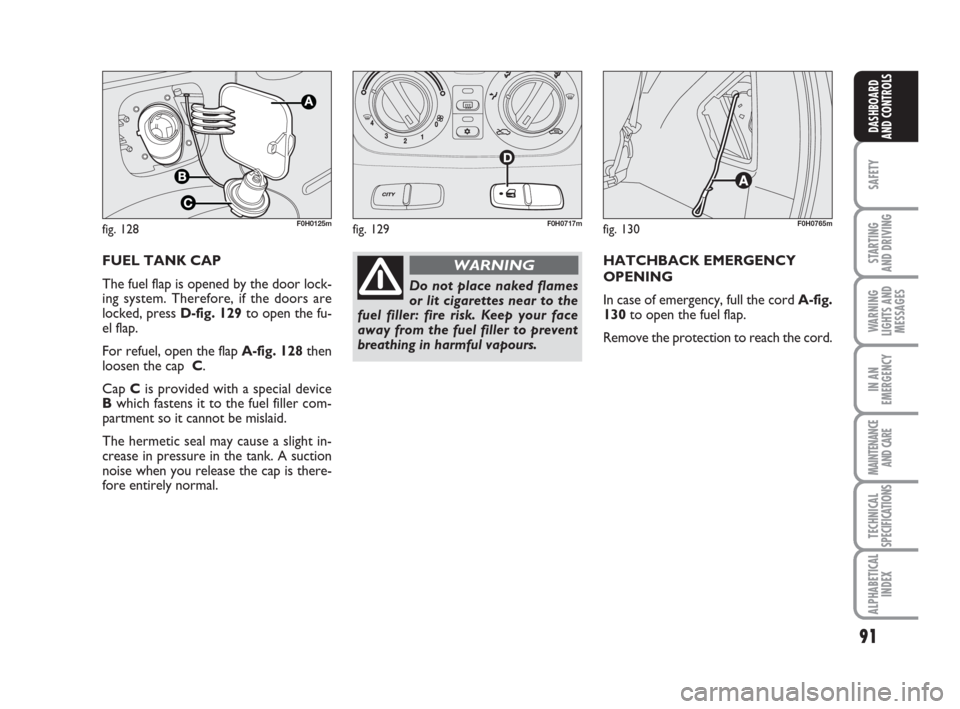
FUEL TANK CAP
The fuel flap is opened by the door lock-
ing system. Therefore, if the doors are
locked, press D-fig. 129to open the fu-
el flap.
For refuel, open the flap A-fig. 128then
loosen the cap C.
Cap Cis provided with a special device
Bwhich fastens it to the fuel filler com-
partment so it cannot be mislaid.
The hermetic seal may cause a slight in-
crease in pressure in the tank. A suction
noise when you release the cap is there-
fore entirely normal.
fig. 128F0H0125m
HATCHBACK EMERGENCY
OPENING
In case of emergency, full the cord A-fig.
130to open the fuel flap.
Remove the protection to reach the cord.
fig. 130F0H0765mfig. 129F0H0717m
Do not place naked flames
or lit cigarettes near to the
fuel filler: fire risk. Keep your face
away from the fuel filler to prevent
breathing in harmful vapours.
WARNING
Page 110 of 210
109
STARTING
AND DRIVING
WARNING
LIGHTS AND
MESSAGES
IN AN
EMERGENCY
MAINTENANCE
AND CARE
TECHNICAL
SPECIFICATIONS
ALPHABETICAL
INDEX
DASHBOARD
AND
CONTROLS
SAFETY
IMPORTANT The front air bags and/or si-
de bags may be deployed if the car is
subject to heavy knocks or accidents in-
volving the underbody area, such as for
example violent shocks, against steps,
kerbs or low obstacles, falling of the car in
big holes or sags in the road.
IMPORTANT A small amount of dust will
be released when the airbags are de-
ployed. The dust is not harmful and does
not indicate the beginning of a fire.
Furthermore, the surface of the deployed
bag and the interior of the car may be co-
vered in a dusty residue: This dust may ir-
ritate the skin and the eyes. Wash with
mild soap and water in the event of ex-
posure.
The airbag system expires after 14 years
(charge) and 10 years (clock contact). Go
to a Fiat Dealership to have the devices
replaced when the expiration date ap-
proaches.
IMPORTANT Should an accident occur in
which any of the safety devices is activa-
ted, take the car to a Fiat Dealership to
have the devices activated replaced and to
have the system checked.
Every control, repair and replacement
operations concerning the air bags must
only be carried out c/o Fiat Dealership.If you are having the car scrapped, have
the air bag system deactivated at a Fiat
Dealership first. If the car changes ow-
nership, the new owner must be informed
of the method of use of air bags and the
above warnings and also be given this
“Owner‘s Handbook”.
IMPORTANT Pretensioners, front airbags
and front side bags are deployed differen-
tly according to the type of collision. Non
deployment of one of the devices does not
therefore indicate a system fault.
Do not rest your head, arms
or elbows on the door, on
the windows and in the window bag
area to prevent injury in case of de-
ployment.
WARNING
Never lean head, arms and
elbows out of window.
WARNING
If when turning the key to
MAR the warning light
¬does not turn on or stays on whilst
driving (together with the message in
the multifunctional display, where
provided), a failure may have occur-
red in the restraint systems. In this ca-
se the air bags or pretensioners may
not be deployed after an impact or,
in a minor number of cases, they may
be deployed accidentally. Contact a
Fiat Dealership immediately to have
the system checked.
WARNING
GENERAL WARNINGS
Do not cover the backrest of
the front seats with covers
which are not suitable for use with si-
de bags.
WARNING
Always drive holding your
hands on the steering wheel
rim so that the airbag can inflate
freely in the case of need. Do not dri-
ve with your body bent forward. Keep
your back straight against the back
rest.
WARNING
Page 135 of 210
134
STARTING
AND DRIVING
MAINTENANCE
AND CARE
TECHNICAL
SPECIFICATIONS
ALPHABETICAL
INDEX
DASHBOARD
AND
CONTROLS
SAFETY
WARNING
LIGHTS AND
MESSAGES
IN AN
EMERGENCY
OPENING/CLOSING
THE DOORS
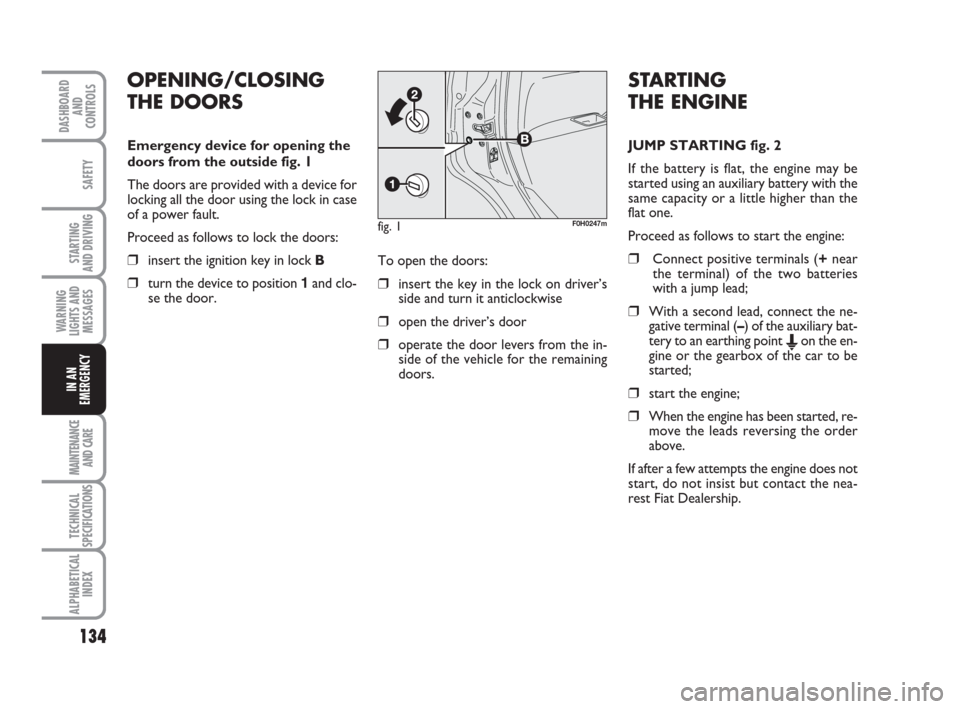
Emergency device for opening the
doors from the outside fig. 1
The doors are provided with a device for
locking all the door using the lock in case
of a power fault.
Proceed as follows to lock the doors:
❒insert the ignition key in lock B
❒turn the device to position 1and clo-
se the door.To open the doors:❒insert the key in the lock on driver’s
side and turn it anticlockwise
❒open the driver’s door
❒operate the door levers from the in-
side of the vehicle for the remaining
doors.
fig. 1F0H0247m
STARTING
THE ENGINE
JUMP STARTING fig. 2
If the battery is flat, the engine may be
started using an auxiliary battery with the
same capacity or a little higher than the
flat one.
Proceed as follows to start the engine:
❒Connect positive terminals (+near
the terminal) of the two batteries
with a jump lead;
❒With a second lead, connect the ne-
gative terminal (–) of the auxiliary bat-
tery to an earthing point
Eon the en-
gine or the gearbox of the car to be
started;
❒start the engine;
❒When the engine has been started, re-
move the leads reversing the order
above.
If after a few attempts the engine does not
start, do not insist but contact the nea-
rest Fiat Dealership.
Page 157 of 210
156
STARTING
AND DRIVING
MAINTENANCE
AND CARE
TECHNICAL
SPECIFICATIONS
ALPHABETICAL
INDEX
DASHBOARD
AND
CONTROLS
SAFETY
WARNING
LIGHTS AND
MESSAGES
IN AN
EMERGENCY
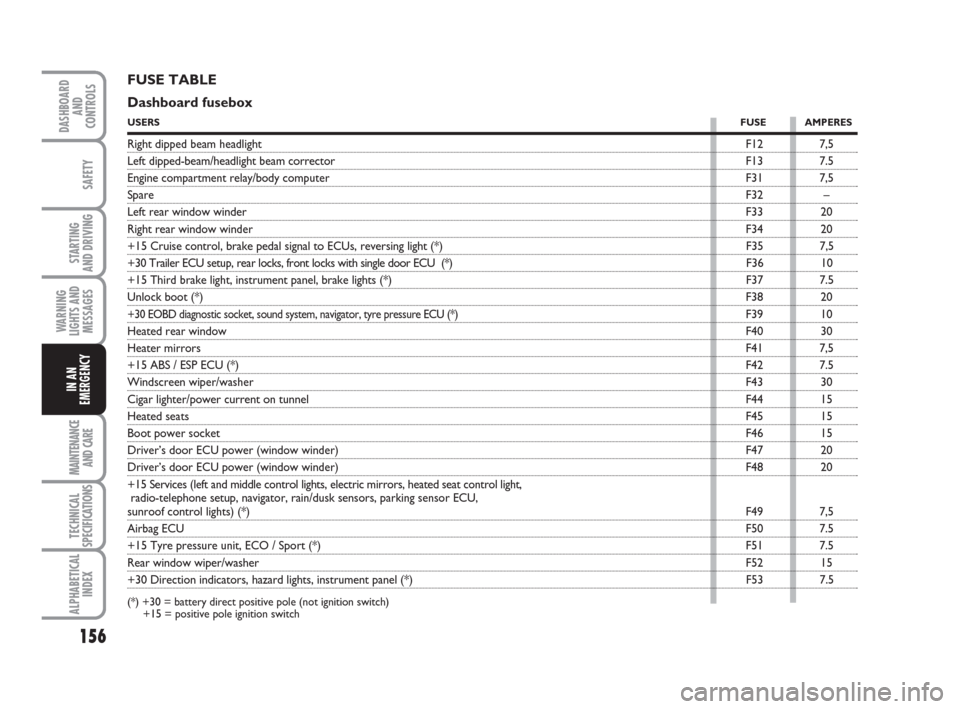
FUSE TABLE
Dashboard fusebox
USERSFUSE AMPERES
Right dipped beam headlightF12 7,5
Left dipped-beam/headlight beam correctorF13 7.5
Engine compartment relay/body computerF31 7,5
SpareF32 –
Left rear window winderF33 20
Right rear window winderF34 20
+15 Cruise control, brake pedal signal to ECUs, reversing light (*) F35 7,5
+30 Trailer ECU setup, rear locks, front locks with single door ECU (*) F36 10
+15 Third brake light, instrument panel, brake lights (*) F37 7.5
Unlock boot (*)F38 20
+30 EOBD diagnostic socket, sound system, navigator, tyre pressure ECU (*)F39 10
Heated rear windowF40 30
Heater mirrorsF41 7,5
+15 ABS / ESP ECU (*)F42 7.5
Windscreen wiper/washerF43 30
Cigar lighter/power current on tunnelF44 15
Heated seatsF45 15
Boot power socketF46 15
Driver’s door ECU power (window winder)F47 20
Driver’s door ECU power (window winder)F48 20
+15 Services (left and middle control lights, electric mirrors, heated seat control light,
radio-telephone setup, navigator, rain/dusk sensors, parking sensor ECU,
sunroof control lights) (*)F49 7,5
Airbag ECUF50 7.5
+15 Tyre pressure unit, ECO / Sport (*)F51 7.5
Rear window wiper/washerF52 15
+30 Direction indicators, hazard lights, instrument panel (*) F53 7.5
(*) +30 = battery direct positive pole (not ignition switch)
+15 = positive pole ignition switch