ignition FIAT IDEA 2010 1.G User Guide
[x] Cancel search | Manufacturer: FIAT, Model Year: 2010, Model line: IDEA, Model: FIAT IDEA 2010 1.GPages: 210, PDF Size: 4.4 MB
Page 35 of 210
34
SAFETY
STARTING
AND DRIVING
WARNING
LIGHTS AND
MESSAGES
IN AN
EMERGENCY
MAINTENANCE
AND CARE
TECHNICAL
SPECIFICATIONS
ALPHABETICAL
INDEX
DASHBOARD
AND CONTROLS
New mission
The new mission begins after:– “manu-
al” resetting by the user, by pressing the
relevant button;
– “automatic” resetting, when the “Trip
distance” reaches 3999.9 km or 9999.9 km
(according to the type of display) or when
the “Travel time” reaches 99.59 (99 hours
and 59 minutes);
– after disconnecting/reconnecting the
battery.
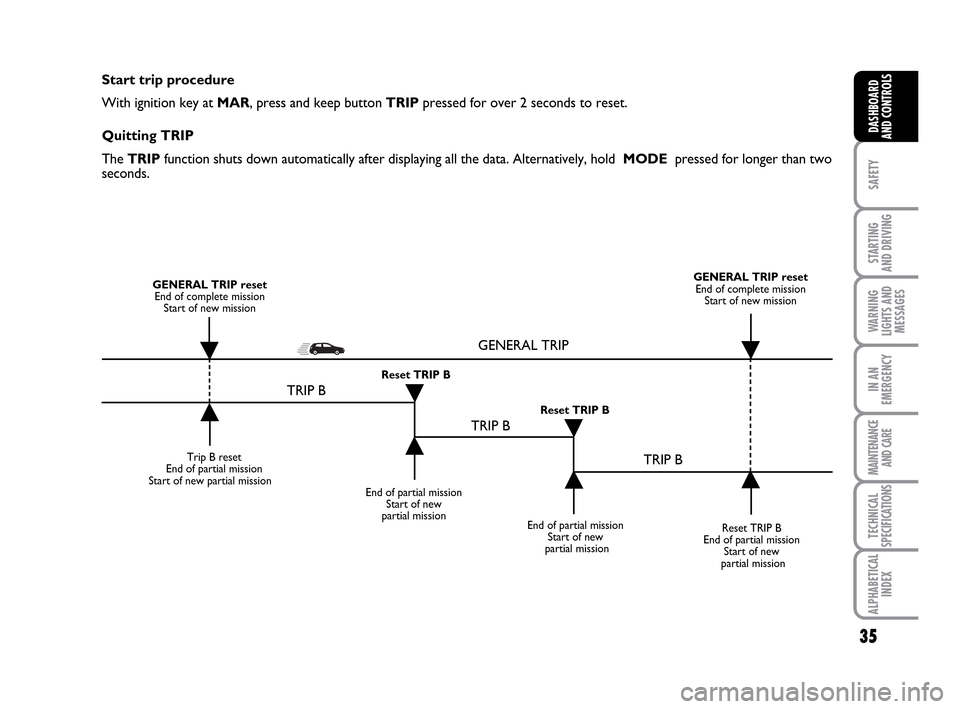
IMPORTANT “General Trip” resets will
reset “Trip B” at the same time, while re-
setting “Trip B” will only reset the val-
ues of the trip B function. Average speed
This shows the car average speed as a
function of the overall time elapsed since
the start of the new mission.Journey time
This value shows the time elapsed since
the start of the new mission.
IMPORTANT If information is not avail-
able, the message “----” will appear instead
of the Trip Computer values. Displaying
of the values will be resumed when nor-
mal operation is restored without reset-
ting the values displayed before the prob-
lem nor starting a new mission.
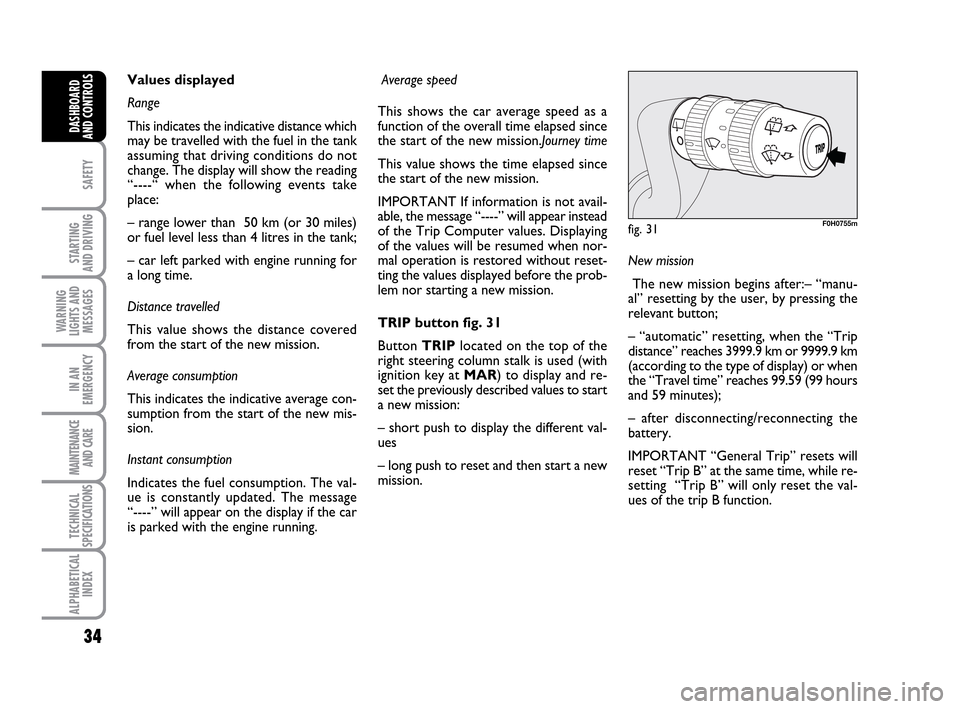
TRIP button fig. 31
Button TRIPlocated on the top of the
right steering column stalk is used (with
ignition key at MAR) to display and re-
set the previously described values to start
a new mission:
– short push to display the different val-
ues
– long push to reset and then start a new
mission. Values displayed
Range
This indicates the indicative distance which
may be travelled with the fuel in the tank
assuming that driving conditions do not
change. The display will show the reading
“----“ when the following events take
place:
– range lower than 50 km (or 30 miles)
or fuel level less than 4 litres in the tank;
– car left parked with engine running for
a long time.
Distance travelled
This value shows the distance covered
from the start of the new mission.
Average consumption
This indicates the indicative average con-
sumption from the start of the new mis-
sion.
Instant consumption
Indicates the fuel consumption. The val-
ue is constantly updated. The message
“----” will appear on the display if the car
is parked with the engine running.
fig. 31F0H0755m
001-035 LUM IDEA GB 2 ed.qxd 19-01-2010 9:14 Pagina 34
Page 36 of 210
35
SAFETY
STARTING
AND DRIVING
WARNING
LIGHTS AND
MESSAGES
IN AN
EMERGENCY
MAINTENANCE
AND CARE
TECHNICAL
SPECIFICATIONS
ALPHABETICAL
INDEX
DASHBOARD
AND CONTROLS
Start trip procedure
With ignition key at MAR, press and keep button TRIPpressed for over 2 seconds to reset.
Quitting TRIP
The TRIP function shuts down automatically after displaying all the data. Alternatively, hold MODE pressed for longer than two
seconds.
Trip B reset
End of partial mission
Start of new partial mission
End of partial mission
Start of new
partial mission
Reset TRIP B
End of partial mission
Start of new
partial mission GENERAL TRIP reset
End of complete mission
Start of new missionGENERAL TRIP reset
End of complete mission
Start of new mission
End of partial mission
Start of new
partial mission Reset TRIP B
Reset TRIP B
TRIP B
TRIP B
TRIP B GENERAL TRIP
˙
˙
˙
˙
˙
˙˙
˙
001-035 LUM IDEA GB 2 ed.qxd 19-01-2010 9:14 Pagina 35
Page 59 of 210
58
SAFETY
STARTING
AND DRIVING
WARNING
LIGHTS AND
MESSAGES
IN AN
EMERGENCY
MAINTENANCE
AND CARE
TECHNICAL
SPECIFICATIONS
ALPHABETICAL
INDEX
DASHBOARD
AND CONTROLS
EXTERNAL LIGHTS
The left-hand lever includes the controls
for the external lights.
The external lights can only be switched
on when the ignition key is at MAR.
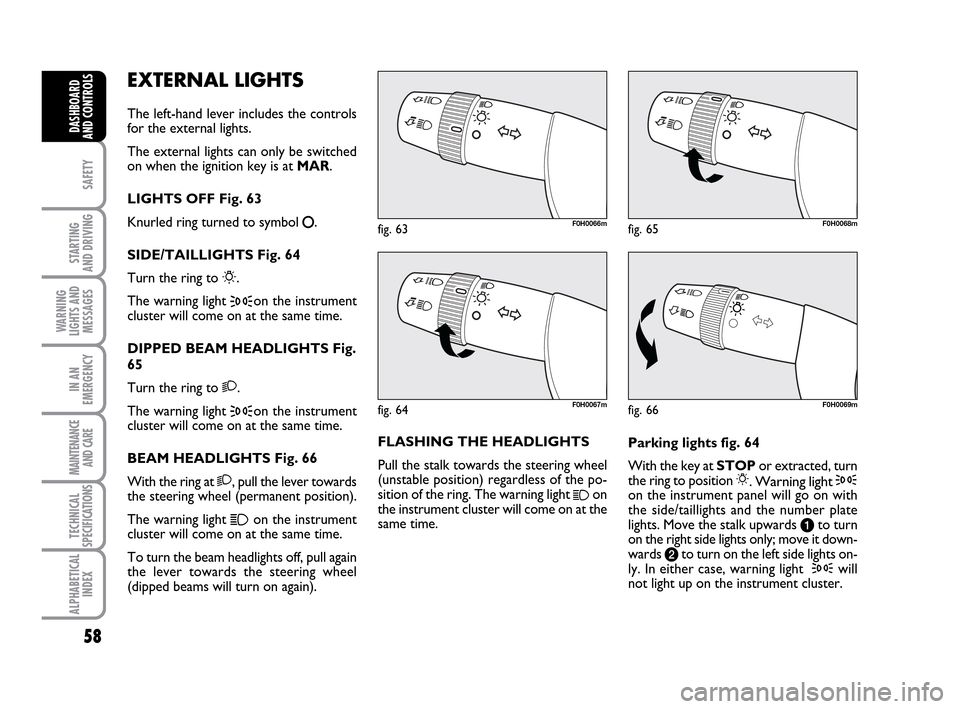
LIGHTS OFF Fig. 63
Knurled ring turned to symbol
å.
SIDE/TAILLIGHTS Fig. 64
Turn the ring to
6.
The warning light
3on the instrument
cluster will come on at the same time.
DIPPED BEAM HEADLIGHTS Fig.
65
Turn the ring to 2.
The warning light
3on the instrument
cluster will come on at the same time.
BEAM HEADLIGHTS Fig. 66
With the ring at 2, pull the lever towards
the steering wheel (permanent position).
The warning light
1on the instrument
cluster will come on at the same time.
To turn the beam headlights off, pull again
the lever towards the steering wheel
(dipped beams will turn on again).FLASHING THE HEADLIGHTS
Pull the stalk towards the steering wheel
(unstable position) regardless of the po-
sition of the ring. The warning light
1on
the instrument cluster will come on at the
same time.Parking lights fig. 64
With the key at STOPor extracted, turn
the ring to position 6. Warning light 3on the instrument panel will go on with
the side/taillights and the number plate
lights. Move the stalk upwards ato turn
on the right side lights only; move it down-
wards bto turn on the left side lights on-
ly. In either case, warning light
3will
not light up on the instrument cluster.
fig. 63F0H0066m
fig. 66F0H0069m
fig. 65F0H0068m
fig. 64F0H0067m
036-092 LUM IDEA GB 2 ed.qxd 14-01-2010 12:15 Pagina 58
Page 60 of 210
59
SAFETY
STARTING
AND DRIVING
WARNING
LIGHTS AND
MESSAGES
IN AN
EMERGENCY
MAINTENANCE
AND CARE
TECHNICAL
SPECIFICATIONS
ALPHABETICAL
INDEX
DASHBOARD
AND CONTROLS
fig. 67F0H0071mfig. 68F0H0070mfig. 69F0H0072m
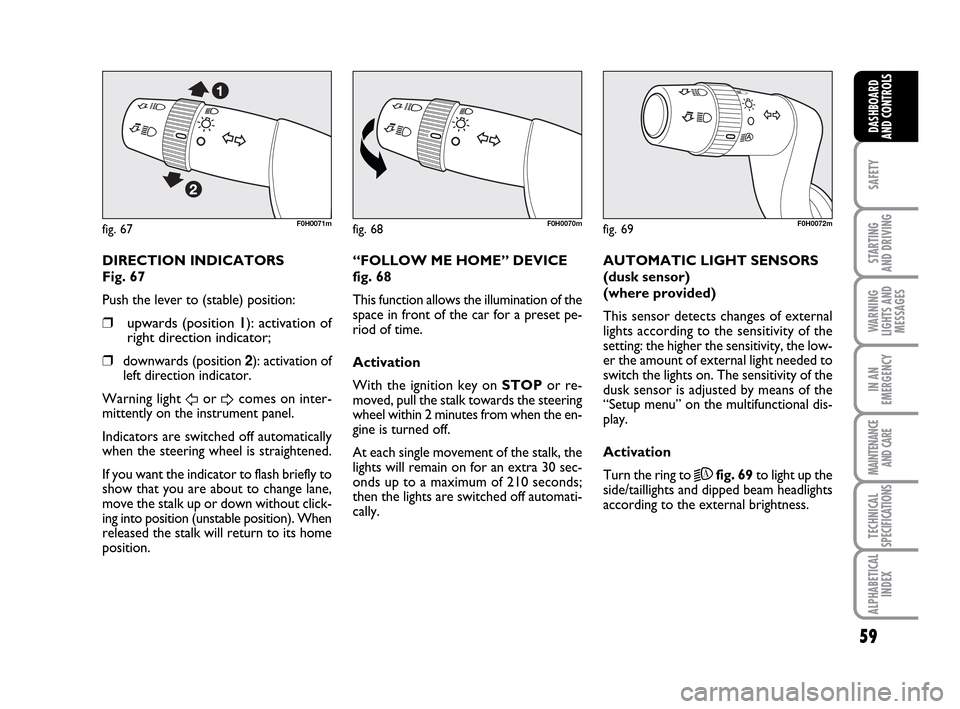
DIRECTION INDICATORS
Fig. 67
Push the lever to (stable) position:
❒upwards (position 11): activation of
right direction indicator;
❒
downwards (position 2): activation of
left direction indicator.
Warning light
ForDcomes on inter-
mittently on the instrument panel.
Indicators are switched off automatically
when the steering wheel is straightened.
If you want the indicator to flash briefly to
show that you are about to change lane,
move the stalk up or down without click-
ing into position (unstable position). When
released the stalk will return to its home
position.“FOLLOW ME HOME” DEVICE
fig. 68
This function allows the illumination of the
space in front of the car for a preset pe-
riod of time.
Activation
With the ignition key on STOPor re-
moved, pull the stalk towards the steering
wheel within 2 minutes from when the en-
gine is turned off.
At each single movement of the stalk, the
lights will remain on for an extra 30 sec-
onds up to a maximum of 210 seconds;
then the lights are switched off automati-
cally. AUTOMATIC LIGHT SENSORS
(dusk sensor)
(where provided)
This sensor detects changes of external
lights according to the sensitivity of the
setting: the higher the sensitivity, the low-
er the amount of external light needed to
switch the lights on. The sensitivity of the
dusk sensor is adjusted by means of the
“Setup menu” on the multifunctional dis-
play.
Activation
Turn the ring to
2Afig. 69to light up the
side/taillights and dipped beam headlights
according to the external brightness.
036-092 LUM IDEA GB 2 ed.qxd 14-01-2010 12:15 Pagina 59
Page 63 of 210
62
SAFETY
STARTING
AND DRIVING
WARNING
LIGHTS AND
MESSAGES
IN AN
EMERGENCY
MAINTENANCE
AND CARE
TECHNICAL
SPECIFICATIONS
ALPHABETICAL
INDEX
DASHBOARD
AND CONTROLS
The wiper will flick once to indicate that
the sensor has been reactivated.
The rain sensor is able to recognize and
automatically adjust itself in the presence
of the following particular conditions:
❒dirt on the controlled surface (salt,
dirt, etc.);
❒difference between day and night.
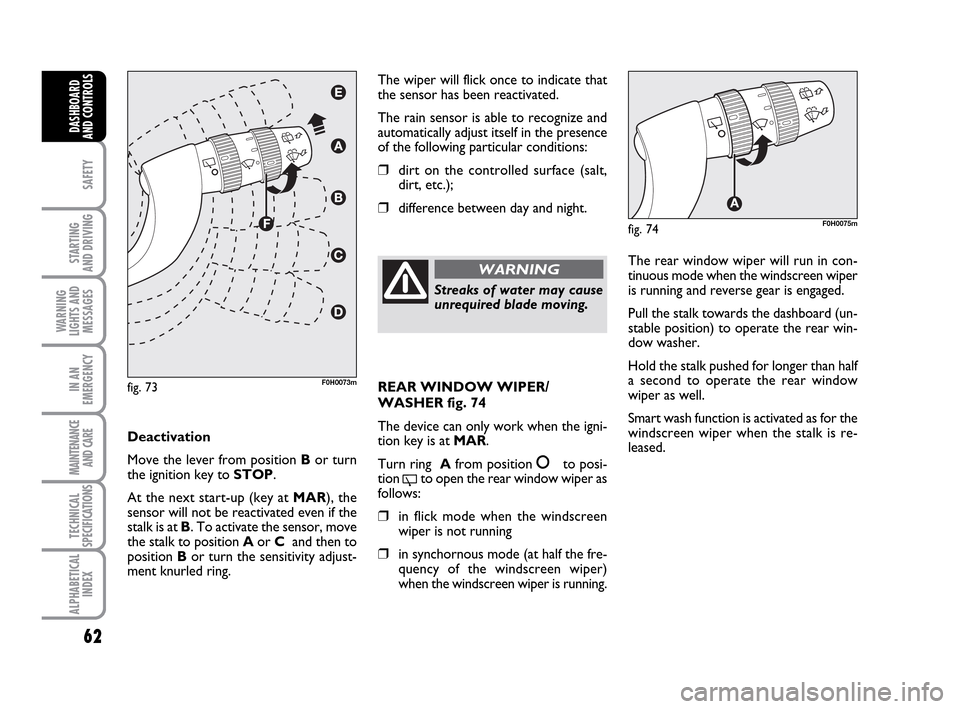
Deactivation
Move the lever from position Bor turn
the ignition key to STOP.
At the next start-up (key at MAR), the
sensor will not be reactivated even if the
stalk is at B. To activate the sensor, move
the stalk to position Aor C and then to
position Bor turn the sensitivity adjust-
ment knurled ring.
fig. 73F0H0073m
Streaks of water may cause
unrequired blade moving.
WARNINGThe rear window wiper will run in con-
tinuous mode when the windscreen wiper
is running and reverse gear is engaged.
Pull the stalk towards the dashboard (un-
stable position) to operate the rear win-
dow washer.
Hold the stalk pushed for longer than half
a second to operate the rear window
wiper as well.
Smart wash function is activated as for the
windscreen wiper when the stalk is re-
leased.
fig. 74F0H0075m
REAR WINDOW WIPER/
WASHER fig. 74
The device can only work when the igni-
tion key is at MAR.
Turn ring Afrom position
åto posi-
tion
'to open the rear window wiper as
follows:
❒in flick mode when the windscreen
wiper is not running
❒in synchornous mode (at half the fre-
quency of the windscreen wiper)
when the windscreen wiper is running.
036-092 LUM IDEA GB 2 ed.qxd 14-01-2010 12:15 Pagina 62
Page 66 of 210
65
SAFETY
STARTING
AND DRIVING
WARNING
LIGHTS AND
MESSAGES
IN AN
EMERGENCY
MAINTENANCE
AND CARE
TECHNICAL
SPECIFICATIONS
ALPHABETICAL
INDEX
DASHBOARD
AND CONTROLS
fig. 77F0H0078mfig. 78F0H0079m
fig. 79F0H0254m
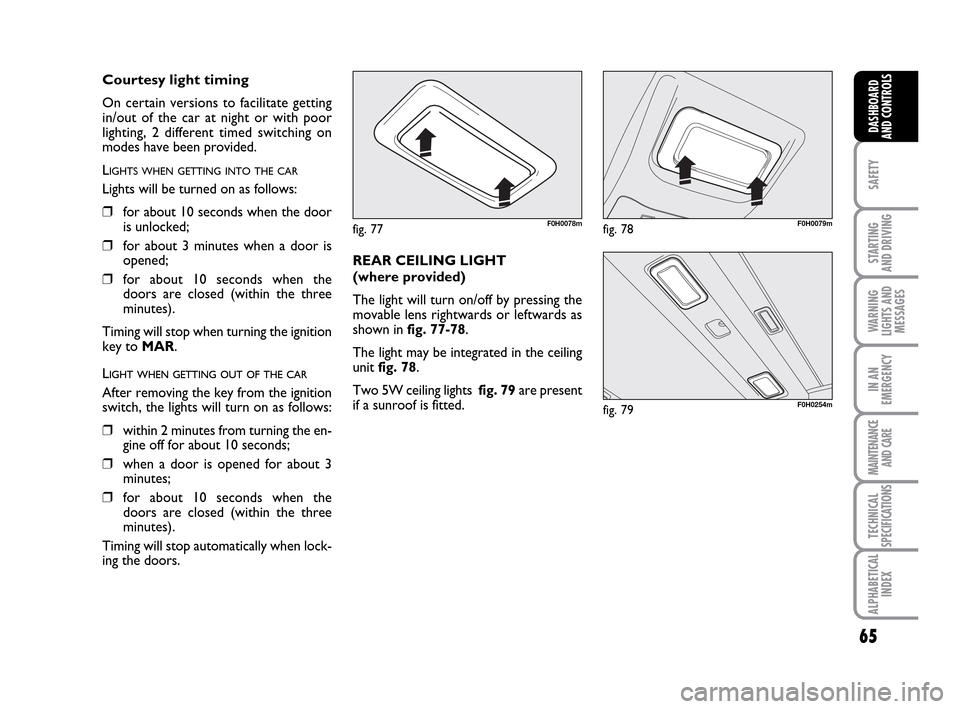
REAR CEILING LIGHT
(where provided)
The light will turn on/off by pressing the
movable lens rightwards or leftwards as
shown in fig. 77-78.
The light may be integrated in the ceiling
unit fig. 78.
Two 5W ceiling lights fig. 79are present
if a sunroof is fitted.
Courtesy light timing
On certain versions to facilitate getting
in/out of the car at night or with poor
lighting, 2 different timed switching on
modes have been provided.
L
IGHTS WHEN GETTING INTO THE CAR
Lights will be turned on as follows:
❒for about 10 seconds when the door
is unlocked;
❒for about 3 minutes when a door is
opened;
❒for about 10 seconds when the
doors are closed (within the three
minutes).
Timing will stop when turning the ignition
key to MAR.
LIGHT WHEN GETTING OUT OF THE CAR
After removing the key from the ignition
switch, the lights will turn on as follows:
❒within 2 minutes from turning the en-
gine off for about 10 seconds;
❒when a door is opened for about 3
minutes;
❒for about 10 seconds when the
doors are closed (within the three
minutes).
Timing will stop automatically when lock-
ing the doors.
036-092 LUM IDEA GB 2 ed.qxd 14-01-2010 12:15 Pagina 65
Page 67 of 210
66
SAFETY
STARTING
AND DRIVING
WARNING
LIGHTS AND
MESSAGES
IN AN
EMERGENCY
MAINTENANCE
AND CARE
TECHNICAL
SPECIFICATIONS
ALPHABETICAL
INDEX
DASHBOARD
AND CONTROLS
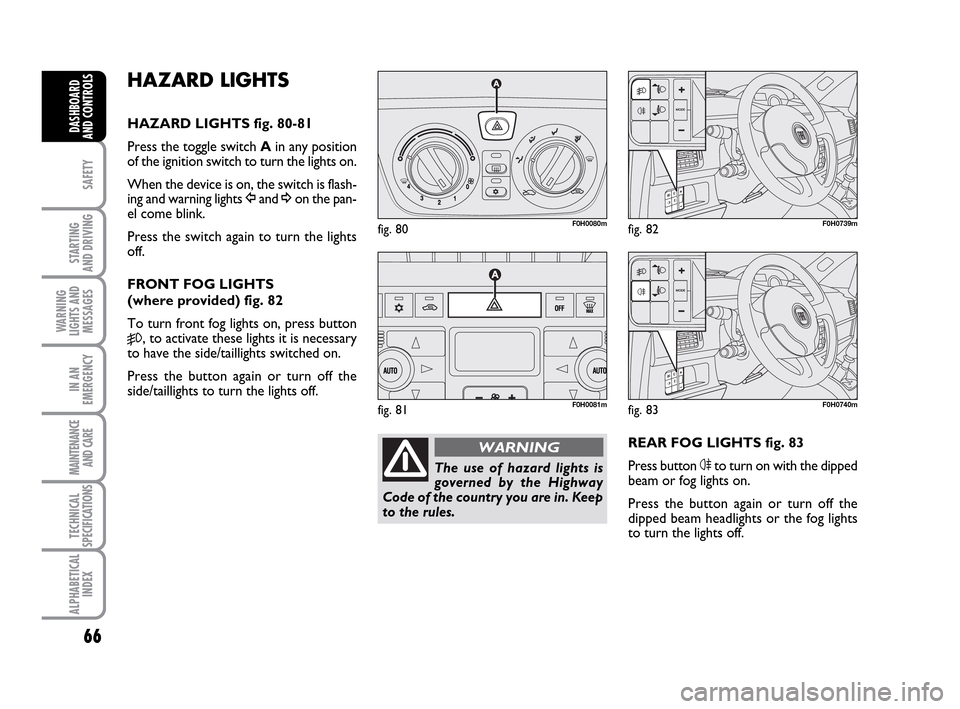
HAZARD LIGHTS
HAZARD LIGHTS fig. 80-81
Press the toggle switch Ain any position
of the ignition switch to turn the lights on.
When the device is on, the switch is flash-
ing and warning lights Îand ¥on the pan-
el come blink.
Press the switch again to turn the lights
off.
FRONT FOG LIGHTS
(where provided) fig. 82
To turn front fog lights on, press button
5, to activate these lights it is necessary
to have the side/taillights switched on.
Press the button again or turn off the
side/taillights to turn the lights off.
REAR FOG LIGHTS fig. 83
Press button 4to turn on with the dipped
beam or fog lights on.
Press the button again or turn off the
dipped beam headlights or the fog lights
to turn the lights off.
fig. 80F0H0080m
fig. 81F0H0081m
fig. 82F0H0739m
The use of hazard lights is
governed by the Highway
Code of the country you are in. Keep
to the rules.
WARNING
fig. 83F0H0740m
036-092 LUM IDEA GB 2 ed.qxd 14-01-2010 12:15 Pagina 66
Page 68 of 210
67
SAFETY
STARTING
AND DRIVING
WARNING
LIGHTS AND
MESSAGES
IN AN
EMERGENCY
MAINTENANCE
AND CARE
TECHNICAL
SPECIFICATIONS
ALPHABETICAL
INDEX
DASHBOARD
AND CONTROLS
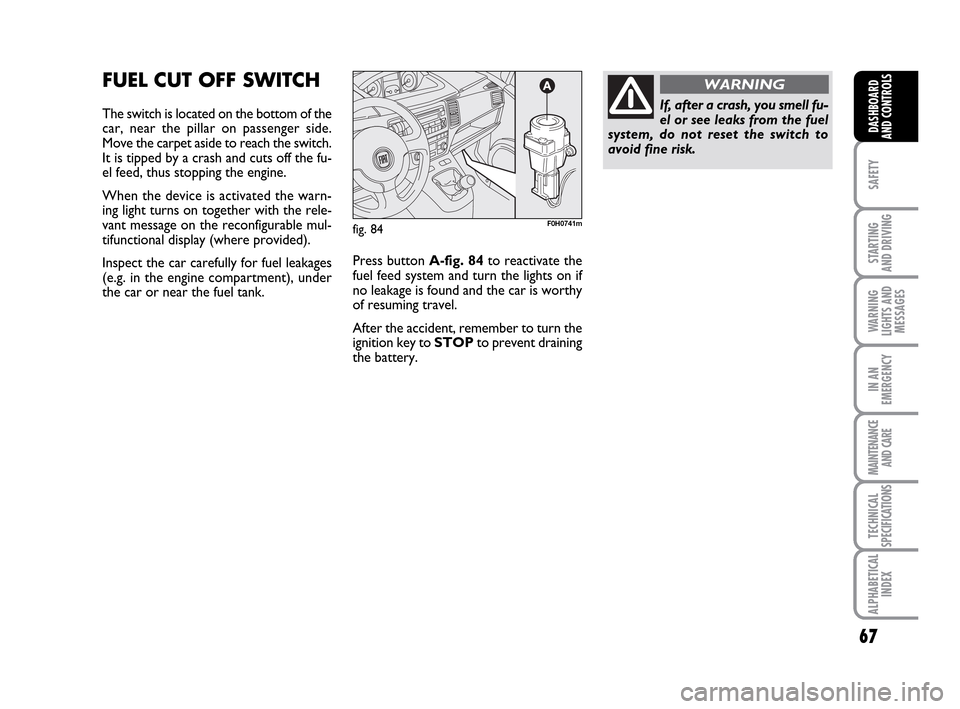
FUEL CUT OFF SWITCH
The switch is located on the bottom of the
car, near the pillar on passenger side.
Move the carpet aside to reach the switch.
It is tipped by a crash and cuts off the fu-
el feed, thus stopping the engine.
When the device is activated the warn-
ing light turns on together with the rele-
vant message on the reconfigurable mul-
tifunctional display (where provided).
Inspect the car carefully for fuel leakages
(e.g. in the engine compartment), under
the car or near the fuel tank. Press button A-fig. 84to reactivate the
fuel feed system and turn the lights on if
no leakage is found and the car is worthy
of resuming travel.
After the accident, remember to turn the
ignition key to STOPto prevent draining
the battery.
fig. 84F0H0741m
If, after a crash, you smell fu-
el or see leaks from the fuel
system, do not reset the switch to
avoid fine risk.
WARNING
036-092 LUM IDEA GB 2 ed.qxd 14-01-2010 12:15 Pagina 67
Page 71 of 210
70
SAFETY
STARTING
AND DRIVING
WARNING
LIGHTS AND
MESSAGES
IN AN
EMERGENCY
MAINTENANCE
AND CARE
TECHNICAL
SPECIFICATIONS
ALPHABETICAL
INDEX
DASHBOARD
AND CONTROLS
fig. 95F0H0093m
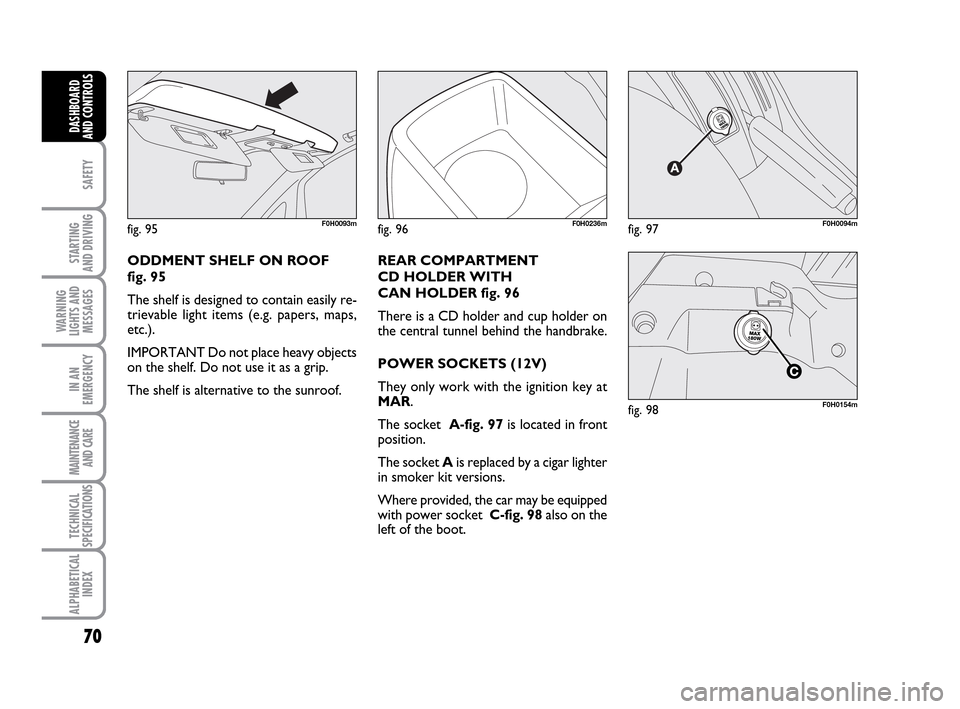
ODDMENT SHELF ON ROOF
fig. 95
The shelf is designed to contain easily re-
trievable light items (e.g. papers, maps,
etc.).
IMPORTANT Do not place heavy objects
on the shelf. Do not use it as a grip.
The shelf is alternative to the sunroof.
fig. 96F0H0236mfig. 97F0H0094m
REAR COMPARTMENT
CD HOLDER WITH
CAN HOLDER fig. 96
There is a CD holder and cup holder on
the central tunnel behind the handbrake.
POWER SOCKETS (12V)
They only work with the ignition key at
MAR.
The socket A-fig. 97is located in front
position.
The socket Ais replaced by a cigar lighter
in smoker kit versions.
Where provided, the car may be equipped
with power socket C-fig. 98also on the
left of the boot.
fig. 98F0H0154m
036-092 LUM IDEA GB 2 ed.qxd 14-01-2010 12:15 Pagina 70
Page 72 of 210
71
SAFETY
STARTING
AND DRIVING
WARNING
LIGHTS AND
MESSAGES
IN AN
EMERGENCY
MAINTENANCE
AND CARE
TECHNICAL
SPECIFICATIONS
ALPHABETICAL
INDEX
DASHBOARD
AND CONTROLS
SMOKER’S KIT
(where provided)
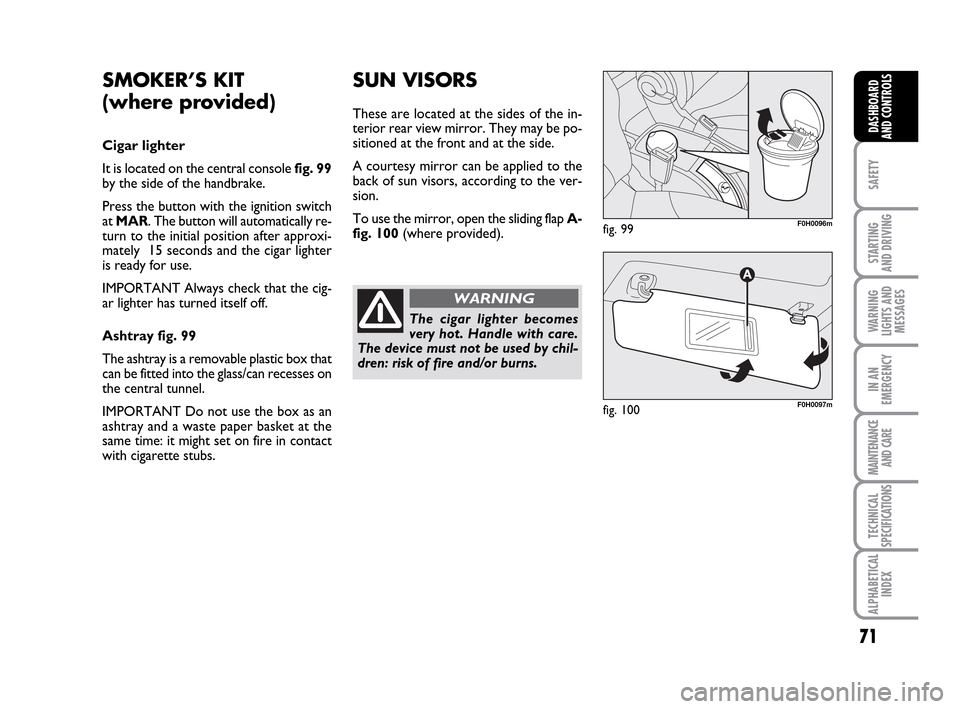
Cigar lighter
It is located on the central console fig. 99
by the side of the handbrake.
Press the button with the ignition switch
at MAR. The button will automatically re-
turn to the initial position after approxi-
mately 15 seconds and the cigar lighter
is ready for use.
IMPORTANT Always check that the cig-
ar lighter has turned itself off.
Ashtray fig. 99
The ashtray is a removable plastic box that
can be fitted into the glass/can recesses on
the central tunnel.
IMPORTANT Do not use the box as an
ashtray and a waste paper basket at the
same time: it might set on fire in contact
with cigarette stubs.
SUN VISORS
These are located at the sides of the in-
terior rear view mirror. They may be po-
sitioned at the front and at the side.
A courtesy mirror can be applied to the
back of sun visors, according to the ver-
sion.
To use the mirror, open the sliding flap A-
fig. 100(where provided).
fig. 99F0H0096m
fig. 100F0H0097m
The cigar lighter becomes
very hot. Handle with care.
The device must not be used by chil-
dren: risk of fire and/or burns.
WARNING
036-092 LUM IDEA GB 2 ed.qxd 14-01-2010 12:15 Pagina 71