low beam FIAT LINEA 2007 1.G Owners Manual
[x] Cancel search | Manufacturer: FIAT, Model Year: 2007, Model line: LINEA, Model: FIAT LINEA 2007 1.GPages: 230, PDF Size: 3.31 MB
Page 19 of 230
18
SAFETY
DEVICES
CORRECT USE
OF THE
CAR
WARNING
LIGHTS AND
MESSAGES
IN AN
EMERGENCY
CAR
MAINTENANCE
TECHNICAL
SPECIFICATIONS
INDEX
DASHBOARD
AND CONTROLS
DIGITAL DISPLAY
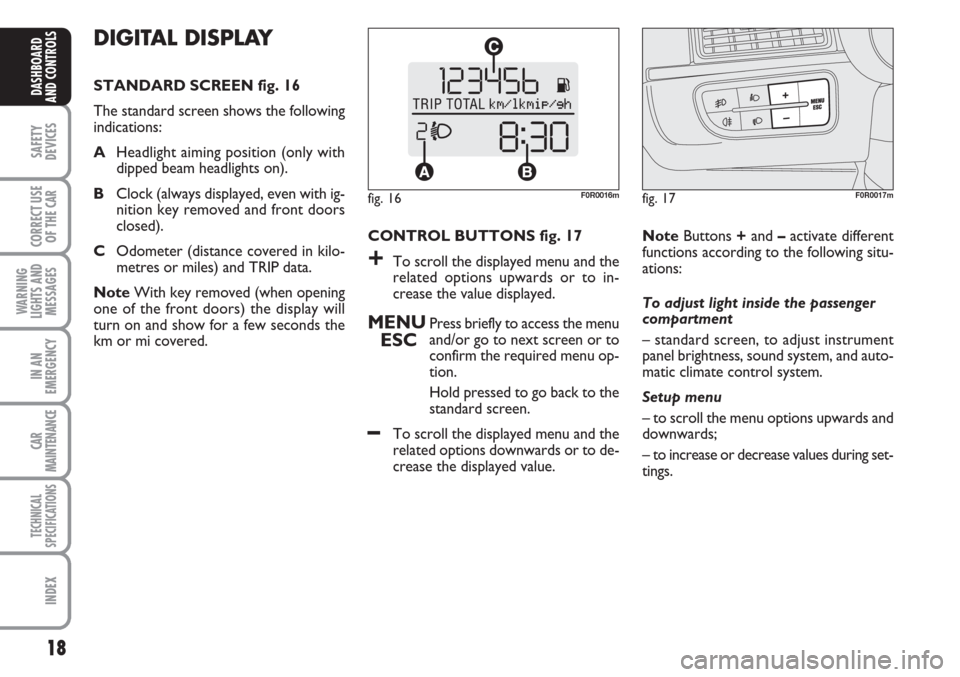
STANDARD SCREEN fig. 16
The standard screen shows the following
indications:
AHeadlight aiming position (only with
dipped beam headlights on).
BClock (always displayed, even with ig-
nition key removed and front doors
closed).
COdometer (distance covered in kilo-
metres or miles) and TRIP data.
NoteWith key removed (when opening
one of the front doors) the display will
turn on and show for a few seconds the
km or mi covered.CONTROL BUTTONS fig. 17
+To scroll the displayed menu and the
related options upwards or to in-
crease the value displayed.
MENU
ESCPress briefly to access the menu
and/or go to next screen or to
confirm the required menu op-
tion.
Hold pressed to go back to the
standard screen.
–To scroll the displayed menu and the
related options downwards or to de-
crease the displayed value. NoteButtons +and –activate different
functions according to the following situ-
ations:
To adjust light inside the passenger
compartment
– standard screen, to adjust instrument
panel brightness, sound system, and auto-
matic climate control system.
Setup menu
– to scroll the menu options upwards and
downwards;
– to increase or decrease values during set-
tings.
fig. 16F0R0016mfig. 17F0R0017m
Page 24 of 230
23
SAFETY
DEVICES
CORRECT USE
OF THE
CAR
WARNING
LIGHTS AND
MESSAGES
IN AN
EMERGENCY
CAR
MAINTENANCE
TECHNICAL
SPECIFICATIONS
INDEX
DASHBOARD
AND CONTROLS
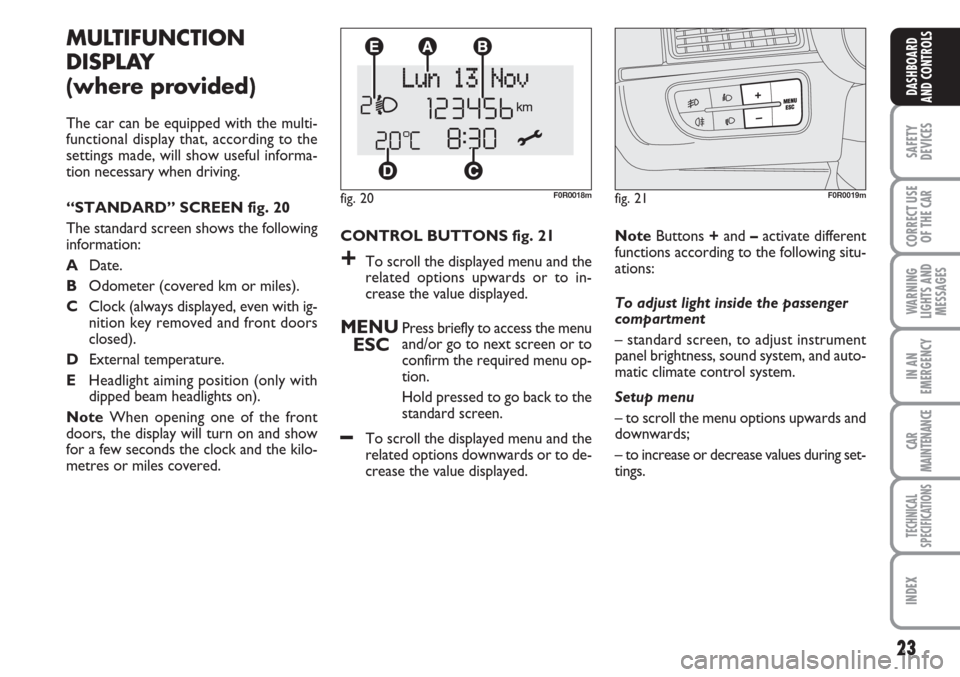
CONTROL BUTTONS fig. 21
+To scroll the displayed menu and the
related options upwards or to in-
crease the value displayed.
MENU
ESCPress briefly to access the menu
and/or go to next screen or to
confirm the required menu op-
tion.
Hold pressed to go back to the
standard screen.
–To scroll the displayed menu and the
related options downwards or to de-
crease the value displayed.
MULTIFUNCTION
DISPLAY
(where provided)
The car can be equipped with the multi-
functional display that, according to the
settings made, will show useful informa-
tion necessary when driving.
“STANDARD” SCREEN fig. 20
The standard screen shows the following
information:
ADate.
BOdometer (covered km or miles).
CClock (always displayed, even with ig-
nition key removed and front doors
closed).
DExternal temperature.
EHeadlight aiming position (only with
dipped beam headlights on).
NoteWhen opening one of the front
doors, the display will turn on and show
for a few seconds the clock and the kilo-
metres or miles covered.
fig. 20F0R0018m
NoteButtons +and –activate different
functions according to the following situ-
ations:
To adjust light inside the passenger
compartment
– standard screen, to adjust instrument
panel brightness, sound system, and auto-
matic climate control system.
Setup menu
– to scroll the menu options upwards and
downwards;
– to increase or decrease values during set-
tings.
fig. 21F0R0019m
Page 33 of 230
32
SAFETY
DEVICES
CORRECT USE
OF THE
CAR
WARNING
LIGHTS AND
MESSAGES
IN AN
EMERGENCY
CAR
MAINTENANCE
TECHNICAL
SPECIFICATIONS
INDEX
DASHBOARD
AND CONTROLS
RECONFIGURABLE
MULTIFUNCTION
DISPLAY
(where provided)
The car may be equipped with reconfig-
urable a multifunctional display that, ac-
cording to the settings made, will show
useful driving information.
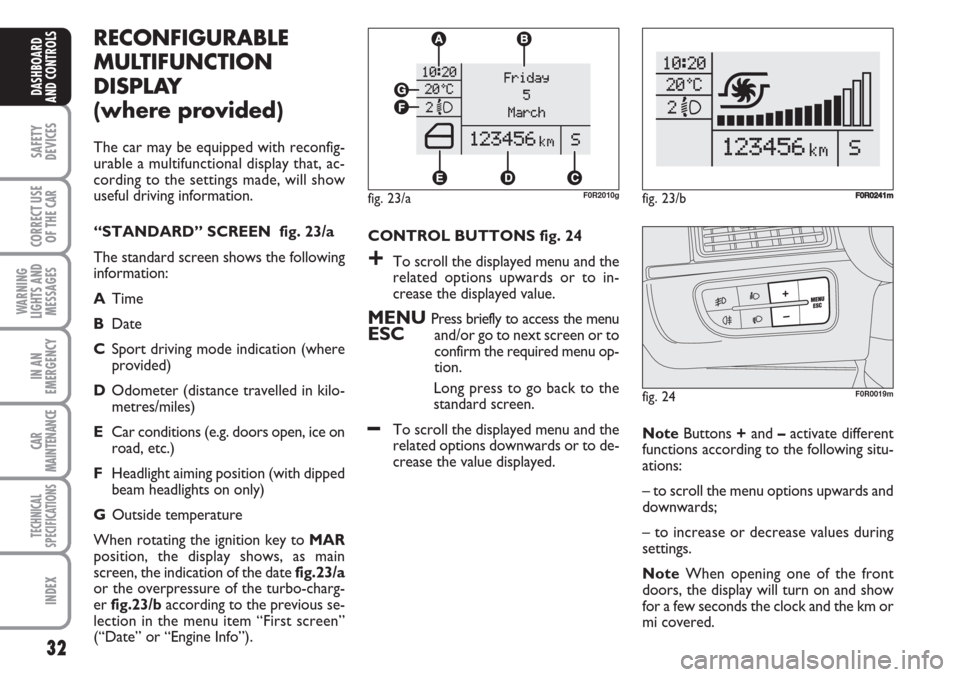
“STANDARD” SCREEN fig. 23/a
The standard screen shows the following
information:
ATime
BDate
CSport driving mode indication (where
provided)
DOdometer (distance travelled in kilo-
metres/miles)
ECar conditions (e.g. doors open, ice on
road, etc.)
FHeadlight aiming position (with dipped
beam headlights on only)
GOutside temperature
When rotating the ignition key to MAR
position, the display shows, as main
screen, the indication of the date fig.23/a
or the overpressure of the turbo-charg-
er fig.23/baccording to the previous se-
lection in the menu item “First screen”
(“Date” or “Engine Info”).CONTROL BUTTONS fig. 24
+To scroll the displayed menu and the
related options upwards or to in-
crease the displayed value.
MENU Press briefly to access the menuESCand/or go to next screen or to
confirm the required menu op-
tion.
Long press to go back to the
standard screen.
–To scroll the displayed menu and the
related options downwards or to de-
crease the value displayed. NoteButtons +and –activate different
functions according to the following situ-
ations:
– to scroll the menu options upwards and
downwards;
– to increase or decrease values during
settings.
NoteWhen opening one of the front
doors, the display will turn on and show
for a few seconds the clock and the km or
mi covered.
fig. 24F0R0019m
fig. 23/aF0R2010gfig. 23/bF0R0241m
Page 67 of 230
66
SAFETY
DEVICES
CORRECT USE
OF THE
CAR
WARNING
LIGHTS AND
MESSAGES
IN AN
EMERGENCY
CAR
MAINTENANCE
TECHNICAL
SPECIFICATIONS
INDEX
DASHBOARD
AND CONTROLS
EXTERNAL LIGHTS
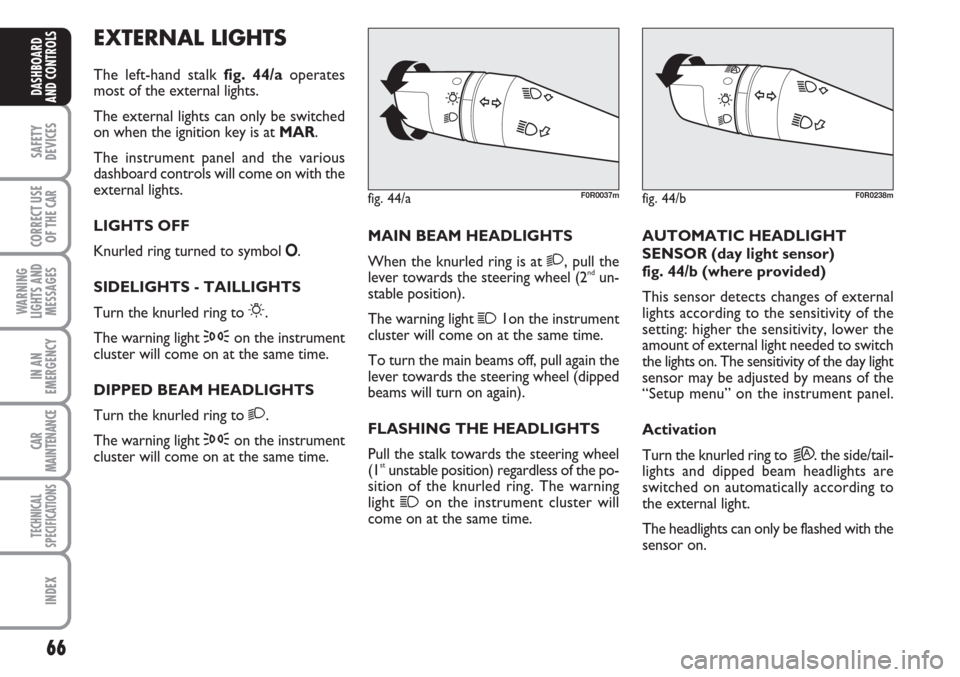
The left-hand stalk fig. 44/aoperates
most of the external lights.
The external lights can only be switched
on when the ignition key is at MAR.
The instrument panel and the various
dashboard controls will come on with the
external lights.
LIGHTS OFF
Knurled ring turned to symbol O.
SIDELIGHTS - TAILLIGHTS
Turn the knurled ring to
6.
The warning light
3on the instrument
cluster will come on at the same time.
DIPPED BEAM HEADLIGHTS
Turn the knurled ring to
2.
The warning light
3on the instrument
cluster will come on at the same time.MAIN BEAM HEADLIGHTS
When the knurled ring is at
2, pull the
lever towards the steering wheel (2ndun-
stable position).
The warning light
11on the instrument
cluster will come on at the same time.
To turn the main beams off, pull again the
lever towards the steering wheel (dipped
beams will turn on again).
FLASHING THE HEADLIGHTS
Pull the stalk towards the steering wheel
(1
stunstable position) regardless of the po-
sition of the knurled ring. The warning
light
1on the instrument cluster will
come on at the same time.AUTOMATIC HEADLIGHT
SENSOR (day light sensor)
fig. 44/b (where provided)
This sensor detects changes of external
lights according to the sensitivity of the
setting: higher the sensitivity, lower the
amount of external light needed to switch
the lights on. The sensitivity of the day light
sensor may be adjusted by means of the
“Setup menu” on the instrument panel.
Activation
Turn the knurled ring to
2A. the side/tail-
lights and dipped beam headlights are
switched on automatically according to
the external light.
The headlights can only be flashed with the
sensor on.
fig. 44/aF0R0037mfig. 44/bF0R0238m
Page 68 of 230
67
SAFETY
DEVICES
CORRECT USE
OF THE
CAR
WARNING
LIGHTS AND
MESSAGES
IN AN
EMERGENCY
CAR
MAINTENANCE
TECHNICAL
SPECIFICATIONS
INDEX
DASHBOARD
AND CONTROLS
Deactivation
The main beam headlights will go out fol-
lowed after approximately 10 seconds by
the side/taillights when the sensor is de-
activated.
The sensor cannot detect the presence of
fog: switch the lights on manually in this
case.
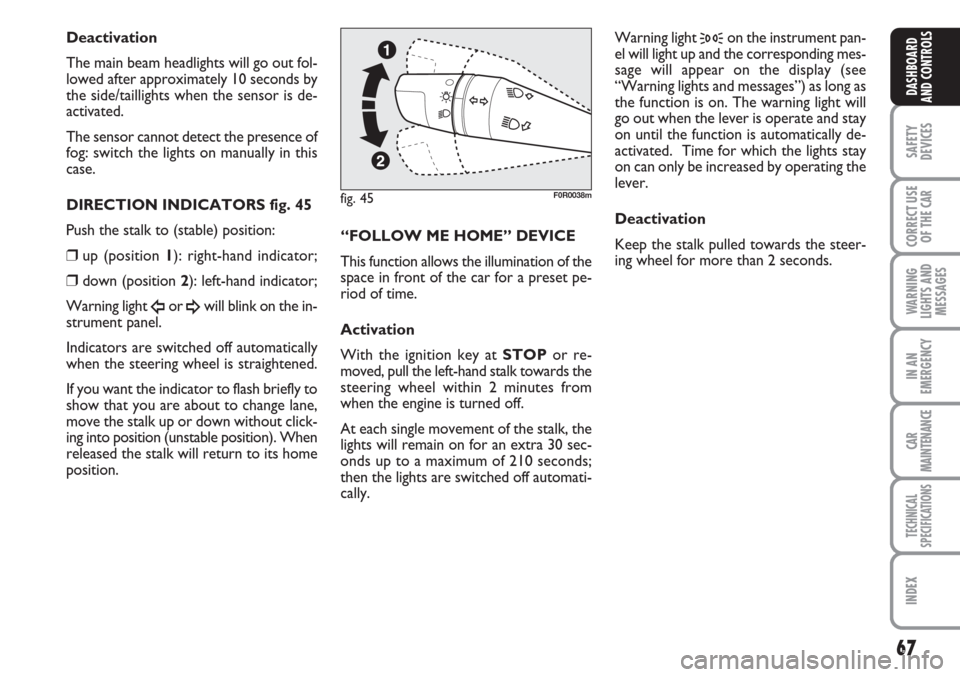
DIRECTION INDICATORS fig. 45
Push the stalk to (stable) position:
❒up (position 1): right-hand indicator;
❒down (position 2): left-hand indicator;
Warning light
Îor ¥will blink on the in-
strument panel.
Indicators are switched off automatically
when the steering wheel is straightened.
If you want the indicator to flash briefly to
show that you are about to change lane,
move the stalk up or down without click-
ing into position (unstable position). When
released the stalk will return to its home
position.“FOLLOW ME HOME” DEVICE
This function allows the illumination of the
space in front of the car for a preset pe-
riod of time.
Activation
With the ignition key at STOPor re-
moved, pull the left-hand stalk towards the
steering wheel within 2 minutes from
when the engine is turned off.
At each single movement of the stalk, the
lights will remain on for an extra 30 sec-
onds up to a maximum of 210 seconds;
then the lights are switched off automati-
cally. Warning light
3on the instrument pan-
el will light up and the corresponding mes-
sage will appear on the display (see
“Warning lights and messages”) as long as
the function is on. The warning light will
go out when the lever is operate and stay
on until the function is automatically de-
activated. Time for which the lights stay
on can only be increased by operating the
lever.
Deactivation
Keep the stalk pulled towards the steer-
ing wheel for more than 2 seconds.
fig. 45F0R0038m
Page 134 of 230
133
IN AN
EMERGENCY
CAR
MAINTENANCE
TECHNICAL
SPECIFICATIONS
INDEX
DASHBOARD
AND CONTROLS
SAFETY
DEVICES
CORRECT USE
OF THE
CAR
WARNING
LIGHTS AND
MESSAGES
GENERAL WARNINGS ..................................................... 134
LOW BRAKE FLUID............................................................ 134
HANDBRAKE ON................................................................ 134
AIR BAG FAILURE................................................................ 135
HOT
ENGINE COOLANT........................................................... 135
LOW BATTERY CHARGE................................................. 136
LOW ENGINE OIL PRESSURE.......................................... 136
INCOMPLETE DOOR LOCKING.................................... 137
SEAT BELTS NOT FASTENED.......................................... 137
EBD SYSTEM FAILURE........................................................ 137
INJECTION SYSTEM FAILURE
(DIESEL VERSIONS) ............................................................ 138
EOBD SYSTEM FAILURE (PETROL VERSIONS) .........138
FRONT PASSENGER AIRBAG DEACTIVATED........... 139
ABS SYSTEM FAILURE......................................................... 139
FUEL RESERVE....................................................................... 139
GLOW PLUG WARMING ................................................ 140
GLOW PLUG WARMING FAILURE............................... 140
WATER IN DIESEL FUEL FILTER..................................... 140FIAT CODE PROTECTION
SYSTEM FAILURE.................................................................. 140
EXTERNAL LIGHTS FAILURE........................................... 141
REAR FOG LIGHTS.............................................................. 141
GENERIC FAILURE INDICATION ................................. 141
ESP SYSTEM FAILURE ........................................................ 142
BRAKE PAD WEAR ............................................................ 142
PARKING SENSOR FAILURE............................................ 143
SIDELIGHTS AND LOW BEAMS..................................... 143
FOLLOW ME HOME........................................................... 143
FRONT FOG LIGHTS ........................................................ 143
LEFT-HAND DIRECTION INDICATOR........................ 143
RIGHT-HAND DIRECTION INDICATOR.................... 143
CRUISE CONTROL ............................................................ 143
MAIN BEAM HEADLIGHTS............................................... 143
POSSIBLE PRESENCE OF ICE ON THE ROAD ........... 144
LIMITED RANGE ................................................................. 144
ASR SYSTEM ......................................................................... 144
WW W
A A
R R
N N
I I
N N
G G
L L
I I
G G
H H
T T
S S
A A
N N
D D
M M
E E
S S
S S
A A
G G
E E
S S
Page 144 of 230
143
IN AN
EMERGENCY
CAR
MAINTENANCE
TECHNICAL
SPECIFICATIONS
INDEX
DASHBOARD
AND CONTROLS
SAFETY
DEVICES
CORRECT USE
OF THE
CAR
WARNING
LIGHTS AND
MESSAGES
PARKING SENSOR
FAILURE
(where provided)
(amber)
The warning light turns on when failure
is detected in parking sensors.
On certain versions warning light è
comes on instead.
Contact Fiat Dealership.
On certain versions the dedicated mes-
sage is displayed.
t
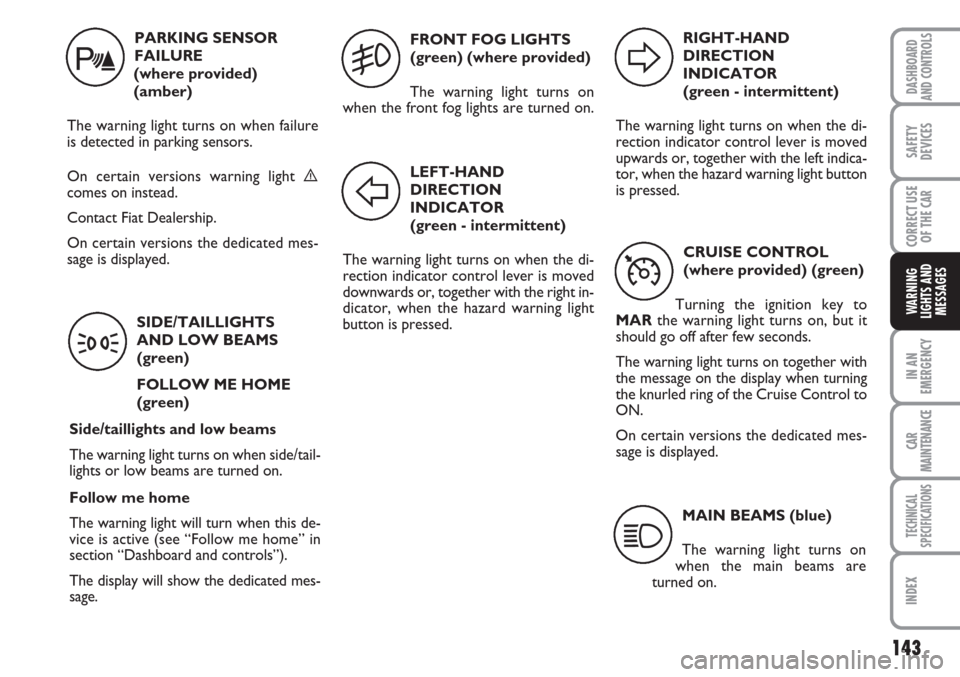
SIDE/TAILLIGHTS
AND LOW BEAMS
(green)
FOLLOW ME HOME
(green)
Side/taillights and low beams
The warning light turns on when side/tail-
lights or low beams are turned on.
Follow me home
The warning light will turn when this de-
vice is active (see “Follow me home” in
section “Dashboard and controls”).
The display will show the dedicated mes-
sage.
3
FRONT FOG LIGHTS
(green) (where provided)
The warning light turns on
when the front fog lights are turned on.
5
LEFT-HAND
DIRECTION
INDICATOR
(green - intermittent)
The warning light turns on when the di-
rection indicator control lever is moved
downwards or, together with the right in-
dicator, when the hazard warning light
button is pressed.
F
RIGHT-HAND
DIRECTION
INDICATOR
(green - intermittent)
The warning light turns on when the di-
rection indicator control lever is moved
upwards or, together with the left indica-
tor, when the hazard warning light button
is pressed.
D
CRUISE CONTROL
(where provided) (green)
Turning the ignition key to
MARthe warning light turns on, but it
should go off after few seconds.
The warning light turns on together with
the message on the display when turning
the knurled ring of the Cruise Control to
ON.
On certain versions the dedicated mes-
sage is displayed.
Ü
MAIN BEAMS (blue)
The warning light turns on
when the main beams are
turned on.
1
Page 159 of 230
158
WARNING
LIGHTS AND
MESSAGES
CAR
MAINTENANCE
TECHNICAL
SPECIFICATIONS
IINDEX
DASHBOARD
AND CONTROLS
SAFETY
DEVICES
CORRECT USE
OF THE
CAR
IN AN
EMERGENCY
WHEN NEEDING TO
CHANGE A BULB
GENERAL INSTRUCTIONS
❒When a bulb is not working, check that
the corresponding fuse is intact before
replacing it: refer to the “If a fuse
blows” paragraph in this chapter for
fuse location.
❒before changing a bulb check the con-
tacts for oxidation;
❒burnt bulbs must be replaced by others
of the same type and power;
❒always check the height of the headlight
beam after changing a bulb, for reasons
of safety.
IMPORTANT A slight misting may appear
on the internal surface of the headlight:
this does not indicate a fault and is caused
by low temperature and the degree of hu-
midity in the air. Misting will rapidly dis-
appear when the headlights are switched
on. The presence of drop inside the head-
lights indicates infiltration of water. Go to
a Fiat Dealership.
TYPES OF BULBS
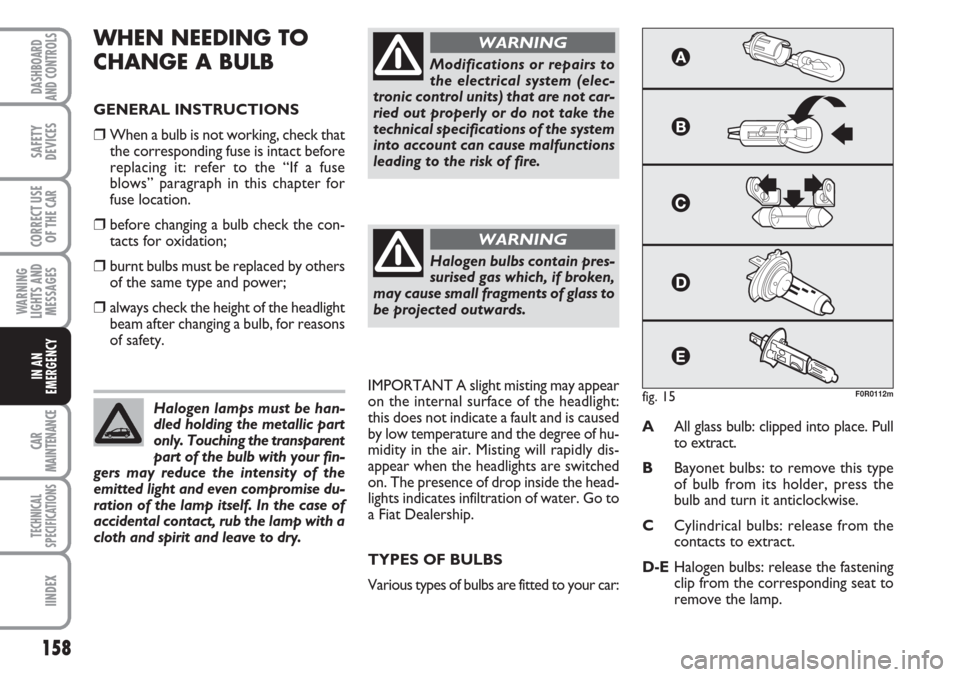
Various types of bulbs are fitted to your car:AAll glass bulb: clipped into place. Pull
to extract.
BBayonet bulbs: to remove this type
of bulb from its holder, press the
bulb and turn it anticlockwise.
CCylindrical bulbs: release from the
contacts to extract.
D-EHalogen bulbs: release the fastening
clip from the corresponding seat to
remove the lamp. Halogen lamps must be han-
dled holding the metallic part
only. Touching the transparent
part of the bulb with your fin-
gers may reduce the intensity of the
emitted light and even compromise du-
ration of the lamp itself. In the case of
accidental contact, rub the lamp with a
cloth and spirit and leave to dry.
Modifications or repairs to
the electrical system (elec-
tronic control units) that are not car-
ried out properly or do not take the
technical specifications of the system
into account can cause malfunctions
leading to the risk of fire.
WARNING
Halogen bulbs contain pres-
surised gas which, if broken,
may cause small fragments of glass to
be projected outwards.
WARNING
fig. 15F0R0112m
Page 161 of 230
160
WARNING
LIGHTS AND
MESSAGES
CAR
MAINTENANCE
TECHNICAL
SPECIFICATIONS
IINDEX
DASHBOARD
AND CONTROLS
SAFETY
DEVICES
CORRECT USE
OF THE
CAR
IN AN
EMERGENCY
IF AN EXTERIOR LIGHT
BURNS OUT
For the type of bulb and power rating, see
“When needing to change a bulb”.
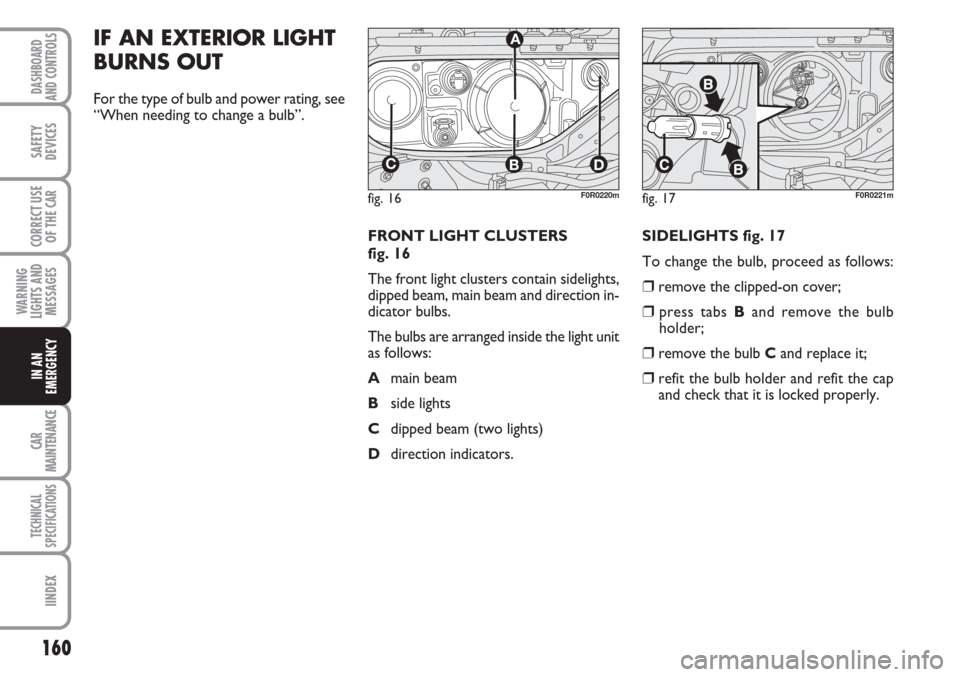
FRONT LIGHT CLUSTERS
fig. 16
The front light clusters contain sidelights,
dipped beam, main beam and direction in-
dicator bulbs.
The bulbs are arranged inside the light unit
as follows:
Amain beam
Bside lights
Cdipped beam (two lights)
Ddirection indicators. SIDELIGHTS fig. 17
To change the bulb, proceed as follows:
❒remove the clipped-on cover;
❒press tabs Band remove the bulb
holder;
❒remove the bulb Cand replace it;
❒refit the bulb holder and refit the cap
and check that it is locked properly.
fig. 16
CBD
A
F0R0220mfig. 17F0R0221m
Page 162 of 230
161
WARNING
LIGHTS AND
MESSAGES
CAR
MAINTENANCE
TECHNICAL
SPECIFICATIONS
INDEX
DASHBOARD
AND CONTROLS
SAFETY
DEVICES
CORRECT USE
OF THE
CAR
IN AN
EMERGENCY
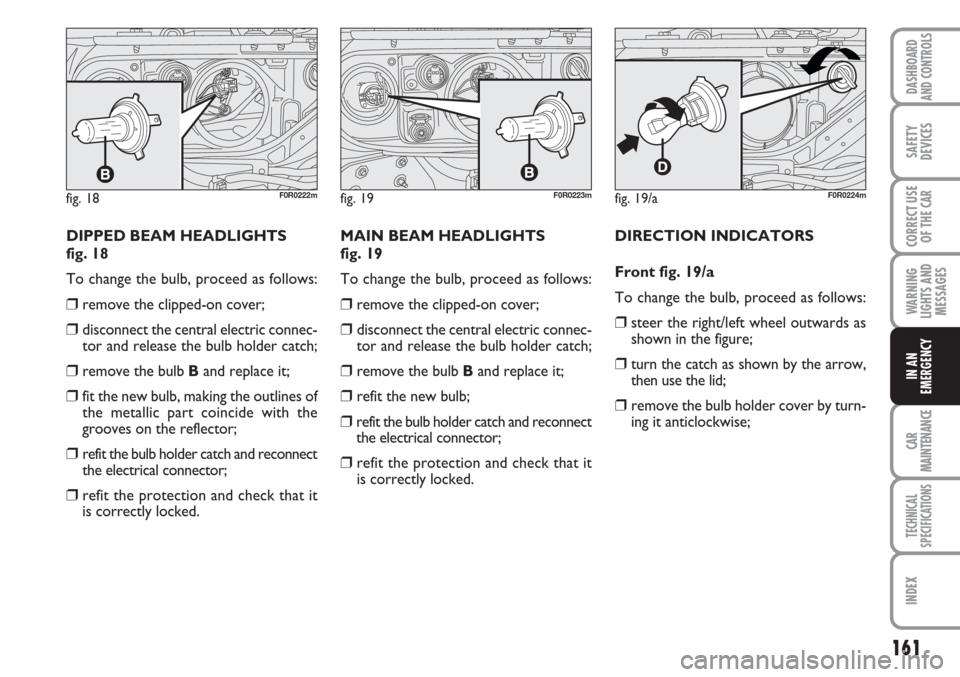
DIPPED BEAM HEADLIGHTS
fig. 18
To change the bulb, proceed as follows:
❒remove the clipped-on cover;
❒disconnect the central electric connec-
tor and release the bulb holder catch;
❒remove the bulb Band replace it;
❒fit the new bulb, making the outlines of
the metallic part coincide with the
grooves on the reflector;
❒refit the bulb holder catch and reconnect
the electrical connector;
❒refit the protection and check that it
is correctly locked.MAIN BEAM HEADLIGHTS
fig. 19
To change the bulb, proceed as follows:
❒remove the clipped-on cover;
❒disconnect the central electric connec-
tor and release the bulb holder catch;
❒remove the bulb Band replace it;
❒refit the new bulb;
❒refit the bulb holder catch and reconnect
the electrical connector;
❒refit the protection and check that it
is correctly locked.DIRECTION INDICATORS
Front fig. 19/a
To change the bulb, proceed as follows:
❒steer the right/left wheel outwards as
shown in the figure;
❒turn the catch as shown by the arrow,
then use the lid;
❒remove the bulb holder cover by turn-
ing it anticlockwise;
fig. 18F0R0222mfig. 19/aF0R0224mfig. 19F0R0223m