steering wheel FIAT PANDA 2013 319 / 3.G User Guide
[x] Cancel search | Manufacturer: FIAT, Model Year: 2013, Model line: PANDA, Model: FIAT PANDA 2013 319 / 3.GPages: 284, PDF Size: 11.33 MB
Page 142 of 284
Hill Holder failure
This warning light switches on, on some versions
together with a message in the display, in the event
of a Hill Holder system fault. In this case, contact
a Fiat Dealership.
FIAT CODE SYSTEM FAILURE
(amber)
The warning light (or symbol on the display) switches
on (along with a message on the display on some
versions) to indicate a Fiat CODE system failure: in
this case contact a Fiat Dealership as soon as
possible.PLUG PREHEATING/PLUG
PREHEATING FAILURE (diesel
versions) (amber)
PLUG PREHEATING
The warning light switches on when the key is turned
to MAR and switches off when the plugs have
reached the preset temperature. The engine can be
started as soon as the warning light switches off.
IMPORTANT At moderate or high ambient
temperatures the warning light may stay on for an
extremely short time.PLUG PREHEATING FAILURE
The warning light flashes (together with a message
and a symbol on the display on some versions)
to indicate a fault in the plug preheating system.
Contact a Fiat Dealership to have the fault fixed as
soon as possible.
"DUALDRIVE" ELECTRIC POWER
STEERING FAILURE (red)
This warning light switches on when the key is
turned to MAR, but it should switch off after a few
seconds. If the warning light (or, on some versions, a
message and a symbol on the display) stays on, you
may not have steering assistance and the effort
required to operate the steering wheel could be
notably increased; steering is, however, possible. In
this case, contact a Fiat Dealership.
IMPORTANT In some circumstances, factors
independent of the electric power steering could
cause the warning light on the instrument panel to
switch on. In this case, stop the car immediately
(should it be in motion), stop the engine for about
20 seconds and then restart the engine. If the
warning light (or, on some versions, a message and a
symbol on the display) stays on, contact a Fiat
Dealership.
138
GETTING TO KNOW
YOUR CAR
SAFETY
STARTING AND
DRIVINGWARNING LIGHTS
AND MESSAGESIN AN EMERGENCY
SERVICING AND
MAINTENANCE
TECHNICAL
SPECIFICATIONS
INDEX
Page 143 of 284
IMPORTANT After the battery is disconnected, the
steering must be initialised. The warning light
switches on to indicate this. To carry out this
procedure, simply turn the steering wheel all the way
from one end to the other or drive in a straight line
for about a hundred metres.
DPF (PARTICULATE FILTER)
CLEANING IN PROGRESS
(only diesel versions with DPF) (amber)
This warning light switches on when the ignition key
is turned to MAR, but it should switch off after a
few seconds. The warning light (together with a
message and a symbol on the display on some
versions) switches on constantly to notify the driver
that the DPF system needs to eliminate captured
pollutants (particulate) through the regeneration
process.
The warning light does not switch on during every
DPF regeneration, but only when driving conditions
require that the driver is notified. To switch the
warning light off, the car must be kept in motion
until the regeneration process is completed.
On average, the process lasts fifteen minutes.
Optimal conditions for completing the process are
achieved by travelling at 60 km/h with engine revs
above 2000 rpm.
If this light switches on, it does not mean that the
car is defective, so there is no need to take it to
a garage. A specific message will appear on thedisplay when the warning light comes on (for
versions/markets, where provided).
WARNING
The driving speed must always be
suitable for traffic and weather
conditions and the driver must always comply
with the Highway Code.The engine can be
stopped even if the DPF warning light is on;
however, repeated interruptions of the
regeneration process could cause premature
deterioration of the engine oil. For this reason,
always wait until the warning light switches
off before stopping the engine as described
above. It is not advisable to complete DPF
regeneration with the car stationar y.GENERIC FAILURE INDICATION
(amber)
(for versions/markets, where provided)
The warning light switches on in the following
circumstances. In these cases contact a Fiat
Dealership to have the fault eliminated as soon as
possible.
139GETTING TO KNOW
YOUR CAR
SAFETY
STARTING AND
DRIVINGWARNING LIGHTS
AND MESSAGESIN AN EMERGENCY
SERVICING AND
MAINTENANCE
TECHNICAL
SPECIFICATIONS
INDEX
Page 148 of 284
Never use a fast batter y-charger to star t
the engine as this could damage the
electronic systems of your car, par ticularly
the ignition and fuel supply control units.
WARNING
This procedure must be performed by
exper t personnel because incorrect
actions could cause electrical discharge of
considerable intensity. Furthermore, battery
fluid is poisonous and corrosive: avoid contact
with skin and eyes. Keep naked flames and
lighted cigarettes away from the battery and do
not cause sparks.
BUMP STARTING
Never bump start the engine by pushing, towing or
coasting downhill.
IMPORTANT Remember that the brake servo and
electrical power steering system are not active until
the engine is started. A much greater effort will
therefore be required to use the brake pedal or turn
the steering wheel.
CHANGING A WHEELGENERAL INSTRUCTIONS
The car is equipped with the “FIX&GO Automatic
Kit”: see the paragraph “FIX&GO Automatic Kit” for
how to use this device. As an alternative to the
“FIX&GO Automatic Kit” the car may be equipped
with a space-saver wheel: see the instructions on the
following pages for changing the tyre.
WARNING
The space-saver wheel (for versions/
markets where provided) is specific to
your car, do not use it on other models, or use
the space-saver wheel of other models on your
car.The space-saver wheel must only be used
in case of emergency. It must only be used
for the distance necessary to reach a service
point and the car speed must not exceed 80
km/h.The space-saver wheel has an orange
sticker that summarises the main cautions for
use and limitations. Never remove or cover
the label.The following information is provided
in four languages on the label: "Important!
For temporar y use only! 80 km/h max! Replace
with a standard tire as soon as possible. Never
cover this indication." Never apply a wheel
cap on a space-saver wheel.
144
GETTING TO KNOW
YOUR CAR
SAFETY
STARTING AND
DRIVING
WARNING LIGHTS
AND MESSAGES
IN AN
EMERGENCY
SERVICING AND
MAINTENANCE
TECHNICAL
SPECIFICATIONS
INDEX
Page 149 of 284
WARNING
Alert other drivers that the car is
stationary in compliance with local
regulations: hazard warning lights, warning
triangle, etc . Any passengers on board should
leave the car, especially if it is heavily laden.
Passengers should stay away from on-coming
traffic while the wheel is being changed. On hills
or uneven roads, use chocks or appropriate
objects to block the wheels of the vehicle.
WARNING
The vehicle's driving characteristics will
be modified with the space-saver wheel
fitted. Avoid violent acceleration and braking,
abrupt steering and fast cornering.The overall
duration of the space-saver spare wheel is
of about 3000 km, after which the relevant tyre
must be replaced with another one of the
same type. Never install a traditional tyre on a
rim designed to be used as a small spare wheel.
Have the wheel repaired and refitted as soon
as possible. Using two or more small spare
wheels at the same time is forbidden. Do not
apply grease to the bolt threads before fitting:
they could unscrew themselves.
WARNING
The jack may be used to replace wheels
only on the car that it comes with or
other cars of the same model. Never use the
jack for other purposes, such as lifting other car
models. Never use it for repair operations
under the car. Incorrectly positioning the jack
may cause the car to fall. Do not use the jack
for loads higher than those shown on the label.
Never install snow chains on the space-saver
spare wheel; if a front tyre (driving wheel)
is punctured and you need to use snow chains,
use a standard wheel from the rear axle and
install the space-saver spare wheel on the rear
axle. In this way, with two normal front drive
wheels, it is possible to use snow chains.
WARNING
If the hub cap is not fitted correctly, it
may come off when the car is travelling.
Never tamper with the inflation valve. Never
introduce tools of any kind between rim and
tyre. Check tyre and space-saver wheel
pressures regularly, complying with the values
given in the "Technical specifications" chapter.
145GETTING TO KNOW
YOUR CAR
SAFETY
STARTING AND
DRIVING
WARNING LIGHTS
AND MESSAGESIN AN
EMERGENCYSERVICING AND
MAINTENANCE
TECHNICAL
SPECIFICATIONS
INDEX
Page 177 of 284
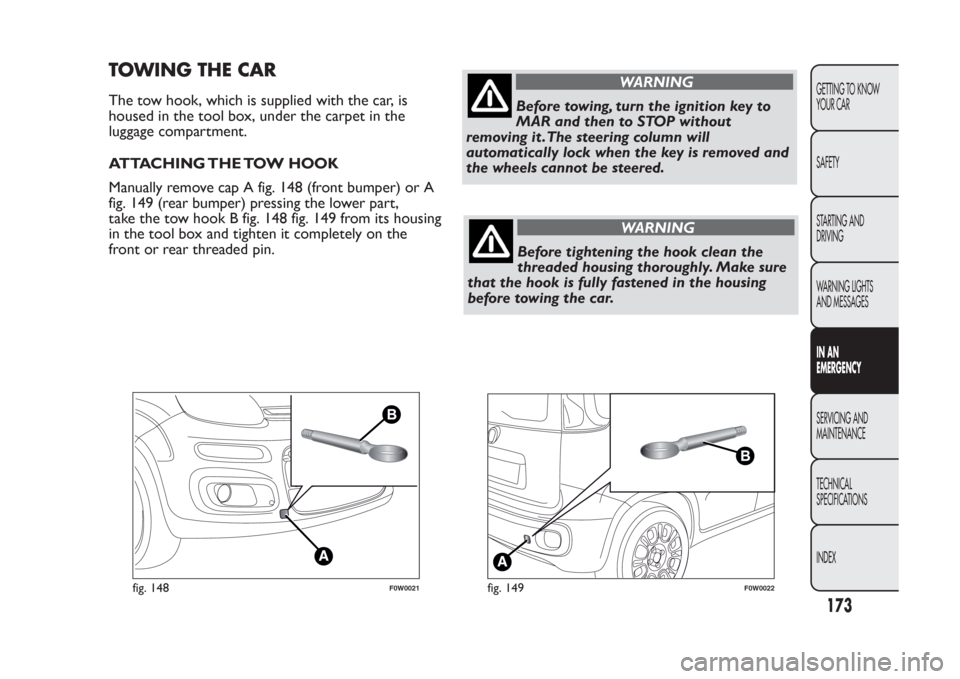
TOWING THE CARThe tow hook, which is supplied with the car, is
housed in the tool box, under the carpet in the
luggage compartment.
ATTACHING THE TOW HOOK
Manually remove cap A fig. 148 (front bumper) or A
fig. 149 (rear bumper) pressing the lower part,
take the tow hook B fig. 148 fig. 149 from its housing
in the tool box and tighten it completely on the
front or rear threaded pin.
WARNING
Before towing, turn the ignition key to
MAR and then to STOP without
removing it .The steering column will
automatically lock when the key is removed and
the wheels cannot be steered.
WARNING
Before tightening the hook clean the
threaded housing thoroughly. Make sure
that the hook is fully fastened in the housing
before towing the car.
fig. 148
F0W0021
fig. 149
F0W0022
173GETTING TO KNOW
YOUR CAR
SAFETY
STARTING AND
DRIVING
WARNING LIGHTS
AND MESSAGESIN AN
EMERGENCYSERVICING AND
MAINTENANCE
TECHNICAL
SPECIFICATIONS
INDEX
Page 178 of 284
WARNING
Whilst towing, remember that as the
assistance of the brake servo and the
electric power assisted steering is not available,
greater force needs to be exerted on the brake
pedal and more effort is required on the
steering wheel. Do not use flexible cables when
towing and avoid jerky movements. During
towing, make sure that the trailer hitch does not
damage any components it is touching.When
towing the car, it is compulsor y to respect
specific highway code regulations relating to
the tow hook and procedures for towing on the
road. Do not star t the engine while towing
the car.
WARNING
The front and rear tow hooks should be
used only for emergencies on the road.
You are allowed to tow the car for short
distances using an appropriate device
in accordance with the highway code (a rigid
bar), to move the vehicle on the road in
readiness for towing or transporting via a
breakdown vehicle.Tow hooks MUST NOT be
used to tow vehicles off the road or where there
are obstacles and/or for towing operations
using cables or other non-rigid devices.
Respecting the above conditions, towing must
take place with the two vehicles (one towing,
the other towed) aligned as much as possible
along the same centre line.
WARNING
Do not use tow hooks for securing the
vehicle on ships.
174
GETTING TO KNOW
YOUR CAR
SAFETY
STARTING AND
DRIVING
WARNING LIGHTS
AND MESSAGES
IN AN
EMERGENCY
SERVICING AND
MAINTENANCE
TECHNICAL
SPECIFICATIONS
INDEX
Page 203 of 284
LEATHER STEERING WHEEL/GEAR
KNOB/HANDBRAKE
These components must be cleaned with mild soap
and water only. Never use alcohol or alcohol-based
products.
Read the product label carefully before using specific
products for cleaning the interiors: make sure the
product does not contain alcohol or alcohol-based
substances.
If, when cleaning the windscreen with special
products, window cleaner accidentally drips onto the
leather of the steering wheel/gear lever knob/hand
brake, wipe away immediately and then wash the
affected area with mild soap and water.IMPORTANT Be careful when using a steering wheel
lock device, where applicable, to avoid damaging
the leather upholstery by rubbing.
199GETTING TO KNOW
YOUR CAR
SAFETY
STARTING AND
DRIVING
WARNING LIGHTS
AND MESSAGES
IN AN EMERGENCYSERVICING AND
MAINTENANCETECHNICAL
SPECIFICATIONS
INDEX
Page 235 of 284
TABLE OF CONTENTS
INTRODUCTION ...................................................................233
ADVICE....................................................................................233
TECHNICAL CHARACTERISTICS ..................................235
QUICK GUIDE .........................................................................236
General functions...................................................................237
Radio functions .......................................................................238
CD functions...........................................................................238
Media Player functions (only withBlue&Me™) ..........239
STEERING WHEEL CONTROLS .......................................240
INTRODUCTION ...................................................................241
FUNCTIONS AND ADJUSTMENTS ..................................242
SWITCHING ON THE CAR RADIO ..............................242
SWITCHING OFF THE CAR RADIO..............................242
SELECTING THE RADIO FUNCTIONS ........................242
SELECTING CD FUNCTION............................................243
AUDIO SOURCE MEMORY FUNCTION ......................243
VOLUME ADJUSTMENT ....................................................243
MUTE/PAUSE FUNCTION .................................................243
AUDIO SETTINGS................................................................244
TONE ADJUSTMENT (bass/treble) ..................................244
BALANCE ADJUSTMENT ..................................................244
FADER ADJUSTMENT .........................................................245
LOUDNESS FUNCTION ....................................................245
EQ FUNCTION ...................................................................245
USER EQ SETTINGS FUNCTION ..................................246
MENU .......................................................................................246
AF SWITCHING function ..................................................247
TRAFFIC INFORMATION function .................................247
REGIONAL MODE function .............................................249
MP3 DISPLAY function ........................................................249SPEED VOLUME function ..................................................250
RADIO ON VOLUME function ........................................250
SPEECH VOLUME function ...............................................251
AUX OFFSET function ........................................................251
RADIO OFF function ..........................................................251
SYSTEM RESET function ......................................................252
PHONE SET-UP .....................................................................252
ANTI-THEFT PROTECTION .............................................252
RADIO (TUNER) .....................................................................254
INTRODUCTION.................................................................254
FREQUENCY BAND SELECTION...................................254
PRESET BUTTONS ...............................................................255
STORING THE LAST STATION LISTENED TO ...........255
AUTOMATIC TUNING .......................................................255
MANUAL TUNING ..............................................................255
AUTOSTORE FUNCTION ................................................256
EMERGENCY ALARM RECEPTION ................................256
EON FUNCTION (Enhanced Other Network) ............257
STEREOPHONIC BROADCASTERS ...............................257
CD PLAYER ...............................................................................257
INTRODUCTION.................................................................257
SELECTING THE CD PLAYER ..........................................257
LOADING/EJECTING A CD ..............................................258
DISPLAY INFORMATION ...................................................259
TRACK SELECTION (forward/backward) ......................259
TRACK FAST FORWARD/REWIND ...............................259
PAUSE FUNCTION ..............................................................259
CD MP3 PLAYER......................................................................260
INTRODUCTION.................................................................260
MP3 MODE .............................................................................260
231
SOUND-SYSTEM
Page 244 of 284
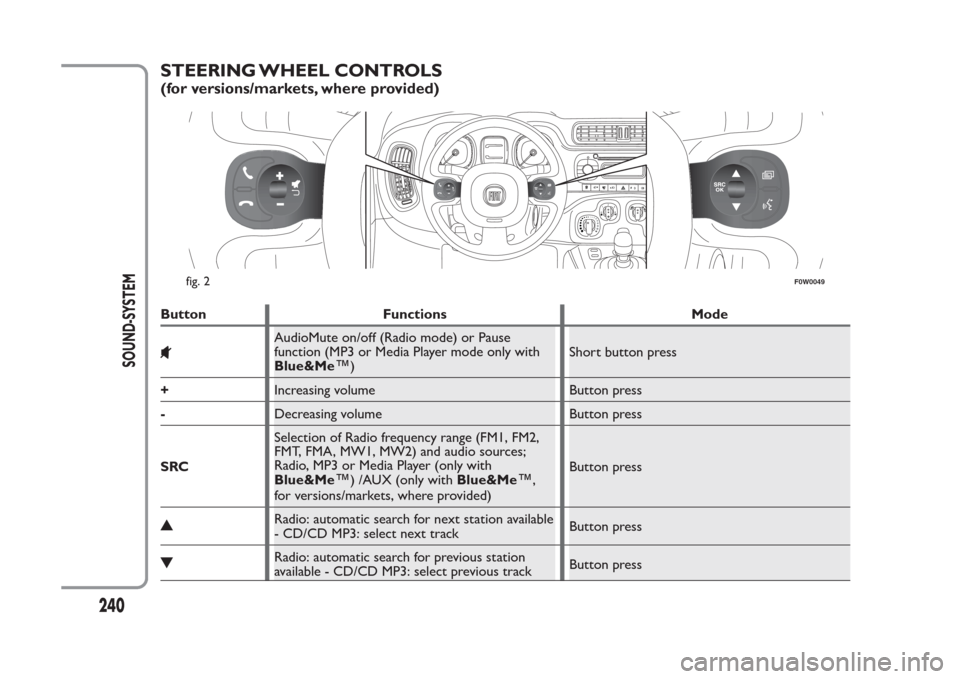
STEERING WHEEL CONTROLS(for versions/markets, where provided)Button Functions Mode
AudioMute on/off (Radio mode) or Pause
function (MP3 or Media Player mode only with
Blue&Me
™
)Short button press
+Increasing volume Button press
-Decreasing volume Button press
SRCSelection of Radio frequency range (FM1, FM2,
FMT, FMA, MW1, MW2) and audio sources;
Radio, MP3 or Media Player (only with
Blue&Me
™
) /AUX (only withBlue&Me
™
,
for versions/markets, where provided)Button press
Radio: automatic search for next station available
- CD/CD MP3: select next trackButton pressRadio: automatic search for previous station
available - CD/CD MP3: select previous trackButton press
1
02
3
4
fig. 2
F0W0049
240
SOUND-SYSTEM
Page 267 of 284
AUX (only with the Blue&Me™
system)(for versions/markets, where provided)
INTRODUCTION
This section describes the variants regarding the
operation of the AUX source: as far as the operation
of the radio is concerned, refer to the description in
the "Functions and Adjustments" chapter.
AUX MODE
To activate the AUX source, press the MEDIA
button or the SRC control on the steering wheel
several times until the corresponding source is
displayed.IMPORTANT
The functions of the device connected to the AUX
socket are directly managed by the device itself; it is
not possible to change track/folder/playlist with radio
or steering wheel controls.
Do not leave the cable of your portable player
connected with the AUX socket after disconnection,
to avoid possible hiss from the speakers.
NOTE The AUX socket is not incorporated in the
radio. For its position, refer to theBlue&Me™
Supplement and its Quick Guide.
263
SOUND-SYSTEM