light FIAT PANDA 2013 319 / 3.G Owners Manual
[x] Cancel search | Manufacturer: FIAT, Model Year: 2013, Model line: PANDA, Model: FIAT PANDA 2013 319 / 3.GPages: 284, PDF Size: 11.33 MB
Page 226 of 284
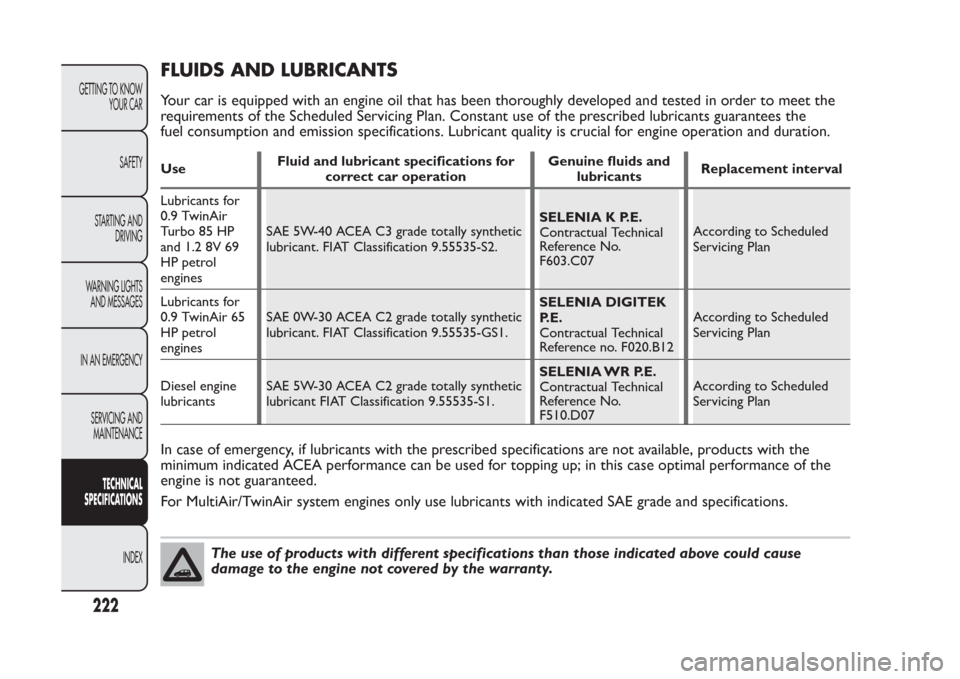
FLUIDS AND LUBRICANTSYour car is equipped with an engine oil that has been thoroughly developed and tested in order to meet the
requirements of the Scheduled Servicing Plan. Constant use of the prescribed lubricants guarantees the
fuel consumption and emission specifications. Lubricant quality is crucial for engine operation and duration.UseFluid and lubricant specifications for
correct car operationGenuine fluids and
lubricantsReplacement interval
Lubricants for
0.9 TwinAir
Turbo 85 HP
and 1.2 8V 69
HP petrol
enginesSAE 5W-40 ACEA C3 grade totally synthetic
lubricant. FIAT Classification 9.55535-S2.SELENIA K P.E.
Contractual Technical
Reference No.
F603.C07According to Scheduled
Servicing Plan
Lubricants for
0.9 TwinAir 65
HP petrol
enginesSAE 0W-30 ACEA C2 grade totally synthetic
lubricant. FIAT Classification 9.55535-GS1.SELENIA DIGITEK
P.E.
Contractual Technical
Reference no. F020.B12According to Scheduled
Servicing Plan
Diesel engine
lubricantsSAE 5W-30 ACEA C2 grade totally synthetic
lubricant FIAT Classification 9.55535-S1.SELENIA WR P.E.
Contractual Technical
Reference No.
F510.D07According to Scheduled
Servicing PlanIn case of emergency, if lubricants with the prescribed specifications are not available, products with the
minimum indicated ACEA performance can be used for topping up; in this case optimal performance of the
engine is not guaranteed.
For MultiAir/TwinAir system engines only use lubricants with indicated SAE grade and specifications.
The use of products with different specifications than those indicated above could cause
damage to the engine not covered by the warranty.
222
GETTING TO KNOW
YOUR CAR
SAFETY
STARTING AND
DRIVING
WARNING LIGHTS
AND MESSAGES
IN AN EMERGENCY
SERVICING AND
MAINTENANCE
TECHNICAL
SPECIFICATIONS
INDEX
Page 227 of 284
UseFluid and lubricant specifications for
correct car operationGenuine fluids and
lubricantsApplications
Lubricants for
motion
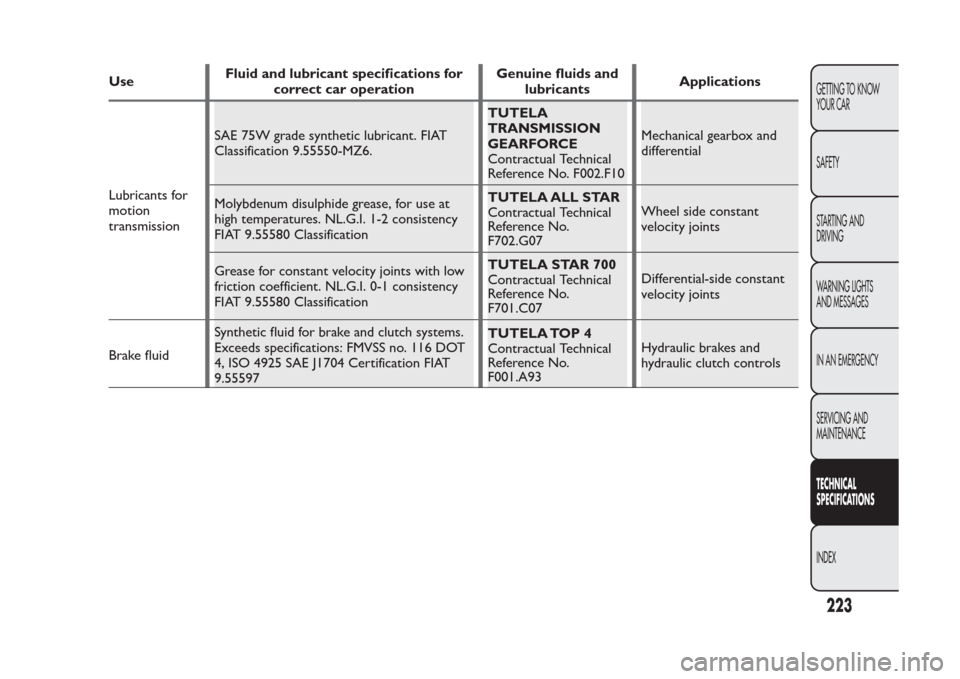
transmissionSAE 75W grade synthetic lubricant. FIAT
Classification 9.55550-MZ6.TUTELA
TRANSMISSION
GEARFORCE
Contractual Technical
Reference No. F002.F10Mechanical gearbox and
differential
Molybdenum disulphide grease, for use at
high temperatures. NL.G.I. 1-2 consistency
FIAT 9.55580 ClassificationTUTELA ALL STAR
Contractual Technical
Reference No.
F702.G07Wheel side constant
velocity joints
Grease for constant velocity joints with low
friction coefficient. NL.G.I. 0-1 consistency
FIAT 9.55580 ClassificationTUTELA STAR 700
Contractual Technical
Reference No.
F701.C07Differential-side constant
velocity joints
Brake fluidSynthetic fluid for brake and clutch systems.
Exceeds specifications: FMVSS no. 116 DOT
4, ISO 4925 SAE J1704 Certification FIAT
9.55597TUTELA TOP 4
Contractual Technical
Reference No.
F001.A93Hydraulic brakes and
hydraulic clutch controls
223GETTING TO KNOW
YOUR CAR
SAFETY
STARTING AND
DRIVING
WARNING LIGHTS
AND MESSAGES
IN AN EMERGENCY
SERVICING AND
MAINTENANCETECHNICAL
SPECIFICATIONSINDEX
Page 228 of 284
UseFluid and lubricant specifications for
correct car operationGenuine fluids and
lubricantsApplications
Protective
agent for
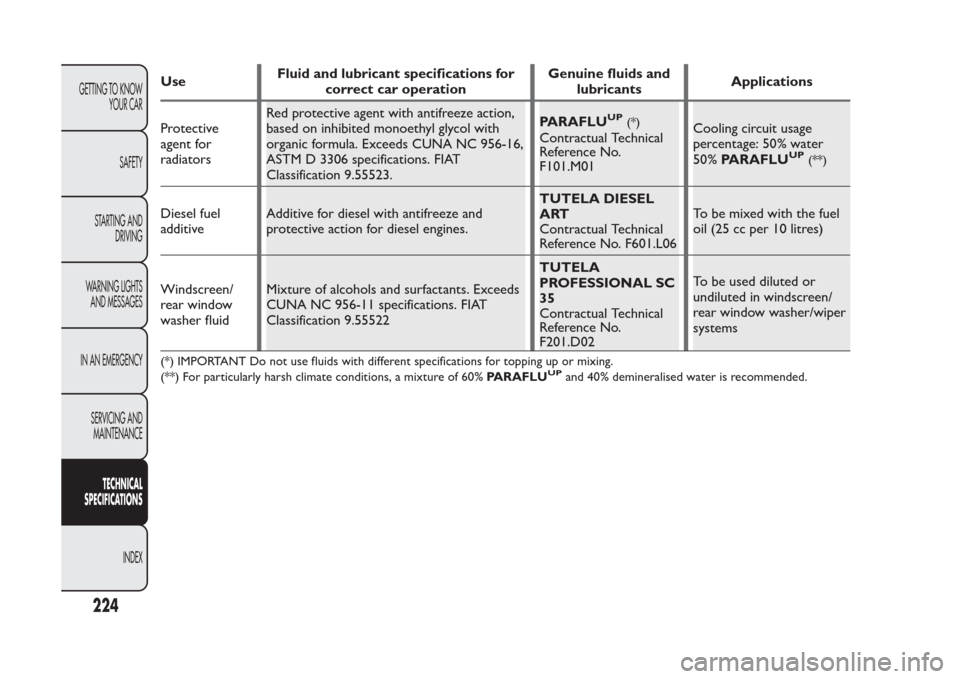
radiatorsRed protective agent with antifreeze action,
based on inhibited monoethyl glycol with
organic formula. Exceeds CUNA NC 956-16,
ASTM D 3306 specifications. FIAT
Classification 9.55523.PARAFLU
UP
(*)
Contractual Technical
Reference No.
F101.M01Cooling circuit usage
percentage: 50% water
50%PARAFLU
UP
(**)
Diesel fuel
additiveAdditive for diesel with antifreeze and
protective action for diesel engines.TUTELA DIESEL
ART
Contractual Technical
Reference No. F601.L06To be mixed with the fuel
oil (25 cc per 10 litres)
Windscreen/
rear window
washer fluidMixture of alcohols and surfactants. Exceeds
CUNA NC 956-11 specifications. FIAT
Classification 9.55522TUTELA
PROFESSIONAL SC
35
Contractual Technical
Reference No.
F201.D02To be used diluted or
undiluted in windscreen/
rear window washer/wiper
systems(*) IMPORTANT Do not use fluids with different specifications for topping up or mixing.
(**) For particularly harsh climate conditions, a mixture of 60%PARAFLU
UP
and 40% demineralised water is recommended.
224
GETTING TO KNOW
YOUR CAR
SAFETY
STARTING AND
DRIVING
WARNING LIGHTS
AND MESSAGES
IN AN EMERGENCY
SERVICING AND
MAINTENANCE
TECHNICAL
SPECIFICATIONS
INDEX
Page 229 of 284
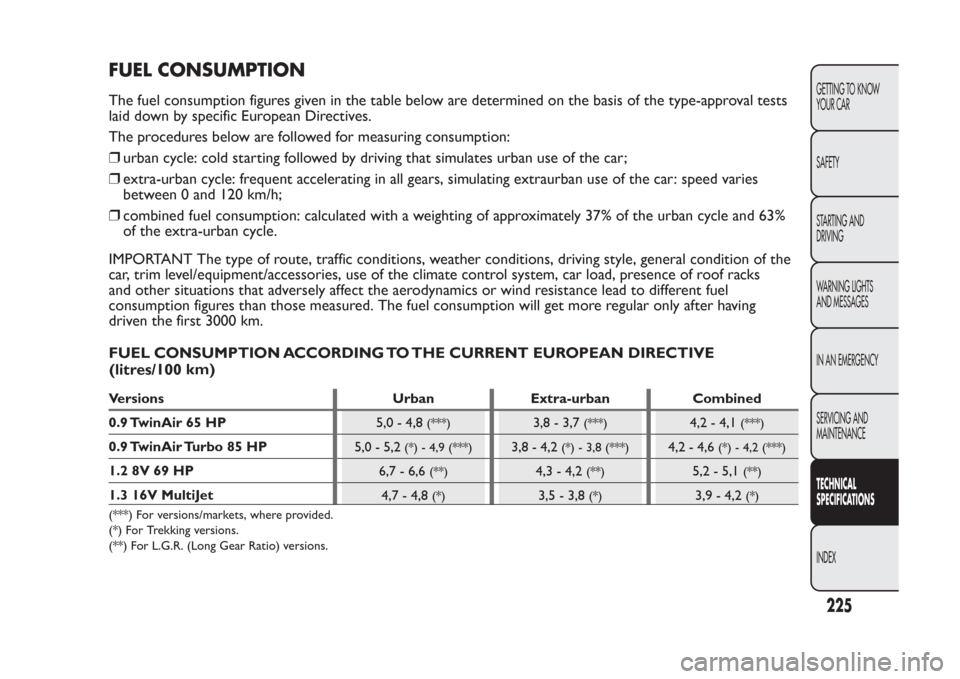
FUEL CONSUMPTIONThe fuel consumption figures given in the table below are determined on the basis of the type-approval tests
laid down by specific European Directives.
The procedures below are followed for measuring consumption:
❒urban cycle: cold starting followed by driving that simulates urban use of the car;
❒extra-urban cycle: frequent accelerating in all gears, simulating extraurban use of the car: speed varies
between 0 and 120 km/h;
❒combined fuel consumption: calculated with a weighting of approximately 37% of the urban cycle and 63%
of the extra-urban cycle.
IMPORTANT The type of route, traffic conditions, weather conditions, driving style, general condition of the
car, trim level/equipment/accessories, use of the climate control system, car load, presence of roof racks
and other situations that adversely affect the aerodynamics or wind resistance lead to different fuel
consumption figures than those measured. The fuel consumption will get more regular only after having
driven the first 3000 km.
FUEL CONSUMPTION ACCORDING TO THE CURRENT EUROPEAN DIRECTIVE
km)Versions Urban Extra-urban Combined
0.9 TwinAir 65 HP
5,0 - 4,8
(***)
3,8 - 3,7
(***)
4,2 - 4,1
(***)
0.9 TwinAir Turbo 85 HP
5,0 - 5,2
(*) - 4,9 (***)
3,8 - 4,2
(*) - 3,8 (***)
4,2 - 4,6
(*) - 4,2 (***)
1.2 8V 69 HP
6,7 - 6,6
(**)
4,3 - 4,2
(**)
5,2 - 5,1
(**)
1.3 16V MultiJet
4,7 - 4,8
(*)
3,5 - 3,8
(*)
3,9 - 4,2
(*)
(***) For versions/markets, where provided.
(*) For Trekking versions.
(**) For L.G.R. (Long Gear Ratio) versions.
225GETTING TO KNOW
YOUR CAR
SAFETY
STARTING AND
DRIVING
WARNING LIGHTS
AND MESSAGES
IN AN EMERGENCY
SERVICING AND
MAINTENANCETECHNICAL
SPECIFICATIONSINDEX
(litres/100
Page 230 of 284
CO
2
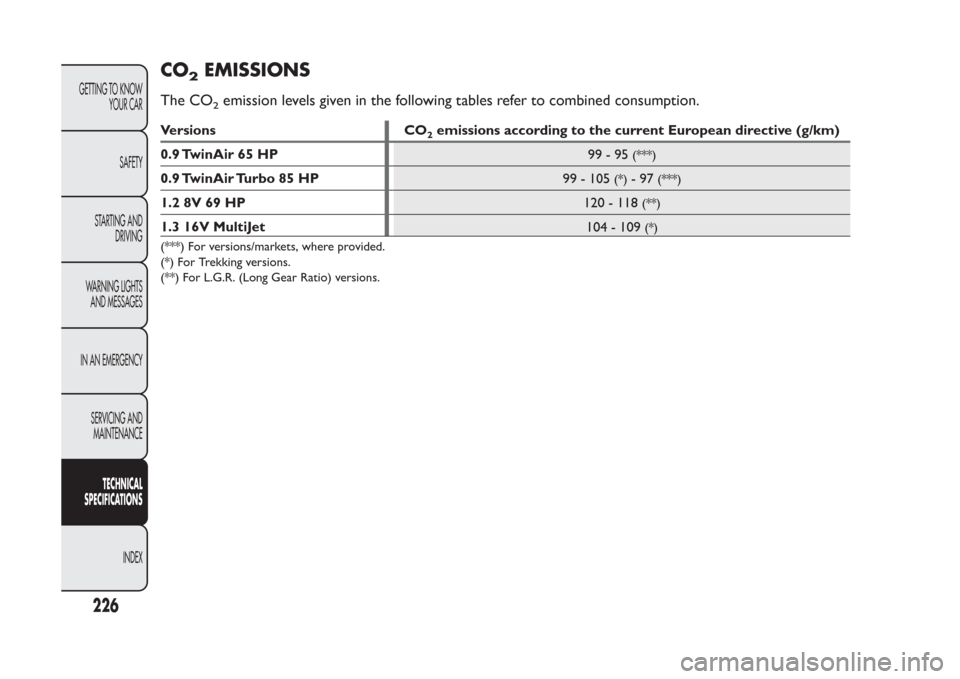
EMISSIONS
The CO
2emission levels given in the following tables refer to combined consumption.
Versions CO
2emissions according to the current European directive (g/km)
0.9 TwinAir 65 HP
99-95
(***)
0.9 TwinAir Turbo 85 HP
99 - 105
(*)
-97
(***)
1.2 8V 69 HP
120 - 118
(**)
1.3 16V MultiJet
104 - 109
(*)
(***) For versions/markets, where provided.
(*) For Trekking versions.
(**) For L.G.R. (Long Gear Ratio) versions.
226
GETTING TO KNOW
YOUR CAR
SAFETY
STARTING AND
DRIVING
WARNING LIGHTS
AND MESSAGES
IN AN EMERGENCY
SERVICING AND
MAINTENANCE
TECHNICAL
SPECIFICATIONS
INDEX
Page 231 of 284
PRESCRIPTIONS FOR HANDLING THE VEHICLE AT THE END OF ITS LIFEFiat has been committed for many years to safeguarding the environment through the constant improvement
of its production processes and manufacturing products that are increasingly compatible with the ecosystem.
To assure customers of the best possible service in terms of respecting environmental laws and in response to
European Directive 2000/53/EC governing vehicles at the end of their life, Fiat is offering their customers the
opportunity of handing over their vehicle (*) at the end of its life without incurring any additional costs.
The European Directive sets out that when the vehicle is handed over the last keeper or owner should not
incur any expenses as a result of it having a zero or negative market value. In particular, in almost all European
Union countries, until 1st January 2007, vehicles registered after 1st July 2002 will be collected free of
charge, whilst from 2007 collection will be free of charge irrespective of the year of registration as long as the
vehicle contains its basic components (in particular, the engine and bodywork) and has no additional waste.
To hand your vehicle over at the end of its life without extra cost, go to one of our Dealerships or
Fiat-authorised collection and scrapping centres. These centres have been carefully chosen to offer high
quality service for the collection, treatment and recycling of vehicles at their end of life, respecting the
surrounding environment.
You can find further information on these collection and scrapping centres either from a Fiat and Fiat
Commercial Vehicle Dealership or by calling the toll-free number 00800 3428 0000 or on the Fiat website.
(*) Vehicle for transporting passengers with a maximum of nine seats and a total permitted weight of 3.5 t
227GETTING TO KNOW
YOUR CAR
SAFETY
STARTING AND
DRIVING
WARNING LIGHTS
AND MESSAGES
IN AN EMERGENCY
SERVICING AND
MAINTENANCETECHNICAL
SPECIFICATIONSINDEX
Page 238 of 284
❒never use chemical products (e.g. antistatic,
thinner or spray cans) for cleaning as they could
damage the surface of the CDs;
❒after listening to them place CDs back in their
cases to avoid them being damaged;
❒do not expose CDs to direct sunlight, high
temperatures or moisture for long periods;
❒do not stick labels on the surface of the CD and
do not write on the recorded surface using pens
or pencils;
❒Never use CDs that are very scratched, cracked,
distorted, etc. Their use could cause damage to
the player or make it malfunction;
❒to achieve the best quality audio reproduction we
recommend the use of original CD media. Correct
operation is not guaranteed when CD-R/RW
media are used that were not correctly burnt
and/or with a maximum capacity above 650 Mb;
❒do not use commercially available protective sheets
for CDs or discs with stabilisers as they could get
stuck in the internal mechanism and damage the
disc;❒if a copy-protected CD is used, it may take a few
seconds before the system starts to play it. The
CD player cannot be guaranteed to play all
protected discs. The presence of copy protection
is often indicated in small letters or may be difficult
to read on the cover of the CD; it may say
something like, for example, "COPY CONTROL",
"COPY PROTECTED", "THIS CD CANNOT BE
PLAYED ON A PC/MAC" or may be identified
through the use of symbols, such as, for example:
❒The CD player is able to read most of the
compression systems currently on the market
(e.g.:LAME, BLADE, XING, FRAUNHOFER) but as
these systems are continually evolving, playback of
all compression formats is not guaranteed.
234
SOUND-SYSTEM
Page 249 of 284
FADER ADJUSTMENT
Proceed as follows:
❒Select the "Fader" setting in the AUDIO menu
using the
or
button;
❒press the
button to increase the sound from the
rear speakers or the
button to increase the
sound from the front speakers.
By pressing the buttons briefly, the levels will change
progressively. By holding them down longer, the levels
will change quickly.
Select the value "
0
" to set the same level for
the front and rear audio outputs.
LOUDNESS FUNCTION
The Loudness function improves the volume of the
sound whilst listening at low volumes, increasing the
bass and treble.
To activate/deactivate the function, select the
Loudness setting of the AUDIO menu using the
or
buttons.
The condition of the function (on or off ) is shown on
the display for a few seconds by the wording
“Loudness On” or “Loudness Off ”.EQ FUNCTION
(equaliser activation/deactivation)
The built-in equaliser can be activated/deactivated.
When the equaliser function is off, the audio settings
can only be changed by adjusting the “Bass” and
“Treble” settings, whereas when the function is on,
the acoustic curves can be adjusted. To turn off the
equaliser, select the "EQ OFF" function using the
or
buttons.
To turn the equaliser on, use the
or
buttons to
select one of the adjustments:
❒“FM/AM/CD...EQ User” (adjustment of 7 equaliser
bands that can be changed by the user);
❒“Classic” (equaliser preset for optimal classical
music sound);
❒“Rock” (equaliser preset for optimal rock and pop
music sound);
❒"Jazz" (equaliser preset for optimal jazz music
sound).
When one of the equaliser settings is activated the
letters "EQ" light up.
245
SOUND-SYSTEM
Page 251 of 284
AF SWITCHING function
(alternative frequency search)
The radio can operate in two different modes in the
RDS system:
❒"AF Switching On": search for alternative
frequencies active (the letters "AF" appear on the
display);
❒"AF Switching Off": search for alternative
frequencies not active.
Proceed as follows to activate/deactivate the
function:
❒press the MENU button and select “AF Switching
On”;
❒press the
or
buttons to activate/deactivate the
function.
With the function activated, the radio automatically
tunes into the station with the strongest signal
broadcasting the same programme. While driving, the
same station can be continuously listened to without
having to change the frequency when you change
zones.
Obviously, it must be possible to receive the station
that you are listening to in the area you are driving
through.
If the AF function is activated, "AF" will light up in the
display.If the AF function has been activated and the radio is
not able to receive the current station, the radio
activates the automatic search, during which "FM
Search" appears on the display (only for top-of-the-
range radios).
With the AF function deactivated, the remaining RDS
functions, such as the display of the station name, still
remain active.
The AF function can only be activated on FM bands.
TRAFFIC INFORMATION function
(traffic information)
Some stations on the FM band (FM1, FM2 and FMA)
can broadcast information about traffic conditions.
In this case the text "TA" appears on the display.
Proceed as follows to activate/deactivate the TA
function:
❒press the MENU button briefly and select “Traffic
info”;
❒press the
or
buttons to activate/deactivate the
function.
If the TA function has been activated, the “TA” icon
lights up on the display.
247
SOUND-SYSTEM
Page 258 of 284
RADIO (TUNER)INTRODUCTION
When the radio is switched on, the last function
selected before it was switched off is activated:
Radio, CD, CD MP3 or Media Player (only with
Blue&Me™) or AUX (only withBlue&Me™, for
versions/markets, where provided).
To select the Radio function when another audio
source is being listened to, briefly press the FM AS or
AM buttons depending on the desired band.
Once the Radio mode has been activated, the display
will show the name (RDS stations only) and the
frequency of the selected radio station, the frequency
band selected (e.g. FM1) and the preselect button
number (e.g. P1).FREQUENCY BAND SELECTION
With the Radio mode active, press the FM AS or AM
button briefly and repeatedly to select the desired
reception band.
Each time the button is pressed the following bands
are selected cyclically:
❒By pressing the FM AS button: “FM1”, “FM2” or
“FMA”;
❒By pressing the AM button: “MW1, MW2”.
Each band is highlighted by the name in the display.
The last station selected on the respective frequency
band will be tuned into.
The FM band is divided into sections: FM1, FM2 or
"FMA"; the FMA reception band is reserved for
broadcasters stored automatically using the
Autostore function.
254
SOUND-SYSTEM