buttons FIAT PANDA 2013 319 / 3.G Owner's Manual
[x] Cancel search | Manufacturer: FIAT, Model Year: 2013, Model line: PANDA, Model: FIAT PANDA 2013 319 / 3.GPages: 284, PDF Size: 11.33 MB
Page 254 of 284
SPEED VOLUME function
(speed-based volume change)
This function automatically adapts the volume level
to the speed of the car, increasing the volume when
the speed increases to maintain the ratio with the
noise level inside the passenger compartment.
To turn the function on/off, press the
/
buttons.
The words "Speed volume" appear on the display,
followed by the current status of the function:
❒Off: function deactivated
❒Low: function activated (low setting)
❒High: function activated (high setting).RADIO ON VOLUME function
(maximum radio volume limit
activation/deactivation)
This function makes it possible to activate/deactivate
the maximum volume limit when the radio is turned
on.
The display shows the function status:
❒“Radio on vol – Limit on”: when the radio is
switched on the volume level will be: – if the
volume level is equal to or higher than the
maximum value, the radio will come on at the
maximum volume;
– if the volume level is between the minimum and
maximum values, the radio will come on at the same
volume as before it was switched off
– if the volume level is equal to or lower than the
minimum value, the radio will come on at the
minimum volume.
❒"Radio on vol – Limit off": the radio will come on
at the volume level it was at before switching off.
The volume level can be between 0 and 40.
To change the setting of the selected function, use
the
/
buttons.
250
SOUND-SYSTEM
Page 255 of 284
NOTES
❒Using the Menu it is only possible to adjust the
activation/deactivation of the function and not the
minimum or maximum volume value.
❒If the "TA" or "TEL" functions or an external audio
source are activated when the radio is turned on,
the radio will come on at the volume set for these
sources. The volume can be adjusted between the
minimum and the maximum level, by deactivating
the external audio source.
❒If the battery charge is low, it will not be possible
to adjust the volume between the minimum and
maximum levels.
SPEECH VOLUME function
(telephone volume setting)
By turning the
(ON/OFF) button/knob or pressing
the
/
buttons, this function allows the volume to
be adjusted (settings from 1 to 40) or to be excluded
(OFF setting) for the Telephone andBlue&Me™
(except the Media Player function).
The display shows the current function status:
❒"Speech Off": function deactivated.
❒“Speech volume 23”: function active with volume
setting 23.AUX OFFSET function
(alignment of the portable device volume with
that of the other sources)
This function enables the alignment of the volume of
the AUX source, depending on its own portable
player, with that of the other sources.
To activate the function, press the MENU button and
select “AUX offset”.
Press the buttons
or
to decrease or increase the
volume value (set from–6to+6).
RADIO OFF function
(on and off mode)
This function is used to set the radio turning off
mode to one of two different settings. To turn the
function on, use the
or
buttons.
The chosen mode appears on the display:
❒"00 MIN": the radio turns off automatically in
connection with the ignition key; the radio turns
off automatically as soon as the key is turned to
the STOP position;
❒"20 MIN": the radio turns off independently of the
ignition key; the radio remains switched on for a
maximum period of 20 minutes after the key has
been turned to the STOP position.
251
SOUND-SYSTEM
Page 258 of 284
RADIO (TUNER)INTRODUCTION
When the radio is switched on, the last function
selected before it was switched off is activated:
Radio, CD, CD MP3 or Media Player (only with
Blue&Me™) or AUX (only withBlue&Me™, for
versions/markets, where provided).
To select the Radio function when another audio
source is being listened to, briefly press the FM AS or
AM buttons depending on the desired band.
Once the Radio mode has been activated, the display
will show the name (RDS stations only) and the
frequency of the selected radio station, the frequency
band selected (e.g. FM1) and the preselect button
number (e.g. P1).FREQUENCY BAND SELECTION
With the Radio mode active, press the FM AS or AM
button briefly and repeatedly to select the desired
reception band.
Each time the button is pressed the following bands
are selected cyclically:
❒By pressing the FM AS button: “FM1”, “FM2” or
“FMA”;
❒By pressing the AM button: “MW1, MW2”.
Each band is highlighted by the name in the display.
The last station selected on the respective frequency
band will be tuned into.
The FM band is divided into sections: FM1, FM2 or
"FMA"; the FMA reception band is reserved for
broadcasters stored automatically using the
Autostore function.
254
SOUND-SYSTEM
Page 259 of 284
PRESET BUTTONS
The buttons numbered from 1 to 6 are used to set
the following preset stations:
❒18 in the FM band (6 in FM1, 6 in FM2, 6 in FMT or
"FMA" (on some versions);
❒12 in the MW band (6 in MW1, 6 in MW2).
To listen to a preset station, select the desired
frequency band and then briefly press the
corresponding preset button (from 1 to 6).
By pressing the preset button for more than 2
seconds, the tuned station will be stored. The storing
phase is confirmed by an acoustic signal.
STORING THE LAST STATION LISTENED
TO
The radio automatically stores the last station that
was selected for each reception band, which is then
tuned into when the radio is turned on or when the
reception band is changed.AUTOMATIC TUNING
Briefly press the
or
button to start the
automatic tuning search for the next station that can
be received in the selected direction.
If the
or
button is pressed down longer, the fast
search starts. When the button is released, the tuner
will stop on the next station that can be received.
If the TA function (traffic alerts) is on, the tuner will
only search for stations that broadcast traffic news.
MANUAL TUNING
This is used to manually search for stations in the
preselected band.
Select the desired frequency band and then press the
or
button briefly and repeatedly to start the
search in the desired direction.
If the or
buttons are pressed longer, the fast
search will start and then stop when the button is
released.
255
SOUND-SYSTEM
Page 260 of 284
AUTOSTORE FUNCTION
(automatic station storing)
To activate the Autostore function, hold the FM AS
button down until a beep is heard. With this
function, the radio automatically stores the 6 stations
with the strongest signal in a decreasing order on the
FMA frequency band.
During the automatic storing process, the text
“Autostore” flashes on the display.
Press the FM AS button again to stop the Autostore
function: the radio will again tune into the station
listened to before the activation of the function.
When the Autostore function has finished, the radio
automatically tunes into the first preselected station
on the FMA band on the preset side 1.
The stations that have a strong signal at that moment
are then automatically stored in the preselected band
on the buttons numbered 1 to 6.
When the Autostore function is activated within the
MW band, the FMA band is automatically selected
and the function is performed there.
Note
Sometimes the Autostore function is not able to find
6 stations with a strong signal. In this case, the
strongest stations stored will be duplicated in the
free preset buttons.Note
When the Autostore function is activated, the
stations that were previously stored in the FMA band
are deleted.
EMERGENCY ALARM RECEPTION
The radio is configured to receive emergency alerts
in RDS mode in exceptional circumstances or where
dangerous situations are present (earthquakes,
floods, etc.) if these are being transmitted by the
current broadcaster.
This function is activated automatically and cannot be
turned off.
The word “Alarm” will be shown in the display during
the transmission of an emergency announcement.
The volume of the radio changes during this
announcement in the same way as during traffic
news.
256
SOUND-SYSTEM
Page 269 of 284
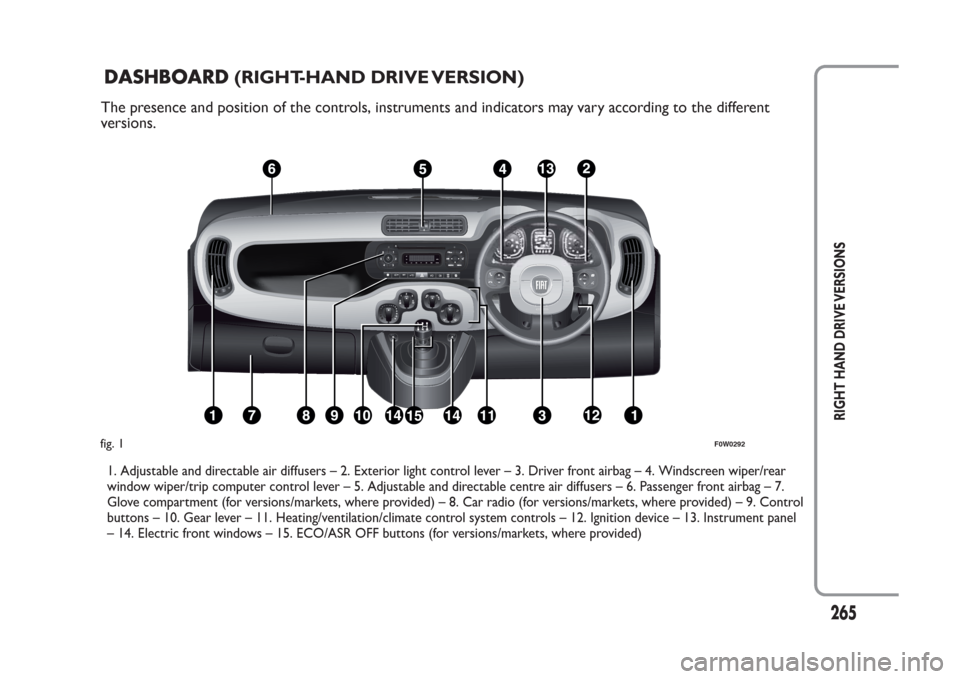
RIGHT HAND DRIVE VERSIONS
2
(RIGHT-HAND DRIVE VERSION)
The presence and position of the controls, instruments and indicators may vary according to the different
versions.1. Adjustable and directable air diffusers – 2. Exterior light control lever – 3. Driver front airbag – 4. Windscreen wiper/rear
window wiper/trip computer control lever – 5. Adjustable and directable centre air diffusers – 6. Passenger front airbag – 7.
Glove compartment (for versions/markets, where provided) – 8. Car radio (for versions/markets, where provided) – 9. Control
buttons – 10. Gear lever – 11. Heating/ventilation/climate control system controls – 12. Ignition device – 13. Instrument panel
– 14. Electric front windows – 15. ECO/ASR OFF buttons (for versions/markets, where provided)
TOTkmiC
fig. 1
F0W0292
65
DASHBOARD
Page 277 of 284
Conditions of use ................... 127
Control panel and
instruments.............................. 4
Controls ..................................... 51D
aytime running lights
(DRL)
– "Daytime Running
Lights".................................... 45
Diesel filter ............................... 189
Dipped beam headlights
– control................................... 45
Dipped headlights
– control................................... 45
Direction indicators
– bulb replacement ............... 158
– control................................... 46
Display ........................................ 7
– Control buttons .................. 8
Doors.......................................... 58
– door locking/unlocking ...... 58
DPF (Diesel Particulate
Filter)......................................... 98
DPF filter .................................... 98
Driving style ............................. 126DRL (Daytime Running
Lights) ....................................... 45
Dualdrive (electric power
steering) ................................... 90
Dualdrive electric power
steering ..................................... 90
Dualdrive (electric power
steering) ................................... 90
E
lectric windows ..................... 62
Engine codes ............................ 202
Engine compartment
– checking fluid levels........... 182
– opening/closing .................... 68
– washing ................................ 197
Engine coolant
temperature gauge ................. 6
Engine
– Engine cooling system
fluid level.............................. 187
– identification codes ........... 202
– marking ................................ 201
– technical specifications ..... 204
Engine oil
– consumption ....................... 187
– level check ........................... 187
– specifications ...................... 222Environment protection ......... 98
EOBD system............................ 87
EOBD (system)......................... 87
ESC system ................................ 74
ESC (system) ............................. 74
Exterior lights ........................... 45
Extinguisher ............................... 55
Fiat CODE (system) ............... 18
Fiat CODE system ................... 18
Filling the tank........................... 95
Fitting "Universal" child
seat ........................................... 108
FIX&GO automatic kit .......... 149
Fluids and lubricants
(specifications) ....................... 222
Fog lights ................................... 158
Follow me home (device) ....... 46
Front
– Air Bags................................ 115
Front roof light
– bulb replacement ............... 162
– control................................... 49
Fuel consumption.................... 225
Fuel level gauge ......................... 6
Fuel reserve .............................. 219
273GETTING TO KNOW
YOUR CAR
SAFETY
STARTING AND
DRIVING
WARNING LIGHTS
AND MESSAGES
IN AN EMERGENCY
SERVICING AND
MAINTENANCE
TECHNICAL
SPECIFICATIONSINDEX