time setting FIAT PANDA 2013 319 / 3.G Owners Manual
[x] Cancel search | Manufacturer: FIAT, Model Year: 2013, Model line: PANDA, Model: FIAT PANDA 2013 319 / 3.GPages: 284, PDF Size: 11.33 MB
Page 13 of 284
The menu includes the following items:
❒MENU
❒LIGHTING
❒SPEED BEEP
❒TRIP B ACTIVATION/DATA
❒SET TIME
❒SET DATE
❒SEE RADIO
❒AUTOCLOSE
❒MEASUREMENT UNIT
❒LANGUAGE
❒WARNING VOLUME
❒SEAT BELT BUZZER (for versions/markets, where
provided)
❒SERVICE
❒AIRBAG/PASSENGER BAG (for versions/markets,
where provided)
❒CITY BRAKE C./COLLISION MITIGATION (for
versions/markets, where provided)
❒EXIT MENU
Selecting an option from the main menu without a
submenu:
❒briefly press the
button to select the main menu
option to be set;❒press buttons
or
(with single presses) to
select the new setting;
❒briefly press the
button to store the new setting
and to go back to the same main menu option
selected previously.
Selecting an option from the main menu with a
submenu:
❒a short press on the
button will display the first
submenu option;
❒press buttons
or
(with single presses) to
scroll through all the submenu options;
❒briefly press the
button to select the displayed
submenu option and to open the relevant set-up
menu;
❒press buttonsor
(with single presses) to
select the new setting for this submenu option;
❒Briefly press button
to store the new setting
and at the same time go back to the previously
selected menu option.
9GETTING TO
KNOW YOUR CARSAFETY
STARTING AND
DRIVING
WARNING LIGHTS
AND MESSAGES
IN AN EMERGENCY
SERVICING AND
MAINTENANCE
TECHNICAL
SPECIFICATIONS
INDEX
Page 14 of 284
MENU ITEMSMenu
This option allows you to access the Setup Menu.
Press the
or
fig. 7 button to select the
various Menu items. Hold down the
button to
return to the standard screen.
Lighting (Interior car lighting adjustment)
(with side lights on only)
With the side lights on, this function is used to set
the brightness of the instrument panel, radio
controls and automatic climate control system
controls (for versions/markets, where provided) to 8
levels.
To adjust the brightness, proceed as follows:
press the
button briefly: the previously set level
will flash on the display;
press the
or
button to adjust the brightness
level;
press the
button briefly to return to the menu
screen or hold the button down to return to the
standard screen without storing.Speed Beep (Speed limit)
This function is used to set the car speed limit (km/h
or mph); the driver is alerted when this limit is
exceeded.
To set the desired speed limit, proceed as follows:
❒briefly press the
button: the display will show
the text (Speed Beep);
❒press the
or
button to select speed limit
activation (On) or deactivation (Off );
❒if the function is on, press
or
to select the
desired speed limit and then pressto confirm.
NoteSetting is possible between 30 and 200 km/h,
or 20 and 125 mph, according to the previously
set unit. See the "Measurement unit adjustment
(Measurement unit)" paragraph described below. The
setting will increase/decrease by 5 units each time
the
/
button is pressed. Hold down the
/
button to automatically increase/decrease
the setting rapidly. Complete the adjustment with
single presses of the button when you approach the
desired value.
❒press the
button briefly to return to the menu
screen or hold the button down to return to the
standard screen without storing.
To cancel the setting, proceed as follows:
❒press thebutton briefly: "On" will flash on the
display;
10GETTING TO
KNOW YOUR CAR
SAFETY
STARTING AND
DRIVING
WARNING LIGHTS
AND MESSAGES
IN AN EMERGENCY
SERVICING AND
MAINTENANCE
TECHNICAL
SPECIFICATIONS
INDEX
Page 15 of 284
❒press the
button: "Off" will flash on the
display;
❒press the
button briefly to return to the menu
screen or hold the button down to return to the
standard screen without storing.
Activation/Trip B data (Activating Trip B)
With this function it is possible to activate ("On") or
deactivate ("Off") the Trip B display (partial trip).
For more information see the "Trip computer"
paragraph.
For activation/deactivation, proceed as follows:
❒press thebutton briefly to make the display flash
"On" or "Off" according to the previous setting;
❒press the
or
button to make the
adjustment;
❒press the
button briefly to return to the menu
screen or hold the button down to return to the
standard screen without storing.
Time adjustment (Clock adjustment)
This function allows the clock to be set through two
submenus: "Time" and "Format".
To carry out the adjustment, proceed as follows:
❒press thebutton briefly: the display will show
the two submenus "Time" and "Format";
❒press the
or
button to switch between
the two submenus;❒once you have selected the submenu to be
changed, press the
button briefly;
❒when you select "Time", pressing
briefly makes
the "hours" flash on the display. press the
or
button to make the adjustment;
❒press the
button briefly: the "minutes" flash on
the display. Press the
or
button to make
the adjustment;
❒if you select the "Format" submenu, pressing the
button briefly makes the display mode flash on
the display. Press the
or
button to select
"12h" or "24h" mode. When you have carried
out the desired adjustment, press the
button
briefly to return to the submenu screen or hold
the button down to return to the main menu
screen without storing.
Hold down the
button again to return to the
standard screen or to the main menu according to
where you are in the menu.
IMPORTANT The setting will increase or decrease
by one unit each time the
or
button is
pressed. Holding the button down causes an
automatic rapid increase/decrease. Complete the
adjustment with single presses of the button when
you approach the desired value.
11GETTING TO
KNOW YOUR CARSAFETY
STARTING AND
DRIVING
WARNING LIGHTS
AND MESSAGES
IN AN EMERGENCY
SERVICING AND
MAINTENANCE
TECHNICAL
SPECIFICATIONS
INDEX
Page 16 of 284
Set date (Setting the date)
This function can be used to set the date (year -
month - day).
To carry out the adjustment, proceed as follows:
❒briefly press the
button: the "year" will flash on
the display;
❒press the
or
button to make the
adjustment;
❒press the
button briefly: the "month" will flash
on the display;
❒press the
or
button to make the
adjustment;
❒briefly press the
button: the "day" will flash on
the display;
❒press the
or
button to make the
adjustment;
❒press the
button briefly to return to the menu
screen or hold the button down to return to the
standard screen without storing.
IMPORTANT The setting will increase or decrease
by one unit each time the
or
button is
pressed. Holding the button down causes an
automatic rapid increase/decrease. Complete the
adjustment with single presses of the button when
you approach the desired value.
See radio (audio information display)
With this function the display shows information
about the sound system.❒Radio: selected radio station frequency or RDS
message, automatic tuning activation or
AutoSTore;
❒Audio CD, MP3 CDs: track number;
❒CD Changer: CD number and track number.
To show the sound system information on the
display (On) or clear it (Off ), proceed as follows:
❒briefly press
button, ON or OFF flashes on the
display according to the previous setting;
❒press theor
button to select;
❒press the
button briefly to return to the menu
screen or hold the button down to return to the
standard screen without storing.
Autoclose (Automatic central locking with car
in motion)
When activated (On), this function locks the doors
automatically when the vehicle speed exceeds 20
km/h.
To activate or deactivate this function, proceed as
follows:
❒press thebutton briefly to make the display flash
"On" or "Off" according to the previous setting;
❒press the
or
button to select;
12GETTING TO
KNOW YOUR CAR
SAFETY
STARTING AND
DRIVING
WARNING LIGHTS
AND MESSAGES
IN AN EMERGENCY
SERVICING AND
MAINTENANCE
TECHNICAL
SPECIFICATIONS
INDEX
Page 21 of 284
Average speed
This shows the average car speed as a function of the
overall time elapsed since the start of the new
journey.
Tr i p t i m e
The time elapsed since the start of a new journey.
TRIP BUTTON
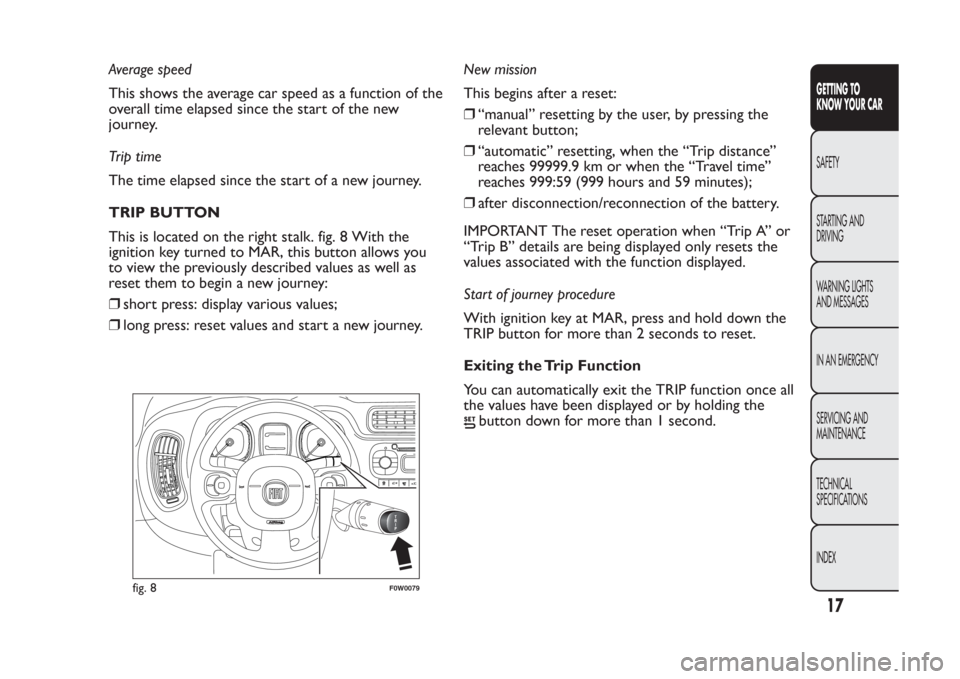
This is located on the right stalk. fig. 8 With the
ignition key turned to MAR, this button allows you
to view the previously described values as well as
reset them to begin a new journey:
❒short press: display various values;
❒long press: reset values and start a new journey.New mission
This begins after a reset:
❒“manual” resetting by the user, by pressing the
relevant button;
❒“automatic” resetting, when the “Trip distance”
reaches 99999.9 km or when the “Travel time”
reaches 999:59 (999 hours and 59 minutes);
❒after disconnection/reconnection of the battery.
IMPORTANT The reset operation when “Trip A” or
“Trip B” details are being displayed only resets the
values associated with the function displayed.
Start of journey procedure
With ignition key at MAR, press and hold down the
TRIP button for more than 2 seconds to reset.
Exiting the Trip Function
You can automatically exit the TRIP function once all
the values have been displayed or by holding the
button down for more than 1 second.
1
02
fig. 8
F0W0079
17GETTING TO
KNOW YOUR CARSAFETY
STARTING AND
DRIVING
WARNING LIGHTS
AND MESSAGES
IN AN EMERGENCY
SERVICING AND
MAINTENANCE
TECHNICAL
SPECIFICATIONS
INDEX
Page 45 of 284
WARNING
It is advisable not to use the air
recirculation function when the outside
temperature is low to prevent the windows from
rapidly misting up.
ADJUSTING THE FAN SPEED
Press the G fig. 30
or M
button to increase/
decrease the fan speed
.
The possible speeds are displayed through a
progression of individual bars which comprise the
symbol:
❒maximum fan speed = all bars lit
❒minimum fan speed = half a bar lit.
The fan can be disabled (no bars lit) only if the
climate control compressor has been switched off by
pressing the
button.
To restore automatic fan speed control after a
manual adjustment, press the AUTO button.RAPID FRONT WINDOW
DEMISTING/DEFROSTING (MAX-DEF
function)
Press the
button to automatically activate the
timed operation of all the functions required to
rapidly demist/defrost the windscreen and front side
windows (for versions/markets, where provided).
The functions are:
❒climate control compressor activation (with an
outside temperature of above 0°C);
❒deactivation, if previously activated, of the internal
air recirculation;
❒activation of heated rear window (LED on
button on) and door mirror heater coils (for
versions/markets, where provided);
❒setting maximum air temperature;
❒activation of air flow.
HEATED WINDSCREEN/HEATED REAR
WINDOW AND DOOR MIRROR
DEMISTING/DEFROSTING (for
versions/markets, where provided)
Press the
button to activate: when this function is
activated, the LED on the button switches on.
For versions/markets where provided, press the
button to activate also demisting/defrosting
of windscreen (with engine running only) and door
mirrors (for versions/markets, where provided).
41GETTING TO
KNOW YOUR CARSAFETY
STARTING AND
DRIVING
WARNING LIGHTS
AND MESSAGES
IN AN EMERGENCY
SERVICING AND
MAINTENANCE
TECHNICAL
SPECIFICATIONS
INDEX
Page 248 of 284
AUDIO SETTINGS
The functions in the audio menu differ according to
the active source: AM/FM/CD/Media Player (only
withBlue&Me™) /AUX (only withBlue&Me™,
for versions/markets, where provided).
Press the
button briefly to change the Audio
functions.
After thebutton is first pressed, the display will
show the bass level value for the source activated at
that time (e.g. in FM mode the display will show the
wording "FM Bass +2").
Use the
or
buttons to scroll through the menu
functions. To change the setting of the function
selected use the
or
buttons. The current status
of the selected function appears on the display.
The functions managed by the Menu are:
❒BASS (adjustment of bass tones);
❒TREBLE (adjustment of high tones);
❒BALANCE (right/left balance adjustment);
❒FADER (front/back balance adjustment);
❒LOUDNESS (LOUDNESS function
activation/deactivation);
❒EQUALISER (activation and selection of factory-
set equaliser levels);
❒USER EQUALISER (customised equaliser setting).TONE ADJUSTMENT (bass/treble)
Proceed as follows:
❒Use
or
buttons to set the “Bass” or “Treble”
in the AUDIO menu;
❒press theor
button to increase/decrease the
bass or treble.
By pressing the buttons briefly, the levels will change
progressively. By holding them down longer, the levels
will change quickly.
BALANCE ADJUSTMENT
Proceed as follows:
❒Select the "Balance" setting in the AUDIO menu
using the
or
button;
❒press the
button to increase the volume of the
right speakers or the
button to increase the
volume of the left speakers.
By pressing the buttons briefly, the levels will change
progressively. By holding them down longer, the levels
will change quickly.
Select the value "
0
" to set the same level for
the right and left audio outputs.
244
SOUND-SYSTEM
Page 250 of 284
USER EQ SETTINGS FUNCTION
(equaliser settings only if the USER setting has
been selected)
To set a customised equaliser adjustment, move to
"User" using the
or
buttons and press the
MENU button.
A 7-bar graph appears on the display, in which each
bar represents a frequency.
Select the bar to adjust using the
or
buttons; the
selected bar will start to flash and it can be adjusted
using the
or
buttons.
To store the setting, press the
button again. The
display will show the source activated at that time
followed by the text “User”. If the mode is “FM” the
display will show the text "FM EQ User".
MENU
Menu button functions
Press the Menu function briefly to activate the
MENU function. The display will show the first menu
item that can be adjusted (AF) ("AF Switching On" on
the display).
Use the
or
buttons to scroll through the menu
functions. To change the setting of the function
selected use the
or
buttons.
The current status of the function selected will be
shown on the display.
The functions managed by the Menu are:
❒AF SWITCHING (ON/OFF);❒TRAFFIC INFORMATION (ON/OFF);
❒REGIONAL MODE regional programmes
(ON/OFF);
❒MP3 DISPLAY (CD MP3 display settings);
❒SPEED VOLUME (speed-dependent automatic
volume control);
❒RADIO ON VOLUME (maximum radio volume
limit activation/deactivation);
❒SPEECH VOLUME (telephone volume setting);
❒AUX OFFSET (alignment of the portable device
volume to that of the other sources);
❒RADIO OFF (switching-off mode);
❒SYSTEM RESET Press the Menu button again to
exit the Menu function.
Note
The AF SWITCHING, TRAFFIC INFORMATION and
REGIONAL MODE adjustments are only possible in
FM mode.
246
SOUND-SYSTEM
Page 253 of 284
REGIONAL MODE function
(regional transmission reception)
Some national broadcasters will transmit regional
programmes at certain times of the day (that vary
from region to region).
This function makes it possible to tune into local
(regional) broadcasters automatically (see "EON
function" paragraph).
If you want the radio to automatically tune into the
regional stations being broadcast on the selected
network, the function must be activated.
To activate/deactivate the function use the
or
buttons.
The current status of the function appears on the
display:
❒"Regional On": function activated;
❒"Regional Off": function deactivated.
If the function is deactivated and you have tuned into
a regional station working in a given area and you
enter a different area, then the regional station
received in the new area will be broadcast.
Note
If the AF and REG functions are on at the same time,
once a border between two regions is crossed, the
radio may not switch correctly to a valid alternative
frequency.MP3 DISPLAY function
(MP3 CD data display)
This function makes it possible to select the
information shown by the display when listening to a
CD containing MP3 tracks.
The function can only be selected if an MP3 CD is
inserted: in this case "MP3 Display" will appear on the
display.
To change the function, use the
or
buttons.
The following settings are available:
❒"Title" (track title, if the ID3-TAG is available);
❒"Author" (track author, if ID3-TAG is available);
❒"Album" (track album, the ID3-TAG if available);
❒"Folder" name (name assigned to the folder);
❒"File" name (name assigned to the MP3 file).
249
SOUND-SYSTEM
Page 256 of 284
SYSTEM RESET function
This function is used to restore all settings to the
factory values.
The options are:
❒NO: no restore intervention;
❒YES: the default parameters will be restored.
During this operation, the text “Resetting” appears
on the display. At the end of the operation, the
source does not change and the previous situation
will be displayed.
PHONE SET-UP
If a hands-free kit is installed on the car, when there
is an incoming phone call the radio audio will be
connected to the telephone output. The incoming
telephone sound always arrives at a fixed volume, but
it can be adjusted during the conversation using the
ON/OFF button/knob.
The fixed telephone audio volume can be adjusted
using the "SPEECH VOLUME" function in the Menu.
The text “PHONE” appears on the display during the
telephone audio deactivation.ANTI-THEFT PROTECTION
The radio is equipped with an anti-theft protection
system based on the exchange of information
between the radio and the electronic control unit
(Body Computer) on the car.
This system guarantees maximum safety and prevents
the secret code from being entered each time the
radio power supply is disconnected.
If the check has a positive outcome, the radio will
start to function, whereas if the comparison codes
are not the same or if the electronic control unit
(Body Computer) is replaced, the device will ask the
user to enter the secret code according to the
procedure described in the paragraph below.
Entering the secret code
When the radio is switched on, if the code is
requested, the display will show "Radio code" for
about 2 seconds followed by four dashes "----".
The code is made up of four numbers from 1 to 6,
each corresponding to one of the dashes.
To enter the first digit of the code, press the
corresponding button of the pre-selected stations
(from 1 to 6). Enter the other code digits in the same
way.
If the four digits are not entered within 20 seconds,
the display will show "Enter code----".Ifthis
occurs, it is not considered an incorrect code entry.
After entering the fourth digit (within 20 seconds),
the car radio will start to work.
252
SOUND-SYSTEM