buttons FIAT PANDA 2014 319 / 3.G User Guide
[x] Cancel search | Manufacturer: FIAT, Model Year: 2014, Model line: PANDA, Model: FIAT PANDA 2014 319 / 3.GPages: 284, PDF Size: 11.54 MB
Page 66 of 284
ELECTRIC WINDOWSFRONT ELECTRIC WINDOWS
These operate when the ignition key is turned to
MAR and for about three minutes after turning the
key to STOP or removing it.
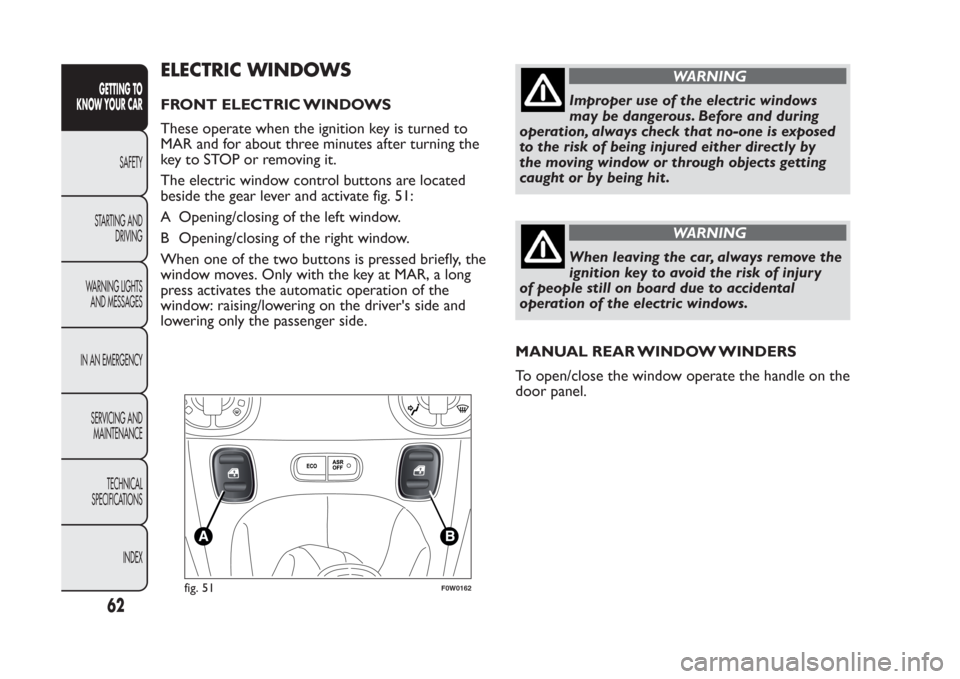
The electric window control buttons are located
beside the gear lever and activate fig. 51:
A Opening/closing of the left window.
B Opening/closing of the right window.
When one of the two buttons is pressed briefly, the
window moves. Only with the key at MAR, a long
press activates the automatic operation of the
window: raising/lowering on the driver's side and
lowering only the passenger side.
WARNING
Improper use of the electric windows
may be dangerous. Before and during
operation, always check that no-one is exposed
to the risk of being injured either directly by
the moving window or through objects getting
caught or by being hit .
WARNING
When leaving the car, always remove the
ignition key to avoid the risk of injury
of people still on board due to accidental
operation of the electric windows.
MANUAL REAR WINDOW WINDERS
To open/close the window operate the handle on the
door panel.
fig. 51
F0W0162
62GETTING TO
KNOW YOUR CAR
SAFETY
STARTING AND
DRIVING
WARNING LIGHTS
AND MESSAGES
IN AN EMERGENCY
SERVICING AND
MAINTENANCE
TECHNICAL
SPECIFICATIONS
INDEX
Page 75 of 284
WARNING
Evenly distribute the load and take into
account , when driving, the increased
responsiveness of the car to side wind.Fully comply with the regulations in force
concerning maximum clearance.
HEADLIGHTSLIGHT BEAM DIRECTION
The correct alignment of the headlights is important
for the comfort and safety of not only the driver
but all other road users. This is also covered by
a specific rule of the highway code.
The headlights must be correctly aimed to guarantee
the best visibility conditions for all drivers while
travelling with headlights on.
Contact a Fiat Dealership to have the lights checked
and adjusted, if necessary.
Check beam alignment every time the load or its
distribution changes.
HEADLIGHT ALIGNMENT CORRECTOR
This device works with the ignition key in the MAR
position and the dipped headlights on.
Headlight alignment adjustment
To adjust press buttons
or
fig. 66. The
instrument panel display shows the position in
relation to the adjustment set.
Position 0 - one or two persons on the front seats
Position 1 - 4/5 persons
Position 2 - 4/5 persons + load in the luggage
compartment
Position 3 - driver + maximum permitted load all
stowed in the luggage compartment.
71GETTING TO
KNOW YOUR CARSAFETY
STARTING AND
DRIVING
WARNING LIGHTS
AND MESSAGES
IN AN EMERGENCY
SERVICING AND
MAINTENANCE
TECHNICAL
SPECIFICATIONS
INDEX
Page 235 of 284
TABLE OF CONTENTS
INTRODUCTION ...................................................................233
ADVICE....................................................................................233
TECHNICAL CHARACTERISTICS ..................................235
QUICK GUIDE .........................................................................236
General functions...................................................................237
Radio functions .......................................................................238
CD functions...........................................................................238
Media Player functions (only withBlue&Me™) ..........239
STEERING WHEEL CONTROLS .......................................240
INTRODUCTION ...................................................................241
FUNCTIONS AND ADJUSTMENTS ..................................242
SWITCHING ON THE CAR RADIO ..............................242
SWITCHING OFF THE CAR RADIO..............................242
SELECTING THE RADIO FUNCTIONS ........................242
SELECTING CD FUNCTION............................................243
AUDIO SOURCE MEMORY FUNCTION ......................243
VOLUME ADJUSTMENT ....................................................243
MUTE/PAUSE FUNCTION .................................................243
AUDIO SETTINGS................................................................244
TONE ADJUSTMENT (bass/treble) ..................................244
BALANCE ADJUSTMENT ..................................................244
FADER ADJUSTMENT .........................................................245
LOUDNESS FUNCTION ....................................................245
EQ FUNCTION ...................................................................245
USER EQ SETTINGS FUNCTION ..................................246
MENU .......................................................................................246
AF SWITCHING function ..................................................247
TRAFFIC INFORMATION function .................................247
REGIONAL MODE function .............................................249
MP3 DISPLAY function ........................................................249SPEED VOLUME function ..................................................250
RADIO ON VOLUME function ........................................250
SPEECH VOLUME function ...............................................251
AUX OFFSET function ........................................................251
RADIO OFF function ..........................................................251
SYSTEM RESET function ......................................................252
PHONE SET-UP .....................................................................252
ANTI-THEFT PROTECTION .............................................252
RADIO (TUNER) .....................................................................254
INTRODUCTION.................................................................254
FREQUENCY BAND SELECTION...................................254
PRESET BUTTONS ...............................................................255
STORING THE LAST STATION LISTENED TO ...........255
AUTOMATIC TUNING .......................................................255
MANUAL TUNING ..............................................................255
AUTOSTORE FUNCTION ................................................256
EMERGENCY ALARM RECEPTION ................................256
EON FUNCTION (Enhanced Other Network) ............257
STEREOPHONIC BROADCASTERS ...............................257
CD PLAYER ...............................................................................257
INTRODUCTION.................................................................257
SELECTING THE CD PLAYER ..........................................257
LOADING/EJECTING A CD ..............................................258
DISPLAY INFORMATION ...................................................259
TRACK SELECTION (forward/backward) ......................259
TRACK FAST FORWARD/REWIND ...............................259
PAUSE FUNCTION ..............................................................259
CD MP3 PLAYER......................................................................260
INTRODUCTION.................................................................260
MP3 MODE .............................................................................260
231
SOUND-SYSTEM
Page 241 of 284
General functionsButton Functions Mode
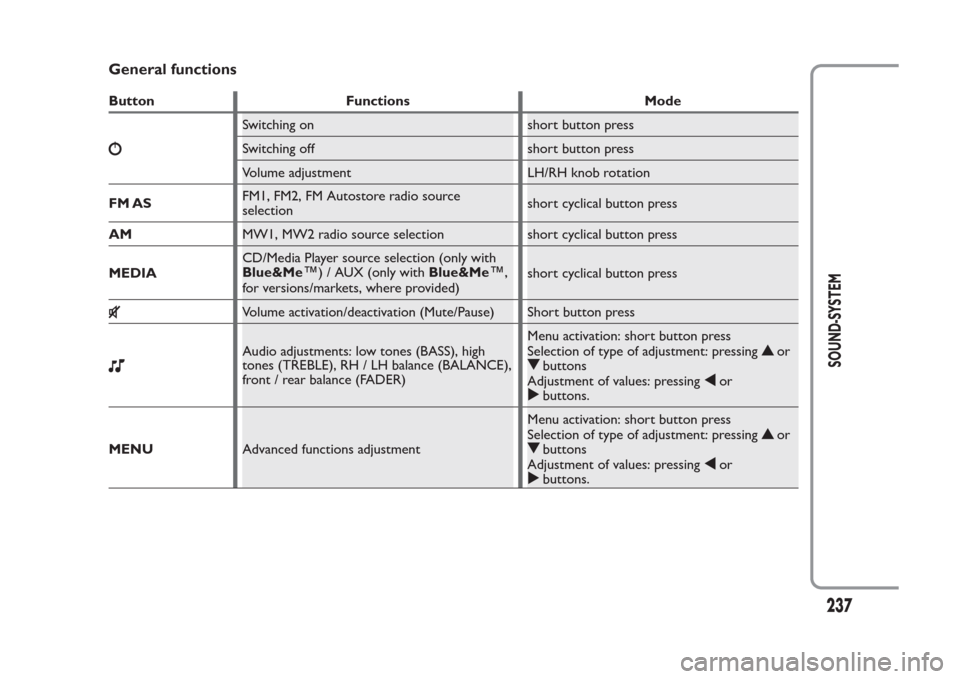
Switching on short button press
Switching off short button press
Volume adjustment LH/RH knob rotation
FM ASFM1, FM2, FM Autostore radio source
selectionshort cyclical button press
AMMW1, MW2 radio source selection short cyclical button press
MEDIACD/Media Player source selection (only with
Blue&Me
™
) / AUX (only withBlue&Me
™
,
for versions/markets, where provided)short cyclical button press
Volume activation/deactivation (Mute/Pause) Short button pressAudio adjustments: low tones (BASS), high
tones (TREBLE), RH / LH balance (BALANCE),
front / rear balance (FADER)Menu activation: short button press
Selection of type of adjustment: pressing
or
buttons
Adjustment of values: pressing
or
buttons.
MENUAdvanced functions adjustmentMenu activation: short button press
Selection of type of adjustment: pressing
or
buttons
Adjustment of values: pressing
or
buttons.
237
SOUND-SYSTEM
Page 242 of 284
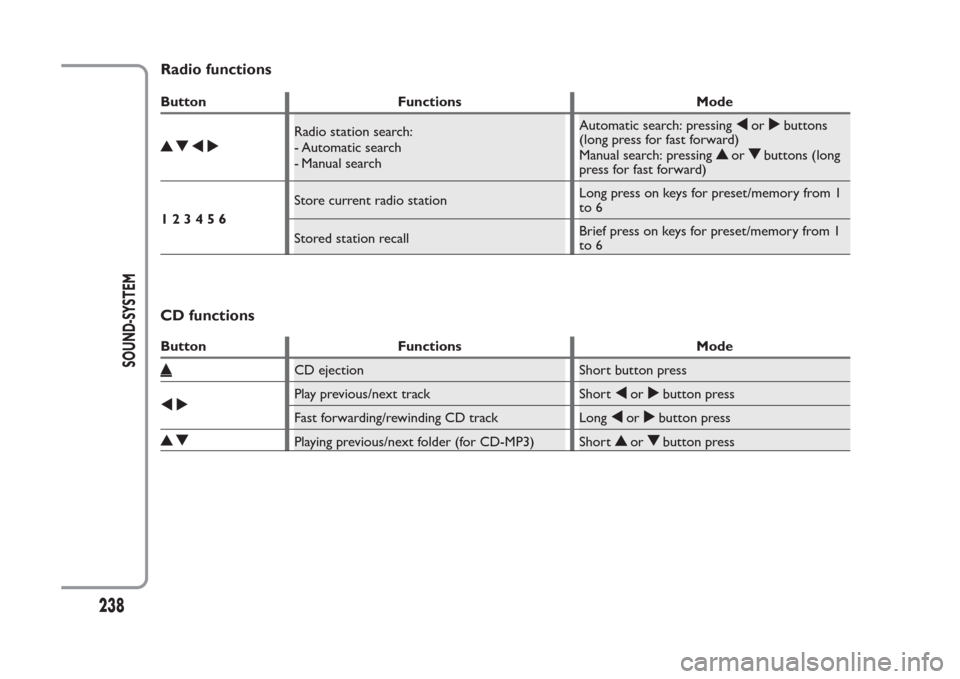
Radio functionsButton Functions Mode
Radio station search:
- Automatic search
- Manual searchAutomatic search: pressing
or
buttons
(long press for fast forward)
Manual search: pressing
or
buttons (long
press for fast forward)
123456Store current radio stationLong press on keys for preset/memory from 1
to 6
Stored station recallBrief press on keys for preset/memory from 1
to 6
CD functionsButton Functions Mode
CD ejection Short button pressPlay previous/next track Short
or
button press
Fast forwarding/rewinding CD track Long
or
button press
Playing previous/next folder (for CD-MP3) Short
or
button press
238
SOUND-SYSTEM
Page 248 of 284
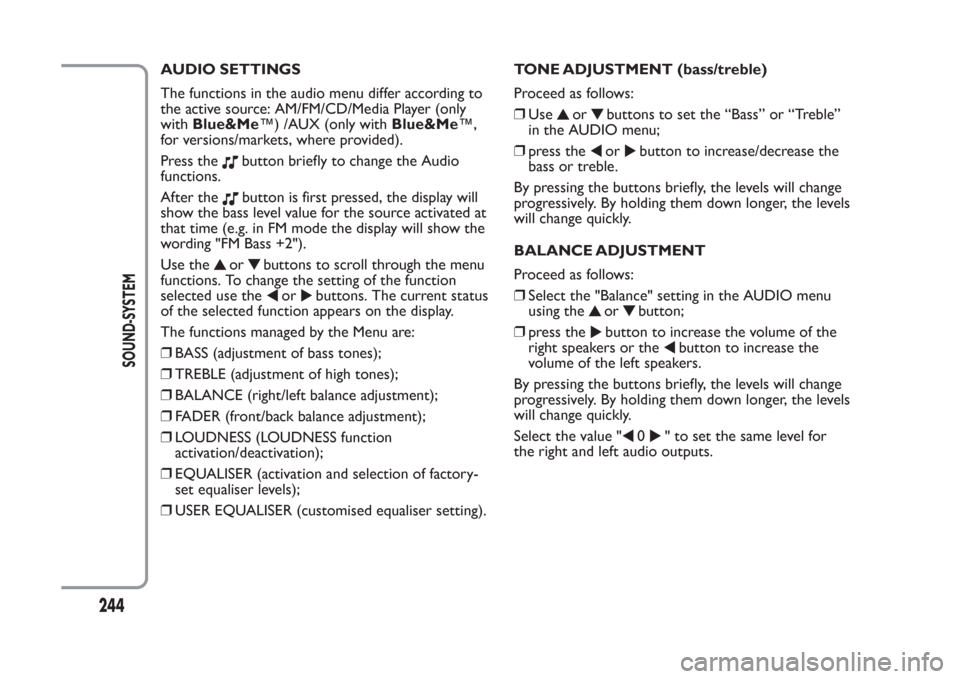
AUDIO SETTINGS
The functions in the audio menu differ according to
the active source: AM/FM/CD/Media Player (only
withBlue&Me™) /AUX (only withBlue&Me™,
for versions/markets, where provided).
Press the
button briefly to change the Audio
functions.
After thebutton is first pressed, the display will
show the bass level value for the source activated at
that time (e.g. in FM mode the display will show the
wording "FM Bass +2").
Use the
or
buttons to scroll through the menu
functions. To change the setting of the function
selected use the
or
buttons. The current status
of the selected function appears on the display.
The functions managed by the Menu are:
❒BASS (adjustment of bass tones);
❒TREBLE (adjustment of high tones);
❒BALANCE (right/left balance adjustment);
❒FADER (front/back balance adjustment);
❒LOUDNESS (LOUDNESS function
activation/deactivation);
❒EQUALISER (activation and selection of factory-
set equaliser levels);
❒USER EQUALISER (customised equaliser setting).TONE ADJUSTMENT (bass/treble)
Proceed as follows:
❒Use
or
buttons to set the “Bass” or “Treble”
in the AUDIO menu;
❒press theor
button to increase/decrease the
bass or treble.
By pressing the buttons briefly, the levels will change
progressively. By holding them down longer, the levels
will change quickly.
BALANCE ADJUSTMENT
Proceed as follows:
❒Select the "Balance" setting in the AUDIO menu
using the
or
button;
❒press the
button to increase the volume of the
right speakers or the
button to increase the
volume of the left speakers.
By pressing the buttons briefly, the levels will change
progressively. By holding them down longer, the levels
will change quickly.
Select the value "
0
" to set the same level for
the right and left audio outputs.
244
SOUND-SYSTEM
Page 249 of 284
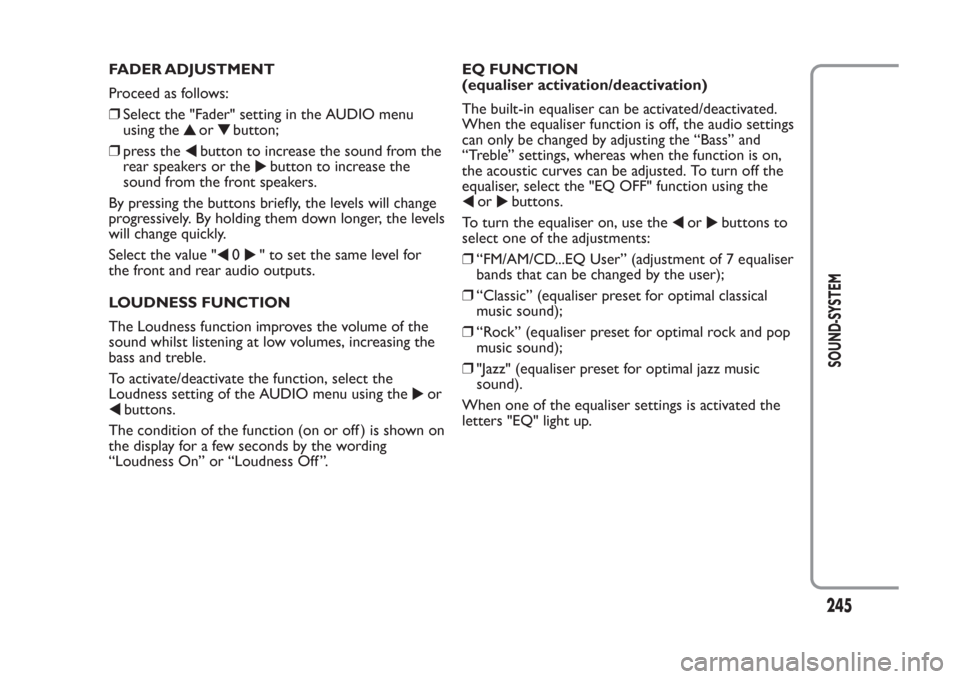
FADER ADJUSTMENT
Proceed as follows:
❒Select the "Fader" setting in the AUDIO menu
using the
or
button;
❒press the
button to increase the sound from the
rear speakers or the
button to increase the
sound from the front speakers.
By pressing the buttons briefly, the levels will change
progressively. By holding them down longer, the levels
will change quickly.
Select the value "
0
" to set the same level for
the front and rear audio outputs.
LOUDNESS FUNCTION
The Loudness function improves the volume of the
sound whilst listening at low volumes, increasing the
bass and treble.
To activate/deactivate the function, select the
Loudness setting of the AUDIO menu using the
or
buttons.
The condition of the function (on or off ) is shown on
the display for a few seconds by the wording
“Loudness On” or “Loudness Off ”.EQ FUNCTION
(equaliser activation/deactivation)
The built-in equaliser can be activated/deactivated.
When the equaliser function is off, the audio settings
can only be changed by adjusting the “Bass” and
“Treble” settings, whereas when the function is on,
the acoustic curves can be adjusted. To turn off the
equaliser, select the "EQ OFF" function using the
or
buttons.
To turn the equaliser on, use the
or
buttons to
select one of the adjustments:
❒“FM/AM/CD...EQ User” (adjustment of 7 equaliser
bands that can be changed by the user);
❒“Classic” (equaliser preset for optimal classical
music sound);
❒“Rock” (equaliser preset for optimal rock and pop
music sound);
❒"Jazz" (equaliser preset for optimal jazz music
sound).
When one of the equaliser settings is activated the
letters "EQ" light up.
245
SOUND-SYSTEM
Page 250 of 284
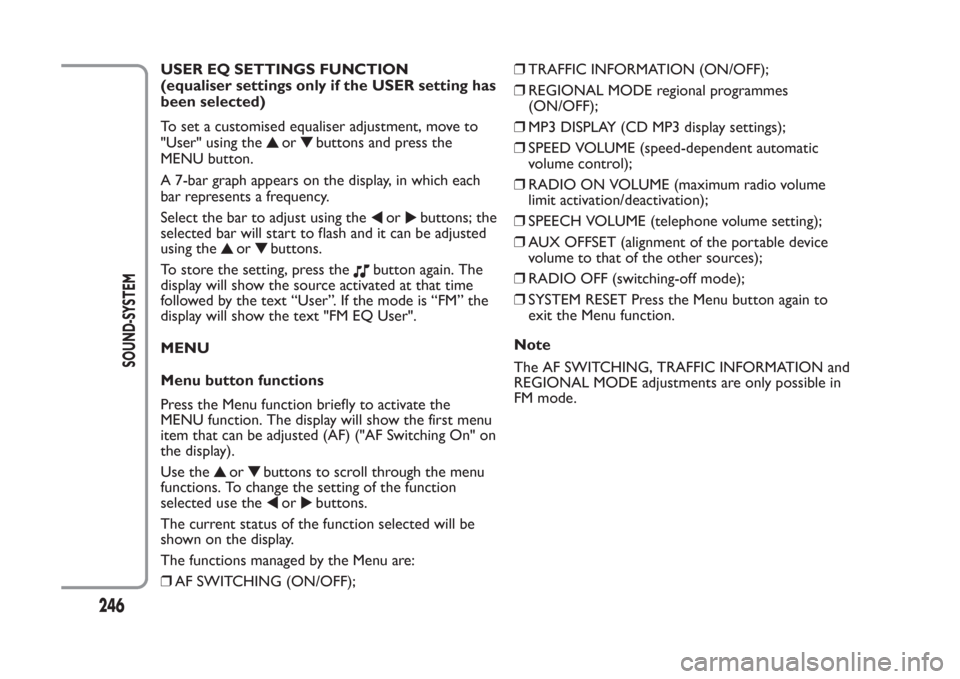
USER EQ SETTINGS FUNCTION
(equaliser settings only if the USER setting has
been selected)
To set a customised equaliser adjustment, move to
"User" using the
or
buttons and press the
MENU button.
A 7-bar graph appears on the display, in which each
bar represents a frequency.
Select the bar to adjust using the
or
buttons; the
selected bar will start to flash and it can be adjusted
using the
or
buttons.
To store the setting, press the
button again. The
display will show the source activated at that time
followed by the text “User”. If the mode is “FM” the
display will show the text "FM EQ User".
MENU
Menu button functions
Press the Menu function briefly to activate the
MENU function. The display will show the first menu
item that can be adjusted (AF) ("AF Switching On" on
the display).
Use the
or
buttons to scroll through the menu
functions. To change the setting of the function
selected use the
or
buttons.
The current status of the function selected will be
shown on the display.
The functions managed by the Menu are:
❒AF SWITCHING (ON/OFF);❒TRAFFIC INFORMATION (ON/OFF);
❒REGIONAL MODE regional programmes
(ON/OFF);
❒MP3 DISPLAY (CD MP3 display settings);
❒SPEED VOLUME (speed-dependent automatic
volume control);
❒RADIO ON VOLUME (maximum radio volume
limit activation/deactivation);
❒SPEECH VOLUME (telephone volume setting);
❒AUX OFFSET (alignment of the portable device
volume to that of the other sources);
❒RADIO OFF (switching-off mode);
❒SYSTEM RESET Press the Menu button again to
exit the Menu function.
Note
The AF SWITCHING, TRAFFIC INFORMATION and
REGIONAL MODE adjustments are only possible in
FM mode.
246
SOUND-SYSTEM
Page 251 of 284
AF SWITCHING function
(alternative frequency search)
The radio can operate in two different modes in the
RDS system:
❒"AF Switching On": search for alternative
frequencies active (the letters "AF" appear on the
display);
❒"AF Switching Off": search for alternative
frequencies not active.
Proceed as follows to activate/deactivate the
function:
❒press the MENU button and select “AF Switching
On”;
❒press the
or
buttons to activate/deactivate the
function.
With the function activated, the radio automatically
tunes into the station with the strongest signal
broadcasting the same programme. While driving, the
same station can be continuously listened to without
having to change the frequency when you change
zones.
Obviously, it must be possible to receive the station
that you are listening to in the area you are driving
through.
If the AF function is activated, "AF" will light up in the
display.If the AF function has been activated and the radio is
not able to receive the current station, the radio
activates the automatic search, during which "FM
Search" appears on the display (only for top-of-the-
range radios).
With the AF function deactivated, the remaining RDS
functions, such as the display of the station name, still
remain active.
The AF function can only be activated on FM bands.
TRAFFIC INFORMATION function
(traffic information)
Some stations on the FM band (FM1, FM2 and FMA)
can broadcast information about traffic conditions.
In this case the text "TA" appears on the display.
Proceed as follows to activate/deactivate the TA
function:
❒press the MENU button briefly and select “Traffic
info”;
❒press the
or
buttons to activate/deactivate the
function.
If the TA function has been activated, the “TA” icon
lights up on the display.
247
SOUND-SYSTEM
Page 253 of 284
REGIONAL MODE function
(regional transmission reception)
Some national broadcasters will transmit regional
programmes at certain times of the day (that vary
from region to region).
This function makes it possible to tune into local
(regional) broadcasters automatically (see "EON
function" paragraph).
If you want the radio to automatically tune into the
regional stations being broadcast on the selected
network, the function must be activated.
To activate/deactivate the function use the
or
buttons.
The current status of the function appears on the
display:
❒"Regional On": function activated;
❒"Regional Off": function deactivated.
If the function is deactivated and you have tuned into
a regional station working in a given area and you
enter a different area, then the regional station
received in the new area will be broadcast.
Note
If the AF and REG functions are on at the same time,
once a border between two regions is crossed, the
radio may not switch correctly to a valid alternative
frequency.MP3 DISPLAY function
(MP3 CD data display)
This function makes it possible to select the
information shown by the display when listening to a
CD containing MP3 tracks.
The function can only be selected if an MP3 CD is
inserted: in this case "MP3 Display" will appear on the
display.
To change the function, use the
or
buttons.
The following settings are available:
❒"Title" (track title, if the ID3-TAG is available);
❒"Author" (track author, if ID3-TAG is available);
❒"Album" (track album, the ID3-TAG if available);
❒"Folder" name (name assigned to the folder);
❒"File" name (name assigned to the MP3 file).
249
SOUND-SYSTEM