key FIAT PANDA 2016 319 / 3.G User Guide
[x] Cancel search | Manufacturer: FIAT, Model Year: 2016, Model line: PANDA, Model: FIAT PANDA 2016 319 / 3.GPages: 204, PDF Size: 18.77 MB
Page 19 of 204
On automatic sensor controlled
deactivation, the dipped headlights are
deactivated first, followed by the side
lights a few seconds later.
If the sensor is activated but is
malfunctioning, the side lights and
dipped headlights are switched
on irrespective of the external lighting
conditions: the sensor failure is
indicated on the display. It is also
possible to deactivate the sensor and
switch on the desired lights, if
necessary.
IMPORTANT The sensor cannot detect
the presence of fog. These lights must
therefore be switched on manually in
these circumstances.
SIDE LIGHTS/DAYTIME
RUNNING LIGHTS (DRL)
"Daytime Running Lights"
(for versions/markets, where provided)
16) 17)With the ignition key turned to MAR
and ring nut A fig. 18 turned to position
Othe daytime running lights are
automatically activated; the other lights
and interior lighting remain off.SIDE LIGHTS AND
DIPPED BEAM
HEADLIGHTS
With the ignition key turned to MAR,
turn ring nut A fig. 18 to
. If dipped
beam headlights are activated, the
daytime running lights switch off and
the side lights and dipped headlights
switch on. The
warning light
switches on in the instrument panel.
When the ignition key is turned to
STOP or removed and the ring nut A is
turned fromOto
, all the side
lights and the number plate lights come
on. The
warning light will come
on in the instrument panel.
PARKING LIGHTS
These lights can only be turned on with
ignition key in STOP position or
removed, by moving the ring nut A fig.
18 first to positionOand then to
position
.
The
warning light switches on in
the instrument panel.
MAIN BEAM HEADLIGHTS
To activate the main beam headlights,
with ring nut A fig. 18 at
, pull the
stalk towards the steering wheel
beyond the end of travel position. The
warning light switches on in the
instrument panel.When the stalk is pulled towards the
steering wheel again, beyond the end
of travel position, the main beam
headlights are deactivated, the dipped
beam headlights are reactivated and
the
warning light switches off.
FLASHING
To do this, pull the stalk towards the
steering wheel (unstable position)
regardless of the position of ring nut A
fig. 18. The
warning light switches
on in the instrument panel.
DIRECTION INDICATORS
Bring the stalk to the (stable) position:
upwards:activates the right direction
indicator;
downwards:activates the left direction
indicator.
Warning light
orwill blink on the
instrument panel. The direction
indicators switch off automatically when
the steering wheel is straightened.
"Lane Change" function
If you wish to signal a lane change,
place the left stalk in the unstable
position for less than half a second. The
direction indicator on the side selected
will flash five times and then switch
off automatically.
17
Page 20 of 204
"FOLLOW ME HOME"
DEVICE
This allows the space in front of the
vehicle to be lit for a set time.
Activation:with the ignition key on
STOP or removed, pull the stalk
towards the steering wheel within 2
minutes from turning the engine off.
Each time the stalk is moved, the lights
stay on for an extra 30 seconds up to
a maximum of 210 seconds; then
the lights are switched off automatically.
Each time the stalk is operated, the
warning light on the instrument
panel switches on and the display also
shows a message and how long the
function will remain active.
The
warning light comes on when
the stalk is first moved and stays on
until the function is automatically
deactivated. Each time the stalk is
activated it increases the time that the
lights remain on.
Deactivation:keep the stalk pulled
towards the steering wheel for more
than two seconds.REAR FOG LIGHTS
Press the
button, on the dashboard,
to switch on the rear fog lights.
With rear fog lights on, the
warning
light on the instrument panel will come
on.
FOG LIGHTS/REAR FOG
LIGHTS
(for versions/markets, where provided)
The fog lights can be activated only
when the dipped beam headlights are
on.
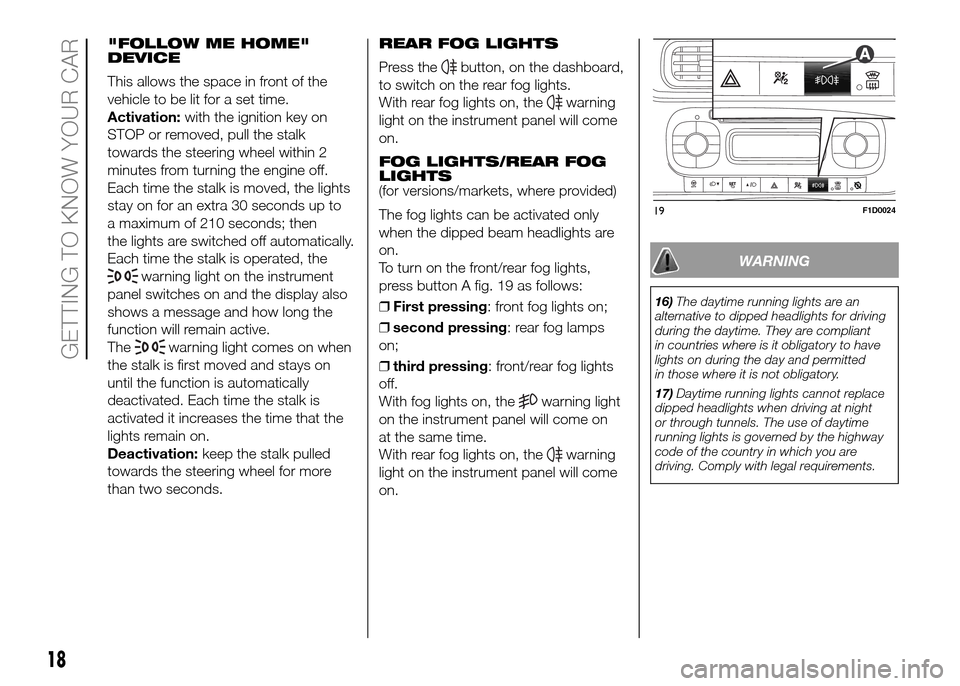
To turn on the front/rear fog lights,
press button A fig. 19 as follows:
❒First pressing: front fog lights on;
❒second pressing: rear fog lamps
on;
❒third pressing: front/rear fog lights
off.
With fog lights on, the
warning light
on the instrument panel will come on
at the same time.
With rear fog lights on, the
warning
light on the instrument panel will come
on.
WARNING
16)The daytime running lights are an
alternative to dipped headlights for driving
during the daytime. They are compliant
in countries where is it obligatory to have
lights on during the day and permitted
in those where it is not obligatory.
17)Daytime running lights cannot replace
dipped headlights when driving at night
or through tunnels. The use of daytime
running lights is governed by the highway
code of the country in which you are
driving. Comply with legal requirements.
19F1D0024
18
GETTING TO KNOW YOUR CAR
Page 22 of 204
WINDOW CLEANING
WINDSCREEN
WIPER/WASHER
4) 5) 6)This operates only with the ignition key
turned to MAR.
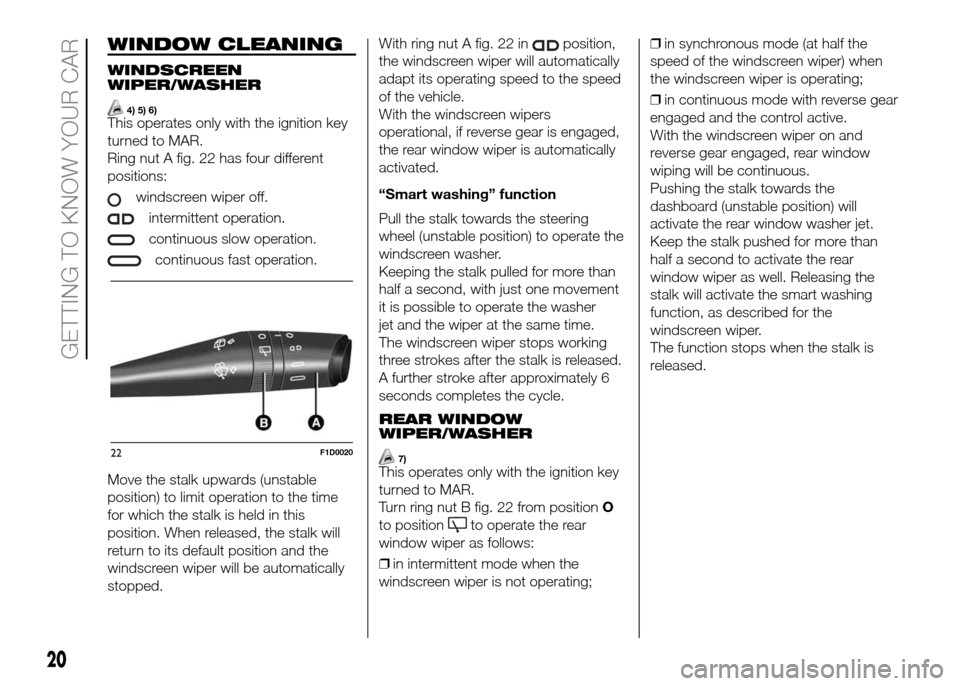
Ring nut A fig. 22 has four different
positions:
windscreen wiper off.
intermittent operation.
continuous slow operation.
continuous fast operation.
Move the stalk upwards (unstable
position) to limit operation to the time
for which the stalk is held in this
position. When released, the stalk will
return to its default position and the
windscreen wiper will be automatically
stopped.With ring nut A fig. 22 in
position,
the windscreen wiper will automatically
adapt its operating speed to the speed
of the vehicle.
With the windscreen wipers
operational, if reverse gear is engaged,
the rear window wiper is automatically
activated.
“Smart washing” function
Pull the stalk towards the steering
wheel (unstable position) to operate the
windscreen washer.
Keeping the stalk pulled for more than
half a second, with just one movement
it is possible to operate the washer
jet and the wiper at the same time.
The windscreen wiper stops working
three strokes after the stalk is released.
A further stroke after approximately 6
seconds completes the cycle.
REAR WINDOW
WIPER/WASHER
7)This operates only with the ignition key
turned to MAR.
Turn ring nut B fig. 22 from positionO
to position
to operate the rear
window wiper as follows:
❒in intermittent mode when the
windscreen wiper is not operating;❒in synchronous mode (at half the
speed of the windscreen wiper) when
the windscreen wiper is operating;
❒in continuous mode with reverse gear
engaged and the control active.
With the windscreen wiper on and
reverse gear engaged, rear window
wiping will be continuous.
Pushing the stalk towards the
dashboard (unstable position) will
activate the rear window washer jet.
Keep the stalk pushed for more than
half a second to activate the rear
window wiper as well. Releasing the
stalk will activate the smart washing
function, as described for the
windscreen wiper.
The function stops when the stalk is
released.
22F1D0020
20
GETTING TO KNOW YOUR CAR
Page 23 of 204
6)Make sure the device is switched off
whenever the windscreen must be
cleaned.
7)Do not use the rear window wiper to
remove layers of snow or ice. In such
conditions, the wiper may be subjected to
excessive stress and the motor cut-out
switch, which prevents operation for a few
seconds, may intervene. If operation is
not subsequently restored, contact a Fiat
Dealership.
21
WARNING
4)Do not use the windscreen wiper to
remove layers of snow or ice from the
windscreen. In such conditions, the
windscreen wiper may be subjected to
excessive stress and the motor cut-out
switch, which prevents operation for a few
seconds, may intervene. If operation is
not restored (even after turning the key and
restarting the engine), contact a Fiat
Dealership.
5)Do not operate the windscreen wiper
with the blades lifted from the windscreen.
Page 28 of 204
ELECTRIC WINDOWS
FRONT ELECTRIC
WINDOWS
19) 20)These operate when the ignition key is
turned to MAR and for about three
minutes after turning the ignition key to
STOP or removing it.
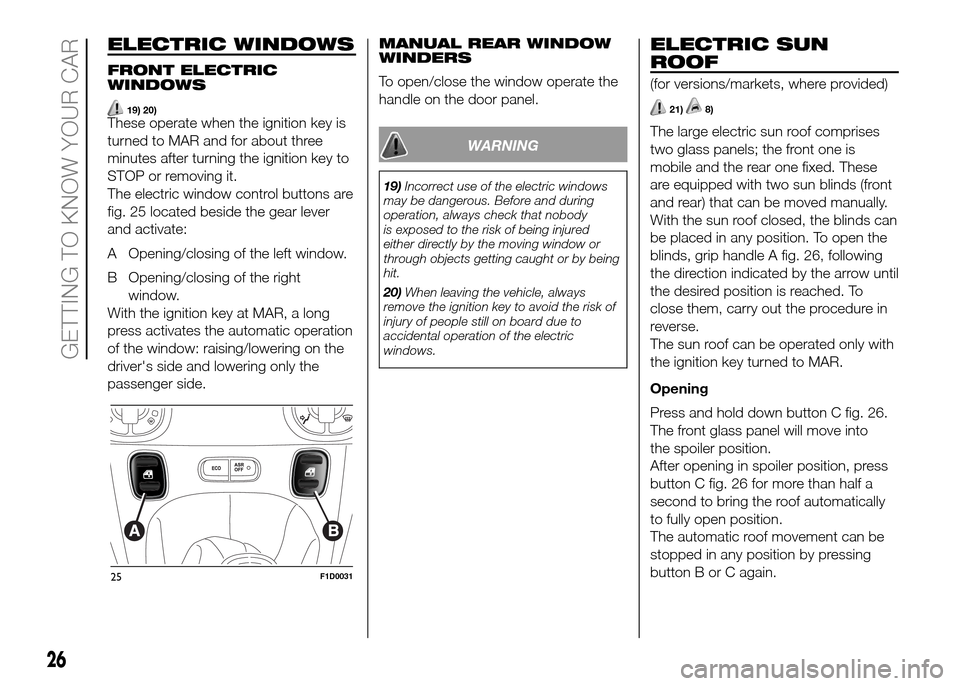
The electric window control buttons are
fig. 25 located beside the gear lever
and activate:
A Opening/closing of the left window.
B Opening/closing of the right
window.
With the ignition key at MAR, a long
press activates the automatic operation
of the window: raising/lowering on the
driver's side and lowering only the
passenger side.MANUAL REAR WINDOW
WINDERS
To open/close the window operate the
handle on the door panel.
WARNING
19)Incorrect use of the electric windows
may be dangerous. Before and during
operation, always check that nobody
is exposed to the risk of being injured
either directly by the moving window or
through objects getting caught or by being
hit.
20)When leaving the vehicle, always
remove the ignition key to avoid the risk of
injury of people still on board due to
accidental operation of the electric
windows.
ELECTRIC SUN
ROOF
(for versions/markets, where provided)
21)8)
The large electric sun roof comprises
two glass panels; the front one is
mobile and the rear one fixed. These
are equipped with two sun blinds (front
and rear) that can be moved manually.
With the sun roof closed, the blinds can
be placed in any position. To open the
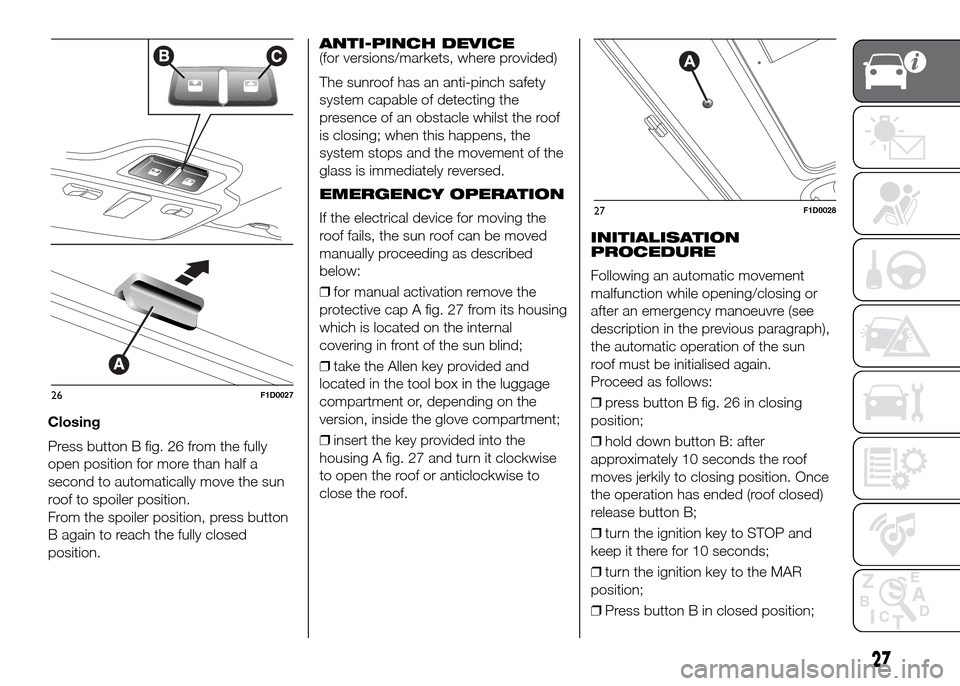
blinds, grip handle A fig. 26, following
the direction indicated by the arrow until
the desired position is reached. To
close them, carry out the procedure in
reverse.
The sun roof can be operated only with
the ignition key turned to MAR.
Opening
Press and hold down button C fig. 26.
The front glass panel will move into
the spoiler position.
After opening in spoiler position, press
button C fig. 26 for more than half a
second to bring the roof automatically
to fully open position.
The automatic roof movement can be
stopped in any position by pressing
button B or C again.
25F1D0031
26
GETTING TO KNOW YOUR CAR
Page 29 of 204
Closing
Press button B fig. 26 from the fully
open position for more than half a
second to automatically move the sun
roof to spoiler position.
From the spoiler position, press button
B again to reach the fully closed
position.ANTI-PINCH DEVICE
(for versions/markets, where provided)
The sunroof has an anti-pinch safety
system capable of detecting the
presence of an obstacle whilst the roof
is closing; when this happens, the
system stops and the movement of the
glass is immediately reversed.
EMERGENCY OPERATION
If the electrical device for moving the
roof fails, the sun roof can be moved
manually proceeding as described
below:
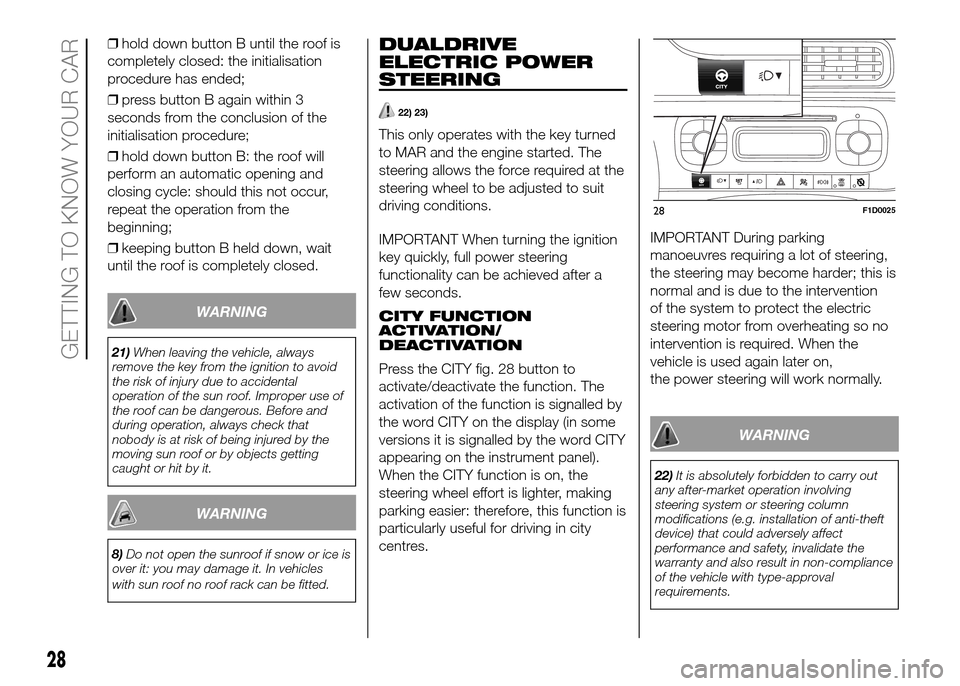
❒for manual activation remove the
protective cap A fig. 27 from its housing
which is located on the internal
covering in front of the sun blind;
❒take the Allen key provided and
located in the tool box in the luggage
compartment or, depending on the
version, inside the glove compartment;
❒insert the key provided into the
housing A fig. 27 and turn it clockwise
to open the roof or anticlockwise to
close the roof.INITIALISATION
PROCEDURE
Following an automatic movement
malfunction while opening/closing or
after an emergency manoeuvre (see
description in the previous paragraph),
the automatic operation of the sun
roof must be initialised again.
Proceed as follows:
❒press button B fig. 26 in closing
position;
❒hold down button B: after
approximately 10 seconds the roof
moves jerkily to closing position. Once
the operation has ended (roof closed)
release button B;
❒turn the ignition key to STOP and
keep it there for 10 seconds;
❒turn the ignition key to the MAR
position;
❒Press button B in closed position;
26F1D0027
27F1D0028
27
Page 30 of 204
❒hold down button B until the roof is
completely closed: the initialisation
procedure has ended;
❒press button B again within 3
seconds from the conclusion of the
initialisation procedure;
❒hold down button B: the roof will
perform an automatic opening and
closing cycle: should this not occur,
repeat the operation from the
beginning;
❒keeping button B held down, wait
until the roof is completely closed.
WARNING
21)When leaving the vehicle, always
remove the key from the ignition to avoid
the risk of injury due to accidental
operation of the sun roof. Improper use of
the roof can be dangerous. Before and
during operation, always check that
nobody is at risk of being injured by the
moving sun roof or by objects getting
caught or hit by it.
WARNING
8)Do not open the sunroof if snow or ice is
over it: you may damage it. In vehicles
with sun roof no roof rack can be fitted.
DUALDRIVE
ELECTRIC POWER
STEERING
22) 23)
This only operates with the key turned
to MAR and the engine started. The
steering allows the force required at the
steering wheel to be adjusted to suit
driving conditions.
IMPORTANT When turning the ignition
key quickly, full power steering
functionality can be achieved after a
few seconds.
CITY FUNCTION
ACTIVATION/
DEACTIVATION
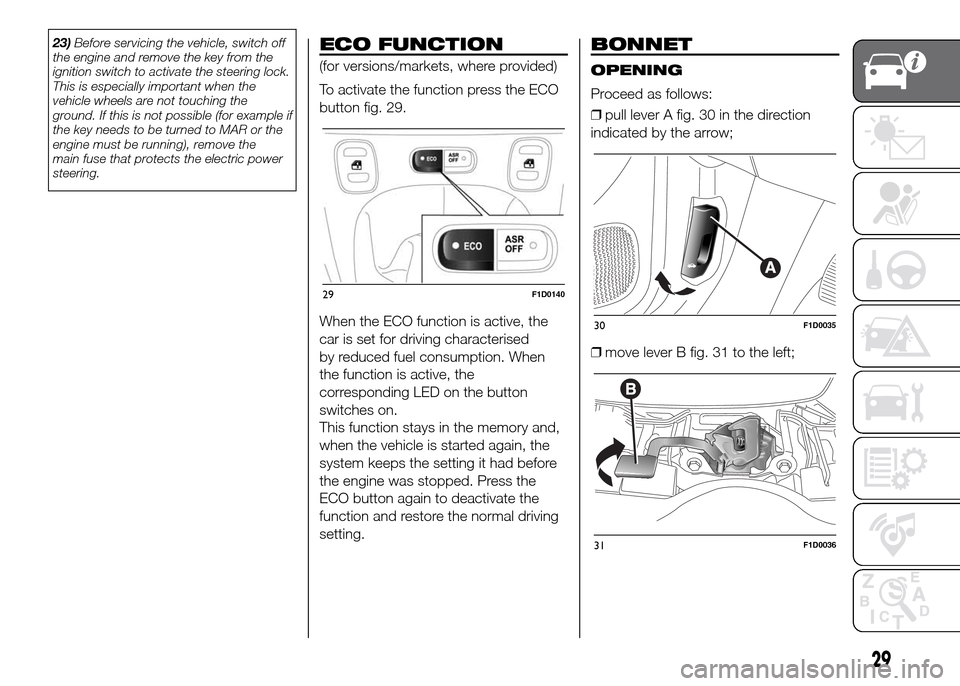
Press the CITY fig. 28 button to
activate/deactivate the function. The
activation of the function is signalled by
the word CITY on the display (in some
versions it is signalled by the word CITY
appearing on the instrument panel).
When the CITY function is on, the
steering wheel effort is lighter, making
parking easier: therefore, this function is
particularly useful for driving in city
centres.IMPORTANT During parking
manoeuvres requiring a lot of steering,
the steering may become harder; this is
normal and is due to the intervention
of the system to protect the electric
steering motor from overheating so no
intervention is required. When the
vehicle is used again later on,
the power steering will work normally.
WARNING
22)It is absolutely forbidden to carry out
any after-market operation involving
steering system or steering column
modifications (e.g. installation of anti-theft
device) that could adversely affect
performance and safety, invalidate the
warranty and also result in non-compliance
of the vehicle with type-approval
requirements.
28F1D0025
28
GETTING TO KNOW YOUR CAR
Page 31 of 204
23)Before servicing the vehicle, switch off
the engine and remove the key from the
ignition switch to activate the steering lock.
This is especially important when the
vehicle wheels are not touching the
ground. If this is not possible (for example if
the key needs to be turned to MAR or the
engine must be running), remove the
main fuse that protects the electric power
steering.ECO FUNCTION
(for versions/markets, where provided)
To activate the function press the ECO
button fig. 29.
When the ECO function is active, the
car is set for driving characterised
by reduced fuel consumption. When
the function is active, the
corresponding LED on the button
switches on.
This function stays in the memory and,
when the vehicle is started again, the
system keeps the setting it had before
the engine was stopped. Press the
ECO button again to deactivate the
function and restore the normal driving
setting.
BONNET
OPENING
Proceed as follows:
❒pull lever A fig. 30 in the direction
indicated by the arrow;
❒move lever B fig. 31 to the left;
29F1D0140
30F1D0035
31F1D0036
29
Page 33 of 204
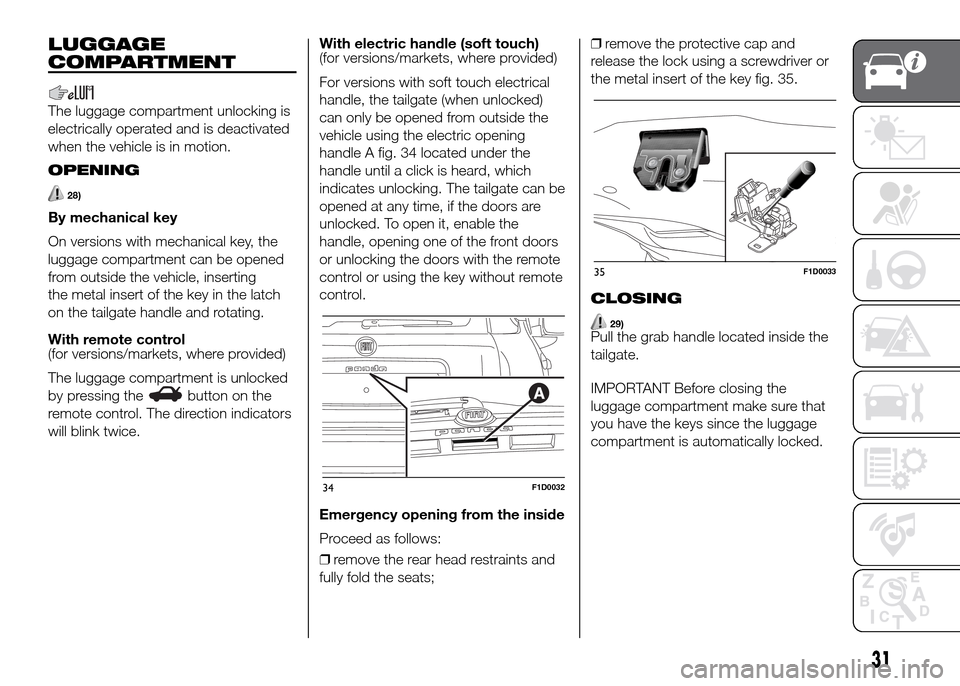
LUGGAGE
COMPARTMENT
The luggage compartment unlocking is
electrically operated and is deactivated
when the vehicle is in motion.
OPENING
28)
By mechanical key
On versions with mechanical key, the
luggage compartment can be opened
from outside the vehicle, inserting
the metal insert of the key in the latch
on the tailgate handle and rotating.
With remote control
(for versions/markets, where provided)
The luggage compartment is unlocked
by pressing the
button on the
remote control. The direction indicators
will blink twice.With electric handle (soft touch)
(for versions/markets, where provided)
For versions with soft touch electrical
handle, the tailgate (when unlocked)
can only be opened from outside the
vehicle using the electric opening
handle A fig. 34 located under the
handle until a click is heard, which
indicates unlocking. The tailgate can be
opened at any time, if the doors are
unlocked. To open it, enable the
handle, opening one of the front doors
or unlocking the doors with the remote
control or using the key without remote
control.
Emergency opening from the inside
Proceed as follows:
❒remove the rear head restraints and
fully fold the seats;❒remove the protective cap and
release the lock using a screwdriver or
the metal insert of the key fig. 35.
CLOSING
29)Pull the grab handle located inside the
tailgate.
IMPORTANT Before closing the
luggage compartment make sure that
you have the keys since the luggage
compartment is automatically locked.
34F1D0032
35F1D0033
31
Page 42 of 204
❒MEASUREMENT UNIT
❒LANGUAGE
❒WARNING VOLUME
❒SEAT BELT BUZZER (for versions/
markets, where provided)
❒SERVICE
❒AIRBAG/PASSENGER BAG (for
versions/markets, where provided)
❒DAYTIME RUNNING LIGHTS (for
versions/markets, where provided)
❒TYRE RESET
❒CITY BRAKE C./COLLISION
MITIGATION (for versions/markets,
where provided)
❒EXIT MENUDeactivating front passenger airbag
and side bag
This function is used to activate/
deactivate the front passenger's airbag.
Proceed as follows:
❒press the
button and, after the
message "Bag pass: Off" (to deactivate)
or "Bag pass: On" (to activate) is
displayed by pressing buttons
and
, press thebutton again;
❒a confirmation message will appear
on the display;
❒by pressing the
orbuttons
select "Yes" (to confirm activation/
deactivation) or "No" (to cancel);
❒press the
button briefly; a
message confirming the selection is
displayed and you return to the menu
screen. Hold down the button to return
to the standard screen without storing.TRIP COMPUTER
The Trip Computer can be used to
display information on vehicle operation
when the key is turned to MAR. This
function is composed of separate trips,
called “Trip A” and “Trip B” which can
monitor the entire mission (journey) in a
reciprocally independent manner.
“Trip A”allows the following values to
be displayed: "Outside temperature
(for versions/markets, where provided)",
"Range", "Distance travelled", "Average
consumption", "Instantaneous
consumption", "Average speed", "Trip
time (driving time)"
“Trip B”allows the following values to
be displayed: "Distance travelled B",
"Average consumption B", "Average
speed B", "Trip time (driving time)
B". The “Trip B” function may be
excluded.
Both functions can be reset (reset
means start of a new journey).
To reset, hold the TRIP button on the
right steering wheel stalk pressed.
NOTE “Range” and “Instantaneous fuel
consumption" parameters cannot be
reset.
40
KNOWING THE INSTRUMENT PANEL