stop start FIAT PANDA 2017 319 / 3.G Owner's Guide
[x] Cancel search | Manufacturer: FIAT, Model Year: 2017, Model line: PANDA, Model: FIAT PANDA 2017 319 / 3.GPages: 216, PDF Size: 19.25 MB
Page 137 of 216
BATTERY
RECHARGING
156) 157)
IMPORTANT After turning the ignition
key to STOP and having closed the
driver's side door, wait at least one
minute before disconnecting and then
reconnecting the battery electrical
supply.
IMPORTANT Charging should be slow
at a low ampere rating for
approximately 24 hours. Charging for a
longer time may damage the battery.
IMPORTANT The cables of the
electrical system must be correctly
reconnected to the battery, i.e. the
positive cable (+) to the positive
terminal and the negative cable (–) to
the negative terminal. The battery
terminals are marked with the positive
(+) and negative (–) symbols, and are
shown on the battery cover. The battery
terminals must also be corrosion-free.
IMPORTANT If a "quick-type" battery
charger is used with the battery fitted
on the vehicle, before connecting it
disconnect both cables of the battery
itself. Do not use a "quick-type" battery
charger to provide the starting voltage.IMPORTANT The battery recharging
procedure is given as information only.
You are advised to contact a Fiat
Dealership to have this operation
performed.
VERSIONS WITHOUT
Start&Stop SYSTEM
(for versions/markets, where provided)
Charge the battery as follows:
disconnect the negative battery
terminal;
connect the charger cables to the
battery terminals, observing the polarity;
turn on the charger;
when it is recharged, turn the
charger off before disconnecting it from
the battery;
reconnect the negative battery
terminal.
VERSIONS WITH
Stop/Start SYSTEM
(for versions/markets, where provided)
To recharge, proceed as follows:
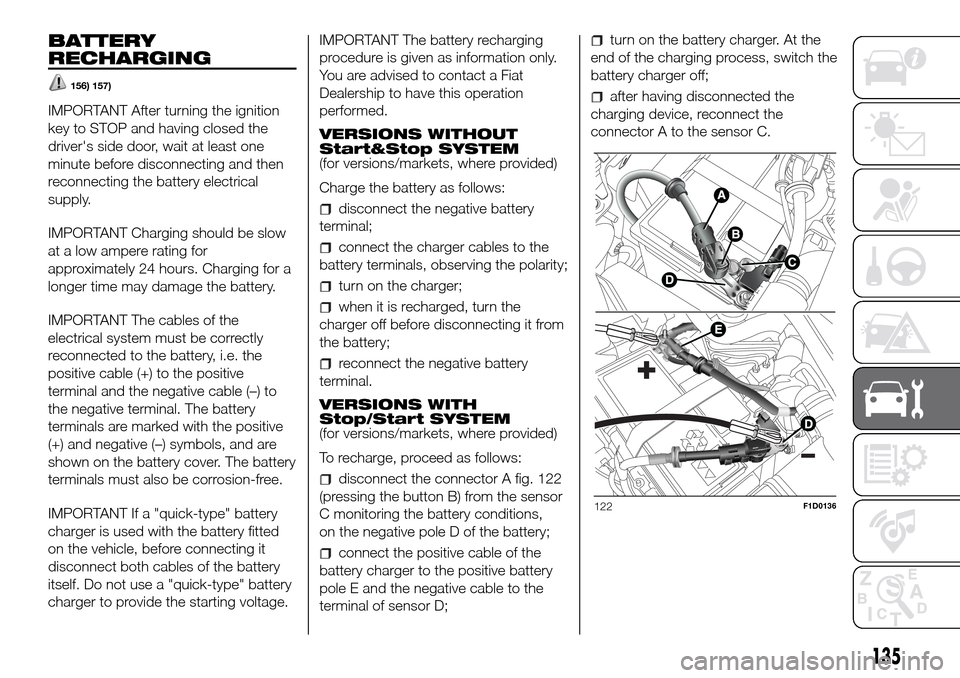
disconnect the connector A fig. 122
(pressing the button B) from the sensor
C monitoring the battery conditions,
on the negative pole D of the battery;
connect the positive cable of the
battery charger to the positive battery
pole E and the negative cable to the
terminal of sensor D;
turn on the battery charger. At the
end of the charging process, switch the
battery charger off;
after having disconnected the
charging device, reconnect the
connector A to the sensor C.
122F1D0136
135
Page 142 of 216
ENGINE OIL
60) 61)3)
Check the oil level a few minutes (about
five) after the engine has stopped,
with the vehicle parked on level ground.
Check that the oil level is between the
MIN and MAX references on the
dipstick B. If the oil level is near or even
under the MIN mark, add oil using the
filler A to reach the MAX mark.
NOTE For the 0.9 TwinAir and 0.9
TwinAir Turbo versions, engine oil
dipstick B is integral with the cap A.
Take out the engine oil dipstick A, clean
it with a lint-free cloth and reinsert it.
Extract it again and check that the level
is between the MIN and MAX marks
on the dipstick.
Engine oil consumption
The maximum engine oil consumption
is usually 400 grams every 1000 km.
During the initial period of use the
engine oil consumption conditions
should be considered as having
stabilised after the first 5000 - 6000
km.
IMPORTANT After adding or changing
the oil, let the engine run for a few
seconds and wait a few minutes after
switching it off before checking the
level.ENGINE COOLANT FLUID
160)62)
The coolant level must be checked
when the engine is cold and must
range between the MIN and MAX
marks on the reservoir.
If the level is too low, unscrew reservoir
cap C and add the fluid described in
the "Technical Specifications" section.
WINDSCREEN/REAR
WINDOW WASHING FLUID
161)
If the level is too low, raise reservoir cap
D (see previous pages) and add the
fluid described in the chapter "Technical
Specifications".
BRAKE FLUID
162) 163)63)
Check that the fluid is at the maximum
level (the fluid level in the reservoir
must not exceed the MAX mark). If the
fluid level in the reservoir is too low,
undo reservoir cap E and add the fluid
described in the "Technical
Specifications" chapter.
DUALOGIC GEARBOX
HYDRAULIC ACTIVATION
SYSTEM OIL
4)
The fluid level should only be checked
at a Fiat Dealership.BATTERY
164) 165) 166) 167)
64)5)
Battery F does not require topping up
the electrolyte with distilled water. A
periodic check carried out at a Fiat
Dealership is, however, necessary to
check efficiency.
IMPORTANT After the battery is
disconnected, the steering must be
initialised. The
warning light on the
instrument panel switches on to
indicate this. To carry out this
procedure turn the steering wheel all
the way from one end to the other
or drive in a straight line for about a
hundred metres.
IMPORTANT If the charge level remains
under 50% for a long time, the battery
is damaged by sulphation, reducing
its capacity and efficiency at start-up.
CLIMATE CONTROL
SYSTEM MAINTENANCE
In winter, the climate control system
must be turned on at least once a
month for about 10 minutes. Before
summer, have the system checked at a
Fiat Dealership.
140
SERVICING AND CARE
Page 186 of 216
Each time the button is pressed, the
AM and FM bands are selected
cyclically:
Preset buttons
The buttons numbered from 1 to 6 are
used to set the following preset
stations:
18 in the FM band (6 in FM1, 6 in
FM2, 6 in FMT or "FMA" (on some
versions);
12 in the MW band (6 in MW1, 6 in
MW2).
To listen to a preset station, select the
desired frequency band and then press
the corresponding preset button briefly
(from 1 to 6).
By pressing the preset button for more
than 2 seconds, the tuned station will
be stored. The storing phase is
confirmed by an acoustic signal.
Automatic tuning
Briefly press the
orbutton to start
the automatic tuning search for the
next station that can be received in the
selected direction.Manual tuning
Select the desired frequency band and
then press the
orbutton briefly
and repeatedly to start to the search in
the desired direction. If the
or
button is pressed longer, the fast
search will start and then stop when the
button is released.
CD PLAYER
To activate the CD player built-into the
equipment, proceed as follows:
insert a CD with the equipment
switched on: the first track will start to
play;
or
if a CD has already been loaded,
switch on the radio and then briefly
press the CD button to select the “CD”
operating mode: the last track listened
to will start to play.
It is advisable to use original CDs to
ensure optimal playback. If CD-R/RW
are used, we recommend using good
quality media that are burned at the
slowest speed possible.
CD loading/ejection
To load the CD, insert it gently into the
slot to activate the motorised loading
system, which will position it correctly.Press the
(EJECT) button with the
radio on to activate the motorised
ejection of the CD. After ejection, the
last audio source listened to before
playing the CD will be heard.
73)
Indications on the display
When the CD player is in operation,
information appears on the display with
the following meanings:
"CD Track 5": indicates the number
of the CD track;
"03:42": indicates the time elapsed
since the start of the track (if the
respective Menu function is activated).
Track selection (forward/back)
Briefly press the
button to play the
previous CD track and the
button to
play the next track.
Fast forward/rewind through tracks
Hold down the
button to fast
forward the selected track or hold
down the
button to fast rewind the
track.
The fast forward/rewind will stop once
the button is released.
184
MULTIMEDIA
Page 198 of 216
To listen to a preset station, select the
desired frequency band with the RADIO
button, briefly press ABC button to
select the preset band (A, B or C), and
then briefly press the corresponding
preset button (from 1 to 6).
By pressing the preset button for more
than 2 seconds, the tuned station will
be stored. The storing phase is
confirmed by an acoustic signal.
Automatic tuning
Briefly press the
orbutton to start
the automatic tuning search for the
next station that can be received in the
selected direction.
Manual tuning
Select the desired frequency band and
then press the
orbutton briefly
and repeatedly to start to the search in
the desired direction. If the
or
button is pressed longer, the fast
search will start and then stop when the
button is released.
USB/iPod MODE
To activate USB/iPod mode, insert the
respective device (USB stick or other
device) in the USB port located in
the glove compartment.
If a USB/iPod device is inserted with
the system on, this starts playing the
tracks present on the device.AUX MODE
To activate the AUX source, press the
MEDIA button or the SRC control
on the steering wheel repeatedly until
the corresponding source is displayed.
BLUETOOTH®
Bluetooth® technology allows you to
use your mobile phone through the
car's hands-free system, without the
need for wires.
To use the hands-free function it is
necessary to have a mobile phone with
Bluetooth® technology. To consult the
list of compatible phones, see the site:
www.mopar.eu/owner.
The hands-free function allows the
following operations to be performed:
Calling a telephone number by voice
command: you can dial a telephone
number by stating the numbers out
loud.
Calling someone in the phonebook
using voice commands: you can call
someone in your mobile phonebook
using your voice. You can also call
someone in your phonebook by
selecting from the contacts that appear
on the display of the instrument panel.
(This function requires your phone
directory to have been copied onto the
vehicle hands-free system).
Accepting a call: you can accept an
incoming call by pressing the
button
on the steering wheel.
Rejecting a call: you can reject a call
with a long press of the
button on
the steering wheel.
SMS message reader
(available only with mobile phones that
support this function)
The SMS message reader makes it
possible to:
Be informed, by means of a
message on the instrument panel
display, of the reception a new SMS
message on your mobile phone with
Bluetooth® technology; the number/
name of the sender is displayed and
the system will also ask whether to read
the message to you.
Manage the list of messages
received on your mobile phone only
during connection with the active
system.
Quick guide to the SMS message
reader
(only for mobile phones that support
this function)
If yourBluetooth® phone supports
this function, when you receive a new
SMS message, the system alerts you
with an acoustic signal and asks you if
you want to read it.
196
MULTIMEDIA
Page 199 of 216
Say “Yes” or press thebutton or
SRC/OK. The system will read the
last message received;
Say “NO” or press the/
button. The system will store the
message which you can read later, as
long as the phone is connected to
the system.
To get to know all the functions and
ways of using the SMS message
reader, refer to the "SMS MESSAGE
READER FUNCTIONS" chapter.
MULTIMEDIA FUNCTIONS
TheMEDIAmenu allows you to view
and reproduce the tracks stored on a
USB/Bluetooth® AUDIO or AUX
source (connected to the USB port).
It is recommended to load only
unprotected music files, with supported
extensions. If the USB device contains
other formats (e.g. .exe, .cab, .inf,
etc.), problems might arise during
playing of tracks.
To connect your UBS device to the
system, proceed as follows:
Connect the device to the USB
socket in the glove compartment;
Turn the ignition key to MAR. The
system will automatically start playing
your digital tracks, selecting them from
a library that is created the moment
the USB device is connected.When the creation of the multimedia
library is over, it is possible to use
the system to display and select the
tracks present and to activate playing.
Managing the multimedia library
With the MEDIA function you can select
the digital audio on your USB device,
using voice recognition or the steering
wheel controls.
Tracks may be selected by folder, artist,
musical genre, album and playlist.
Activate the Main Menu from the
steering wheel controls on the
instrument panel display, select the
BROWSE USB option and then press
SRC/OK.
Select one of the following items:
FOLDERS
ARTISTS
GENRES
ALBUMS
PLAYLIST
and pressSRC/OK.
select “PLAY ALL” and confirm with
SRC/OK;
select the item chosen and confirm
withSRC/OK;
It is also possible to access the same
functions with the voice commands:
press the button on the steering
wheel
and say "BROWSE USB";
say one of the available options:
"FOLDERS", "ARTISTS", "GENRES",
"ALBUMS", "PLAYLIST";
select “PLAY ALL” and confirm with
SRC/OK;
select the item chosen and confirm
withSRC/OK.
Pause
To pause the track you are listening to:
press the
button on the front
panel of the Uconnect Radio.
To resume listening to a track that you
have paused: press the
button
on the front panel of the Uconnect
Radio.
Stop
To stop playing a track: say "Stop”.
To resume, say “Play”.
NoteThe “Play” command is only
available if playback has been stopped
using the “Stop” command.
Next track
To skip to the next track, using manual
interaction: while listening to a digital
track, press
(steering wheel controls)
or
(Uconnect Radio controls) (where
present).
197
Page 214 of 216
Pre-tensioners................................ 72
Prescriptions for handling the
vehicle at the end of its life ........... 176
Radio
............................................ 178
Rear fog lights ................................ 18
Rear light clusters (bulb
replacement) ................................ 110
Rear view mirrors ........................... 16
Refuelling ....................................... 166
Refuelling the vehicle ...................... 101
Replacing a bulb ............................ 106
Reversing light/rear fog light ........... 110
SBR (Seat Belt Reminder)
system
......................................... 71
Scheduled servicing ....................... 126
Seat belts....................................... 69
Seats ............................................. 12– Adjustments .............................. 12
Side bags....................................... 88
Side lights/daytime running lights
(bulb replacement) ....................... 110
Smartphone Docking ..................... 30
Snow chains .................................. 156
Starting the engine ......................... 92
Steering lock .................................. 10
Steering wheel ............................... 15
Steering wheel stalks
– left stalk..................................... 17
– right stalk .................................. 20
Stop/Start system .......................... 99
Supplementary Restraint System
(SRS) - Airbag .............................. 84
Symbols......................................... 3
Technical data146The keys ........................................ 9
Towing the vehicle .......................... 123
Towing trailers ................................ 103
Uconnect RADIO
.......................... 186
USB ports and AUX input............... 29
Version with LPG system
.............. 31
Version with methane system
(Natural Power) ............................ 33
Warning lights on panel
................ 40
Weights.......................................... 161
Wheel (changing)............................ 115
Wheels ........................................... 151
Wheels and tyres ........................... 143
Window cleaning............................ 20
Windscreen/rear window wiper ...... 142
FCA Italy S.p.A. – Mopar – Technical Services – Service Engineering
Largo Senatore G. Agnelli, 3 - 10040 Volvera - Turin (Italy)
Print no. 603.9 1.162 - 10/2016 - 1 Edition..............................