Beep FIAT PUNTO EVO 2010 1.G Owners Manual
[x] Cancel search | Manufacturer: FIAT, Model Year: 2010, Model line: PUNTO EVO, Model: FIAT PUNTO EVO 2010 1.GPages: 270, PDF Size: 8.34 MB
Page 28 of 270
CONTENTS TECHNICAL
SPECIFICATIONS SERVICING
AND CARE IN AN
EMERGENCY WARNING LIGHTS
AND MESSAGES STARTING
AND DRIVING SAFETY
KNOWING
YOUR
VEHICLE
27
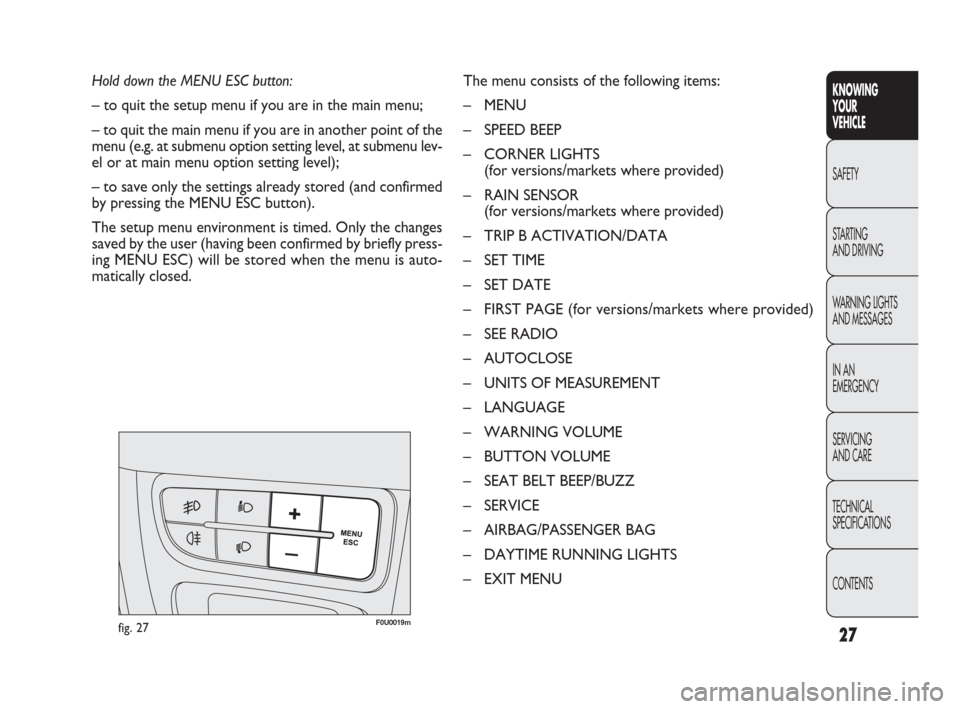
Hold down the MENU ESC button:
– to quit the setup menu if you are in the main menu;
– to quit the main menu if you are in another point of the
menu (e.g. at submenu option setting level, at submenu lev-
el or at main menu option setting level);
– to save only the settings already stored (and confirmed
by pressing the MENU ESC button).
The setup menu environment is timed. Only the changes
saved by the user (having been confirmed by briefly press-
ing MENU ESC) will be stored when the menu is auto-
matically closed.The menu consists of the following items:
– MENU
– SPEED BEEP
– CORNER LIGHTS
(for versions/markets where provided)
– RAIN SENSOR
(for versions/markets where provided)
– TRIP B ACTIVATION/DATA
– SET TIME
– SET DATE
– FIRST PAGE (for versions/markets where provided)
– SEE RADIO
– AUTOCLOSE
– UNITS OF MEASUREMENT
– LANGUAGE
– WARNING VOLUME
– BUTTON VOLUME
– SEAT BELT BEEP/BUZZ
– SERVICE
– AIRBAG/PASSENGER BAG
– DAYTIME RUNNING LIGHTS
– EXIT MENU
fig. 27F0U0019m
001-036 PUNTO FL EN 4ed 18-01-2010 12:21 Pagina 27
Page 29 of 270
CONTENTS TECHNICAL
SPECIFICATIONSSERVICING
AND CAREIN AN
EMERGENCY WARNING LIGHTS
AND MESSAGESSTARTING
AND DRIVINGSAFETY
KNOWING
YOUR
VEHICLE
28
DISPLAY FUNCTIONS
(see multifunction display
or reconfigurable multifunction
display)
SPEED BEEP
(Setting the speed limit)
This function is used to set the car speed limit (km/h or
mph); the driver is immediately alerted when this limit is
exceeded (see section “Warning lights and messages”).
To set the desired speed limit, proceed as follows:
– briefly press the MENU ESC button: the display will show
the words (Speed Beep);
– press +or –to select speed limit activation (On) or
deactivation (Off);
– when the function has been activated (On) by pressing
buttons +or –, select the speed limit and press MENU
ESC to confirm selection.NB You can select a speed between 30 and 200 km/h, or
20 and 125 mph depending on the selected unit, see “Set-
ting measurement unit (Unit)”. The setting will in-
crease/decrease by five units each time +/ –is pressed.
Hold down +/–to increase/decrease the setting rapidly.
Complete the setting with single presses of the button
when you approach the required setting.
– briefly press the MENU ESC button to go back to the
menu screen or hold the button down to go back to the
standard screen without saving.
To cancel the setting, proceed as follows:
– press the MENU ESC button briefly to make the dis-
play flash (On);
– press –: (Off) will flash on the display;
– briefly press the MENU ESC button to go back to the
menu screen or hold the button down to go back to the
standard screen without saving.
001-036 PUNTO FL EN 4ed 18-01-2010 12:21 Pagina 28
Page 37 of 270
36
KNOWING
YOUR
VEHICLE
SAFETY
STARTING
AND DRIVING
WARNING LIGHTS
AND MESSAGES
IN AN
EMERGENCY
SERVICING
AND CARE
TECHNICAL
SPECIFICATIONS
CONTENTS
AIRBAG/PASSENGER BAG
(Passenger front and side airbag activation/
deactivation)
(for versions/markets where available)
This function is used to activate/deactivate the front pas-
senger’s air bag.
Proceed as follows:
❒press MENU ESC and, after the message BAG P OFF
(to deactivate) or BAG P On (to activate) is displayed
by pressing buttons +or –, press MENU ESC again;
❒the display will show the confirmation request message;
❒press +or –to select either Yes (to confirm activa-
tion/deactivation) or No (to abort);
❒briefly press MENU ESC to confirm setting and go back
to the menu screen or hold the button down to go back
to the standard screen without saving.DAYTIME RUNNING LIGHTS (D.R.L.)
(for versions/markets where provided)
This function allows you to activate/deactivate the daytime
running lights.
Proceed as follows to switch this function on or off:
– press the MENU ESC button briefly: the display will show
a submenu;
– press the MENU ESC button briefly, the display will show
On or Off flashing depending on the previous setting;
– press +or –to change the setting;
– briefly press the MENU ESC button to go back to the
submenu screen or hold the button down to go back to
the main menu screen without saving;
– hold down MENU ESC again to go back to the standard
screen or main menu, depending on which point in the
menu you have reached.
EXIT MENU
This function closes the cycle of settings listed in the menu
screen.
Briefly press MENU ESC to go back to the standard screen
without saving.
Press –to return to the first menu option (Speed Beep).
001-036 PUNTO FL EN 4ed 18-01-2010 12:22 Pagina 36
Page 122 of 270
121
KNOWING
YOUR
VEHICLE
SAFETY
STARTING
AND DRIVING
WARNING LIGHTS
AND MESSAGES
IN AN
EMERGENCY
SERVICING
AND CARE
TECHNICAL
SPECIFICATIONS
CONTENTS
F0U0108mfig. 125
PARKING SENSORS
(for versions/markets where provided)
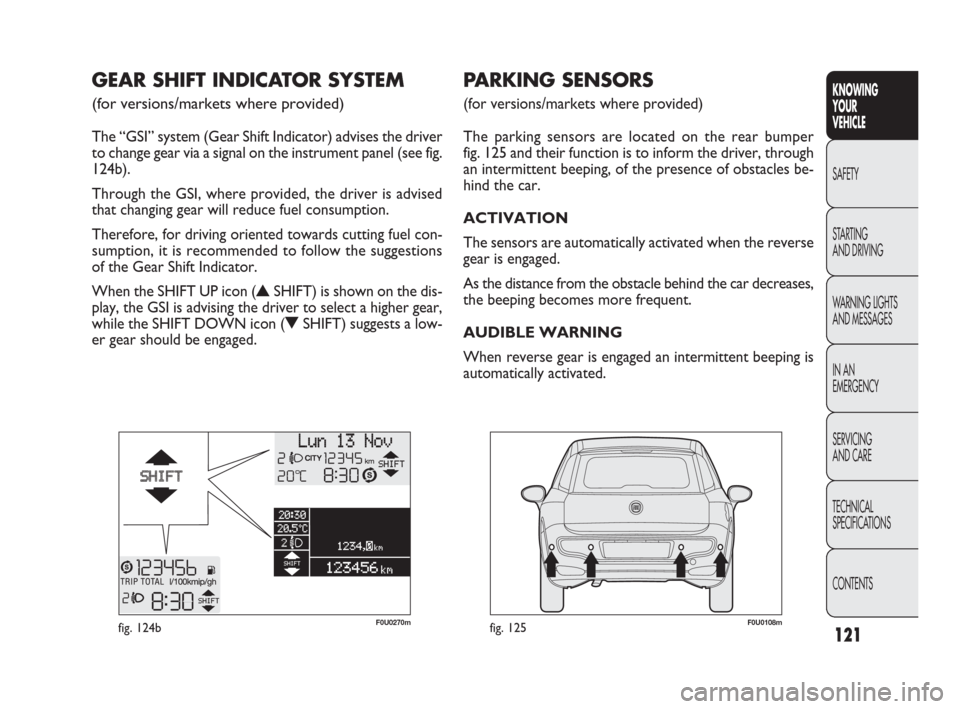
The parking sensors are located on the rear bumper
fig. 125 and their function is to inform the driver, through
an intermittent beeping, of the presence of obstacles be-
hind the car.
ACTIVATION
The sensors are automatically activated when the reverse
gear is engaged.
As the distance from the obstacle behind the car decreases,
the beeping becomes more frequent.
AUDIBLE WARNING
When reverse gear is engaged an intermittent beeping is
automatically activated.
GEAR SHIFT INDICATOR SYSTEM
(for versions/markets where provided)
The “GSI” system (Gear Shift Indicator) advises the driver
to change gear via a signal on the instrument panel (see fig.
124b).
Through the GSI, where provided, the driver is advised
that changing gear will reduce fuel consumption.
Therefore, for driving oriented towards cutting fuel con-
sumption, it is recommended to follow the suggestions
of the Gear Shift Indicator.
When the SHIFT UP icon (
NSHIFT) is shown on the dis-
play, the GSI is advising the driver to select a higher gear,
while the SHIFT DOWN icon (
OSHIFT) suggests a low-
er gear should be engaged.
F0U0270mfig. 124b
082-128 PUNTO FL EN 4ed 20-01-2010 15:07 Pagina 121
Page 123 of 270
122
The beeping:
❒increases as the distance between the car and the ob-
stacle decreases;
❒becomes continuous when the distance between the
car and the obstacle is less than around 30 cm and stops
immediately if the distance increases;
❒is constant if the distance is unvaried; if this situation oc-
curs for the side sensors, the beeping will stop after
about 3 seconds to avoid, for example, warning indica-
tions in the event of manoeuvres alongside walls.
Detection distances
If several obstacles are detected by the sensors, only the
nearest one is considered.
FAILURE INDICATIONS
See “Warning lights and messages” section.
OPERATION WITH TRAILER
The operation of the sensors is automatically deactivated
when the trailer electric plug is inserted in the car tow
hook socket.
The sensors are automatically enabled again when the trail-
er cable plug is removed.
When using special washing equipment such as high pres-
sure jets or steam cleaning, clean the sensors very quick-
ly keeping the jet more than 10 cm away.KNOWING
YOUR
VEHICLE
SAFETY
STARTING
AND DRIVING
WARNING LIGHTS
AND MESSAGES
IN AN
EMERGENCY
SERVICING
AND CARE
TECHNICAL
SPECIFICATIONS
CONTENTS
The driver always has ultimate responsi-
bility for parking and other dangerous ma-
noeuvres. When parking, make sure that no-one
is standing in the area, especially children or an-
imals. The parking sensors are designed to assist
drivers: in all cases, you must always pay the ut-
most attention during potentially dangerous ma-
noeuvres, even when carried out at low speed.
WARNING
The sensor must be clean of mud, dirt, snow
or ice in order for the system to work. Be
careful not to scratch or damage the sen-
sors while cleaning them. Avoid using dry, rough or
hard cloths. The sensors should be washed with
clean water, possibly with some car shampoo.
GENERAL WARNINGS
❒When parking, watch out for obstacles that may be
above or under the sensors.
❒Sometimes, objects placed close to the car are not de-
tected and could therefore cause damage to the car or
be damaged themselves.
❒Indications sent by the sensors can be altered by dirt,
snow or ice deposited on the sensors or by ultrasound
systems (e.g. truck pneumatic brakes or pneumatic ham-
mers) near the car.
082-128 PUNTO FL EN 4ed 20-01-2010 15:07 Pagina 122