MEDIA FIAT PUNTO EVO 2010 1.G Owners Manual
[x] Cancel search | Manufacturer: FIAT, Model Year: 2010, Model line: PUNTO EVO, Model: FIAT PUNTO EVO 2010 1.GPages: 270, PDF Size: 8.34 MB
Page 17 of 270
16
KNOWING
YOUR
VEHICLE
SAFETY
STARTING
AND DRIVING
WARNING LIGHTS
AND MESSAGES
IN AN
EMERGENCY
SERVICING
AND CARE
TECHNICAL
SPECIFICATIONS
CONTENTS
F0U0016mfig. 16F0U0017mfig. 17
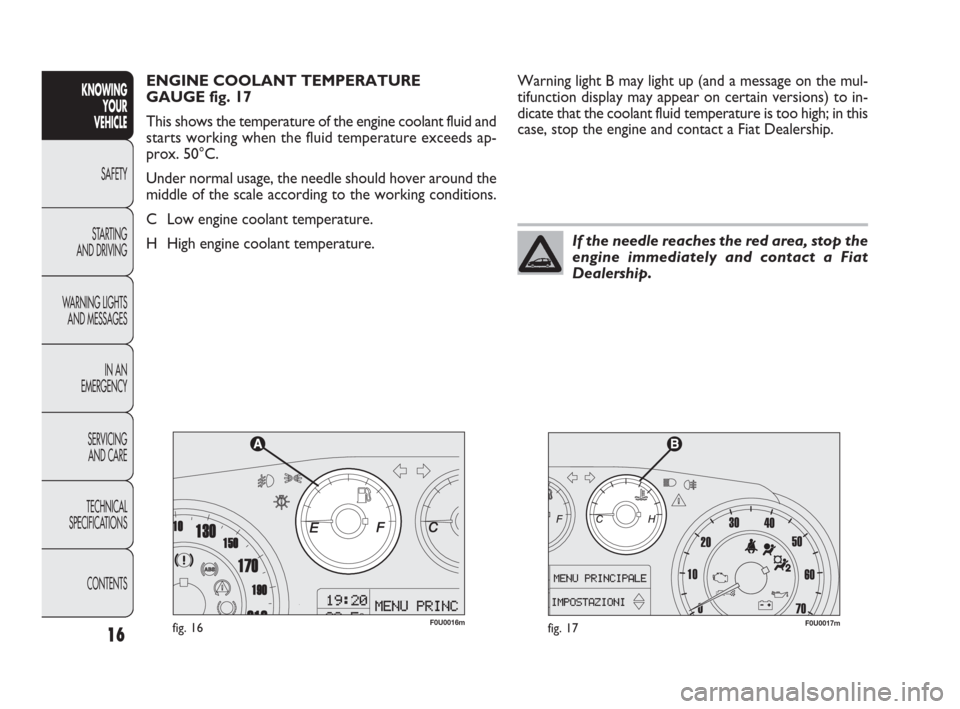
Warning light B may light up (and a message on the mul-
tifunction display may appear on certain versions) to in-
dicate that the coolant fluid temperature is too high; in this
case, stop the engine and contact a Fiat Dealership. ENGINE COOLANT TEMPERATURE
GAUGE fig. 17
This shows the temperature of the engine coolant fluid and
starts working when the fluid temperature exceeds ap-
prox. 50°C.
Under normal usage, the needle should hover around the
middle of the scale according to the working conditions.
C Low engine coolant temperature.
H High engine coolant temperature.
If the needle reaches the red area, stop the
engine immediately and contact a Fiat
Dealership.
001-036 PUNTO FL EN 4ed 18-01-2010 12:21 Pagina 16
Page 21 of 270
SPEEd
(Setting the speed limit)
With this function, it is possible to set the car speed lim-
it (km/h or mph). When this limit is exceeded, the driver
is immediately alerted (see section “Warning lights and
messages”).
To set the desired speed limit, proceed as follows:
– briefly press MENU ESC. The message (SPEEd) and the
previously set unit (km/h or mph) will appear on the dis-
play;
– press +or –to select speed limit activation (On) or
deactivation (Off);
– if the function is on, press +or –to select the required
speed limit and then press MENU ESC to confirm;
NBThe speed may be set in the range from 30 to 200
km/h, or from 20 to 125 mph according to the previous-
ly chosen unit (see “Setting the distance unit (Unit)” be-
low). The setting will increase/decrease by five units each
time +/–is pressed. Hold down +/–to increase/decrease
the setting rapidly. When you get close to the desired val-
ue, finish the setting with single presses.– briefly press MENU ESC to return to the menu screen
or hold the button down to return to the standard screen
without saving.
To cancel the setting, proceed as follows:
– press the MENU ESC button briefly to make the dis-
play flash (On);
– press –: (Off) will flash on the display;
– briefly press the MENU ESC button to go back to the
menu screen or hold the button down to go back to the
standard screen without saving.
CornEr
(activate/deactivate cornering lights)
(for versions/markets where provided)
This function activates/deactivates the corner lights. To ac-
tivate/deactivate (ON/OFF) the lights, proceed as follows:
- press the MENU ESC button briefly: the display will show
“On” or “Off” flashing depending on the previous setting;
– press +or –to make your choice;
– briefly press the MENU ESC button to go back to the
menu screen or hold the button down to go back to the
standard screen without saving.
CONTENTS TECHNICAL
SPECIFICATIONSSERVICING
AND CAREIN AN
EMERGENCY WARNING LIGHTS
AND MESSAGESSTARTING
AND DRIVINGSAFETY
KNOWING
YOUR
VEHICLE
20
001-036 PUNTO FL EN 4ed 18-01-2010 12:21 Pagina 20
Page 29 of 270
CONTENTS TECHNICAL
SPECIFICATIONSSERVICING
AND CAREIN AN
EMERGENCY WARNING LIGHTS
AND MESSAGESSTARTING
AND DRIVINGSAFETY
KNOWING
YOUR
VEHICLE
28
DISPLAY FUNCTIONS
(see multifunction display
or reconfigurable multifunction
display)
SPEED BEEP
(Setting the speed limit)
This function is used to set the car speed limit (km/h or
mph); the driver is immediately alerted when this limit is
exceeded (see section “Warning lights and messages”).
To set the desired speed limit, proceed as follows:
– briefly press the MENU ESC button: the display will show
the words (Speed Beep);
– press +or –to select speed limit activation (On) or
deactivation (Off);
– when the function has been activated (On) by pressing
buttons +or –, select the speed limit and press MENU
ESC to confirm selection.NB You can select a speed between 30 and 200 km/h, or
20 and 125 mph depending on the selected unit, see “Set-
ting measurement unit (Unit)”. The setting will in-
crease/decrease by five units each time +/ –is pressed.
Hold down +/–to increase/decrease the setting rapidly.
Complete the setting with single presses of the button
when you approach the required setting.
– briefly press the MENU ESC button to go back to the
menu screen or hold the button down to go back to the
standard screen without saving.
To cancel the setting, proceed as follows:
– press the MENU ESC button briefly to make the dis-
play flash (On);
– press –: (Off) will flash on the display;
– briefly press the MENU ESC button to go back to the
menu screen or hold the button down to go back to the
standard screen without saving.
001-036 PUNTO FL EN 4ed 18-01-2010 12:21 Pagina 28
Page 50 of 270
49
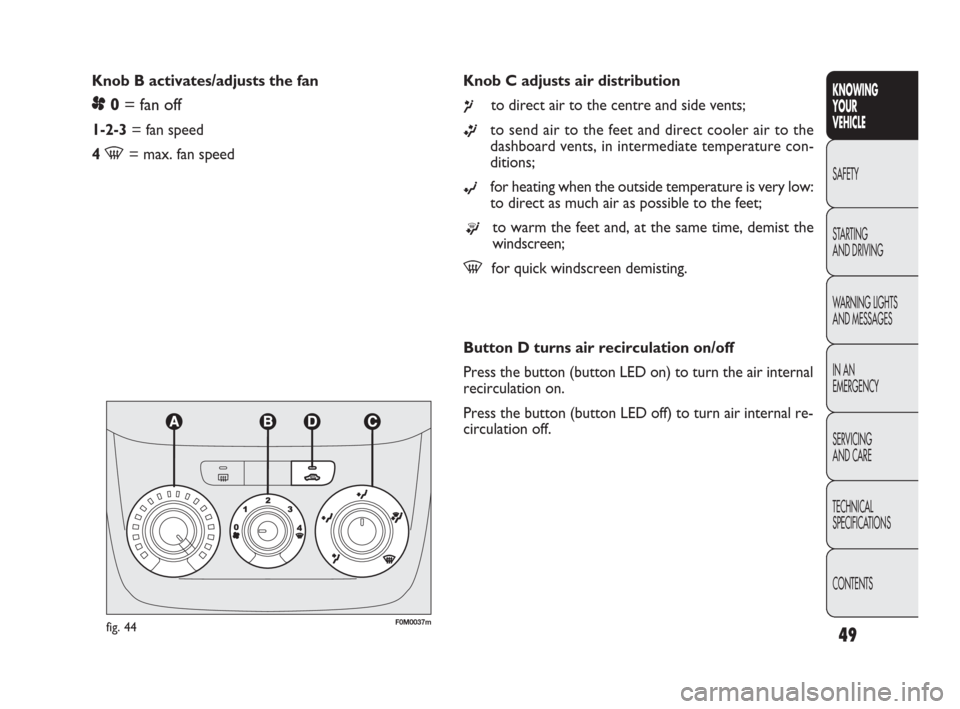
Knob C adjusts air distribution
¶to direct air to the centre and side vents;
ßto send air to the feet and direct cooler air to the
dashboard vents, in intermediate temperature con-
ditions;
©for heating when the outside temperature is very low:
to direct as much air as possible to the feet;
®to warm the feet and, at the same time, demist the
windscreen;
-for quick windscreen demisting. Knob B activates/adjusts the fan
p0= fan off
1-2-3= fan speed
4
-= max. fan speed
KNOWING
YOUR
VEHICLE
SAFETY
STARTING
AND DRIVING
WARNING LIGHTS
AND MESSAGES
IN AN
EMERGENCY
SERVICING
AND CARE
TECHNICAL
SPECIFICATIONS
CONTENTS
fig. 44F0M0037m
Button D turns air recirculation on/off
Press the button (button LED on) to turn the air internal
recirculation on.
Press the button (button LED off) to turn air internal re-
circulation off.
037-081 PUNTO FL EN 4ed 18-01-2010 12:23 Pagina 49
Page 53 of 270
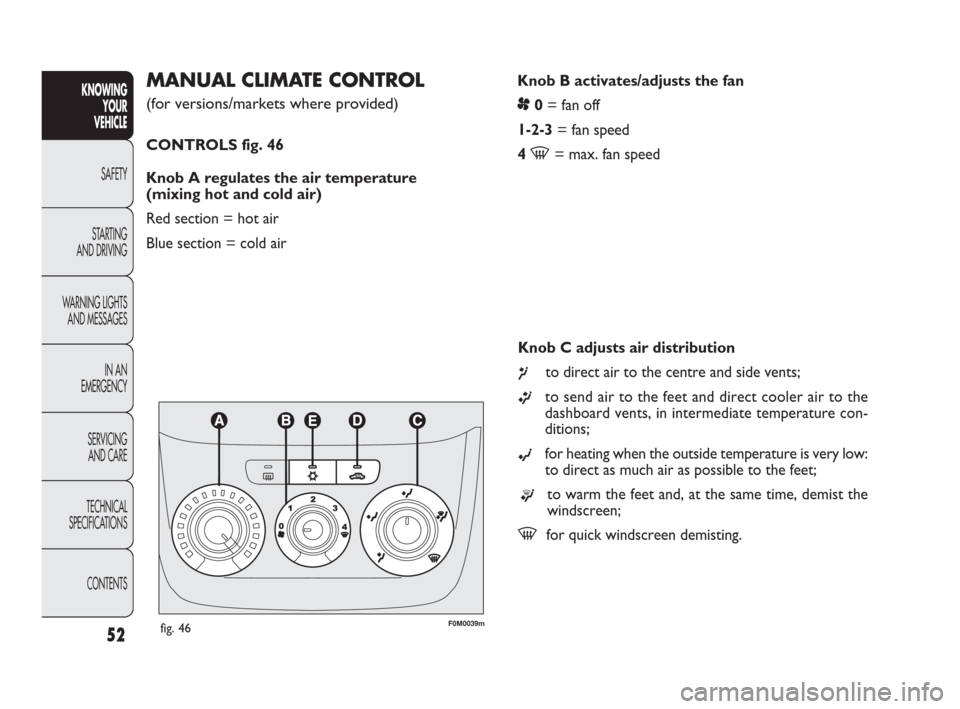
Knob B activates/adjusts the fan
p0= fan off
1-2-3= fan speed
4
-= max. fan speed
MANUAL CLIMATE CONTROL
(for versions/markets where provided)
CONTROLS fig. 46
Knob A regulates the air temperature
(mixing hot and cold air)
Red section = hot air
Blue section = cold air
52
KNOWING
YOUR
VEHICLE
SAFETY
STARTING
AND DRIVING
WARNING LIGHTS
AND MESSAGES
IN AN
EMERGENCY
SERVICING
AND CARE
TECHNICAL
SPECIFICATIONS
CONTENTS
fig. 46F0M0039m
Knob C adjusts air distribution
¶to direct air to the centre and side vents;
ßto send air to the feet and direct cooler air to the
dashboard vents, in intermediate temperature con-
ditions;
©for heating when the outside temperature is very low:
to direct as much air as possible to the feet;
®to warm the feet and, at the same time, demist the
windscreen;
-for quick windscreen demisting.
037-081 PUNTO FL EN 4ed 18-01-2010 12:23 Pagina 52
Page 82 of 270
81
KNOWING
YOUR
VEHICLE
SAFETY
STARTING
AND DRIVING
WARNING LIGHTS
AND MESSAGES
IN AN
EMERGENCY
SERVICING
AND CARE
TECHNICAL
SPECIFICATIONS
CONTENTS
F0U0075mfig. 82
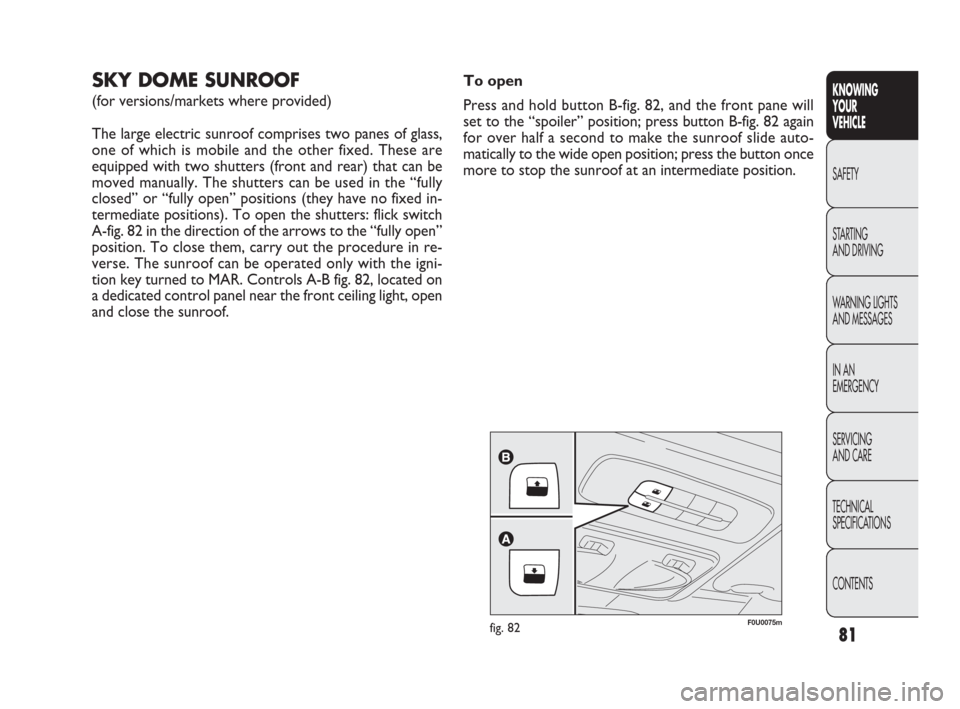
SKY DOME SUNROOF
(for versions/markets where provided)
The large electric sunroof comprises two panes of glass,
one of which is mobile and the other fixed. These are
equipped with two shutters (front and rear) that can be
moved manually. The shutters can be used in the “fully
closed” or “fully open” positions (they have no fixed in-
termediate positions). To open the shutters: flick switch
A-fig. 82 in the direction of the arrows to the “fully open”
position. To close them, carry out the procedure in re-
verse. The sunroof can be operated only with the igni-
tion key turned to MAR. Controls A-B fig. 82, located on
a dedicated control panel near the front ceiling light, open
and close the sunroof.To open
Press and hold button B-fig. 82, and the front pane will
set to the “spoiler” position; press button B-fig. 82 again
for over half a second to make the sunroof slide auto-
matically to the wide open position; press the button once
more to stop the sunroof at an intermediate position.
037-081 PUNTO FL EN 4ed 18-01-2010 12:23 Pagina 81
Page 83 of 270
82
F0U0075mfig. 83
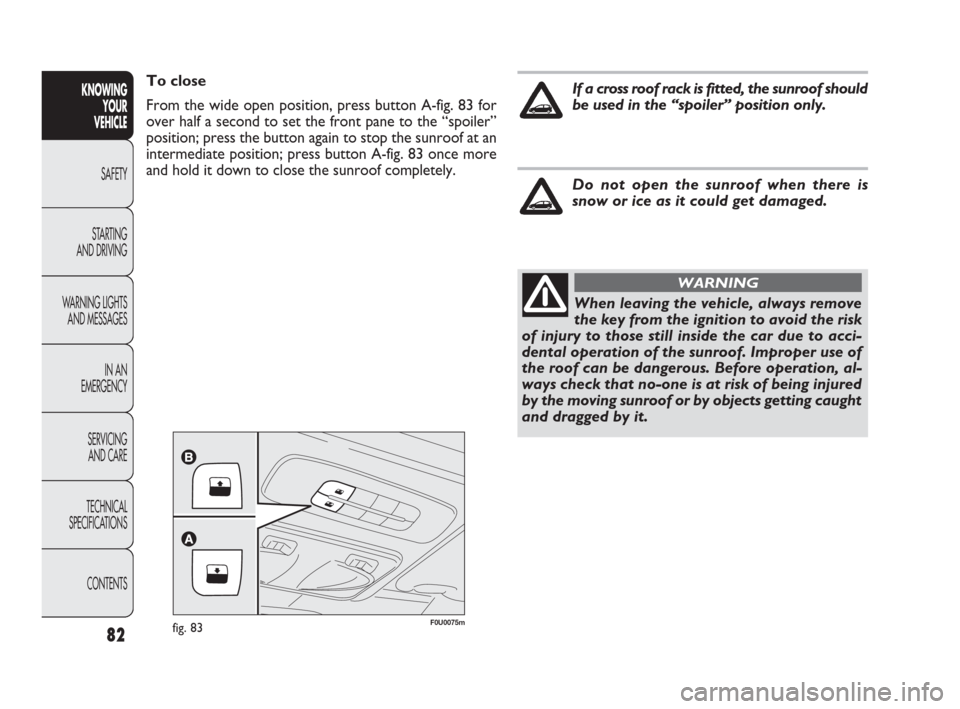
To close
From the wide open position, press button A-fig. 83 for
over half a second to set the front pane to the “spoiler”
position; press the button again to stop the sunroof at an
intermediate position; press button A-fig. 83 once more
and hold it down to close the sunroof completely.KNOWING
YOUR
VEHICLE
SAFETY
STARTING
AND DRIVING
WARNING LIGHTS
AND MESSAGES
IN AN
EMERGENCY
SERVICING
AND CARE
TECHNICAL
SPECIFICATIONS
CONTENTS
When leaving the vehicle, always remove
the key from the ignition to avoid the risk
of injury to those still inside the car due to acci-
dental operation of the sunroof. Improper use of
the roof can be dangerous. Before operation, al-
ways check that no-one is at risk of being injured
by the moving sunroof or by objects getting caught
and dragged by it.
WARNING
If a cross roof rack is fitted, the sunroof should
be used in the “spoiler” position only.
Do not open the sunroof when there is
snow or ice as it could get damaged.
082-128 PUNTO FL EN 4ed 20-01-2010 15:06 Pagina 82
Page 84 of 270
83
KNOWING
YOUR
VEHICLE
SAFETY
STARTING
AND DRIVING
WARNING LIGHTS
AND MESSAGES
IN AN
EMERGENCY
SERVICING
AND CARE
TECHNICAL
SPECIFICATIONS
CONTENTS
ANTI-PINCH SAFETY SYSTEM
The sunroof has an anti-pinch safety system capable of de-
tecting the presence of an obstacle whilst the roof is clos-
ing; when this happens, the system stops and the move-
ment of the glass is immediately reversed.
INITIALISATION PROCEDURE
The sunroof must be re-initialised after disconnecting the
battery or if the relevant protection fuse is blown.
Proceed as follows:
❒press button A-fig. 83 at close position;
❒hold the button down so that the sunroof closes in
stages;
❒after full closing, wait for sunroof’s electric motor
to stop.
When leaving the vehicle, always remove the key from the
ignition to avoid the risk of injury to those still inside the
car due to accidental operation of the sunroof. Improper
use of the roof can be dangerous. Before and during op-
eration, always check that no-one is exposed to the risk
of being injured by the moving sunroof or by objects get-
ting caught and dragged by it.
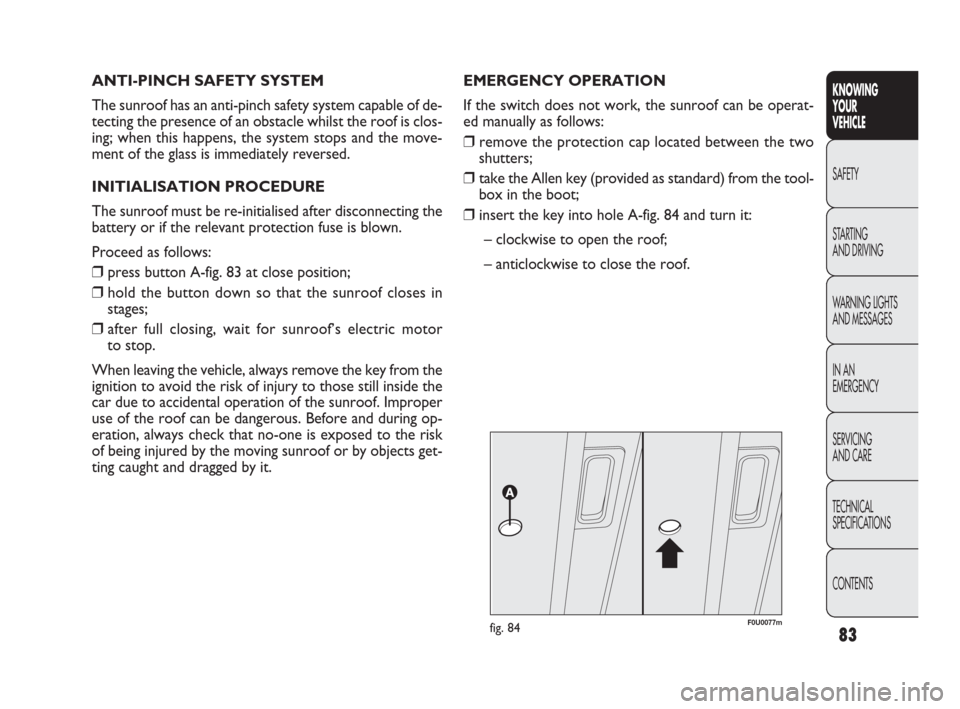
F0U0077mfig. 84
EMERGENCY OPERATION
If the switch does not work, the sunroof can be operat-
ed manually as follows:
❒remove the protection cap located between the two
shutters;
❒take the Allen key (provided as standard) from the tool-
box in the boot;
❒insert the key into hole A-fig. 84 and turn it:
– clockwise to open the roof;
– anticlockwise to close the roof.
082-128 PUNTO FL EN 4ed 20-01-2010 15:06 Pagina 83
Page 105 of 270
BRAKE ASSIST
(integrated ESP emergency braking assistance)
(for versions/markets where available)
This system (which cannot be switched off) recognises
emergency braking (according to the speed of operation
of the brake pedal) and provides additional hydraulic brak-
ing pressure to support that applied by the driver. This
allows faster and more powerful operation of the brak-
ing system.
The Brake Assist is deactivated on versions equipped with
ESP if there is an ESP system failure (indicated by the warn-
ing light and the message on the multifunction display, for
versions/markets where provided). Drive carefully to the nearest Fiat Dealership to have the
system checked.
104
KNOWING
YOUR
VEHICLE
SAFETY
STARTING
AND DRIVING
WARNING LIGHTS
AND MESSAGES
IN AN
EMERGENCY
SERVICING
AND CARE
TECHNICAL
SPECIFICATIONS
CONTENTSIf only warning light xlights up on the in-
strument panel (with a message on the
multifunction display, where provided), stop the
car immediately and contact the nearest Fiat
Dealership. Fluid leaking from the hydraulic sys-
tem will compromise the operation of the brak-
ing system, whether it is of the conventional type
or with ABS.
WARNING
When the ABS cuts in, and you feel the
brake pedal pulsating, do not remove your
foot, but keep it pressed; in doing so you will stop
in the shortest distance possible under the road
conditions at the time.
WARNING
082-128 PUNTO FL EN 4ed 20-01-2010 15:06 Pagina 104
Page 111 of 270
110
F0U0107mfig. 117
When the CITY function is on, the steering wheel effort
is lighter, making parking easier: therefore, this function
is particularly useful for driving in city centres.
For the Sport version, this function guarantees improved
driving comfort because the accelerator pedal is better cal-
ibrated for gradual acceleration/deceleration.
FAILURE INDICATIONS
Any failure of the electric power steering system is indicat-
ed by instrument panel warning light
gcoming on together
with a message on the multifunction display (for ver-
sions/markets where provided) (see “Warning lights and
messages”). In the event of electric power steering system
failure, the car can be driven with mechanical steering.
IMPORTANT In some circumstances, factors independent
of the electric power steering could cause the
gwarning
light on the instrument panel to come on.
In this case, stop the car immediately, switch off the en-
gine for about 20 seconds and then restart the car. If the
warning light
gis still on, along with the message on the
multifunction display (for versions/markets where provid-
ed), contact a Fiat Dealership.
IMPORTANT During parking manoeuvres requiring a lot
of steering, the steering may become harder; this is nor-
mal and is due to the intervention of the system that pro-
tects the electric steering motor from overheating, so no
intervention is required. The power steering system will
start working properly again the next time the car is used.
KNOWING
YOUR
VEHICLE
SAFETY
STARTING
AND DRIVING
WARNING LIGHTS
AND MESSAGES
IN AN
EMERGENCY
SERVICING
AND CARE
TECHNICAL
SPECIFICATIONS
CONTENTS
“DUALDRIVE” ELECTRIC POWER
STEERING SYSTEM
The car is equipped with an electrically controlled power
steering system called “Dualdrive”, working only with the
ignition key at MAR and the engine running, that cus-
tomises steering force according to the driving conditions.
ACTIVATION/DEACTIVATION
(CITY function)
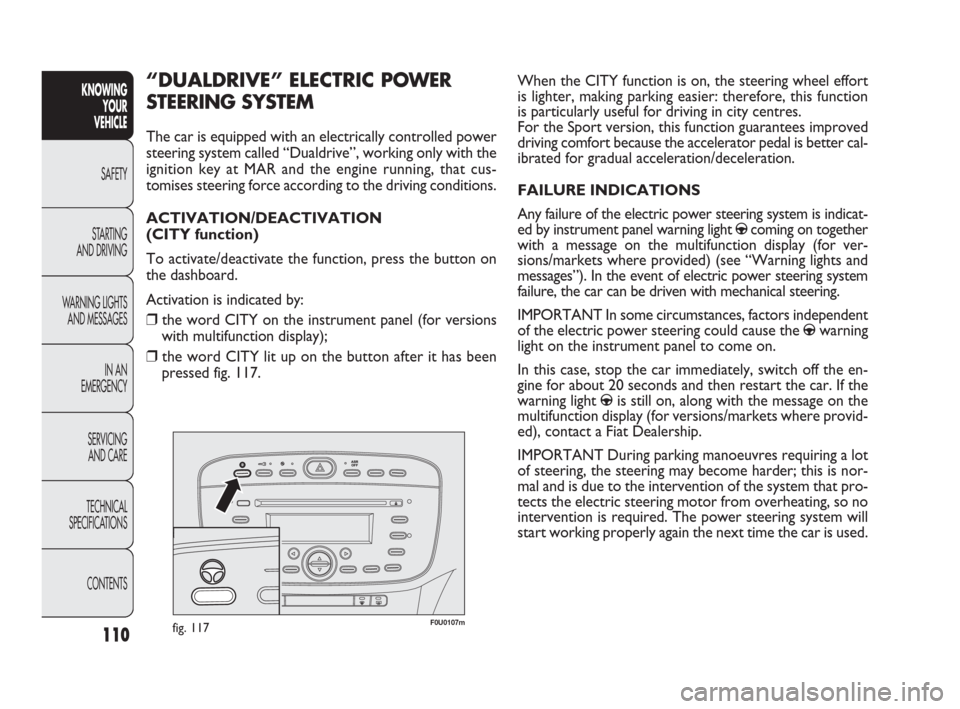
To activate/deactivate the function, press the button on
the dashboard.
Activation is indicated by:
❒the word CITY on the instrument panel (for versions
with multifunction display);
❒the word CITY lit up on the button after it has been
pressed fig. 117.
082-128 PUNTO FL EN 4ed 20-01-2010 15:06 Pagina 110