headlights FIAT QUBO 2010 1.G User Guide
[x] Cancel search | Manufacturer: FIAT, Model Year: 2010, Model line: QUBO, Model: FIAT QUBO 2010 1.GPages: 230, PDF Size: 4.38 MB
Page 147 of 230
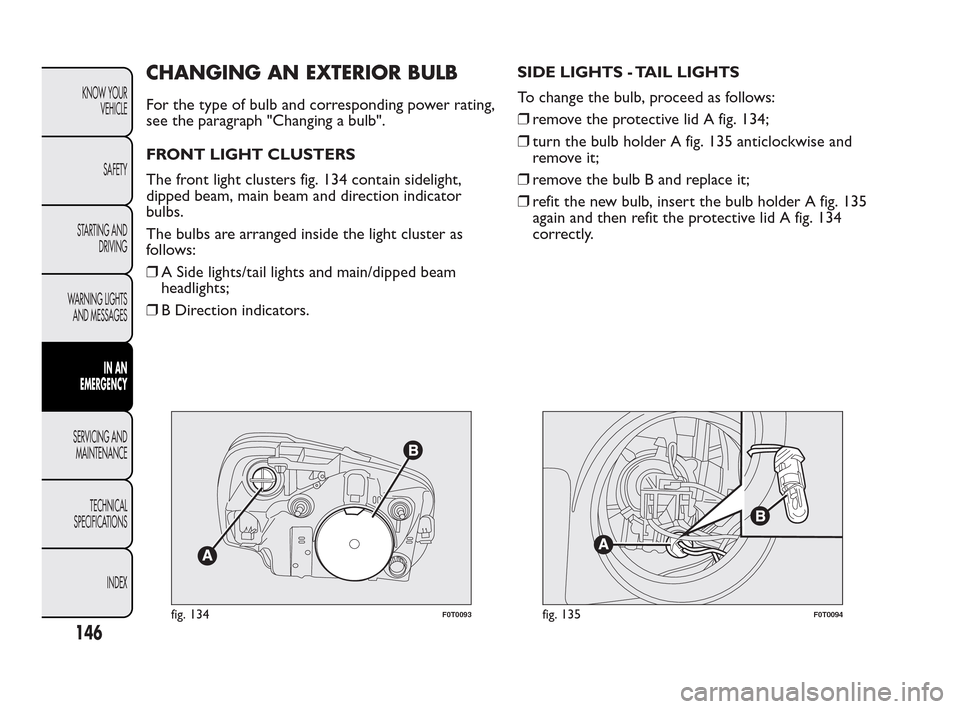
CHANGING AN EXTERIOR BULB
For the type of bulb and corresponding power rating,
see the paragraph "Changing a bulb".
FRONT LIGHT CLUSTERS
The front light clusters fig. 134 contain sidelight,
dipped beam, main beam and direction indicator
bulbs.
The bulbs are arranged inside the light cluster as
follows:
❒A Side lights/tail lights and main/dipped beam
headlights;
❒B Direction indicators.SIDE LIGHTS - TAIL LIGHTS
To change the bulb, proceed as follows:
❒remove the protective lid A fig. 134;
❒turn the bulb holder A fig. 135 anticlockwise and
remove it;
❒remove the bulb B and replace it;
❒refit the new bulb, insert the bulb holder A fig. 135
again and then refit the protective lid A fig. 134
correctly.
fig. 134F0T0093fig. 135F0T0094
146
KNOW YOUR
VEHICLE
SAFETY
STARTING AND
DRIVING
WARNING LIGHTS
AND MESSAGES
IN AN
EMERGENCY
SERVICING AND
MAINTENANCE
TECHNICAL
SPECIFICA
TIONS
INDEX
Page 148 of 230
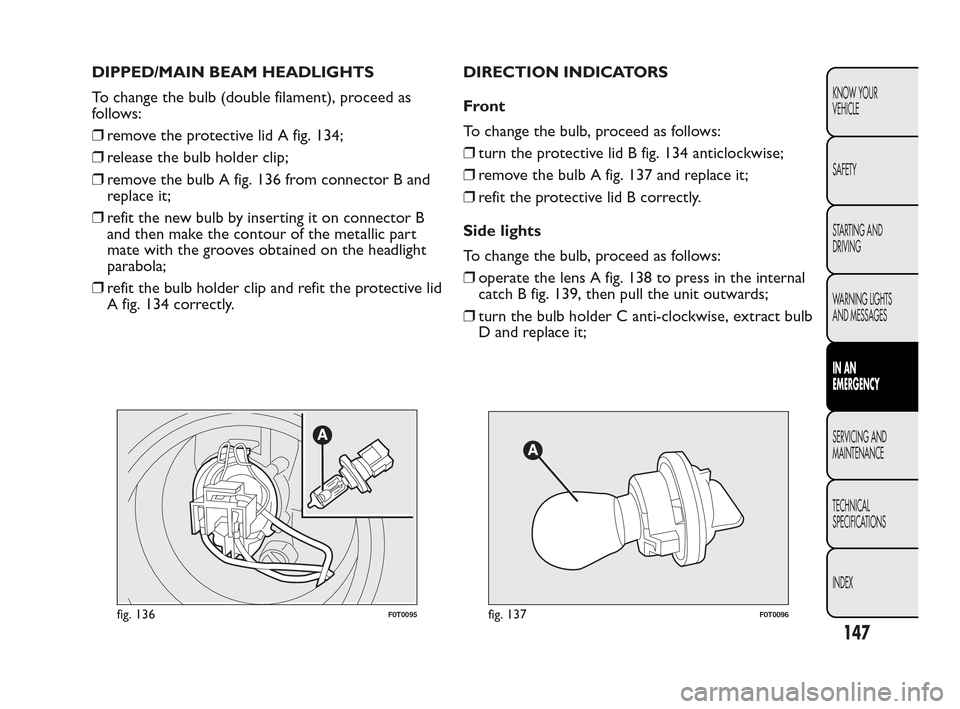
DIPPED/MAIN BEAM HEADLIGHTS
To change the bulb (double filament), proceed as
follows:
❒remove the protective lid A fig. 134;
❒release the bulb holder clip;
❒remove the bulb A fig. 136 from connector B and
replace it;
❒refit the new bulb by inserting it on connector B
and then make the contour of the metallic part
mate with the grooves obtained on the headlight
parabola;
❒refit the bulb holder clip and refit the protective lid
A fig. 134 correctly.DIRECTION INDICATORS
Front
To change the bulb, proceed as follows:
❒turn the protective lid B fig. 134 anticlockwise;
❒remove the bulb A fig. 137 and replace it;
❒refit the protective lid B correctly.
Side lights
To change the bulb, proceed as follows:
❒operate the lens A fig. 138 to press in the internal
catch B fig. 139, then pull the unit outwards;
❒turn the bulb holder C anti-clockwise, extract bulb
D and replace it;
fig. 136F0T0095fig. 137F0T0096
147
KNOW YOUR
VEHICLE
SAFETY
STARTING AND
DRIVING
WARNING LIGHTS
AND MESSAGES
IN AN
EMERGENCY
SERVICING AND
MAINTENANCE
TECHNICAL
SPECIFICA
TIONS
INDEX
Page 159 of 230
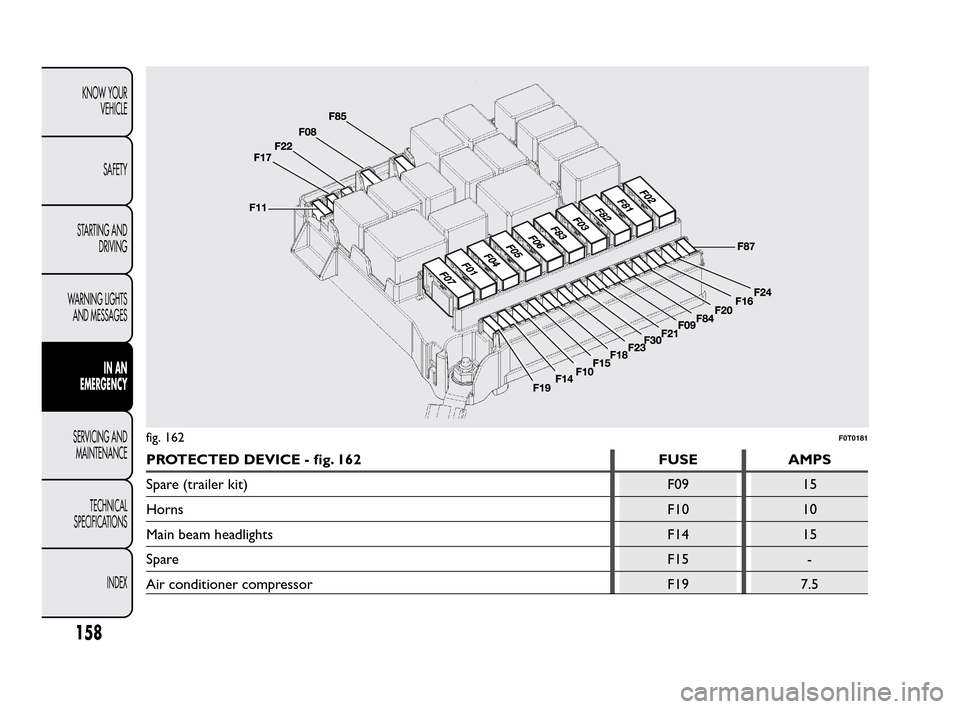
PROTECTED DEVICE - fig. 162 FUSE AMPS
Spare (trailer kit) F09 15
HornsF10 10
Main beam headlights F14 15
SpareF15 -
Air conditioner compressor F19 7.5
fig. 162F0T0181
158
KNOW YOUR
VEHICLE
SAFETY
STARTING AND
DRIVING
WARNING LIGHTS
AND MESSAGES
IN AN
EMERGENCY
SERVICING AND
MAINTENANCE
TECHNICAL
SPECIFICA
TIONS
INDEX
Page 169 of 230
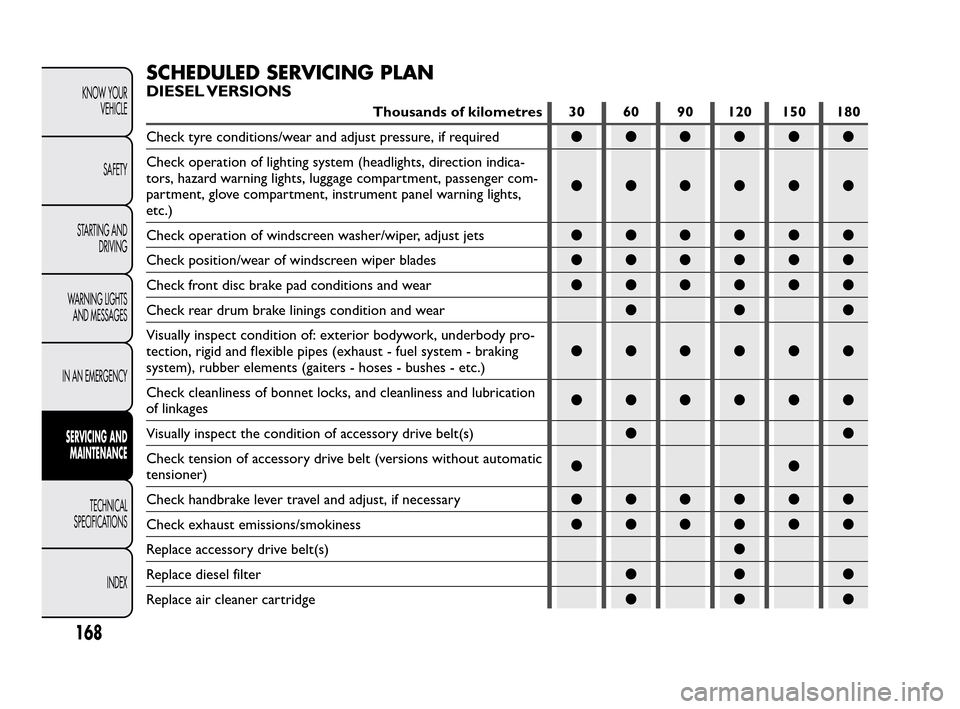
SCHEDULED SERVICING PLAN
DIESEL VERSIONS
Thousands of kilometres 30 60 90 120 150 180
Check tyre conditions/wear and adjust pressure, if required●●●●●●
Check operation of lighting system (headlights, direction indica-
tors, hazard warning lights, luggage compartment, passenger com-
partment, glove compartment, instrument panel warning lights,
etc.)●●●●●●
Check operation of windscreen washer/wiper, adjust jets●●●●●●
Check position/wear of windscreen wiper blades●●●●●●
Check front disc brake pad conditions and wear●●●●●●
Check rear drum brake linings condition and wear●●●
Visually inspect condition of: exterior bodywork, underbody pro-
tection, rigid and flexible pipes (exhaust - fuel system - braking
system), rubber elements (gaiters - hoses - bushes - etc.)●●●●●●
Check cleanliness of bonnet locks, and cleanliness and lubrication
of linkages●●●●●●
Visually inspect the condition of accessory drive belt(s)●●
Check tension of accessory drive belt (versions without automatic
tensioner)●●
Check handbrake lever travel and adjust, if necessary●●●●●●
Check exhaust emissions/smokiness●●●●●●
Replace accessory drive belt(s)●
Replace diesel filter●●●
Replace air cleaner cartridge●●●
168
KNOW YOUR
VEHICLE
SAFETY
STARTING AND
DRIVING
WARNING LIGHTS
AND MESSAGES
IN AN EMERGENCY
SERVICING AND
MAINTENANCE
TECHNICAL
SPECIFICA
TIONS
INDEX
Page 187 of 230
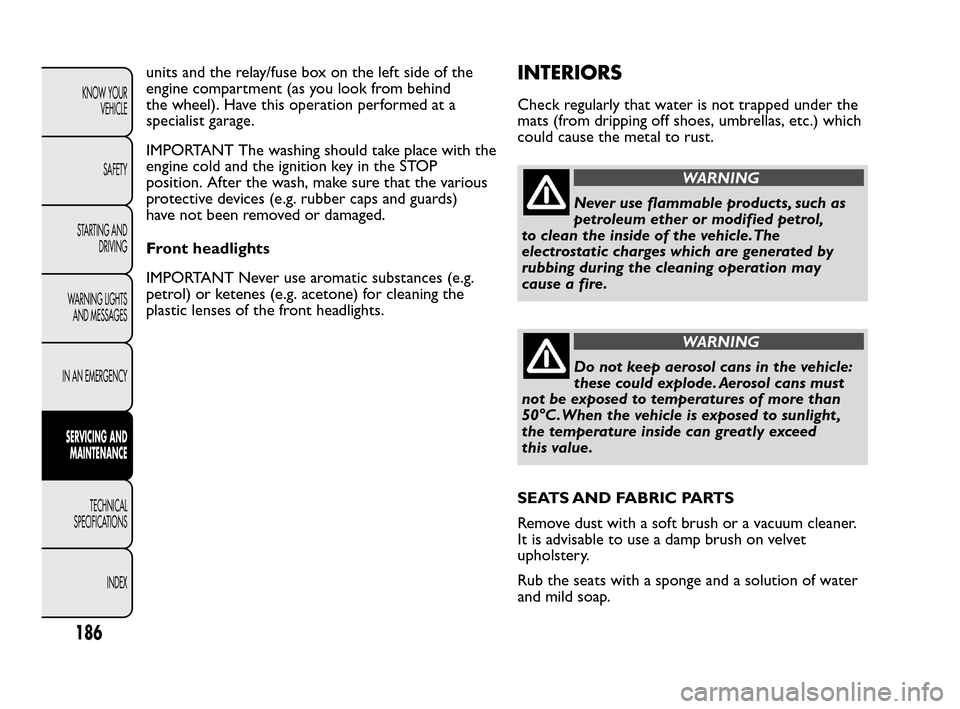
units and the relay/fuse box on the left side of the
engine compartment (as you look from behind
the wheel). Have this operation performed at a
specialist garage.
IMPORTANT The washing should take place with the
engine cold and the ignition key in the STOP
position. After the wash, make sure that the various
protective devices (e.g. rubber caps and guards)
have not been removed or damaged.
Front headlights
IMPORTANT Never use aromatic substances (e.g.
petrol) or ketenes (e.g. acetone) for cleaning the
plastic lenses of the front headlights.INTERIORS
Check regularly that water is not trapped under the
mats (from dripping off shoes, umbrellas, etc.) which
could cause the metal to rust.
WARNING
Never use flammable products, such as
pet
roleum ether or modified petrol,
to clean the inside of the vehicle.The
electrostatic charges which are generated by
rubbing during the cleaning operation may
cause a fire.
WARNING
Do not keep aerosol cans in the vehicle:
t
hese could explode. Aerosol cans must
not be exposed to temperatures of more than
50°C.When the vehicle is exposed to sunlight ,
the temperature inside can greatly exceed
this value.
SEATS AND FABRIC PARTS
Remove dust with a soft brush or a vacuum cleaner.
It is advisable to use a damp brush on velvet
upholstery.
Rub the seats with a sponge and a solution of water
and mild soap.
186
KNOW YOUR
VEHICLE
SAFETY
STARTING AND
DRIVING
WARNING LIGHTS
AND MESSAGES
IN AN EMERGENCY
SERVICING AND
MAINTENANCE
TECHNICAL
SPECIFICA
TIONS
INDEX
Page 224 of 230
Conditions of use ...................... 117
Controls........................................ 53
Coupling the tow ring............... 164
Cylinder replacement ............... 142
Dashboard ................................... 3
Dead lock ..................................... 8
Dead Lock .................................... 8
Dimensions ................................. 199
Dipped beam headlights ............ 45
Dipped/main beam
headlights (changing a bulb)... 147
Dipped/main beam
headlights ................................... 147
Direction indicators
(changing a bulb) .............. 147-149
Direction indicators ............ 46-147
– Left direction indicator
warning light .......................... 130
– Right-hand indicator
warning light .......................... 130
Door open .................................. 124
Doors (unlocking/locking) ........ 58
Double rear swing doors .......... 63
DPF (particulate filter) .............. 90
DPF (particulate trap)
cleaning underway warning
light ............................................. 125DPF (particulate trap)
(cleaning underway
warning light) ............................ 125
Driver's seat arm rest ................ 54
Driving style ................................ 116EBD fault warning light............ 123
EBD (fault warning light) .......... 123
EBD system .................................. 76
Emergency starting.................... 112
Engine bay fuse box ................... 156
Engine codes ............................... 190
Engine compartment fuse
box table .................................... 159
Engine coolant fluid ................... 174
Engine coolant fluid
(warning light)........................... 122
Engine coolant fluid warning
light ............................................. 122
Engine coolant temperature
gauge............................................ 14
Engine ........................................... 191
Engine marking ........................... 189
Engine oil ..................................... 173
Engine oil (low pressure
warning light) ............................ 123
EOBD system .............................. 81
ESP (system) ................................ 77ESP/Traction Plus fault
warning light.............................. 123
ESP/Traction Plus (fault
warning light) ............................ 123
Extending the boot .................... 66
Exterior light fault warning
light ............................................. 128
Exterior lights .............................. 45
Exterior lights (warning
light) ............................................ 128
Fiat CODE system .................... 5
Fiat CODE vehicle
protection system fault
warning light.............................. 127
Fiat CODE (vehicle
protection system fault
warning light) ............................ 127
Fix&Go automatic quick
tyre repair kit ........... 138-140-142
Flashing the headlights ............... 46
Fluids and lubricants.................. 205
Fog lights (changing a bulb)...... 148
Fog lights ................................ 54-148
– Warning light ......................... 129
Fog lights warning light ............. 129
Follow Me Home ........................ 47
Front airbags ............................... 105
– Front airbag driver's side .... 106
223
KNOW YOUR
VEHICLE
SAFETY
STARTING AND
DRIVING
WARNING LIGHTS
AND MESSAGES
IN AN EMERGENCY
SERVICING AND
MAINTENANCE
TECHNICAL
SPECIFICATIONS
INDEX
Page 225 of 230
– Front airbag passenger's
side .......................................... 106
– Manual deactivation of
passenger front airbag
and side bag ........................... 107
Front ceiling light ....................... 151
Front ceiling light with map
reading lights (changing a
bulb) ............................................ 152
Front light clusters
(changing a bulb) ...................... 146
Front light clusters .................... 146
Front power socket ................... 55
Fuel cap ......................................... 88
Fuel consumption ...................... 208
Fuel cut-off system ..................... 89
Fuel filter (water in fuel
warning light) ............................ 127
Fuel level indicator ..................... 13
Fuel reserve warning light........ 126
Fuel (reserve warning light) ..... 126
Fuel system.................................. 192
Fuses (replacement) . 154-156-160
Gear lever................................... 115
Generic failure indication
warning light.............................. 128
Generic failure indication
(warning light)........................... 128Glove compartment................... 55
Glow plug preheating fault
warning light.............................. 126
Glow plugs (preheating/fault
warning light) ............................ 126
Glow plugs preheating
warning light.............................. 126
Handbrake ................................... 113
Handbrake lever ......................... 113
Handbrake (warning light) ....... 120
Hazard lights ................................ 53
Headlight alignment
corrector .................................... 73
Headlights
– Headlight alignment
corrector................................. 73
– Light beam direction ............ 73
Headrest
– Front ........................................ 32
– Rear .......................................... 33
Heating and ventilation ............. 38
Heating and ventilation
system; ........................................ 37
Heavy use of the vehicle .......... 170
Hill Holder (system) .................. 78
How to warm up the engine
after it has just started ........... 112
Identification data ..................... 188Ignition switch
– Ignition ..................................... 12
– Steering lock........................... 12
In an emergency ......................... 131
Inflation pressure ....................... 198
Inflation procedure .................... 140
Injection system/EOBD
engine control system fault
warning light.............................. 125
Injection system (warning
light) ............................................ 125
Installing
electrical/electronic devices ... 86
Instrument panel ......................... 4
Instruments .................................. 13
Interior fittings ............................ 54
Interiors ....................................... 186
Isofix child seat assembly
setup ........................................... 102
Isofix child seats (fitting
arrangement) ............................ 102
– Seat compliance with
child seat use......................... 104
Jack ............................................... 133
Jump starting............................... 131
224
KNOW YOUR
VEHICLE
SAFETY
STARTING AND
DRIVING
WARNING LIGHTS
AND MESSAGES
IN AN EMERGENCY
SERVICING AND
MAINTENANCE
TECHNICAL
SPECIFICATIONS
INDEX
Page 226 of 230
Keys
– Key without remote
control ..................................... 6
– Key with remote control..... 6
– Ordering additional
remote controls .................... 8
Left direction indicator
warning light ............................. 130
Lifting the vehicle....................... 164
Light beam direction .................. 73
Low battery charge warning
light ............................................. 122
Low engine oil level ................... 124
Low engine oil pressure
warning light.............................. 123
Main beam headlights ............... 45
Maintenance and care -
regular checks........................... 170
Maintenance and care -
scheduled servicing.................. 167
Maintenance and care -
scheduled servicing plan......... 168
Manual climate control
system ......................................... 41
Manual deactivation of
passenger front airbag and
side bag ...................................... 107
MSR system.................................. 79Multifunction display
– Control buttons .................... 16
– Setup menu............................. 17
– Standard screen ..................... 15
Number plate lights (bulb
replacement)............................. 150
Number plate lights................... 150
Oddment tray ............................. 55
Ordering additional remote
controls ....................................... 8
Parking......................................... 113
Parking lights ................................ 45
Parking sensor fault warning
light ............................................. 129
Parking sensors ........................... 82
Parking sensors (warning
light) ............................................ 129
Particulate filter (DPF) .............. 90
Partition ........................................ 31
Passenger air bag/side bag
off warning light ....................... 121
Passenger air bag/side bag
(warning light)........................... 121
Passenger compartment
fuse box ..................................... 160
Passenger compartment
fuse box table ........................... 160Performance................................ 200
Pollen filter .................................. 177
Power steering fluid .................. 176
Pressure check and
correction.................................. 142
Prolonged vehicle inactivity ..... 119
Protecting the environment ..... 90
Radio ............................................. 84
Radio transmitters and
mobile phones ........................... 86
Rear ceiling light ......................... 152
Rear fog lights (changing a
bulb) ............................................ 149
Rear fog lights .............................. 54
– Warning light ......................... 129
Rear fog lights warning light .... 129
Rear light clusters (changing
a bulb)......................................... 148
Rear light clusters ...................... 148
Rear side windows ..................... 57
Rear-view mirrors
– Interior rear-view mirror..... 35
– Wing mirrors ......................... 35
Rear window washer ................. 48
Rear window wiper ............. 48-182
Refuelling the vehicle ................. 87
Removable ceiling light ............. 153
225
KNOW YOUR
VEHICLE
SAFETY
STARTING AND
DRIVING
WARNING LIGHTS
AND MESSAGES
IN AN EMERGENCY
SERVICING AND
MAINTENANCE
TECHNICAL
SPECIFICATIONS
INDEX