key FIAT QUBO 2010 1.G User Guide
[x] Cancel search | Manufacturer: FIAT, Model Year: 2010, Model line: QUBO, Model: FIAT QUBO 2010 1.GPages: 230, PDF Size: 4.38 MB
Page 27 of 230
TRIP COMPUTER
General features
The Trip computer is used to display information on
vehicle operation when the ignition key is turned
to MAR. This function allows you to define two
separate trips, called "Trip A" and "Trip B", for
monitoring the "complete mission" (journey) of the
vehicle in a reciprocally independent manner. Both
functions can be reset (start of a new journey).
“Trip A” is used to display the values relating to:
❒Outside temperature (for versions with outside
temperature sensor and methane-powered
vehicles)
❒Range
❒Distance travelled
❒Average consumption
❒Current consumption
❒Average speed
❒Travel time (driving time).
"Trip B", available on multifunction display only, is
used to display the values relating to:
❒Distance travelled B
❒Average consumption B
❒Average speed B
❒Travel time B (driving time).
“Trip B” may be disabled (see “Activating
Trip B”). “Range” and “Instant
consumption" parameters cannot be
reset .
Values displayed
Range
This indicates the distance which may be travelled
with the fuel in the tank assuming that driving style
does not change. The display will show the reading
“----“ when the following events take place:
❒range is lower than 50 km (or 30 mi)
❒vehicle is left parked with the engine running for a
long time.
IMPORTANT The range can be affected by several
factors: driving style (see “Driving style” in the
“Starting and driving” section), type of route
(motorway, towns and cities, mountain roads, etc.),
conditions of use (load, tyre pressures, etc.). Trip
planning must therefore take the above into account.
Distance travelled
This value shows the distance covered from the start
of the new journey.
26
KNOW YOUR
VEHICLE
SAFETY
ST
ARTING AND
DRIVING
WARNING LIGHTS
AND MESSAGES
IN AN EMERGENCY
SERVICING AND
MAINTENANCE
TECHNICAL
SPECIFICATIONS
INDEX
Page 28 of 230
Average consumption
This value shows the approximate average fuel
consumption from the start of the new journey.
Current consumption
Indicates the fuel consumption. The value is
constantly updated. The message “----” will appear
on the display if the car is parked with the engine
running.
Average speed
This value shows the average speed of the vehicle
based on the overall time elapsed since the start of
the new journey.
Journey time
Time elapsed since the start of the new journey.
IMPORTANT If there is no information, the Trip
computer displays "----" in place of the value. When
normal operating conditions are restored, the
counting of the various values is resumed, without
either zeroing the values displayed prior to the
problem, or starting a new journey.Control TRIP button
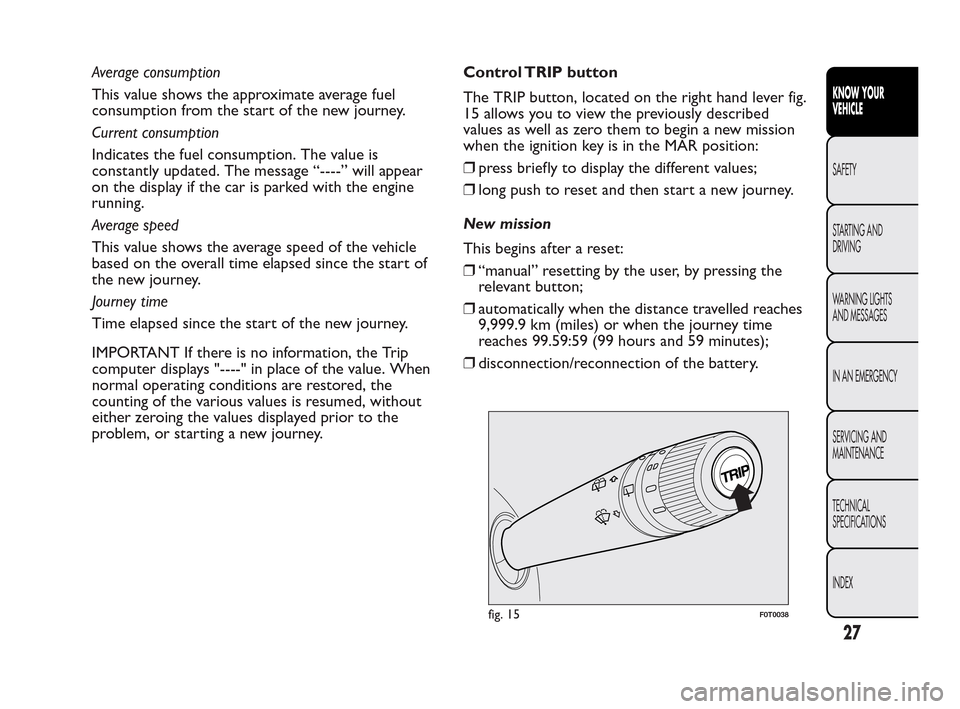
The TRIP button, located on the right hand lever fig.
15 allows you to view the previously described
values as well as zero them to begin a new mission
when the ignition key is in the MAR position:
❒press briefly to display the different values;
❒long push to reset and then start a new journey.
New mission
This begins after a reset:
❒“manual” resetting by the user, by pressing the
relevant button;
❒automatically when the distance travelled reaches
9,999.9 km (miles) or when the journey time
reaches 99.59:59 (99 hours and 59 minutes);
❒disconnection/reconnection of the battery.
fig. 15F0T0038
27
KNOW YOUR
VEHICLE
SAFETY
ST
ARTING AND
DRIVING
WARNING LIGHTS
AND MESSAGES
IN AN EMERGENCY
SERVICING AND
MAINTENANCE
TECHNICAL
SPECIFICATIONS
INDEX
Page 29 of 230
IMPORTANT The reset operation when “Trip A”
details are being displayed only resets the
information associated with this function.
IMPORTANT The reset operation when “Trip B”
details are being displayed resets only the
information associated with this function.
Start of journey procedure
With ignition key at MAR, press and hold the TRIP
button for more than 2 seconds to reset.
Exit Trip
You can automatically exit the TRIP function once all
the values have been displayed, or by holding the
MENU ESC button down for more than 1 second.SEATS
FRONT SEATS
WARNING
All adjustments must be made with the
v
ehicle stationary.
Lengthwise adjustment
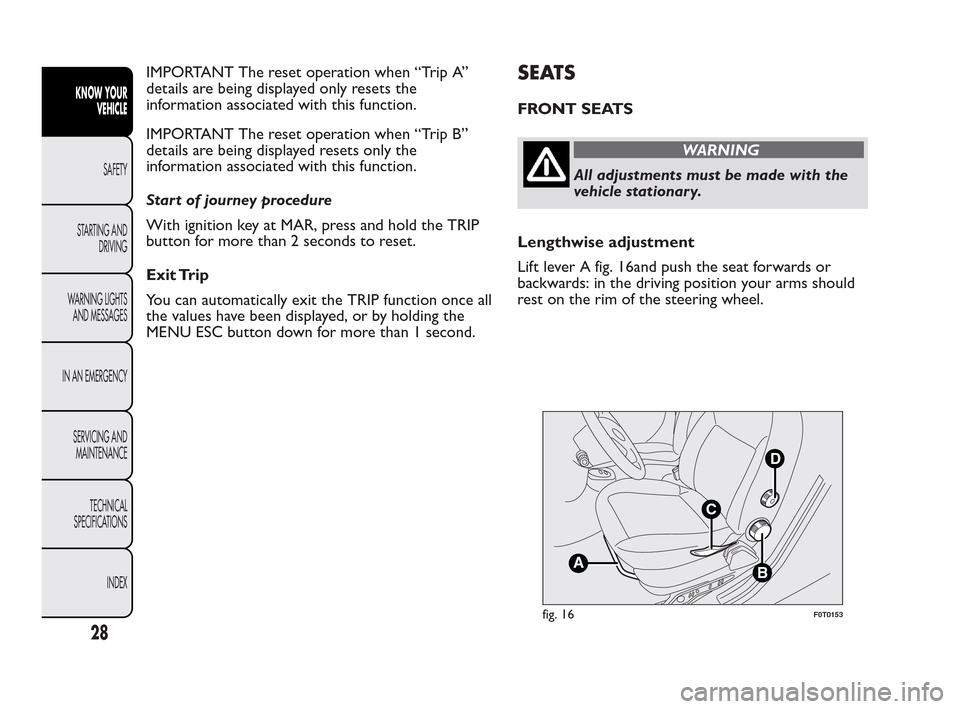
Lift lever A fig. 16and push the seat forwards or
backwards: in the driving position your arms should
rest on the rim of the steering wheel.
B
D
C
A
fig. 16F0T0153
28
KNOW YOUR
VEHICLE
SAFETY
ST
ARTING AND
DRIVING
WARNING LIGHTS
AND MESSAGES
IN AN EMERGENCY
SERVICING AND
MAINTENANCE
TECHNICAL
SPECIFICATIONS
INDEX
Page 30 of 230
WARNING
Once you have released the adjustment
le
ver, always check that the seat is
locked on the guides by trying to move it back
and forth. If it is not locked, the seat may move
unexpectedly and make you lose control of
the vehicle.
Backrest angle adjustment
Turn knob B fig. 16.
Height adjustment (driver only)
(for versions/markets, where provided)
Operate lever C fig. 16 to lift or lower the rear part
of the cushion to achieve the most comfortable
driving position.
IMPORTANT Adjustment must be carried out only
when seated in the relevant seat.
Driver seat lumbar adjustment
(for versions/markets, where provided)
Turn knob D fig. 16 to adjust the backrest support.Seat heating
(for versions/markets, where provided)
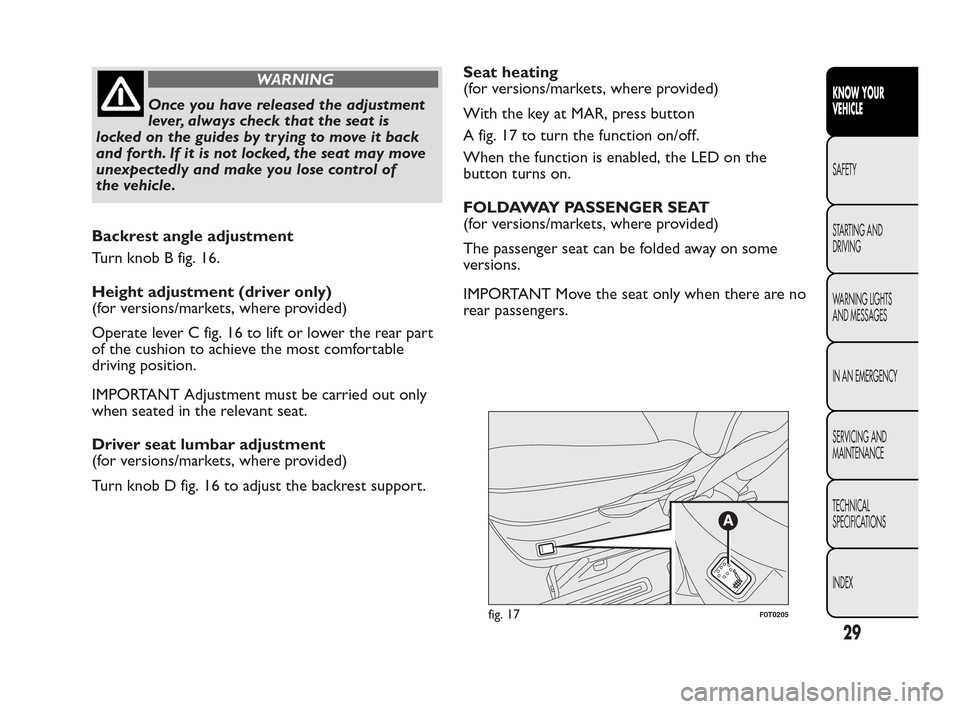
With the key at MAR, press button
A fig. 17 to turn the function on/off.
When the function is enabled, the LED on the
button turns on.
FOLDAWAY PASSENGER SEAT
(for versions/markets, where provided)
The passenger seat can be folded away on some
versions.
IMPORTANT Move the seat only when there are no
rear passengers.
fig. 17F0T0205
29
KNOW YOUR
VEHICLE
SAFETY
ST
ARTING AND
DRIVING
WARNING LIGHTS
AND MESSAGES
IN AN EMERGENCY
SERVICING AND
MAINTENANCE
TECHNICAL
SPECIFICATIONS
INDEX
Page 37 of 230
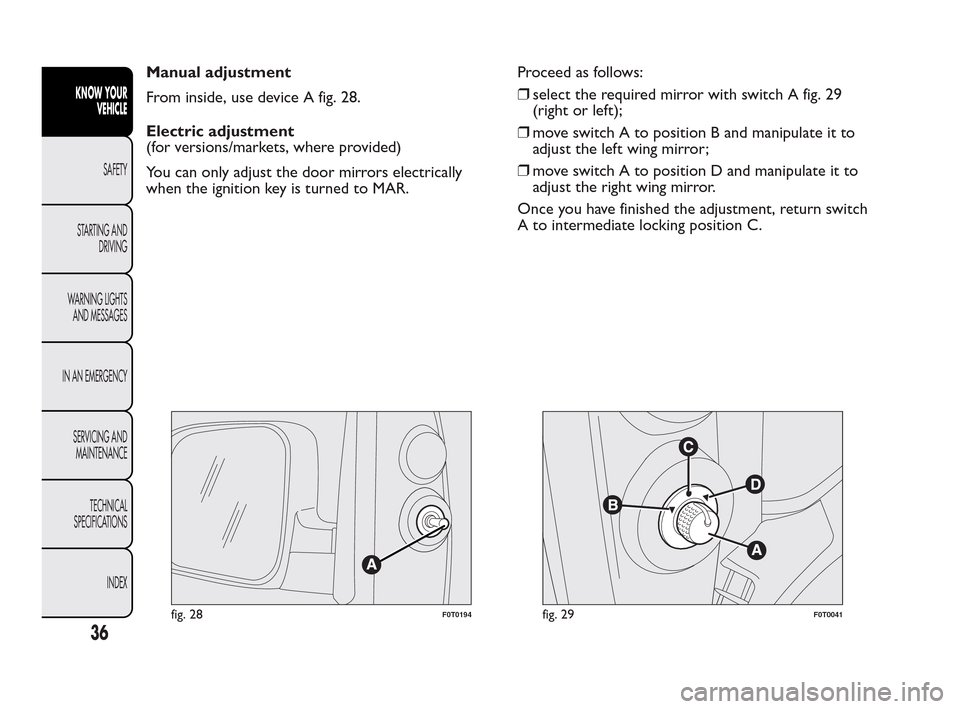
Manual adjustment
From inside, use device A fig. 28.
Electric adjustment
(for versions/markets, where provided)
You can only adjust the door mirrors electrically
when the ignition key is turned to MAR.Proceed as follows:
❒select the required mirror with switch A fig. 29
(right or left);
❒move switch A to position B and manipulate it to
adjust the left wing mirror;
❒move switch A to position D and manipulate it to
adjust the right wing mirror.
Once you have finished the adjustment, return switch
A to intermediate locking position C.
fig. 28F0T0194fig. 29F0T0041
36
KNOW YOUR
VEHICLE
SAFETY
ST
ARTING AND
DRIVING
WARNING LIGHTS
AND MESSAGES
IN AN EMERGENCY
SERVICING AND
MAINTENANCE
TECHNICAL
SPECIFICATIONS
INDEX
Page 46 of 230
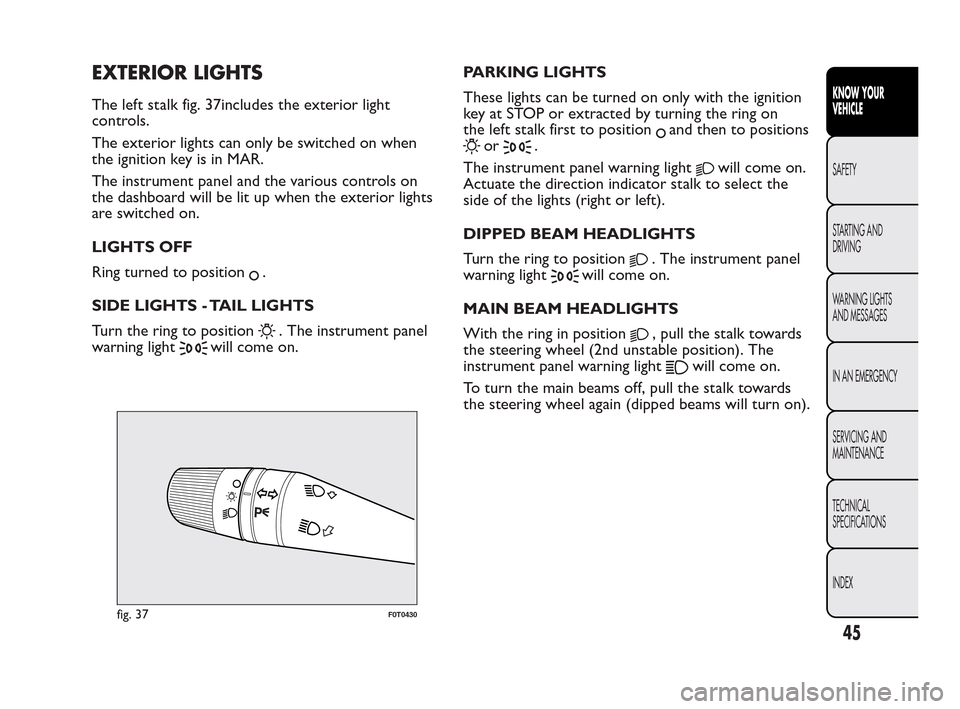
EXTERIOR LIGHTS
The left stalk fig. 37includes the exterior light
controls.
The exterior lights can only be switched on when
the ignition key is in MAR.
The instrument panel and the various controls on
the dashboard will be lit up when the exterior lights
are switched on.
LIGHTS OFF
Ring turned to position
.
SIDE LIGHTS - TAIL LIGHTS
Turn the ring to position
. The instrument panel
warning light
will come on.PARKING LIGHTS
These lights can be turned on only with the ignition
key at STOP or extracted by turning the ring on
the left stalk first to position
and then to positions
or.
The instrument panel warning light
will come on.
Actuate the direction indicator stalk to select the
side of the lights (right or left).
DIPPED BEAM HEADLIGHTS
Turn the ring to position
. The instrument panel
warning light
will come on.
MAIN BEAM HEADLIGHTS
With the ring in position
, pull the stalk towards
the steering wheel (2nd unstable position). The
instrument panel warning light
will come on.
To turn the main beams off, pull the stalk towards
the steering wheel again (dipped beams will turn on).
fig. 37F0T0430
45
KNOW YOUR
VEHICLE
SAFETY
ST
ARTING AND
DRIVING
WARNING LIGHTS
AND MESSAGES
IN AN EMERGENCY
SERVICING AND
MAINTENANCE
TECHNICAL
SPECIFICATIONS
INDEX
Page 48 of 230
“FOLLOW ME HOME” DEVICE
This device lights up the space in front of the vehicle
for a short time.
Activation
With the ignition key in the STOP position or
extracted, pull the stalk towards the steering wheel
and move it within 2 minutes of the engine switching
off.
Each time the stalk is moved, the lights stay on for an
extra 30 seconds up to a maximum of 210 seconds;
then the lights are switched off automatically.
Each time the stalk is moved, instrument panel
warning light
comes on and the corresponding
message will appear on the display (see “Warning
lights and messages”) for as long as the function
remains on. The light comes on when the stalk is
first moved and stays on until the function is
automatically deactivated. Each movement of the
stalk increases only the amount of time the lights
stay on.
Deactivation
Keep the stalk pulled towards the steering wheel for
more than 2 seconds.
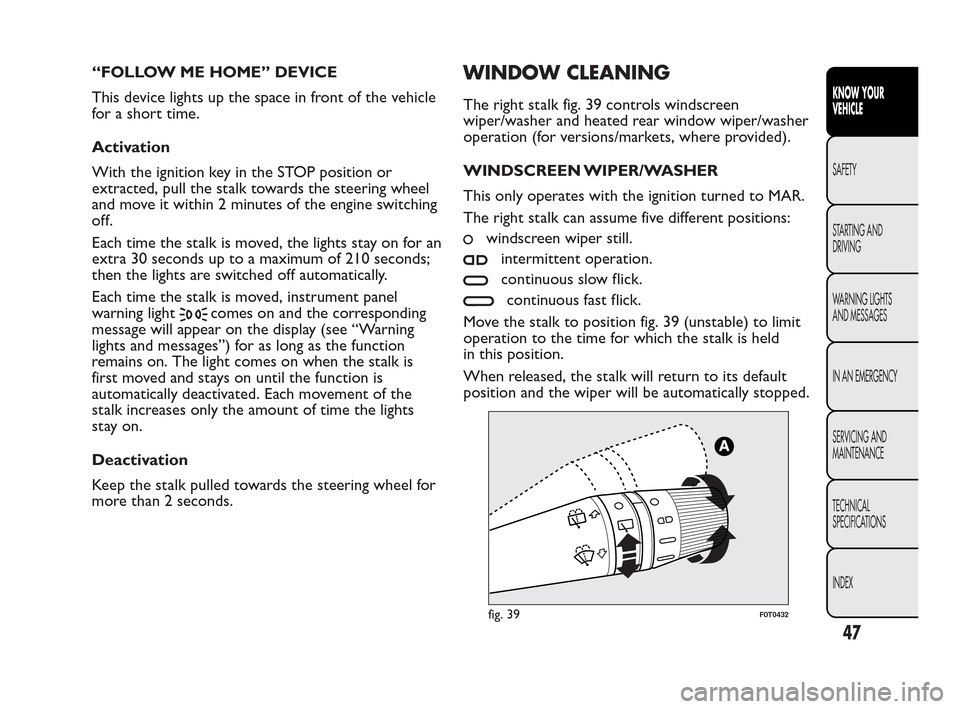
WINDOW CLEANING
The right stalk fig. 39 controls windscreen
wiper/washer and heated rear window wiper/washer
operation (for versions/markets, where provided).
WINDSCREEN WIPER/WASHER
This only operates with the ignition turned to MAR.
The right stalk can assume five different positions:
windscreen wiper still.
intermittent operation.
continuous slow flick.
continuous fast flick.
Move the stalk to position fig. 39 (unstable) to limit
operation to the time for which the stalk is held
in this position.
When released, the stalk will return to its default
position and the wiper will be automatically stopped.
fig. 39F0T0432
47
KNOW YOUR
VEHICLE
SAFETY
ST
ARTING AND
DRIVING
WARNING LIGHTS
AND MESSAGES
IN AN EMERGENCY
SERVICING AND
MAINTENANCE
TECHNICAL
SPECIFICATIONS
INDEX
Page 52 of 230
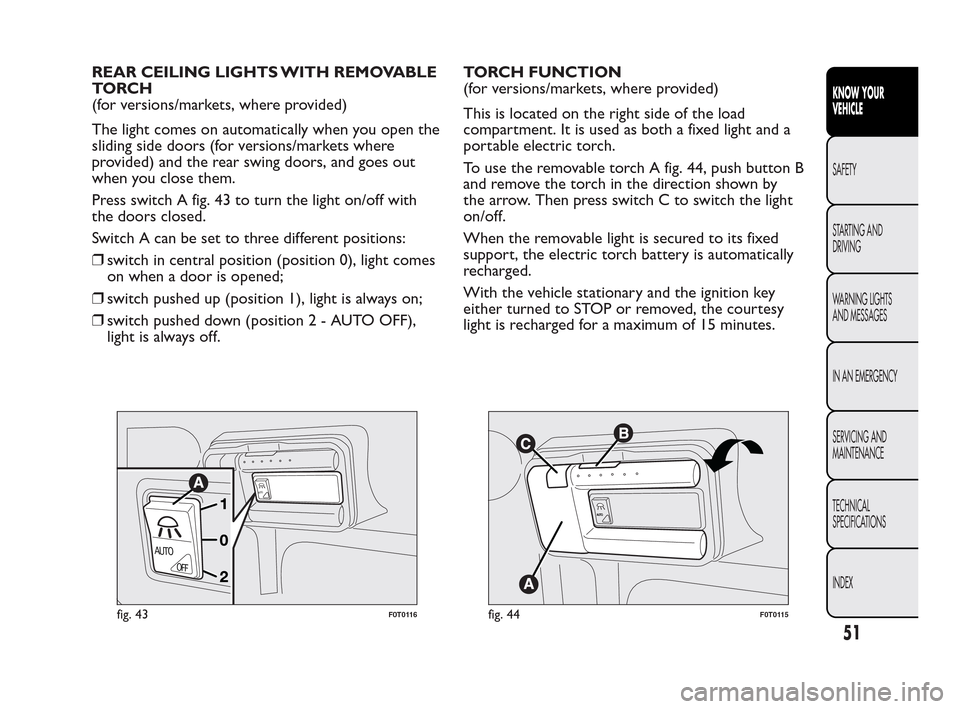
REAR CEILING LIGHTS WITH REMOVABLE
TO RC H
(for versions/markets, where provided)
The light comes on automatically when you open the
sliding side doors (for versions/markets where
provided) and the rear swing doors, and goes out
when you close them.
Press switch A fig. 43 to turn the light on/off with
the doors closed.
Switch A can be set to three different positions:
❒switch in central position (position 0), light comes
on when a door is opened;
❒switch pushed up (position 1), light is always on;
❒switch pushed down (position2-AUTOOFF),
light is always off.TORCH FUNCTION
(for versions/markets, where provided)
This is located on the right side of the load
compartment. It is used as both a fixed light and a
portable electric torch.
To use the removable torch A fig. 44, push button B
and remove the torch in the direction shown by
the arrow. Then press switch C to switch the light
on/off.
When the removable light is secured to its fixed
support, the electric torch battery is automatically
recharged.
With the vehicle stationary and the ignition key
either turned to STOP or removed, the courtesy
light is recharged for a maximum of 15 minutes.
AUTO
AUTO
OFF
fig. 43F0T0116
AUT
O
fig. 44F0T0115
51
KNOW YOUR
VEHICLE
SAFETY
ST
ARTING AND
DRIVING
WARNING LIGHTS
AND MESSAGES
IN AN EMERGENCY
SERVICING AND
MAINTENANCE
TECHNICAL
SPECIFICATIONS
INDEX
Page 54 of 230
COMMANDS
HAZARD LIGHTS
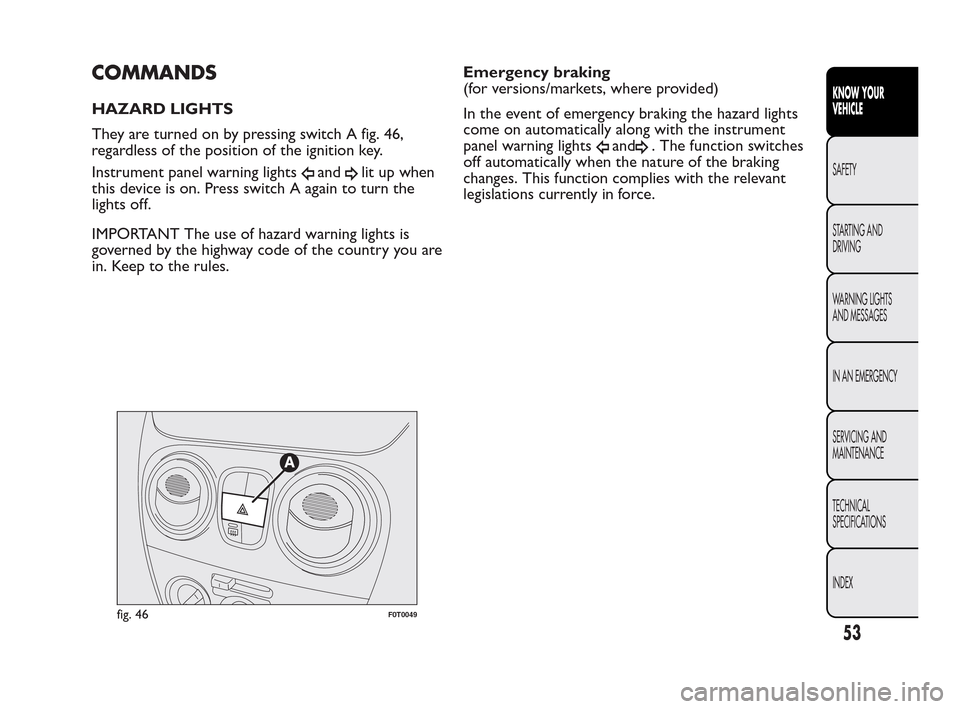
They are turned on by pressing switch A fig. 46,
regardless of the position of the ignition key.
Instrument panel warning lights
andlit up when
this device is on. Press switch A again to turn the
lights off.
IMPORTANT The use of hazard warning lights is
governed by the highway code of the country you are
in. Keep to the rules.Emergency braking
(for versions/markets, where provided)
In the event of emergency braking the hazard lights
come on automatically along with the instrument
panel warning lights
and. The function switches
off automatically when the nature of the braking
changes. This function complies with the relevant
legislations currently in force.
fig. 46F0T0049
53
KNOW YOUR
VEHICLE
SAFETY
ST
ARTING AND
DRIVING
WARNING LIGHTS
AND MESSAGES
IN AN EMERGENCY
SERVICING AND
MAINTENANCE
TECHNICAL
SPECIFICATIONS
INDEX
Page 56 of 230
GLOVE COMPARTMENT
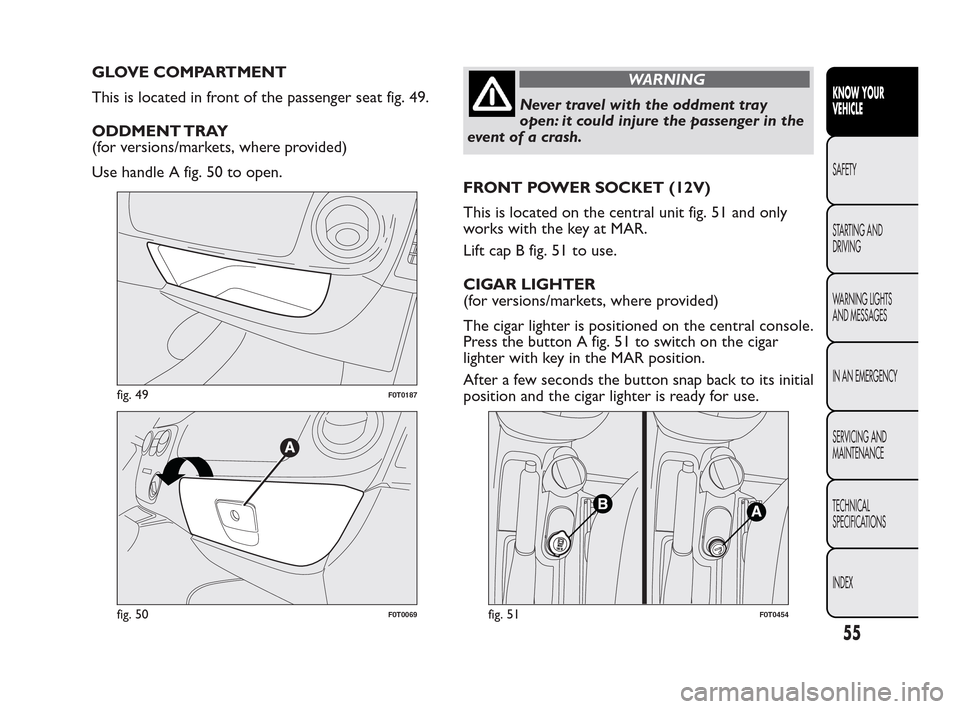
This is located in front of the passenger seat fig. 49.
ODDMENT TRAY
(for versions/markets, where provided)
Use handle A fig. 50 to open.WARNING
Never travel with the oddment tray
o
pen: it could injure the passenger in the
event of a crash.
FRONT POWER SOCKET (12V)
This is located on the central unit fig. 51 and only
works with the key at MAR.
Lift cap B fig. 51 to use.
CIGAR LIGHTER
(for versions/markets, where provided)
The cigar lighter is positioned on the central console.
Press the button A fig. 51 to switch on the cigar
lighter with key in the MAR position.
After a few seconds the button snap back to its initial
position and the cigar lighter is ready for use.
fig. 49F0T0187
fig. 50F0T0069fig. 51F0T0454
55
KNOW YOUR
VEHICLE
SAFETY
ST
ARTING AND
DRIVING
WARNING LIGHTS
AND MESSAGES
IN AN EMERGENCY
SERVICING AND
MAINTENANCE
TECHNICAL
SPECIFICATIONS
INDEX