display FIAT QUBO 2015 1.G User Guide
[x] Cancel search | Manufacturer: FIAT, Model Year: 2015, Model line: QUBO, Model: FIAT QUBO 2015 1.GPages: 231, PDF Size: 5.01 MB
Page 24 of 231
NoteThe setting increases or decreases by one unit
each time
or
is pressed. Keeping the button
pressed causes an automatic speed increase/
decrease. Complete the setting by single pressing the
button when you approach the required value.
- press the MENU ESC button briefly to return to
the menu screen or give the button a long press
to return to the standard screen without storing.
Audio information (See radio)
This function is used to display radio information.
- Radio: selected radio station frequency or RDS
message, automatic tuning activation or AutoSTore;
- Audio CD, MP3 CDs: track number;
- CD Changer: CD number and track number;
To show the car radio information on the display
(on) or not (off ), proceed as follows:
- briefly press MENU ESC: On or Off will flash on
the display (depending on previous setting);
- press
or
to make your choice;
- press the MENU ESC button briefly to return to
the menu screen or give the button a long press
to return to the standard screen without storing.
Automatic central door locking with vehicle
running (Autoclose)
After activation (On) this function allows the
automatic locking of the doors to be activated when
the speed exceeds 20 km/h.To activate (On) or deactivate (Off ) this function,
proceed as follows:
- press the MENU ESC button briefly: the display will
show a submenu;
- briefly press MENU ESC: On or Off will flash on
the display (depending on previous setting);
- press
or
to make your choice;
- briefly press the MENU ESC button to go back to
the submenu screen or hold the button down to
go back to the main menu screen without saving;
- hold down MENU ESC again to go back to the
standard screen or main menu, depending on which
point in the menu you have reached.
Setting the unit of measurement
With this function it is possible to set the
measurement units through three submenus:
“Distance”, “Consumption” and “Temperature”.
To set the desired measurement unit, proceed
as follows:
- briefly press MENU ESC to display the three
submenus;
- press
or
to switch between the three
submenus;
- once the submenu to be modified has been
selected, briefly press the MENU ESC button;
- if the submenu “Distances” is entered: by briefly
pressing SET ESC the display shows "km" or "mi"
depending on the previous setting;
20KNOW YOUR
VEHICLE
SAFETY
STARTING AND
DRIVING
WARNING LIGHTS
AND MESSAGES
IN AN EMERGENCY
SERVICING AND
MAINTENANCE
TECHNICAL
SPECIFICATIONS
INDEX
Page 25 of 231
- press
or
to make your choice;
- when you select “Consumption”, pressing SET ESC
makes km/l, l/100km or mpg appear on the display
(depending on the previous setting);
If the set distance unit is "km", the display enables
setting of the fuel consumption unit (km/l or
l/100km).
If the set distance unit is "mi", the display shows the
amount of fuel consumed in "mpg".
- press
or
to make your choice;
- if the submenu “Distances” is entered: by briefly
pressing SET ESC the display shows "km" or "mi"
depending on the previous setting;
- press
or
to make your choice;
When you have made the required adjustments,
press SET ESC to go back to the submenu screen or
hold the button down to go back to the main menu
screen without saving.
- hold down MENU ESC again to go back to the
standard screen or main menu, depending on which
point in the menu you have reached.
Selecting the language (Language)
Display messages can be shown in different
languages: Italian, German, English, Spanish, French,
Portuguese, Turkish and Dutch.
To set the required language, proceed as follows:
- briefly press MENU ESC: the previously set
language will flash on the display;- press
or
to make your choice;
- press the MENU ESC button briefly to return to
the menu screen or give the button a long press
to return to the standard screen without storing.
Adjusting the failure/warning buzzer volume
(Alert Volume)
With this function is possible to adjust (to eight
levels) the volume of the acoustic signal which
sounds in the event of alerts and warning.
To set the desired volume, proceed as follows:
- briefly press MENU ESC: the previously set volume
level will flash on the display;
- press the
or
button to make the
adjustment;
- press the MENU ESC button briefly to return to
the menu screen or give the button a long press
to return to the standard screen without storing.
Adjusting the button volume (Button Vol.)
This function may be used to adjust (over 8 levels)
the volume of the noise made when the MENU ESC,
and
buttons are pressed.
To set the desired volume, proceed as follows:
- briefly press MENU ESC: the previously set volume
level will flash on the display;
- press the
or
button to make the
adjustment;
21KNOW YOUR
VEHICLESAFETY
STARTING AND
DRIVING
WARNING LIGHTS
AND MESSAGES
IN AN EMERGENCY
SERVICING AND
MAINTENANCE
TECHNICAL
SPECIFICATIONS
INDEX
Page 26 of 231
- press the MENU ESC button briefly to return to
the menu screen or give the button a long press
to return to the standard screen without storing.
SBR buzzer reactivation (Belt Buzzer)
This function can be displayed only after a Fiat
Dealership has deactivated the SBR system (see “SBR
system” in the “Safety” section).
Scheduled Servicing (Service)
This function is used to display information related to
regular servicing intervals.
This information can be consulted as follows:
- briefly press MENU ESC: service intervals in km or
mi, depending on the previous setting, will be
displayed (see “Setting the unit of measurement”);
- press the MENU ESC button briefly to return
to the menu screen or hold the button down to
return to the standard screen.
NoteThe “Scheduled Servicing Plan” requires the
vehicle to be serviced every 30,000 km (or 18,000
mi). This indication will appear automatically, with
the key at MAR, starting from 2,000 km (or 1,240
mi) and will be displayed every 200 km (or 124 mi).
Below 200 km the signals become more frequent.
The display will be in km or miles according to
the unit of measurement set. When the next service
is close, when the ignition is turned ON the word
"Service" appears in the display followed by the
remaining number of kilometres/miles. Go to a FiatDealership, where the "Scheduled Service Plan"
operations will be performed and the message will
be reset.
Passenger airbag and side bag activation/
deactivation (Passenger bag)
(for versions/markets, where provided)
This function is used to activated/deactivated the
passenger's airbag.
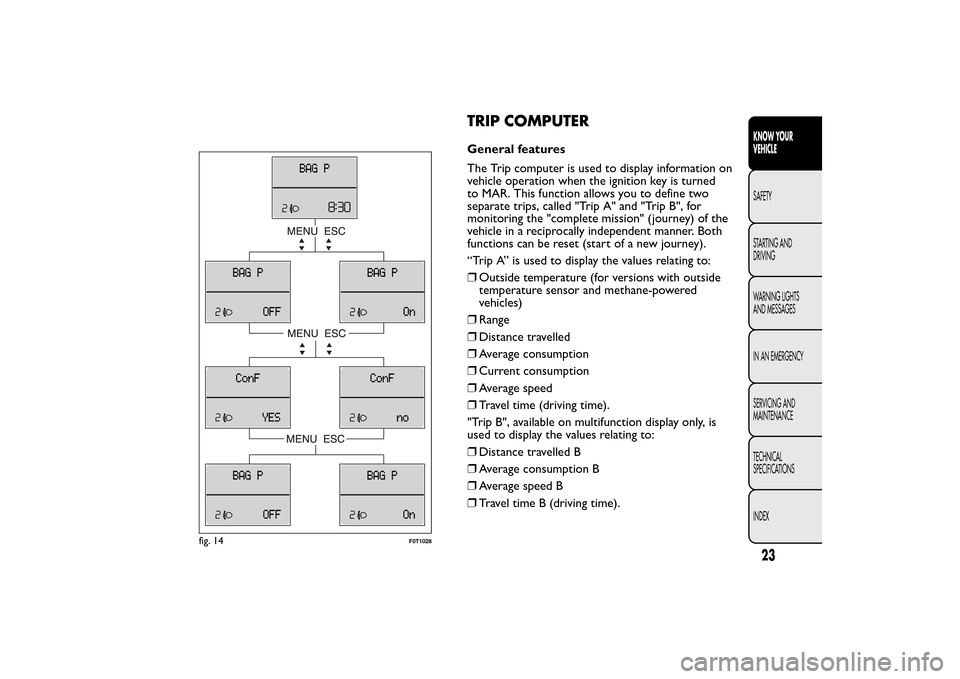
Proceed as follows fig. 14:
❒press MENU ESC and, after the message BAG P
OFF (to deactivate) or BAG P On (to activate) is
displayed by pressing buttons
and
, press
MENU ESC again;
❒the confirmation request message will appear on
the display;
❒use the
or
menu buttons to select (Yes)
(to confirm the activation/deactivation) or (No)
(to cancel);
❒press the MENU ESC button briefly; a selection
confirmation message will be displayed after which
the program returns to the menu screen.
Alternatively, press and hold down the button to
return to the standard screen without storing.
Exit menu
This function closes the settings listed on the menu
screen.
Briefly press MENU ESC to go back to the standard
screen without saving.
22KNOW YOUR
VEHICLE
SAFETY
STARTING AND
DRIVING
WARNING LIGHTS
AND MESSAGES
IN AN EMERGENCY
SERVICING AND
MAINTENANCE
TECHNICAL
SPECIFICATIONS
INDEX
Press
to return to the first menu option (Speed
Beep).
Page 27 of 231
TRIP COMPUTERGeneral features
The Trip computer is used to display information on
vehicle operation when the ignition key is turned
to MAR. This function allows you to define two
separate trips, called "Trip A" and "Trip B", for
monitoring the "complete mission" (journey) of the
vehicle in a reciprocally independent manner. Both
functions can be reset (start of a new journey).
“Trip A” is used to display the values relating to:
❒Outside temperature (for versions with outside
temperature sensor and methane-powered
vehicles)
❒Range
❒Distance travelled
❒Average consumption
❒Current consumption
❒Average speed
❒Travel time (driving time).
"Trip B", available on multifunction display only, is
used to display the values relating to:
❒Distance travelled B
❒Average consumption B
❒Average speed B
❒Travel time B (driving time).
fig. 14
F0T1028
23KNOW YOUR
VEHICLESAFETY
STARTING AND
DRIVING
WARNING LIGHTS
AND MESSAGES
IN AN EMERGENCY
SERVICING AND
MAINTENANCE
TECHNICAL
SPECIFICATIONS
INDEX
Page 28 of 231
“Trip B” may be disabled (see “Activating
Trip B”). “Range” and “Instant
consumption" parameters cannot be
reset .
Values displayed
Range
Range (for versions/markets where provided)
This value shows the distance that the car can still
cover before needing fuel, assuming that driving style
is unvaried. “----”will appear on the display in
the following cases:
❒range is lower than 50 km (or 30 mi)
❒vehicle is left parked with the engine running for a
long time.
IMPORTANT The range can be affected by several
factors: driving style (see “Driving style” in the
“Starting and driving” section), type of route
(motorway, towns and cities, mountain roads, etc.),
conditions of use (load, tyre pressures, etc.). Trip
planning must therefore take the above into account.
Distance travelled
This value shows the distance covered from the start
of the new journey.Average consumption
This value shows the approximate average fuel
consumption from the start of the new journey.
Current consumption
This value shows the fuel consumption. The value is
constantly updated. The message “----” will appear
on the display if the vehicle is parked with the engine
running.
Average speed
Shows the average speed of the vehicle by using the
overall time elapsed since the start of a new journey.
Journey time
Time elapsed since the start of the new journey.
IMPORTANT If there is no information, the Trip
computer displays "----" in place of the value. When
normal operating conditions are restored, the
counting of the various values is resumed, without
either zeroing the values displayed prior to the
problem, or starting a new journey.
24KNOW YOUR
VEHICLE
SAFETY
STARTING AND
DRIVING
WARNING LIGHTS
AND MESSAGES
IN AN EMERGENCY
SERVICING AND
MAINTENANCE
TECHNICAL
SPECIFICATIONS
INDEX
Page 29 of 231
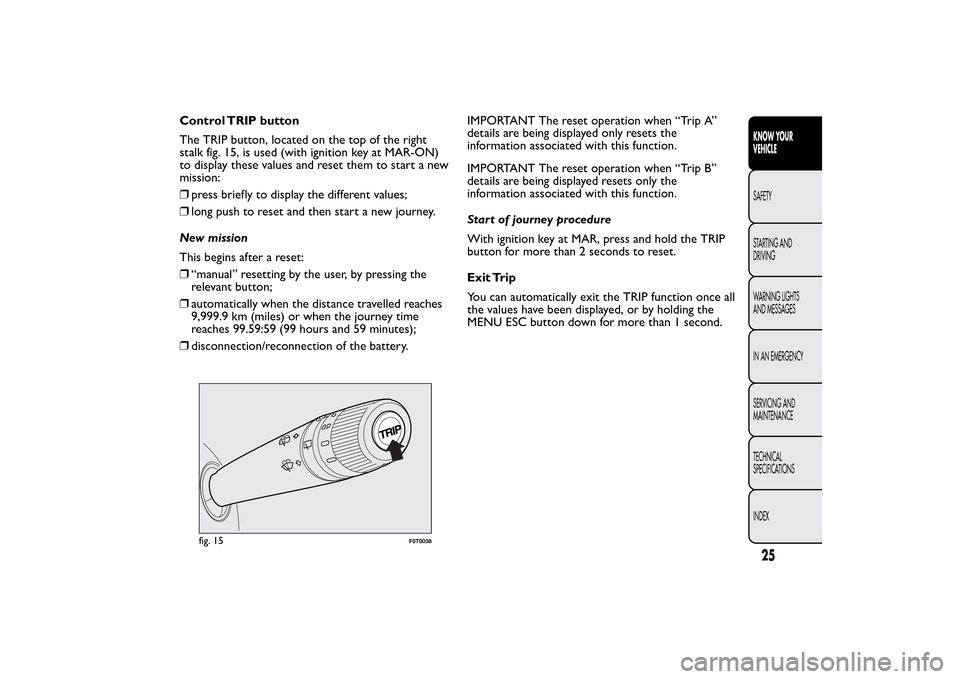
Control TRIP button
The TRIP button, located on the top of the right
stalk fig. 15, is used (with ignition key at MAR-ON)
to display these values and reset them to start a new
mission:
❒press briefly to display the different values;
❒long push to reset and then start a new journey.
New mission
This begins after a reset:
❒“manual” resetting by the user, by pressing the
relevant button;
❒automatically when the distance travelled reaches
9,999.9 km (miles) or when the journey time
reaches 99.59:59 (99 hours and 59 minutes);
❒disconnection/reconnection of the battery.IMPORTANT The reset operation when “Trip A”
details are being displayed only resets the
information associated with this function.
IMPORTANT The reset operation when “Trip B”
details are being displayed resets only the
information associated with this function.
Start of journey procedure
With ignition key at MAR, press and hold the TRIP
button for more than 2 seconds to reset.
Exit Trip
You can automatically exit the TRIP function once all
the values have been displayed, or by holding the
MENU ESC button down for more than 1 second.
fig. 15
F0T0038
25KNOW YOUR
VEHICLESAFETY
STARTING AND
DRIVING
WARNING LIGHTS
AND MESSAGES
IN AN EMERGENCY
SERVICING AND
MAINTENANCE
TECHNICAL
SPECIFICATIONS
INDEX
Page 46 of 231
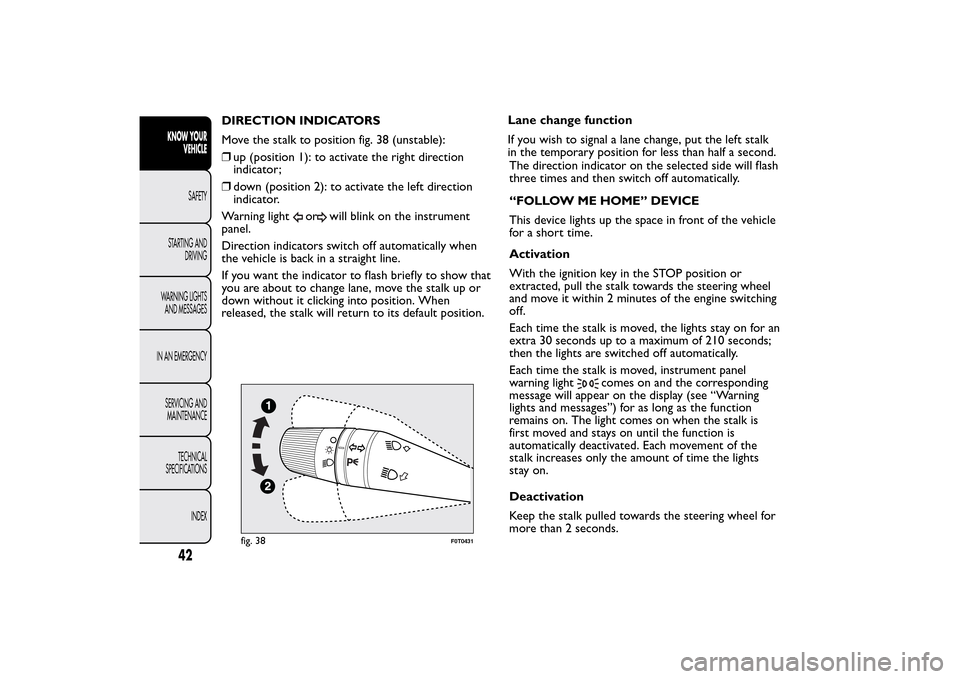
DIRECTION INDICATORS
Move the stalk to position fig. 38 (unstable):
❒up (position 1): to activate the right direction
indicator;
❒down (position 2): to activate the left direction
indicator.
Warning light
or
will blink on the instrument
panel.
Direction indicators switch off automatically when
the vehicle is back in a straight line.
If you want the indicator to flash briefly to show that
you are about to change lane, move the stalk up or
down without it clicking into position. When
released, the stalk will return to its default position.Lane change function
If you wish to signal a lane change, put the left stalk
in the temporary position for less than half a second.
The direction indicator on the selected side will flash
three times and then switch off automatically.
“FOLLOW ME HOME” DEVICE
This device lights up the space in front of the vehicle
for a short time.
Activation
With the ignition key in the STOP position or
extracted, pull the stalk towards the steering wheel
and move it within 2 minutes of the engine switching
off.
Each time the stalk is moved, the lights stay on for an
extra 30 seconds up to a maximum of 210 seconds;
then the lights are switched off automatically.
Each time the stalk is moved, instrument panel
warning light
comes on and the corresponding
message will appear on the display (see “Warning
lights and messages”) for as long as the function
remains on. The light comes on when the stalk is
first moved and stays on until the function is
automatically deactivated. Each movement of the
stalk increases only the amount of time the lights
stay on.
Deactivation
Keep the stalk pulled towards the steering wheel for
more than 2 seconds.
fig. 38
F0T0431
42KNOW YOUR
VEHICLE
SAFETY
STARTING AND
DRIVING
WARNING LIGHTS
AND MESSAGES
IN AN EMERGENCY
SERVICING AND
MAINTENANCE
TECHNICAL
SPECIFICATIONS
INDEX
Page 72 of 231
HEADLIGHTSLIGHT BEAM DIRECTION
The correct direction of the headlights is essential
for the comfort and safety of the driver and other
road users. To ensure the best visibility when
travelling with the headlights on, the headlight
alignment must be correct. Contact a Fiat Dealership
to have the direction checked and, if necessary,
adjusted.
HEADLIGHT ALIGNMENT CORRECTOR
This device works with the ignition key in the MAR
position and the dipped headlights on.
The vehicle tilts backwards when it is laden, raising
the beam.
The beams must therefore be aimed again in this
case.Adjusting headlight alignment
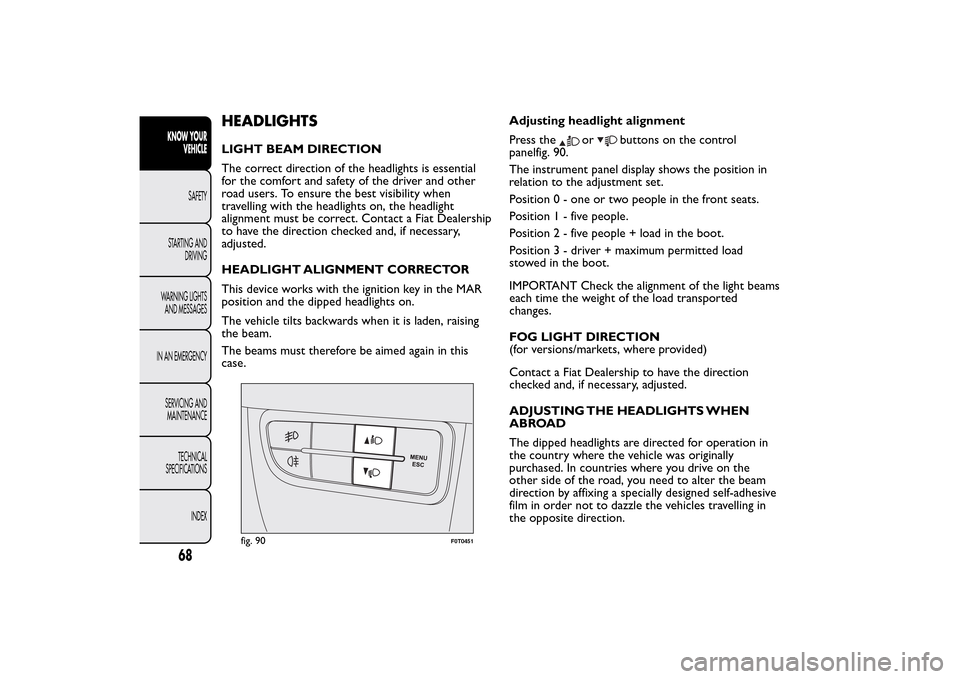
Press the
or
buttons on the control
panelfig. 90.
The instrument panel display shows the position in
relation to the adjustment set.
Position 0 - one or two people in the front seats.
Position1-fivepeople.
Position2-fivepeople + load in the boot.
Position 3 - driver + maximum permitted load
stowed in the boot.
IMPORTANT Check the alignment of the light beams
each time the weight of the load transported
changes.
FOG LIGHT DIRECTION
(for versions/markets, where provided)
Contact a Fiat Dealership to have the direction
checked and, if necessary, adjusted.
ADJUSTING THE HEADLIGHTS WHEN
ABROAD
The dipped headlights are directed for operation in
the country where the vehicle was originally
purchased. In countries where you drive on the
other side of the road, you need to alter the beam
direction by affixing a specially designed self-adhesive
film in order not to dazzle the vehicles travelling in
the opposite direction.
fig. 90
F0T0451
68KNOW YOUR
VEHICLE
SAFETY
STARTING AND
DRIVING
WARNING LIGHTS
AND MESSAGES
IN AN EMERGENCY
SERVICING AND
MAINTENANCE
TECHNICAL
SPECIFICATIONS
INDEX
Page 74 of 231
FAILURE INDICATIONS
ABS failure
ABS failure is indicated by warning light
in the
instrument panel coming on (together with the
appropriate message on the multifunction display on
some versions) (see “Warning lights and messages”).
In this case, the braking system will work as normal,
but without the extra capacity offered by the ABS
system. Drive carefully to the nearest Fiat Dealership
to have the system checked.
EBD failure
ABS failure is indicated by warning lightand
in
the instrument panel coming on (together with the
appropriate message on the multifunction display
on some versions) (see “Warning lights and
messages”).
In this case, the rear wheels may suddenly lock and
the vehicle may swerve when braking sharply. Drive
carefully to the nearest Fiat Dealership to have
the system checked.
WARNING
If only warning light
lights up in the
instrument panel (with a message in the
multifunction display on some versions), stop
the vehicle immediately and contact the nearest
Fiat Dealership. Fluid leaking from the
hydraulic system will compromise the operation
of the braking system, whether it is of the
conventional type or with ABS.
70KNOW YOUR
VEHICLE
SAFETY
STARTING AND
DRIVING
WARNING LIGHTS
AND MESSAGES
IN AN EMERGENCY
SERVICING AND
MAINTENANCE
TECHNICAL
SPECIFICATIONS
INDEX
Page 75 of 231
ESP SYSTEM (Electronic Stability
Program)(for versions/markets, where provided)
This is an electronic system that controls vehicle
stability in the event of tyre grip loss, helping to
maintain directional control.
The ESP system is therefore particularly useful when
the grip conditions of road surfaces change.
The MSR system (adjustment of the engine braking
torque during gear changes) and the HBA system
(automatic increase in the braking pressure during
emergency braking) are present with ESP, ASR and
Hill Holder systems (for versions/markets where
provided).SYSTEM INTERVENTION
It is signalled by the blinking of the instrument panel
warning light
, to inform the driver that the car
is in critical stability and grip conditions.
Switching the system on
The ESP system is automatically activated when the
vehicle is started and cannot be de-activated.
Failure indications
In the event of a failure, the ESP will be automatically
switched off and the
warning light will come on
permanently on the instrument panel along with
a message on the multifunction display (for
versions/markets, where provided) (see “Warning
lights and messages” section). The LED on the ASR
OFF button will also light up. Contact a Fiat
Dealership as soon as possible.WARNING
Do not take unnecessary risks, even if
your vehicle is fitted with an ESP
system.Your driving style should always take
road conditions, visibility and traffic into
account .The driver is always responsible for
road safety.
71KNOW YOUR
VEHICLESAFETY
STARTING AND
DRIVING
WARNING LIGHTS
AND MESSAGES
IN AN EMERGENCY
SERVICING AND
MAINTENANCE
TECHNICAL
SPECIFICATIONS
INDEX