stop start FIAT QUBO 2016 1.G User Guide
[x] Cancel search | Manufacturer: FIAT, Model Year: 2016, Model line: QUBO, Model: FIAT QUBO 2016 1.GPages: 231, PDF Size: 5.02 MB
Page 45 of 231
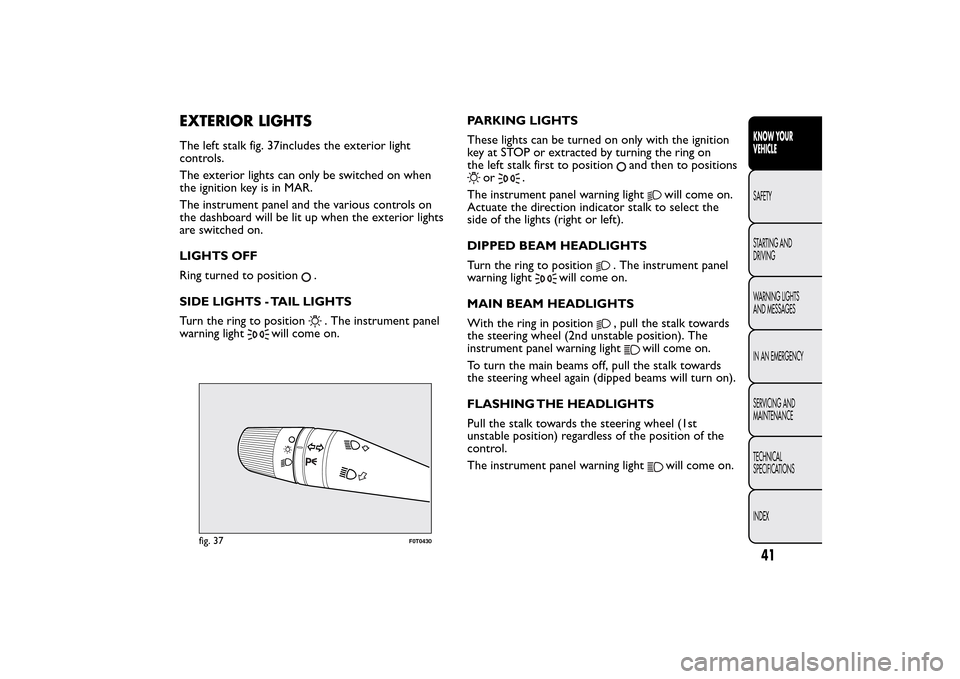
EXTERIOR LIGHTSThe left stalk fig. 37includes the exterior light
controls.
The exterior lights can only be switched on when
the ignition key is in MAR.
The instrument panel and the various controls on
the dashboard will be lit up when the exterior lights
are switched on.
LIGHTS OFF
Ring turned to position
.
SIDE LIGHTS - TAIL LIGHTS
Turn the ring to position. The instrument panel
warning light
will come on.PARKING LIGHTS
These lights can be turned on only with the ignition
key at STOP or extracted by turning the ring on
the left stalk first to position
and then to positions
or
.
The instrument panel warning light
will come on.
Actuate the direction indicator stalk to select the
side of the lights (right or left).
DIPPED BEAM HEADLIGHTS
Turn the ring to position
. The instrument panel
warning light
will come on.
MAIN BEAM HEADLIGHTS
With the ring in position
, pull the stalk towards
the steering wheel (2nd unstable position). The
instrument panel warning light
will come on.
To turn the main beams off, pull the stalk towards
the steering wheel again (dipped beams will turn on).
FLASHING THE HEADLIGHTS
Pull the stalk towards the steering wheel (1st
unstable position) regardless of the position of the
control.
The instrument panel warning light
will come on.
fig. 37
F0T0430
41KNOW YOUR
VEHICLESAFETY
STARTING AND
DRIVING
WARNING LIGHTS
AND MESSAGES
IN AN EMERGENCY
SERVICING AND
MAINTENANCE
TECHNICAL
SPECIFICATIONS
INDEX
Page 46 of 231
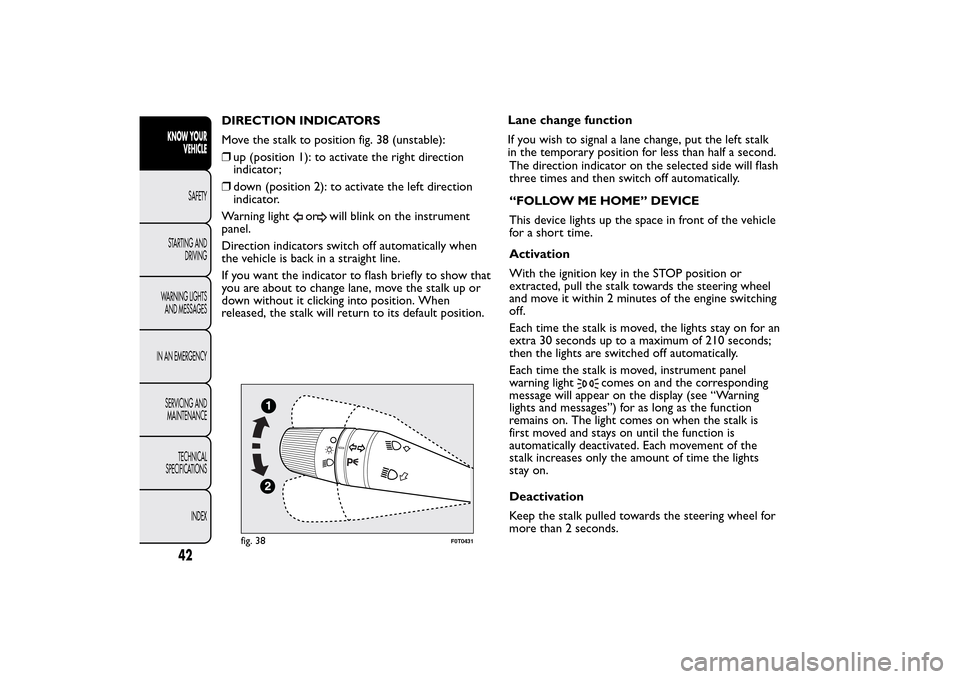
DIRECTION INDICATORS
Move the stalk to position fig. 38 (unstable):
❒up (position 1): to activate the right direction
indicator;
❒down (position 2): to activate the left direction
indicator.
Warning light
or
will blink on the instrument
panel.
Direction indicators switch off automatically when
the vehicle is back in a straight line.
If you want the indicator to flash briefly to show that
you are about to change lane, move the stalk up or
down without it clicking into position. When
released, the stalk will return to its default position.Lane change function
If you wish to signal a lane change, put the left stalk
in the temporary position for less than half a second.
The direction indicator on the selected side will flash
three times and then switch off automatically.
“FOLLOW ME HOME” DEVICE
This device lights up the space in front of the vehicle
for a short time.
Activation
With the ignition key in the STOP position or
extracted, pull the stalk towards the steering wheel
and move it within 2 minutes of the engine switching
off.
Each time the stalk is moved, the lights stay on for an
extra 30 seconds up to a maximum of 210 seconds;
then the lights are switched off automatically.
Each time the stalk is moved, instrument panel
warning light
comes on and the corresponding
message will appear on the display (see “Warning
lights and messages”) for as long as the function
remains on. The light comes on when the stalk is
first moved and stays on until the function is
automatically deactivated. Each movement of the
stalk increases only the amount of time the lights
stay on.
Deactivation
Keep the stalk pulled towards the steering wheel for
more than 2 seconds.
fig. 38
F0T0431
42KNOW YOUR
VEHICLE
SAFETY
STARTING AND
DRIVING
WARNING LIGHTS
AND MESSAGES
IN AN EMERGENCY
SERVICING AND
MAINTENANCE
TECHNICAL
SPECIFICATIONS
INDEX
Page 47 of 231
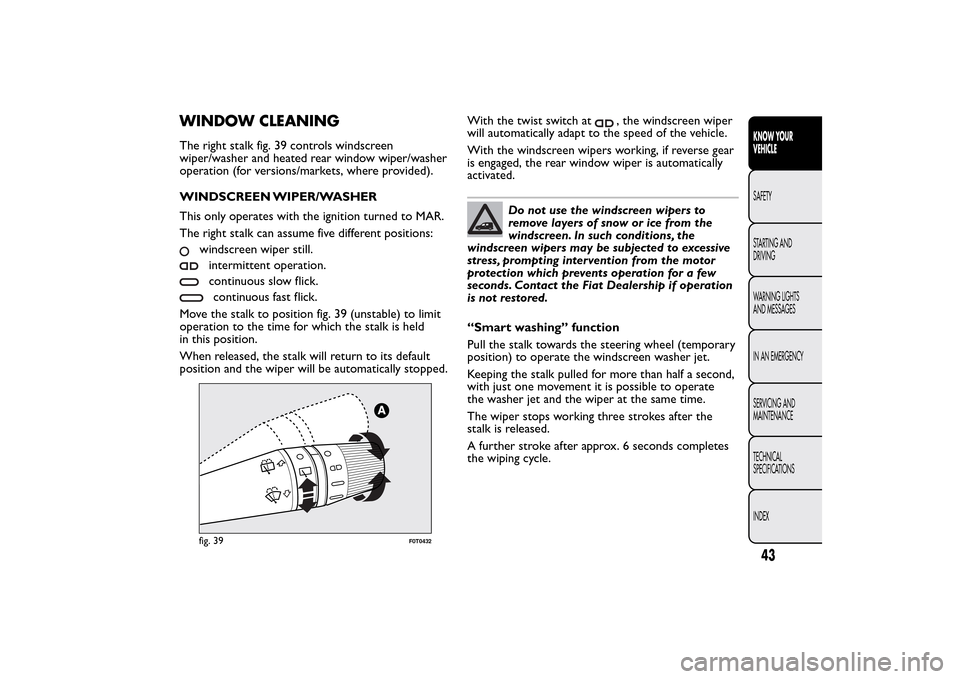
WINDOW CLEANINGThe right stalk fig. 39 controls windscreen
wiper/washer and heated rear window wiper/washer
operation (for versions/markets, where provided).
WINDSCREEN WIPER/WASHER
This only operates with the ignition turned to MAR.
The right stalk can assume five different positions:
windscreen wiper still.intermittent operation.continuous slow flick.continuous fast flick.
Move the stalk to position fig. 39 (unstable) to limit
operation to the time for which the stalk is held
in this position.
When released, the stalk will return to its default
position and the wiper will be automatically stopped.With the twist switch at
, the windscreen wiper
will automatically adapt to the speed of the vehicle.
With the windscreen wipers working, if reverse gear
is engaged, the rear window wiper is automatically
activated.
Do not use the windscreen wipers to
remove layers of snow or ice from the
windscreen. In such conditions, the
windscreen wipers may be subjected to excessive
stress, prompting intervention from the motor
protection which prevents operation for a few
seconds. Contact the Fiat Dealership if operation
is not restored.
“Smart washing” function
Pull the stalk towards the steering wheel (temporary
position) to operate the windscreen washer jet.
Keeping the stalk pulled for more than half a second,
with just one movement it is possible to operate
the washer jet and the wiper at the same time.
The wiper stops working three strokes after the
stalk is released.
A further stroke after approx. 6 seconds completes
the wiping cycle.
fig. 39
F0T0432
43KNOW YOUR
VEHICLESAFETY
STARTING AND
DRIVING
WARNING LIGHTS
AND MESSAGES
IN AN EMERGENCY
SERVICING AND
MAINTENANCE
TECHNICAL
SPECIFICATIONS
INDEX
Page 48 of 231
Activation
Turn the ring to
to operate the rear window
wiper as follows:
❒intermittent operation if the windscreen wiper is
off;
❒in synchronous mode (at half the speed of the
windscreen wiper) when the windscreen wiper
is on;
❒in continuous mode with reverse gear engaged and
the control active.
With the windscreen wiper on and reverse gear
engaged, rear window wiping will be continuous.
Pushing the stalk towards the dashboard (temporary
position) the rear window washer jet will activate.
Keeping the stalk pushed for more than half a second
also the rear window wiper will activate. Releasing
the stalk will activate the smart washing function, as
described for the windscreen wiper.
Deactivation
The function stops when the stalk is released.
Do not use the rear window wiper to
removelayersofsnoworice.In
such conditions, the wiper may be
subjected to excessive stress and the motor
protection, which prevents operation for a few
seconds, may intervene. Contact the Fiat
Dealership if operation is not restored.
CEILING LIGHTSFRONT CEILING LIGHT WITH MOVABLE
LENS
The light comes on automatically when a front door
or sliding side door is opened and goes out when
it is closed.
Press the left-hand side of the lens A fig. 40, as
shown in the diagram, to switch the light on/off
when the doors are closed.
FRONT CEILING LIGHT WITH SPOT
LIGHTS
(for versions/markets, where provided)
Switch A fig. 41 is used to switch the ceiling lights
on/off.
With switch A in the middle position, lights C and D
go on/off fig. 41when the doors are opened/closed.
fig. 40
F0T0113
44KNOW YOUR
VEHICLE
SAFETY
STARTING AND
DRIVING
WARNING LIGHTS
AND MESSAGES
IN AN EMERGENCY
SERVICING AND
MAINTENANCE
TECHNICAL
SPECIFICATIONS
INDEX
REAR WINDOW WIPER/WASHER
(for versions/markets, where provided)
This only operates with the ignition turned to MAR.
Page 50 of 231
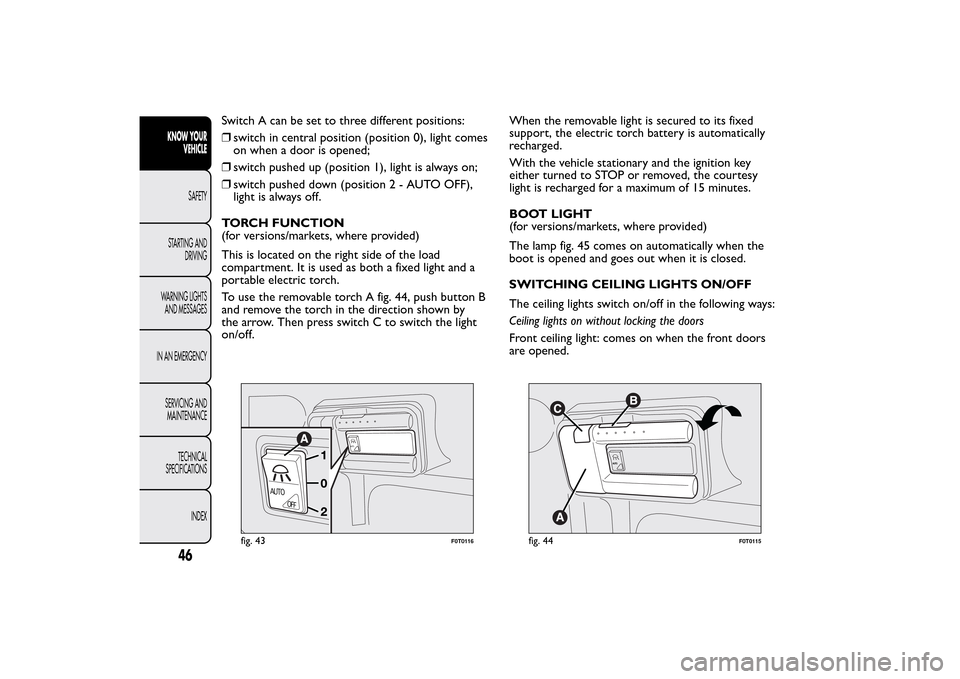
Switch A can be set to three different positions:
❒switch in central position (position 0), light comes
on when a door is opened;
❒switch pushed up (position 1), light is always on;
❒switch pushed down (position2-AUTOOFF),
light is always off.
TORCH FUNCTION
(for versions/markets, where provided)
This is located on the right side of the load
compartment. It is used as both a fixed light and a
portable electric torch.
To use the removable torch A fig. 44, push button B
and remove the torch in the direction shown by
the arrow. Then press switch C to switch the light
on/off.When the removable light is secured to its fixed
support, the electric torch battery is automatically
recharged.
With the vehicle stationary and the ignition key
either turned to STOP or removed, the courtesy
light is recharged for a maximum of 15 minutes.
BOOT LIGHT
(for versions/markets, where provided)
The lamp fig. 45 comes on automatically when the
boot is opened and goes out when it is closed.
SWITCHING CEILING LIGHTS ON/OFF
The ceiling lights switch on/off in the following ways:
Ceiling lights on without locking the doors
Front ceiling light: comes on when the front doors
are opened.
AUTO
AUTO
OFF
fig. 43
F0T0116
A
UT
O
fig. 44
F0T0115
46KNOW YOUR
VEHICLE
SAFETY
STARTING AND
DRIVING
WARNING LIGHTS
AND MESSAGES
IN AN EMERGENCY
SERVICING AND
MAINTENANCE
TECHNICAL
SPECIFICATIONS
INDEX
Page 57 of 231
On Cargo versions, the sliding side door is fitted
with a spring-loaded latch that stops the door from
opening any further. To lock it, simply push the
door as far as it will go; to unlock it, pull forward
firmly.
In any case, make sure that the door is properly
hooked to the system which keeps the door fully
open.
WARNING
Do not leave the sliding side door open
when the vehicle is parked on a
gradient . A knock could release the latch leaving
the door free to move.
WARNING
Before leaving the vehicle parked with
sliding doors open, always check that
the latch is engaged.
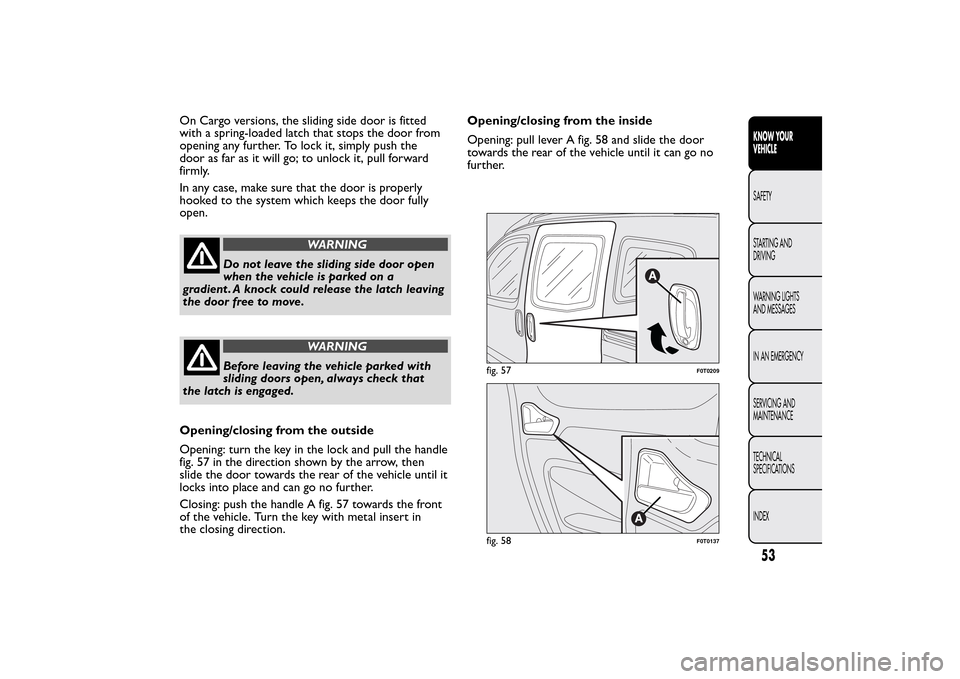
Opening/closing from the outside
Opening: turn the key in the lock and pull the handle
fig. 57 in the direction shown by the arrow, then
slide the door towards the rear of the vehicle until it
locks into place and can go no further.
Closing: push the handle A fig. 57 towards the front
of the vehicle. Turn the key with metal insert in
the closing direction.Opening/closing from the inside
Opening: pull lever A fig. 58 and slide the door
towards the rear of the vehicle until it can go no
further.
fig. 57
F0T0209
fig. 58
F0T0137
53KNOW YOUR
VEHICLESAFETY
STARTING AND
DRIVING
WARNING LIGHTS
AND MESSAGES
IN AN EMERGENCY
SERVICING AND
MAINTENANCE
TECHNICAL
SPECIFICATIONS
INDEX
Page 59 of 231
WINDOWSFRONT ELECTRIC WINDOWS
(for versions/markets, where provided)
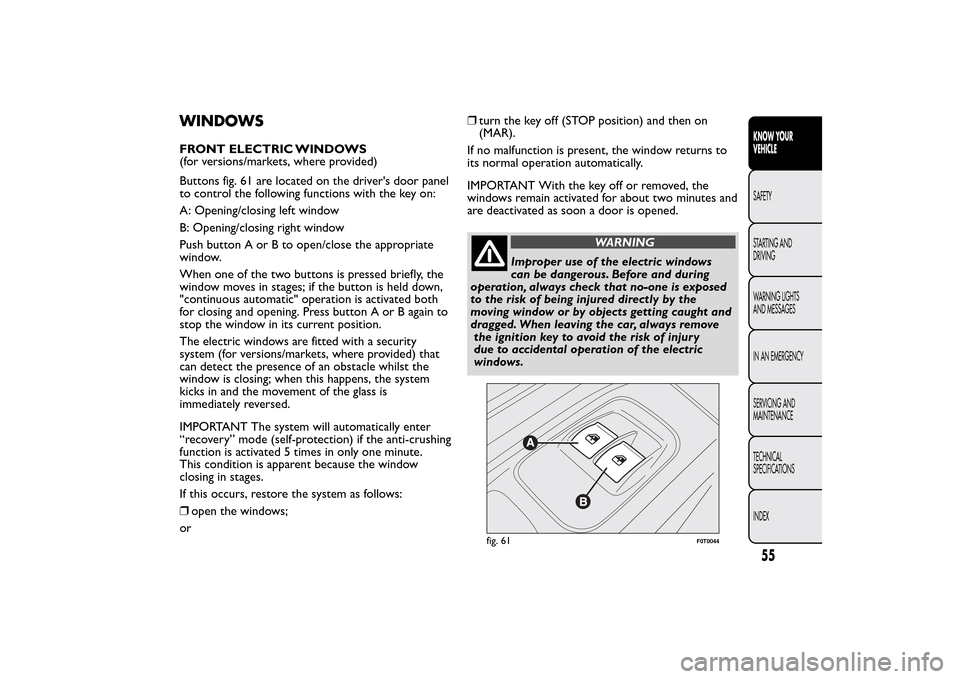
Buttons fig. 61 are located on the driver's door panel
to control the following functions with the key on:
A: Opening/closing left window
B: Opening/closing right window
Push button A or B to open/close the appropriate
window.
When one of the two buttons is pressed briefly, the
window moves in stages; if the button is held down,
"continuous automatic" operation is activated both
for closing and opening. Press button A or B again to
stop the window in its current position.
The electric windows are fitted with a security
system (for versions/markets, where provided) that
can detect the presence of an obstacle whilst the
window is closing; when this happens, the system
kicks in and the movement of the glass is
immediately reversed.
IMPORTANT The system will automatically enter
“recovery” mode (self-protection) if the anti-crushing
function is activated 5 times in only one minute.
This condition is apparent because the window
closing in stages.
If this occurs, restore the system as follows:
❒open the windows;
or❒turn the key off (STOP position) and then on
(MAR).
If no malfunction is present, the window returns to
its normal operation automatically.
IMPORTANT With the key off or removed, the
windows remain activated for about two minutes and
are deactivated as soon a door is opened.
WARNING
Improper use of the electric windows
can be dangerous. Before and during
operation, always check that no-one is exposed
to the risk of being injured directly by the
moving window or by objects getting caught and
dragged. When leaving the car, always remove
the ignition key to avoid the risk of injury
due to accidental operation of the electric
windows.
fig. 61
F0T0044
55KNOW YOUR
VEHICLESAFETY
STARTING AND
DRIVING
WARNING LIGHTS
AND MESSAGES
IN AN EMERGENCY
SERVICING AND
MAINTENANCE
TECHNICAL
SPECIFICATIONS
INDEX
Page 62 of 231
DOUBLE REAR SWING DOORS
(for versions/markets, where provided)
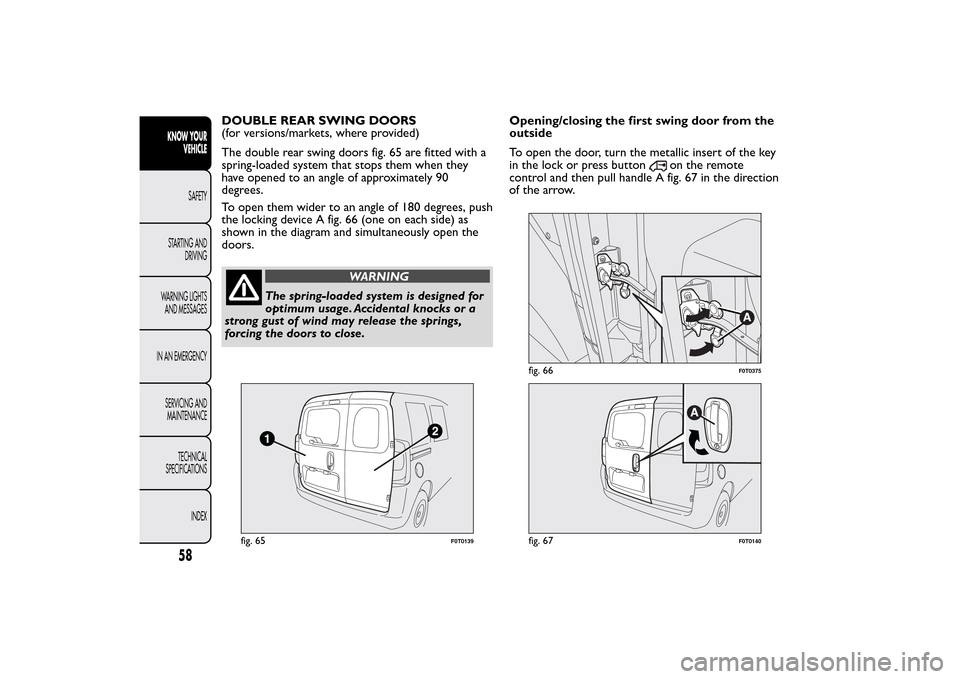
The double rear swing doors fig. 65 are fitted with a
spring-loaded system that stops them when they
have opened to an angle of approximately 90
degrees.
To open them wider to an angle of 180 degrees, push
the locking device A fig. 66 (one on each side) as
shown in the diagram and simultaneously open the
doors.
WARNING
The spring-loaded system is designed for
optimum usage. Accidental knocks or a
strong gust of wind may release the springs,
forcing the doors to close.Opening/closing the first swing door from the
outside
To open the door, turn the metallic insert of the key
in the lock or press button
on the remote
control and then pull handle A fig. 67 in the direction
of the arrow.
fig. 65
F0T0139
fig. 66
F0T0375
fig. 67
F0T0140
58KNOW YOUR
VEHICLE
SAFETY
STARTING AND
DRIVING
WARNING LIGHTS
AND MESSAGES
IN AN EMERGENCY
SERVICING AND
MAINTENANCE
TECHNICAL
SPECIFICATIONS
INDEX
Page 70 of 231
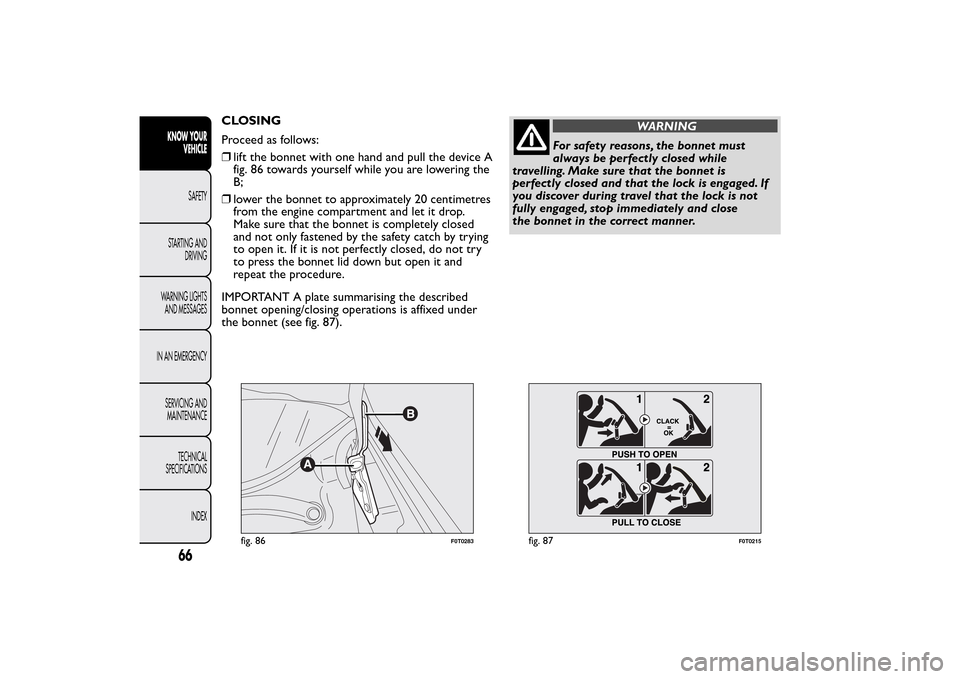
CLOSING
Proceed as follows:
❒lift the bonnet with one hand and pull the device A
fig. 86 towards yourself while you are lowering the
B;
❒lower the bonnet to approximately 20 centimetres
from the engine compartment and let it drop.
Make sure that the bonnet is completely closed
and not only fastened by the safety catch by trying
to open it. If it is not perfectly closed, do not try
to press the bonnet lid down but open it and
repeat the procedure.
IMPORTANT A plate summarising the described
bonnet opening/closing operations is affixed under
the bonnet (see fig. 87).
WARNING
For safety reasons, the bonnet must
always be perfectly closed while
travelling. Make sure that the bonnet is
perfectly closed and that the lock is engaged. If
you discover during travel that the lock is not
fully engaged, stop immediately and close
the bonnet in the correct manner.
fig. 86
F0T0283
fig. 87
F0T0215
66KNOW YOUR
VEHICLE
SAFETY
STARTING AND
DRIVING
WARNING LIGHTS
AND MESSAGES
IN AN EMERGENCY
SERVICING AND
MAINTENANCE
TECHNICAL
SPECIFICATIONS
INDEX
Page 73 of 231
ABS SYSTEMThis is an integral part of the braking system, which
prevents one or more wheels from locking or
slipping regardless of the road surface conditions and
braking intensity, giving the best control during
emergency braking.
The EBD system (Electronic Braking Force
Distribution) completes the system, allowing the
brake force to be distributed between the front and
rear wheels.
IMPORTANT For maximum efficiency of the braking
system, a bedding-in period of about 500 km is
needed: during this period it is better to avoid sharp,
repeated and prolonged braking.
SYSTEM INTERVENTION
The driver can tell the ABS system has come into
action because the brake pedal pulsates slightly and
the system gets noisier: it means that the vehicle
speed should be altered to suit the type of road
surface.
MECHANICAL BRAKE ASSIST (emergency
braking assistance)
(for versions/markets, where provided)
This system, which cannot be deactivated, recognises
emergency braking conditions (according to the
brake pedal operation speed) and provides an
additional hydraulic braking pressure to support thatprovided by the driver. This allows faster and more
powerful operation of the braking system.
IMPORTANT When the Mechanical Brake Assist is
activated, noises may be heard from the system. This
is normal. In any case, while braking keep the brake
pedal firmly depressed.
WARNING
When the ABS cuts in and you feel the
brake pedal pulsating, do not remove
your foot , but keep the pedal pushed down; in
doing so you, will stop in the shortest distance
possible under the road conditions at the time.
WARNING
If the ABS cuts in, it is a sign that the
grip between tyre and the road surface
has reached the limit : you must slow down to
match the speed to the road grip available.
WARNING
The ABS gets the most from the
available grip, but it cannot improve it ;
you should therefore take every care when
driving on slippery surfaces and not take
unnecessary risks.
69KNOW YOUR
VEHICLESAFETY
STARTING AND
DRIVING
WARNING LIGHTS
AND MESSAGES
IN AN EMERGENCY
SERVICING AND
MAINTENANCE
TECHNICAL
SPECIFICATIONS
INDEX