display FIAT SEDICI 2008 2.G User Guide
[x] Cancel search | Manufacturer: FIAT, Model Year: 2008, Model line: SEDICI, Model: FIAT SEDICI 2008 2.GPages: 266, PDF Size: 3.25 MB
Page 96 of 266
95
THERMOMETER (2)
The thermometer shows the outside tem-
perature when the ignition switch is in the
“ON” position.
If the outside temperature nears freezing,
the mark (d) will come on.
NOTE The thermometer will not indicate
the actual outside temperature when dri-
ving at low speed, or when stopped.FUEL CONSUMPTION (3)
This display can be changed to show in-
stantaneous fuel consumption or average
fuel consumption by changing the display.
Also, the display of fuel consumption can
be turned off if you desire.
When the ignition switch is turned to the
“ACC” or “ON” position:
❒If you selected instantaneous fuel con-
sumption the last time you drove the
vehicle, the display indicates “--.-”.
Unless the vehicle is moving, the display
will indicate “--.-”.
❒If you selected average fuel consump-
tion the last time you drove the vehi-
cle, the display shows the last value of
average fuel consumption. Unless you
reset the value of average fuel con-
sumption, the display will show the val-
ue of average fuel consumption which
includes average fuel consumption dur-
ing previous driving.
For details of how to reset the display,
refer to the explanation in this section.
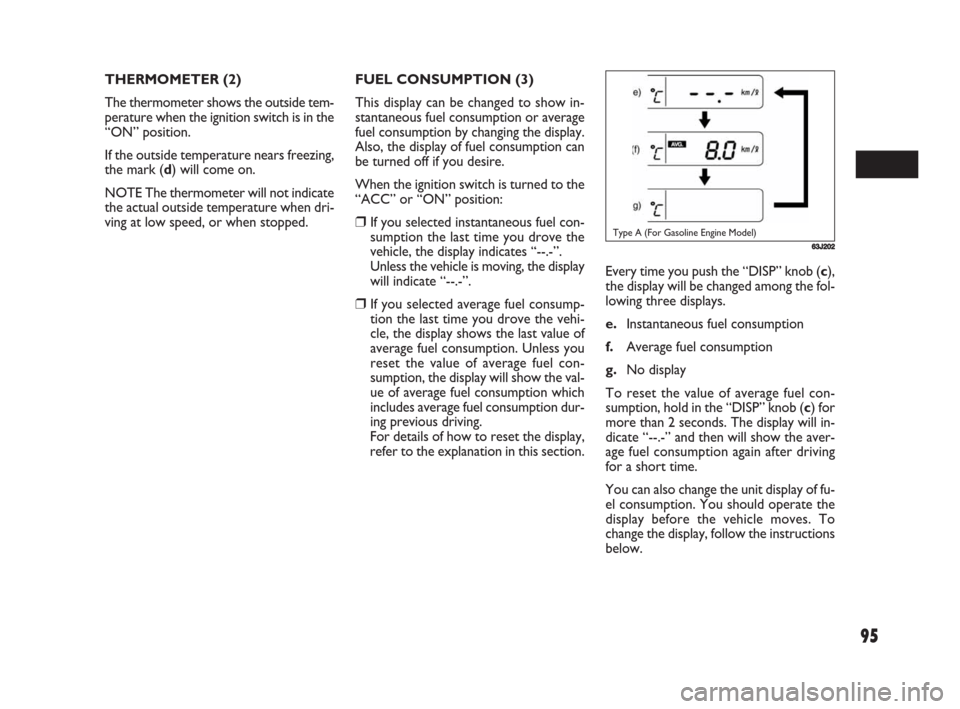
63J202Type A (For Gasoline Engine Model)
Every time you push the “DISP” knob (c),
the display will be changed among the fol-
lowing three displays.
e.Instantaneous fuel consumption
f.Average fuel consumption
g.No display
To reset the value of average fuel con-
sumption, hold in the “DISP” knob (c) for
more than 2 seconds. The display will in-
dicate “--.-” and then will show the aver-
age fuel consumption again after driving
for a short time.
You can also change the unit display of fu-
el consumption. You should operate the
display before the vehicle moves. To
change the display, follow the instructions
below.
069-128 Fiat16 New GB 3-09-2008 8:20 Pagina 95
Page 97 of 266
96
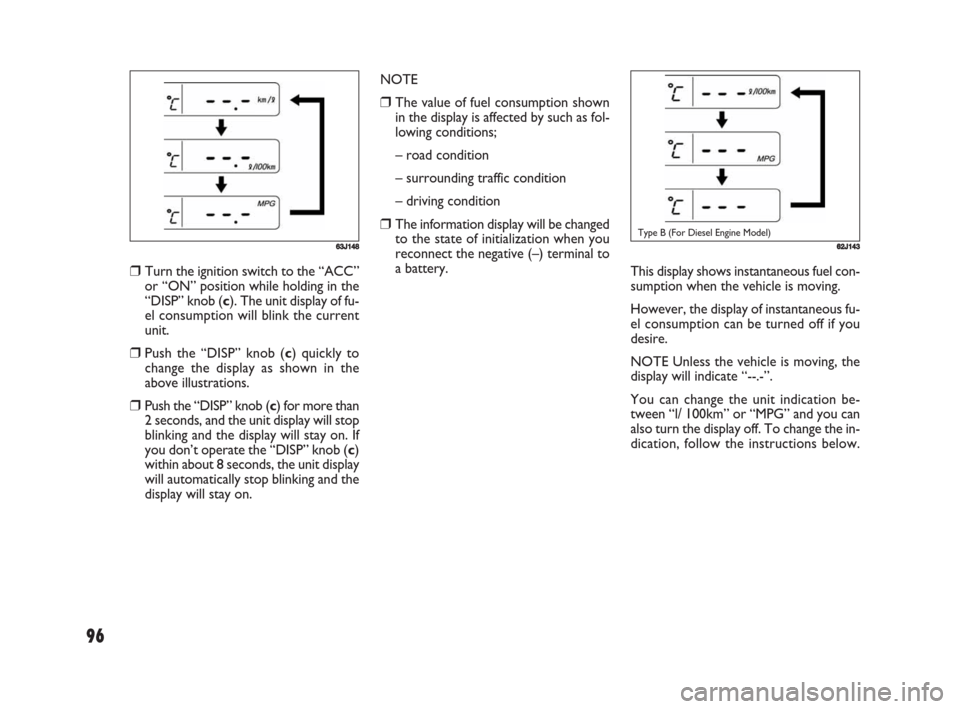
662J143Type B (For Diesel Engine Model)
This display shows instantaneous fuel con-
sumption when the vehicle is moving.
However, the display of instantaneous fu-
el consumption can be turned off if you
desire.
NOTE Unless the vehicle is moving, the
display will indicate “--.-”.
You can change the unit indication be-
tween “l/ 100km” or “MPG” and you can
also turn the display off. To change the in-
dication, follow the instructions below. NOTE
❒The value of fuel consumption shown
in the display is affected by such as fol-
lowing conditions;
– road condition
– surrounding traffic condition
– driving condition
❒The information display will be changed
to the state of initialization when you
reconnect the negative (–) terminal to
a battery.
63J148
❒Turn the ignition switch to the “ACC”
or “ON” position while holding in the
“DISP” knob (c). The unit display of fu-
el consumption will blink the current
unit.
❒Push the “DISP” knob (c) quickly to
change the display as shown in the
above illustrations.
❒Push the “DISP” knob (c) for more than
2 seconds, and the unit display will stop
blinking and the display will stay on. If
you don’t operate the “DISP” knob (c)
within about 8 seconds, the unit display
will automatically stop blinking and the
display will stay on.
069-128 Fiat16 New GB 3-09-2008 8:20 Pagina 96
Page 98 of 266
97
63J111
❒Hold in the “DISP” knob (c) for more
than 2 seconds. The unit display of the
instantaneous fuel consumption will
blink. When the display of instanta-
neous fuel consumption is turned off,
the display “-- -” will appear.
❒Push the “DISP” knob (c) quickly to
change the indication as shown in the
above illustration.
❒Push the “DISP” knob (c) for more than
2 seconds, and the unit indication will
stop blinking or the display “-- -” will go
out and the display will be turned off.
If you don’t operate the “DISP” knob
(c) within about 8 seconds after the
unit indication starts blinking, the unit
display will automatically stop blinking
or the display “-- -” will go out and the
display will be turned off.NOTE
❒The value of fuel consumption shown
in the display is affected by such as fol-
lowing conditions;
– road condition
– surrounding traffic condition
– driving condition
❒The information display will be changed
to the state of initialization when you
reconnect the negative (–) terminal to
a battery.
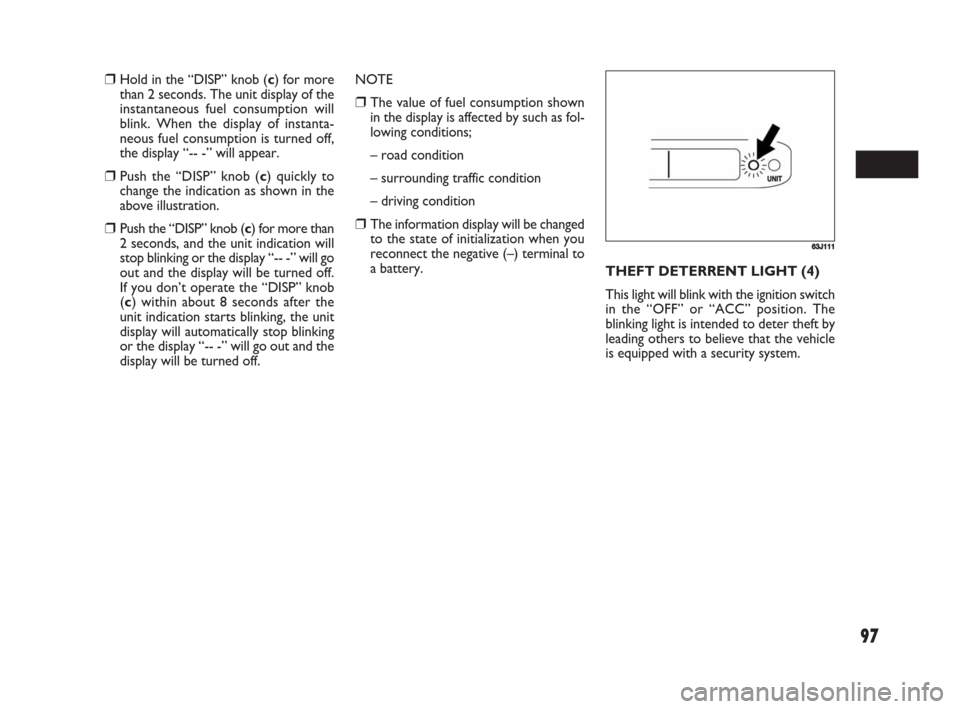
THEFT DETERRENT LIGHT (4)
This light will blink with the ignition switch
in the “OFF” or “ACC” position. The
blinking light is intended to deter theft by
leading others to believe that the vehicle
is equipped with a security system.
069-128 Fiat16 New GB 3-09-2008 8:20 Pagina 97
Page 99 of 266
98
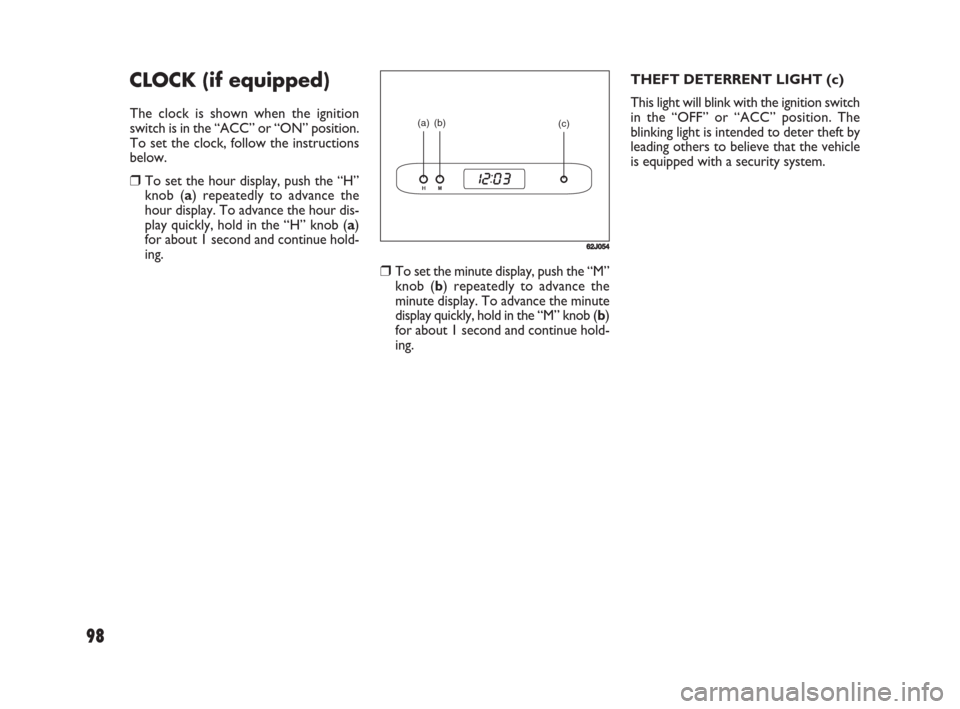
❒To set the minute display, push the “M”
knob (b) repeatedly to advance the
minute display. To advance the minute
display quickly, hold in the “M” knob (b)
for about 1 second and continue hold-
ing.THEFT DETERRENT LIGHT (c)
This light will blink with the ignition switch
in the “OFF” or “ACC” position. The
blinking light is intended to deter theft by
leading others to believe that the vehicle
is equipped with a security system.
CLOCK (if equipped)
The clock is shown when the ignition
switch is in the “ACC” or “ON” position.
To set the clock, follow the instructions
below.
❒To set the hour display, push the “H”
knob (a) repeatedly to advance the
hour display. To advance the hour dis-
play quickly, hold in the “H” knob (a)
for about 1 second and continue hold-
ing.
(a) (b)
(c)
62J054
069-128 Fiat16 New GB 3-09-2008 8:20 Pagina 98
Page 115 of 266
114
❒Stations can be preset for FM1, FM2,
LW, MW1, and MW2 respectively.
❒Up to six stations can be preset. If sta-
tions in good receiving condition are
not found, the number of stations pre-
set may be less than six.
❒After you have preset stations, the sta-
tion preset under the button with num-
ber [1] is received. If none of stations
is found, the unit is reset to the pre-
ceding frequency.
❒When stations are preset, the new da-
ta is written over the old data.
❒If AF is ON, only RDS stations are pre-
set.
Preset Station Calling
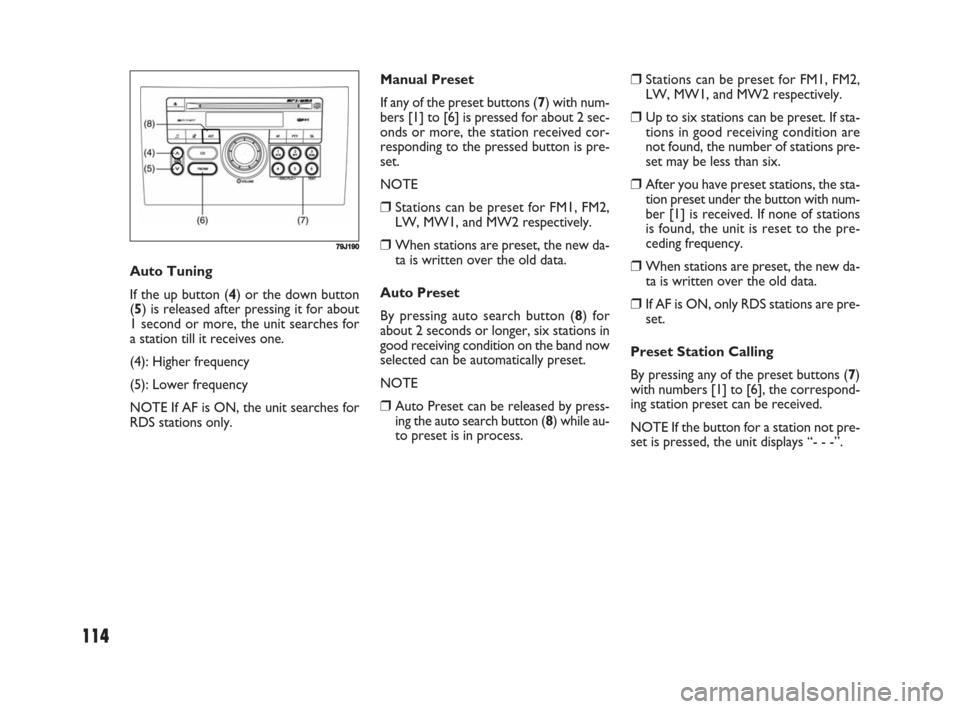
By pressing any of the preset buttons (7)
with numbers [1] to [6], the correspond-
ing station preset can be received.
NOTE If the button for a station not pre-
set is pressed, the unit displays “- - -”. Manual Preset
If any of the preset buttons (7) with num-
bers [1] to [6] is pressed for about 2 sec-
onds or more, the station received cor-
responding to the pressed button is pre-
set.
NOTE
❒Stations can be preset for FM1, FM2,
LW, MW1, and MW2 respectively.
❒When stations are preset, the new da-
ta is written over the old data.
Auto Preset
By pressing auto search button (8) for
about 2 seconds or longer, six stations in
good receiving condition on the band now
selected can be automatically preset.
NOTE
❒Auto Preset can be released by press-
ing the auto search button (8) while au-
to preset is in process. Auto Tuning
If the up button (4) or the down button
(5) is released after pressing it for about
1 second or more, the unit searches for
a station till it receives one.
(4): Higher frequency
(5): Lower frequency
NOTE If AF is ON, the unit searches for
RDS stations only.
79J190
069-128 Fiat16 New GB 3-09-2008 8:20 Pagina 114
Page 116 of 266
115
REG (Region)
An area in which the AF function may be
used to select stations can be set. When
REG is ON, the AF function is effective
in the present area only.
PS (Program Service Name)
Instead of the frequency, the name of the
broadcast station appears.
PTY (Program Type)
Programs can be searched for by PTY.TA (Traffic Announcement)
The unit can search for stations emitting
TP (traffic programmes), and tune in to
such stations in preference to others. Sta-
tions emitting TP are called TP stations.
EON (Enhanced Other Network)
RDS information is updated constantly in
response to the current position.
The “EON” indicator remains lit while
RDS information is received.
Emergency Announcement
Reception
Emergency announcements are automat-
ically received and displayed.
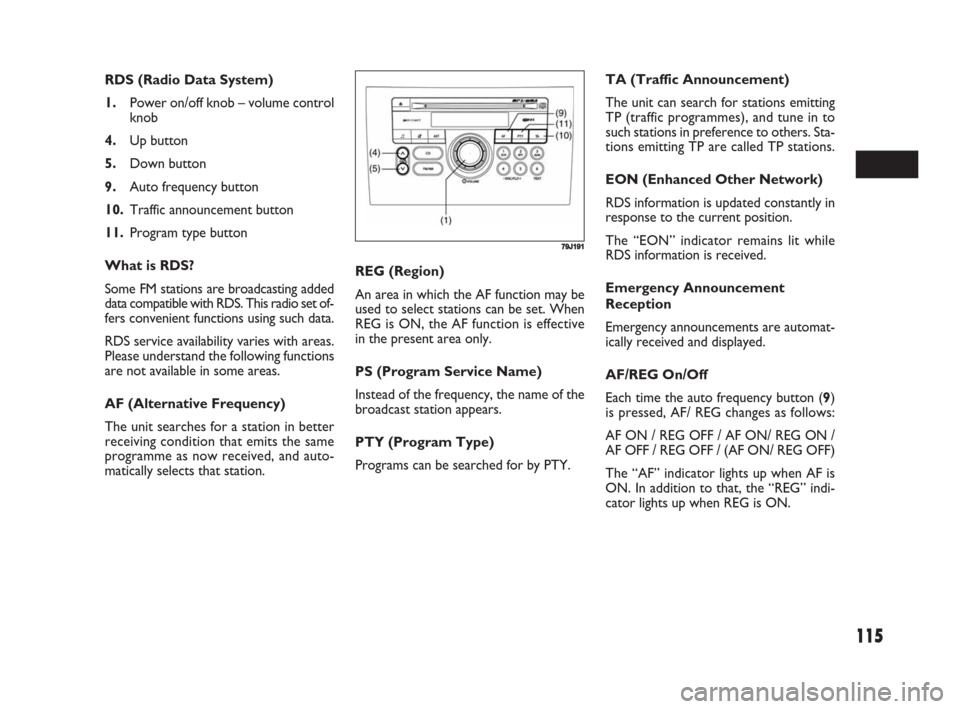
AF/REG On/Off
Each time the auto frequency button (9)
is pressed, AF/ REG changes as follows:
AF ON / REG OFF / AF ON/ REG ON /
AF OFF / REG OFF / (AF ON/ REG OFF)
The “AF” indicator lights up when AF is
ON. In addition to that, the “REG” indi-
cator lights up when REG is ON. RDS (Radio Data System)
1.Power on/off knob – volume control
knob
4.Up button
5.Down button
9.Auto frequency button
10.Traffic announcement button
11.Program type button
What is RDS?
Some FM stations are broadcasting added
data compatible with RDS. This radio set of-
fers convenient functions using such data.
RDS service availability varies with areas.
Please understand the following functions
are not available in some areas.
AF (Alternative Frequency)
The unit searches for a station in better
receiving condition that emits the same
programme as now received, and auto-
matically selects that station.
79J191
069-128 Fiat16 New GB 3-09-2008 8:20 Pagina 115
Page 117 of 266
116
PTY Search
Programs can be searched for by PTY.
❒Press the program type button (11) to
select PTY mode.
❒Turn the volume control knob (1) to
select a desired PTY.
Turning the volume knob (1) clockwise
changes the items in the following order.
(Turning it counter clockwise changes
them in the reverse order.)
NO PTY / NEWS / AFFAIRS / INFO /
SPORTS / EDUCATE / DRAMA / CUL-
TURE / SCIENCE / VARIED / POP /
ROCK / EASY M / LIGHT M / CLASSICS /
OTHER M / WEATHER / FINANCE /
CHILDREN / SOCIAL / RELIGION /
PHONE IN / TRAVEL / LEISURE / JAZZ /
COUNTRY / NATION M / OLDIES /
FOLK M / DOCUMENT / (NEWS)
❒Press the up button (4) or the down
button (5) while PTY is displayed.
Search begins.
NOTE If the specified PTY is not received,
the unit displays “NOTHING”, and then
PTY again. If the up button (4) or the
down button (5) is pressed, the same PTY
is searched for again.CD PLAYER
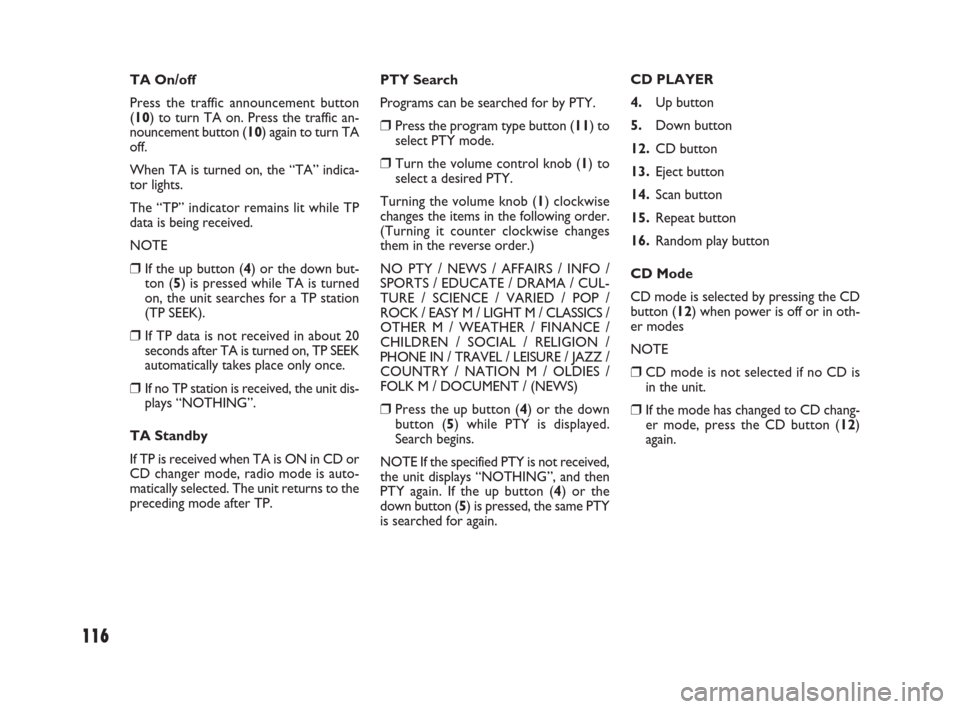
4.Up button
5.Down button
12.CD button
13.Eject button
14.Scan button
15.Repeat button
16.Random play button
CD Mode
CD mode is selected by pressing the CD
button (12) when power is off or in oth-
er modes
NOTE
❒CD mode is not selected if no CD is
in the unit.
❒If the mode has changed to CD chang-
er mode, press the CD button (12)
again. TA On/off
Press the traffic announcement button
(10) to turn TA on. Press the traffic an-
nouncement button (10) again to turn TA
off.
When TA is turned on, the “TA” indica-
tor lights.
The “TP” indicator remains lit while TP
data is being received.
NOTE
❒If the up button (4) or the down but-
ton (5) is pressed while TA is turned
on, the unit searches for a TP station
(TP SEEK).
❒If TP data is not received in about 20
seconds after TA is turned on, TP SEEK
automatically takes place only once.
❒If no TP station is received, the unit dis-
plays “NOTHING”.
TA Standby
If TP is received when TA is ON in CD or
CD changer mode, radio mode is auto-
matically selected. The unit returns to the
preceding mode after TP.
069-128 Fiat16 New GB 3-09-2008 8:20 Pagina 116
Page 121 of 266
120
MP3/WMA Player
(if equipped)
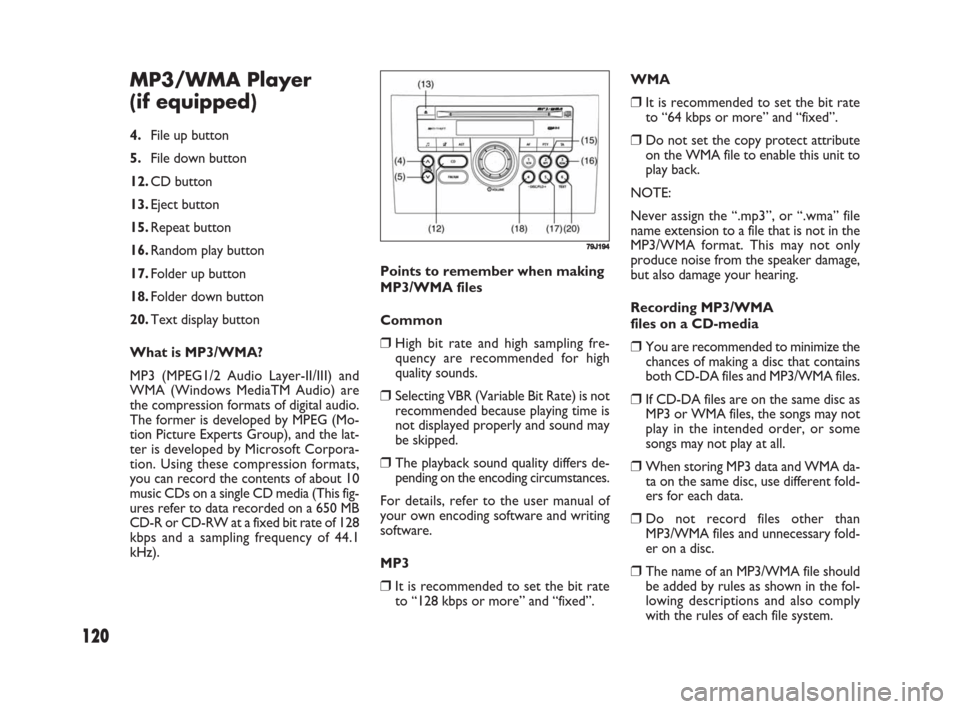
4.File up button
5.File down button
12.CD button
13.Eject button
15.Repeat button
16.Random play button
17.Folder up button
18.Folder down button
20.Text display button
What is MP3/WMA?
MP3 (MPEG1/2 Audio Layer-II/III) and
WMA (Windows MediaTM Audio) are
the compression formats of digital audio.
The former is developed by MPEG (Mo-
tion Picture Experts Group), and the lat-
ter is developed by Microsoft Corpora-
tion. Using these compression formats,
you can record the contents of about 10
music CDs on a single CD media (This fig-
ures refer to data recorded on a 650 MB
CD-R or CD-RW at a fixed bit rate of 128
kbps and a sampling frequency of 44.1
kHz).
79J194
Points to remember when making
MP3/WMA files
Common
❒High bit rate and high sampling fre-
quency are recommended for high
quality sounds.
❒Selecting VBR (Variable Bit Rate) is not
recommended because playing time is
not displayed properly and sound may
be skipped.
❒The playback sound quality differs de-
pending on the encoding circumstances.
For details, refer to the user manual of
your own encoding software and writing
software.
MP3
❒It is recommended to set the bit rate
to “128 kbps or more” and “fixed”.WMA
❒It is recommended to set the bit rate
to “64 kbps or more” and “fixed”.
❒Do not set the copy protect attribute
on the WMA file to enable this unit to
play back.
NOTE:
Never assign the “.mp3”, or “.wma” file
name extension to a file that is not in the
MP3/WMA format. This may not only
produce noise from the speaker damage,
but also damage your hearing.
Recording MP3/WMA
files on a CD-media
❒You are recommended to minimize the
chances of making a disc that contains
both CD-DA files and MP3/WMA files.
❒If CD-DA files are on the same disc as
MP3 or WMA files, the songs may not
play in the intended order, or some
songs may not play at all.
❒When storing MP3 data and WMA da-
ta on the same disc, use different fold-
ers for each data.
❒Do not record files other than
MP3/WMA files and unnecessary fold-
er on a disc.
❒The name of an MP3/WMA file should
be added by rules as shown in the fol-
lowing descriptions and also comply
with the rules of each file system.
069-128 Fiat16 New GB 3-09-2008 8:20 Pagina 120
Page 122 of 266
121
Supported file systems
ISO 9660 Level 1/Level 2, Apple Extension
to ISO 9660, Joliet, Romeo
Maximum number of files/folders
❒Maximum number of files: 511 (files +
folders)
❒Maximum number of files in one fold-
er: 255
❒Maximum depth of trees: 8
❒Maximum number of folders: 255 (Root
folder is included.)
MP3/ WMA Mode
MP3/ WMA mode is selected by pressing
the CD button (12) when power is off or
in other modes.
NOTE
❒MP3/ WMA mode is not selected if no
MP3/ WMA disc is in the unit.
❒If the mode has changed to CD chang-
er mode, press the CD button (12)
again.
Disc Insert/ Eject
To insert a disc, make sure that its label-
side is up. To eject it, press the eject but-
ton (13).
NOTE The “CD IN” indicator remains lit
while a disc is in the unit. Be careful not to
insert a disc when the “CD IN” indicator
is lit.File Up/ Down
The desired file can be selected by press-
ing the file up button (4) or the file down
button (5).
(4): Next file
(5): Preceding file (Press it twice.)
Folder Up/ Down
The desired folder can be selected by
pressing the folder up button (17) or the
folder down button (18).
(17): Next folder
(18): Preceding folder
Fast Forward/ Fast Reverse
Play speed increases while the button ((4)
or (5)) is kept depressed.
(4): Fast forward
(5): Fast reverse
NOTE
❒When the present file in REPEAT play
mode comes to its end, it returns to
normal play.
❒If Fast Forward is kept to the end of the
disc, it returns to the first file.
❒The file extension “.mp3” or “.wma”
should be assigned to each file de-
pending on the file format.
❒You may encounter trouble in playing
MP3/WMA files or displaying the in-
formation of MP3/WMA files recorded
with certain writing software or CD
recorders.
❒This unit does not have a play list func-
tion.
❒Although Multi-session recording is
supported, the use of Disc-at-Once is
recommended.
Compression formats MP3
❒Bit rate
MPEG1 Audio Layer II : 64k – 320 kbps
MPEG1 Audio Layer III : 32k – 320 kbps
MPEG2 Audio Layer II : 64k – 320 kbps
MPEG2 Audio Layer III : 8k – 160 kbps
❒Sampling frequency
MPEG1 Audio Layer II/III : 44.1 k/48 k/32
kHz
MPEG2 Audio Layer II/III : 22.05 k/24 k/
16 kHz
WMA (Ver.7, Ver.8, Ver. 9*)
❒Bit rate 32 k – 192 kbps
❒Sampling frequency 44.1 k/48 k/32 kHz
* WMA 9 Professional/LossLess/Voice are not sup-
ported.
069-128 Fiat16 New GB 3-09-2008 8:20 Pagina 121
Page 123 of 266
![FIAT SEDICI 2008 2.G User Guide 122
User ID Setting
❒Press the power on/ off knob (1) to
turn off the power.
❒With numbered buttons (19) with
number [3] and [4] kept depressed at
the same time; press the power on/ off
knob (1) f](/img/10/4721/w960_4721-122.png "FIAT SEDICI 2008 2.G User Guide 122
User ID Setting
❒Press the power on/ off knob (1) to
turn off the power.
❒With numbered buttons (19) with
number [3] and [4] kept depressed at
the same time; press the power on/ off
knob (1) f")
122
User ID Setting
❒Press the power on/ off knob (1) to
turn off the power.
❒With numbered buttons (19) with
number [3] and [4] kept depressed at
the same time; press the power on/ off
knob (1) for about 1 second or more.
The unit displays “SEC”.
❒With the up button (4) kept depressed,
press the numbered button (19) with
number [1].
The unit displays “- - - -”. ANTI-THEFT SYSTEM (SEC)
1.Power on/ off knob – volume control
knob
4.Up button
11.Program type button
19.Numbered buttons [1] to [4]
You can set up a 4-digit ID to prevent
theft. Once you set up the ID, the unit is
inoperable without the ID when this unit
or the battery is removed.
NOTE
❒If the wrong user ID is entered 10
times, the unit displays “HELP” and can-
not be operated.
❒If you should forget your user ID, con-
sult your Fiat Dealership.
79J195
Text Display
Each time the text display button (20) is
pressed in MP3/ WMA mode, the display
change as follows:
Elapsed Time / Folder Name / File Name /
(Elapsed Time)
NOTE For scrolling text, hold down the
text display button (20) for 2 seconds or
more.
REPEAT Play
For repeat play (playing the present file re-
peatedly), press the repeat button (15).
To release repeat play, press the repeat
button (15) again.
The “RPT” indicator remains lit during re-
peat play.
RANDOM Play
For random play (playing the disc files at
random), press the random play button
(16).
To release random play, press the random
play button (16) again.
The “RDM” indicator remains lit during
random play.
069-128 Fiat16 New GB 3-09-2008 8:20 Pagina 122