automatic transmission FIAT SPIDER ABARTH 2017 User Guide
[x] Cancel search | Manufacturer: FIAT, Model Year: 2017, Model line: SPIDER ABARTH, Model: FIAT SPIDER ABARTH 2017Pages: 292, PDF Size: 9.24 MB
Page 98 of 292
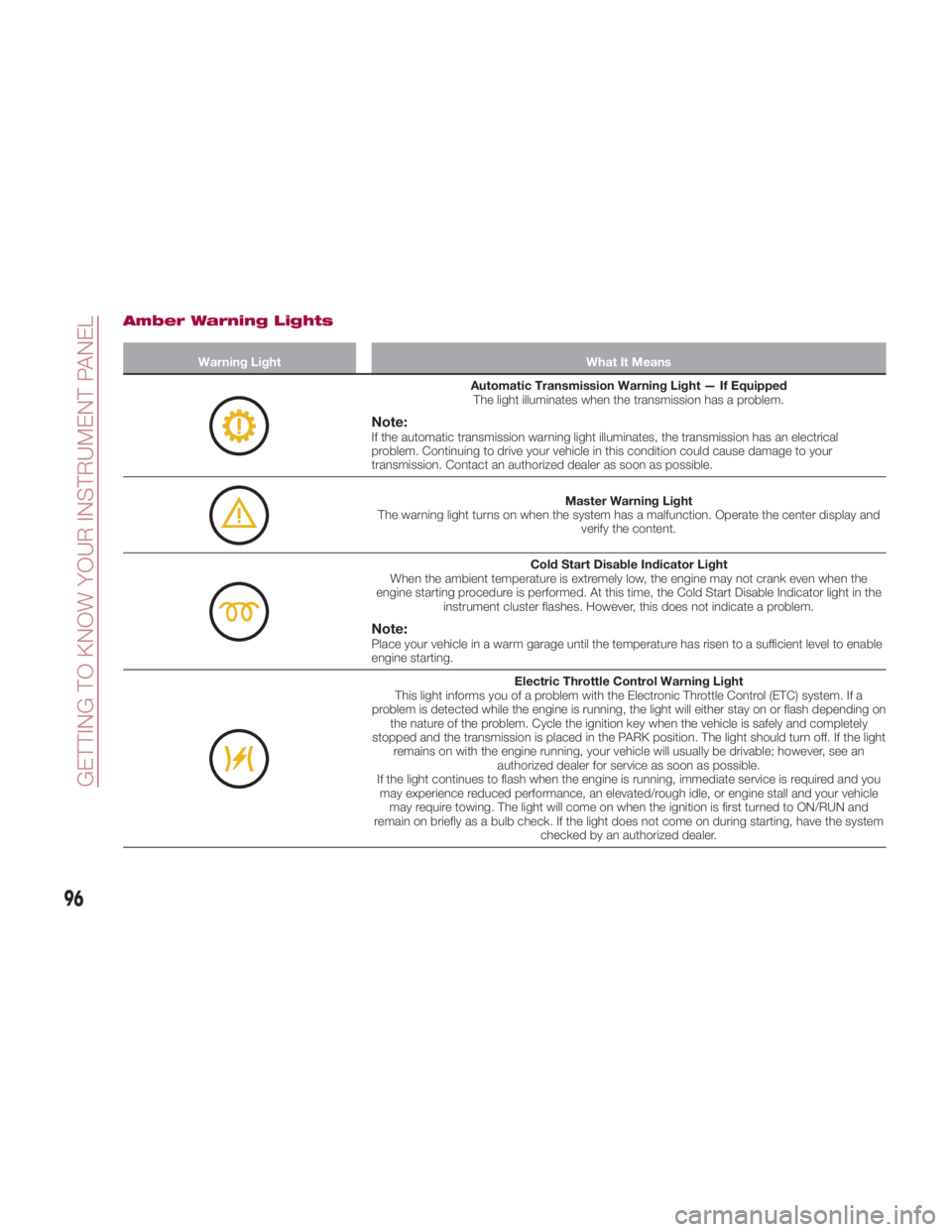
Amber Warning Lights Warning Light What It Means
Automatic Transmission Warning Light — If Equipped
The light illuminates when the transmission has a problem.
Note: If the automatic transmission warning light illuminates, the transmission has an electrical
problem. Continuing to drive your vehicle in this condition could cause damage to your
transmission. Contact an authorized dealer as soon as possible.
Master Warning Light
The warning light turns on when the system has a malfunction. Operate the center display and
verify the content.
Cold Start Disable Indicator Light
When the ambient temperature is extremely low, the engine may not crank even when the
engine starting procedure is performed. At this time, the Cold Start Disable Indicator light in the
instrument cluster flashes. However, this does not indicate a problem.
Note: Place your vehicle in a warm garage until the temperature has risen to a sufficient level to enable
engine starting.
Electric Throttle Control Warning Light
This light informs you of a problem with the Electronic Throttle Control (ETC) system. If a
problem is detected while the engine is running, the light will either stay on or flash depending on
the nature of the problem. Cycle the ignition key when the vehicle is safely and completely
stopped and the transmission is placed in the PARK position. The light should turn off. If the light
remains on with the engine running, your vehicle will usually be drivable; however, see an
authorized dealer for service as soon as possible.
If the light continues to flash when the engine is running, immediate service is required and you
may experience reduced performance, an elevated/rough idle, or engine stall and your vehicle
may require towing. The light will come on when the ignition is first turned to ON/RUN and
remain on briefly as a bulb check. If the light does not come on during starting, have the system
checked by an authorized dealer.
96
GETTING TO KNOW YOUR INSTRUMENT PANEL
Page 111 of 292
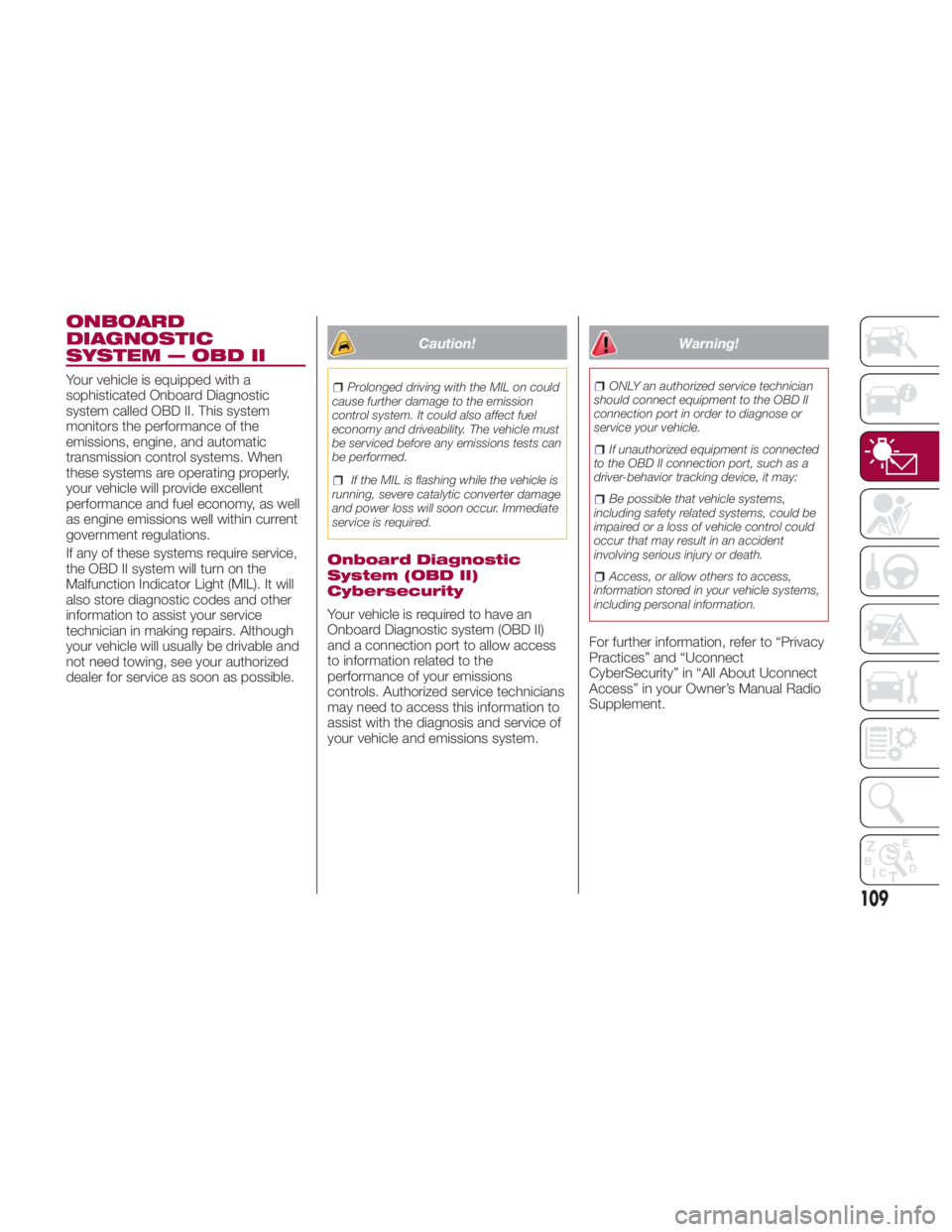
ONBOARD
DIAGNOSTIC
SYSTEM — OBD II Your vehicle is equipped with a
sophisticated Onboard Diagnostic
system called OBD II. This system
monitors the performance of the
emissions, engine, and automatic
transmission control systems. When
these systems are operating properly,
your vehicle will provide excellent
performance and fuel economy, as well
as engine emissions well within current
government regulations.
If any of these systems require service,
the OBD II system will turn on the
Malfunction Indicator Light (MIL). It will
also store diagnostic codes and other
information to assist your service
technician in making repairs. Although
your vehicle will usually be drivable and
not need towing, see your authorized
dealer for service as soon as possible. Caution!Prolonged driving with the MIL on could
cause further damage to the emission
control system. It could also affect fuel
economy and driveability. The vehicle must
be serviced before any emissions tests can
be performed.
If the MIL is flashing while the vehicle is
running, severe catalytic converter damage
and power loss will soon occur. Immediate
service is required.
Onboard Diagnostic
System (OBD II)
Cybersecurity
Your vehicle is required to have an
Onboard Diagnostic system (OBD II)
and a connection port to allow access
to information related to the
performance of your emissions
controls. Authorized service technicians
may need to access this information to
assist with the diagnosis and service of
your vehicle and emissions system. Warning! ONLY an authorized service technician
should connect equipment to the OBD II
connection port in order to diagnose or
service your vehicle.
If unauthorized equipment is connected
to the OBD II connection port, such as a
driver-behavior tracking device, it may:
Be possible that vehicle systems,
including safety related systems, could be
impaired or a loss of vehicle control could
occur that may result in an accident
involving serious injury or death.
Access, or allow others to access,
information stored in your vehicle systems,
including personal information.
For further information, refer to “Privacy
Practices” and “Uconnect
CyberSecurity” in “All About Uconnect
Access” in your Owner’s Manual Radio
Supplement.
109
Page 150 of 292
STARTING AND OPERATINGSTARTINGTHEENGINE ...... .149
BRAKE SYSTEM ........... .150
MANUAL TRANSMISSION ..... .152
AUTOMATIC TRANSMISSION — IF
EQUIPPED ............... .153
SPORT MODE ............ .158
SPEED CONTROL .......... .159
RADAR SENSORS — IF
EQUIPPED ............... .162
REAR PARK ASSIST — IF
EQUIPPED ............... .163
PARKVIEW REAR BACKUP CAMERA
— IF EQUIPPED ........... .167
REFUELING THE VEHICLE ..... .173
VEHICLELOADING ......... .176
TOWING TRAILERS ......... .178
DRIVING TIPS ............. .178
148
STARTING AND OPERATING
Page 151 of 292
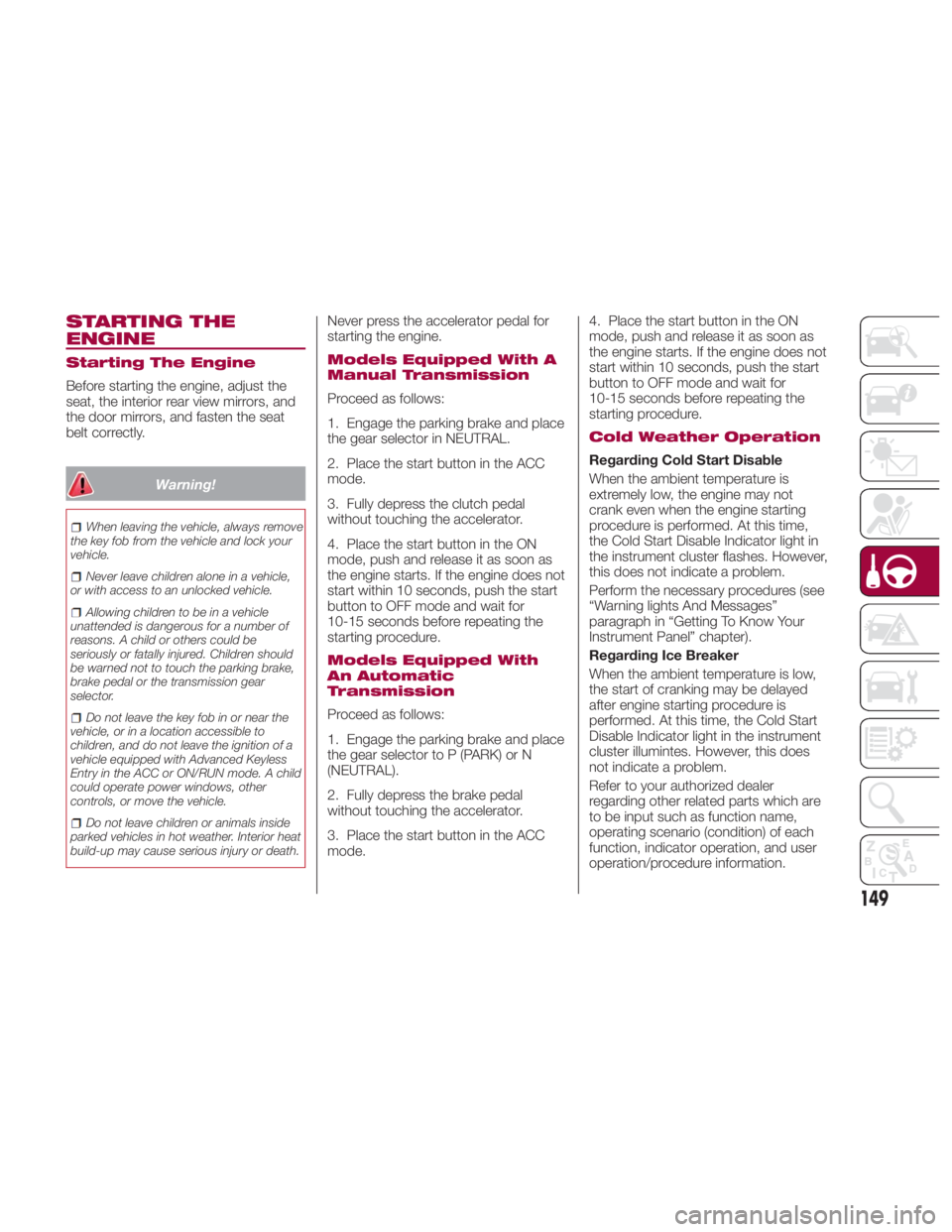
STARTING THE
ENGINE Starting The Engine
Before starting the engine, adjust the
seat, the interior rear view mirrors, and
the door mirrors, and fasten the seat
belt correctly.
Warning!When leaving the vehicle, always remove
the key fob from the vehicle and lock your
vehicle.
Never leave children alone in a vehicle,
or with access to an unlocked vehicle.
Allowing children to be in a vehicle
unattended is dangerous for a number of
reasons. A child or others could be
seriously or fatally injured. Children should
be warned not to touch the parking brake,
brake pedal or the transmission gear
selector.
Do not leave the key fob in or near the
vehicle, or in a location accessible to
children, and do not leave the ignition of a
vehicle equipped with Advanced Keyless
Entry in the ACC or ON/RUN mode. A child
could operate power windows, other
controls, or move the vehicle.
Do not leave children or animals inside
parked vehicles in hot weather. Interior heat
build-up may cause serious injury or death. Never press the accelerator pedal for
starting the engine.
Models Equipped With A
Manual Transmission
Proceed as follows:
1. Engage the parking brake and place
the gear selector in NEUTRAL.
2. Place the start button in the ACC
mode.
3. Fully depress the clutch pedal
without touching the accelerator.
4. Place the start button in the ON
mode, push and release it as soon as
the engine starts. If the engine does not
start within 10 seconds, push the start
button to OFF mode and wait for
10-15 seconds before repeating the
starting procedure.
Models Equipped With
An Automatic
Transmission
Proceed as follows:
1. Engage the parking brake and place
the gear selector to P (PARK) or N
(NEUTRAL).
2. Fully depress the brake pedal
without touching the accelerator.
3. Place the start button in the ACC
mode. 4. Place the start button in the ON
mode, push and release it as soon as
the engine starts. If the engine does not
start within 10 seconds, push the start
button to OFF mode and wait for
10-15 seconds before repeating the
starting procedure.
Cold Weather Operation
Regarding Cold Start Disable
When the ambient temperature is
extremely low, the engine may not
crank even when the engine starting
procedure is performed. At this time,
the Cold Start Disable Indicator light in
the instrument cluster flashes. However,
this does not indicate a problem.
Perform the necessary procedures (see
“Warning lights And Messages”
paragraph in “Getting To Know Your
Instrument Panel” chapter).
Regarding Ice Breaker
When the ambient temperature is low,
the start of cranking may be delayed
after engine starting procedure is
performed. At this time, the Cold Start
Disable Indicator light in the instrument
cluster illumintes. However, this does
not indicate a problem.
Refer to your authorized dealer
regarding other related parts which are
to be input such as function name,
operating scenario (condition) of each
function, indicator operation, and user
operation/procedure information.
149
Page 152 of 292
Extended Park Starting
Note: Extended Park condition occurs
when the vehicle has not been started
or driven for at least 30 days.
1. Install a battery charger or jumper
cables to the battery to ensure a full
battery charge during the crank cycle.
2. Place the ignition in the START
mode and release it when the engine
starts.
3. If the engine fails to start within
10 seconds, place the ignition in the
STOP (OFF/LOCK) mode, wait five
seconds to allow the starter to cool,
then repeat the Extended Park Starting
procedure.
4. If the engine fails to start after eight
attempts, allow the starter to cool for at
least 10 minutes, then repeat the
procedure.
Caution!To prevent damage to the starter, do not
crank continuously for more than
10 seconds at a time. Wait 10 to
15 seconds before trying again. After Starting —
Warming Up The Engine
Proceed as follows:
1. Travel slowly, letting the engine run
at a reduced RPM, without accelerating
suddenly.
2. It is recommended to wait until the
digital engine coolant temperature
indicator starts moving before
demanding full performance.
Stopping The Engine
Proceed as follows:
1. Park the car in a position that is not
dangerous for oncoming traffic, if
equipped with manual transmission
place gear selector in FIRST (1st) or
REVERSE (R) gear, if equipped with
automatic transmission place the gear
selector to PARK (P).
2. Push and release the ignition button
to STOP the engine. BRAKE SYSTEM This vehicle has power-assisted brakes
that adjust automatically through
normal use. Should power-assist fail,
you can stop by applying greater force
than normal to the brake pedal. But the
distance required to stop will be greater
than usual.
Note: Always depress the brake pedal
with the right foot. Applying the brakes
with the unaccustomed left foot could
slow your reaction time to an
emergency situation resulting in
insufficient braking operation.
Do not drive with your foot held on the
clutch pedal or brake pedal, or hold the
clutch pedal depressed halfway
unnecessarily. Doing so could result in
the following:
The clutch and brake parts will wear
out more quickly.
The brakes can overheat and
adversely affect brake performance.
150
STARTING AND OPERATING
Page 155 of 292
With Parking Sensor System
When the gear selector is shifted to the
REVERSE (R) position with the ignition
placed in the ON mode, the parking
sensor system is activated an audible
sound is heard.
Caution!Keep your foot off the clutch pedal
except when shifting gears. Also, do not
use the clutch to hold the vehicle on an hill
or grade. Riding the clutch will cause
needless clutch wear and damage.
Do not apply any excessive lateral force
to the gear selector when changing from
fifth to fourth gear. This could lead to the
accidental selection of second gear, which
could result in damage to the transmission.
Make sure the vehicle comes to a
complete stop before shifting to REVERSE
(R). Shifting to REVERSE (R) while the
vehicle is still moving may damage the
transmission.
Reverse can only be engaged when the
vehicle is completely stationary. With the
engine running, wait at least two seconds
with the clutch pedal fully pressed before
engaging reverse to prevent damage to the
gears. AUTOMATIC
TRANSMISSION — IF
EQUIPPED Shift Interlock
This vehicle is equipped with an
interlock system that holds the
transmission gear selector in PARK (P)
unless the brakes are applied. To shift
the transmission out of PARK (P), the
ignition must be placed in the ON/RUN
mode (engine running or not) and the
brake pedal must be pressed.
Warning!It is dangerous to shift out of PARK or
NEUTRAL if the engine speed is higher
than idle speed. If your foot is not firmly
pressing the brake pedal, the vehicle could
accelerate quickly forward or in reverse.
You could lose control of the vehicle and hit
someone or something. Only shift into gear
when the engine is idling normally and your
foot is firmly pressing the brake pedal.
Unintended movement of a vehicle
could injure those in or near the vehicle. As
with all vehicles, you should never exit a
vehicle while the engine is running. Before
exiting a vehicle, always apply the park
brake, shift the transmission into PARK,
and turn the ignition OFF. When the ignition
is in the OFF mode, the transmission is
locked in PARK, securing the vehicle
against unwanted movement. When leaving the vehicle, always make
sure the ignition is in the OFF mode,
remove the key fob from the vehicle, and
lock the vehicle.
Never leave children alone in a vehicle,
or with access to an unlocked vehicle.
Allowing children to be in a vehicle
unattended is dangerous for a number of
reasons. A child or others could be
seriously or fatally injured. Children should
be warned not to touch the parking brake,
brake pedal or the transmission gear
selector.
Do not leave the key fob in or near the
vehicle (or in a location accessible to
children), and do not leave the ignition in
the ACC or ON/RUN mode. A child could
operate power windows, other controls, or
move the vehicle.
Caution!Damage to the transmission may occur if
the following precautions are not observed:
Shift into or out of PARK or REVERSE
only after the vehicle has come to a
complete stop.
Do not shift between PARK, REVERSE,
NEUTRAL, or DRIVE when the engine is
above idle speed.
Before shifting into any gear, make sure
your foot is firmly pressing the brake pedal.
153
Page 156 of 292
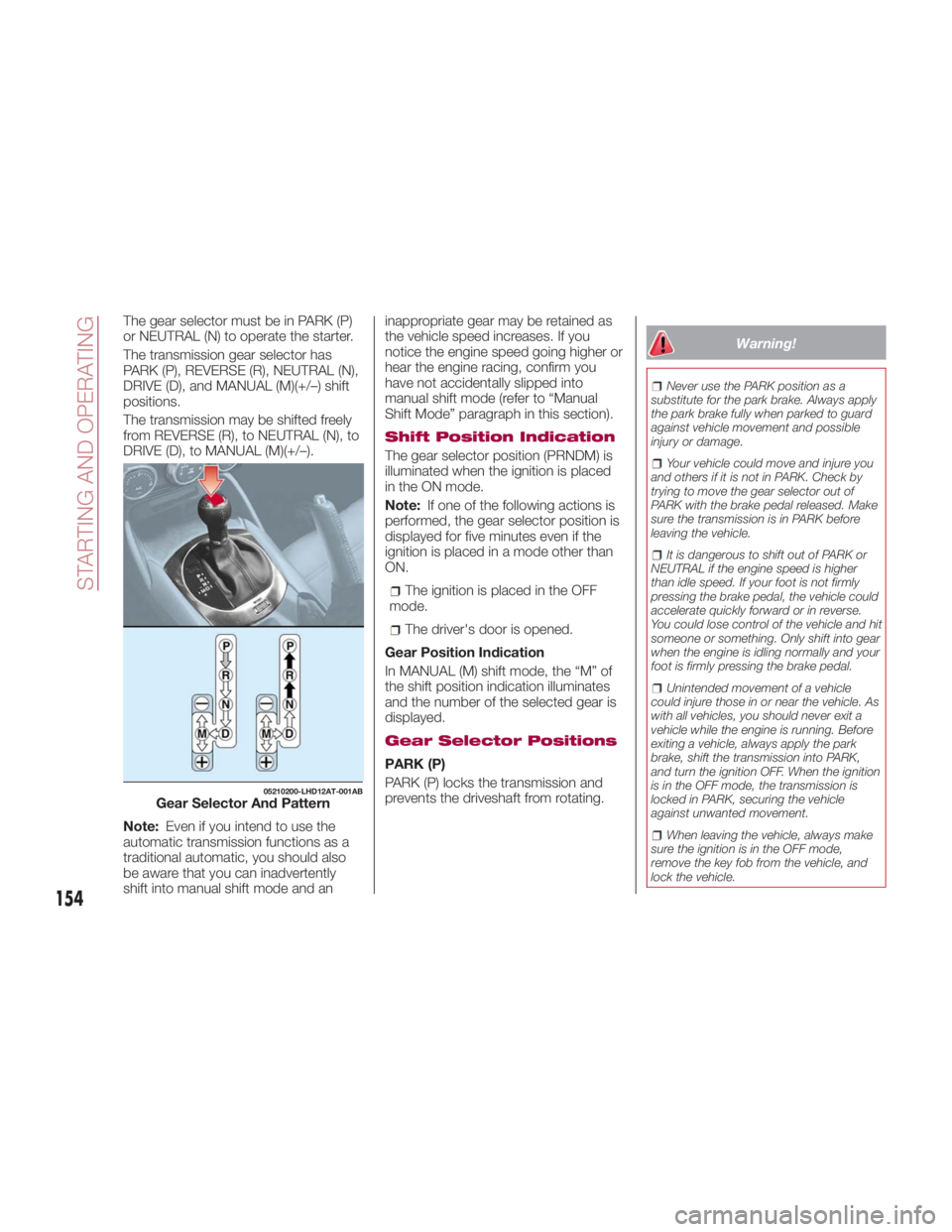
The gear selector must be in PARK (P)
or NEUTRAL (N) to operate the starter.
The transmission gear selector has
PARK (P), REVERSE (R), NEUTRAL (N),
DRIVE (D), and MANUAL (M)(+/–) shift
positions.
The transmission may be shifted freely
from REVERSE (R), to NEUTRAL (N), to
DRIVE (D), to MANUAL (M)(+/–).
Note: Even if you intend to use the
automatic transmission functions as a
traditional automatic, you should also
be aware that you can inadvertently
shift into manual shift mode and an inappropriate gear may be retained as
the vehicle speed increases. If you
notice the engine speed going higher or
hear the engine racing, confirm you
have not accidentally slipped into
manual shift mode (refer to “Manual
Shift Mode” paragraph in this section).
Shift Position Indication
The gear selector position (PRNDM) is
illuminated when the ignition is placed
in the ON mode.
Note: If one of the following actions is
performed, the gear selector position is
displayed for five minutes even if the
ignition is placed in a mode other than
ON.
The ignition is placed in the OFF
mode.
The driver's door is opened.
Gear Position Indication
In MANUAL (M) shift mode, the “M” of
the shift position indication illuminates
and the number of the selected gear is
displayed.
Gear Selector Positions
PARK (P)
PARK (P) locks the transmission and
prevents the driveshaft from rotating. Warning! Never use the PARK position as a
substitute for the park brake. Always apply
the park brake fully when parked to guard
against vehicle movement and possible
injury or damage.
Your vehicle could move and injure you
and others if it is not in PARK. Check by
trying to move the gear selector out of
PARK with the brake pedal released. Make
sure the transmission is in PARK before
leaving the vehicle.
It is dangerous to shift out of PARK or
NEUTRAL if the engine speed is higher
than idle speed. If your foot is not firmly
pressing the brake pedal, the vehicle could
accelerate quickly forward or in reverse.
You could lose control of the vehicle and hit
someone or something. Only shift into gear
when the engine is idling normally and your
foot is firmly pressing the brake pedal.
Unintended movement of a vehicle
could injure those in or near the vehicle. As
with all vehicles, you should never exit a
vehicle while the engine is running. Before
exiting a vehicle, always apply the park
brake, shift the transmission into PARK,
and turn the ignition OFF. When the ignition
is in the OFF mode, the transmission is
locked in PARK, securing the vehicle
against unwanted movement.
When leaving the vehicle, always make
sure the ignition is in the OFF mode,
remove the key fob from the vehicle, and
lock the vehicle.05210200-LHD12AT-001AB
Gear Selector And Pattern
154
STARTING AND OPERATING
Page 157 of 292
Never leave children alone in a vehicle,
or with access to an unlocked vehicle.
Allowing children to be in a vehicle
unattended is dangerous for a number of
reasons. A child or others could be
seriously or fatally injured. Children should
be warned not to touch the park brake,
brake pedal or the transmission gear
selector.
Do not leave the key fob in or near the
vehicle (or in a location accessible to
children), and do not leave the ignition in
the ACC or ON/RUN mode. A child could
operate power windows, other controls, or
move the vehicle.
Caution!Before moving the transmission gear
selector out of PARK, you must place the
ignition from the LOCK/OFF mode to the
ON/RUN mode, and also press the brake
pedal. Otherwise, damage to the gear
selector could result.
DO NOT race the engine when shifting
from PARK or NEUTRAL into another gear
range, as this can damage the drivetrain.
Note:
Shifting into PARK (P), NEUTRAL
(N) or REVERSE (R) while the vehicle is
moving can damage your
transmission. Shifting into DRIVE (D) or REVERSE
(R) when the engine is running faster
than idle can damage the
transmission.
REVERSE (R)
This range is for moving the vehicle
backward. Shift into REVERSE only
after the vehicle has come to a
complete stop.
With Parking Sensor system : when
the gear selector is shifted to the
REVERSE (R) position with the ignition
placed in the ON mode, the parking
sensor system is activated and an
audible sound is heard.
NEUTRAL (N)
In NEUTRAL (N), the wheels and
transmission are not locked. The vehicle
will roll freely even on the slightest
incline unless the parking brake or
brakes are applied.
Warning!Do not coast in NEUTRAL and never turn
off the ignition to coast down a hill. These
are unsafe practices that limit your
response to changing traffic or road
conditions. You might lose control of the
vehicle and have a collision. Note: Do not shift into NEUTRAL (N)
when driving the vehicle. Doing so will
damage the transmission. Press the
parking brake or depress the brake
pedal before moving the gear selector
from NEUTRAL (N) to prevent the
vehicle from moving unexpectedly.
DRIVE (D)
DRIVE (D) is the normal driving position.
From a stop, the transmission will
automatically shift through all available
gears.
MANUAL (M)
MANUAL (M) is the manual shift mode
position. Gears can be shifted up or
down by operating the gear selector.
(Refer to “Manual Shift Mode”
paragraph in this section).
Warning!Do not downshift for additional engine
braking on a slippery surface. The drive
wheels could lose their grip and the vehicle
could skid, causing a collision or personal
injury.
155
Page 158 of 292
Active Adaptive Shift
(AAS)
Active Adaptive Shift (AAS)
automatically controls the transmission
shift points to best suit the road
conditions and driver input. This
improves driving feel.
The transmission may switch to AAS
mode when driving up and down
slopes, cornering, driving at high
elevations, or depressing the
accelerator pedal quickly while the gear
selector is in the DRIVE (D) position.
Depending on the road and driving
conditions/vehicle operations, gear
shifting could be delayed or not occur,
however, this does not indicate a
problem because the AAS mode will
maintain the optimum gear position.
Shift-Lock System
The shift-lock system prevents shifting
out of PARK (P) unless the brake pedal
is depressed.
To shift from PARK (P):
1. Depress and hold the brake pedal.
2. Turn the ignition to the ON/RUN
mode.
3. Press and hold the lock-release
button on the gear selector.
4. Move the gear selector. When the ignition is in the ACC or OFF
mode, the gear selector cannot be
shifted from PARK (P).
The ignition cannot be placed in the
OFF mode if the gear selector is not in
PARK (P).
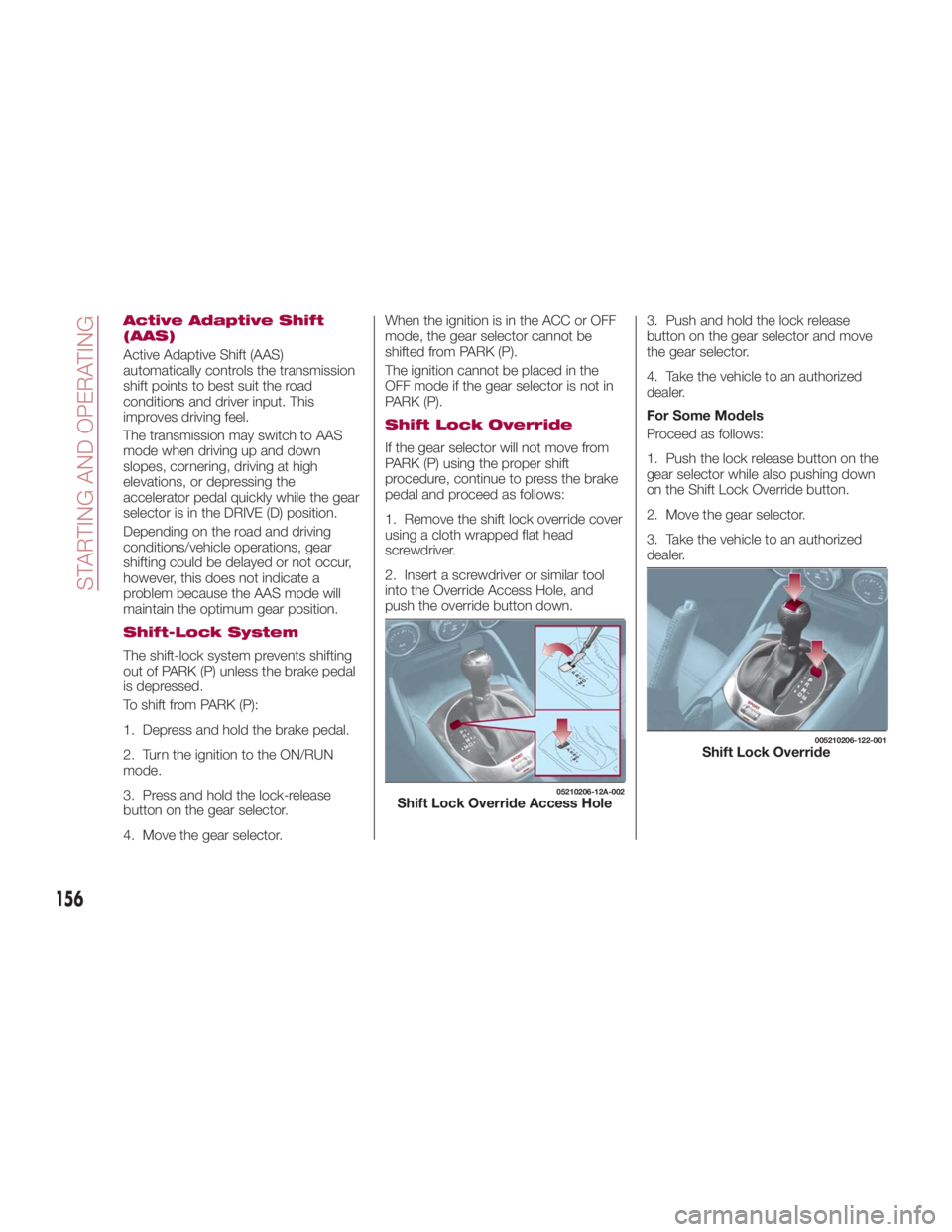
Shift Lock Override
If the gear selector will not move from
PARK (P) using the proper shift
procedure, continue to press the brake
pedal and proceed as follows:
1. Remove the shift lock override cover
using a cloth wrapped flat head
screwdriver.
2. Insert a screwdriver or similar tool
into the Override Access Hole, and
push the override button down. 3. Push and hold the lock release
button on the gear selector and move
the gear selector.
4. Take the vehicle to an authorized
dealer.
For Some Models
Proceed as follows:
1. Push the lock release button on the
gear selector while also pushing down
on the Shift Lock Override button.
2. Move the gear selector.
3. Take the vehicle to an authorized
dealer. 05210206-12A-002
Shift Lock Override Access Hole 005210206-122-001
Shift Lock Override
156
STARTING AND OPERATING
Page 159 of 292
Manual Shift Mode
The manual shift mode gives you the
feel of driving a manual transmission
vehicle by allowing you to operate the
gear selector manually.
This allows you to control engine rpm
and torque to the drive wheels much
like a manual transmission when more
control is desired.
To change to MANUAL (M) shift mode,
shift the gear selector from DRIVE (D) to
MANUAL (M). To return to automatic
shift mode, shift the gear selector from
MANUAL (M) to DRIVE (D).
You can shift between DRIVE (D) and
MANUAL (M) mode at any time, without
taking your foot off the accelerator.
Note:
If you change to manual shift mode
when the vehicle is stopped, the gear
will shift to M1.
If you change to manual shift mode
while the vehicle is moving it will remain
in the current gear until a manual shift
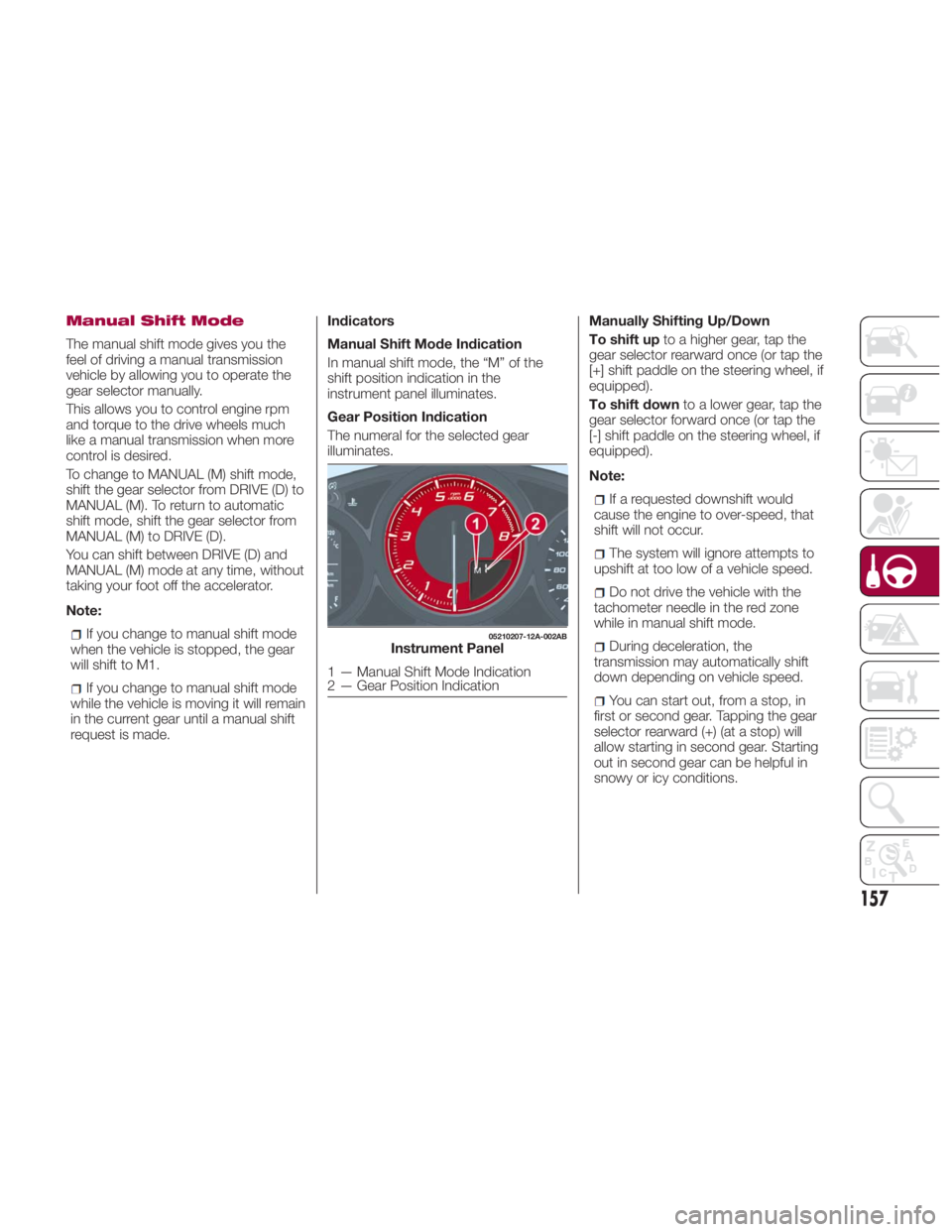
request is made. Indicators
Manual Shift Mode Indication
In manual shift mode, the “M” of the
shift position indication in the
instrument panel illuminates.
Gear Position Indication
The numeral for the selected gear
illuminates. Manually Shifting Up/Down
To shift up to a higher gear, tap the
gear selector rearward once (or tap the
[+] shift paddle on the steering wheel, if
equipped).
To shift down to a lower gear, tap the
gear selector forward once (or tap the
[-] shift paddle on the steering wheel, if
equipped).
Note:
If a requested downshift would
cause the engine to over-speed, that
shift will not occur.
The system will ignore attempts to
upshift at too low of a vehicle speed.
Do not drive the vehicle with the
tachometer needle in the red zone
while in manual shift mode.
During deceleration, the
transmission may automatically shift
down depending on vehicle speed.
You can start out, from a stop, in
first or second gear. Tapping the gear
selector rearward (+) (at a stop) will
allow starting in second gear. Starting
out in second gear can be helpful in
snowy or icy conditions. 05210207-12A-002AB
Instrument Panel
1 — Manual Shift Mode Indication
2 — Gear Position Indication
157