fuel FIAT SPIDER ABARTH 2017 Owner's Manual
[x] Cancel search | Manufacturer: FIAT, Model Year: 2017, Model line: SPIDER ABARTH, Model: FIAT SPIDER ABARTH 2017Pages: 292, PDF Size: 9.24 MB
Page 86 of 292
FUEL ECONOMY
MONITOR — IF
EQUIPPED Description
The “Fuel Consumption” information is
displayed by operating each icon in the
display.
In addition, after completing a trip, the
total energy efficiency to date is
displayed in the ending display when
the ending display is turned on.
Proceed as follows:
1. Select the
icon on the home
screen to display the applications
screen.
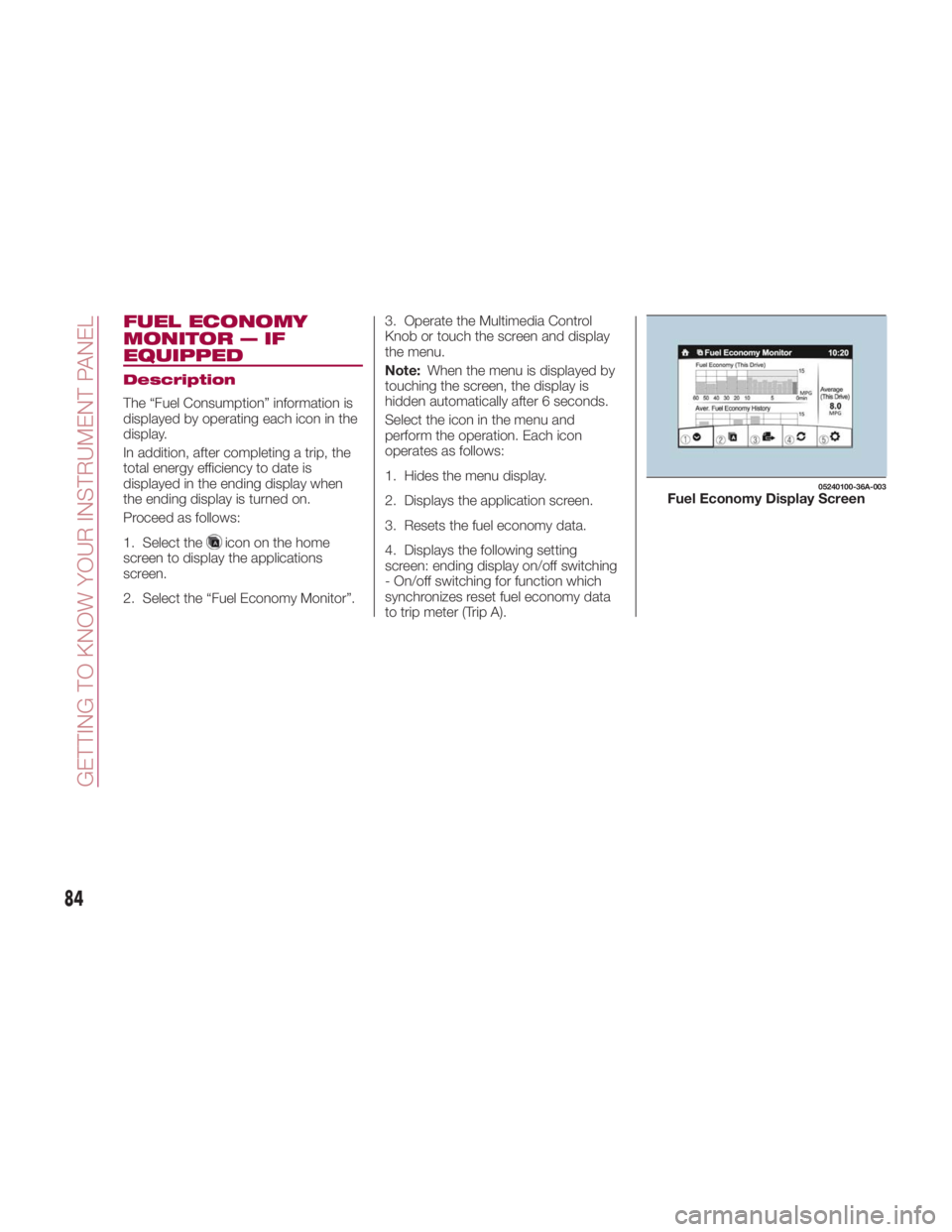
2. Select the “Fuel Economy Monitor”. 3. Operate the Multimedia Control
Knob or touch the screen and display
the menu.
Note: When the menu is displayed by
touching the screen, the display is
hidden automatically after 6 seconds.
Select the icon in the menu and
perform the operation. Each icon
operates as follows:
1. Hides the menu display.
2. Displays the application screen.
3. Resets the fuel economy data.
4. Displays the following setting
screen: ending display on/off switching
- On/off switching for function which
synchronizes reset fuel economy data
to trip meter (Trip A). 05240100-36A-003
Fuel Economy Display Screen
84
GETTING TO KNOW YOUR INSTRUMENT PANEL
Page 87 of 292
Fuel Consumption
Display
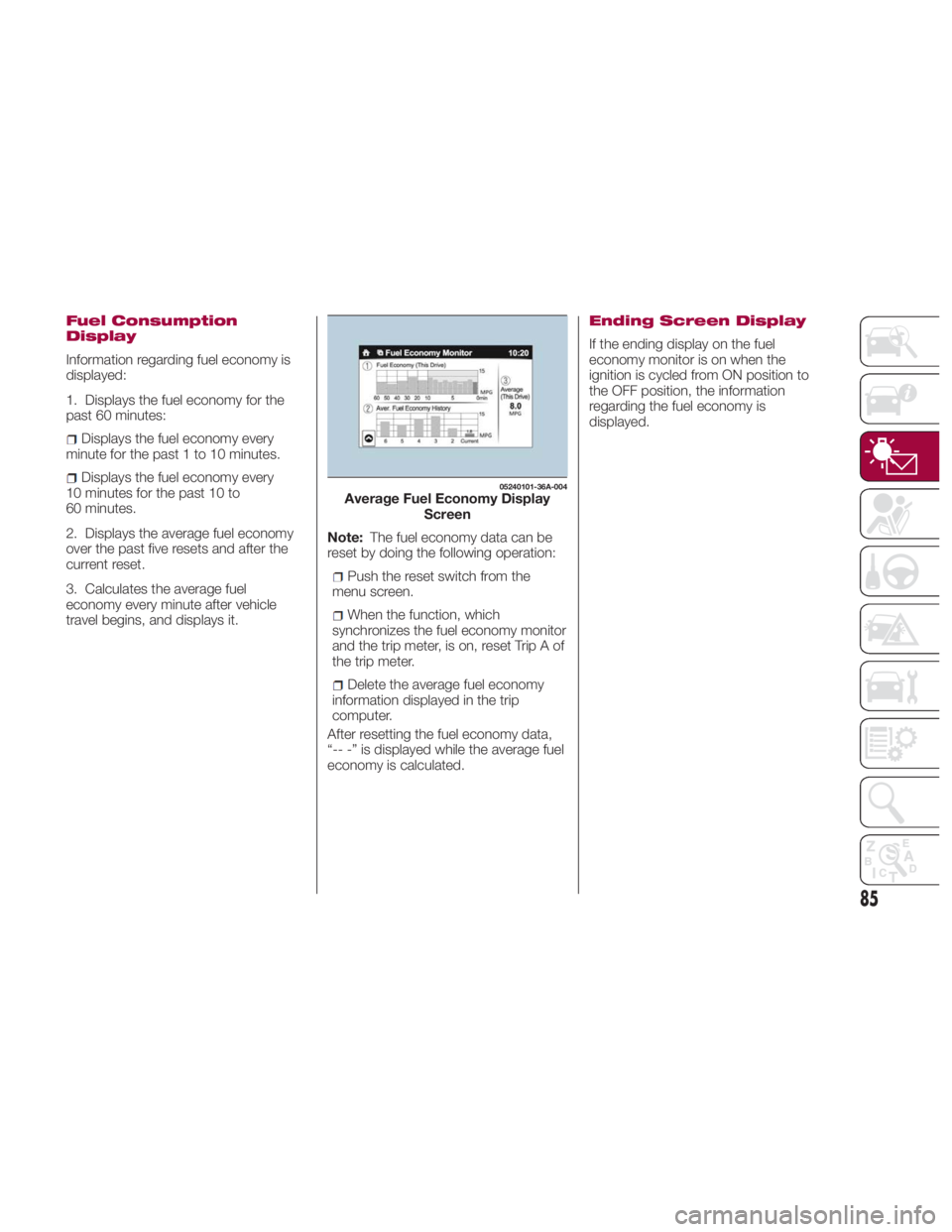
Information regarding fuel economy is
displayed:
1. Displays the fuel economy for the
past 60 minutes:
Displays the fuel economy every
minute for the past 1 to 10 minutes.
Displays the fuel economy every
10 minutes for the past 10 to
60 minutes.
2. Displays the average fuel economy
over the past five resets and after the
current reset.
3. Calculates the average fuel
economy every minute after vehicle
travel begins, and displays it. Note: The fuel economy data can be
reset by doing the following operation:
Push the reset switch from the
menu screen.
When the function, which
synchronizes the fuel economy monitor
and the trip meter, is on, reset Trip A of
the trip meter.
Delete the average fuel economy
information displayed in the trip
computer.
After resetting the fuel economy data,
“-- -” is displayed while the average fuel
economy is calculated. Ending Screen Display
If the ending display on the fuel
economy monitor is on when the
ignition is cycled from ON position to
the OFF position, the information
regarding the fuel economy is
displayed. 05240101-36A-004
Average Fuel Economy Display
Screen
85
Page 88 of 292
WARNING LIGHTS
AND MESSAGES Warning Lights And
Messages
Note:
The warning light in the instrument
panel appears together with a
dedicated message and/or acoustic
signal when applicable. These
indications are indicative and
precautionary and as such must not be
considered as exhaustive and/or
alternative to the information contained
in the Owner’s Manual, which you are
advised to read carefully in all cases.
Always refer to the information in this
chapter in the event of a failure
indication.
Failure indications displayed are
divided into two categories: serious
and less serious failures. Serious
failures are indicated by a repeated
and prolonged warning "cycle". Less
serious failures are indicated by a
warning "cycle" with a shorter duration.
The display cycle of both categories
can be interrupted. The instrument
panel warning light will stay on until the
cause of the failure is eliminated.
The warning contents can be verified
on the audio system. Proceed as follows:
1. If the warning light is turned on,
select
icon on the home screen to
display the application screen.
2. Select “ Warning Guidance ”to
display the current warnings.
3. Select the applicable warning to
view the warning details.
For the following warning/indicator
lights:
Master Warning Light
Brake System Warning Light
ABS Warning Light
Charging System Warning Light
Engine Oil Warning Light
Electric Throttle Warning Light
Cold Start Warning Light
Check Engine Warning Light
Coolant Temperature Warning Light
Automatic Transmission Warning
Light
Power Steering Malfunction Indicator
Light
Air Bag/Seat Belt Pretensioner
System Warning Light
Check Fuel Cap Warning Light
Low Fuel Warning Light Seat Belt Warning Light
Door Ajar Warning Light
Low Washer Fluid Level Warning
Light
Tire Pressure Monitoring System
Warning Light
KEY Warning Light
LED Headlight KEY Warning Light
BSM (Blind Spot Monitoring) OFF
Indicator Light
TCS/DSC Indicator Light
DSC OFF Indicator Light
Security Indicator Light
Indicator Light
Passenger Air Bag Deactivation
Warning Light
The light turns on when the ignition is
switched on for an operation check,
and turns off a few seconds later or
when the engine is started. If the light
does not turn on or remains turned on,
have the vehicle inspected at an
authorized dealer.
Note: Only for “Brake System Warning
Light:” the light turns on continuously
when the parking brake is applied.
86
GETTING TO KNOW YOUR INSTRUMENT PANEL
Page 93 of 292
Amber Warning Lights Warning Light What It Means
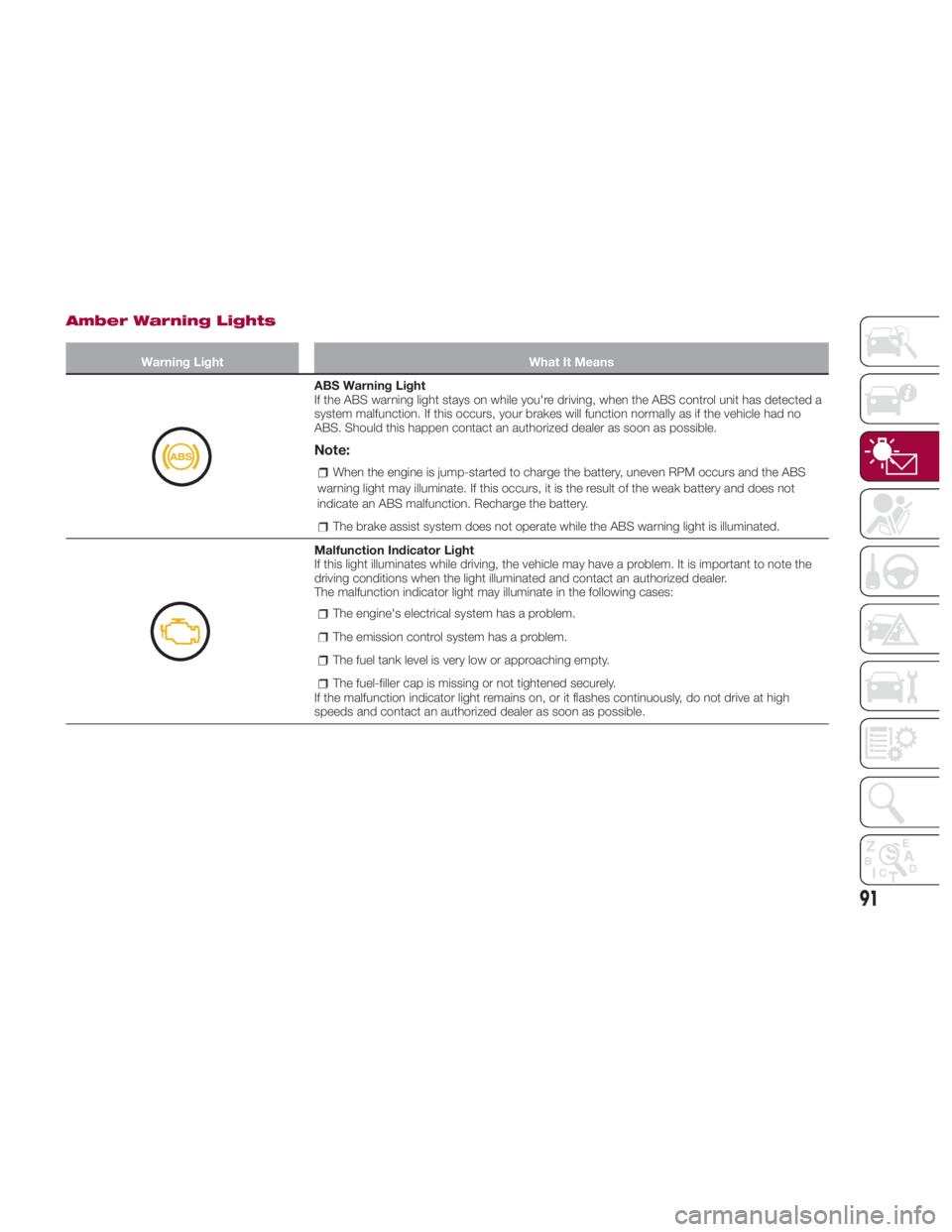
ABS Warning Light
If the ABS warning light stays on while you're driving, when the ABS control unit has detected a
system malfunction. If this occurs, your brakes will function normally as if the vehicle had no
ABS. Should this happen contact an authorized dealer as soon as possible.
Note: When the engine is jump-started to charge the battery, uneven RPM occurs and the ABS
warning light may illuminate. If this occurs, it is the result of the weak battery and does not
indicate an ABS malfunction. Recharge the battery.
The brake assist system does not operate while the ABS warning light is illuminated.
Malfunction Indicator Light
If this light illuminates while driving, the vehicle may have a problem. It is important to note the
driving conditions when the light illuminated and contact an authorized dealer.
The malfunction indicator light may illuminate in the following cases:
The engine's electrical system has a problem.
The emission control system has a problem.
The fuel tank level is very low or approaching empty.
The fuel-filler cap is missing or not tightened securely.
If the malfunction indicator light remains on, or it flashes continuously, do not drive at high
speeds and contact an authorized dealer as soon as possible.
91
Page 94 of 292
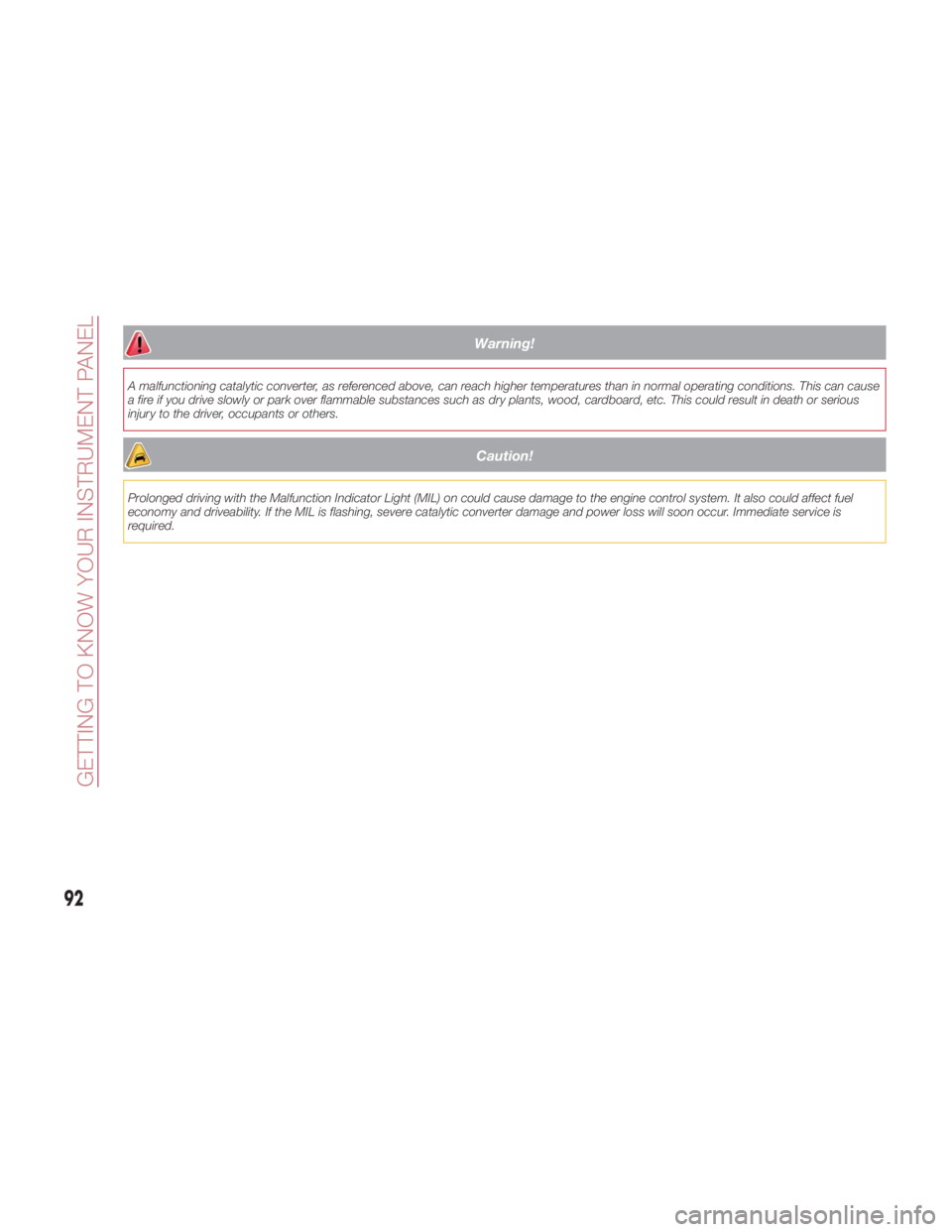
Warning!A malfunctioning catalytic converter, as referenced above, can reach higher temperatures than in normal operating conditions. This can cause
a fire if you drive slowly or park over flammable substances such as dry plants, wood, cardboard, etc. This could result in death or serious
injury to the driver, occupants or others.
Caution!Prolonged driving with the Malfunction Indicator Light (MIL) on could cause damage to the engine control system. It also could affect fuel
economy and driveability. If the MIL is flashing, severe catalytic converter damage and power loss will soon occur. Immediate service is
required.
92
GETTING TO KNOW YOUR INSTRUMENT PANEL
Page 95 of 292
Amber Warning Lights Warning Light What It Means
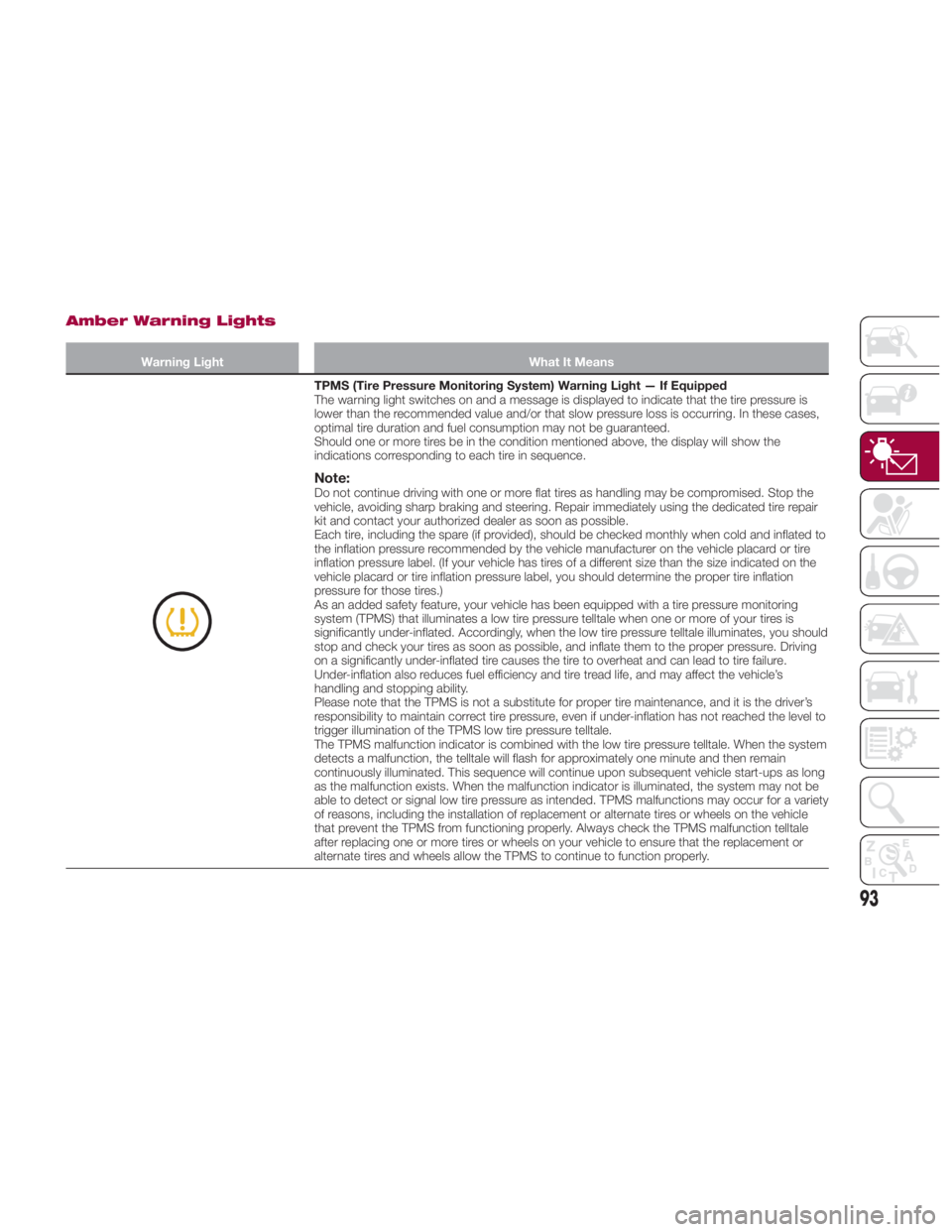
TPMS (Tire Pressure Monitoring System) Warning Light — If Equipped
The warning light switches on and a message is displayed to indicate that the tire pressure is
lower than the recommended value and/or that slow pressure loss is occurring. In these cases,
optimal tire duration and fuel consumption may not be guaranteed.
Should one or more tires be in the condition mentioned above, the display will show the
indications corresponding to each tire in sequence.
Note: Do not continue driving with one or more flat tires as handling may be compromised. Stop the
vehicle, avoiding sharp braking and steering. Repair immediately using the dedicated tire repair
kit and contact your authorized dealer as soon as possible.
Each tire, including the spare (if provided), should be checked monthly when cold and inflated to
the inflation pressure recommended by the vehicle manufacturer on the vehicle placard or tire
inflation pressure label. (If your vehicle has tires of a different size than the size indicated on the
vehicle placard or tire inflation pressure label, you should determine the proper tire inflation
pressure for those tires.)
As an added safety feature, your vehicle has been equipped with a tire pressure monitoring
system (TPMS) that illuminates a low tire pressure telltale when one or more of your tires is
significantly under-inflated. Accordingly, when the low tire pressure telltale illuminates, you should
stop and check your tires as soon as possible, and inflate them to the proper pressure. Driving
on a significantly under-inflated tire causes the tire to overheat and can lead to tire failure.
Under-inflation also reduces fuel efficiency and tire tread life, and may affect the vehicle’s
handling and stopping ability.
Please note that the TPMS is not a substitute for proper tire maintenance, and it is the driver’s
responsibility to maintain correct tire pressure, even if under-inflation has not reached the level to
trigger illumination of the TPMS low tire pressure telltale.
The TPMS malfunction indicator is combined with the low tire pressure telltale. When the system
detects a malfunction, the telltale will flash for approximately one minute and then remain
continuously illuminated. This sequence will continue upon subsequent vehicle start-ups as long
as the malfunction exists. When the malfunction indicator is illuminated, the system may not be
able to detect or signal low tire pressure as intended. TPMS malfunctions may occur for a variety
of reasons, including the installation of replacement or alternate tires or wheels on the vehicle
that prevent the TPMS from functioning properly. Always check the TPMS malfunction telltale
after replacing one or more tires or wheels on your vehicle to ensure that the replacement or
alternate tires and wheels allow the TPMS to continue to function properly.
93
Page 99 of 292
Amber Warning Lights Warning Lights What It Means
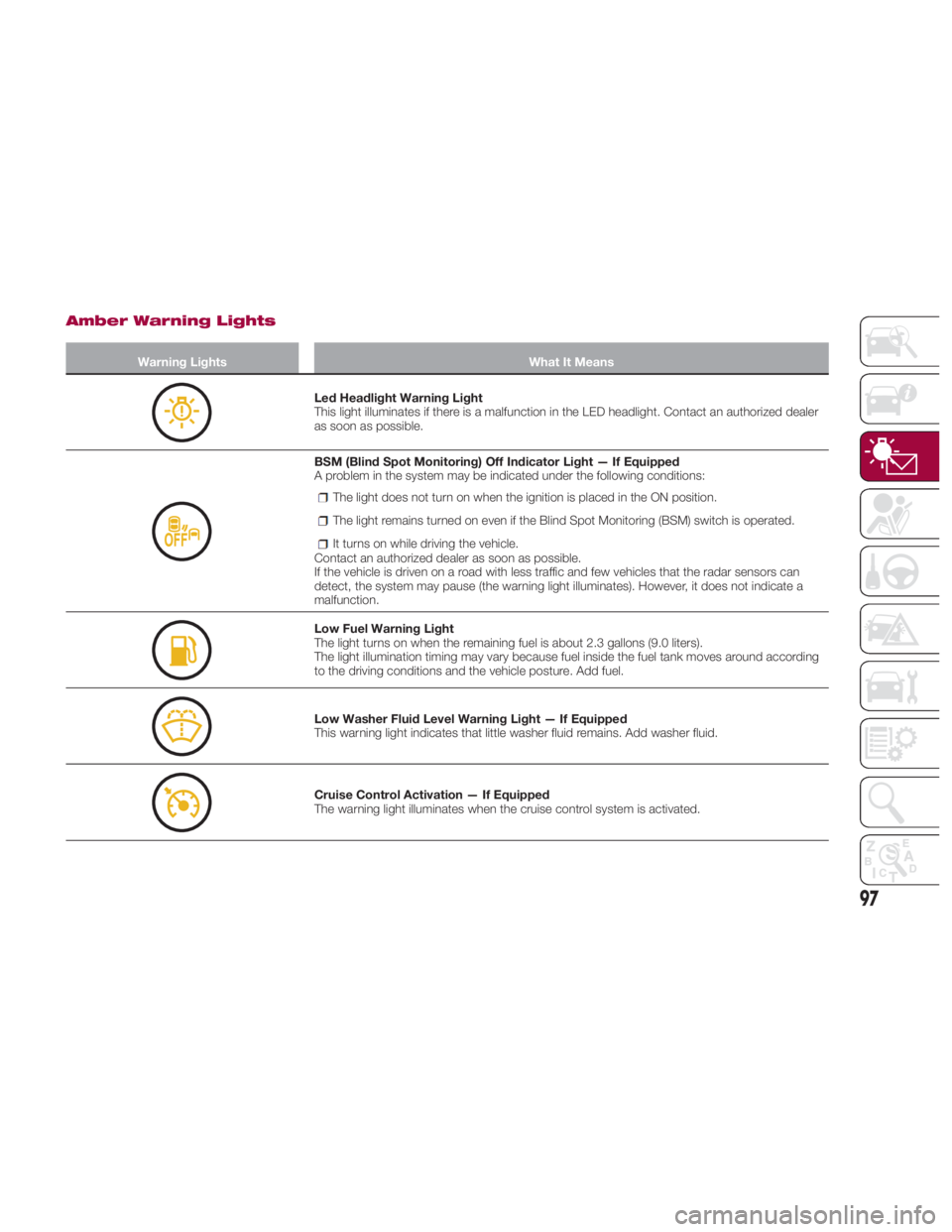
Led Headlight Warning Light
This light illuminates if there is a malfunction in the LED headlight. Contact an authorized dealer
as soon as possible.
BSM (Blind Spot Monitoring) Off Indicator Light — If Equipped
A problem in the system may be indicated under the following conditions:
The light does not turn on when the ignition is placed in the ON position.
The light remains turned on even if the Blind Spot Monitoring (BSM) switch is operated.
It turns on while driving the vehicle.
Contact an authorized dealer as soon as possible.
If the vehicle is driven on a road with less traffic and few vehicles that the radar sensors can
detect, the system may pause (the warning light illuminates). However, it does not indicate a
malfunction.
Low Fuel Warning Light
The light turns on when the remaining fuel is about 2.3 gallons (9.0 liters).
The light illumination timing may vary because fuel inside the fuel tank moves around according
to the driving conditions and the vehicle posture. Add fuel.
Low Washer Fluid Level Warning Light — If Equipped
This warning light indicates that little washer fluid remains. Add washer fluid.
Cruise Control Activation — If Equipped
The warning light illuminates when the cruise control system is activated.
97
Page 100 of 292
Amber Warning Lights Warning Light What It Means
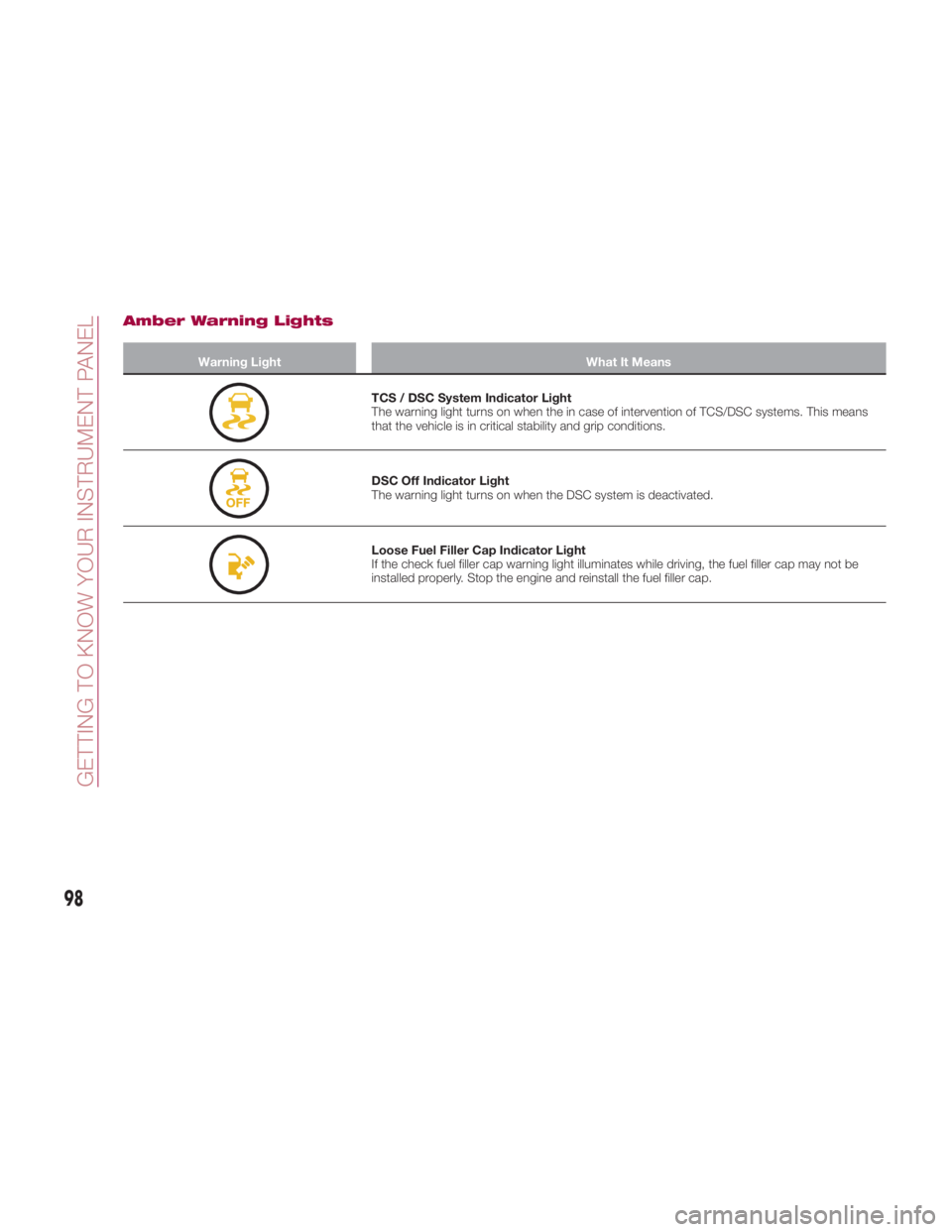
TCS / DSC System Indicator Light
The warning light turns on when the in case of intervention of TCS/DSC systems. This means
that the vehicle is in critical stability and grip conditions.
DSC Off Indicator Light
The warning light turns on when the DSC system is deactivated.
Loose Fuel Filler Cap Indicator Light
If the check fuel filler cap warning light illuminates while driving, the fuel filler cap may not be
installed properly. Stop the engine and reinstall the fuel filler cap.
98
GETTING TO KNOW YOUR INSTRUMENT PANEL
Page 107 of 292
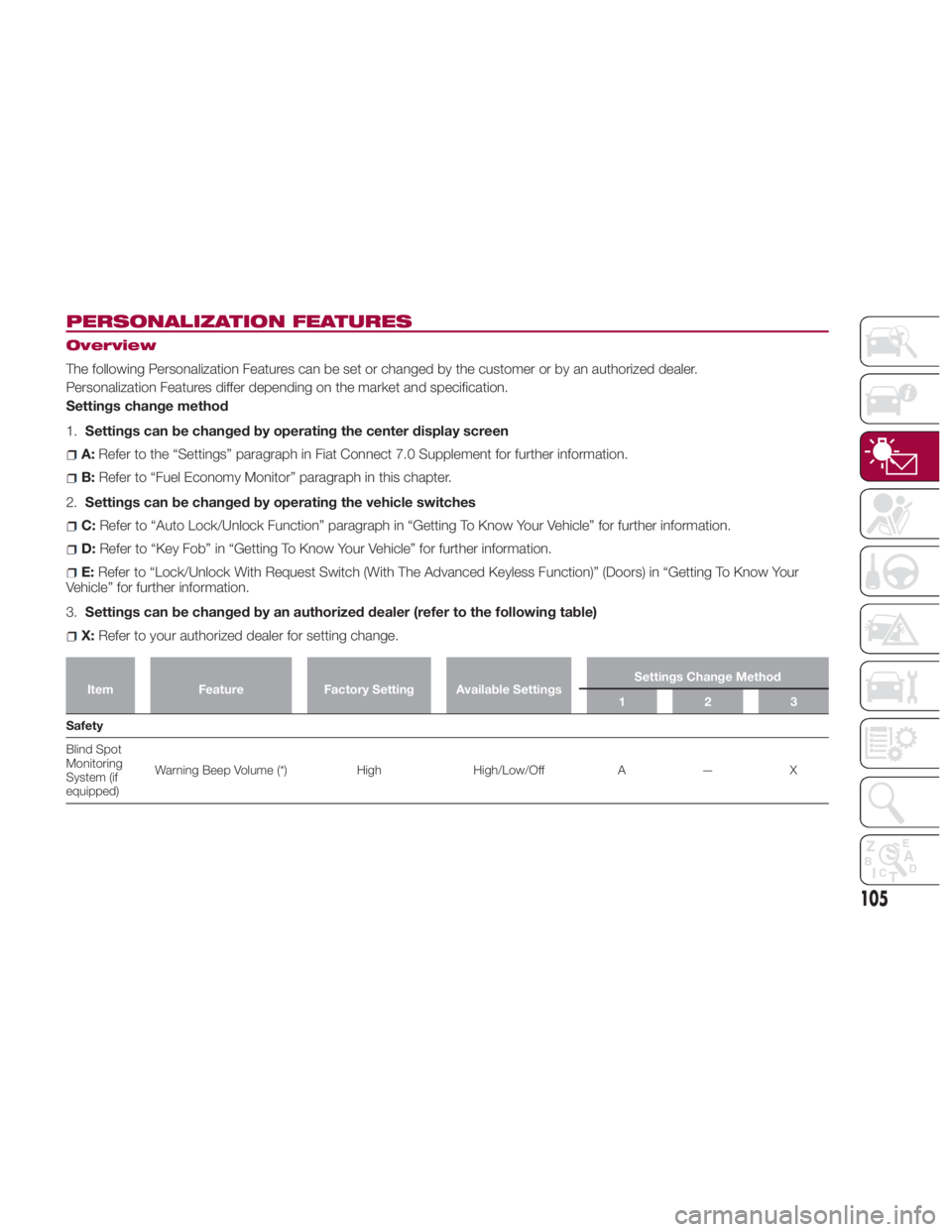
PERSONALIZATION FEATURES Overview
The following Personalization Features can be set or changed by the customer or by an authorized dealer.
Personalization Features differ depending on the market and specification.
Settings change method
1. Settings can be changed by operating the center display screen
A: Refer to the “Settings” paragraph in Fiat Connect 7.0 Supplement for further information.
B: Refer to “Fuel Economy Monitor” paragraph in this chapter.
2. Settings can be changed by operating the vehicle switches
C: Refer to “Auto Lock/Unlock Function” paragraph in “Getting To Know Your Vehicle” for further information.
D: Refer to “Key Fob” in “Getting To Know Your Vehicle” for further information.
E: Refer to “Lock/Unlock With Request Switch (With The Advanced Keyless Function)” (Doors) in “Getting To Know Your
Vehicle” for further information.
3. Settings can be changed by an authorized dealer (refer to the following table)
X: Refer to your authorized dealer for setting change.Item Feature Factory Setting Available Settings Settings Change Method
123
Safety
Blind
Spot
Monitoring
System (if
equipped) Warning Beep Volume (*) High High/Low/Off A — X
105
Page 110 of 292
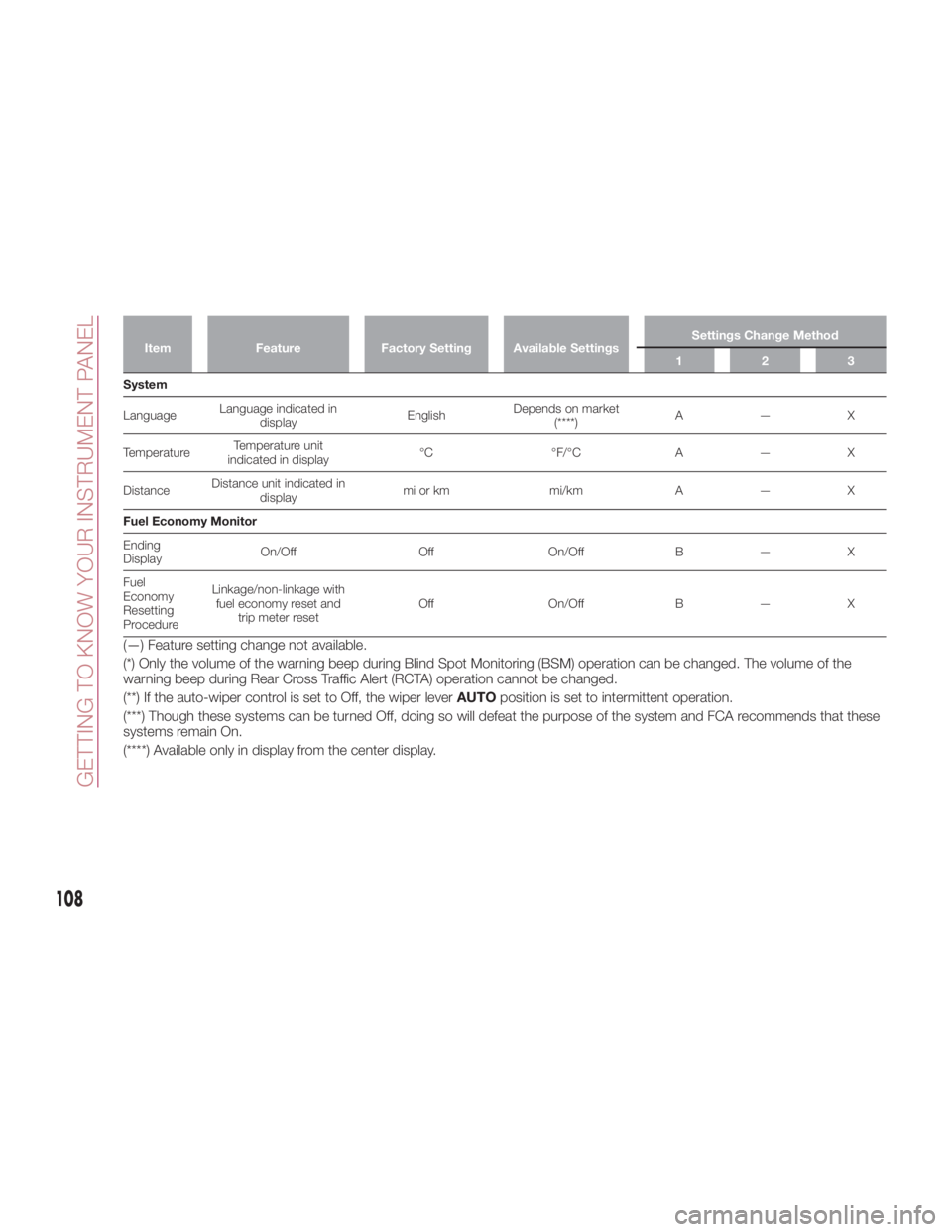
Item Feature Factory Setting Available Settings Settings Change Method
123
System
Language Language indicated in
display English Depends on market
(****) A—X
Temperature Temperature unit
indicated in display °C °F/°C A — X
Distance Distance unit indicated in
display mi or km mi/km A — X
Fuel Economy Monitor
Ending
Display On/Off Off On/Off B — X
Fuel
Economy
Resetting
Procedure Linkage/non-linkage with
fuel economy reset and
trip meter reset Off On/Off B — X
(—) Feature setting change not available.
(*) Only the volume of the warning beep during Blind Spot Monitoring (BSM) operation can be changed. The volume of the
warning beep during Rear Cross Traffic Alert (RCTA) operation cannot be changed.
(**) If the auto-wiper control is set to Off, the wiper lever AUTO position is set to intermittent operation.
(***) Though these systems can be turned Off, doing so will defeat the purpose of the system and FCA recommends that these
systems remain On.
(****) Available only in display from the center display.
108
GETTING TO KNOW YOUR INSTRUMENT PANEL