heating FIAT SPIDER ABARTH 2017 Owners Manual
[x] Cancel search | Manufacturer: FIAT, Model Year: 2017, Model line: SPIDER ABARTH, Model: FIAT SPIDER ABARTH 2017Pages: 292, PDF Size: 9.24 MB
Page 46 of 292
If dirt or debris (such as ice or debris
containing salt water) adheres to the
windshield above the rain sensor or if
the windshield is iced, it could cause
the wipers to move automatically.
However, if the wipers cannot remove
this ice, dirt or debris, the auto-wiper
control will stop operation. In this case,
set the wiper lever to the low speed
position or high speed position for
manual operation, or remove the ice,
dirt or debris by hand to restore the
auto-wiper operation.
If the auto-wiper lever is left in the
AUTO position, the wipers could
operate automatically from the effect of
strong light sources, electromagnetic
waves, or infrared light because the rain
sensor uses an optical sensor.
It is recommended that the auto-wiper
lever be switched to the OFF position
other than when driving the vehicle
under rainy conditions.
The auto-wiper control functions can be
turned off. Because heavy ice and snow can jam
the wiper blades, the wiper motor is
protected from motor breakdown,
overheating and possible fire by a
circuit breaker. This mechanism will
automatically stop operation of the
blades, but only for about five minutes.
If this happens, turn off the wiper switch
and park off the road and remove the
snow and ice. After five minutes, turn
on the switch and the blades should
operate normally. If they do not resume
functioning, contact an authorized
dealer as soon as possible. Pull off to
the side of the road to a safe location.
Wait until the weather clears before
trying to drive with the wipers
inoperative.
Windshield Washer
Pull the wiper/washer lever rearward
and hold it to spray washer fluid onto
the windshield.
With the wiper lever in the OFF,
intermittent, or AUTO position, the
wipers will operate continuously until
the lever is released. Warning!Sudden loss of visibility through the
windshield could lead to a collision. You
might not see other vehicles or other
obstacles. To avoid sudden icing of the
windshield during freezing weather, warm
the windshield with defroster before and
during windshield washer use.
If the fluid level is normal and the
washer does not work, contact an
authorized dealer.
With Headlight Washers
When the headlights are on, the
headlight washers operate
automatically once every fifth time the
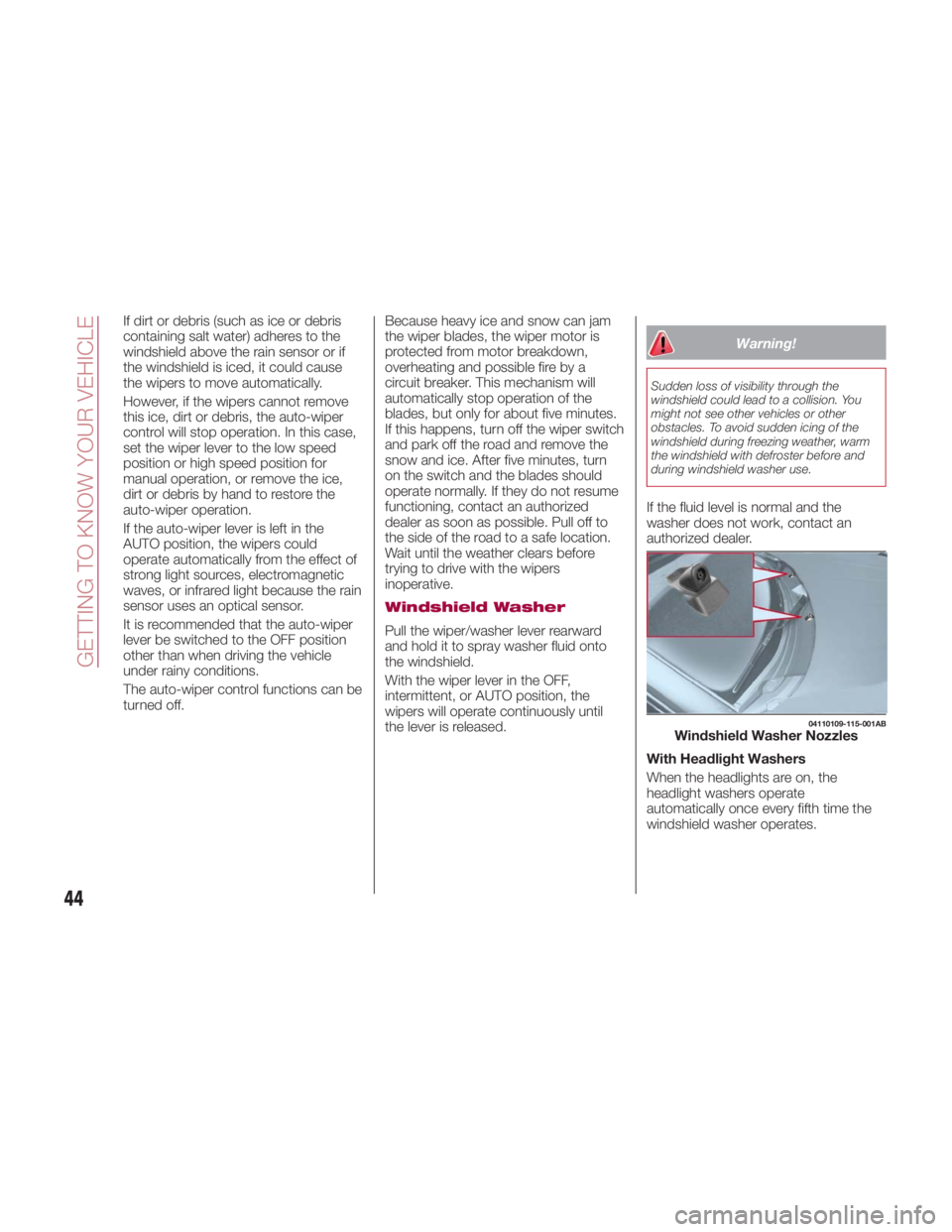
windshield washer operates. 04110109-115-001AB
Windshield Washer Nozzles
44
GETTING TO KNOW YOUR VEHICLE
Page 51 of 292
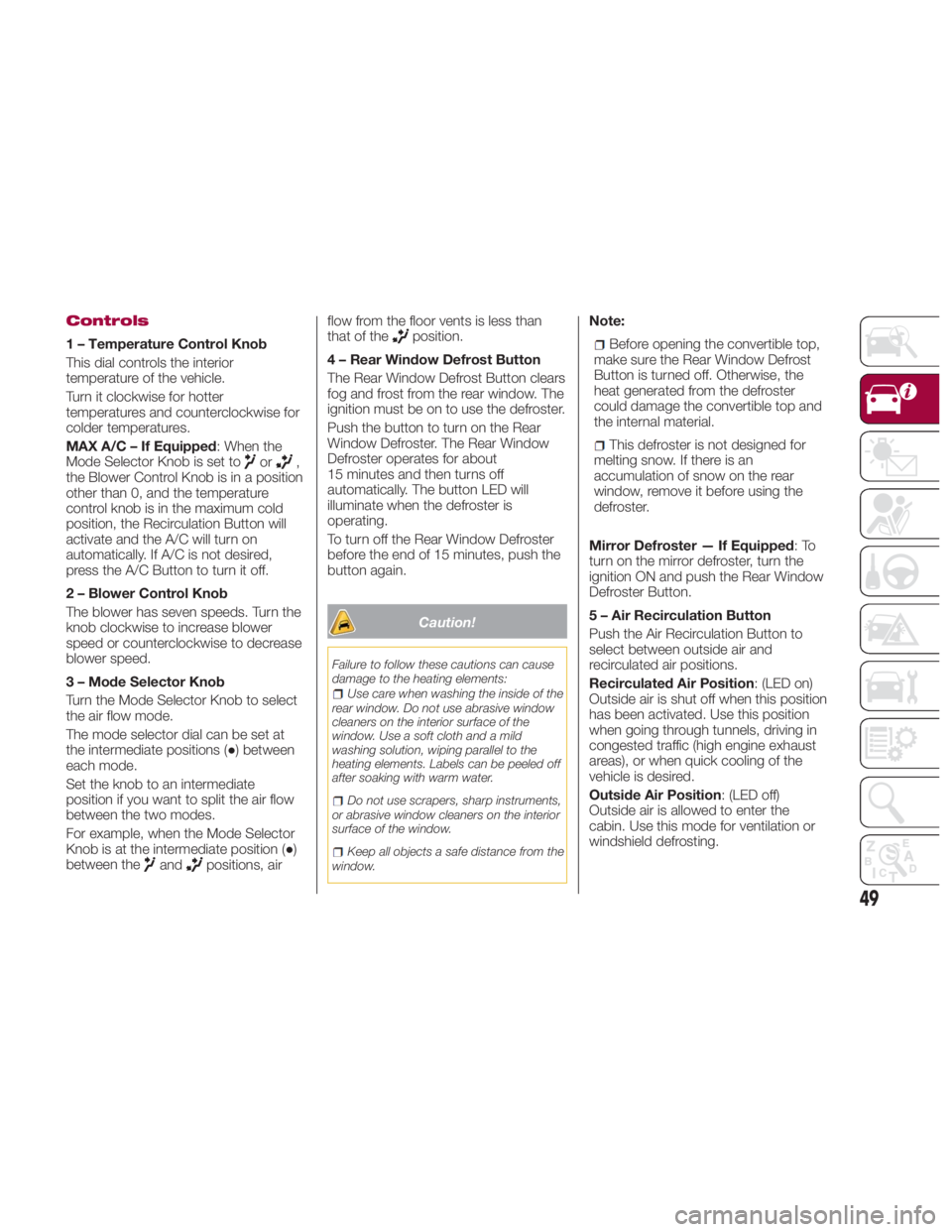
Controls
1 – Temperature Control Knob
This dial controls the interior
temperature of the vehicle.
Turn it clockwise for hotter
temperatures and counterclockwise for
colder temperatures.
MAX A/C – If Equipped : When the
Mode Selector Knob is set to
or ,
the Blower Control Knob is in a position
other than 0, and the temperature
control knob is in the maximum cold
position, the Recirculation Button will
activate and the A/C will turn on
automatically. If A/C is not desired,
press the A/C Button to turn it off.
2 – Blower Control Knob
The blower has seven speeds. Turn the
knob clockwise to increase blower
speed or counterclockwise to decrease
blower speed.
3 – Mode Selector Knob
Turn the Mode Selector Knob to select
the air flow mode.
The mode selector dial can be set at
the intermediate positions ( ● ) between
each mode.
Set the knob to an intermediate
position if you want to split the air flow
between the two modes.
For example, when the Mode Selector
Knob is at the intermediate position ( ● )
between the
and positions, air flow from the floor vents is less than
that of the
position.
4 – Rear Window Defrost Button
The Rear Window Defrost Button clears
fog and frost from the rear window. The
ignition must be on to use the defroster.
Push the button to turn on the Rear
Window Defroster. The Rear Window
Defroster operates for about
15 minutes and then turns off
automatically. The button LED will
illuminate when the defroster is
operating.
To turn off the Rear Window Defroster
before the end of 15 minutes, push the
button again.
Caution!Failure to follow these cautions can cause
damage to the heating elements:
Use care when washing the inside of the
rear window. Do not use abrasive window
cleaners on the interior surface of the
window. Use a soft cloth and a mild
washing solution, wiping parallel to the
heating elements. Labels can be peeled off
after soaking with warm water.
Do not use scrapers, sharp instruments,
or abrasive window cleaners on the interior
surface of the window.
Keep all objects a safe distance from the
window. Note:
Before opening the convertible top,
make sure the Rear Window Defrost
Button is turned off. Otherwise, the
heat generated from the defroster
could damage the convertible top and
the internal material.
This defroster is not designed for
melting snow. If there is an
accumulation of snow on the rear
window, remove it before using the
defroster.
Mirror Defroster — If Equipped :To
turn on the mirror defroster, turn the
ignition ON and push the Rear Window
Defroster Button.
5 – Air Recirculation Button
Push the Air Recirculation Button to
select between outside air and
recirculated air positions.
Recirculated Air Position : (LED on)
Outside air is shut off when this position
has been activated. Use this position
when going through tunnels, driving in
congested traffic (high engine exhaust
areas), or when quick cooling of the
vehicle is desired.
Outside Air Position : (LED off)
Outside air is allowed to enter the
cabin. Use this mode for ventilation or
windshield defrosting.
49
Page 52 of 292
Note: Do not use the Outside Air
Position in cold or rainy weather is
dangerous as it will cause the windows
to fog up. Your vision will be hampered,
which could lead to a serious accident.
6 – A/C Button
Push the A/C Button to turn on the air
conditioner.
The LED on the switch will illuminate
when the Blower Control Knob is in any
position except the OFF position.
Push the button again to turn off the air
conditioner.
Note: The air conditioner may not
function when the outside temperature
approaches 32 °F (0 °C).
Heating
Proceed as follows:
1. Set the Mode Selector Knob to the
position.
2. Set the Air Recirculation Button to
the outside air position.
3. Set the Temperature Control Dial to
the hot position.
4. Set the Blower Control Knob to the
desired speed. 5. If dehumidified heating is desired,
turn on the air conditioner.
If the windshield fogs up easily, set the
Mode Selector Knob to the
position.
If cooler air is desired at face level, set
the Mode Selector Knob to the
position and adjust the Temperature
Control Knob to maintain comfort.
The floor vents will blow warmer air
while the side air vents will blow cooler
air (except when the temperature
control dial is set at the maximum hot
or cold position).
Cooling (With Air
Conditioner)
Proceed as follows:
1. Set the Mode Selector Knob to the
position.
2. Set the Temperature Control Knob
to the cold position.
3. Set the Blower Control Knob to the
desired speed.
4. Turn on the air conditioner by
pushing the A/C Button.
5. After cooling begins, adjust the
Blower Control Knob and Temperature
Control Knob as needed to maintain
comfort. Note:
If the air conditioner is used while
driving up large hills or in heavy traffic,
monitor the Engine Coolant
Temperature Warning Light to see if it
is illuminated or flashing. The air
conditioner may cause engine
overheating in these situations. If the
warning light is illuminated or flashing,
turn the air conditioning off
immediately.
When maximum cooling is desired,
set the Temperature Control Knob to
the extreme cold position, push the Air
Recirculation Button to activate the
recirculated air position, and then turn
the fan control dial fully clockwise.
If warmer air is desired at floor level,
set the Mode Selector Knob to the
position, and adjust the
Temperature Control Knob to maintain
comfort.
The floor vents will blow warmer air
while the side air vents will blow cooler
air (except when the temperature
control dial is set at the maximum hot
or cold position).
50
GETTING TO KNOW YOUR VEHICLE
Page 53 of 292
Ventilation
Proceed as follows:
1. Set the Mode Selector Knob to the
position.
2. Set the Air Recirculation Button to
the outside air position.
3. Set the Temperature Control Knob
to the desired position.
4. Set the Blower Control Knob to the
desired speed.
Windshield Defrosting
And Defogging
Proceed as follows:
1. Set the Mode Selector Knob to the
Front Defrost
position.
2. Set the Temperature Control Knob to
the desired position.
3. Set the Blower Control Knob to the
desired speed.
4. If dehumidified heating is desired,
turn on the air conditioner. Warning!Set the temperature control to the hot or
warm position when defogging (Front
Defrost position). Using the Front Defrost
position with the temperature control set to
the cold position is dangerous as it will
cause the outside of the windshield to fog
up. Your vision will be hampered, which
could lead to a serious accident.
Note:
For maximum defrosting, turn on
the air conditioner, set the Temperature
Control Knob to the extreme hot
position, and turn the Blower Control
Knob fully clockwise.
If warm air is desired from the floor
vents, set the Mode Selector Knob to
the position.
If equipped with MAX A/C, the
Recirculation Button can be set to the
Recirculated Air position, when the
Blower Control Knob is ON, and the
Mode Selector Knob is set to the Front
Defrost position. Dehumidifying (With Air
Conditioner)
Operate the air conditioner in cool or
cold weather to help defog the
windshield and side windows.
Proceed as follows:
1. Set the Mode Selector Knob to the
desired position.
2. Set the Air Recirculation Knob to the
outside air position.
3. Set the Temperature Control Knob
to the desired position.
4. Set the Blower Control Knob to the
desired speed.
5. Turn on the air conditioner by
pressing the A/C Button.
Note: One of the functions of the air
conditioner is dehumidifying the air. To
use this function, the temperature does
not have to be set to cold. Set the
Temperature Control Knob to the
desired position (hot or cold), and turn
on the air conditioner to dehumidify the
cabin air.
51
Page 56 of 292
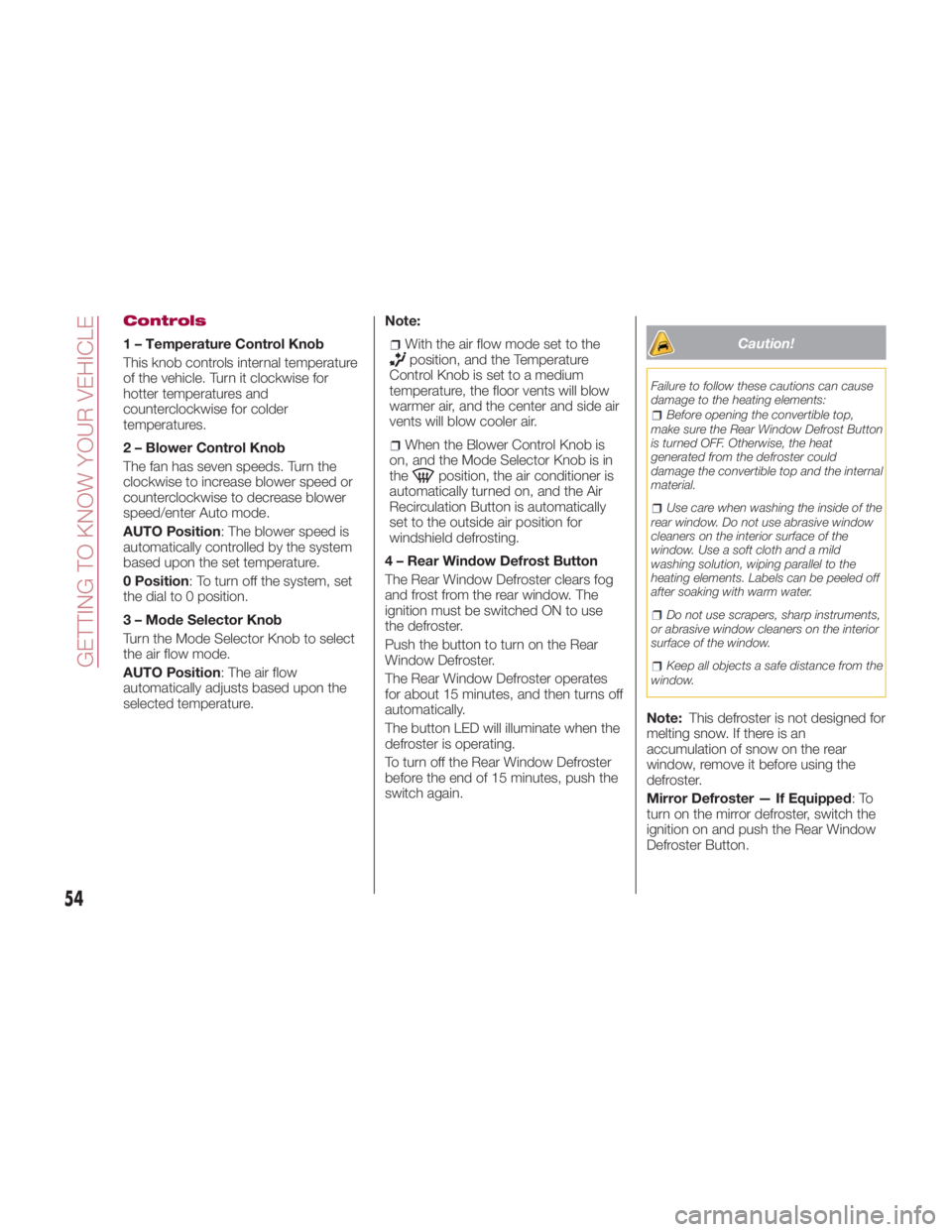
Controls
1 – Temperature Control Knob
This knob controls internal temperature
of the vehicle. Turn it clockwise for
hotter temperatures and
counterclockwise for colder
temperatures.
2 – Blower Control Knob
The fan has seven speeds. Turn the
clockwise to increase blower speed or
counterclockwise to decrease blower
speed/enter Auto mode.
AUTO Position : The blower speed is
automatically controlled by the system
based upon the set temperature.
0 Position : To turn off the system, set
the dial to 0 position.
3 – Mode Selector Knob
Turn the Mode Selector Knob to select
the air flow mode.
AUTO Position : The air flow
automatically adjusts based upon the
selected temperature. Note:
With the air flow mode set to the
position, and the Temperature
Control Knob is set to a medium
temperature, the floor vents will blow
warmer air, and the center and side air
vents will blow cooler air.
When the Blower Control Knob is
on, and the Mode Selector Knob is in
the
position, the air conditioner is
automatically turned on, and the Air
Recirculation Button is automatically
set to the outside air position for
windshield defrosting.
4 – Rear Window Defrost Button
The Rear Window Defroster clears fog
and frost from the rear window. The
ignition must be switched ON to use
the defroster.
Push the button to turn on the Rear
Window Defroster.
The Rear Window Defroster operates
for about 15 minutes, and then turns off
automatically.
The button LED will illuminate when the
defroster is operating.
To turn off the Rear Window Defroster
before the end of 15 minutes, push the
switch again. Caution!Failure to follow these cautions can cause
damage to the heating elements:
Before opening the convertible top,
make sure the Rear Window Defrost Button
is turned OFF. Otherwise, the heat
generated from the defroster could
damage the convertible top and the internal
material.
Use care when washing the inside of the
rear window. Do not use abrasive window
cleaners on the interior surface of the
window. Use a soft cloth and a mild
washing solution, wiping parallel to the
heating elements. Labels can be peeled off
after soaking with warm water.
Do not use scrapers, sharp instruments,
or abrasive window cleaners on the interior
surface of the window.
Keep all objects a safe distance from the
window.
Note: This defroster is not designed for
melting snow. If there is an
accumulation of snow on the rear
window, remove it before using the
defroster.
Mirror Defroster — If Equipped :To
turn on the mirror defroster, switch the
ignition on and push the Rear Window
Defroster Button.
54
GETTING TO KNOW YOUR VEHICLE
Page 62 of 292
should now activate your rolling code
equipped device.
Note: To program the remaining two
HomeLink buttons, begin with step
one.
For questions or comments, please
contact HomeLink at
www.homelink.com or
1-800-355-3515 .
Gate Operator/Canadian
Programming
Canadian radio-frequency laws require
transmitter signals to “time-out” (or quit)
after several seconds of transmission -
which may not be long enough for
HomeLink to pick up the signal during
programming.
Similar to this Canadian law, some U.S.
gate operators are designed to
“time-out” in the same manner.
If you live in Canada or you are having
difficulties programming a gate operator
by using the “Programming”
procedures (regardless of where you
live), replace “Programming The
System” step three with the following:
Note: If programming a garage door
opener or gate operator, it is advised to
unplug the device during the “cycling”
process to prevent possible
overheating.
1. Continue to press and hold the
HomeLink button while you press and
release - every two seconds (“cycle”)
your hand-held transmitter until the frequency signal has successfully been
accepted by HomeLink (the indicator
light will flash slowly and then rapidly).
2. Proceed with the “Programming”
steps to complete.
Operating The System
Push the programmed HomeLink
button to operate a programmed
device.
The code will continue being
transmitted for a maximum of
20 seconds.
Reprogramming The
System
To program a device to HomeLink using
a HomeLink button previously trained,
follow these steps:
1. Push and hold the desired HomeLink
button. DO NOT release the button;
2. The indicator light will begin to flash
after 20 seconds. Without releasing the
HomeLink button, proceed with
“Programming The System” step one.
Erasing Programmed
HomeLink Buttons
To erase the existing programming from
all three operating channels, push and
hold the two outside buttons 1 and
3 on the auto-dimming mirror until the
HomeLink indicator light begins to flash
after approximately 10 seconds.
Verify that the programming has been
erased when you resell the vehicle. INTERNAL
EQUIPMENT Storage Compartments
Center Console
The center console is located between
the driver’s and passenger’s seats.
Warning!Keep storage compartments closed when
driving. Driving with the storage
compartments open is dangerous. To
reduce the possibility of injury in an
accident or a sudden stop, keep the
storage compartments closed when
driving.
Caution!Do not leave lighters or eyeglasses in the
storage compartments while parked under
the sun. A lighter could explode or the
plastic material in eyeglasses could deform
and crack from high temperature.
60
GETTING TO KNOW YOUR VEHICLE
Page 82 of 292
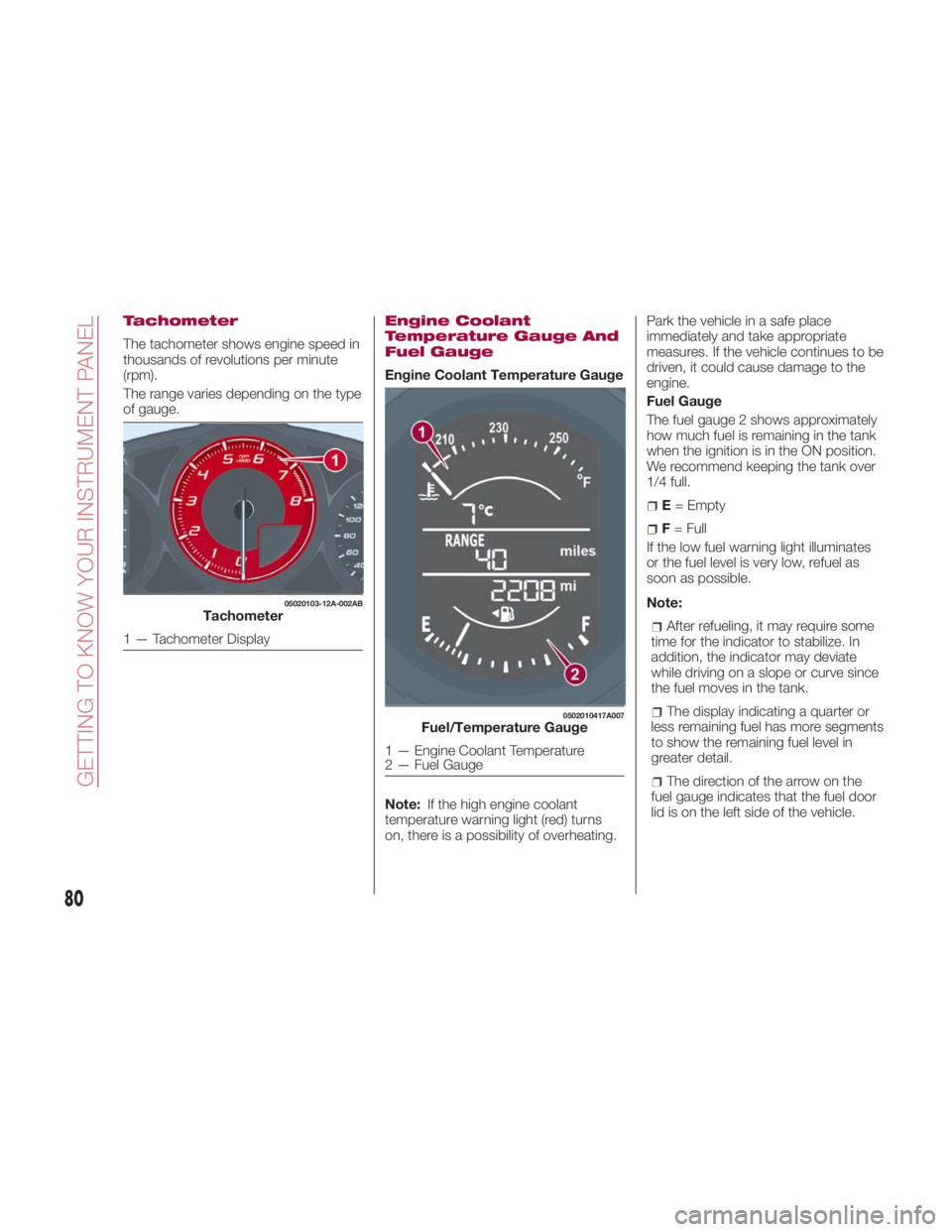
Tachometer
The tachometer shows engine speed in
thousands of revolutions per minute
(rpm).
The range varies depending on the type
of gauge. Engine Coolant
Temperature Gauge And
Fuel Gauge
Engine Coolant Temperature Gauge
Note: If the high engine coolant
temperature warning light (red) turns
on, there is a possibility of overheating. Park the vehicle in a safe place
immediately and take appropriate
measures. If the vehicle continues to be
driven, it could cause damage to the
engine.
Fuel Gauge
The fuel gauge 2 shows approximately
how much fuel is remaining in the tank
when the ignition is in the ON position.
We recommend keeping the tank over
1/4 full.
E = Empty
F = Full
If the low fuel warning light illuminates
or the fuel level is very low, refuel as
soon as possible.
Note:
After refueling, it may require some
time for the indicator to stabilize. In
addition, the indicator may deviate
while driving on a slope or curve since
the fuel moves in the tank.
The display indicating a quarter or
less remaining fuel has more segments
to show the remaining fuel level in
greater detail.
The direction of the arrow on the
fuel gauge indicates that the fuel door
lid is on the left side of the vehicle.05020103-12A-002AB
Tachometer
1 — Tachometer Display 0502010417A007
Fuel/Temperature Gauge
1 — Engine Coolant Temperature
2 — Fuel Gauge
80
GETTING TO KNOW YOUR INSTRUMENT PANEL
Page 91 of 292
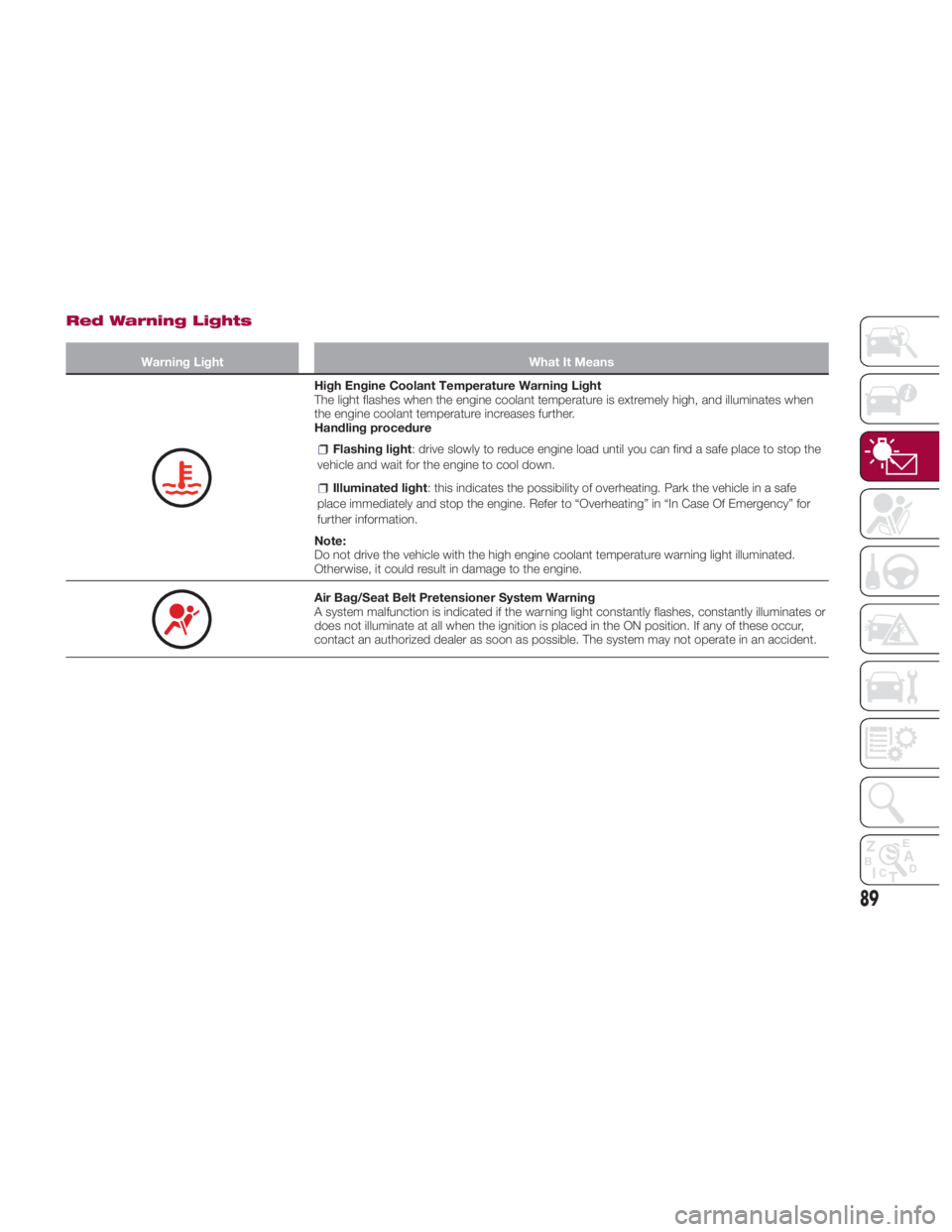
Red Warning Lights Warning Light What It Means
High Engine Coolant Temperature Warning Light
The light flashes when the engine coolant temperature is extremely high, and illuminates when
the engine coolant temperature increases further.
Handling procedure
Flashing light : drive slowly to reduce engine load until you can find a safe place to stop the
vehicle and wait for the engine to cool down.
Illuminated light : this indicates the possibility of overheating. Park the vehicle in a safe
place immediately and stop the engine. Refer to “Overheating” in “In Case Of Emergency” for
further information.
Note:
Do not drive the vehicle with the high engine coolant temperature warning light illuminated.
Otherwise, it could result in damage to the engine.
Air Bag/Seat Belt Pretensioner System Warning
A system malfunction is indicated if the warning light constantly flashes, constantly illuminates or
does not illuminate at all when the ignition is placed in the ON position. If any of these occur,
contact an authorized dealer as soon as possible. The system may not operate in an accident.
89
Page 160 of 292
Paddle Mode — If
Equipped
Tapping one of the steering
wheel-mounted shift paddles (+/-), if
equipped, while the gear selector is in
DRIVE (D), will activate Paddle Mode (a
temporary manual mode). The current
gear will be displayed in the instrument
cluster, with the "M" also illuminated.
The transmission will revert back to
normal operation (if the gear selector
remains in DRIVE) after a period of time,
depending on accelerator pedal activity.
Note: Because Paddle mode is only
temporary, use of the MANUAL (M)
position is recommended if you need to
drive the vehicle in a particular gear for
long periods.
Driving Tips
Overtaking
For extra power when passing another
vehicle or climbing steep grades, press
the accelerator fully. The transmission
will shift to a lower gear, depending on
vehicle speed.
Note:
The accelerator pedal may initially
feel heavy as it is being pressed, then
feel lighter as it is pressed further. This
change in pedal force controls whether
or not kickdown should be performed. While the gear selector is in the
MANUAL (M) position and the Dynamic
Stability Control (DSC) is turned off,
manual shift mode does not switch to
automatic shift mode even if the
accelerator pedal is completely
pressed. Tap the gear selector forward
or rearward to select the appropriate
gear.
Climbing steep grades from a stop
To climb a steep grade from a stopped
position:
1. Press the brake pedal.
2. Shift to DRIVE (D) or M1, depending
on the load weight and grade
steepness.
3. Release the brake pedal while
gradually accelerating.
Descending steep grades
When descending a steep grade, shift
to lower gears, depending on load
weight and grade steepness.
Descend slowly, using the brakes only
occasionally to prevent them from
overheating. SPORT MODE The Sport mode increases steering
feedback to the driver with slight
increase in effort and changes the
transmission shift schedules for more
aggressive shifting. This driving mode is
useful while driving on twisty roads
where more steering precision is
desired in spirited cornering.
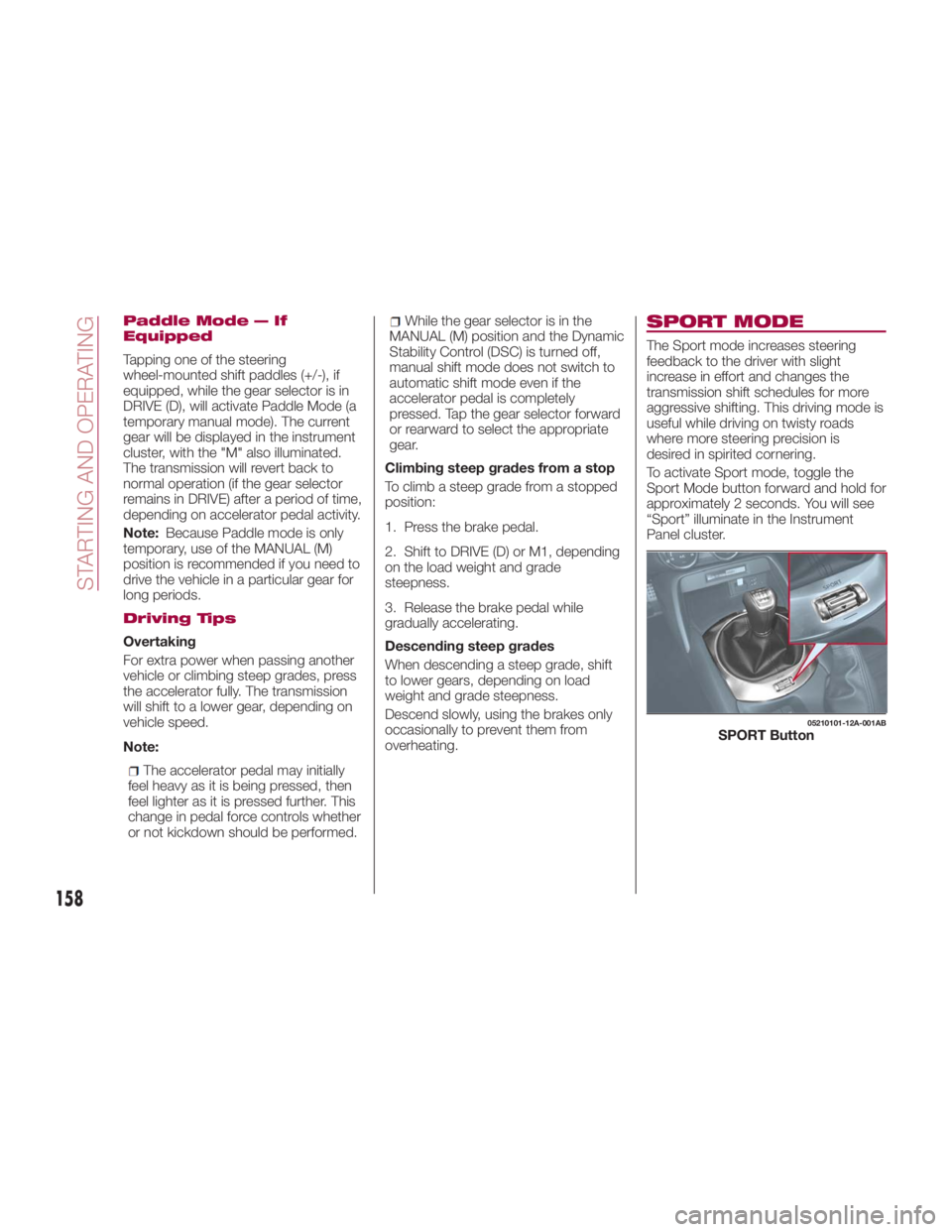
To activate Sport mode, toggle the
Sport Mode button forward and hold for
approximately 2 seconds. You will see
“Sport” illuminate in the Instrument
Panel cluster. 05210101-12A-001AB
SPORT Button
158
STARTING AND OPERATING
Page 181 of 292
For more traction in starting on
slippery surfaces such as ice or packed
snow, use sand, rock salt, chains,
carpeting, or other nonslip material
under the rear wheels.
Note: Use snow chains only on the
rear wheels.
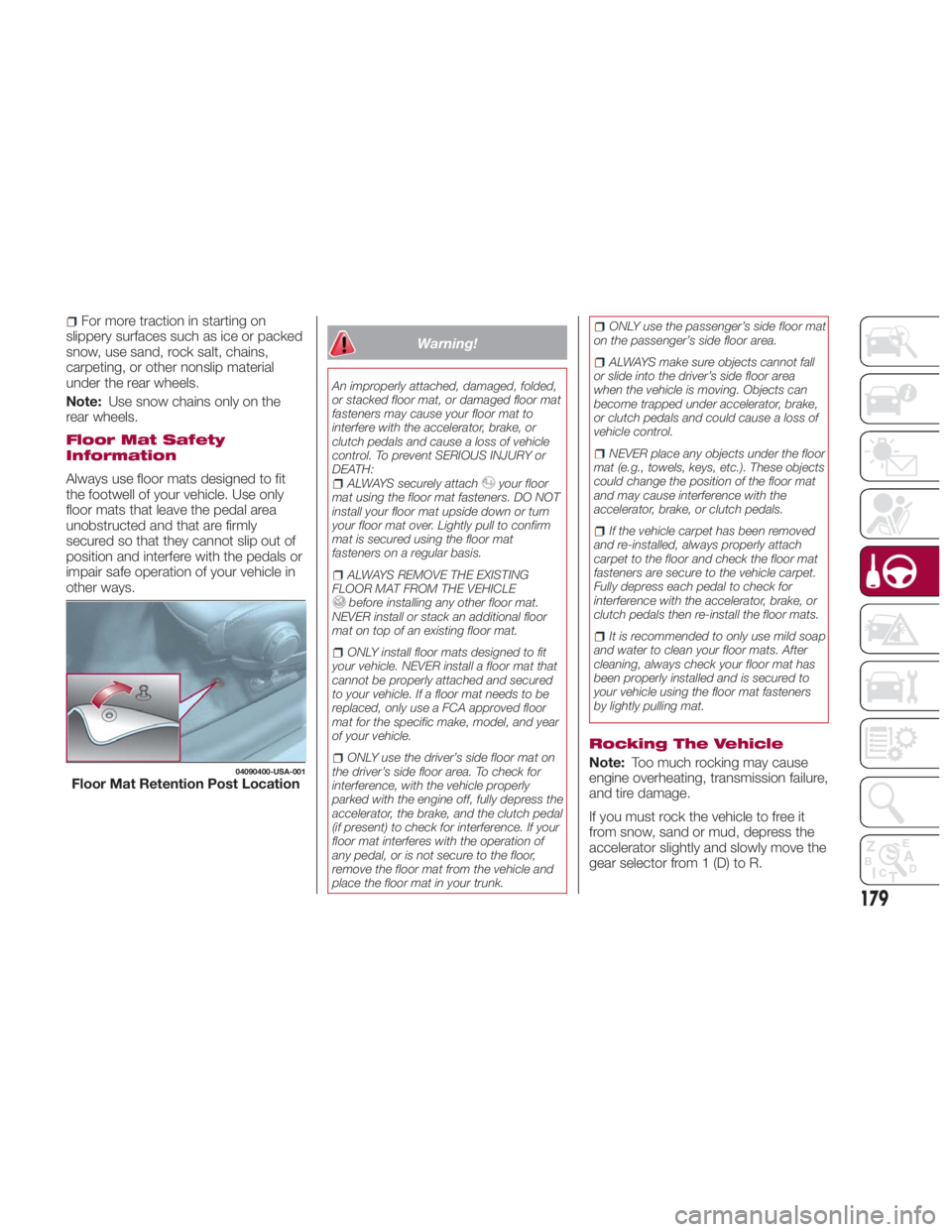
Floor Mat Safety
Information
Always use floor mats designed to fit
the footwell of your vehicle. Use only
floor mats that leave the pedal area
unobstructed and that are firmly
secured so that they cannot slip out of
position and interfere with the pedals or
impair safe operation of your vehicle in
other ways. Warning!An improperly attached, damaged, folded,
or stacked floor mat, or damaged floor mat
fasteners may cause your floor mat to
interfere with the accelerator, brake, or
clutch pedals and cause a loss of vehicle
control. To prevent SERIOUS INJURY or
DEATH:
ALWAYS securely attach your floor
mat using the floor mat fasteners. DO NOT
install your floor mat upside down or turn
your floor mat over. Lightly pull to confirm
mat is secured using the floor mat
fasteners on a regular basis.
ALWAYS REMOVE THE EXISTING
FLOOR MAT FROM THE VEHICLE
before installing any other floor mat.
NEVER install or stack an additional floor
mat on top of an existing floor mat.
ONLY install floor mats designed to fit
your vehicle. NEVER install a floor mat that
cannot be properly attached and secured
to your vehicle. If a floor mat needs to be
replaced, only use a FCA approved floor
mat for the specific make, model, and year
of your vehicle.
ONLY use the driver’s side floor mat on
the driver’s side floor area. To check for
interference, with the vehicle properly
parked with the engine off, fully depress the
accelerator, the brake, and the clutch pedal
(if present) to check for interference. If your
floor mat interferes with the operation of
any pedal, or is not secure to the floor,
remove the floor mat from the vehicle and
place the floor mat in your trunk. ONLY use the passenger’s side floor mat
on the passenger’s side floor area.
ALWAYS make sure objects cannot fall
or slide into the driver’s side floor area
when the vehicle is moving. Objects can
become trapped under accelerator, brake,
or clutch pedals and could cause a loss of
vehicle control.
NEVER place any objects under the floor
mat (e.g., towels, keys, etc.). These objects
could change the position of the floor mat
and may cause interference with the
accelerator, brake, or clutch pedals.
If the vehicle carpet has been removed
and re-installed, always properly attach
carpet to the floor and check the floor mat
fasteners are secure to the vehicle carpet.
Fully depress each pedal to check for
interference with the accelerator, brake, or
clutch pedals then re-install the floor mats.
It is recommended to only use mild soap
and water to clean your floor mats. After
cleaning, always check your floor mat has
been properly installed and is secured to
your vehicle using the floor mat fasteners
by lightly pulling mat.
Rocking The Vehicle
Note: Too much rocking may cause
engine overheating, transmission failure,
and tire damage.
If you must rock the vehicle to free it
from snow, sand or mud, depress the
accelerator slightly and slowly move the
gear selector from 1 (D) to R.04090400-USA-001
Floor Mat Retention Post Location
179