lane change FIAT SPIDER ABARTH 2017 Owners Manual
[x] Cancel search | Manufacturer: FIAT, Model Year: 2017, Model line: SPIDER ABARTH, Model: FIAT SPIDER ABARTH 2017Pages: 292, PDF Size: 9.24 MB
Page 37 of 292
STEERING WHEEL Steering Wheel
Adjustment
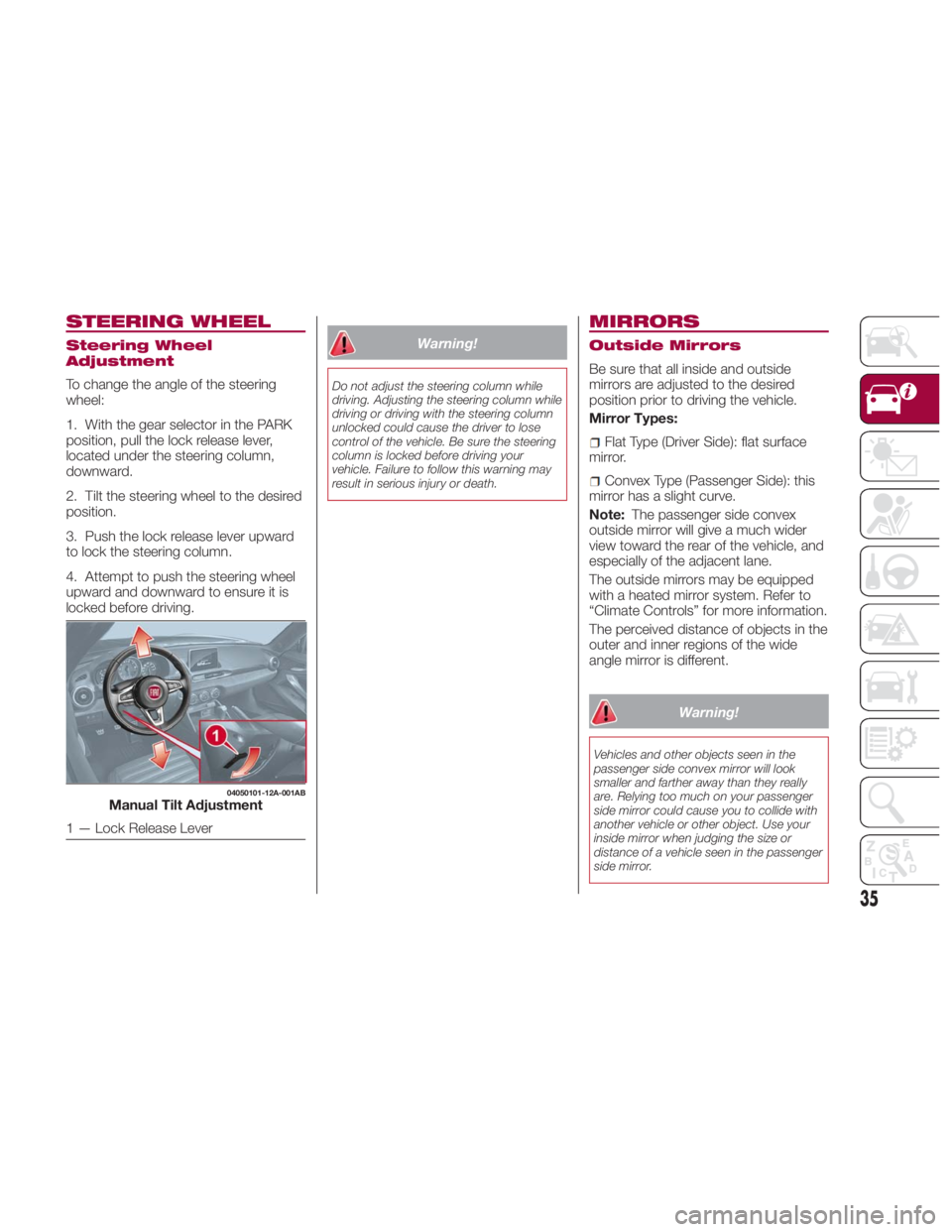
To change the angle of the steering
wheel:
1. With the gear selector in the PARK
position, pull the lock release lever,
located under the steering column,
downward.
2. Tilt the steering wheel to the desired
position.
3. Push the lock release lever upward
to lock the steering column.
4. Attempt to push the steering wheel
upward and downward to ensure it is
locked before driving. Warning!Do not adjust the steering column while
driving. Adjusting the steering column while
driving or driving with the steering column
unlocked could cause the driver to lose
control of the vehicle. Be sure the steering
column is locked before driving your
vehicle. Failure to follow this warning may
result in serious injury or death.
MIRRORS Outside Mirrors
Be sure that all inside and outside
mirrors are adjusted to the desired
position prior to driving the vehicle.
Mirror Types:
Flat Type (Driver Side): flat surface
mirror.
Convex Type (Passenger Side): this
mirror has a slight curve.
Note: The passenger side convex
outside mirror will give a much wider
view toward the rear of the vehicle, and
especially of the adjacent lane.
The outside mirrors may be equipped
with a heated mirror system. Refer to
“Climate Controls” for more information.
The perceived distance of objects in the
outer and inner regions of the wide
angle mirror is different.
Warning!Vehicles and other objects seen in the
passenger side convex mirror will look
smaller and farther away than they really
are. Relying too much on your passenger
side mirror could cause you to collide with
another vehicle or other object. Use your
inside mirror when judging the size or
distance of a vehicle seen in the passenger
side mirror.04050101-12A-001AB
Manual Tilt Adjustment
1 — Lock Release Lever
35
Page 43 of 292
System Activation
With the ignition switched to ACC or
OFF, pull the headlight control lever
rearward and the low beam headlights
will turn on.
The headlights turn off after a period of
time after all doors are closed.
The time until the headlights turn off
after all of the doors are closed can be
changed through the Connect system.
The headlights turn off if the lever is
pulled again while the headlights are on,
or after three minutes of no further
action after the first pull of the lever.
Front Fog Lights
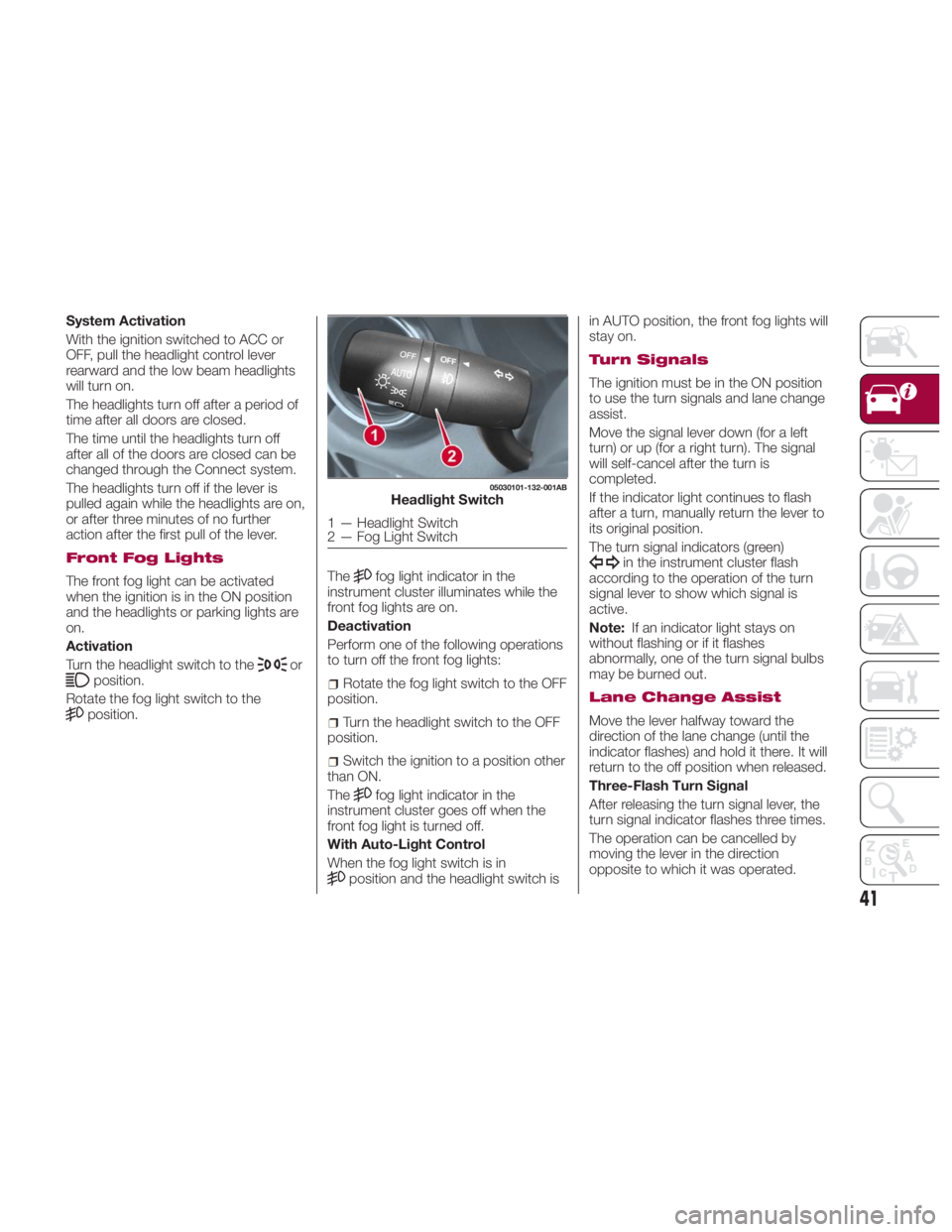
The front fog light can be activated
when the ignition is in the ON position
and the headlights or parking lights are
on.
Activation
Turn the headlight switch to the
or
position.
Rotate the fog light switch to the
position. The fog light indicator in the
instrument cluster illuminates while the
front fog lights are on.
Deactivation
Perform one of the following operations
to turn off the front fog lights:
Rotate the fog light switch to the OFF
position.
Turn the headlight switch to the OFF
position.
Switch the ignition to a position other
than ON.
The
fog light indicator in the
instrument cluster goes off when the
front fog light is turned off.
With Auto-Light Control
When the fog light switch is in
position and the headlight switch is in AUTO position, the front fog lights will
stay on.
Turn Signals
The ignition must be in the ON position
to use the turn signals and lane change
assist.
Move the signal lever down (for a left
turn) or up (for a right turn). The signal
will self-cancel after the turn is
completed.
If the indicator light continues to flash
after a turn, manually return the lever to
its original position.
The turn signal indicators (green)
in the instrument cluster flash
according to the operation of the turn
signal lever to show which signal is
active.
Note: If an indicator light stays on
without flashing or if it flashes
abnormally, one of the turn signal bulbs
may be burned out.
Lane Change Assist
Move the lever halfway toward the
direction of the lane change (until the
indicator flashes) and hold it there. It will
return to the off position when released.
Three-Flash Turn Signal
After releasing the turn signal lever, the
turn signal indicator flashes three times.
The operation can be cancelled by
moving the lever in the direction
opposite to which it was operated. 05030101-132-001AB
Headlight Switch
1 — Headlight Switch
2 — Fog Light Switch
41
Page 116 of 292
Note:
When DSC is on and you attempt
to free the vehicle when it is stuck, or
drive it out of freshly fallen snow, the
TCS (part of the DSC system) will
activate. Depressing the accelerator
will not increase engine power and
freeing the vehicle may be difficult.
When this happens, turn off the
TCS/DSC.
If the TCS/DSC is off when the
engine is turned off, it automatically
activates when the ignition is placed in
the ON mode. Warning!Dynamic Stability Control (DSC) cannot
prevent the natural laws of physics from
acting on the vehicle, nor can it increase
the traction afforded by prevailing road
conditions. DSC cannot prevent accidents,
including those resulting from excessive
speed in turns, driving on very slippery
surfaces, or hydroplaning. DSC also cannot
prevent accidents resulting from loss of
vehicle control due to inappropriate driver
input for the conditions. Only a safe,
attentive, and skillful driver can prevent
accidents. The capabilities of an DSC
equipped vehicle must never be exploited
in a reckless or dangerous manner which
could jeopardize the user’s safety or the
safety of others.
Vehicle modifications, or failure to
properly maintain your vehicle, may change
the handling characteristics of your vehicle,
and may negatively affect the performance
of the DSC system. Changes to the
steering system, suspension, braking
system, tire type and size or wheel size
may adversely affect DSC performance.
Improperly inflated and unevenly worn tires
may also degrade DSC performance. Any
vehicle modification or poor vehicle
maintenance that reduces the effectiveness
of the DSC system can increase the risk of
loss of vehicle control, vehicle rollover,
personal injury and death. AUXILIARY DRIVING
SYSTEMS Blind Spot Monitoring
(BSM) System
The Blind Spot Monitoring (BSM)
system is designed to assist the driver
during lane changes by alerting the
driver to the presence of vehicles
approaching from the rear in an
adjacent lane.
The system detects vehicles
approaching from the rear while
traveling in the forward direction at a
speed of 19 mph (30 km/h) or faster,
and will activate the BSM warning lights
equipped within the door mirrors.
If the turn signal lever is operated to
signal a lane change in the direction in
which the warning light is illuminated,
the system warns the driver of a vehicle
in the detection area by flashing the
warning light and activating an audible
alert.
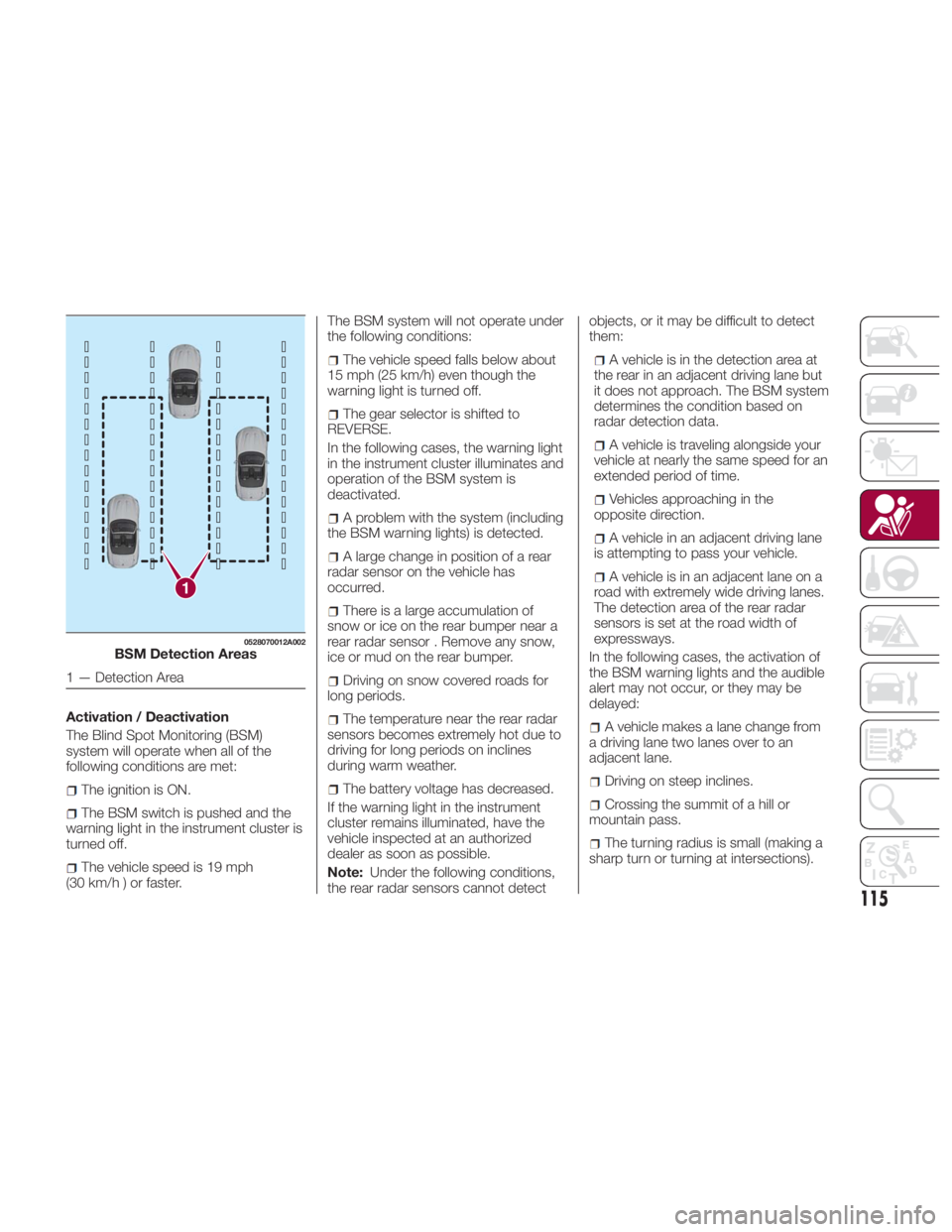
The detection area on this system
covers the driving lanes on both sides
of the vehicle and from the rear part of
the doors to about 164 ft (50 m) behind
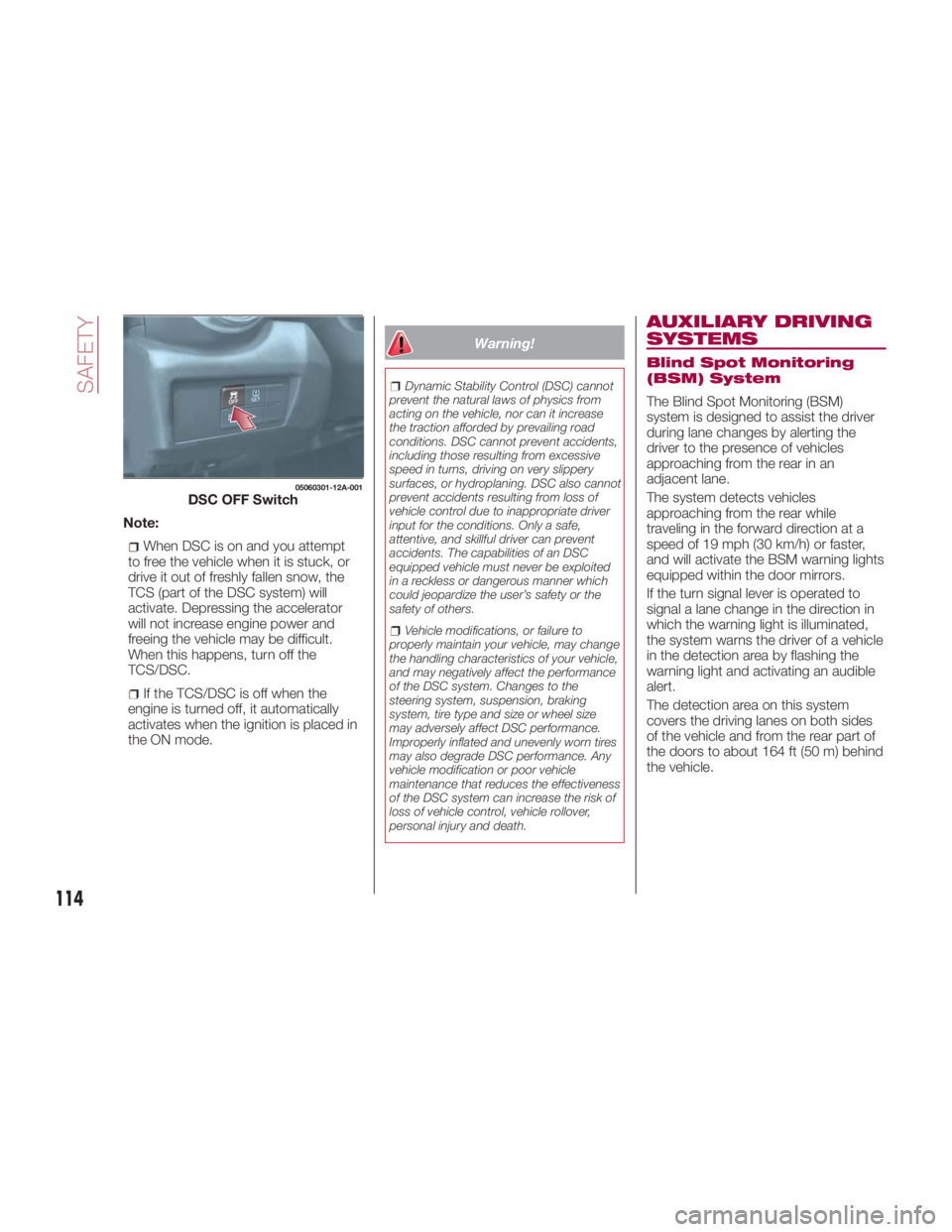
the vehicle.05060301-12A-001
DSC OFF Switch
114
SAFETY
Page 117 of 292
Activation / Deactivation
The Blind Spot Monitoring (BSM)
system will operate when all of the
following conditions are met:
The ignition is ON.
The BSM switch is pushed and the
warning light in the instrument cluster is
turned off.
The vehicle speed is 19 mph
(30km/h)orfaster. The BSM system will not operate under
the following conditions:
The vehicle speed falls below about
15 mph (25 km/h) even though the
warning light is turned off.
The gear selector is shifted to
REVERSE.
In the following cases, the warning light
in the instrument cluster illuminates and
operation of the BSM system is
deactivated.
A problem with the system (including
the BSM warning lights) is detected.
A large change in position of a rear
radar sensor on the vehicle has
occurred.
There is a large accumulation of
snow or ice on the rear bumper near a
rear radar sensor . Remove any snow,
ice or mud on the rear bumper.
Driving on snow covered roads for
long periods.
The temperature near the rear radar
sensors becomes extremely hot due to
driving for long periods on inclines
during warm weather.
The battery voltage has decreased.
If the warning light in the instrument
cluster remains illuminated, have the
vehicle inspected at an authorized
dealer as soon as possible.
Note: Under the following conditions,
the rear radar sensors cannot detect objects, or it may be difficult to detect
them:
A vehicle is in the detection area at
the rear in an adjacent driving lane but
it does not approach. The BSM system
determines the condition based on
radar detection data.
A vehicle is traveling alongside your
vehicle at nearly the same speed for an
extended period of time.
Vehicles approaching in the
opposite direction.
A vehicle in an adjacent driving lane
is attempting to pass your vehicle.
A vehicle is in an adjacent lane on a
road with extremely wide driving lanes.
The detection area of the rear radar
sensors is set at the road width of
expressways.
In the following cases, the activation of
the BSM warning lights and the audible
alert may not occur, or they may be
delayed:
A vehicle makes a lane change from
a driving lane two lanes over to an
adjacent lane.
Driving on steep inclines.
Crossing the summit of a hill or
mountain pass.
The turning radius is small (making a
sharp turn or turning at intersections).1 0528070012A002
BSM Detection Areas
1 — Detection Area
115
Page 206 of 292
To Secure The Jack
Proceed as follows:
1. Insert the wing bolt into the jack with
the jack screw pointing back, and turn
the wing bolt clockwise to temporarily
tighten it.
2. Turn the jack screw clockwise.
3. Turn the wing bolt completely to
secure the jack.
4. Insert the cover tabs and install the
cover.
Warning!A loose tire or jack thrown forward in a
collision or hard stop could endanger the
occupants of the vehicle. Always stow the
jack parts and the spare tire in the places
provided. Have the deflated (flat) tire
repaired or replaced immediately.
Maintenance
Always keep the jack clean.
Make sure the moving parts are kept
free from dirt or rust.
Make sure the screw thread is
adequately lubricated. Conditions Of Non-Use
Temperatures below -40°F (−40°C)
On sandy or muddy ground
On uneven ground
On steep roads
In extreme weather conditions
In direct contact with the engine or
for repairs under the vehicle
On boats
Jacking Instructions
Note: Make sure the jack is well
lubricated before using it.
Warning!Do not attempt to change a tire on the side
of the vehicle close to moving traffic, pull
far enough off the road to avoid being hit
when operating the jack or changing the
wheel.
Proceed as follows:
1. Stop the vehicle in a position that
does not cause any danger to traffic
and lets you change the tire in safety, as
far as possible from the edge of the
driving lane. The ground must be flat
and sufficiently compact. 2. Turn on the Hazard Warning Lights
and engage the parking brake.
3. For vehicles with automatic
transmission, place the gear selector in
PARK. For vehicles with manual
transmission, place gear selector in
REVERSE and turn the engine to OFF.
4. Stop the engine. The motor must be
kept off as long as the vehicle is lifted
off the ground.
5. Remove the jack and tools.
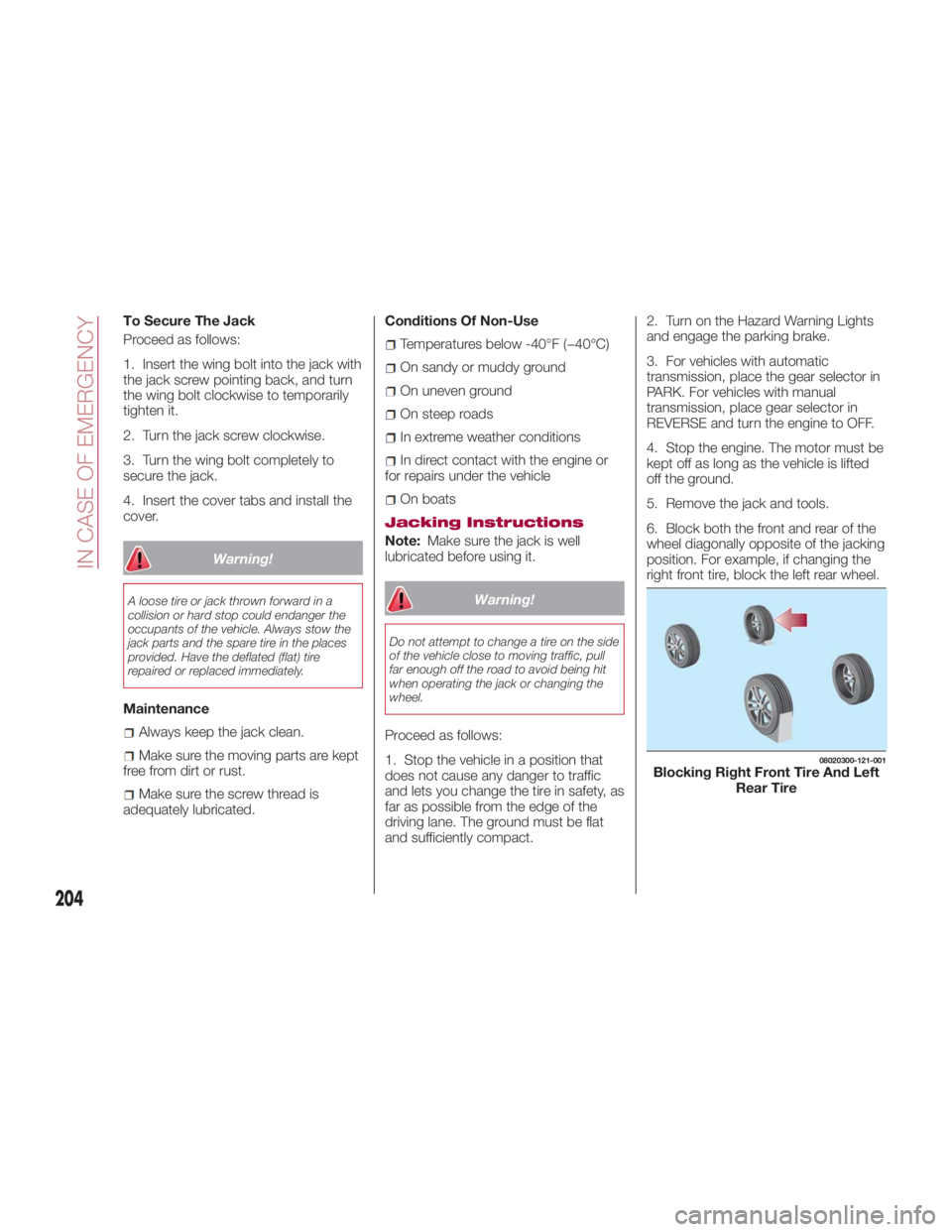
6. Block both the front and rear of the
wheel diagonally opposite of the jacking
position. For example, if changing the
right front tire, block the left rear wheel. 08020300-121-001
Blocking Right Front Tire And Left
Rear Tire
204
IN CASE OF EMERGENCY
Page 288 of 292
KeyFob...................14
Emergency Key ............14
Programming Additional Key
Fobs ...................24
Key-In Reminder ..............20
Lane Change And Turn Signals ....41
Lane Change Assist ............41
Lap/Shoulder Belts ....... .123,125
Leaving Home Light System ......42
Life Of Tires ............... .248
Lights
Daytime Running ...........40
Fog ...................41
Hazard Warning Flasher ..... .184
Passing .................40
Turn Signal ...............41
Loading Vehicle ............ .176
Tires ................. .242
Locks
PowerDoor ........... .26,31
Maintaining the finish ......... .257
Maintenance Monitor ...........81
Maintenance procedures ....... .235
Malfunction Indicator Light (Check
Engine) ................ .110
Manual Climate Control System ....48
Heating .................50
Manual transmission ......... .152 Manual, Service ............ .283
Methanol ................. .173
Mirrors....................35
Automatic Dimming .........36
Electric Remote ............37
Exterior Folding ............37
Outside .................35
Rearview ................36
Occupant Restraints ......... .122
Onboard Diagnostic System .... .109
Operating Precautions ........ .109
Outside Rearview Mirrors ..... .35,36
Overhead light (bulb replacement) . .194
Overheating, Engine .......... .219
Overloading ............... .182
Owner's Manual (Operator
Manual) ................ .283
Paint damage touch-up ....... .259
Parking Brake ..............
.151
Passing
Light ................ 40
Performance .............. .278
Periodic checks (scheduled
servicing) ............... .225
Personal Settings ........... .105
Personalization Features ....... .105
Placard, Tire And Loading
Information .............. .242
Plastic part maintenance ....... .261 Power
Brakes ................ .150
Door Locks ........... .26,31
Mirrors .................37
Pregnant Women And Seat Belts . .124
Pretensioners
Seat Belts ............. .127
Protection from atmospheric
agents (bodywork) ......... .256
Radar Sensors ............. .162
Radial Ply Tires ............. .247
Radio Frequency
General Information ....... .19,23
Radio transmitter and mobile
phones ...................5
Rear Camera .............. .167
Rear lights (light bulbs) ........ .187
Rear Park Assist System ....... .163
Rearview Mirrors ..............36
Recommended Tire Inflation
Pressure ............... .267
Recorder, Event Data ......... .145
Recreational towing .......... .178
Reformulated Gasoline ........ .173
Refueling procedure .......... .175
Refueling the vehicle ......... .173
Reminder, Seat Belt .......... .127
Replacement Tires ........... .248
Replacing a bulb ............ .184
INDEX