ignition FIAT STILO 2006 1.G User Guide
[x] Cancel search | Manufacturer: FIAT, Model Year: 2006, Model line: STILO, Model: FIAT STILO 2006 1.GPages: 274, PDF Size: 4.76 MB
Page 21 of 274
20
SAFETY
DEVICES
CORRECT USE
OF THE CAR
WARNING
LIGHTS AND
MESSAGES
IN AN
EMERGENCY
CAR
MAINTENANCE
TECHNICAL
SPECIFICATIONS
INDEX
DASHBOARD
AND CONTROLS
IGNITION SWITCH
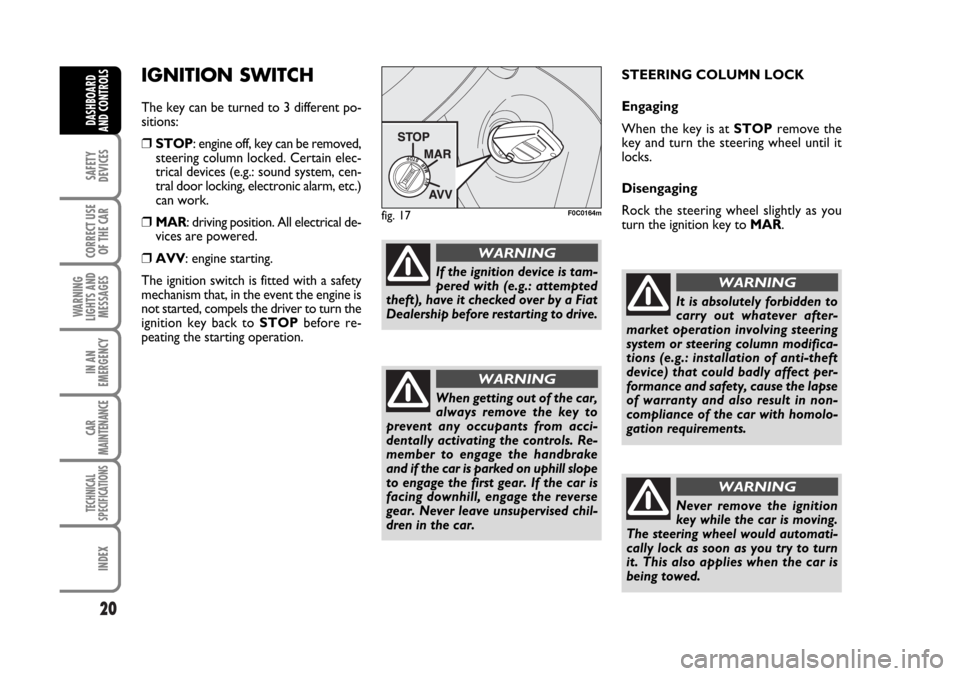
The key can be turned to 3 different po-
sitions:
❒STOP: engine off, key can be removed,
steering column locked. Certain elec-
trical devices (e.g.: sound system, cen-
tral door locking, electronic alarm, etc.)
can work.
❒MAR: driving position. All electrical de-
vices are powered.
❒AVV: engine starting.
The ignition switch is fitted with a safety
mechanism that, in the event the engine is
not started, compels the driver to turn the
ignition key back to STOPbefore re-
peating the starting operation.STEERING COLUMN LOCK
Engaging
When the key is at STOPremove the
key and turn the steering wheel until it
locks.
Disengaging
Rock the steering wheel slightly as you
turn the ignition key to MAR.
fig. 17F0C0164m
If the ignition device is tam-
pered with (e.g.: attempted
theft), have it checked over by a Fiat
Dealership before restarting to drive.
WARNING
When getting out of the car,
always remove the key to
prevent any occupants from acci-
dentally activating the controls. Re-
member to engage the handbrake
and if the car is parked on uphill slope
to engage the first gear. If the car is
facing downhill, engage the reverse
gear. Never leave unsupervised chil-
dren in the car.
WARNING
It is absolutely forbidden to
carry out whatever after-
market operation involving steering
system or steering column modifica-
tions (e.g.: installation of anti-theft
device) that could badly affect per-
formance and safety, cause the lapse
of warranty and also result in non-
compliance of the car with homolo-
gation requirements.
WARNING
Never remove the ignition
key while the car is moving.
The steering wheel would automati-
cally lock as soon as you try to turn
it. This also applies when the car is
being towed.
WARNING
Page 34 of 274
33
SAFETY
DEVICES
CORRECT USE
OF THE CAR
WARNING
LIGHTS AND
MESSAGES
IN AN
EMERGENCY
CAR
MAINTENANCE
TECHNICAL
SPECIFICATIONS
INDEX
DASHBOARD
AND CONTROLS
NoteThe “Service Schedule” includes car
maintenance every 30,000 km (or equiv-
alent value in miles) or every year; this is
shown automatically, with the ignition key
at MAR, starting from 2,000 km (or equiv-
alent value in miles) or 30 days from this
deadline and it is shown again every 200
km (or equivalent value in miles) or every
3 days. Below 200 km servicing indications
are displayed more frequently. Servicing
indication will be displayed in km or mi ac-
cording to previous setting. When a pro-
grammed maintenance interval (coupon)
is near to come, turning the ignition key
to MAR, the display will show the mes-
sage “Service” followed by the number of
km/mi or days to go before car servicing.
“Scheduled servicing” message is displayed
in km/mi or days according to the ap-
proaching service interval. Contact a Fiat
Dealership to carry out any service op-
eration provided by the “Service sched-
ule” or “Annual inspection plan”, and to
reset the display.Exit Menu
This is the last function that closes the cir-
cular setting cycle listed in the initial menu
screen.
Briefly press button MODEto go back to
the standard screen without storing set-
tings.
Press button
Ôto return to the first menu
option (Speed Beep).
Instrument panel, display and
button lighting adjustment
(Light rheostat)
With this function it is possible to adjust
the lighting (dimming/brightening) of the
instrument panel, sound system display,
Connect/Navigator display, two-zone cli-
mate control display and steering wheel
controls.
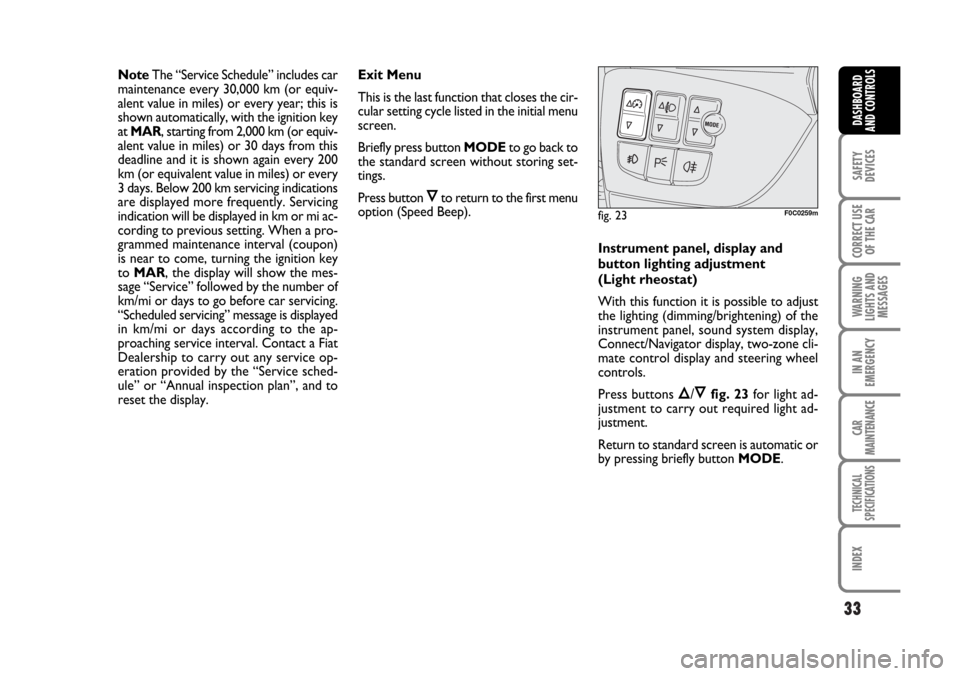
Press buttons
Õ/Ôfig. 23for light ad-
justment to carry out required light ad-
justment.
Return to standard screen is automatic or
by pressing briefly button MODE.
fig. 23F0C0259m
Page 35 of 274
34
SAFETY
DEVICES
CORRECT USE
OF THE CAR
WARNING
LIGHTS AND
MESSAGES
IN AN
EMERGENCY
CAR
MAINTENANCE
TECHNICAL
SPECIFICATIONS
INDEX
DASHBOARD
AND CONTROLS
TRIP COMPUTER
GENERAL
The “Trip computer” displays information
(with ignition key at MAR), relating to the
operating status of the car.
This function comprises the “General trip”
concerning the “complete mission” of the
car (journey) and “Trip B”, concerning the
partial mission of the car; this latter func-
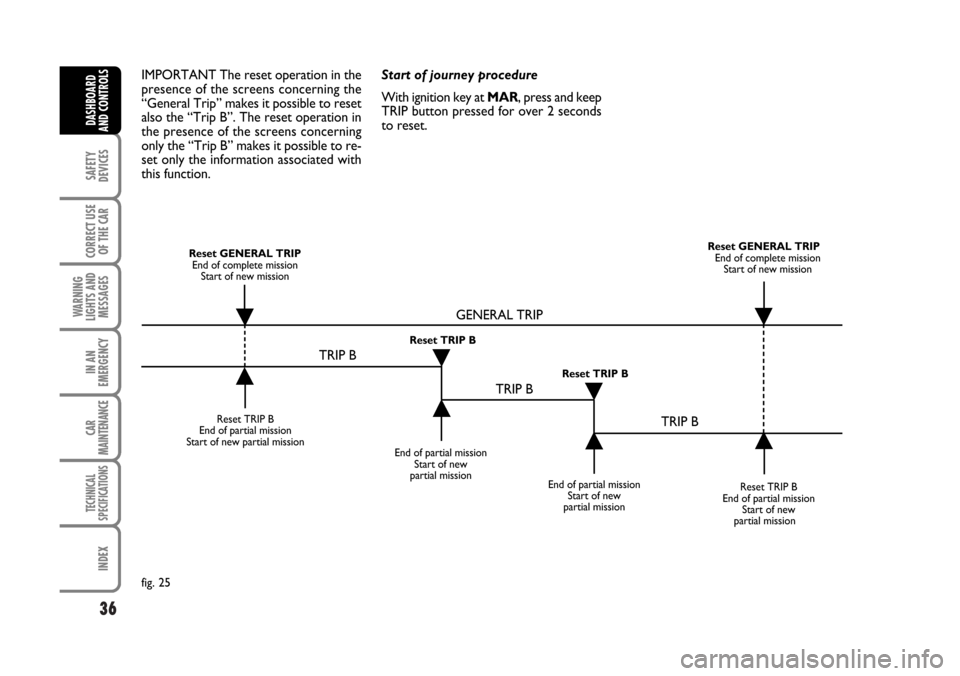
tion is “contained” (as shown in fig. 25)
within the complete mission. Both func-
tions are resettable (reset - start of new
mission).“General Trip” displays the figures relat-
ing to:
– Range
– Trip distance
– Average consumption
– Instant consumption
– Average speed
– Trip time (driving time).
“Trip B” displays the figures relating to:
– Trip distance B
– Average consumption B
– Average speed B
– Trip time B (driving time).
Note“Trip B” function can be excluded
(see paragraph “Trip B On/Off”). “Range”
and “Instant consumption” cannot be re-
set.Values displayed
Range
This value shows the distance in km (or
mi) that the car can still cover before
needing fuel, assuming that driving condi-
tions are kept unvaried. The display will
show “----” if the range value is below 50
km (or 30 mi).
Trip distance
This value shows the distance covered
from the start of the new mission.
Average consumption
This value shows the average consump-
tion from the start of the new mission.
Instant consumption
This value shows instant fuel consumption
(this value is updated second by second). If
parking the car with engine on, the display
will show “----”.
Average speed
This value shows the car average speed as
a function of the overall time elapsed since
the start of the new mission.
Page 36 of 274
35
SAFETY
DEVICES
CORRECT USE
OF THE CAR
WARNING
LIGHTS AND
MESSAGES
IN AN
EMERGENCY
CAR
MAINTENANCE
TECHNICAL
SPECIFICATIONS
INDEX
DASHBOARD
AND CONTROLS
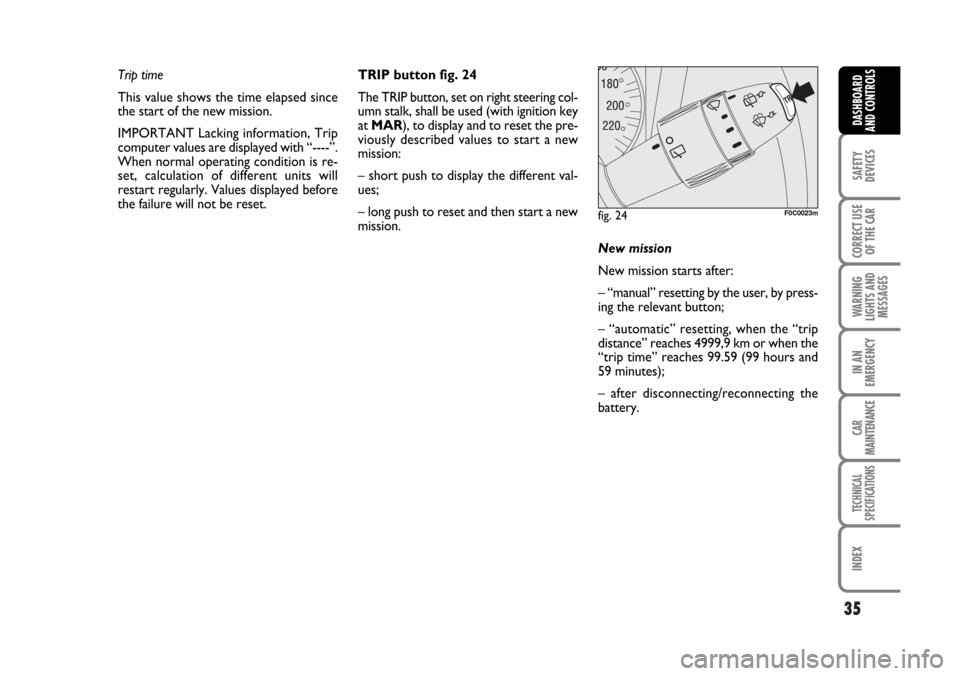
fig. 24F0C0023m
Trip time
This value shows the time elapsed since
the start of the new mission.
IMPORTANT Lacking information, Trip
computer values are displayed with “----”.
When normal operating condition is re-
set, calculation of different units will
restart regularly. Values displayed before
the failure will not be reset.TRIP button fig. 24
The TRIP button, set on right steering col-
umn stalk, shall be used (with ignition key
at MAR), to display and to reset the pre-
viously described values to start a new
mission:
– short push to display the different val-
ues;
– long push to reset and then start a new
mission.
New mission
New mission starts after:
– “manual” resetting by the user, by press-
ing the relevant button;
– “automatic” resetting, when the “trip
distance” reaches 4999,9 km or when the
“trip time” reaches 99.59 (99 hours and
59 minutes);
– after disconnecting/reconnecting the
battery.
Page 37 of 274
36
SAFETY
DEVICES
CORRECT USE
OF THE CAR
WARNING
LIGHTS AND
MESSAGES
IN AN
EMERGENCY
CAR
MAINTENANCE
TECHNICAL
SPECIFICATIONS
INDEX
DASHBOARD
AND CONTROLS
IMPORTANT The reset operation in the
presence of the screens concerning the
“General Trip” makes it possible to reset
also the “Trip B”. The reset operation in
the presence of the screens concerning
only the “Trip B” makes it possible to re-
set only the information associated with
this function.Start of journey procedure
With ignition key at MAR, press and keep
TRIP button pressed for over 2 seconds
to reset.
Reset TRIP B
End of partial mission
Start of new partial mission
End of partial mission
Start of new
partial mission
Reset TRIP B
End of partial mission
Start of new
partial mission Reset GENERAL TRIP
End of complete mission
Start of new missionReset GENERAL TRIP
End of complete mission
Start of new mission
End of partial mission
Start of new
partial mission Reset TRIP B
Reset TRIP B
TRIP B
TRIP B
TRIP B GENERAL TRIP
˙
˙
˙
˙
˙
˙
˙
˙
fig. 25
Page 39 of 274
38
SAFETY
DEVICES
CORRECT USE
OF THE CAR
WARNING
LIGHTS AND
MESSAGES
IN AN
EMERGENCY
CAR
MAINTENANCE
TECHNICAL
SPECIFICATIONS
INDEX
DASHBOARD
AND CONTROLS
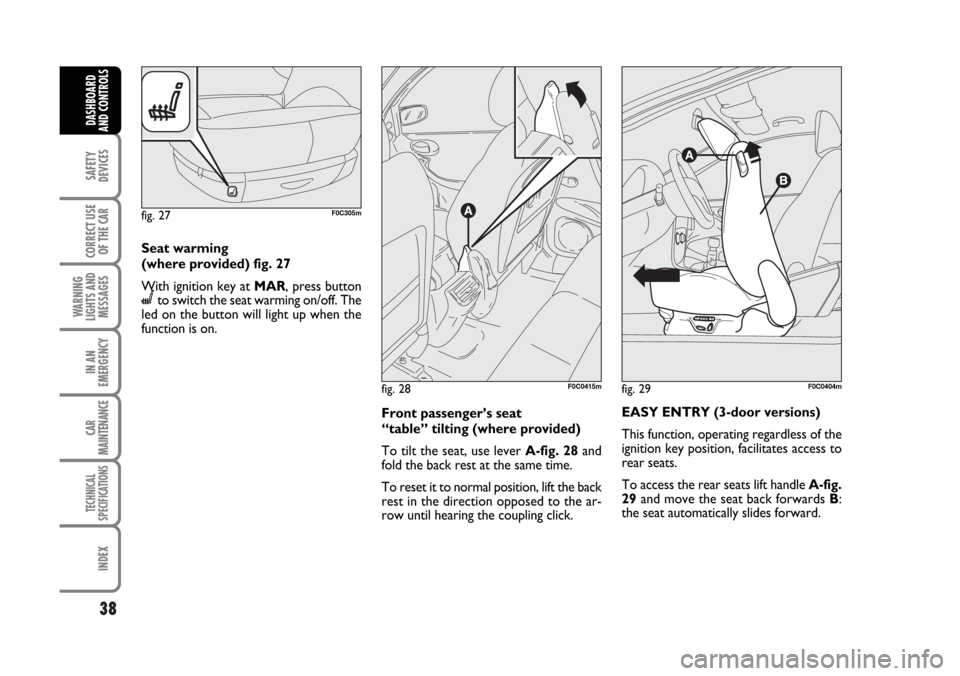
Seat warming
(where provided) fig. 27
With ignition key at MAR, press button
Cto switch the seat warming on/off. The
led on the button will light up when the
function is on.
Front passenger’s seat
“table” tilting (where provided)
To tilt the seat, use lever A-fig. 28and
fold the back rest at the same time.
To reset it to normal position, lift the back
rest in the direction opposed to the ar-
row until hearing the coupling click.EASY ENTRY (3-door versions)
This function, operating regardless of the
ignition key position, facilitates access to
rear seats.
To access the rear seats lift handle A-fig.
29and move the seat back forwards B:
the seat automatically slides forward.
fig. 27F0C305m
fig. 28F0C0415mfig. 29F0C0404m
Page 58 of 274
57
SAFETY
DEVICES
CORRECT USE
OF THE CAR
WARNING
LIGHTS AND
MESSAGES
IN AN
EMERGENCY
CAR
MAINTENANCE
TECHNICAL
SPECIFICATIONS
INDEX
DASHBOARD
AND CONTROLS
EXTERNAL LIGHTS
The left-hand stalk controls the external
lights and the direction indicators.
The external lights can only be switched
on when the ignition key is at MAR.
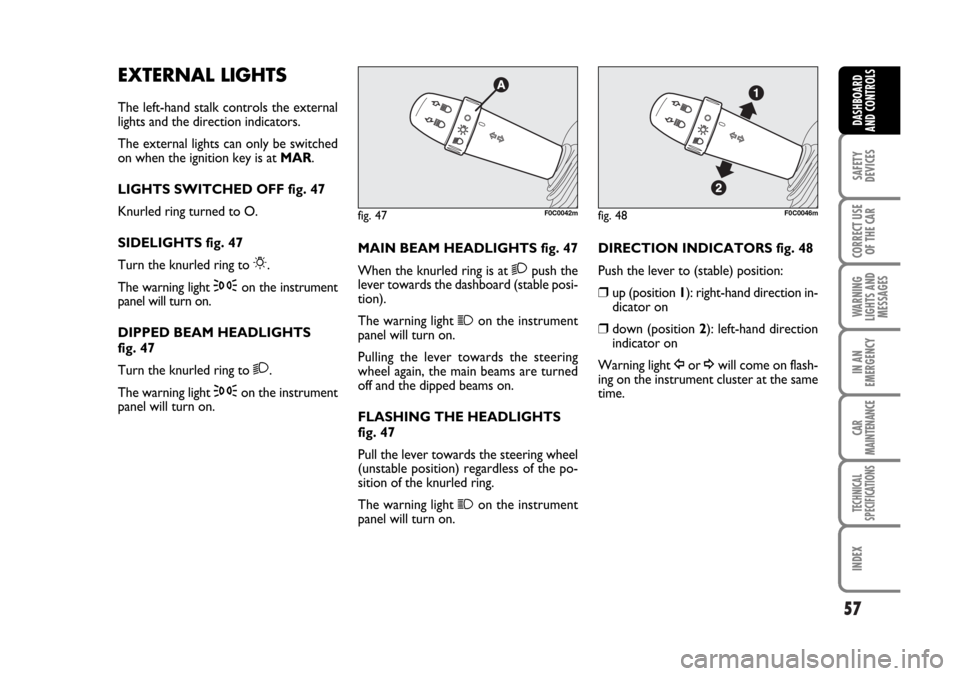
LIGHTS SWITCHED OFF fig. 47
Knurled ring turned to O.
SIDELIGHTS fig. 47
Turn the knurled ring to
6.
The warning light
3on the instrument
panel will turn on.
DIPPED BEAM HEADLIGHTS
fig. 47
Turn the knurled ring to
2.
The warning light
3on the instrument
panel will turn on.MAIN BEAM HEADLIGHTS fig. 47
When the knurled ring is at
2push the
lever towards the dashboard (stable posi-
tion).
The warning light
1on the instrument
panel will turn on.
Pulling the lever towards the steering
wheel again, the main beams are turned
off and the dipped beams on.
FLASHING THE HEADLIGHTS
fig. 47
Pull the lever towards the steering wheel
(unstable position) regardless of the po-
sition of the knurled ring.
The warning light
1on the instrument
panel will turn on.
fig. 47F0C0042mfig. 48F0C0046m
DIRECTION INDICATORS fig. 48
Push the lever to (stable) position:
❒up (position 1): right-hand direction in-
dicator on
❒down (position 2): left-hand direction
indicator on
Warning light
Îor ¥will come on flash-
ing on the instrument cluster at the same
time.
Page 59 of 274
58
SAFETY
DEVICES
CORRECT USE
OF THE CAR
WARNING
LIGHTS AND
MESSAGES
IN AN
EMERGENCY
CAR
MAINTENANCE
TECHNICAL
SPECIFICATIONS
INDEX
DASHBOARD
AND CONTROLS
Direction indicators are switched off au-
tomatically when the steering wheel is
straightened.
If you want the indicator to flash briefly to
show that you are about to change lane,
move the stalk up or down without click-
ing into position (unstable position). When
released the stalk will return to its home
position.
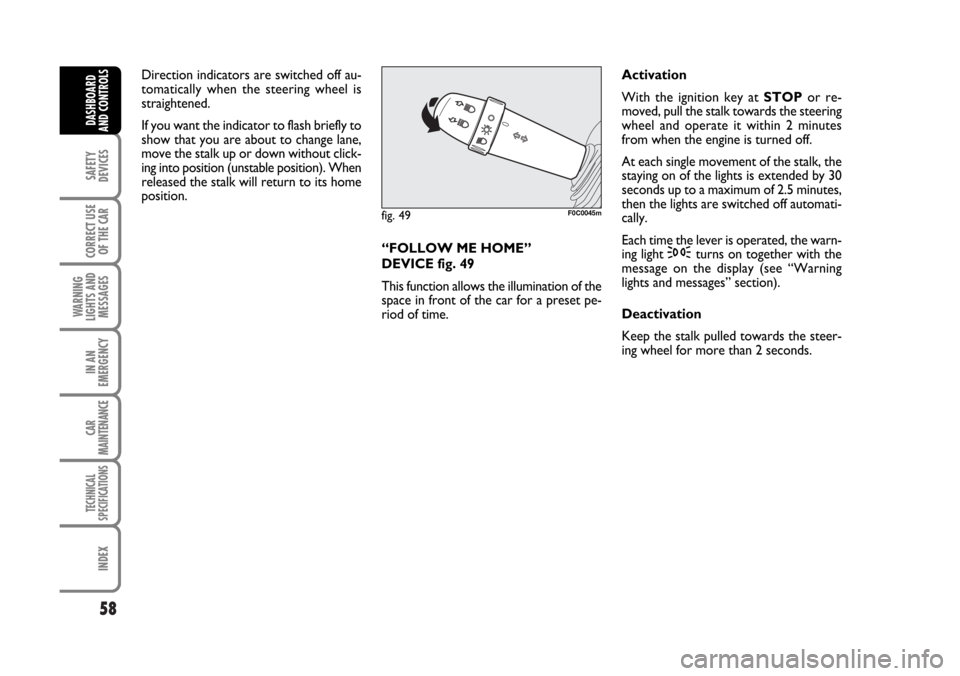
“FOLLOW ME HOME”
DEVICE fig. 49
This function allows the illumination of the
space in front of the car for a preset pe-
riod of time.Activation
With the ignition key at STOPor re-
moved, pull the stalk towards the steering
wheel and operate it within 2 minutes
from when the engine is turned off.
At each single movement of the stalk, the
staying on of the lights is extended by 30
seconds up to a maximum of 2.5 minutes,
then the lights are switched off automati-
cally.
Each time the lever is operated, the warn-
ing light
3turns on together with the
message on the display (see “Warning
lights and messages” section).
Deactivation
Keep the stalk pulled towards the steer-
ing wheel for more than 2 seconds.
fig. 49F0C0045m
Page 63 of 274
62
SAFETY
DEVICES
CORRECT USE
OF THE CAR
WARNING
LIGHTS AND
MESSAGES
IN AN
EMERGENCY
CAR
MAINTENANCE
TECHNICAL
SPECIFICATIONS
INDEX
DASHBOARD
AND CONTROLS
Deactivation
Turn the ignition key to STOP.
To the following starting operation (key
at MAR), the sensor will not be reacti-
vated even is the stalk is on B-
fig. 51. In this event, to activate the rain
sensor, you have to move the stalk to A
or Cand then again to B.
When the rain sensor is again activated
in this way, at least one windscreen wiper
stroke occurs, even if the windscreen is
dry.
Do not activate the rain sen-
sor when washing the car in
an automatic washing station.In the event of ice on the
windscreen, make sure to have
disconnected the device.
Make sure to have discon-
nected the device when
cleaning the windscreen.
WARNING
The rain sensor is able to recognize and
automatically adjust itself in the presence
of the following particular conditions:
❒impurities on the controlled surface
(salt, dirt, etc.);
❒streaks of water caused by worn wiper
blades;
❒difference between day and night.
Page 67 of 274
66
SAFETY
DEVICES
CORRECT USE
OF THE CAR
WARNING
LIGHTS AND
MESSAGES
IN AN
EMERGENCY
CAR
MAINTENANCE
TECHNICAL
SPECIFICATIONS
INDEX
DASHBOARD
AND CONTROLS
DEVICE DISENGAGEMENT
Turn the knurled ring A-fig. 56to OFF
or the ignition key to STOP. The device
is automatically deactivated also in one of
the following cases:
❒pressing the brake or clutch pedal;
❒ASR or ESP cut-in (where provided);
❒gearshifting in versions with Selespeed
automatic transmission (where provid-
ed);
❒involuntarily moving the Selespeed
lever (where provided) toN.
When travelling with the de-
vice on, never set the
gearshift lever to neutral and do not
move the Selespeed lever to N.
WARNING
In the event of device mal-
function or failure, turn the
knurled ring A-fig. 56to OFF and
contact a Fiat Dealership after check-
ing the protection fuse integrity.
WARNING