fuel FIAT TALENTO 2016 2.G User Guide
[x] Cancel search | Manufacturer: FIAT, Model Year: 2016, Model line: TALENTO, Model: FIAT TALENTO 2016 2.GPages: 232, PDF Size: 5.01 MB
Page 80 of 232
DISPLAY
82)
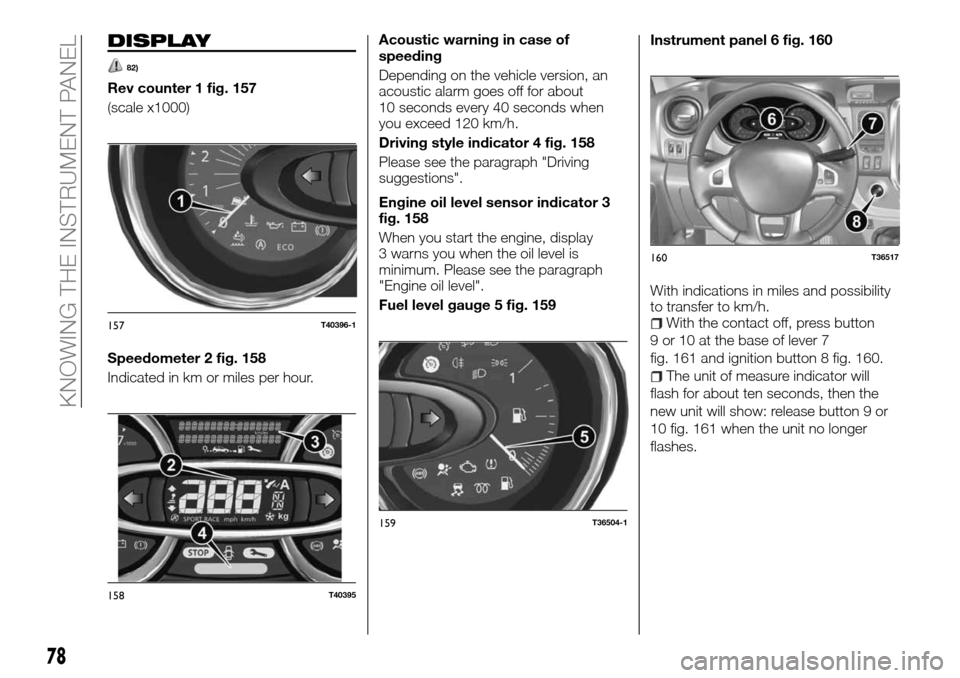
Rev counter 1 fig. 157
(scale x1000)
Speedometer 2 fig. 158
Indicated in km or miles per hour.Acoustic warning in case of
speeding
Depending on the vehicle version, an
acoustic alarm goes off for about
10 seconds every 40 seconds when
you exceed 120 km/h.
Driving style indicator 4 fig. 158
Please see the paragraph "Driving
suggestions".
Engine oil level sensor indicator 3
fig. 158
When you start the engine, display
3 warns you when the oil level is
minimum. Please see the paragraph
"Engine oil level".
Fuel level gauge 5 fig. 159Instrument panel 6 fig. 160
With indications in miles and possibility
to transfer to km/h.
With the contact off, press button
9 or 10 at the base of lever 7
fig. 161 and ignition button 8 fig. 160.
The unit of measure indicator will
flash for about ten seconds, then the
new unit will show: release button 9 or
10 fig. 161 when the unit no longer
flashes.
157T40396-1
158T40395
159T36504-1
160T36517
78
KNOWING THE INSTRUMENT PANEL
Page 84 of 232
Warning light What it means
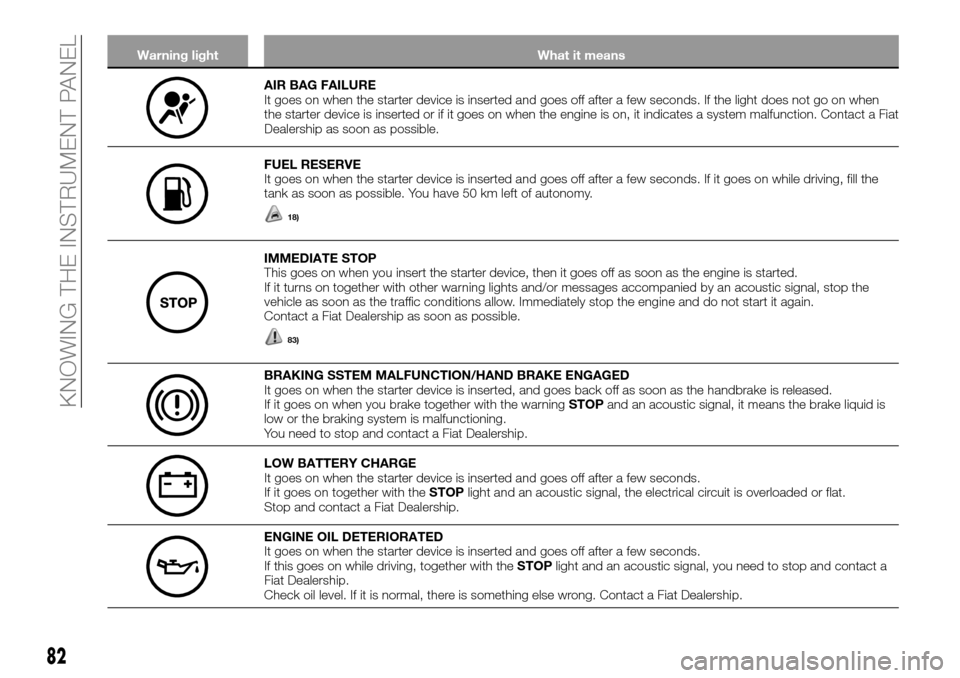
AIR BAG FAILURE
It goes on when the starter device is inserted and goes off after a few seconds. If the light does not go on when
the starter device is inserted or if it goes on when the engine is on, it indicates a system malfunction. Contact a Fiat
Dealership as soon as possible.
FUEL RESERVE
It goes on when the starter device is inserted and goes off after a few seconds. If it goes on while driving, fill the
tank as soon as possible. You have 50 km left of autonomy.
18)
IMMEDIATE STOP
This goes on when you insert the starter device, then it goes off as soon as the engine is started.
If it turns on together with other warning lights and/or messages accompanied by an acoustic signal, stop the
vehicle as soon as the traffic conditions allow. Immediately stop the engine and do not start it again.
Contact a Fiat Dealership as soon as possible.
83)
BRAKING SSTEM MALFUNCTION/HAND BRAKE ENGAGED
It goes on when the starter device is inserted, and goes back off as soon as the handbrake is released.
If it goes on when you brake together with the warningSTOPand an acoustic signal, it means the brake liquid is
low or the braking system is malfunctioning.
You need to stop and contact a Fiat Dealership.
LOW BATTERY CHARGE
It goes on when the starter device is inserted and goes off after a few seconds.
If it goes on together with theSTOPlight and an acoustic signal, the electrical circuit is overloaded or flat.
Stop and contact a Fiat Dealership.
ENGINE OIL DETERIORATED
It goes on when the starter device is inserted and goes off after a few seconds.
If this goes on while driving, together with theSTOPlight and an acoustic signal, you need to stop and contact a
Fiat Dealership.
Check oil level. If it is normal, there is something else wrong. Contact a Fiat Dealership.
82
KNOWING THE INSTRUMENT PANEL
Page 90 of 232
CONTROL PANEL
AND ON-BOARD
INSTRUMENTS
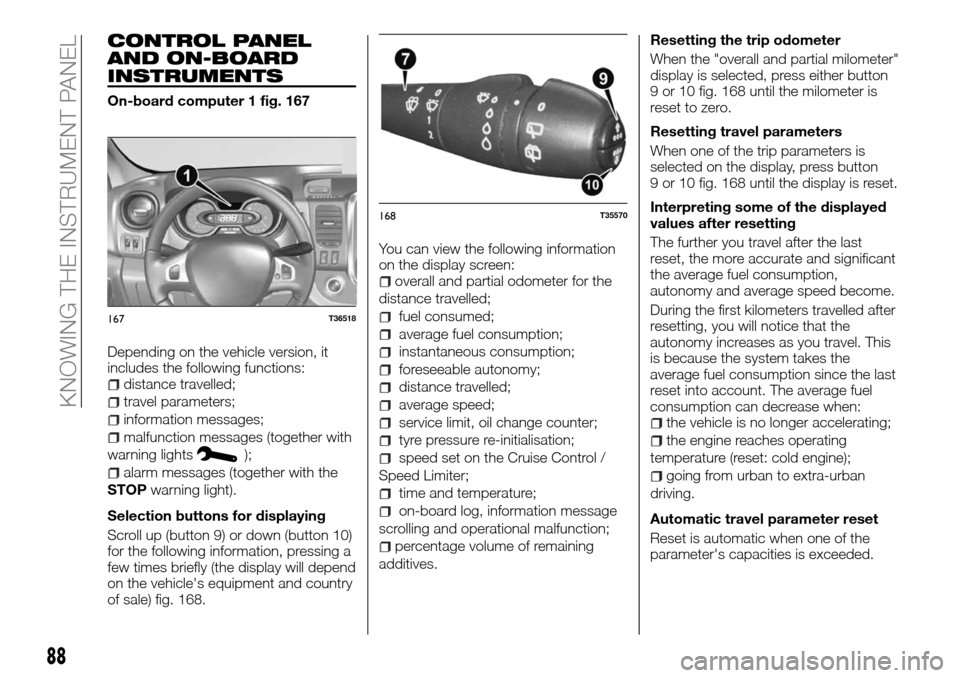
On-board computer 1 fig. 167
Depending on the vehicle version, it
includes the following functions:
distance travelled;
travel parameters;
information messages;
malfunction messages (together with
warning lights
);
alarm messages (together with the
STOPwarning light).
Selection buttons for displaying
Scroll up (button 9) or down (button 10)
for the following information, pressing a
few times briefly (the display will depend
on the vehicle's equipment and country
of sale) fig. 168.You can view the following information
on the display screen:
overall and partial odometer for the
distance travelled;
fuel consumed;
average fuel consumption;
instantaneous consumption;
foreseeable autonomy;
distance travelled;
average speed;
service limit, oil change counter;
tyre pressure re-initialisation;
speed set on the Cruise Control /
Speed Limiter;
time and temperature;
on-board log, information message
scrolling and operational malfunction;
percentage volume of remaining
additives.Resetting the trip odometer
When the "overall and partial milometer"
display is selected, press either button
9 or 10 fig. 168 until the milometer is
reset to zero.
Resetting travel parameters
When one of the trip parameters is
selected on the display, press button
9 or 10 fig. 168 until the display is reset.
Interpreting some of the displayed
values after resetting
The further you travel after the last
reset, the more accurate and significant
the average fuel consumption,
autonomy and average speed become.
During the first kilometers travelled after
resetting, you will notice that the
autonomy increases as you travel. This
is because the system takes the
average fuel consumption since the last
reset into account. The average fuel
consumption can decrease when:
the vehicle is no longer accelerating;
the engine reaches operating
temperature (reset: cold engine);
going from urban to extra-urban
driving.
Automatic travel parameter reset
Reset is automatic when one of the
parameter's capacities is exceeded.
167T36518
168T35570
88
KNOWING THE INSTRUMENT PANEL
Page 91 of 232
ON BOARD COMPUTER: travel parameters
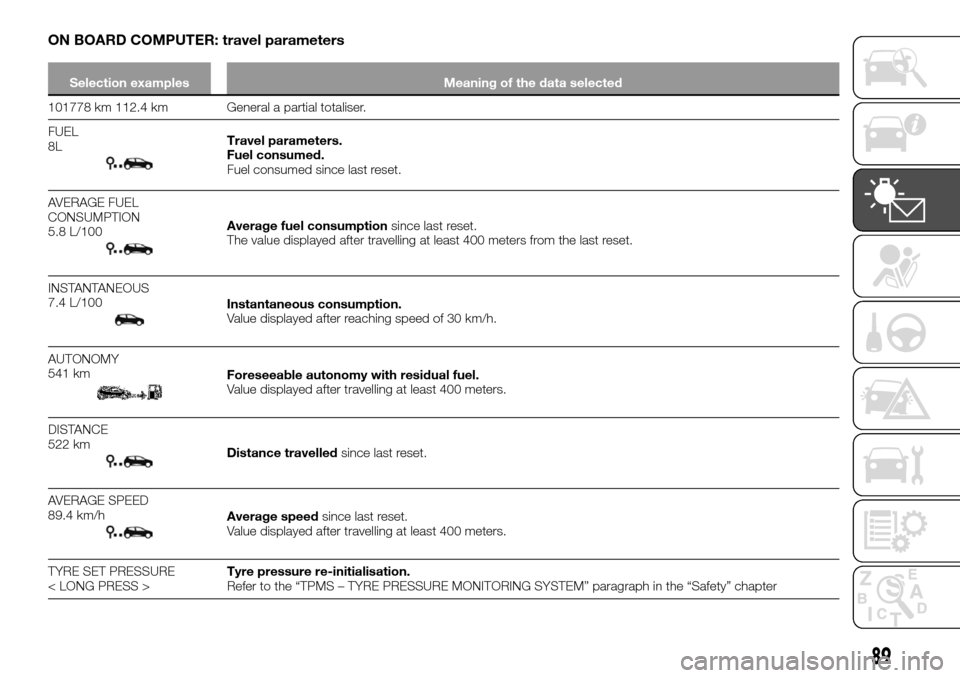
Selection examples Meaning of the data selected
101778 km 112.4 km General a partial totaliser.
FUEL
8L
Travel parameters.
Fuel consumed.
Fuel consumed since last reset.
AVERAGE FUEL
CONSUMPTION
5.8 L/100
Average fuel consumptionsince last reset.
The value displayed after travelling at least 400 meters from the last reset.
INSTANTANEOUS
7.4 L/100
Instantaneous consumption.
Value displayed after reaching speed of 30 km/h.
AUTONOMY
541 km
Foreseeable autonomy with residual fuel.
Value displayed after travelling at least 400 meters.
DISTANCE
522 km
Distance travelledsince last reset.
AVERAGE SPEED
89.4 km/h
Average speedsince last reset.
Value displayed after travelling at least 400 meters.
TYRE SET PRESSURE
< LONG PRESS >Tyre pressure re-initialisation.
Refer to the “TPMS – TYRE PRESSURE MONITORING SYSTEM” paragraph in the “Safety” chapter
89
Page 136 of 232
IMPORTANT
23)When the engine is stopped, never
leave the ignition device in the "M" position
to prevent useless current absorption from
draining the battery.
24)A quick burst on the accelerator before
turning off the engine serves absolutely no
practical purpose; it wastes fuel and is
especially damaging to turbocharged
engines.
USING THE
GEARBOX
144)
25)
To engage reverse (vehicle
stopped)
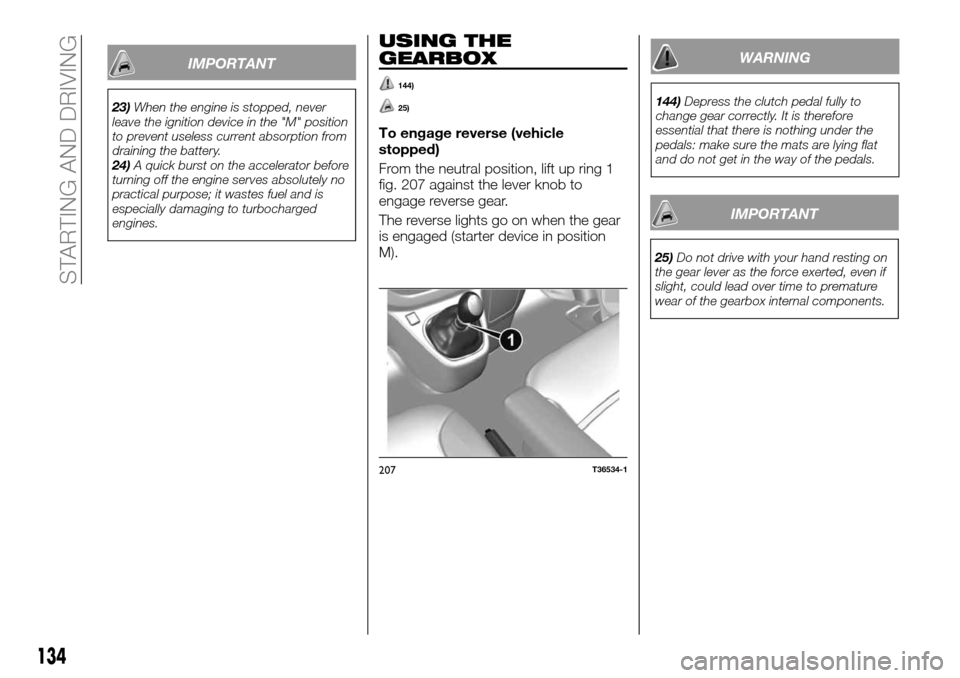
From the neutral position, lift up ring 1
fig. 207 against the lever knob to
engage reverse gear.
The reverse lights go on when the gear
is engaged (starter device in position
M).
WARNING
144)Depress the clutch pedal fully to
change gear correctly. It is therefore
essential that there is nothing under the
pedals: make sure the mats are lying flat
and do not get in the way of the pedals.
IMPORTANT
25)Do not drive with your hand resting on
the gear lever as the force exerted, even if
slight, could lead over time to premature
wear of the gearbox internal components.
207T36534-1
134
STARTING AND DRIVING
Page 141 of 232
SUGGESTIONS FOR
DRIVING
SAVING FUEL
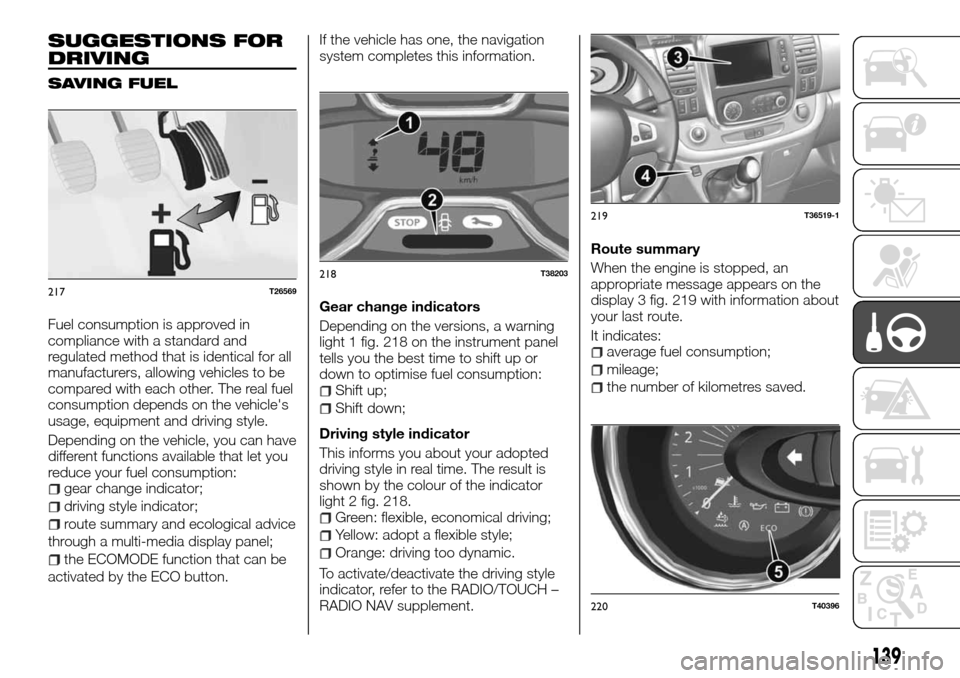
Fuel consumption is approved in
compliance with a standard and
regulated method that is identical for all
manufacturers, allowing vehicles to be
compared with each other. The real fuel
consumption depends on the vehicle's
usage, equipment and driving style.
Depending on the vehicle, you can have
different functions available that let you
reduce your fuel consumption:
gear change indicator;
driving style indicator;
route summary and ecological advice
through a multi-media display panel;
the ECOMODE function that can be
activated by the ECO button.If the vehicle has one, the navigation
system completes this information.
Gear change indicators
Depending on the versions, a warning
light 1 fig. 218 on the instrument panel
tells you the best time to shift up or
down to optimise fuel consumption:
Shift up;
Shift down;
Driving style indicator
This informs you about your adopted
driving style in real time. The result is
shown by the colour of the indicator
light 2 fig. 218.
Green: flexible, economical driving;
Yellow: adopt a flexible style;
Orange: driving too dynamic.
To activate/deactivate the driving style
indicator, refer to the RADIO/TOUCH –
RADIO NAV supplement.Route summary
When the engine is stopped, an
appropriate message appears on the
display 3 fig. 219 with information about
your last route.
It indicates:
average fuel consumption;
mileage;
the number of kilometres saved.
217T26569
218T38203
219T36519-1
220T40396
139
Page 142 of 232
A general grade from 0 to 100 appears
that allows you to assess your
ecological driving performance: high
values mean reduced fuel consumption.
Below is some ecological advice to
improve your performance. Store your
preferred routes lets you compare
performances. For further information,
refer to the RADIO/TOUCH – RADIO
NAV supplement.
ECOMODE
ECOMODE is a function that optimises
fuel consumption. It acts on a few of
the vehicle's uses (heating, air
conditioning, power steering, etc.) and
on a few driving operations
(acceleration, gear shift, speed
regulation, deceleration, etc.).
Activation of the function
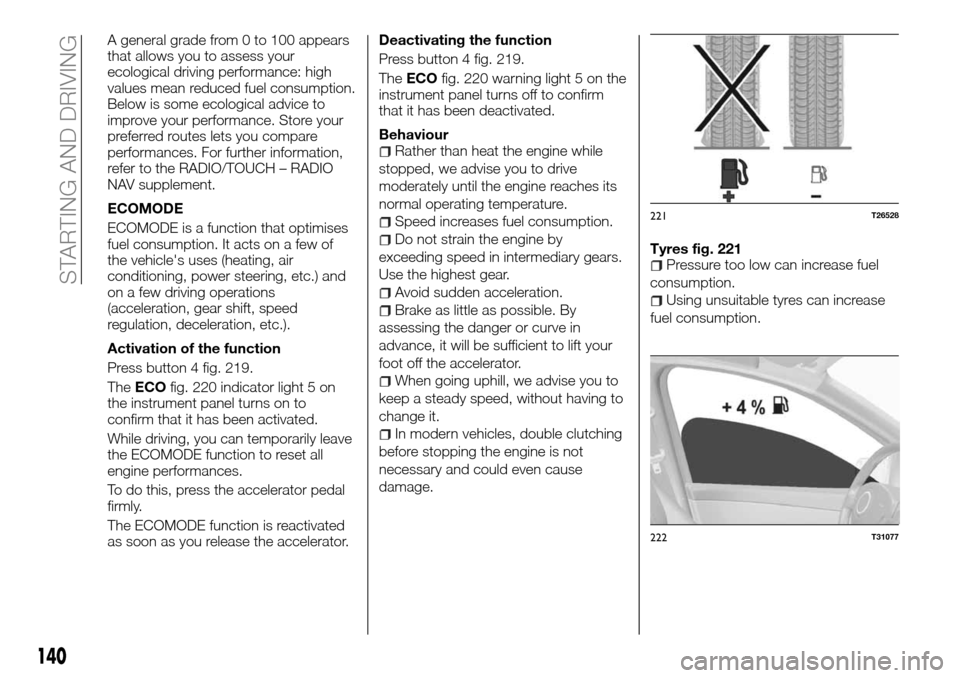
Press button 4 fig. 219.
TheECOfig. 220 indicator light 5 on
the instrument panel turns on to
confirm that it has been activated.
While driving, you can temporarily leave
the ECOMODE function to reset all
engine performances.
To do this, press the accelerator pedal
firmly.
The ECOMODE function is reactivated
as soon as you release the accelerator.Deactivating the function
Press button 4 fig. 219.
TheECOfig. 220 warning light 5 on the
instrument panel turns off to confirm
that it has been deactivated.
Behaviour
Rather than heat the engine while
stopped, we advise you to drive
moderately until the engine reaches its
normal operating temperature.
Speed increases fuel consumption.
Do not strain the engine by
exceeding speed in intermediary gears.
Use the highest gear.
Avoid sudden acceleration.
Brake as little as possible. By
assessing the danger or curve in
advance, it will be sufficient to lift your
foot off the accelerator.
When going uphill, we advise you to
keep a steady speed, without having to
change it.
In modern vehicles, double clutching
before stopping the engine is not
necessary and could even cause
damage.Tyres fig. 221
Pressure too low can increase fuel
consumption.
Using unsuitable tyres can increase
fuel consumption.
221T26528
222T31077
140
STARTING AND DRIVING
Page 143 of 232
Advice for useFavour the ECOMODE function.
Electricity increases fuel
consumption. We advise you to turn off
accessories when they are not in use.
You must use your lights according to
the laws in effect in the country you are
in.
Use diffusers as much as possible.
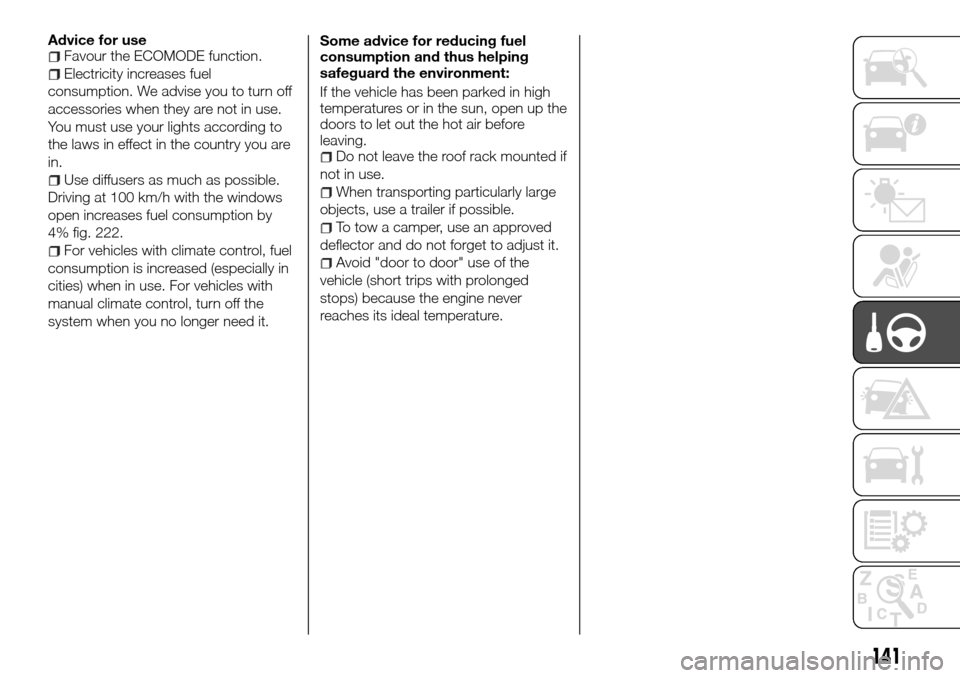
Driving at 100 km/h with the windows
open increases fuel consumption by
4% fig. 222.
For vehicles with climate control, fuel
consumption is increased (especially in
cities) when in use. For vehicles with
manual climate control, turn off the
system when you no longer need it.Some advice for reducing fuel
consumption and thus helping
safeguard the environment:
If the vehicle has been parked in high
temperatures or in the sun, open up the
doors to let out the hot air before
leaving.
Do not leave the roof rack mounted if
not in use.
When transporting particularly large
objects, use a trailer if possible.
To tow a camper, use an approved
deflector and do not forget to adjust it.
Avoid "door to door" use of the
vehicle (short trips with prolonged
stops) because the engine never
reaches its ideal temperature.
141
Page 160 of 232
JUMP STARTING
173) 174) 175) 176) 177)
39)
WARNING
173)Check that the wires A and B are not
touching and that the positive cable A does
not touch any metal component of the
vehicle providing the current. You risk injury
and/or damage to the vehicle.
174)Before opening the bonnet, make
sure that the engine is off and that the
ignition key is in the "S" (Stop) position.
Follow the indications on the plate
underneath the bonnet.
175)Do not get too close to the radiator
cooling fan: the electric fan may start;
danger of injury. Scarves, ties and other
loose clothing might be pulled by moving
parts.
176)Remove any metal objects (e.g. rings,
watches, bracelets), that might cause an
accidental electrical contact and cause
serious injury.
177)The batteries contain acid that can
burn skin or eyes. Batteries produce
hydrogen, which is easily flammable and
explosive. Therefore, keep away flames or
devices which may cause sparks.
IMPORTANT
39)Never use a fast battery-charger to
start the engine as this could damage the
electronic systems of your vehicle,
particularly the ignition and engine fuel
supply control units.
260T36708
261T36629
158
IN AN EMERGENCY
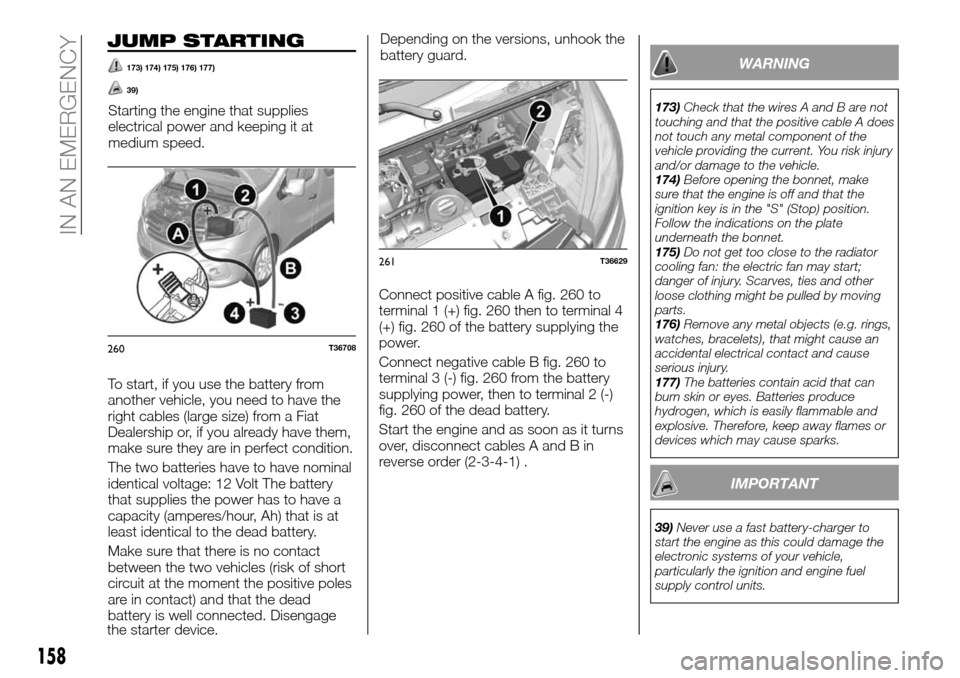
Starting the engine that supplies
electrical power and keeping it at
medium speed.
To start, if you use the battery from
another vehicle, you need to have the
right cables (large size) from a Fiat
Dealership or, if you already have them,
make sure they are in perfect condition.
The two batteries have to have nominal
identical voltage: 12 Volt The battery
that supplies the power has to have a
capacity (amperes/hour, Ah) that is at
least identical to the dead battery.
Make sure that there is no contact
between the two vehicles (risk of short
circuit at the moment the positive poles
are in contact) and that the dead
battery is well connected. Disengage
the starter device.Depending on the versions, unhook the
battery guard.
Connect positive cable A fig. 260 to
terminal 1 (+) fig. 260 then to terminal 4
(+) fig. 260 of the battery supplying the
power.
Connect negative cable B fig. 260 to
terminal 3 (-) fig. 260 from the battery
supplying power, then to terminal 2 (-)
fig. 260 of the dead battery.
Start the engine and as soon as it turns
over, disconnect cables A and B in
reverse order (2-3-4-1) .
Page 166 of 232
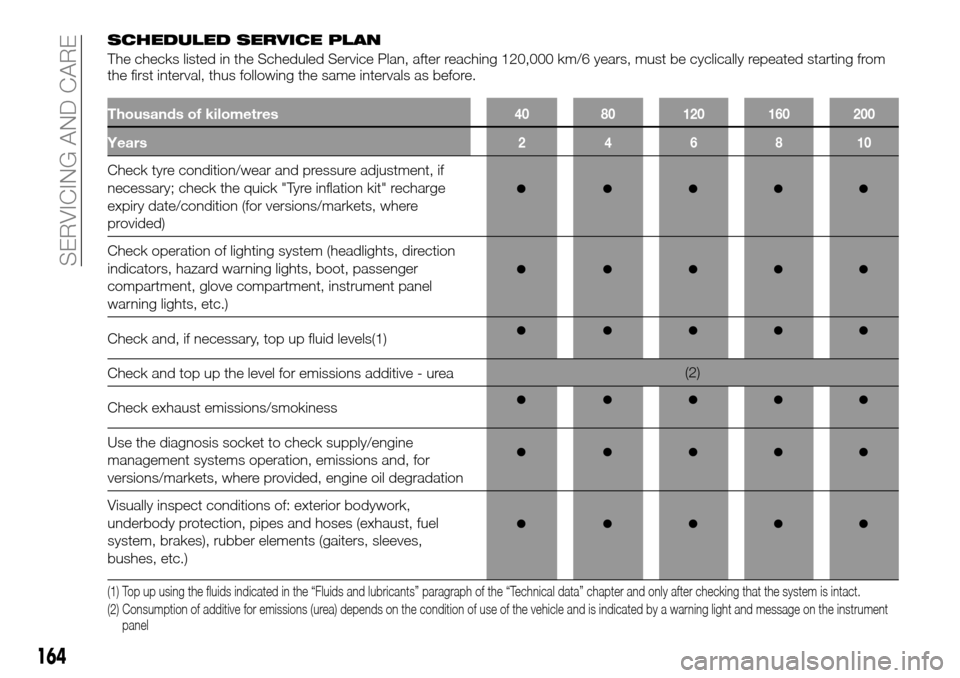
SCHEDULED SERVICE PLAN
The checks listed in the Scheduled Service Plan, after reaching 120,000 km/6 years, must be cyclically repeated starting from
the first interval, thus following the same intervals as before.
Thousands of kilometres40 80 120 160 200
Years246810
Check tyre condition/wear and pressure adjustment, if
necessary; check the quick "Tyre inflation kit" recharge
expiry date/condition (for versions/markets, where
provided)
Check operation of lighting system (headlights, direction
indicators, hazard warning lights, boot, passenger
compartment, glove compartment, instrument panel
warning lights, etc.)
Check and, if necessary, top up fluid levels(1)
Check and top up the level for emissions additive - urea(2)
Check exhaust emissions/smokiness
Use the diagnosis socket to check supply/engine
management systems operation, emissions and, for
versions/markets, where provided, engine oil degradation
Visually inspect conditions of: exterior bodywork,
underbody protection, pipes and hoses (exhaust, fuel
system, brakes), rubber elements (gaiters, sleeves,
bushes, etc.)
(1) Top up using the fluids indicated in the “Fluids and lubricants” paragraph of the “Technical data” chapter and only after checking that the system is intact.
(2) Consumption of additive for emissions (urea) depends on the condition of use of the vehicle and is indicated by a warning light and message on the instrument
panel
164
SERVICING AND CARE