mirror FIAT TALENTO 2016 2.G Owners Manual
[x] Cancel search | Manufacturer: FIAT, Model Year: 2016, Model line: TALENTO, Model: FIAT TALENTO 2016 2.GPages: 232, PDF Size: 5.01 MB
Page 5 of 232
USE OF THE OWNER HANDBOOK
OPERATING INSTRUCTIONS
Each time direction instructions (left/right or forwards/backwards) about the vehicle are given, these must be intended as
regarding an occupant in the driver's seat. Special cases not complying with this rule will be specified as appropriate in the text.
The figures in the Owner Handbook are provided by way of example only: this might imply that some details of the image do
not correspond to the actual arrangement of your vehicle. In addition, the Handbook has been conceived considering vehicles
with steering wheel on the left side; it is therefore possible that on vehicles with steering wheel on the right side, the position or
construction of some controls is not exactly mirror-like with respect to the figure.
To identify the chapter with the information needed you can consult the index at the end of this Owner Handbook.
Chapters can be rapidly identified with dedicated graphic tabs, at the side of each odd page. A few pages further there is a key
for getting to know the chapter order and the relevant symbols in the tabs. There is in any case a textual indication of the
current chapter at the side of each even page.
Page 11 of 232
GRAPHICAL INDEX
FRONT VIEW
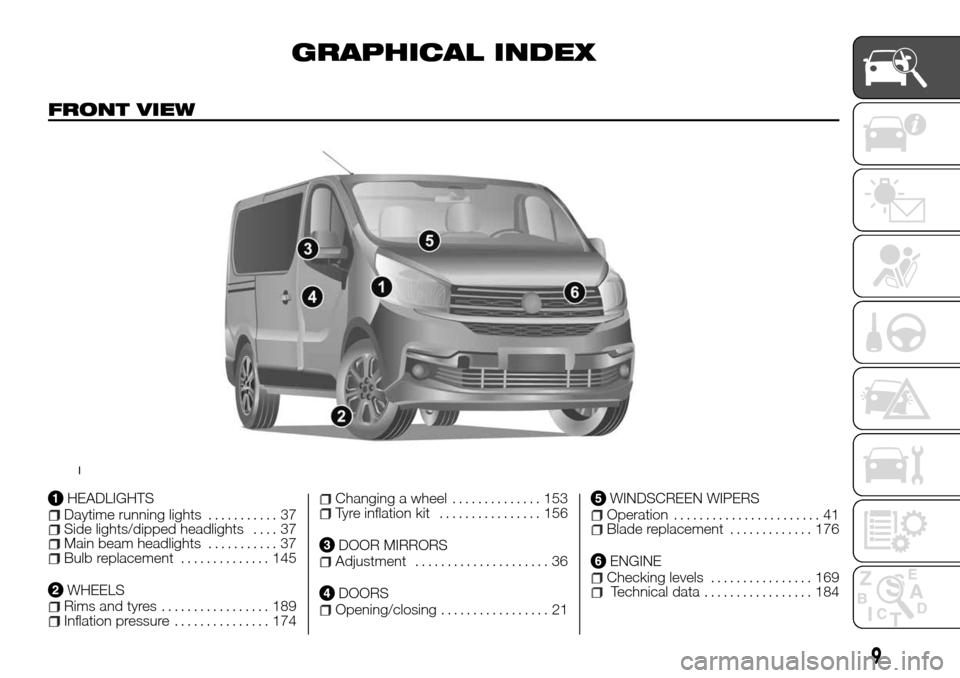
HEADLIGHTSDaytime running lights........... 37Side lights/dipped headlights.... 37Main beam headlights........... 37Bulb replacement.............. 145
WHEELSRims and tyres................. 189Inflation pressure............... 174
Changing a wheel.............. 153Tyre inflation kit................ 156
DOOR MIRRORSAdjustment..................... 36
DOORSOpening/closing................. 21
WINDSCREEN WIPERSOperation....................... 41Blade replacement............. 176
ENGINEChecking levels................ 169Technical data................. 184
1
9
Page 15 of 232
KNOWING YOUR VEHICLE
In-depth knowledge of your new vehicle
starts here.
The handbook that you are reading
simply and directly explains how it is
made and how it works.
That’s why we advise you to read it
seated comfortably on board, so that
you can see what is described here for
yourself.THE KEYS.................14
DOORS...................21
HEADRESTS................28
SEATS....................29
STEERING WHEEL/POWER
STEERING.................33
START&STOP SYSTEM.........34
REAR VIEW MIRRORS.........36
EXTERNAL LIGHTS...........37
INTERIOR LIGHTS............40
WINDSCREEN / REAR WINDOW
WIPERS..................41
REFUELLING THE VEHICLE......43
ADBLUE ADDITIVE RESERVOIR . . .45
IGNITION DEVICE............46
CLIMATE CONTROL...........46
RADAR PARKING.............57
REAR CAMERA..............58
ELECTRIC WINDOWS..........60
ENGINE BONNET............61
INTERIOR FITTINGS...........62
RADIO....................69
BAGGAGE COVER............70
CRUISE CONTROL
(constant speed
regulator) . . .....70
SPEED LIMITER..............73
PROTECTING THE ENVIRONMENT .75
DIESEL VERSION
PARTICULARITIES............76
13
Page 38 of 232
REAR VIEW
MIRRORS
DOOR MIRRORS
30) 31) 32)
Power Mirrors
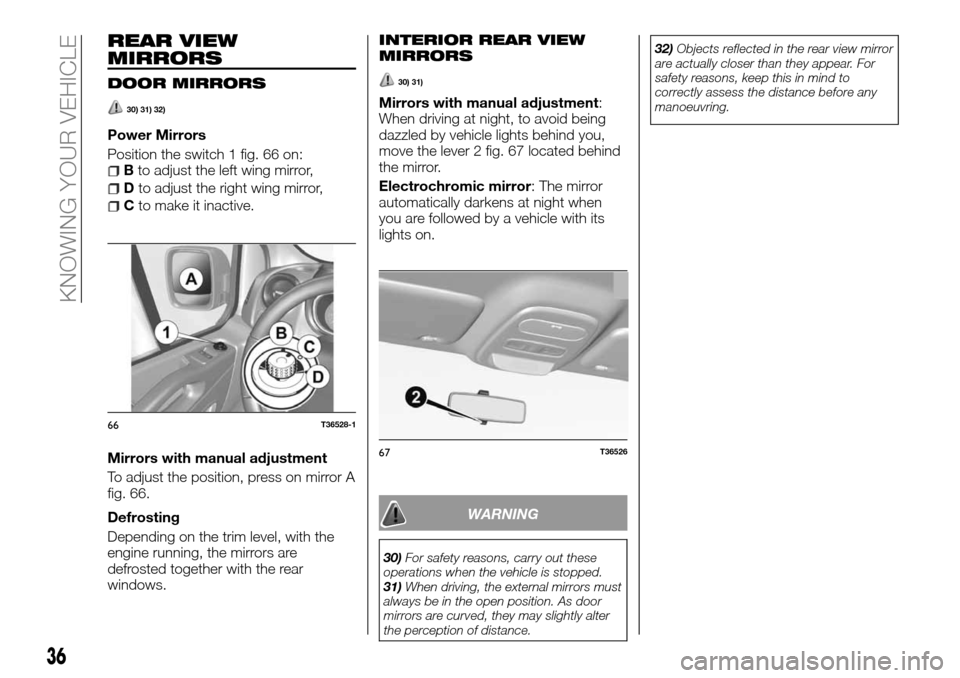
Position the switch 1 fig. 66 on:
Bto adjust the left wing mirror,
Dto adjust the right wing mirror,
Cto make it inactive.
Mirrors with manual adjustment
To adjust the position, press on mirror A
fig. 66.
Defrosting
Depending on the trim level, with the
engine running, the mirrors are
defrosted together with the rear
windows.
INTERIOR REAR VIEW
MIRRORS
30) 31)
Mirrors with manual adjustment:
When driving at night, to avoid being
dazzled by vehicle lights behind you,
move the lever 2 fig. 67 located behind
the mirror.
Electrochromic mirror: The mirror
automatically darkens at night when
you are followed by a vehicle with its
lights on.
WARNING
30)For safety reasons, carry out these
operations when the vehicle is stopped.
31)When driving, the external mirrors must
always be in the open position. As door
mirrors are curved, they may slightly alter
the perception of distance.32)Objects reflected in the rear view mirror
are actually closer than they appear. For
safety reasons, keep this in mind to
correctly assess the distance before any
manoeuvring.
66T36528-1
67T36526
36
KNOWING YOUR VEHICLE
Page 44 of 232
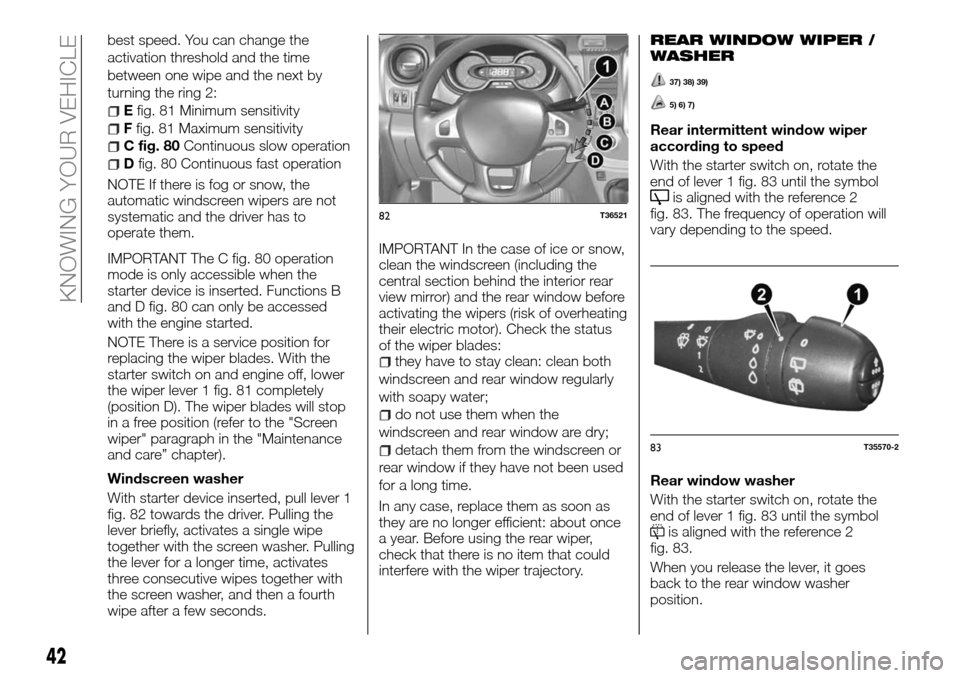
best speed. You can change the
activation threshold and the time
between one wipe and the next by
turning the ring 2:
Efig. 81 Minimum sensitivity
Ffig. 81 Maximum sensitivity
C fig. 80Continuous slow operation
Dfig. 80 Continuous fast operation
NOTE If there is fog or snow, the
automatic windscreen wipers are not
systematic and the driver has to
operate them.
IMPORTANT The C fig. 80 operation
mode is only accessible when the
starter device is inserted. Functions B
and D fig. 80 can only be accessed
with the engine started.
NOTE There is a service position for
replacing the wiper blades. With the
starter switch on and engine off, lower
the wiper lever 1 fig. 81 completely
(position D). The wiper blades will stop
in a free position (refer to the "Screen
wiper" paragraph in the "Maintenance
and care” chapter).
Windscreen washer
With starter device inserted, pull lever 1
fig. 82 towards the driver. Pulling the
lever briefly, activates a single wipe
together with the screen washer. Pulling
the lever for a longer time, activates
three consecutive wipes together with
the screen washer, and then a fourth
wipe after a few seconds.IMPORTANT In the case of ice or snow,
clean the windscreen (including the
central section behind the interior rear
view mirror) and the rear window before
activating the wipers (risk of overheating
their electric motor). Check the status
of the wiper blades:
they have to stay clean: clean both
windscreen and rear window regularly
with soapy water;
do not use them when the
windscreen and rear window are dry;
detach them from the windscreen or
rear window if they have not been used
for a long time.
In any case, replace them as soon as
they are no longer efficient: about once
a year. Before using the rear wiper,
check that there is no item that could
interfere with the wiper trajectory.
REAR WINDOW WIPER /
WASHER
37) 38) 39)
5) 6) 7)
Rear intermittent window wiper
according to speed
With the starter switch on, rotate the
end of lever 1 fig. 83 until the symbol
is aligned with the reference 2
fig. 83. The frequency of operation will
vary depending to the speed.
Rear window washer
With the starter switch on, rotate the
end of lever 1 fig. 83 until the symbol
is aligned with the reference 2
fig. 83.
When you release the lever, it goes
back to the rear window washer
position.
82T36521
83T35570-2
42
KNOWING YOUR VEHICLE
Page 45 of 232
NOTE If the wipers are operating or are
in automatic mode, when you put the
gear in reverse, the rear window starts
working intermittently.
IMPORTANT In the case of ice or snow,
clean the windscreen (including the
central section behind the interior rear
view mirror) and the rear window before
activating the wipers (risk of overheating
their electric motor). Check the status
of the wiper blades:
they have to be kept clean: clean the
blades, the windscreen and rearscreen
regularly with soapy water;
do not use them when the
windscreen and rear window are dry;
detach them from the windscreen or
rear window if they have not been used
for a long time.
IMPORTANT In any case, replace them
as soon as they are no longer efficient:
about once a year.
IMPORTANT Before using the rear
wiper, check that there is no item that
could interfere with the wiper trajectory.
IMPORTANT Do not use the wiper arm
to open or close the luggage
compartment door.
WARNING
37)When working in the engine
compartment, make sure that the
windscreen wiper is in position A
(stopped). Risk of injury.
38)If the window needs to be cleaned,
make sure the device is deactivated or the
key is on STOP.
39)When working in the engine
compartment, make sure that the rear
window wiper is in the stopped position.
Risk of injury.
IMPORTANT
5)Never use the windscreen wipers to
remove layers of snow or ice from the
windscreen. In such conditions, the
windscreen wiper may be subjected to
excessive stress and the motor cut-out
switch, which prevents operation for a few
seconds, may intervene. If operation is not
subsequently restored, even after restarting
the vehicle, contact a Fiat Dealership.
6)Do not operate the windscreen wiper
with the blades lifted from the windscreen.
7)Make sure the device is switched off if
there is ice on the windscreen.
REFUELLING THE
VEHICLE
Useful tank capacity: Approx. 80 litres
Open the left front door to access the
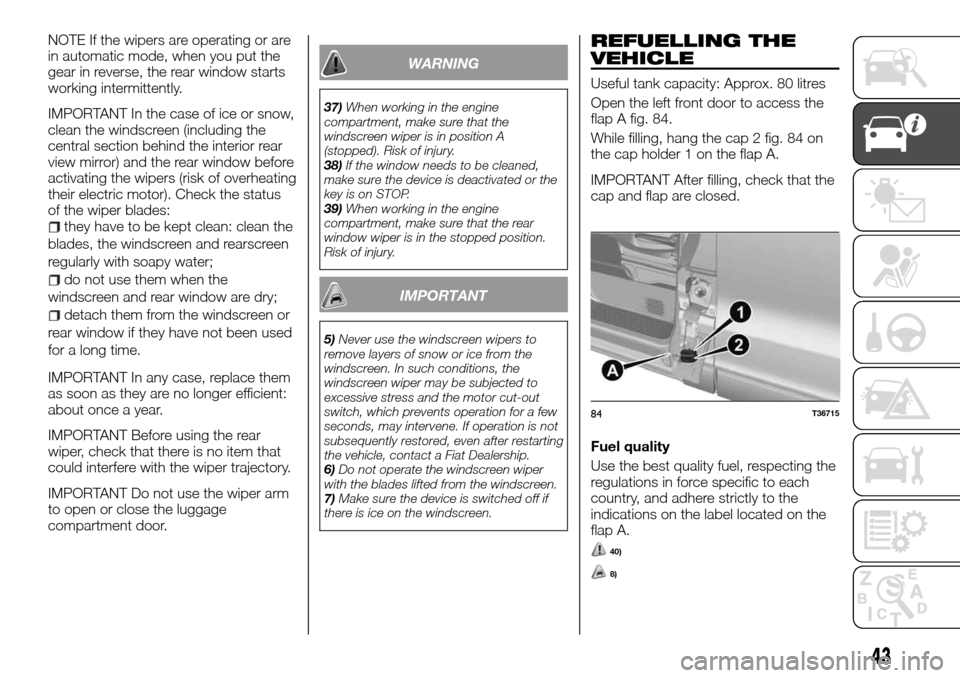
flap A fig. 84.
While filling, hang the cap 2 fig. 84 on
the cap holder 1 on the flap A.
IMPORTANT After filling, check that the
cap and flap are closed.
Fuel quality
Use the best quality fuel, respecting the
regulations in force specific to each
country, and adhere strictly to the
indications on the label located on the
flap A.
40)
8)
84T36715
43
Page 54 of 232
Heated rear window demisting/
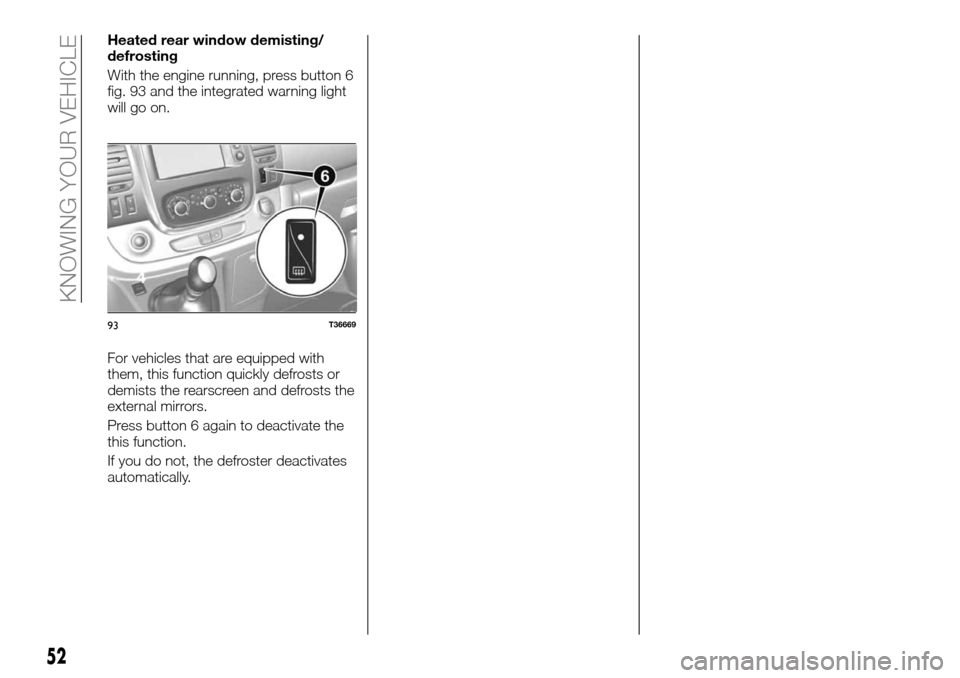
defrosting
With the engine running, press button 6
fig. 93 and the integrated warning light
will go on.
For vehicles that are equipped with
them, this function quickly defrosts or
demists the rearscreen and defrosts the
external mirrors.
Press button 6 again to deactivate the
this function.
If you do not, the defroster deactivates
automatically.
93T36669
52
KNOWING YOUR VEHICLE
Page 55 of 232
AUTOMATIC AIR CONDITIONING
50) 51)
2)
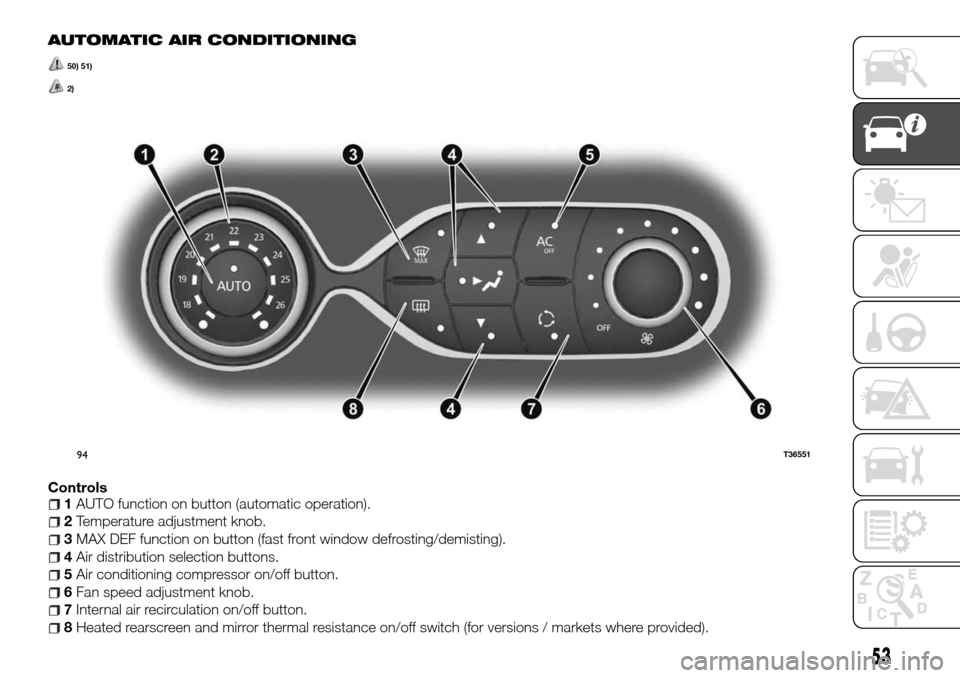
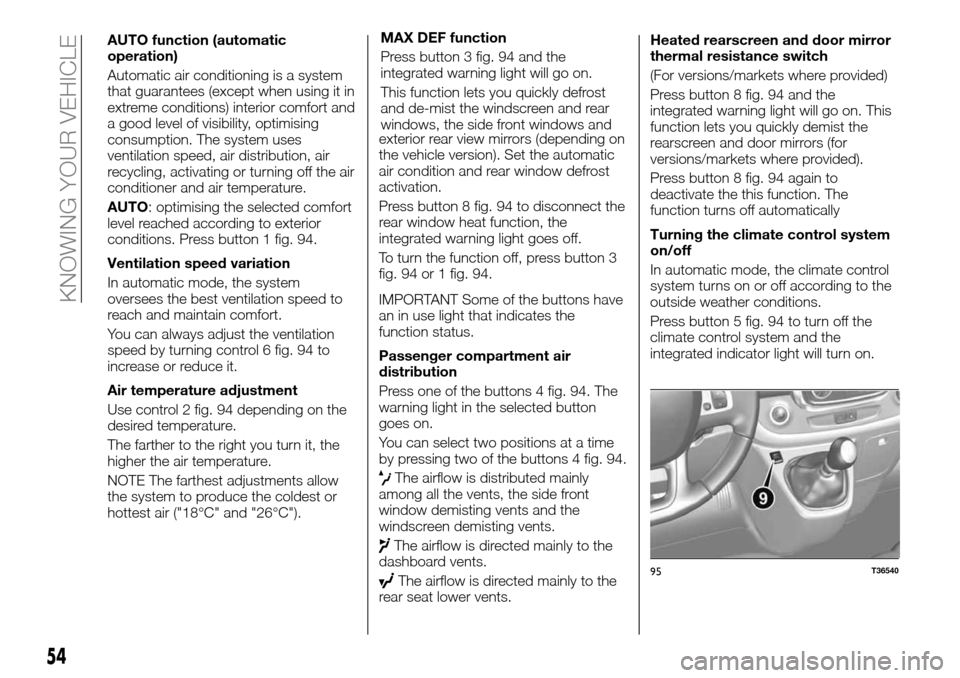
Controls1AUTO function on button (automatic operation).
2Temperature adjustment knob.
3MAX DEF function on button (fast front window defrosting/demisting).
4Air distribution selection buttons.
5Air conditioning compressor on/off button.
6Fan speed adjustment knob.
7Internal air recirculation on/off button.
8Heated rearscreen and mirror thermal resistance on/off switch (for versions / markets where provided).
94T36551
53
Page 56 of 232
AUTO function (automatic
operation)
Automatic air conditioning is a system
that guarantees (except when using it in
extreme conditions) interior comfort and
a good level of visibility, optimising
consumption. The system uses
ventilation speed, air distribution, air
recycling, activating or turning off the air
conditioner and air temperature.
AUTO: optimising the selected comfort
level reached according to exterior
conditions. Press button 1 fig. 94.
Ventilation speed variation
In automatic mode, the system
oversees the best ventilation speed to
reach and maintain comfort.
You can always adjust the ventilation
speed by turning control 6 fig. 94 to
increase or reduce it.
Air temperature adjustment
Use control 2 fig. 94 depending on the
desired temperature.
The farther to the right you turn it, the
higher the air temperature.
NOTE The farthest adjustments allow
the system to produce the coldest or
hottest air ("18°C" and "26°C").MAX DEF function
Press button 3 fig. 94 and the
integrated warning light will go on.
This function lets you quickly defrost
and de-mist the windscreen and rear
windows, the side front windows and
exterior rear view mirrors (depending on
the vehicle version). Set the automatic
air condition and rear window defrost
activation.
Press button 8 fig. 94 to disconnect the
rear window heat function, the
integrated warning light goes off.
To turn the function off, press button 3
fig. 94 or 1 fig. 94.
IMPORTANT Some of the buttons have
an in use light that indicates the
function status.
Passenger compartment air
distribution
Press one of the buttons 4 fig. 94. The
warning light in the selected button
goes on.
You can select two positions at a time
by pressing two of the buttons 4 fig. 94.
The airflow is distributed mainly
among all the vents, the side front
window demisting vents and the
windscreen demisting vents.
The airflow is directed mainly to the
dashboard vents.
The airflow is directed mainly to the
rear seat lower vents.Heated rearscreen and door mirror
thermal resistance switch
(For versions/markets where provided)
Press button 8 fig. 94 and the
integrated warning light will go on. This
function lets you quickly demist the
rearscreen and door mirrors (for
versions/markets where provided).
Press button 8 fig. 94 again to
deactivate the this function. The
function turns off automatically
Turning the climate control system
on/off
In automatic mode, the climate control
system turns on or off according to the
outside weather conditions.
Press button 5 fig. 94 to turn off the
climate control system and the
integrated indicator light will turn on.95T36540
54
KNOWING YOUR VEHICLE
Page 60 of 232
Irregular operation
Depending on the versions, when the
system detects irregular operation, an
appropriate message will appear on the
instrument panel along with the alarm
warning light
and an acoustic
signal going off every 5 seconds.
Contact a Fiat Dealership.
WARNING
52)Parking and other potentially
dangerous manoeuvres are, however,
always the driver’s responsibility. When
performing these operations, always make
sure that there are no other people
(especially children) or animals on the route
you want to take. The parking sensors are
an aid for the driver, but the driver must
never allow their attention to lapse during
potentially dangerous manoeuvres, even
those executed at low speeds.
IMPORTANT
12)If the vehicle collides with something
when in reverse (for example against a
stake, a curbstone or any other street
furniture) you could damage the vehicle (for
example, bend an axle). To prevent any risk
of accident, have the vehicle checked at a
Fiat Dealership.13)The sensors must be clean of mud,
dirt, snow or ice in order for the system to
operate correctly. Be careful not to scratch
or damage the sensors while cleaning
them. Avoid using dry, rough or hard
cloths. The sensors should be washed
using clean water with the addition of car
shampoo if necessary. When using special
washing equipment such as high pressure
jets or steam cleaning, clean the sensors
very quickly keeping the jet more than
10 cm away.
14)Only have the bumpers repainted or
any retouches to the paintwork in the area
of the sensors carried out by a Fiat
Dealership. Incorrect paint application
could affect the Radar parking operation.
REAR CAMERA
Operation
53)
15)
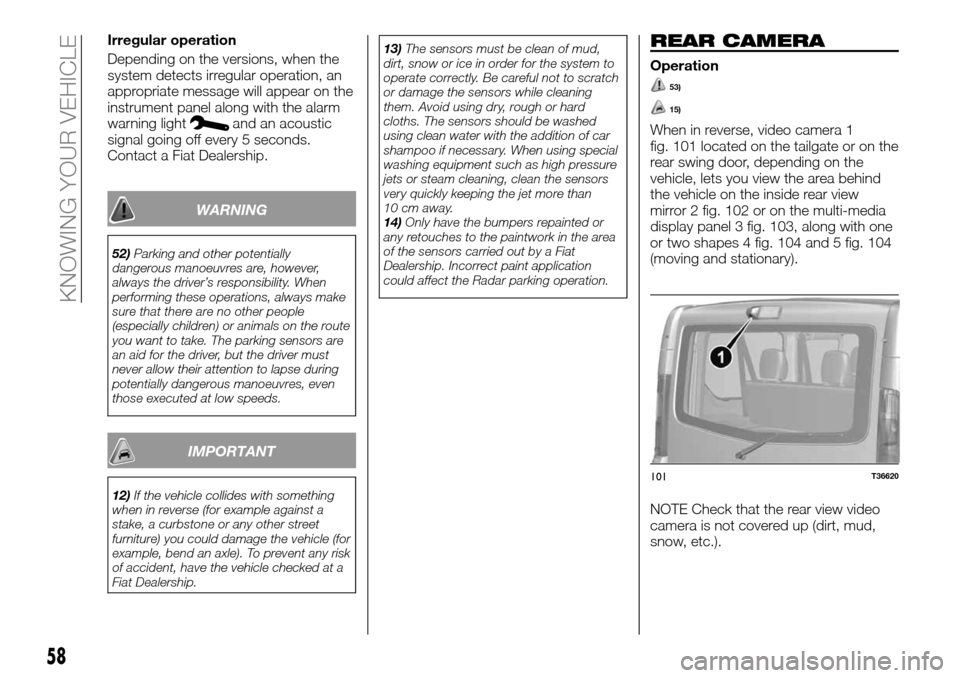
When in reverse, video camera 1
fig. 101 located on the tailgate or on the
rear swing door, depending on the
vehicle, lets you view the area behind
the vehicle on the inside rear view
mirror 2 fig. 102 or on the multi-media
display panel 3 fig. 103, along with one
or two shapes 4 fig. 104 and 5 fig. 104
(moving and stationary).
NOTE Check that the rear view video
camera is not covered up (dirt, mud,
snow, etc.).
101T36620
58
KNOWING YOUR VEHICLE