lock FIAT TIPO 4DOORS 2018 Owner handbook (in English)
[x] Cancel search | Manufacturer: FIAT, Model Year: 2018, Model line: TIPO 4DOORS, Model: FIAT TIPO 4DOORS 2018Pages: 244, PDF Size: 5.77 MB
Page 154 of 244
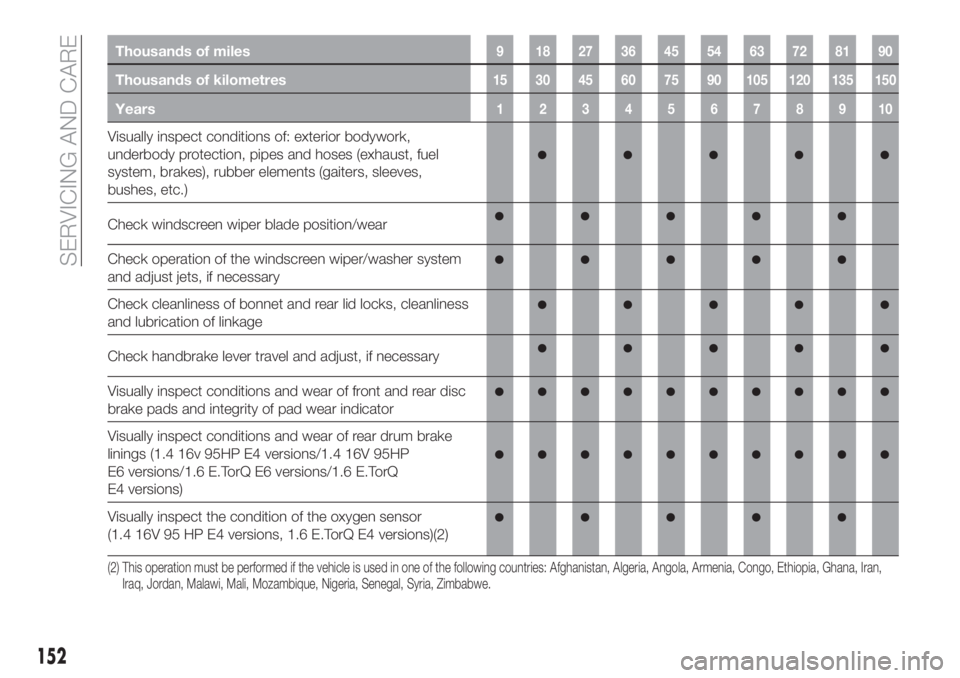
Thousands of miles9 182736455463728190
Thousands of kilometres15 30 45 60 75 90 105 120 135 150
Years12345678910
Visually inspect conditions of: exterior bodywork,
underbody protection, pipes and hoses (exhaust, fuel
system, brakes), rubber elements (gaiters, sleeves,
bushes, etc.)
Check windscreen wiper blade position/wear
Check operation of the windscreen wiper/washer system
and adjust jets, if necessary
Check cleanliness of bonnet and rear lid locks, cleanliness
and lubrication of linkage
Check handbrake lever travel and adjust, if necessary
Visually inspect conditions and wear of front and rear disc
brake pads and integrity of pad wear indicator
Visually inspect conditions and wear of rear drum brake
linings (1.4 16v 95HP E4 versions/1.4 16V 95HP
E6 versions/1.6 E.TorQ E6 versions/1.6 E.TorQ
E4 versions)
Visually inspect the condition of the oxygen sensor
(1.4 16V 95 HP E4 versions, 1.6 E.TorQ E4 versions)(2)
(2) This operation must be performed if the vehicle is used in one of the following countries: Afghanistan, Algeria, Angola, Armenia, Congo, Ethiopia, Ghana, Iran,
Iraq, Jordan, Malawi, Mali, Mozambique, Nigeria, Senegal, Syria, Zimbabwe.
152
SERVICING AND CARE
Page 160 of 244
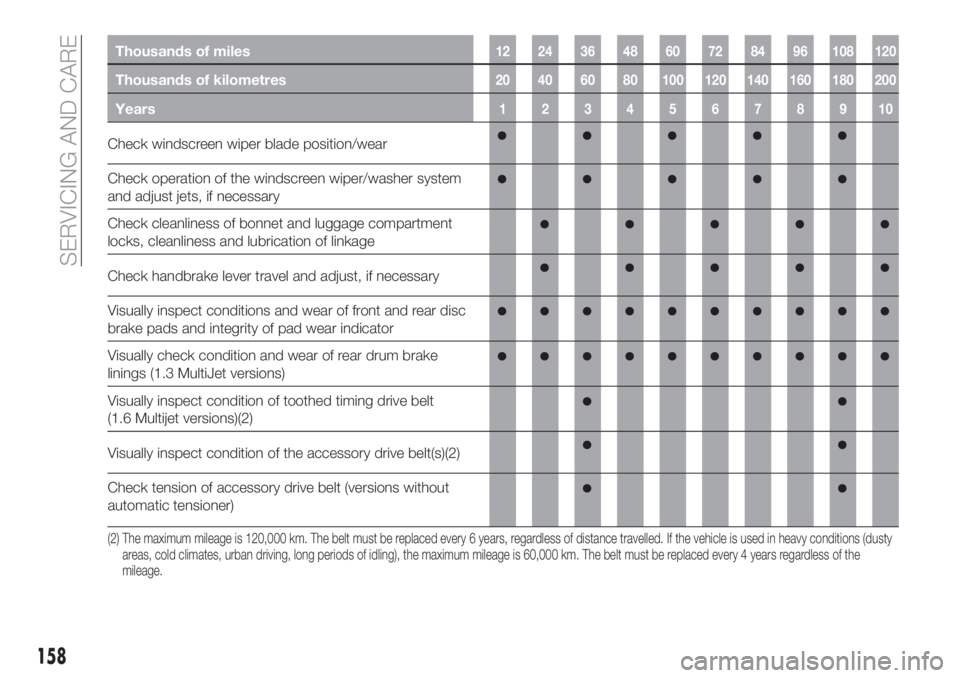
Thousands of miles12 24 36 48 60 72 84 96 108 120
Thousands of kilometres20 40 60 80 100 120 140 160 180 200
Years12345678910
Check windscreen wiper blade position/wear
Check operation of the windscreen wiper/washer system
and adjust jets, if necessary
Check cleanliness of bonnet and luggage compartment
locks, cleanliness and lubrication of linkage
Check handbrake lever travel and adjust, if necessary
Visually inspect conditions and wear of front and rear disc
brake pads and integrity of pad wear indicator
Visually check condition and wear of rear drum brake
linings (1.3 MultiJet versions)
Visually inspect condition of toothed timing drive belt
(1.6 Multijet versions)(2)
Visually inspect condition of the accessory drive belt(s)(2)
Check tension of accessory drive belt (versions without
automatic tensioner)
(2) The maximum mileage is 120,000 km. The belt must be replaced every 6 years, regardless of distance travelled. If the vehicle is used in heavy conditions (dusty
areas, cold climates, urban driving, long periods of idling), the maximum mileage is 60,000 km. The belt must be replaced every 4 years regardless of the
mileage.
158
SERVICING AND CARE
Page 162 of 244
PERIODIC CHECKS
Every1,000km or before long trips
check and, if necessary, top up:
engine coolant level;
brake fluid level;
windscreen washer fluid level;
tyre inflation pressure and condition;
operation of lighting system
(headlights, direction indicators, hazard
warning lights, etc.);
operation of screen washing/wiping
system and positioning/wear of wiper
blades.
Every3,000km, check and top up if
required: engine oil level.
DEMANDING USE OF THE
CAR
If the vehicle is used mainly under one
of the following conditions:
dusty roads;
short, repeated journeys (less than
7-8 km) at sub-zero outside
temperatures;
engine often idling or driving long
distances at low speeds or long periods
of inactivity;
the following checks must be carried
out more often than indicated in the
Scheduled Servicing Plan:
check front disc brake pad condition
and wear;
check cleanliness of bonnet and
luggage compartment locks,
cleanliness and lubrication of linkage;
visually inspect conditions of: engine,
gearbox, transmission, pipes and hoses
(exhaust/fuel system/brakes) and
rubber elements (gaiters/sleeves/
bushes, etc.);
check battery charge and battery
fluid level (electrolyte);
visually inspect conditions of the
accessory drive belts;
check and, if necessary, change
engine oil and replace oil filter;
check and, if necessary, replace
pollen filter;
check and, if necessary, replace air
cleaner.
160
SERVICING AND CARE
Page 175 of 244
SERVICING
PROCEDURES
65) 66) 67)
The following pages contain the rules
on therequiredmaintenance
envisaged by the technical personnel
who designed the vehicle.
In addition to these specific
maintenance instructions specified for
routine scheduled servicing, there are
other components which may require
intervention or replacements over the
vehicle’s life cycle.
ENGINE OIL
Engine oil level check
68)
To ensure correct engine lubrication, the
oil must always be kept at the
prescribed level (see "Engine
compartment" in this chapter).
ENGINE OIL FILTER
Replacing the engine oil filter
The engine oil filter must be replaced
each time the engine oil is changed.
It is advisable to replace it with a
genuine spare part, specifically
designed for this vehicle.
AIR FILTER
162)
Replacing the air cleaner
See the "Scheduled servicing plan" for
the correct servicing intervals.
It is advisable to replace it with a
genuine spare part, specifically
designed for this vehicle.
AIR CONDITIONING
SYSTEM MAINTENANCE
69) 70)
To ensure the best possible
performance, the air conditioning
system must be checked and undergo
maintenance at a Fiat Dealership at the
beginning of the summer.
WINDOWS
When cleaning the heated rear window
be careful, if the defrosting function is
active, regarding the temperature of the
window; also make sure that children
do not come into contact with the
heated surface. The window may be
hot.
Never use an abrasive detergent to
clean the surface of the windows.
Do not use scrapers or sharp items that
might scratch the windows.Spray the detergent on the cloth to be
used for cleaning the rear view mirror.
Do not spray the detergent directly on
the window.
Cleaning the window with hot water
could cause the removal of any labels.
WINDSCREEN WIPER
Replacing the windscreen wiper
blades
Proceed as follows:
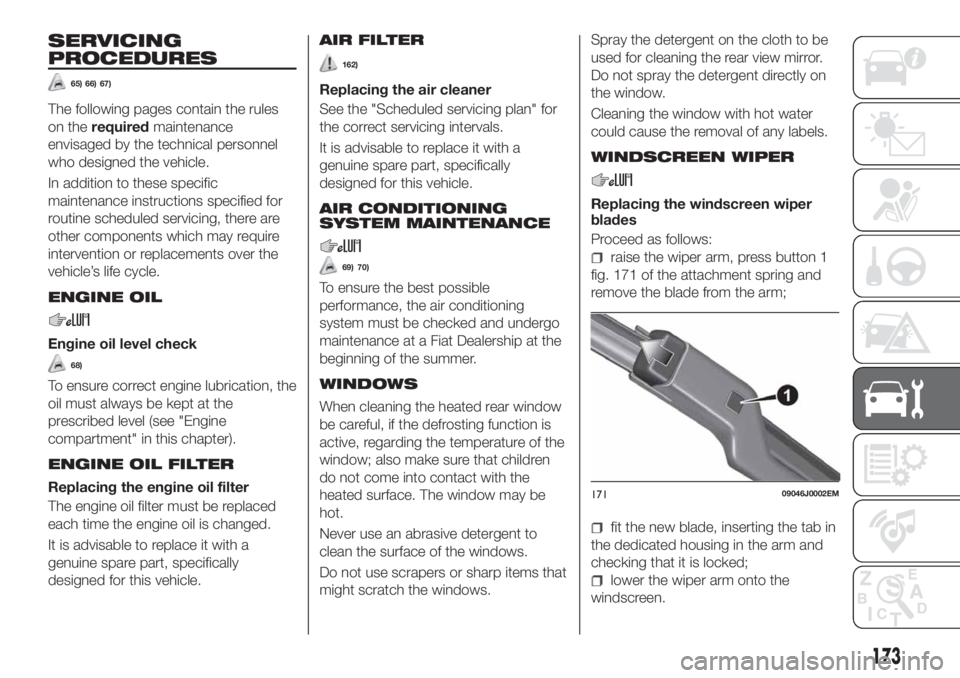
raise the wiper arm, press button 1
fig. 171 of the attachment spring and
remove the blade from the arm;
fit the new blade, inserting the tab in
the dedicated housing in the arm and
checking that it is locked;
lower the wiper arm onto the
windscreen.
17109046J0002EM
173
Page 176 of 244
IMPORTANT Do not operate the
windscreen wiper with the blades lifted
from the windscreen.
Windscreen washer
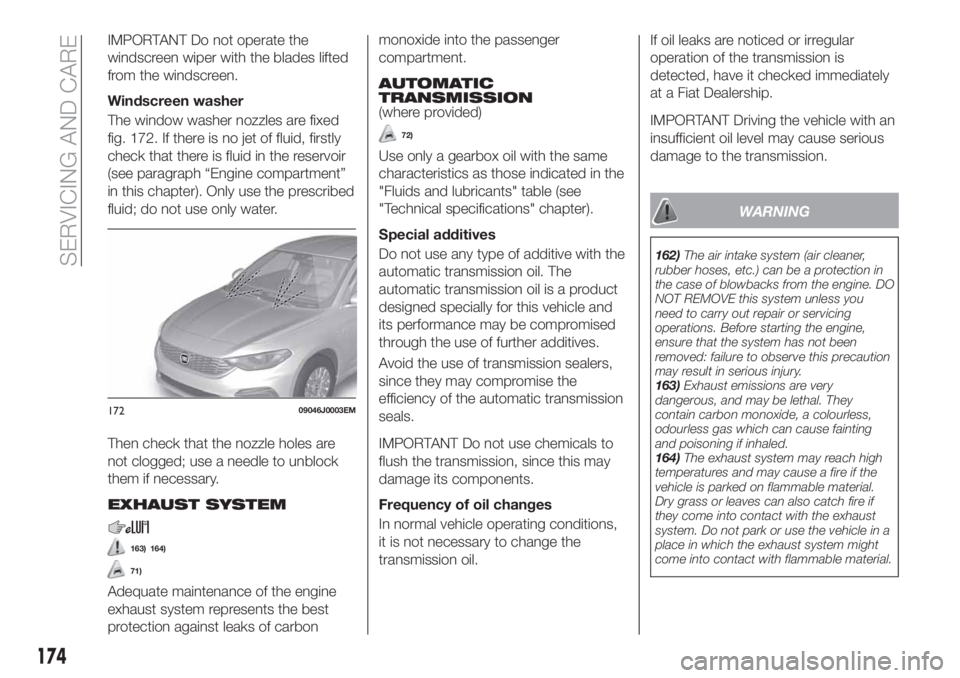
The window washer nozzles are fixed
fig. 172. If there is no jet of fluid, firstly
check that there is fluid in the reservoir
(see paragraph “Engine compartment”
in this chapter). Only use the prescribed
fluid; do not use only water.
Then check that the nozzle holes are
not clogged; use a needle to unblock
them if necessary.
EXHAUST SYSTEM
163) 164)
71)
Adequate maintenance of the engine
exhaust system represents the best
protection against leaks of carbonmonoxide into the passenger
compartment.
AUTOMATIC
TRANSMISSION
(where provided)
72)
Use only a gearbox oil with the same
characteristics as those indicated in the
"Fluids and lubricants" table (see
"Technical specifications" chapter).
Special additives
Do not use any type of additive with the
automatic transmission oil. The
automatic transmission oil is a product
designed specially for this vehicle and
its performance may be compromised
through the use of further additives.
Avoid the use of transmission sealers,
since they may compromise the
efficiency of the automatic transmission
seals.
IMPORTANT Do not use chemicals to
flush the transmission, since this may
damage its components.
Frequency of oil changes
In normal vehicle operating conditions,
it is not necessary to change the
transmission oil.If oil leaks are noticed or irregular
operation of the transmission is
detected, have it checked immediately
at a Fiat Dealership.
IMPORTANT Driving the vehicle with an
insufficient oil level may cause serious
damage to the transmission.
WARNING
162)The air intake system (air cleaner,
rubber hoses, etc.) can be a protection in
the case of blowbacks from the engine. DO
NOT REMOVE this system unless you
need to carry out repair or servicing
operations. Before starting the engine,
ensure that the system has not been
removed: failure to observe this precaution
may result in serious injury.
163)Exhaust emissions are very
dangerous, and may be lethal. They
contain carbon monoxide, a colourless,
odourless gas which can cause fainting
and poisoning if inhaled.
164)The exhaust system may reach high
temperatures and may cause a fire if the
vehicle is parked on flammable material.
Dry grass or leaves can also catch fire if
they come into contact with the exhaust
system. Do not park or use the vehicle in a
place in which the exhaust system might
come into contact with flammable material.
17209046J0003EM
174
SERVICING AND CARE
Page 183 of 244
IDENTIFICATION
DATA
VEHICLE IDENTIFICATION
NUMBER (VIN) PLATE
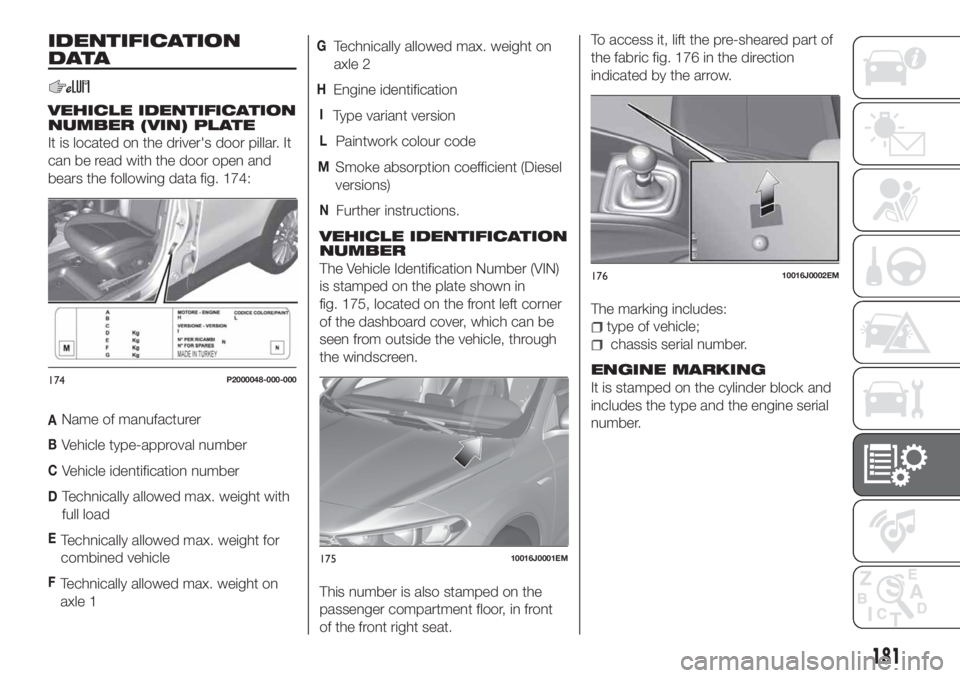
It is located on the driver's door pillar. It
can be read with the door open and
bears the following data fig. 174:
AName of manufacturer
BVehicle type-approval number
CVehicle identification number
DTechnically allowed max. weight with
full load
ETechnically allowed max. weight for
combined vehicle
FTechnically allowed max. weight on
axle 1
GTechnically allowed max. weight on
axle 2
HEngine identification
IType variant version
LPaintwork colour code
MSmoke absorption coefficient (Diesel
versions)
NFurther instructions.
VEHICLE IDENTIFICATION
NUMBER
The Vehicle Identification Number (VIN)
is stamped on the plate shown in
fig. 175, located on the front left corner
of the dashboard cover, which can be
seen from outside the vehicle, through
the windscreen.
This number is also stamped on the
passenger compartment floor, in front
of the front right seat.To access it, lift the pre-sheared part of
the fabric fig. 176 in the direction
indicated by the arrow.
The marking includes:
type of vehicle;
chassis serial number.
ENGINE MARKING
It is stamped on the cylinder block and
includes the type and the engine serial
number.174P2000048-000-000
17510016J0001EM
17610016J0002EM
181
Page 207 of 244
TIPS, CONTROLS
AND GENERAL
INFORMATION
ROAD SAFETY
Learn how to use the various system
functions before setting off.
Read the instructions for the system
carefully before setting off.
178) 179)
RECEPTION CONDITIONS
Reception conditions change
constantly while driving. Reception may
be interfered with by the presence of
mountains, buildings or bridges,
especially when you are far away from
the broadcaster.
IMPORTANT The volume may be
increased when receiving traffic
information and news.
CARE AND
MAINTENANCE
Observe the following precautions to
ensure the system is fully operational:
the display lens should not come into
contact with pointed or rigid objects
which could damage its surface; use a
soft, dry anti-static cloth to clean and
do not press.
never use alcohol, petrols and
derivatives to clean the display lens.
prevent any liquid from entering the
system: this could damage it beyond
repair.
78) 79)
ANTITHEFT PROTECTION
The system is equipped with an
anti-theft protection system based on
the exchange of information with the
electronic control unit (Body Computer)
on the vehicle.
This guarantees maximum safety and
prevents the secret code from being
entered after the power supply has
been disconnected.
If the check has a positive outcome, the
system will start to operate, whereas if
the comparison codes are not the same
or if the electronic control unit (Body
Computer) is replaced, the system will
ask the user to enter the secret code
according to the procedure described
in the paragraph below.
Entering the secret code
When the system is switched on, if the
code is requested, the display will show
"Please enter Anti-Theft Code" followed
by the screen showing a keypad to
enter the secret code.
The secret code is made up of four
digits from 0 to 9.Uconnect™ Radio:
To enter the first digit of the code,
turn the "BROWSE/ENTER" right knob
and press to confirm.
After inserting the fourth digit, move
the cursor to "OK" and press the
"BROWSE ENTER" right knob: the
system will start to operate.
Uconnect™ 5” and Uconnect™ 5”
Nav:
Use the graphic buttons on the
display to enter the code digits.
If an incorrect code is entered, the
system displays "Incorrect Code" to
notify the user of the need to enter the
correct code.
After the 3 available attempts to enter
the code, the system displays
"Incorrect Code. Radio locked. Wait for
30 minutes". After the text has
disappeared it is possible to start the
code entering procedure again.
Vehicle radio passport
This document certifies ownership of
the system. The vehicle radio passport
shows the system model, serial number
and secret code.
In case of loss of the car radio
passport, contact the Fiat Dealership,
taking an ID document and the car
ownership documents.
205
Page 210 of 244
FRONT CONTROL PANEL SUMMARY TABLE
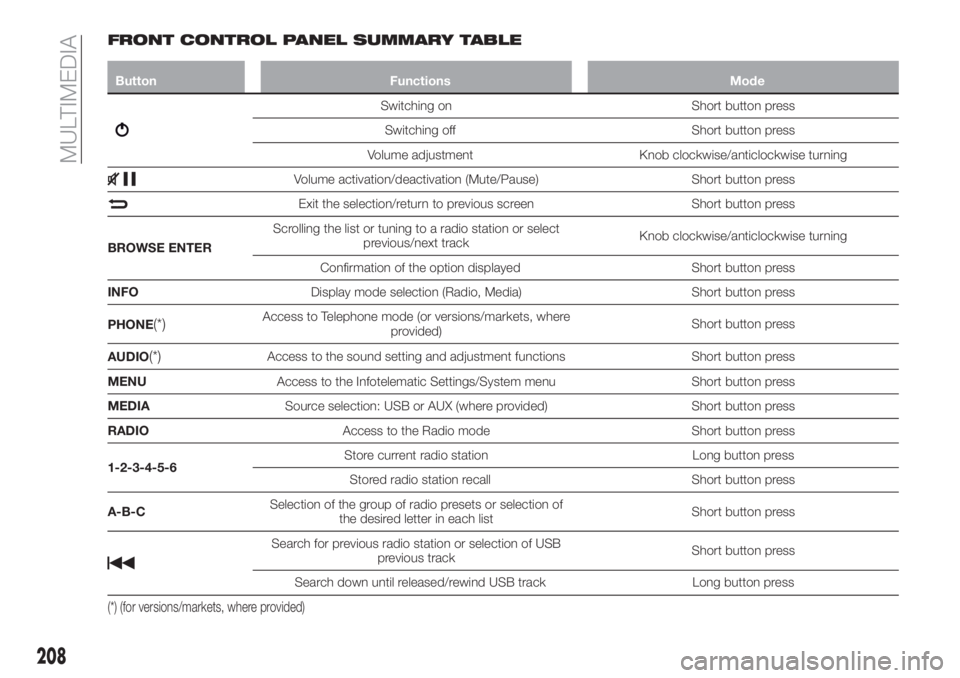
Button Functions Mode
Switching on Short button press
Switching off Short button press
Volume adjustment Knob clockwise/anticlockwise turning
Volume activation/deactivation (Mute/Pause) Short button press
Exit the selection/return to previous screen Short button press
BROWSE ENTERScrolling the list or tuning to a radio station or select
previous/next trackKnob clockwise/anticlockwise turning
Confirmation of the option displayed Short button press
INFODisplay mode selection (Radio, Media) Short button press
PHONE
(*)Access to Telephone mode (or versions/markets, where
provided)Short button press
AUDIO
(*)Access to the sound setting and adjustment functions Short button press
MENUAccess to the Infotelematic Settings/System menu Short button press
MEDIASource selection: USB or AUX (where provided) Short button press
RADIOAccess to the Radio mode Short button press
1-2-3-4-5-6Store current radio station Long button press
Stored radio station recall Short button press
A-B-CSelection of the group of radio presets or selection of
the desired letter in each listShort button press
Search for previous radio station or selection of USB
previous trackShort button press
Search down until released/rewind USB track Long button press
(*) (for versions/markets, where provided)
208
MULTIMEDIA
Page 215 of 244
SWITCHING THE SYSTEM
ON/OFF
The system is switched on/off by
pressing the
button/knob.
Turn the button/knob clockwise to
increase the radio volume or
anticlockwise to decrease it.
RADIO (TUNER) MODE
The system is equipped with the
following tuners: AM, FM and DAB (for
versions/markets, where provided).
Radio mode selection
Press the RADIO button on the front
panel to activate radio mode.
Selecting a frequency band
The different tuning modes can be
selected by pressing the RADIO button
on the front panel.
Indications on display
After the desired radio station is
selected on the display, the following
information is shown (INFO mode
activated):
In the upper part: the preset station, the
time and the other active radio settings
are highlighted.
In the central part: the name of the
current station, the frequency and the
radio text information (if any) are
highlighted.FM station list
Press the BROWSE ENTER
button/knob to display the complete list
of the FM stations that can be received.
AM/FM radio station storage
The preset stations are available in all
system modes and are selected by
touching one of the presetting buttons
1-2-3-4-5-6on the front panel. If you
are tuned to a radio station that you
wish to store, hold down the button on
the display which corresponds to the
desired preset until an acoustic
confirmation signal is emitted.
AM/FM radio station selection
To search for the desired radio station
press the
orbutton or use the
wheel of the steering wheel controls, or
turn the "BROWSE ENTER" knob.
Previous/next radio station search
Briefly press the
orbutton:
when the button is released the
previous or the next radio station is
displayed.
Previous/next radio station fast
search
Hold down the
orbutton to
start the fast search: when the button is
released, the first tunable radio is
played.
MEDIA MODE
Interaction modes for AUX (where
provided), USB operation.
Audio source selection
To select the desired audio source
among those available: AUX (where
provided) or USB, press theMEDIA
media.
To select and playback music tracks on
the cell phone CD card (where the
phone allows) press the BROWSE
ENTER button, select Folders then
Card.
IMPORTANT Some multimedia players
may not be compatible with the
Uconnect™.
CHANGE TRACK (next/previous)
Briefly press the
button to play the
next track or briefly press the
button to return to the beginning
of the selected track or to the beginning
of the previous track if this has been
played for less than 3 seconds.
Fast forward/rewind through tracks
Press and hold down the
button to
fast forward the selected track or keep
the
button pressed to fast rewind
the track.
Track selection (browse)
Use this function to scroll through and
select the tracks on the active device.
213
Page 224 of 244
SWITCHING THE SYSTEM
ON/OFF
The system is switched on/off by
pressing the
button/knob.
Turn the button/knob clockwise to
increase the radio volume or
anticlockwise to decrease it.
RADIO MODE
After the desired radio station is
selected, the following information is
shown on the display:
At the top: the list of radio stations
stored (preset) is displayed; the station
being listened to is highlighted.
In the middle: display of the name of
the current radio station and the
buttons for selecting the previous or
next radio station.
At the bottom: display of the following
buttons:
"Browse": list of the radio stations
available;
"AM/FM", "AM/DAB", "FM/DAB":
selection of the desired frequency band
(button reconfigurable according to the
band selected: AM, FM or DAB);
"Tune" : manual radio station tuning
(not available for DAB radios);
"Info": additional information on the
source being listened to;
"Audio": access to the "Audio
setting" screen.Audio menu
To access the "Audio" menu press the
Audio" button located at the bottom of
the display.
The following adjustments can be
carried out using the "Audio" menu:
"Equalizer" (for versions/markets,
where provided);
"Balance/Fader" (left/right and
front/rear audio balance adjustment);
"Speed/Volume" (speed-dependent
automatic volume control);
"Loudness" (for versions/markets,
where provided);
"Auto-On Radio";
To exit the "Audio" menu, press the
/Done button.
MEDIA MODE
Press the "Source" button to select the
desired audio source among those
available: AUX (where provided), USB or
Bluetooth®
.
Applications used on portable devices
may be not compatible with the
Uconnect™system
Track selection (browse)
Use this function to scroll through and
select the tracks on the active device.
The choices available depend on the
device connected.For example, on a USB device, you can
also use the BROWSE ENTER
button/knob to scroll through the list of
artists, genres and albums available on
the device, depending on the
information available in the tracks.
Within each list, the "ABC" button
allows the user to skip to the desired
letter in the list.
NOTE This button might be disabled for
some
Apple®
devices.
NOTE The BROWSE ENTER button
does not allow any operation on an
AUX device (where provided).
Press the BROWSE ENTER button to
activate this function on the source
being played.
Turn the BROWSE ENTER button/knob
to select the desired category and then
press the button/knob to confirm the
selection.
Press the
button to cancel the
function.
Bluetooth
This mode is activated by pairing a
Bluetooth®
device containing music
tracks with the system.
222
MULTIMEDIA
®SOURCE