handbrake FIAT TIPO 4DOORS 2018 Owner handbook (in English)
[x] Cancel search | Manufacturer: FIAT, Model Year: 2018, Model line: TIPO 4DOORS, Model: FIAT TIPO 4DOORS 2018Pages: 244, PDF Size: 5.77 MB
Page 4 of 244
READ THIS CAREFULLY
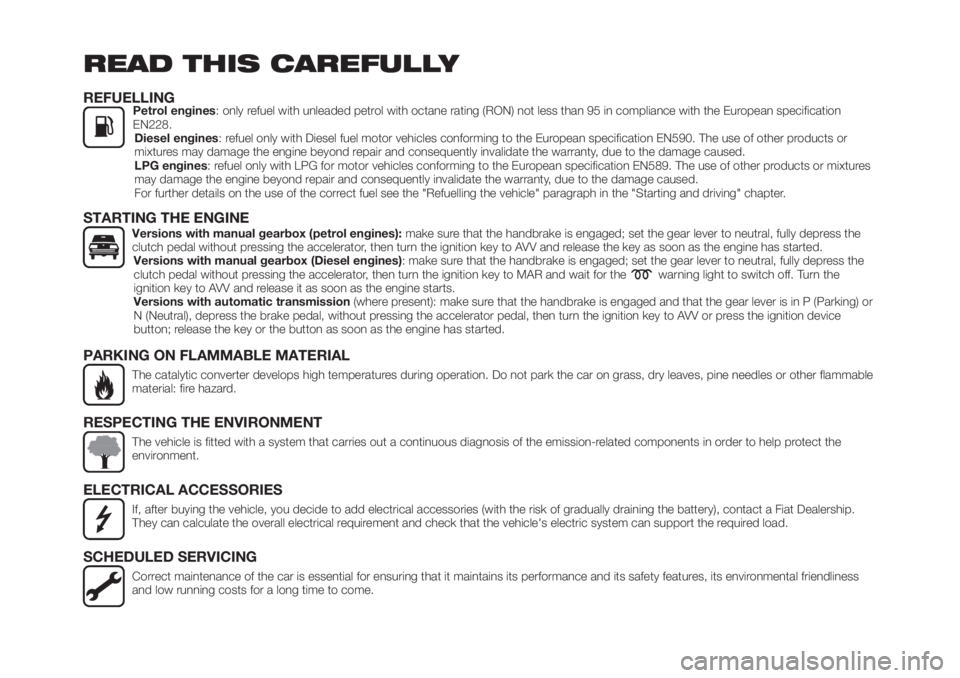
REFUELLINGPetrol engines: only refuel with unleaded petrol with octane rating (RON) not less than 95 in compliance with the European specification
EN228.
Diesel engines: refuel only with Diesel fuel motor vehicles conforming to the European specification EN590. The use of other products or
mixtures may damage the engine beyond repair and consequently invalidate the warranty, due to the damage caused.
LPG engines: refuel only with LPG for motor vehicles conforming to the European specification EN589. The use of other products or mixtures
may damage the engine beyond repair and consequently invalidate the warranty, due to the damage caused.
For further details on the use of the correct fuel see the "Refuelling the vehicle" paragraph in the "Starting and driving" chapter.
STARTING THE ENGINEVersions with manual gearbox (petrol engines):make sure that the handbrake is engaged; set the gear lever to neutral, fully depress the
clutch pedal without pressing the accelerator, then turn the ignition key to AVV and release the key as soon as the engine has started.
Versions with manual gearbox (Diesel engines): make sure that the handbrake is engaged; set the gear lever to neutral, fully depress the
clutch pedal without pressing the accelerator, then turn the ignition key to MAR and wait for the
warning light to switch off. Turn the
ignition key to AVV and release it as soon as the engine starts.
Versions with automatic transmission(where present): make sure that the handbrake is engaged and that the gear lever is in P (Parking) or
N (Neutral), depress the brake pedal, without pressing the accelerator pedal, then turn the ignition key to AVV or press the ignition device
button; release the key or the button as soon as the engine has started.
PARKING ON FLAMMABLE MATERIAL
The catalytic converter develops high temperatures during operation. Do not park the car on grass, dry leaves, pine needles or other flammable
material: fire hazard.
RESPECTING THE ENVIRONMENT
The vehicle is fitted with a system that carries out a continuous diagnosis of the emission-related components in order to help protect the
environment.
ELECTRICAL ACCESSORIES
If, after buying the vehicle, you decide to add electrical accessories (with the risk of gradually draining the battery), contact a Fiat Dealership.
They can calculate the overall electrical requirement and check that the vehicle's electric system can support the required load.
SCHEDULED SERVICING
Correct maintenance of the car is essential for ensuring that it maintains its performance and its safety features, its environmental friendliness
and low running costs for a long time to come.
Page 106 of 244
37)When the engine is switched off never
leave the ignition device in the MAR
position to prevent useless current
absorption from draining the battery.
38)A quick burst on the accelerator before
turning off the engine serves absolutely no
practical purpose; it wastes fuel and is
especially damaging to turbocharged
engines.
39)Warning light
will flash after starting
or during prolonged cranking to indicate a
fault with the glow plug heating system. If
the engine starts, the vehicle can be used
as normal, but a Fiat Dealership must be
contacted as soon as possible.
PARKING THE
VEHICLE
When parking and leaving the car,
proceed as follows:
engage a gear (1stgear if facing
uphill or reverse if facing downhill) and
leave the wheels turned;
stop the engine and engage the
handbrake;
always remove the ignition key.
Block the wheels with a wedge or a
stone if the car is parked on a steep
slope.
On versions equipped with automatic
transmission, wait for the letter P to be
displayed before releasing the brake
pedal.
IMPORTANTNEVERleave the car with
the gearbox in neutral (or, on versions
equipped with automatic transmission,
before placing the gear lever at P).
109)
WARNING
109)Never leave children unattended in
the car. Always remove the key from the
ignition when leaving the car and take it
with you.
PARKING BRAKE
110) 111)
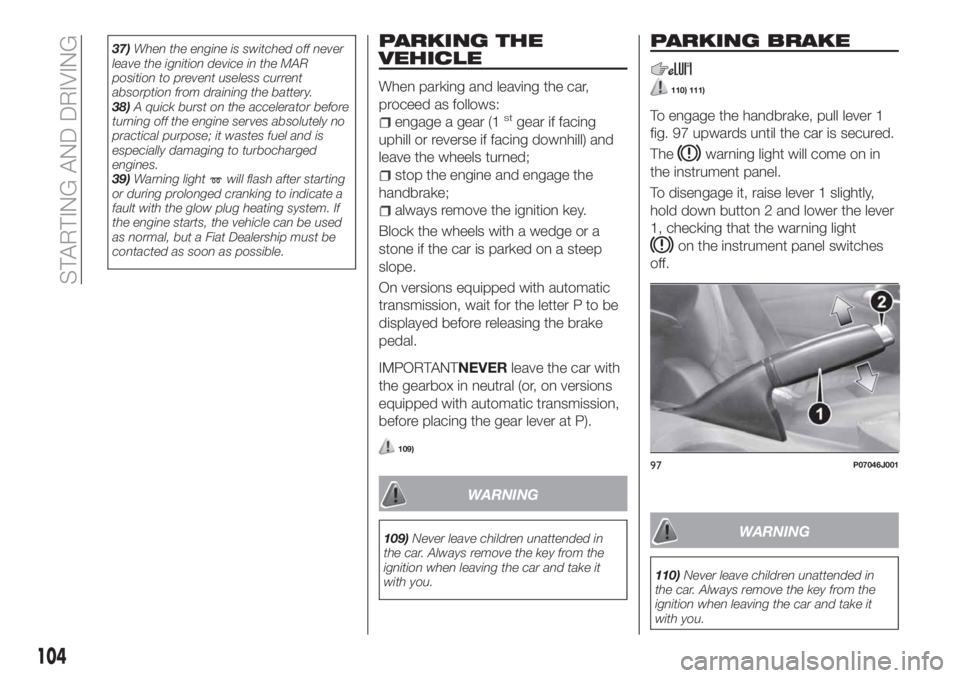
To engage the handbrake, pull lever 1
fig. 97 upwards until the car is secured.
The
warning light will come on in
the instrument panel.
To disengage it, raise lever 1 slightly,
hold down button 2 and lower the lever
1, checking that the warning light
on the instrument panel switches
off.
WARNING
110)Never leave children unattended in
the car. Always remove the key from the
ignition when leaving the car and take it
with you.
97P07046J001
104
STARTING AND DRIVING
Page 107 of 244
111)For cars equipped with a front
armrest, lift it up to ensure that it does not
interfere with the action of the handbrake.MANUAL GEARBOX
112)
40)
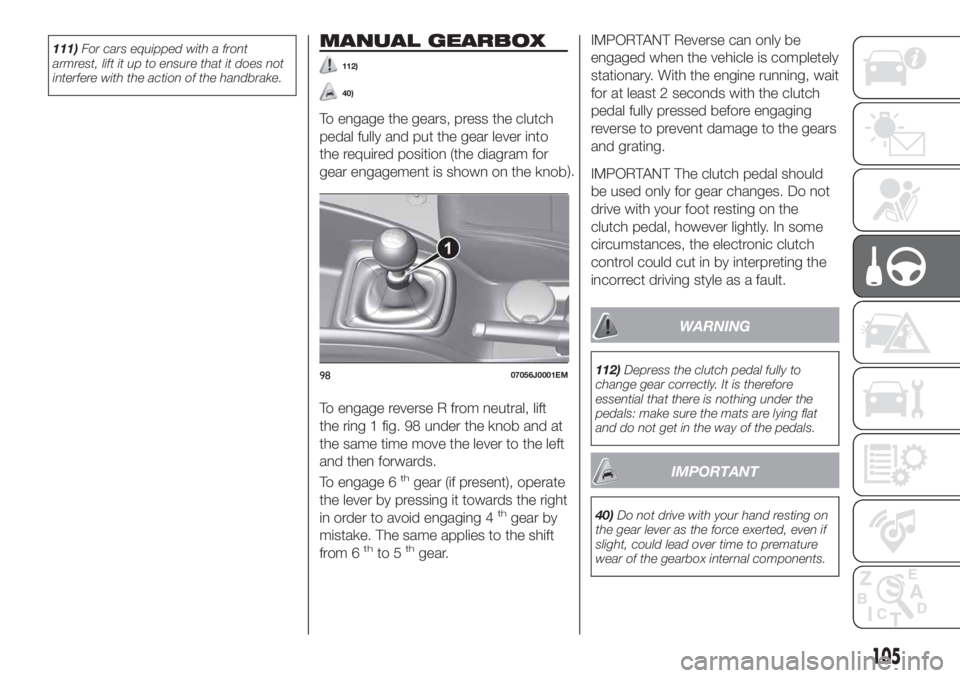
To engage the gears, press the clutch
pedal fully and put the gear lever into
the required position (the diagram for
gear engagement is shown on the knob).
To engage reverse R from neutral, lift
the ring 1 fig. 98 under the knob and at
the same time move the lever to the left
and then forwards.
To engage 6
thgear (if present), operate
the lever by pressing it towards the right
in order to avoid engaging 4
thgear by
mistake. The same applies to the shift
from 6
thto 5thgear.
IMPORTANT Reverse can only be
engaged when the vehicle is completely
stationary. With the engine running, wait
for at least 2 seconds with the clutch
pedal fully pressed before engaging
reverse to prevent damage to the gears
and grating.
IMPORTANT The clutch pedal should
be used only for gear changes. Do not
drive with your foot resting on the
clutch pedal, however lightly. In some
circumstances, the electronic clutch
control could cut in by interpreting the
incorrect driving style as a fault.
WARNING
112)Depress the clutch pedal fully to
change gear correctly. It is therefore
essential that there is nothing under the
pedals: make sure the mats are lying flat
and do not get in the way of the pedals.
IMPORTANT
40)Do not drive with your hand resting on
the gear lever as the force exerted, even if
slight, could lead over time to premature
wear of the gearbox internal components.
9807056J0001EM
105
Page 120 of 244
The flap is provided with a dust cover
gaiter 2 which prevents deposits of
impurities and dust at the end of the
filler when the flap is closed.
Emergency refuelling
If there is no fuel in the vehicle or the
supply circuit is completely empty,
proceed as follows to reintroduce fuel
to the tank:
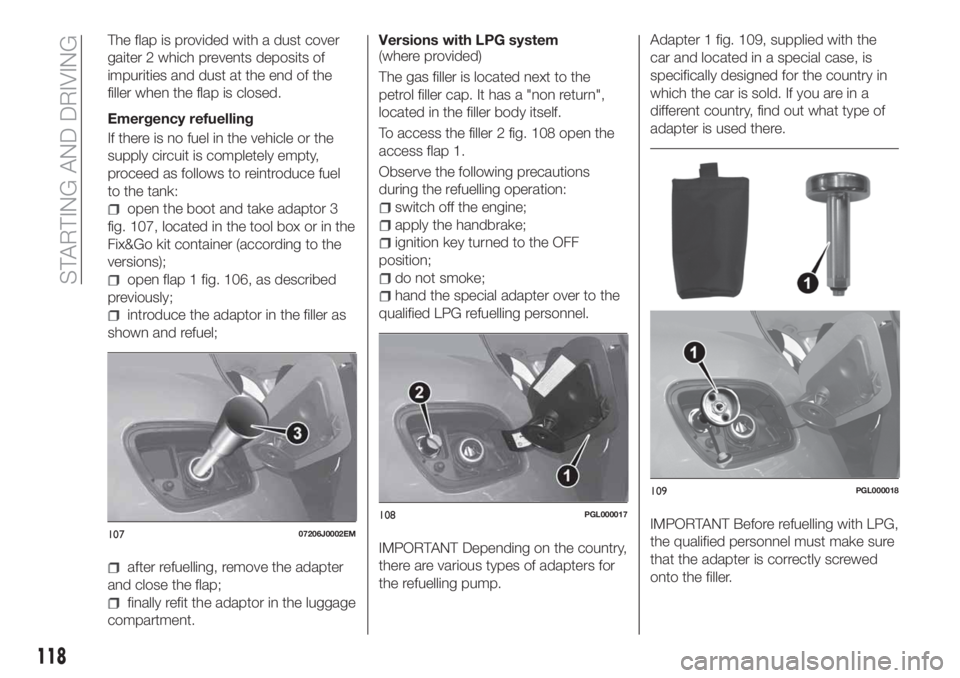
open the boot and take adaptor 3
fig. 107, located in the tool box or in the
Fix&Go kit container (according to the
versions);
open flap 1 fig. 106, as described
previously;
introduce the adaptor in the filler as
shown and refuel;
after refuelling, remove the adapter
and close the flap;
finally refit the adaptor in the luggage
compartment.Versions with LPG system
(where provided)
The gas filler is located next to the
petrol filler cap. It has a "non return",
located in the filler body itself.
To access the filler 2 fig. 108 open the
access flap 1.
Observe the following precautions
during the refuelling operation:
switch off the engine;
apply the handbrake;
ignition key turned to the OFF
position;
do not smoke;
hand the special adapter over to the
qualified LPG refuelling personnel.
IMPORTANT Depending on the country,
there are various types of adapters for
the refuelling pump.Adapter 1 fig. 109, supplied with the
car and located in a special case, is
specifically designed for the country in
which the car is sold. If you are in a
different country, find out what type of
adapter is used there.
IMPORTANT Before refuelling with LPG,
the qualified personnel must make sure
that the adapter is correctly screwed
onto the filler.10707206J0002EM
108PGL000017
109PGL000018
118
STARTING AND DRIVING
Page 141 of 244
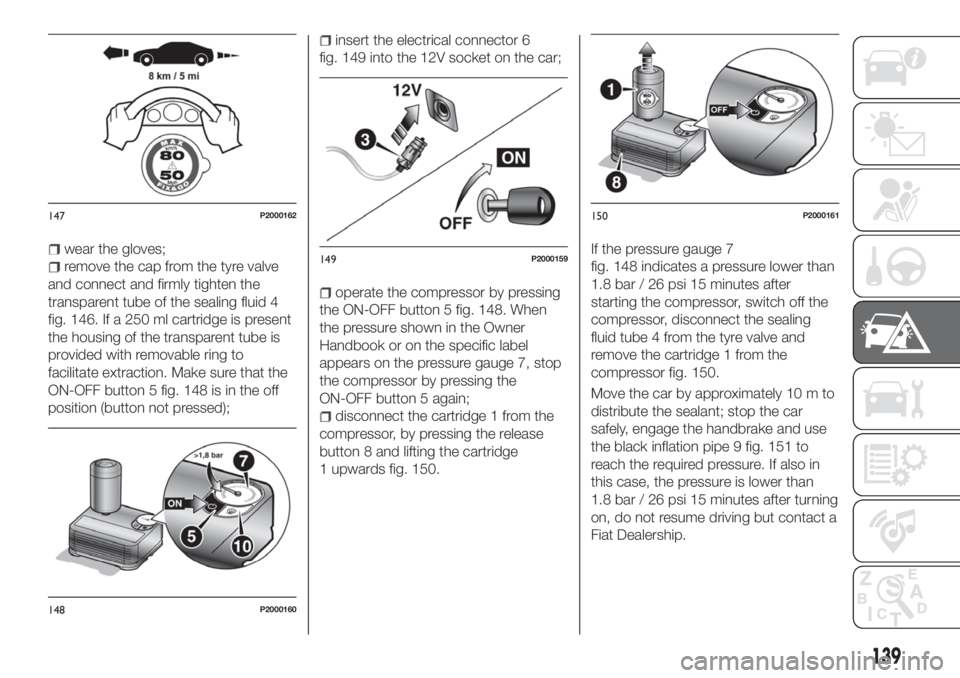
wear the gloves;
remove the cap from the tyre valve
and connect and firmly tighten the
transparent tube of the sealing fluid 4
fig. 146. If a 250 ml cartridge is present
the housing of the transparent tube is
provided with removable ring to
facilitate extraction. Make sure that the
ON-OFF button 5 fig. 148 is in the off
position (button not pressed);
insert the electrical connector 6
fig. 149 into the 12V socket on the car;
operate the compressor by pressing
the ON-OFF button 5 fig. 148. When
the pressure shown in the Owner
Handbook or on the specific label
appears on the pressure gauge 7, stop
the compressor by pressing the
ON-OFF button 5 again;
disconnect the cartridge 1 from the
compressor, by pressing the release
button 8 and lifting the cartridge
1 upwards fig. 150.If the pressure gauge 7
fig. 148 indicates a pressure lower than
1.8 bar / 26 psi 15 minutes after
starting the compressor, switch off the
compressor, disconnect the sealing
fluid tube 4 from the tyre valve and
remove the cartridge 1 from the
compressor fig. 150.
Move the car by approximately 10 m to
distribute the sealant; stop the car
safely, engage the handbrake and use
the black inflation pipe 9 fig. 151 to
reach the required pressure. If also in
this case, the pressure is lower than
1.8 bar / 26 psi 15 minutes after turning
on, do not resume driving but contact a
Fiat Dealership.
147P2000162
148P2000160
149P2000159
150P2000161
139
Page 142 of 244
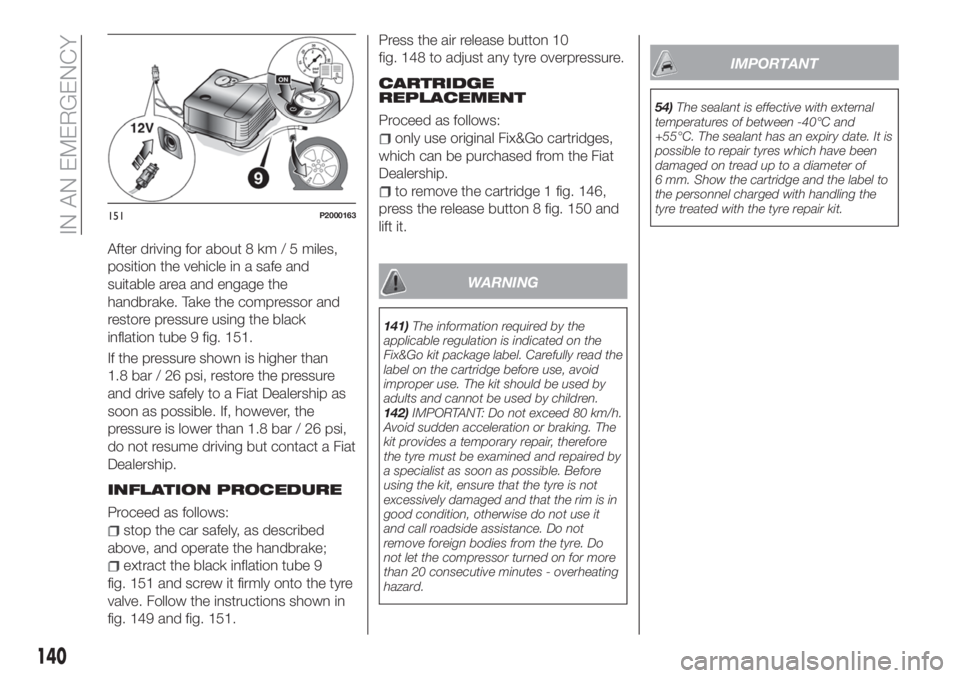
After driving for about 8 km / 5 miles,
position the vehicle in a safe and
suitable area and engage the
handbrake. Take the compressor and
restore pressure using the black
inflation tube 9 fig. 151.
If the pressure shown is higher than
1.8 bar / 26 psi, restore the pressure
and drive safely to a Fiat Dealership as
soon as possible. If, however, the
pressure is lower than 1.8 bar / 26 psi,
do not resume driving but contact a Fiat
Dealership.
INFLATION PROCEDURE
Proceed as follows:
stop the car safely, as described
above, and operate the handbrake;
extract the black inflation tube 9
fig. 151 and screw it firmly onto the tyre
valve. Follow the instructions shown in
fig. 149 and fig. 151.Press the air release button 10
fig. 148 to adjust any tyre overpressure.
CARTRIDGE
REPLACEMENT
Proceed as follows:
only use original Fix&Go cartridges,
which can be purchased from the Fiat
Dealership.
to remove the cartridge 1 fig. 146,
press the release button 8 fig. 150 and
lift it.
WARNING
141)The information required by the
applicable regulation is indicated on the
Fix&Go kit package label. Carefully read the
label on the cartridge before use, avoid
improper use. The kit should be used by
adults and cannot be used by children.
142)IMPORTANT: Do not exceed 80 km/h.
Avoid sudden acceleration or braking. The
kit provides a temporary repair, therefore
the tyre must be examined and repaired by
a specialist as soon as possible. Before
using the kit, ensure that the tyre is not
excessively damaged and that the rim is in
good condition, otherwise do not use it
and call roadside assistance. Do not
remove foreign bodies from the tyre. Do
not let the compressor turned on for more
than 20 consecutive minutes - overheating
hazard.
IMPORTANT
54)The sealant is effective with external
temperatures of between -40°C and
+55°C. The sealant has an expiry date. It is
possible to repair tyres which have been
damaged on tread up to a diameter of
6 mm. Show the cartridge and the label to
the personnel charged with handling the
tyre treated with the tyre repair kit.
151P2000163
140
IN AN EMERGENCY
Page 154 of 244
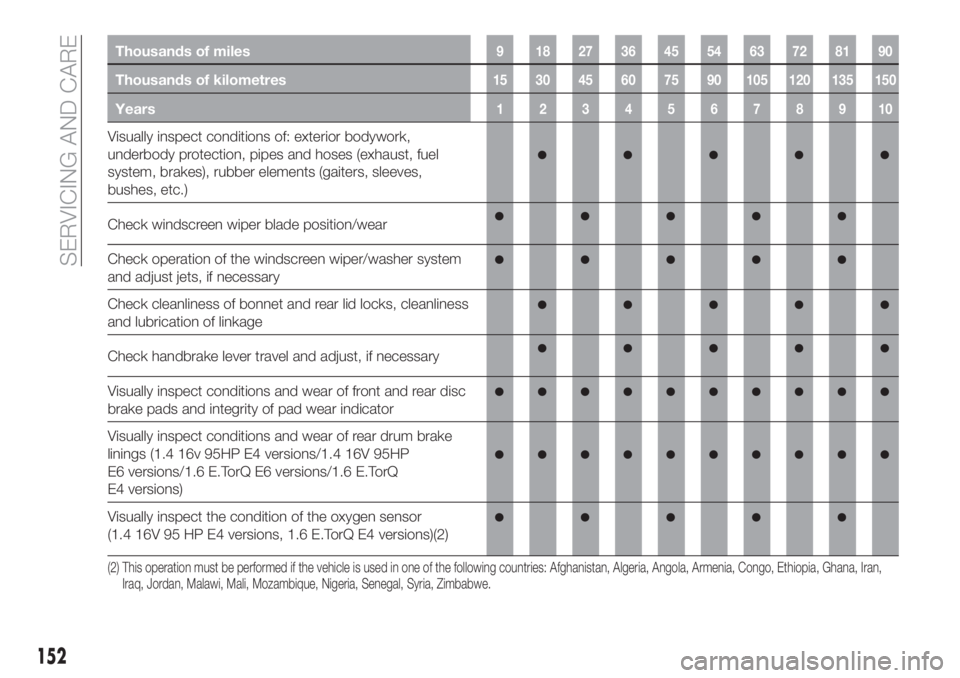
Thousands of miles9 182736455463728190
Thousands of kilometres15 30 45 60 75 90 105 120 135 150
Years12345678910
Visually inspect conditions of: exterior bodywork,
underbody protection, pipes and hoses (exhaust, fuel
system, brakes), rubber elements (gaiters, sleeves,
bushes, etc.)
Check windscreen wiper blade position/wear
Check operation of the windscreen wiper/washer system
and adjust jets, if necessary
Check cleanliness of bonnet and rear lid locks, cleanliness
and lubrication of linkage
Check handbrake lever travel and adjust, if necessary
Visually inspect conditions and wear of front and rear disc
brake pads and integrity of pad wear indicator
Visually inspect conditions and wear of rear drum brake
linings (1.4 16v 95HP E4 versions/1.4 16V 95HP
E6 versions/1.6 E.TorQ E6 versions/1.6 E.TorQ
E4 versions)
Visually inspect the condition of the oxygen sensor
(1.4 16V 95 HP E4 versions, 1.6 E.TorQ E4 versions)(2)
(2) This operation must be performed if the vehicle is used in one of the following countries: Afghanistan, Algeria, Angola, Armenia, Congo, Ethiopia, Ghana, Iran,
Iraq, Jordan, Malawi, Mali, Mozambique, Nigeria, Senegal, Syria, Zimbabwe.
152
SERVICING AND CARE
Page 160 of 244
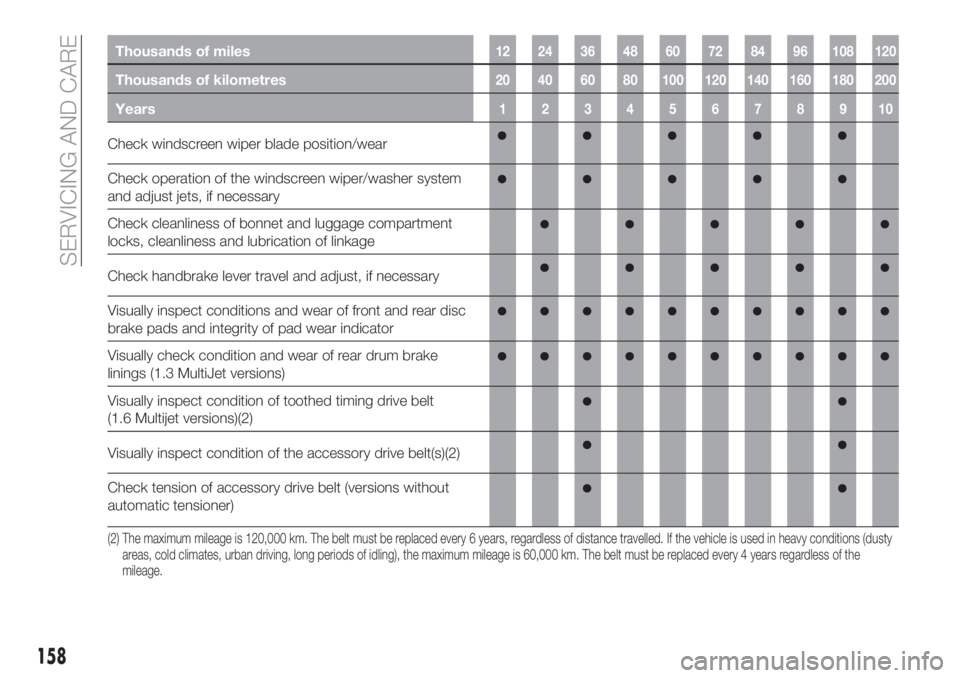
Thousands of miles12 24 36 48 60 72 84 96 108 120
Thousands of kilometres20 40 60 80 100 120 140 160 180 200
Years12345678910
Check windscreen wiper blade position/wear
Check operation of the windscreen wiper/washer system
and adjust jets, if necessary
Check cleanliness of bonnet and luggage compartment
locks, cleanliness and lubrication of linkage
Check handbrake lever travel and adjust, if necessary
Visually inspect conditions and wear of front and rear disc
brake pads and integrity of pad wear indicator
Visually check condition and wear of rear drum brake
linings (1.3 MultiJet versions)
Visually inspect condition of toothed timing drive belt
(1.6 Multijet versions)(2)
Visually inspect condition of the accessory drive belt(s)(2)
Check tension of accessory drive belt (versions without
automatic tensioner)
(2) The maximum mileage is 120,000 km. The belt must be replaced every 6 years, regardless of distance travelled. If the vehicle is used in heavy conditions (dusty
areas, cold climates, urban driving, long periods of idling), the maximum mileage is 60,000 km. The belt must be replaced every 4 years regardless of the
mileage.
158
SERVICING AND CARE
Page 216 of 244
The choices available depend on the
device connected. For example, on a
USB device, you can also use the
BROWSE ENTER button/knob to scroll
through the list of artists, genres and
albums available on the device,
depending on the information available
in the tracks.
Within each alphabetical list, theA-B-C
button on the front panel allows the
user to skip to the desired letter in the
list.
NOTE This button might be disabled
for someApple®
devices.
Press the BROWSE ENTER button to
activate this function on the source
being played. Turn the BROWSE
ENTER button/knob to select the
desired category and then press the
button/knob to confirm the selection.
Press the
button to cancel the
function.
NOTE The BROWSE ENTER button
does not allow any operation on an
AUX device (where provided).
Track information display
Press theINFObutton to select the
information displayed while playing
(Artist, Album, Genre, Name, Folder, File
name). Press the
button to exit the
screen.Shuffle
Press the
button to play the tracks
on USB in a random order. Press again
to deactivate the function.
Repeat
To listen to the track again, press the
button. Press again to deactivate
the function.
USB SOURCE
To activate USB mode, insert a suitable
USB device into the car USB port.
If a USB device is inserted with the
system on, it will start playing the tracks
found on the device.
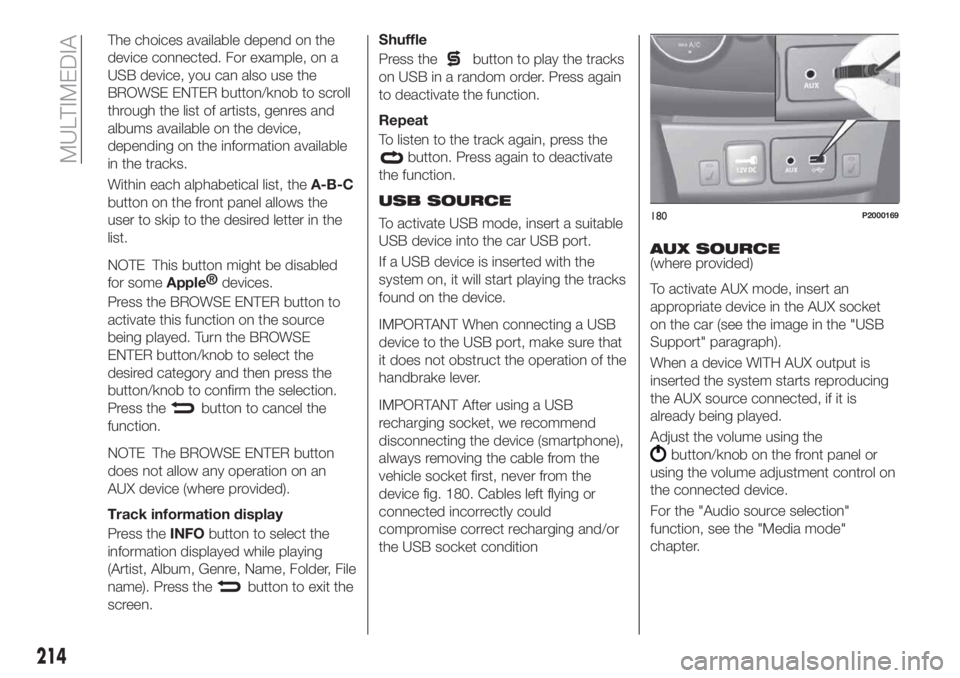
IMPORTANT When connecting a USB
device to the USB port, make sure that
it does not obstruct the operation of the
handbrake lever.
IMPORTANT After using a USB
recharging socket, we recommend
disconnecting the device (smartphone),
always removing the cable from the
vehicle socket first, never from the
device fig. 180. Cables left flying or
connected incorrectly could
compromise correct recharging and/or
the USB socket conditionAUX SOURCE
(where provided)
To activate AUX mode, insert an
appropriate device in the AUX socket
on the car (see the image in the "USB
Support" paragraph).
When a device WITH AUX output is
inserted the system starts reproducing
the AUX source connected, if it is
already being played.
Adjust the volume using the
button/knob on the front panel or
using the volume adjustment control on
the connected device.
For the "Audio source selection"
function, see the "Media mode"
chapter.
180P2000169
214
MULTIMEDIA
Page 217 of 244
IMPORTANT NOTES
The functions of the device connected
with the AUX socket are directly
managed by the device itself: it is not
possible to change track/folder/playlist
or control playing start/end/pause with
the controls on the front panel or on the
steering wheel.
Do not leave the cable of your portable
player connected to the AUX socket
after disconnection, to avoid possible
hiss from the speakers.
IMPORTANT When connecting a device
to the AUX socket, make sure that it
does not obstruct the operation of the
handbrake lever.
PHONE MODE
(where provided)
Phone mode activation
Press the PHONE button on the front
panel to activate the Phone mode.
The available commands can be used
to:
dial the wished phone number;
display and call the contacts in the
mobile phone phonebook;
display and call contacts from the
registers of previous calls;
pair up to 8 phones to make access
and connection easier and quicker;
transfer calls from the system to the
mobile phone and vice versa and
deactivate the microphone audio for
private conversations.
The mobile phone audio is transmitted
through the vehicle’s audio system; the
system automatically mutes the radio
when the Phone function is used.
Pairing a mobile phone
To pair the mobile phone, proceed as
follows:
activate theBluetooth®
function on
the mobile phone;
press thePHONEbutton on the
front panel;
if no phone is paired with the system
yet, the display shows a dedicated
screen;
select "Connect Phone" to start the
pairing procedure then search for the
Uconnect™device on the mobile
phone (if "No" is selected, the Phone
main screen is displayed);
when prompted by the mobile
phone, use the phone keypad to enter
the PIN code shown on the system
display or confirm on the mobile phone
the PIN displayed;
from the "Settings" menu you can
always pair a mobile phone by selecting
"Phone menu/Add phone", then
proceed as described above;
during the pairing stage a screen is
displayed showing the progress of the
operation.
NOTE After updating the telephone
software, for correct operation it is
advisable to remove the telephone from
the list of devices paired to the radio,
delete the previous system pairing from
the telephone's availableBluetooth®
device list and pair it again.
Making a phone call
The operations described below can
only be accessed if supported by the
mobile phone in use.
A call can be made by:
selecting "Contacts" (Phonebook
......);
selecting "Recent Calls list";
selecting "Dial Pad".
Dialling the phone number using
the "keypad" on the display
Enter the phone number using the
graphic keypad displayed.
Proceed as follows:
press thePHONEbutton on the
front panel;
select "Dial Pad" on the display and
use the "BROWSE/ENTER" right knob
to enter the number;
select theicon to call.
215