automatic transmission FIAT TIPO 4DOORS 2020 Owner handbook (in English)
[x] Cancel search | Manufacturer: FIAT, Model Year: 2020, Model line: TIPO 4DOORS, Model: FIAT TIPO 4DOORS 2020Pages: 252, PDF Size: 7.29 MB
Page 176 of 252
ENGINE OIL
155)
60)
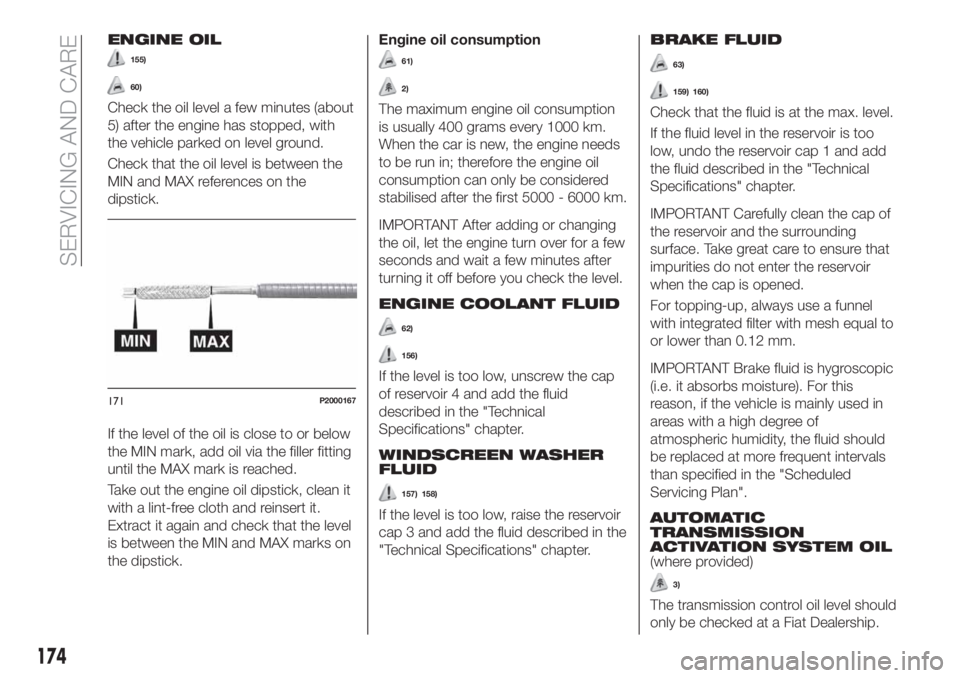
Check the oil level a few minutes (about
5) after the engine has stopped, with
the vehicle parked on level ground.
Check that the oil level is between the
MIN and MAX references on the
dipstick.
If the level of the oil is close to or below
the MIN mark, add oil via the filler fitting
until the MAX mark is reached.
Take out the engine oil dipstick, clean it
with a lint-free cloth and reinsert it.
Extract it again and check that the level
is between the MIN and MAX marks on
the dipstick.Engine oil consumption
61)
2)
The maximum engine oil consumption
is usually 400 grams every 1000 km.
When the car is new, the engine needs
to be run in; therefore the engine oil
consumption can only be considered
stabilised after the first 5000 - 6000 km.
IMPORTANT After adding or changing
the oil, let the engine turn over for a few
seconds and wait a few minutes after
turning it off before you check the level.
ENGINE COOLANT FLUID
62)
156)
If the level is too low, unscrew the cap
of reservoir 4 and add the fluid
described in the "Technical
Specifications" chapter.
WINDSCREEN WASHER
FLUID
157) 158)
If the level is too low, raise the reservoir
cap 3 and add the fluid described in the
"Technical Specifications" chapter.
BRAKE FLUID
63)
159) 160)
Check that the fluid is at the max. level.
If the fluid level in the reservoir is too
low, undo the reservoir cap 1 and add
the fluid described in the "Technical
Specifications" chapter.
IMPORTANT Carefully clean the cap of
the reservoir and the surrounding
surface. Take great care to ensure that
impurities do not enter the reservoir
when the cap is opened.
For topping-up, always use a funnel
with integrated filter with mesh equal to
or lower than 0.12 mm.
IMPORTANT Brake fluid is hygroscopic
(i.e. it absorbs moisture). For this
reason, if the vehicle is mainly used in
areas with a high degree of
atmospheric humidity, the fluid should
be replaced at more frequent intervals
than specified in the "Scheduled
Servicing Plan".
AUTOMATIC
TRANSMISSION
ACTIVATION SYSTEM OIL
(where provided)
3)
The transmission control oil level should
only be checked at a Fiat Dealership.
171P2000167
174
SERVICING AND CARE
Page 181 of 252
IMPORTANT Do not operate the
windscreen wiper with the blades lifted
from the windscreen.
Windscreen washer
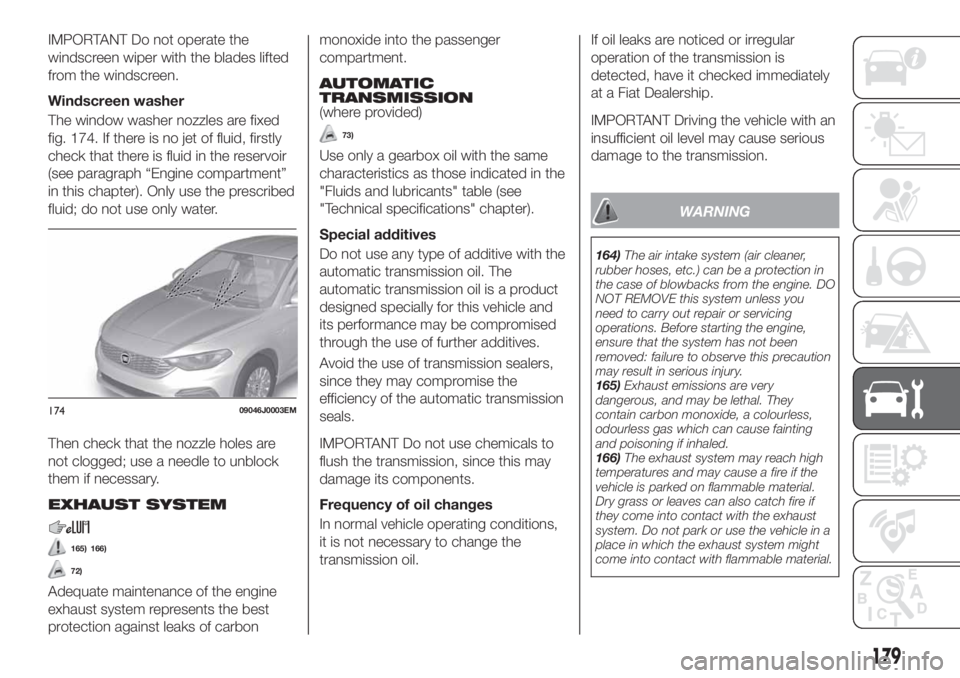
The window washer nozzles are fixed
fig. 174. If there is no jet of fluid, firstly
check that there is fluid in the reservoir
(see paragraph “Engine compartment”
in this chapter). Only use the prescribed
fluid; do not use only water.
Then check that the nozzle holes are
not clogged; use a needle to unblock
them if necessary.
EXHAUST SYSTEM
165) 166)
72)
Adequate maintenance of the engine
exhaust system represents the best
protection against leaks of carbonmonoxide into the passenger
compartment.
AUTOMATIC
TRANSMISSION
(where provided)
73)
Use only a gearbox oil with the same
characteristics as those indicated in the
"Fluids and lubricants" table (see
"Technical specifications" chapter).
Special additives
Do not use any type of additive with the
automatic transmission oil. The
automatic transmission oil is a product
designed specially for this vehicle and
its performance may be compromised
through the use of further additives.
Avoid the use of transmission sealers,
since they may compromise the
efficiency of the automatic transmission
seals.
IMPORTANT Do not use chemicals to
flush the transmission, since this may
damage its components.
Frequency of oil changes
In normal vehicle operating conditions,
it is not necessary to change the
transmission oil.If oil leaks are noticed or irregular
operation of the transmission is
detected, have it checked immediately
at a Fiat Dealership.
IMPORTANT Driving the vehicle with an
insufficient oil level may cause serious
damage to the transmission.
WARNING
164)The air intake system (air cleaner,
rubber hoses, etc.) can be a protection in
the case of blowbacks from the engine. DO
NOT REMOVE this system unless you
need to carry out repair or servicing
operations. Before starting the engine,
ensure that the system has not been
removed: failure to observe this precaution
may result in serious injury.
165)Exhaust emissions are very
dangerous, and may be lethal. They
contain carbon monoxide, a colourless,
odourless gas which can cause fainting
and poisoning if inhaled.
166)The exhaust system may reach high
temperatures and may cause a fire if the
vehicle is parked on flammable material.
Dry grass or leaves can also catch fire if
they come into contact with the exhaust
system. Do not park or use the vehicle in a
place in which the exhaust system might
come into contact with flammable material.
17409046J0003EM
179
Page 208 of 252
Use Features SpecificationOriginal fluids and
lubricantsApplications
Lubricants and
greases for drive
transmissionSAE 75W grade synthetic
lubricant9.55550-MZ6TUTELA
TRANSMISSION
GEARFORCE
Contractual Technical
Reference N° F002.F10Manual mechanical
transmission
ATF AW-1 automatic
transmission lubricant9.55550-AV2TUTELA
TRANSMISSION GI/VI
Contractual Technical
Reference N° F336.G05Lubricant for versions with
AT6 automatic gearbox
Grease for constant
velocity joints with low
friction coefficient.
N.L.G.I. consistency 0-19.55580 – GRASS IITUTELA STAR 700
Contractual Technical
Reference N° F701.C07Differential side constant
velocity joints
Molybdenum disulphide
grease, for use at high
temperatures. N.L.G.I.
consistency 1-29.55580-GRAS IITUTELA ALL STAR
Contractual Technical
Reference N° F702.G07Wheel side constant
velocity joints
206
TECHNICAL DATA
Page 223 of 252
Fast forward/rewind through tracks
Press and hold down the
button to
fast forward the selected track or keep
the
button pressed to fast rewind
the track.
Track selection (browse)
Use this function to scroll through and
select the tracks on the active device.
The choices available depend on the
device connected. For example, on a
USB device, you can also use the
BROWSE ENTER button/knob to scroll
through the list of artists, genres and
albums available on the device,
depending on the information available
in the tracks.
Within each alphabetical list, theA-B-C
button on the front panel allows the
user to skip to the desired letter in the
list.
NOTE This button might be disabled
for someApple®
devices.
Press the BROWSE ENTER button to
activate this function on the source
being played. Turn the BROWSE
ENTER button/knob to select the
desired category and then press the
button/knob to confirm the selection.
Press the
button to cancel the
function.
NOTE The BROWSE ENTER button
does not allow any operation on an
AUX device (where provided).
Track information display
Press theINFObutton to select the
information displayed while playing
(Artist, Album, Genre, Name, Folder, File
name). Press the
button to exit the
screen.
Shuffle
Press the
button to play the tracks
on USB in a random order. Press again
to deactivate the function.
Repeat
To listen to the track again, press the
button. Press again to deactivate
the function.
TheUconnect™system may not
support some USB keys: in this case, it
may not automatically switch from
“Radio” mode to “Media” mode. If the
device used does not play, verify its
compatibility by selecting Media mode:
a dedicated message will appear on the
Uconnect™system display.
USB SOURCE
To activate USB mode, insert a suitable
USB device into the car USB port.
If a USB device is inserted with the
system on, it will start playing the tracks
found on the device.
IMPORTANT When connecting a USB
device to the USB port, make sure that
it does not obstruct the operation of the
handbrake lever.
NOTE TheUconnect™system may
not support some USB keys: in this
case, it will not automatically switch
from “Radio” mode to “Media” mode. If
the device used does not play, verify its
compatibility by selecting Media mode:
a dedicated message will appear on the
Uconnect™system display.
IMPORTANT After using a USB
recharging socket, we recommend
disconnecting the device (smartphone),
always removing the cable from the
vehicle socket first, never from the
device fig. 182. Cables left flying or
connected incorrectly could
compromise correct recharging and/or
the USB socket condition
NOTE The USB port handles data
transmission from the Pen
Drive/Smartphone, etc. and slow
recharging, which is not guaranteed as
it depends on the device type/brand of
the external device itself.
221
Page 232 of 252
PAIRING A Bluetooth®
AUDIO DEVICE
To pair aBluetooth®
audio device,
proceed as follows:
activate theBluetooth®
function on
the device;
press the MEDIA button on the front
panel;
if the "Media" source is active, press
the "Source" button;
select theBluetooth®
Media
source;
press the "Add Device" button;
search forUconnect™on the
Bluetooth®
audio device (during the
pairing stage a screen is displayed
showing the progress of the operation);
when requested by the audio device,
enter the PIN code shown on the
system display or confirm on the device
the PIN displayed;
if the pairing procedure is completed
successfully, a screen is displayed.
Answer "Yes" to the question to pair the
Bluetooth®
audio device as favourite
(the device will have priority over all
other devices to be paired
subsequently). If "No" is selected, the
priority is determined according to the
order of connection. The last device
connected will have the highest priority;
an audio device can also be paired
by pressing the PHONE
button on
the front panel and by selecting
"Settings" or, from the "Settings" menu,selecting "Phone/Bluetooth".
WARNING If the
Bluetooth®
connection between mobile phone and
system is lost, consult the mobile
phone handbook.
USB SOURCE
To activate the USB mode, insert the
corresponding USB device into the
USB port on the central console.
When a USB device is inserted with the
radio on, it starts to play the tracks on
the device if the “AutoPlay” is set to ON
in the “Audio” menu.
NOTE TheUconnect™system may
not support some USB keys: in this
case, it will not automatically switch
from “Radio” mode to “Media” mode. If
the device used does not play, verify its
compatibility by selecting Media mode:
a dedicated message will appear on the
Uconnect™system display.
IMPORTANT After using a USB
recharging socket, we recommend
disconnecting the device (smartphone),
always removing the cable from the
vehicle socket first, never from the
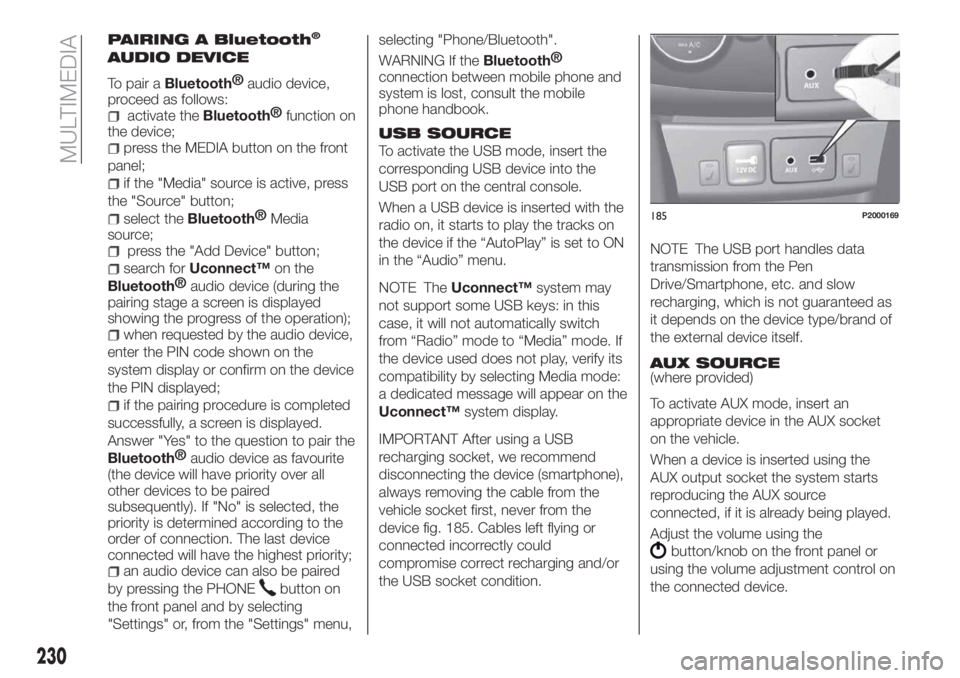
device fig. 185. Cables left flying or
connected incorrectly could
compromise correct recharging and/or
the USB socket condition.NOTE The USB port handles data
transmission from the Pen
Drive/Smartphone, etc. and slow
recharging, which is not guaranteed as
it depends on the device type/brand of
the external device itself.
AUX SOURCE
(where provided)
To activate AUX mode, insert an
appropriate device in the AUX socket
on the vehicle.
When a device is inserted using the
AUX output socket the system starts
reproducing the AUX source
connected, if it is already being played.
Adjust the volume using the
button/knob on the front panel or
using the volume adjustment control on
the connected device.
185P2000169
230
MULTIMEDIA
Page 247 of 252
INDEX
ABS (system)...............69
Active safety systems...........69
AdBlue (additive top-up
procedure)...............120
AdBlue® (UREA) additive for
diesel emissions...........124
Airbag....................97
Front airbags..............97
Side airbags.............101
Automatic climate control
system..................29
Automatic light control..........20
Automatic transmission.....107 ,150
AUX source................230
Battery..................175
Battery recharging............177
Bodywork (cleaning and
maintenance).............182
Bonnet....................32
Boot.....................34
Brake lights (bulb replacement). . . .131
Brakes...................182
Carrying children safely.........85
Changing a wheel............139
Checking levels..............165
Child protection systems........85
Child safety device............13
Climate control system..........26CO2 emissions..............209
Control buttons............46,48
Control panel and on-board
instruments...............41
Cornering lights..............21
Courtesy lights...............22
Daytime running lights (DRL)......20
Daytime running lights (DRL) (bulb
replacement)..............130
Demanding use of the car.......164
Dimensions................197
Dipped headlights.............20
Dipped headlights (bulb
replacement)..............129
Direction indicators............22
Display....................46
Doors.....................12
Driving assistance systems.......72
DTC (system)................69
Electric power steering.........33
Electric windows..............31
Electronic Cruise Control........112
Emergency starting...........146
Engine...................189
marking................188
Engine compartment..........165
Engine compartment (washing). . . .183
Engine oil (consumption)........174
Engine oil (level check).........174EOBD system...............50
ERM (system)................71
ESC (system)................69
External lights...............20
Fiat Code (system)............12
Fix&Go kit.................143
Fluids and lubricants..........204
Fog lights..................21
Fog lights (bulb replacement).....129
Front ceiling light..............23
Front seat electric heating........15
Front seats (manual adjustments) . . .14
Fuel consumption............209
Fuel cut-off system...........148
Full Brake Control (system).......72
Fuse boxes................133
Fuses (replacement)...........133
GSI (Gear Shift Indicator)........46
Hazard warning lights.........126
Emergency braking.........126
Headlight alignment adjustment....22
Headlight alignment corrector.....22
Headlights (cleaning)..........183
Headrests..................17
HHC (system)................70
i-Size child restraint systems......91
Identification data
chassis marking...........187
Page 248 of 252
engine marking............188
identification data plate.......187
Ignition device...............11
Important information and
recommendations..........237
Interior lights................23
Interiors (cleaning)............184
ISOFIX child restraint system
(installation)...............89
iTPMS (indirect Tyre Pressure
Monitoring System)..........76
Jump starting..............146
Key removal (automatic
transmission).............150
Keys.....................10
key with remote control.......10
Lever release
(automatic transmission)......150
Lifting the vehicle.............180
Light bulbs
Bulbs types..............127
Luggage compartment
(extension)................15
Main beam headlights..........22
Main beam headlights
(changing a bulb)...........130
Main menu...............47,48
Manual climate control..........27
Manual transmission..........106
Mopar Connect.............235Multi-functional display - Right
hand drive version...........44
Multi-Functional Reconfigurable
Display - Right hand drive
version..................45
Multifunction display...........41
Number plate lights
(bulb replacement)..........132
Occupant protection systems.....79
Official type approvals.........236
Paintwork (cleaning and
maintenance).............182
Parking Brake...............105
Parking lights................21
Parking sensors.............114
Parking the vehicle...........105
Passenger compartment air
diffusers.................26
Passive/active safety
(LPG system)..............36
PBA (system)................70
Performance (top speed)........208
Periodic checks
(scheduled servicing)........164
Pre-tensioners...............83
Load limiters..............84
Prescriptions for handling the
vehicle at the end of its life.....210
Rain sensor................25
Rear direction indicators
(bulb replacement)..........131Rear power socket............35
Rear seats..................15
Rear side lights (bulb
replacement)..............131
Rear view camera............116
Rear View Camera............116
Rear view mirrors.............19
Reconfigurable Multifunction
Display..................42
Refuelling.................200
Refuelling procedure..........120
Emergency refuelling........122
Refuelling the vehicle..........119
Replacing a bulb.............126
Replacing an external bulb......129
Rims and tyres (dimensions)......192
Saving fuel................118
SBR (Seat Belt Reminder)........81
SBR (Seat Belt Reminder)
system..................81
Scheduled servicing...........154
Screen wiper/washer...........24
Smart washing function.......24
Seat belts..................79
Seats.....................14
Service schedule.............155
Servicing procedures..........178
Side bag..................101
INDEX