brake light FIAT TIPO 5DOORS STATION WAGON 2016 1.G User Guide
[x] Cancel search | Manufacturer: FIAT, Model Year: 2016, Model line: TIPO 5DOORS STATION WAGON, Model: FIAT TIPO 5DOORS STATION WAGON 2016 1.GPages: 240, PDF Size: 5.43 MB
Page 65 of 240
not warn the driver about the possible
collision with the preceding vehicle.
The system deactivation status will not
be stored when the engine is switched
off: if the system is deactivated when
the engine is switched off, it will be
active when it is next started.
This function is not active at a speed
lower than 7 km/h or higher than
200 km/h.
The system is only active if:
it is correctly activated through the
Menu;
the ignition device is at MAR;
the vehicle speed is between 7 and
200 km/h;
the front seat belts are fastened.
Changing the system sensitivity
The sensitivity of the system can be
changed through the Menu, choosing
from one of the following three options:
"Near", "Med" or "Far". See the
description in theUconnect™ 5"o7"
HDsupplement for how to change the
settings.
The pre-set option is "Near". With this
setting, the system will warn the driver
of a possible collision with the vehicle in
front when it is close. This setting offers
the driver a lower reaction time
compared to the "Med" and "Far"
settings, in the event of a potentialcollision, but permits more dynamic
driving of the vehicle.
With the system sensitivity set to "Far",
the system will warn the driver of a
possible collision with the vehicle in
front when that vehicle is at a greater
distance, thus providing the possibility
of acting on the brakes more lightly and
gradually. This setting provides the
drivers with the maximum possible
reaction time to prevent a potential
accident.
Changing the setting to “Med”, the
system warns the driver of a possible
collision with the vehicle in front when it
is at a standard distance, between that
of the other two settings. The system
sensitivity setting is kept in the memory
when the engine is switched off.
System failure signalling
If the system switches off and a
dedicated message is shown on the
display, it means that there is a fault on
the system.
In this case, it is still possible to drive
the vehicle, but you are advised to
contact a Fiat Dealership as soon as
possible.
Radar indication not available
If conditions are such that the radar
cannot detect obstacles correctly, the
system is deactivated and a dedicatedmessage appears on the display. This
generally occurs in the event of poor
visibility, such as when it is snowing or
raining heavily.
The system can also be temporarily
dimmed due to obstructions such as
mud, dirt or ice on the bumper. In such
cases, a dedicated message will be
shown on the display and the system
will be deactivated. This message can
sometimes appear in conditions of high
reflectivity (e.g. tunnels with reflective
tiles or ice or snow). When the
conditions limiting the system functions
end, this will go back to normal and
complete operation.
In certain particular cases, this
dedicated message could be displayed
when the radar is not detecting any
vehicles or objects within its view range.
If atmospheric conditions are not the
real reason behind this message, check
if the sensor is dirty. It could be
necessary to clean or remove any
obstructions in the area illustrated in
fig. 53.
If the message appears often, even in
the absence of atmospheric conditions
such as snow, rain, mud or other
obstructions, contact a Fiat Dealership
for a sensor alignment check.
In the absence of visible obstructions,
cleaning the radar surface, by manually
63
Following a deactivation, the system will
Page 69 of 240
59)If the driver depresses the brake pedal
fully or carries out a fast steering during
system operation, the automatic braking
function may stop (e.g. to allow a possible
manoeuvre to avoid the obstacle).
60)The system intervenes on vehicles
travelling in the same lane. People, animals
and things (e.g. pushchairs) are not taken
into consideration.
61)If the car must be placed on a roller
bench for maintenance interventions or if it
is washed in an automatic roller washing
tunnel with an obstacle in the front part
(e.g. another car, a wall or another
obstacle), the system may detect its
presence and activate. In this case the
system must be deactivated through the
settings of theUconnect™5"or7" HD
system.
62)If the iTMPS system signals a pressure
decrease on the tyres, it is recommended
to check the pressure on all four tyres.
63)The iTPMS does not relieve the driver
from the obligation to check the tyre
pressure every month; it is not even to be
considered a replacing system for
maintenance or a safety system.
64)Tyre pressure must be checked with
tyres cold. Should it become necessary for
whatever reason to check pressure with
warm tyres, do not reduce pressure even
though it is higher than the prescribed
value, but repeat the check when tyres are
cold
65)The iTPMS cannot indicate sudden tyre
pressure drops (e.g. if a tyre bursts). In this
case, stop the vehicle, braking with caution
and avoiding abrupt steering.
66)The system only warns that the tyre
pressure is low: it is not able to inflate
them.67)Insufficient tyre inflation increases fuel
consumption, reduces the tread duration
and may affect the capacity to drive safely.
IMPORTANT
18)The system may have limited or absent
operation due to weather conditions such
as: heavy rain, hail, thick fog, heavy snow.
19)The section of the bumper before the
sensor must not be covered with
adhesives, auxiliary headlights or any other
object.
20)System intervention might be
unexpected or delayed when other vehicles
transport loads projecting from the side,
above or from the rear, with respect to the
normal size of the vehicle.
21)Operation can be adversely affected by
any structural change made to the vehicle,
such as a modification to the front
geometry, tyre change, or a heavier load
than the standard load of the vehicle.
22)Incorrect repairs made on the front part
of the vehicle (e.g. bumper, chassis) may
alter the position of the radar sensor, and
adversely affect its operation. Go to a Fiat
Dealership for any operation of this type.
23)Do not tamper nor operate on the radar
sensor. In the event of a sensor failure,
contact a Fiat Dealership.
24)When towing a trailer (with modules
installed after purchasing the vehicle), a
vehicle or during loading manoeuvres on a
vehicle transporter (or in vehicle for
transport), the system must be deactivated
via theUconnect™5"or7" HDsystem.25)Do not wash with high-pressure jets in
the bumper lower area: in particular do not
operate on the system's electrical
connector.
26)Be careful in the case of repairs and
new paintings in the area around the
sensor (panel covering the sensor on the
left side of the bumper). In the event of a
frontal impact the sensor may automatically
deactivate and display a warning to indicate
that the sensor needs to be repaired. Even
without a malfunction warning, deactivate
the system operation if you think that the
position of the radar sensor has changed
(e.g. due to low-speed frontal impact as
during parking manoeuvres). In these
cases, go to a Fiat Dealership to have the
radar sensor realigned or replaced.
67
Page 96 of 240
STARTING THE
ENGINE
Before starting the engine, adjust the
seat, the interior rear view mirrors, the
door mirrors and fasten the seat belt
correctly.
Never press the accelerator pedal for
starting the engine.
If necessary, messages indicating the
starting procedure can be shown on
the display.
ENGINE STARTING
PROCEDURE
103) 104) 105) 106)
28) 29) 30) 31)
Proceed as follows:
engage the parking brake and place
the gear lever in neutral;
fully depress the clutch pedal
without touching the accelerator;
only for diesel versions, bring the
ignition device to MAR, warning light
will come on in the instrument
panel and wait for the warning light to
switch off;
turn the ignition device to AVV and
release it as soon as the engine starts;
if the engine does not start within 10
seconds, bring the ignition device back
to STOP and wait for 10-15 secondsbefore repeating the starting procedure;
after the manoeuvre has been
repeated, if the problem persists,
contact a Fiat Dealership.
WARNING
103)Do not try to start the engine pouring
fuel or other flammable fluid inside the
throttle body air intake: this might damage
the engine and injury people nearby.
104)It is dangerous to run the engine in
enclosed areas. The engine takes in
oxygen and releases carbon dioxide,
carbon monoxide and other toxic gases.
105)The brake servo is not active until the
engine is started, so you would need to
apply much more force than usual to the
brake pedal.
106)Do not start the engine by pushing,
towing or driving downhill. These
manoeuvres may damage the catalytic
converter.
IMPORTANT
28)We recommend that during the initial
period, or during the first 1600 km, you do
not drive to full car performance (e.g.
excessive acceleration, long journeys at top
speed, sharp braking, etc.).
29)When the engine is switched off never
leave the ignition device in the MAR
position to prevent useless current
absorption from draining the battery.30)A quick burst on the accelerator before
turning off the engine serves absolutely no
practical purpose; it wastes fuel and is
especially damaging to turbocharged
engines.
31)Warning light
will flash after starting
or during prolonged cranking to indicate a
fault with the glow plug heating system. If
the engine starts, the vehicle can be used
as normal, but a Fiat Dealership must be
contacted as soon as possible.
94
STARTING AND DRIVING
Page 97 of 240
PARKING THE
VEHICLE
Always remove the ignition key when
leaving the car.
When parking and leaving the car,
proceed as follows:
Engage a gear (1st gear if parked
uphill or reverse if facing downhill) and
leave the wheels turned.
stop the engine and engage the
handbrake.
Block the wheels with a wedge or a
stone if the car is parked on a steep
slope.
IMPORTANT NEVER leave the vehicle
with the gearbox in neutral
PARKING BRAKE
107) 108)
To engage the handbrake, pull lever 1
fig. 82 upwards until the car is secured.
The
warning light will come on in
the instrument panel.
To disengage it, raise lever 1 slightly,
hold down button 2 and lower the lever,
checking that the warning light
on
the instrument panel switches off.
WARNING
107)Never leave children unattended in
the car. Always remove the key from the
ignition when leaving the car and take it
with you.
108)For cars equipped with a front
armrest, lift it up to ensure that it does not
interfere with the action of the handbrake.
USING THE
TRANSMISSION
109)
32)
To engage the gears, press the clutch
pedal fully and put the gear lever into
the required position (the diagram for
gear engagement is shown on the knob
).
To engage 6
thgear (if present), operate
the lever by pressing it towards the right
in order to avoid engaging 4
thgear by
mistake. The same applies to the shift
from 6
thto 5thgear.
1.3 Multijet 95 HP versions:To
engage reverse gear R from neutral,
press the clutch pedal and
simultaneously move the lever to the
right and then backwards.
8207046J0001EM
8307056J0001EM
95
Page 102 of 240
When travelling downhill with the device
active, the vehicle speed may exceed
the set one.
CHANGING SPEED
Increasing speed
Once the electronic Cruise Control has
been activated, the speed can be
increased by pressing button SET +.
Keeping the button pressed, the set
speed will increase until the button is
released, then the new speed will be
stored. Perform this operation only if
you want to increase vehicle speed by a
high value.
Each time button SET + is pressed the
set speed will be fine tuned.
Decreasing speed
With the device activated, the speed
can be decreased by pressing button
SET–.
Keeping the button pressed, the set
speed will decrease until the button is
released, then the new speed will be
stored.
Each time button SET – is pressed the
set speed will be fine tuned.
RECALLING THE SPEED
Before returning to the previously set
speed, you must bring the speed close
to that value, press the RES (Resume)
button and then release it.
DEACTIVATING THE
DEVICE
Lightly pressing the brake pedal or
pressing the CANC button deactivates
the electronic Cruise Control without
deleting the stored speed.
The Cruise Control may be deactivated
also by applying the parking brake,
when the braking system is operated
(e.g. operation of the ESC system) or by
pressing the clutch pedal while shifting
gear.
The stored speed is deleted in the
following cases:
pressing button 1 fig. 86 or switching
off the engine;
if there is a malfunction in the
electronic Cruise Control.
DEACTIVATING THE
DEVICE
The electronic Cruise Control is
deactivated by pressing button 1
fig. 86 or bringing the ignition device to
STOP.
WARNING
111)When travelling with the device active,
never move the gear lever to neutral.
112)In case of a malfunction or failure of
the device, contact a Fiat Dealership.113)The electronic Cruise Control can be
dangerous if the system cannot keep a
constant speed. In specific conditions
speed may be excessive, resulting in the
risk of losing control of the vehicle and
causing accidents. Do not use the device
in heavy traffic or on winding, icy, snowy or
slippery roads.
100
STARTING AND DRIVING
Page 105 of 240
in mph) by pressing the accelerator
pedal. In this situation, the device does
not turn off automatically, but the
device’s functions are limited: it is
therefore recommended to turn it off.
CHANGING SPEED
Increasing speed
After having set the device, the stored
speed can be stored by holding the
SET + button pressed.
Press the SET + button once, the set
speed will increase by 1 km/h (or the
equivalent in mph). Each subsequent
touch of the button will increase the
speed by 1 km/h (or the equivalent
in mph).
Hold the SET + button down, the set
speed will increase in 10 km/h steps (or
the equivalent in mph) until the button is
released. The set speed increase is
shown on the display.
Decreasing speed
After having set the device, the stored
speed can be reduced by holding the
SET –. button down.
Press the SET – button once, the set
speed will decrease by 1 km/h (or the
equivalent in mph). Each subsequent
touch of the button will reduce the
speed by 1 km/h (or the equivalent
in mph).Hold the SET – button down, the set
speed will decrease in 10 km/h steps
(or the equivalent in mph) until the
button is released. The set speed
decrease is shown on the display.
IMPORTANT NOTES
By keeping the accelerator pedal
depressed, the vehicle can continue to
accelerate beyond the set speed. In this
case, press SET + (or SET–)tosetthe
speed to the current speed of the
vehicle.
When the SET – button is pressed to
reduce the speed, the braking system
intervenes automatically if the engine
brake does not slow the vehicle down
sufficiently to reach the set speed.
The device holds the set speed uphill
and downhill; however a slight variation
is entirely normal, particularly on slight
gradients.
Gears can be shifted during operation
of the device to allow to select the gear
suited to the set speed and keep the
device set. The device is cancelled
when you press and hold the clutch
pedal down or putting the gear lever in
the neutral position for more than a
certain time limit.
The device is switched off while driving
if the brakes overheat.
ACCELERATING WHEN
OVERTAKING
When driving with the device active and
following a vehicle, the device provides
additional acceleration to facilitate
overtaking, when travelling over a given
speed and switches on the left direction
indicator (of the right indicator for
right-hand drive versions).
In left-hand traffic, the overtaking assist
function is only active when the
left-hand lane is used for overtaking the
vehicle ahead (the opposite activation
logic is used in right-hand traffic
countries).
The device detects the direction of
traffic automatically when the vehicle
passes from left-hand traffic to
right-hand traffic. In this case, the
overtaking assist function is only active
when the reference vehicle is overtaken
on the right.
The additional acceleration is activated
when the driver uses the right direction
indicator.
In this condition, the device no longer
provides the overtaking assist function
on the left-hand side until it determines
that the vehicle has returned to
left-hand traffic conditions.
103
Page 109 of 240
ELECTRONIC CRUISE
CONTROL MODE
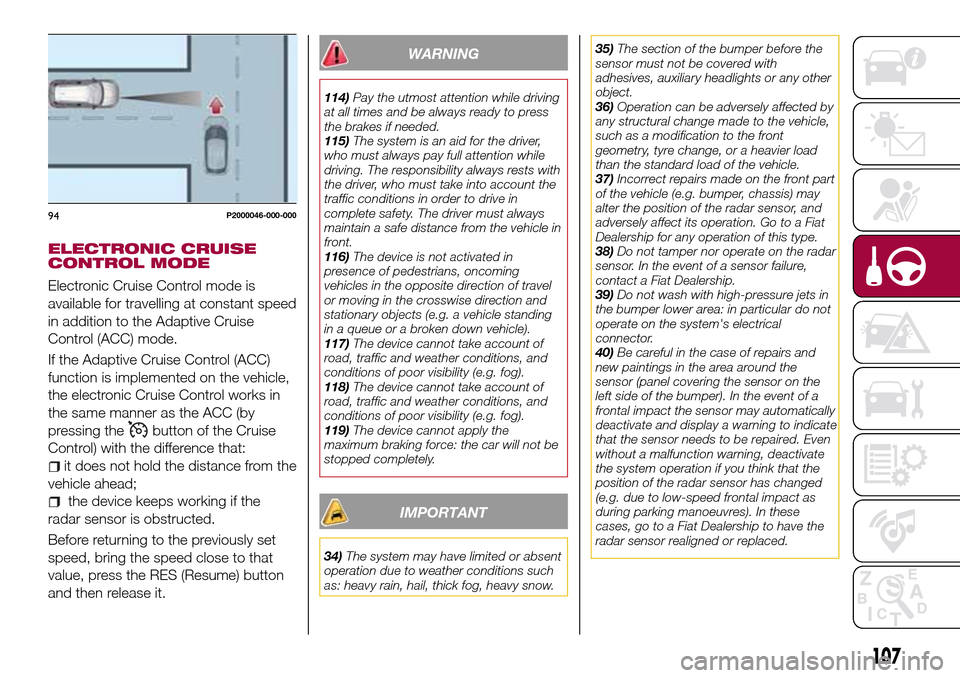
Electronic Cruise Control mode is
available for travelling at constant speed
in addition to the Adaptive Cruise
Control (ACC) mode.
If the Adaptive Cruise Control (ACC)
function is implemented on the vehicle,
the electronic Cruise Control works in
the same manner as the ACC (by
pressing the
button of the Cruise
Control) with the difference that:
it does not hold the distance from the
vehicle ahead;
the device keeps working if the
radar sensor is obstructed.
Before returning to the previously set
speed, bring the speed close to that
value, press the RES (Resume) button
and then release it.
WARNING
114)Pay the utmost attention while driving
at all times and be always ready to press
the brakes if needed.
115)The system is an aid for the driver,
who must always pay full attention while
driving. The responsibility always rests with
the driver, who must take into account the
traffic conditions in order to drive in
complete safety. The driver must always
maintain a safe distance from the vehicle in
front.
116)The device is not activated in
presence of pedestrians, oncoming
vehicles in the opposite direction of travel
or moving in the crosswise direction and
stationary objects (e.g. a vehicle standing
in a queue or a broken down vehicle).
117)The device cannot take account of
road, traffic and weather conditions, and
conditions of poor visibility (e.g. fog).
118)The device cannot take account of
road, traffic and weather conditions, and
conditions of poor visibility (e.g. fog).
119)The device cannot apply the
maximum braking force: the car will not be
stopped completely.
IMPORTANT
34)The system may have limited or absent
operation due to weather conditions such
as: heavy rain, hail, thick fog, heavy snow.35)The section of the bumper before the
sensor must not be covered with
adhesives, auxiliary headlights or any other
object.
36)Operation can be adversely affected by
any structural change made to the vehicle,
such as a modification to the front
geometry, tyre change, or a heavier load
than the standard load of the vehicle.
37)Incorrect repairs made on the front part
of the vehicle (e.g. bumper, chassis) may
alter the position of the radar sensor, and
adversely affect its operation. Go to a Fiat
Dealership for any operation of this type.
38)Do not tamper nor operate on the radar
sensor. In the event of a sensor failure,
contact a Fiat Dealership.
39)Do not wash with high-pressure jets in
the bumper lower area: in particular do not
operate on the system's electrical
connector.
40)Be careful in the case of repairs and
new paintings in the area around the
sensor (panel covering the sensor on the
left side of the bumper). In the event of a
frontal impact the sensor may automatically
deactivate and display a warning to indicate
that the sensor needs to be repaired. Even
without a malfunction warning, deactivate
the system operation if you think that the
position of the radar sensor has changed
(e.g. due to low-speed frontal impact as
during parking manoeuvres). In these
cases, go to a Fiat Dealership to have the
radar sensor realigned or replaced.
94P2000046-000-000
107
Page 115 of 240
to each country you are driving in, in the
case of vehicles towing trailers. In any
case, the top speed must not exceed
100 km/h.
Any electric brake must be powered
directly by the battery through a cable
with a cross-section of no less than 2.5
mm
2.
In addition to the electrical branches,
the vehicle electrical system can only be
connected to the supply cable for an
electric brake and to the cable for an
internal light for the trailer, not
exceeding 15 W. For connections, use
the preset control unit with a battery
cable with section not less than 2.5 mm
2.
IMPORTANT The use of auxiliary loads
other than external lights (e.g. electric
brake) must take place with engine
running.
INSTALLING A TOW
HOOK
To install a tow hook contact a Fiat
Dealership.
WARNING
122)The ABS with which the car is
equipped will not control the braking
system of the trailer. Particular caution is
required on slippery roads.123)Never modify the braking system of
the vehicle to control the trailer brake. The
trailer braking system must be fully
independent of the car’s hydraulic system.
REFUELLING THE
VEHICLE
124) 125) 126)
Before refuelling, make sure that the
fuel type is correct.
Also stop the engine before refuelling.
PETROL ENGINES
Only use unleaded petrol with a number
of octanes (R.O.N.) not lower than 95
(EN228 specification).
DIESEL ENGINES
45)
Only use Diesel for motor vehicles
(EN590 specification).
When using or parking the vehicle for a
long time in the mountains or cold
areas, it is advisable to refuel using
locally available Diesel. In this case, it is
also advisable to keep the tank over
50% full.
REFUELLING CAPACITY
To ensure that you fill the tank
completely, top up twice after the first
click of the fuel supply gun.
Further top-ups could cause faults in
the fuel feeding system.
113
Page 121 of 240
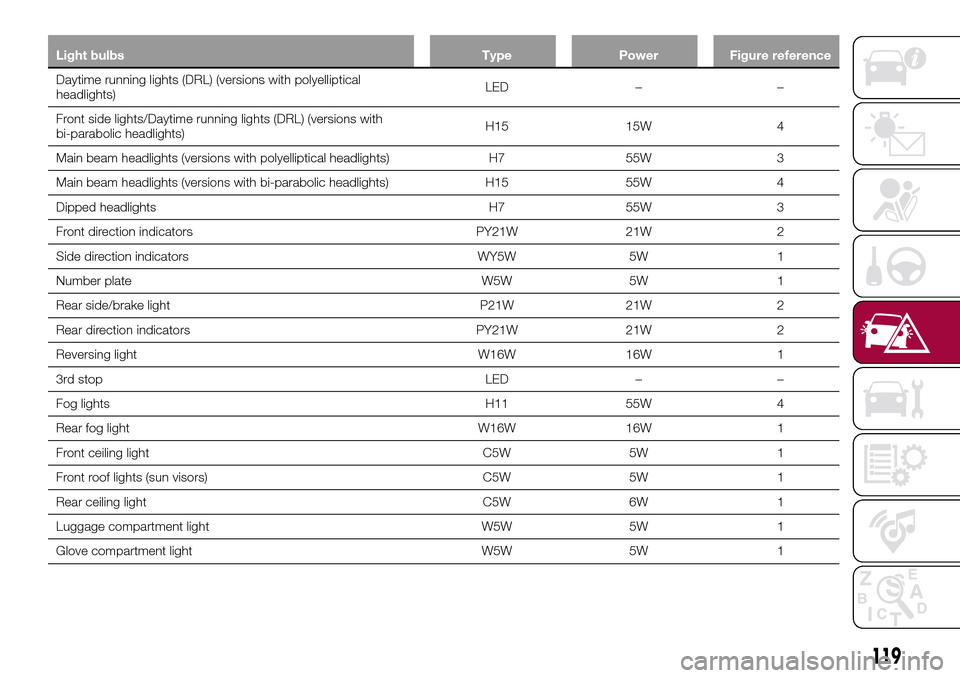
Light bulbs Type Power Figure reference
Daytime running lights (DRL) (versions with polyelliptical
headlights)LED – –
Front side lights/Daytime running lights (DRL) (versions with
bi-parabolic headlights)H15 15W 4
Main beam headlights (versions with polyelliptical headlights) H7 55W 3
Main beam headlights (versions with bi-parabolic headlights) H15 55W 4
Dipped headlights H7 55W 3
Front direction indicators PY21W 21W 2
Side direction indicators WY5W 5W 1
Number plate W5W 5W 1
Rear side/brake light P21W 21W 2
Rear direction indicators PY21W 21W 2
Reversing light W16W 16W 1
3rd stop LED – –
Fog lights H11 55W 4
Rear fog light W16W 16W 1
Front ceiling light C5W 5W 1
Front roof lights (sun visors) C5W 5W 1
Rear ceiling light C5W 6W 1
Luggage compartment light W5W 5W 1
Glove compartment light W5W 5W 1
119
Page 126 of 240
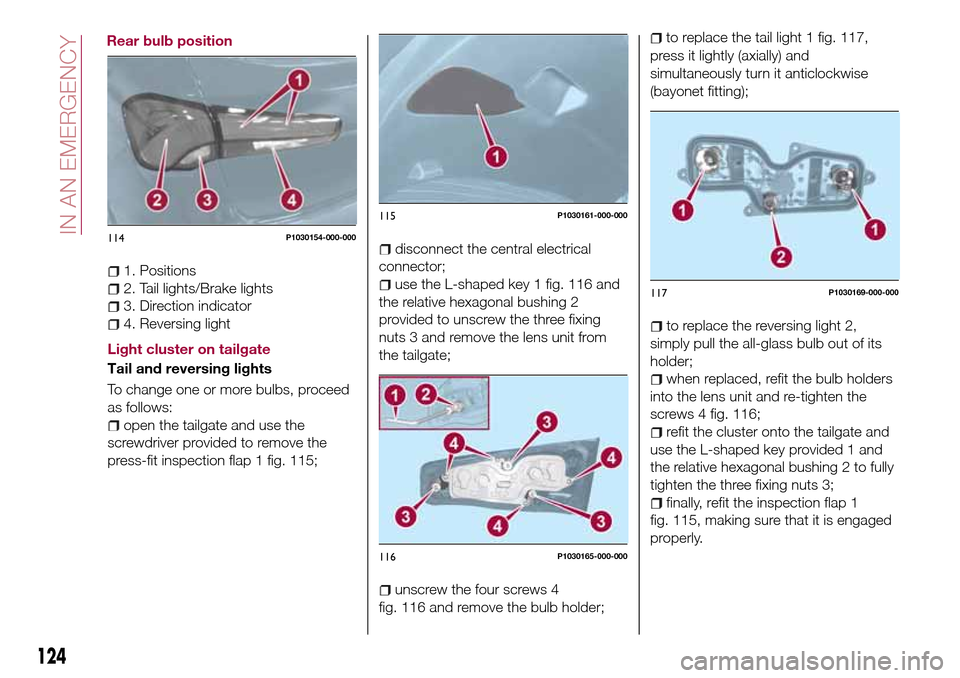
1. Positions
2. Tail lights/Brake lights
3. Direction indicator
4. Reversing light
Light cluster on tailgate
Tail and reversing lights
To change one or more bulbs, proceed
as follows:
open the tailgate and use the
screwdriver provided to remove the
press-fit inspection flap 1 fig. 115;
disconnect the central electrical
connector;
use the L-shaped key 1 fig. 116 and
the relative hexagonal bushing 2
provided to unscrew the three fixing
nuts 3 and remove the lens unit from
the tailgate;
unscrew the four screws 4
fig. 116 and remove the bulb holder;
to replace the tail light 1 fig. 117,
press it lightly (axially) and
simultaneously turn it anticlockwise
(bayonet fitting);
to replace the reversing light 2,
simply pull the all-glass bulb out of its
holder;
when replaced, refit the bulb holders
into the lens unit and re-tighten the
screws 4 fig. 116;
refit the cluster onto the tailgate and
use the L-shaped key provided 1 and
the relative hexagonal bushing 2 to fully
tighten the three fixing nuts 3;
finally, refit the inspection flap 1
fig. 115, making sure that it is engaged
properly.
114P1030154-000-000
115P1030161-000-000
116P1030165-000-000
117P1030169-000-000
124
IN AN EMERGENCY
Rear bulb position