mirror FIAT TIPO 5DOORS STATION WAGON 2016 1.G Owners Manual
[x] Cancel search | Manufacturer: FIAT, Model Year: 2016, Model line: TIPO 5DOORS STATION WAGON, Model: FIAT TIPO 5DOORS STATION WAGON 2016 1.GPages: 240, PDF Size: 5.43 MB
Page 5 of 240
USE OF THE OWNER HANDBOOK
Each time direction instructions (left/right or forwards/backwards) about the vehicle are given, these must be understood as
regarding an occupant in the driver's seat. Special cases not complying with this rule will be specified as appropriate in the text.
The figures in the Owner Handbook are provided by way of example only: this might imply that some details of the image do
not correspond to the actual arrangement of your vehicle. In addition, the Handbook has been conceived considering vehicles
with steering wheel on the left side; it is therefore possible that on vehicles with steering wheel on the right side, the position or
construction of some controls is not exactly mirror-like with respect to the figure.
To identify the chapter with the information needed you can consult the index at the end of this Owner Handbook.
Chapters can be rapidly identified with dedicated graphic tabs, at the side of each odd page. A few pages further there is a key
for getting to know the chapter order and the relevant symbols in the tabs. There is in any case a textual indication of the
current chapter at the side of each even page.
Page 9 of 240
KNOWING YOUR CAR
In-depth knowledge of your new vehicle
starts here.
The booklet that you are reading simply
and directly explains how it is made and
how it works.
That’s why we advise you to read it
seated comfortably on board, so that
you can see immediately what is
described here for yourself.INSTRUMENT PANEL...........8
THE KEYS.................10
IGNITION DEVICE............11
FIAT CODE.................12
DOORS...................13
SEATS....................15
HEAD RESTRAINTS...........18
STEERING WHEEL............19
REAR VIEW MIRRORS.........19
EXTERNAL LIGHTS...........21
INTERIOR LIGHTS............23
WINDSCREEN / REAR WINDOW
WIPERS..................24
CLIMATE CONTROL...........27
ELECTRIC WINDOWS..........32
BONNET..................32
DUALDRIVE ELECTRIC POWER
STEERING.................33
LUGGAGE COMPARTMENT......34
HEADLIGHTS...............35
ROOF RACK/SKI RACK........36
7
Page 21 of 240
STEERING WHEEL
16) 17)
ADJUSTMENTS
The steering wheel can be adjusted
both in height and axially.
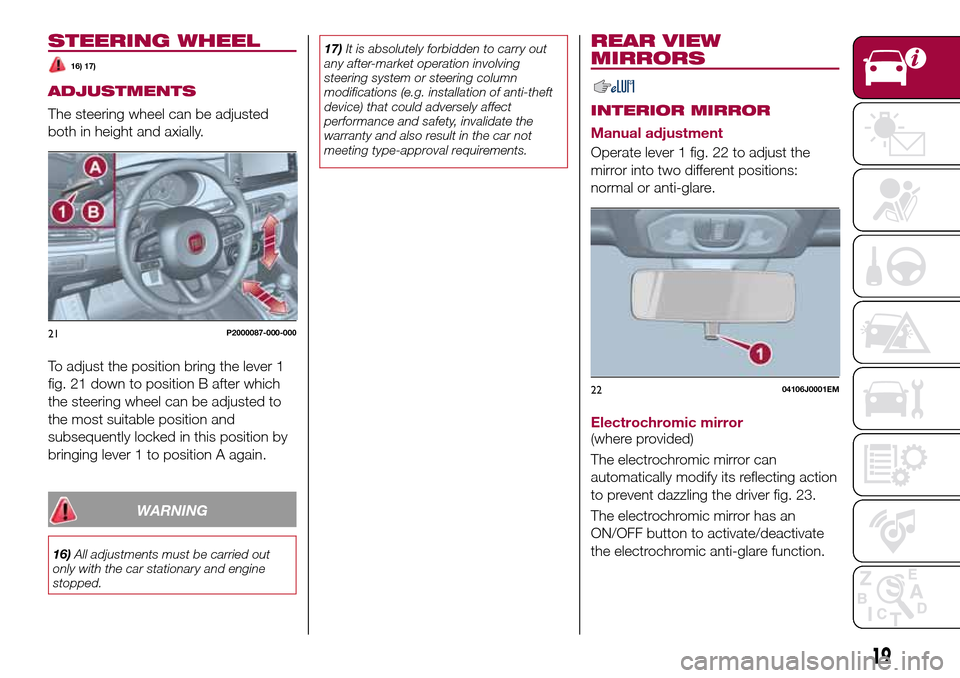
To adjust the position bring the lever 1
fig. 21 down to position B after which
the steering wheel can be adjusted to
the most suitable position and
subsequently locked in this position by
bringing lever 1 to position A again.
WARNING
16)All adjustments must be carried out
only with the car stationary and engine
stopped.17)It is absolutely forbidden to carry out
any after-market operation involving
steering system or steering column
modifications (e.g. installation of anti-theft
device) that could adversely affect
performance and safety, invalidate the
warranty and also result in the car not
meeting type-approval requirements.
REAR VIEW
MIRRORS
INTERIOR MIRROR
Manual adjustment
Operate lever 1 fig. 22 to adjust the
mirror into two different positions:
normal or anti-glare.
Electrochromic mirror
(where provided)
The electrochromic mirror can
automatically modify its reflecting action
to prevent dazzling the driver fig. 23.
The electrochromic mirror has an
ON/OFF button to activate/deactivate
the electrochromic anti-glare function.
21P2000087-000-000
2204106J0001EM
19
Page 22 of 240
When reverse gear is engaged, the
mirror is automatically set for daytime
use.
DOOR MIRRORS
18)
Electric adjustment
The mirrors can only be adjusted with
the ignition device at MAR.
To carry out the adjustment, proceed as
follows:
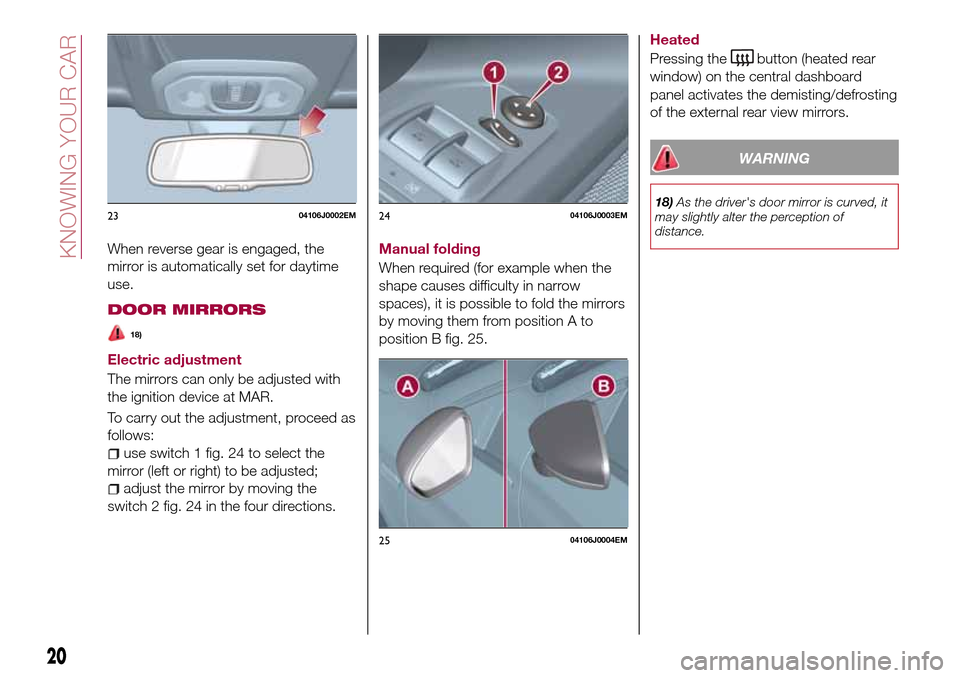
use switch 1 fig. 24 to select the
mirror (left or right) to be adjusted;
adjust the mirror by moving the
switch 2 fig. 24 in the four directions.Manual folding
When required (for example when the
shape causes difficulty in narrow
spaces), it is possible to fold the mirrors
by moving them from position A to
position B fig. 25.Heated
Pressing the
button (heated rear
window) on the central dashboard
panel activates the demisting/defrosting
of the external rear view mirrors.
WARNING
18)As the driver's door mirror is curved, it
may slightly alter the perception of
distance.2304106J0002EM2404106J0003EM
2504106J0004EM
20
KNOWING YOUR CAR
Page 27 of 240
If the position isLOWorHIGH, the
smart washing function is not carried
out.
“Service Position” function
This function makes it possible to
replace the wipers or protect them in
conditions of ice and/or snow.
It can only be activated after turning off
the vehicle.
The Service Position can be explicitly
requested by the driver within two
minutes of turning off the vehicle, when
the wipers have correctly returned to
the parking position.
The driver can enable the function by
turning the ring nut to positionOand
moving the stalk upwards, to the MIST
position, more than three times. The
activations are used to position the
wipers as preferred. The function is
deactivated when the vehicle is turned
on, with a wiping request or when the
vehicle is moving (speed above 5
Km/h).
IMPORTANT Make sure, when turning
on the vehicle, that the windscreen is
free of snow or ice before turning the
ignition key.RAIN SENSOR(where provided)
7) 8)
This is a device located behind the
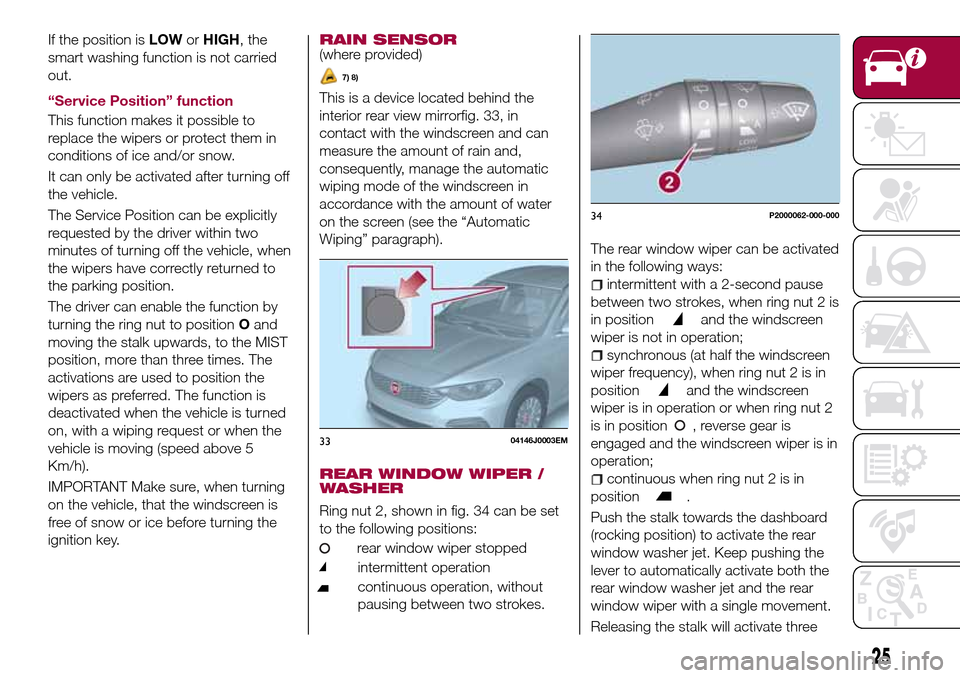
interior rear view mirrorfig. 33, in
contact with the windscreen and can
measure the amount of rain and,
consequently, manage the automatic
wiping mode of the windscreen in
accordance with the amount of water
on the screen (see the “Automatic
Wiping” paragraph).
REAR WINDOW WIPER /
WASHER
Ring nut 2, shown in fig. 34 can be set
to the following positions:
rear window wiper stopped
intermittent operation
continuous operation, without
pausing between two strokes.
The rear window wiper can be activated
in the following ways:
intermittent with a 2-second pause
between two strokes, when ring nut 2 is
in position
and the windscreen
wiper is not in operation;
synchronous (at half the windscreen
wiper frequency), when ring nut 2 is in
position
and the windscreen
wiper is in operation or when ring nut 2
is in position , reverse gear is
engaged and the windscreen wiper is in
operation;
continuous when ring nut 2 is in
position
.
Push the stalk towards the dashboard
(rocking position) to activate the rear
window washer jet. Keep pushing the
lever to automatically activate both the
rear window washer jet and the rear
window wiper with a single movement.
Releasing the stalk will activate three
3304146J0003EM
34P2000062-000-000
25
Page 96 of 240
STARTING THE
ENGINE
Before starting the engine, adjust the
seat, the interior rear view mirrors, the
door mirrors and fasten the seat belt
correctly.
Never press the accelerator pedal for
starting the engine.
If necessary, messages indicating the
starting procedure can be shown on
the display.
ENGINE STARTING
PROCEDURE
103) 104) 105) 106)
28) 29) 30) 31)
Proceed as follows:
engage the parking brake and place
the gear lever in neutral;
fully depress the clutch pedal
without touching the accelerator;
only for diesel versions, bring the
ignition device to MAR, warning light
will come on in the instrument
panel and wait for the warning light to
switch off;
turn the ignition device to AVV and
release it as soon as the engine starts;
if the engine does not start within 10
seconds, bring the ignition device back
to STOP and wait for 10-15 secondsbefore repeating the starting procedure;
after the manoeuvre has been
repeated, if the problem persists,
contact a Fiat Dealership.
WARNING
103)Do not try to start the engine pouring
fuel or other flammable fluid inside the
throttle body air intake: this might damage
the engine and injury people nearby.
104)It is dangerous to run the engine in
enclosed areas. The engine takes in
oxygen and releases carbon dioxide,
carbon monoxide and other toxic gases.
105)The brake servo is not active until the
engine is started, so you would need to
apply much more force than usual to the
brake pedal.
106)Do not start the engine by pushing,
towing or driving downhill. These
manoeuvres may damage the catalytic
converter.
IMPORTANT
28)We recommend that during the initial
period, or during the first 1600 km, you do
not drive to full car performance (e.g.
excessive acceleration, long journeys at top
speed, sharp braking, etc.).
29)When the engine is switched off never
leave the ignition device in the MAR
position to prevent useless current
absorption from draining the battery.30)A quick burst on the accelerator before
turning off the engine serves absolutely no
practical purpose; it wastes fuel and is
especially damaging to turbocharged
engines.
31)Warning light
will flash after starting
or during prolonged cranking to indicate a
fault with the glow plug heating system. If
the engine starts, the vehicle can be used
as normal, but a Fiat Dealership must be
contacted as soon as possible.
94
STARTING AND DRIVING
Page 114 of 240
IMPORTANT NOTES
IMPORTANT In some circumstances,
such as with ice, snow or mud on the
surface of the camera, the camera
sensitivity may be reduced.
IMPORTANT When parking, take the
utmost care over obstacles that may be
above or under the camera range.
WARNING
121)Parking and other potentially
dangerous manoeuvres are, however,
always the driver’s responsibility. While
carrying out these manoeuvres, always
make sure that no people (especially
children) or animals are in the area
concerned. The camera is an aid for the
driver, but the driver must never allow
his/her attention to lapse during potentially
dangerous manoeuvres, even those
executed at low speeds. Always keep a
slow speed, so as to promptly brake in the
case of obstacles.
IMPORTANT
44)It is vital, for correct operation, that the
camera is always kept clean and free from
any mud, dirt, snow or ice. Be careful not
to scratch or damage the camera while
cleaning it. Avoid using dry, rough or hard
cloths. The camera must be washed using
clean water, with the addition of car
shampoo if necessary. In washing stations
which use steam or high-pressure jets,
clean the camera quickly, keeping the
nozzle more than 10 cm away from the
sensors. Also, do not apply stickers to the
camera.
TOWING TRAILERS
IMPORTANT NOTES
122) 123)
For towing caravans or trailers the
vehicle must be fitted with an approved
tow hook and an adequate electrical
system. Should aftermarket installation
be requested, this must be carried out
by specialists.
Install any specific and/or additional
door mirrors as specified by the
Highway Code.
Remember that, when towing a trailer,
steep hills are harder to climb, braking
distances increase and overtaking takes
longer depending on the overall weight
of the trailer.
Engage a low gear when driving
downhill, rather than constantly using
the brake.
The weight the trailer exerts on the
vehicle tow hook reduces the vehicle's
loading capacity by the same amount.
To make sure that the maximum
towable weight is not exceeded (given
in the vehicle registration document)
account should be taken of the fully
laden trailer, including accessories and
luggage.
Do not exceed the speed limits specific
112
STARTING AND DRIVING
Page 132 of 240
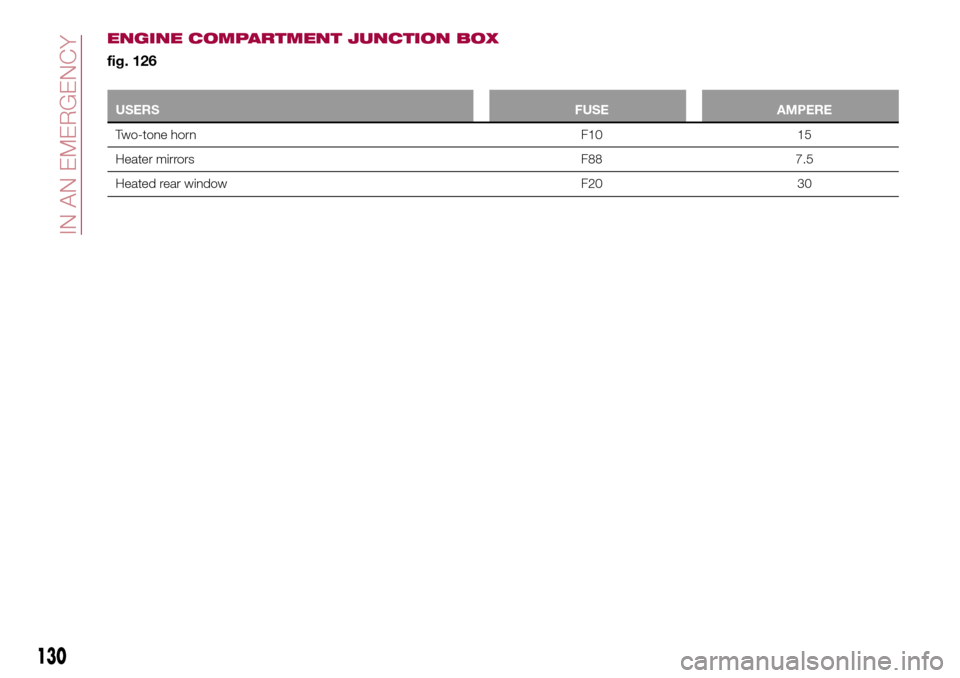
USERSFUSE AMPERE
Two-tone horn F10 15
Heater mirrors F88 7.5
Heated rear window F20 30
130
IN AN EMERGENCY
ENGINE COMPARTMENT JUNCTION BOX
fig. 126
Page 212 of 240
"Lane Assist Warning"(where
provided): this function can be used to
select the LaneAssist system
intervention "readiness".
"Lane Assist Strength"(where
provided): this function can be used to
select the force to apply to the steering
wheel to put the vehicle back in the
lane through the electric steering
system, in the event of Lane Assist
system intervention.
"Blind Spot Alert"(where provided):
this function can be used to select the
type of warning ("Sound Only" or
"Sound & Display") to indicate the
presence of objects in the blind spot of
the door mirror.
"Rain sensor"(where provided): this
function can be used to activate/
deactivate the automatic operation of
the wipers in the event of rain.
"Brakes"(where provided): this
function can be used to select the
following submenus:
- "Brake Service" (where provided):
allows you to activate the procedure for
carrying out braking system servicing;
- "Auto Park Brake" (where provided):
allows you to activate/deactivate the
automatic park brake engagement.
NAVIGATION(UConnect™ 5" Nav LIVE only)
Programming a route
WARNING In the interest of safety and
to reduce distractions while you are
driving, you should always plan a route
before you start driving.
Using the destination search function, it
is possible to find and reach your
destinations in different ways: searching
for a specific address, a partial address,
a specific type of location (for example
a service station or a restaurant), a
postal code, a POI (Point Of Interest)
near your current position (for example,
a restaurant with the search type set to
"nearby"), a pair of latitude and
longitude coordinates, or by selecting a
point on the map.
Select “Search” in the Main menu and
set the search for a destination.
While entering the information, the list
displays the corresponding addresses
and POIs in two separate lists. The
corresponding address and city are
displayed in the Address list and the
POI, the type of POIs and the locations
are displayed in the Point of Interest
lists.
To plan a route towards the destination,
select the “Guide” button.
A route is planned and you are guided
to your destination, using spoken
instructions and on-screen directions.VOICE COMMANDS
NoteFor languages not supported by
the system, voice commands are not
available.
To use the voice commands, press the
button on the steering wheel ("Voice"
button) and say out loud the command
you want to activate.
Global
The following voice commands can be
given after pressing the
button on
the steering wheel:
Help
Cancel
Repeat
Voice Prompts
Phone
The following voice commands can be
given after pressing the
button on
the steering wheel:
Call
Dial
Redial
Call back
Last calls
Outgoing calls
Missed calls
Incoming calls
Contacts
Search
Show SMS
Send an SMS
210
MULTIMEDIA
Show messages
Page 236 of 240
Interior lights................23
Interiors (cleaning)............166
ISOFIX child restraint system
(installation)...............77
iTPMS (indirect Tyre Pressure
Monitoring System)..........65
Jump starting..............139
Keys.....................10
key with remote control.......10
Lifting the vehicle............164
Light beam direction...........35
Light bulbs
types of bulbs............118
Luggage Compartment.........34
Luggage compartment
(extension)................16
Main beam headlights..........21
Main Beam Headlights (bulb
replacement)..............120
Main menu.................40
Manual climate control..........27
Media mode...............218
Multimedia
Uconnect™ LIVE Services .207 ,221
Number plate lights (bulb
replacement)..............126
Occupant protection systems.....68
Paintwork (cleaning and
maintenance).............165
Parking lights................21Parking sensors.............108
Parking the vehicle............95
PBA (system)................59
Performance (top speed)........183
Periodic checks (scheduled
servicing)................151
Pre-tensioners...............71
Load limiters..............72
Prescriptions for handling the
vehicle at the end of its life.....187
Radio mode...............218
Rain sensor.................25
Rear seats..................16
Rear view camera............110
Rear View Camera............110
Rear view mirrors.............19
Reconfigurable Multifunction
Display..................38
Refuelling.................178
Refuelling procedure..........114
Emergency refuelling........114
Refuelling the vehicle..........113
Replacing a bulb.............117
Replacing an external bulb......120
Rims and tyres (dimensions)......173
Roof rack/ski rack.............36
SBR (Seat Belt Reminder).......70
SBR (Seat Belt Reminder) system.......................70
Scheduled servicing...........144Scheduled Servicing Plan.......145
Screen wiper/washer...........24
Smart washing function.......24
Seat belts..................68
Seats.....................15
Servicing procedures..........159
Side bag...................90
Side direction indicators (bulb
replacement)..............121
Snow chains...............164
Speed Limiter...............98
SRS (supplementary restraint
system)..................86
Starting the engine............94
Steering lock................12
Steering wheel...............19
Steering wheel controls.........215
Stop/Start system.............96
TC (system)................59
Technical data..............169
Third brake light (bulb
replacement)..............125
Towing the vehicle............142
Towing trailers..............112
Trip Computer...............43
TSC (system)................60
Tyres (inflation pressure)........174
Uconnect 3” Radio...........191
Uconnect 5” LIVE — Uconnect 5”
Nav LIVE................200
INDEX