sensor FIAT TIPO 5DOORS STATION WAGON 2016 1.G Owners Manual
[x] Cancel search | Manufacturer: FIAT, Model Year: 2016, Model line: TIPO 5DOORS STATION WAGON, Model: FIAT TIPO 5DOORS STATION WAGON 2016 1.GPages: 240, PDF Size: 5.43 MB
Page 10 of 240
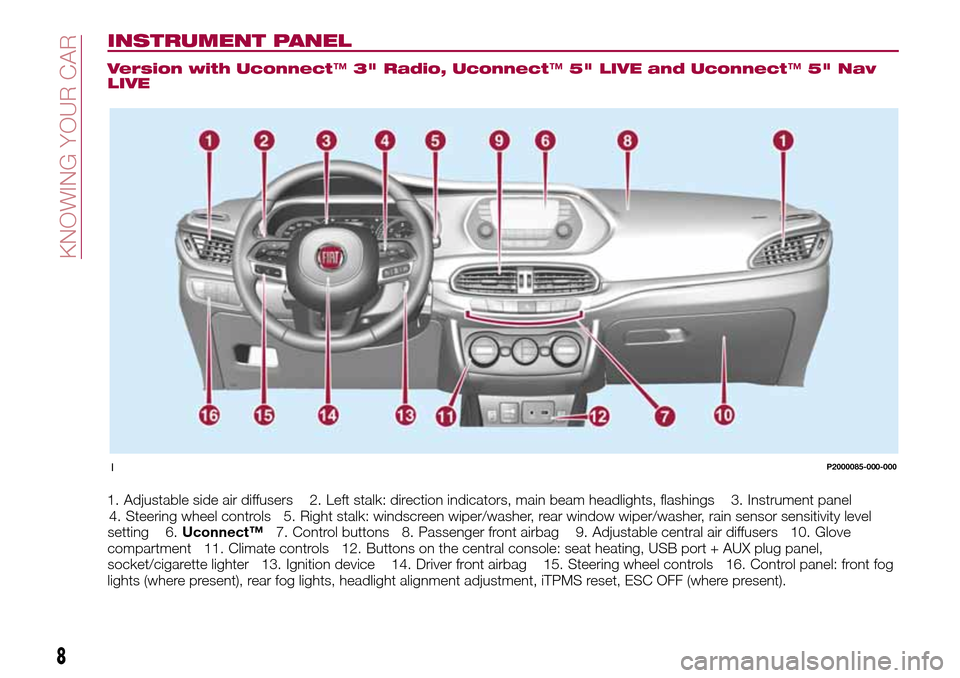
INSTRUMENT PANEL
Version with Uconnect™3" Radio, Uconnect™5" LIVE and Uconnect™5" Nav
LIVE
1. Adjustable side air diffusers 2. Left stalk: direction indicators, main beam headlights, flashings 3. Instrument panel
4. Steering wheel controls 5. Right stalk: windscreen wiper/washer, rear window wiper/washer, rain sensor sensitivity level
setting 6.Uconnect™7. Control buttons 8. Passenger front airbag 9. Adjustable central air diffusers 10. Glove
compartment 11. Climate controls 12. Buttons on the central console: seat heating, USB port + AUX plug panel,
socket/cigarette lighter 13. Ignition device 14. Driver front airbag 15. Steering wheel controls 16. Control panel: front fog
lights (where present), rear fog lights, headlight alignment adjustment, iTPMS reset, ESC OFF (where present).
1P2000085-000-000
8
KNOWING YOUR CAR
Page 11 of 240
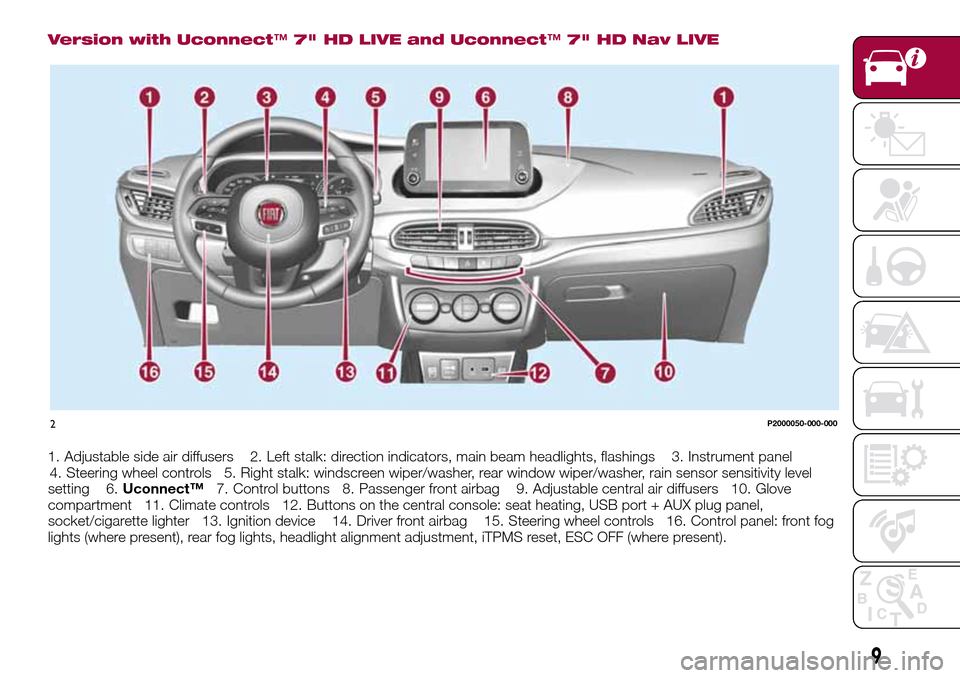
Version with Uconnect™7" HD LIVE and Uconnect™7" HD Nav LIVE
1. Adjustable side air diffusers 2. Left stalk: direction indicators, main beam headlights, flashings 3. Instrument panel
4. Steering wheel controls 5. Right stalk: windscreen wiper/washer, rear window wiper/washer, rain sensor sensitivity level
setting 6.Uconnect™7. Control buttons 8. Passenger front airbag 9. Adjustable central air diffusers 10. Glove
compartment 11. Climate controls 12. Buttons on the central console: seat heating, USB port + AUX plug panel,
socket/cigarette lighter 13. Ignition device 14. Driver front airbag 15. Steering wheel controls 16. Control panel: front fog
lights (where present), rear fog lights, headlight alignment adjustment, iTPMS reset, ESC OFF (where present).
2P2000050-000-000
9
Page 23 of 240
EXTERNAL LIGHTS
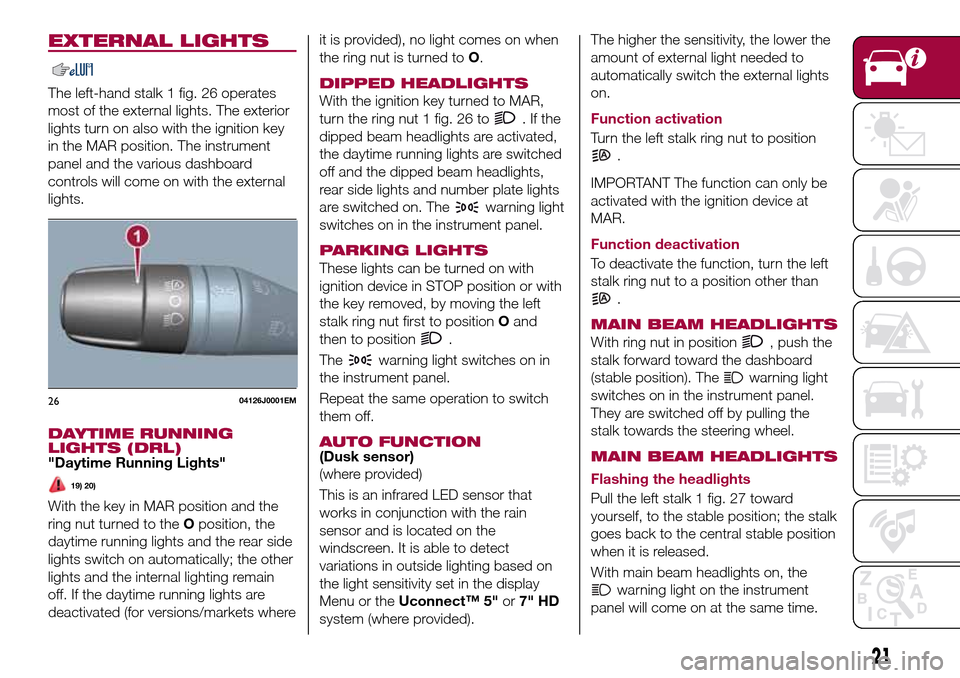
The left-hand stalk 1 fig. 26 operates
most of the external lights. The exterior
lights turn on also with the ignition key
in the MAR position. The instrument
panel and the various dashboard
controls will come on with the external
lights.
DAYTIME RUNNING
LIGHTS (DRL)
"Daytime Running Lights"
19) 20)
With the key in MAR position and the
ring nut turned to theOposition, the
daytime running lights and the rear side
lights switch on automatically; the other
lights and the internal lighting remain
off. If the daytime running lights are
deactivated (for versions/markets whereit is provided), no light comes on when
the ring nut is turned toO.
DIPPED HEADLIGHTS
With the ignition key turned to MAR,
turn the ring nut 1 fig. 26 to
.Ifthe
dipped beam headlights are activated,
the daytime running lights are switched
off and the dipped beam headlights,
rear side lights and number plate lights
are switched on. The
warning light
switches on in the instrument panel.
PARKING LIGHTS
These lights can be turned on with
ignition device in STOP position or with
the key removed, by moving the left
stalk ring nut first to positionOand
then to position
.
The
warning light switches on in
the instrument panel.
Repeat the same operation to switch
them off.
AUTO FUNCTION(Dusk sensor)
(where provided)
This is an infrared LED sensor that
works in conjunction with the rain
sensor and is located on the
windscreen. It is able to detect
variations in outside lighting based on
the light sensitivity set in the display
Menu or theUconnect™ 5"or7" HD
system (where provided).The higher the sensitivity, the lower the
amount of external light needed to
automatically switch the external lights
on.
Function activation
Turn the left stalk ring nut to position
.
IMPORTANT The function can only be
activated with the ignition device at
MAR.
Function deactivation
To deactivate the function, turn the left
stalk ring nut to a position other than
.
MAIN BEAM HEADLIGHTS
With ring nut in position, push the
stalk forward toward the dashboard
(stable position). The
warning light
switches on in the instrument panel.
They are switched off by pulling the
stalk towards the steering wheel.
MAIN BEAM HEADLIGHTS
Flashing the headlights
Pull the left stalk 1 fig. 27 toward
yourself, to the stable position; the stalk
goes back to the central stable position
when it is released.
With main beam headlights on, the
warning light on the instrument
panel will come on at the same time.
2604126J0001EM
21
Page 27 of 240
If the position isLOWorHIGH, the
smart washing function is not carried
out.
“Service Position” function
This function makes it possible to
replace the wipers or protect them in
conditions of ice and/or snow.
It can only be activated after turning off
the vehicle.
The Service Position can be explicitly
requested by the driver within two
minutes of turning off the vehicle, when
the wipers have correctly returned to
the parking position.
The driver can enable the function by
turning the ring nut to positionOand
moving the stalk upwards, to the MIST
position, more than three times. The
activations are used to position the
wipers as preferred. The function is
deactivated when the vehicle is turned
on, with a wiping request or when the
vehicle is moving (speed above 5
Km/h).
IMPORTANT Make sure, when turning
on the vehicle, that the windscreen is
free of snow or ice before turning the
ignition key.RAIN SENSOR(where provided)
7) 8)
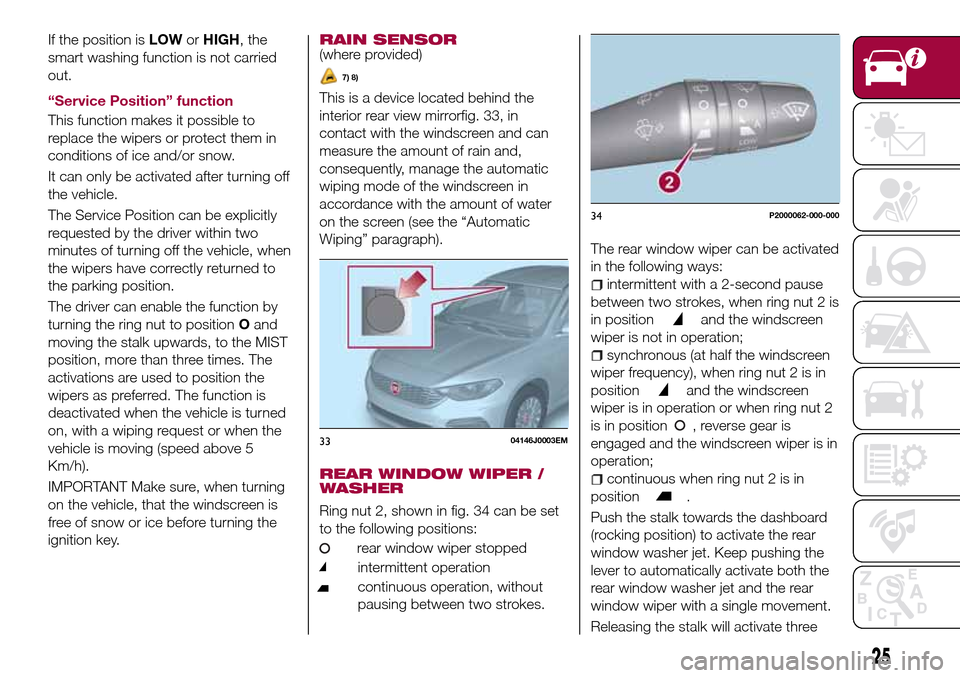
This is a device located behind the
interior rear view mirrorfig. 33, in
contact with the windscreen and can
measure the amount of rain and,
consequently, manage the automatic
wiping mode of the windscreen in
accordance with the amount of water
on the screen (see the “Automatic
Wiping” paragraph).
REAR WINDOW WIPER /
WASHER
Ring nut 2, shown in fig. 34 can be set
to the following positions:
rear window wiper stopped
intermittent operation
continuous operation, without
pausing between two strokes.
The rear window wiper can be activated
in the following ways:
intermittent with a 2-second pause
between two strokes, when ring nut 2 is
in position
and the windscreen
wiper is not in operation;
synchronous (at half the windscreen
wiper frequency), when ring nut 2 is in
position
and the windscreen
wiper is in operation or when ring nut 2
is in position , reverse gear is
engaged and the windscreen wiper is in
operation;
continuous when ring nut 2 is in
position
.
Push the stalk towards the dashboard
(rocking position) to activate the rear
window washer jet. Keep pushing the
lever to automatically activate both the
rear window washer jet and the rear
window wiper with a single movement.
Releasing the stalk will activate three
3304146J0003EM
34P2000062-000-000
25
Page 28 of 240
strokes, as described for the
windscreen wiper. If the position is
(rear window wiper stopped), after a
6 second pause, the washing cycle is
completed by a single stroke. The
smart wash cycle will not be performed
if the position is
.
WARNING
21)If the window needs to be cleaned,
make sure the device is deactivated or the
key is on STOP.
IMPORTANT
5)Never use the windscreen wipers to
remove layers of snow or ice from the
windscreen. In such conditions, the
windscreen wiper may be subjected to
excessive stress and the motor cut-out
switch, which prevents operation for a few
seconds, may intervene. If operation is not
subsequently restored, even after restarting
the engine, contact a Fiat Dealership.
6)Do not operate the windscreen wiper
with the blades lifted from the windscreen.
7)Do not activate the rain sensor when
washing the car in an automatic car wash.
8)Make sure the device is switched off if
there is ice on the windscreen.
26
KNOWING YOUR CAR
Page 44 of 240
adjusted at night or when the dipped
headlights are on. To set the brightness,
briefly press theOKbutton, the display
will show the previously set brightness
“level”; then press the
orbutton
to adjust. To return to the previous
screen, briefly press the
button.
Unit of measurement
Selecting the item "Units" you can
choose the unit of measurement to be
used for displaying the various values.
The possible options are:
Imperial
Metric
Customised
Clock & Date
Select item "Clock & Date" to adjust the
clock.
The possible options are:
Set time: hours/minutes adjustment;
Time format: adjustment of the time
format "12h" (12-hour) or "24h"
(24-hour);
Set date: adjustment of
day/month/year.
Safety
Select item "Security" to make the
following adjustments:
Passenger AIRBAG: passenger side
airbag activation/deactivation “Off” (to
deactivate) or “On” (to activate).Passenger's protection not active
the
LED comes on constantly in the
instrument panel dashboard;
"Speed beep": setting of the vehicle
speed limit (km/h or mph). When this is
exceeded, the driver is notified through
an acoustic and visual signal;
“Seat belt buzzer": this function can
be only displayed after a Fiat Dealership
has deactivated the SBR system (see
the "SBR system" paragraph in the
"Security" chapter).
Safety & Assistance
Select item "Safety & Assistance" to
make the following adjustments:
Rain sensor: activation/deactivation
of the automatic switching on of the
wipers in the case of rain;
Warning volume: selection of the
volume of the buzzer that accompanies
the display of the failure/warning;
Brake Control: selection of the
intervention mode for the Full Brake
Control system;
“Brake C.Sensitivity": selection of the
"readiness" of the Full Brake Control
system to intervene, on the basis of the
distance from the obstacle;
Park Assist: selection of the type of
warning provided by the Park Assist
system;
Park Assist volume: selection of the
volume of the acoustic warnings
provided by the Park Assist system.Lights
Select item "Lights" to make the
following adjustments:
Courtesy lights: interior light
brightness selection;
Daytime running lights:
activation/deactivation of the daytime
running lights;
Cornering lights: activation/
deactivation of cornering lights (where
provided);
Headlamp sensor: adjustment of
headlight activation sensitivity;
Follow me home: setting of the
headlight deactivation delay after
switching off the engine.
Doors & Locks
Select item "Doors & Locks" to make
the following adjustments:
Autoclose: activation/deactivation of
automatic door locking when the
vehicle is moving;
Flash Lights w/Lock: activation of the
direction indicator flashing at door
locking;
Auto Unlock on Exit: automatic
unlocking of the doors when exiting the
vehicle.
42
KNOWING THE INSTRUMENT PANEL
dashboard, buttons, etc.) can only be:
Page 53 of 240
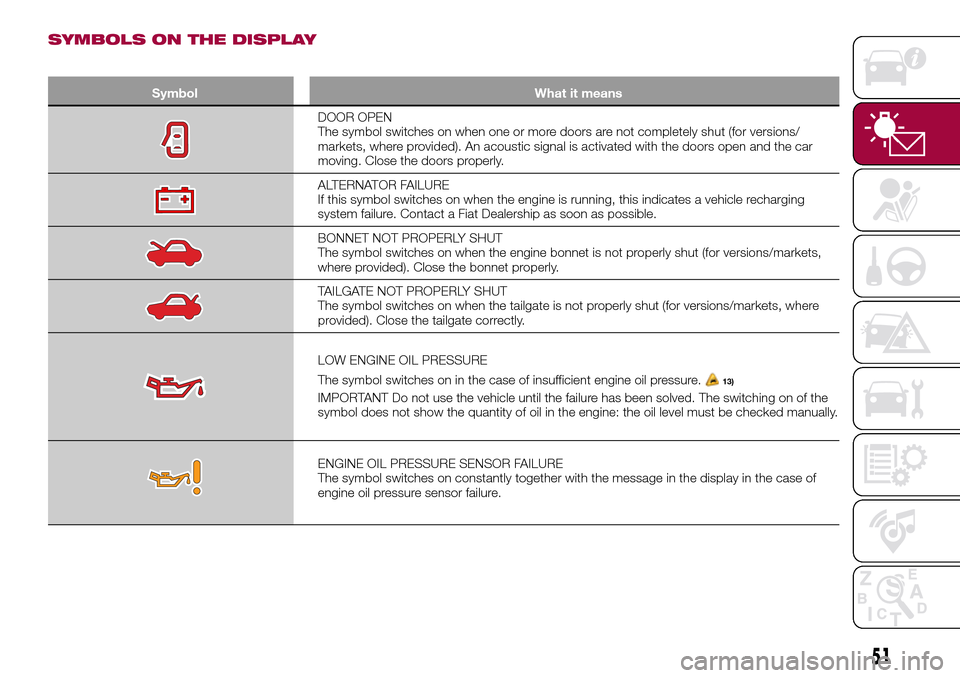
SYMBOLS ON THE DISPLAY
Symbol What it means
DOOR OPEN
The symbol switches on when one or more doors are not completely shut (for versions/
markets, where provided). An acoustic signal is activated with the doors open and the car
moving. Close the doors properly.
ALTERNATOR FAILURE
If this symbol switches on when the engine is running, this indicates a vehicle recharging
system failure. Contact a Fiat Dealership as soon as possible.
BONNET NOT PROPERLY SHUT
The symbol switches on when the engine bonnet is not properly shut (for versions/markets,
where provided). Close the bonnet properly.
TAILGATE NOT PROPERLY SHUT
The symbol switches on when the tailgate is not properly shut (for versions/markets, where
provided). Close the tailgate correctly.
LOW ENGINE OIL PRESSURE
The symbol switches on in the case of insufficient engine oil pressure.
13)
IMPORTANT Do not use the vehicle until the failure has been solved. The switching on of the
symbol does not show the quantity of oil in the engine: the oil level must be checked manually.
ENGINE OIL PRESSURE SENSOR FAILURE
The symbol switches on constantly together with the message in the display in the case of
engine oil pressure sensor failure.
51
Page 54 of 240
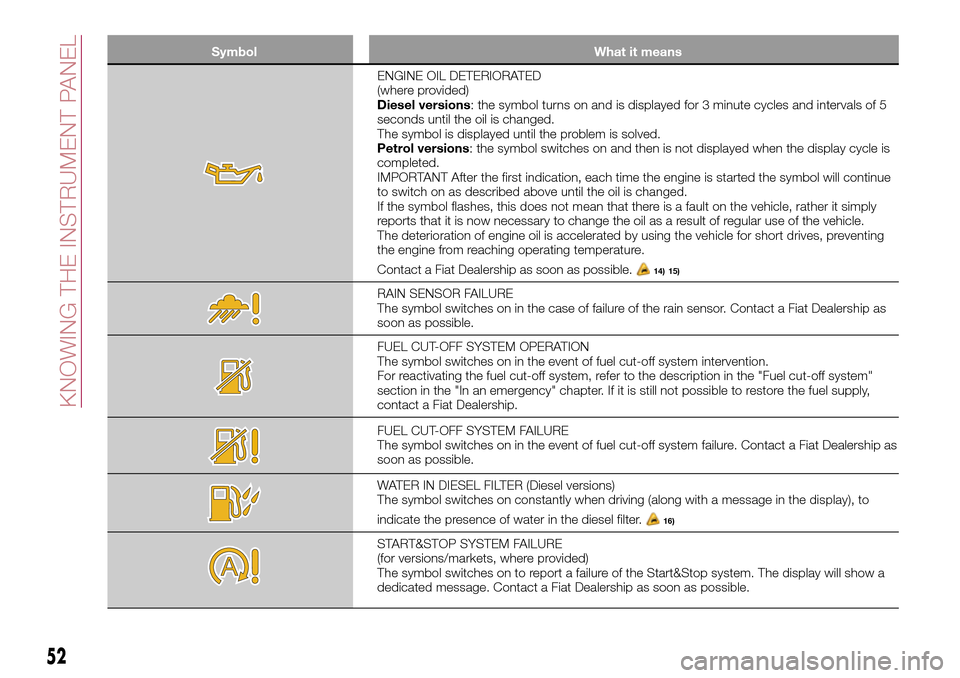
Symbol What it means
ENGINE OIL DETERIORATED
(where provided)
Diesel versions: the symbol turns on and is displayed for 3 minute cycles and intervals of 5
seconds until the oil is changed.
The symbol is displayed until the problem is solved.
Petrol versions: the symbol switches on and then is not displayed when the display cycle is
completed.
IMPORTANT After the first indication, each time the engine is started the symbol will continue
to switch on as described above until the oil is changed.
If the symbol flashes, this does not mean that there is a fault on the vehicle, rather it simply
reports that it is now necessary to change the oil as a result of regular use of the vehicle.
The deterioration of engine oil is accelerated by using the vehicle for short drives, preventing
the engine from reaching operating temperature.
Contact a Fiat Dealership as soon as possible.
14) 15)
RAIN SENSOR FAILURE
The symbol switches on in the case of failure of the rain sensor. Contact a Fiat Dealership as
soon as possible.
FUEL CUT-OFF SYSTEM OPERATION
The symbol switches on in the event of fuel cut-off system intervention.
For reactivating the fuel cut-off system, refer to the description in the "Fuel cut-off system"
section in the "In an emergency" chapter. If it is still not possible to restore the fuel supply,
contact a Fiat Dealership.
FUEL CUT-OFF SYSTEM FAILURE
The symbol switches on in the event of fuel cut-off system failure. Contact a Fiat Dealership as
soon as possible.
WATER IN DIESEL FILTER (Diesel versions)
The symbol switches on constantly when driving (along with a message in the display), to
indicate the presence of water in the diesel filter.
16)
START&STOP SYSTEM FAILURE
(for versions/markets, where provided)
The symbol switches on to report a failure of the Start&Stop system. The display will show a
dedicated message. Contact a Fiat Dealership as soon as possible.
52
KNOWING THE INSTRUMENT PANEL
Page 55 of 240
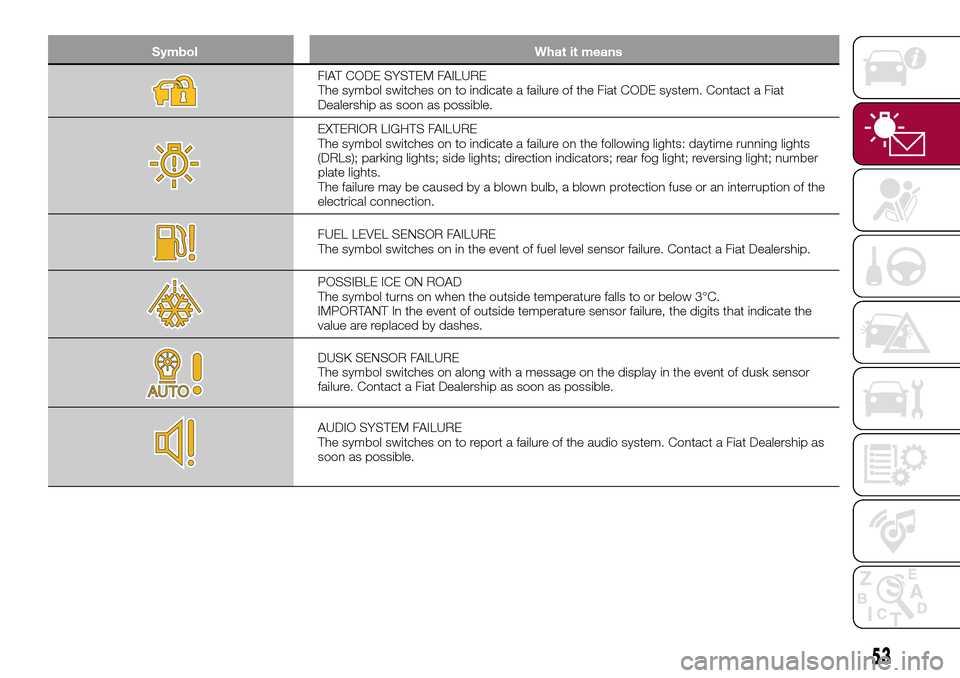
Symbol What it means
FIAT CODE SYSTEM FAILURE
The symbol switches on to indicate a failure of the Fiat CODE system. Contact a Fiat
Dealership as soon as possible.
EXTERIOR LIGHTS FAILURE
The symbol switches on to indicate a failure on the following lights: daytime running lights
(DRLs); parking lights; side lights; direction indicators; rear fog light; reversing light; number
plate lights.
The failure may be caused by a blown bulb, a blown protection fuse or an interruption of the
electrical connection.
FUEL LEVEL SENSOR FAILURE
The symbol switches on in the event of fuel level sensor failure. Contact a Fiat Dealership.
POSSIBLE ICE ON ROAD
The symbol turns on when the outside temperature falls to or below 3°C.
IMPORTANT In the event of outside temperature sensor failure, the digits that indicate the
value are replaced by dashes.
DUSK SENSOR FAILURE
The symbol switches on along with a message on the display in the event of dusk sensor
failure. Contact a Fiat Dealership as soon as possible.
AUDIO SYSTEM FAILURE
The symbol switches on to report a failure of the audio system. Contact a Fiat Dealership as
soon as possible.
53
Page 56 of 240
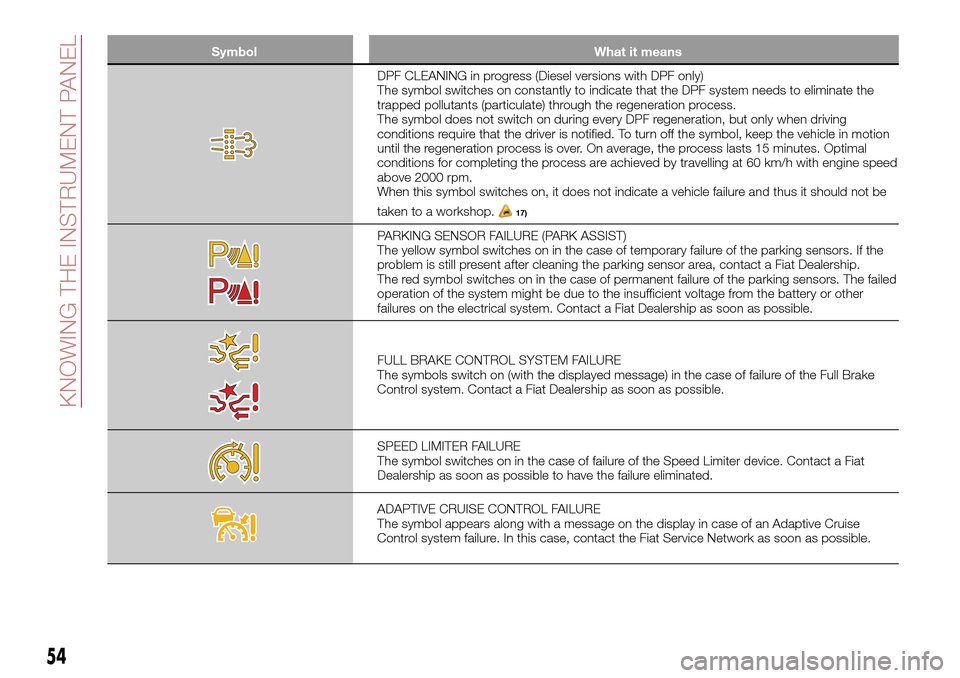
Symbol What it means
DPF CLEANING in progress (Diesel versions with DPF only)
The symbol switches on constantly to indicate that the DPF system needs to eliminate the
trapped pollutants (particulate) through the regeneration process.
The symbol does not switch on during every DPF regeneration, but only when driving
conditions require that the driver is notified. To turn off the symbol, keep the vehicle in motion
until the regeneration process is over. On average, the process lasts 15 minutes. Optimal
conditions for completing the process are achieved by travelling at 60 km/h with engine speed
above 2000 rpm.
When this symbol switches on, it does not indicate a vehicle failure and thus it should not be
taken to a workshop.
17)
PARKING SENSOR FAILURE (PARK ASSIST)
The yellow symbol switches on in the case of temporary failure of the parking sensors. If the
problem is still present after cleaning the parking sensor area, contact a Fiat Dealership.
The red symbol switches on in the case of permanent failure of the parking sensors. The failed
operation of the system might be due to the insufficient voltage from the battery or other
failures on the electrical system. Contact a Fiat Dealership as soon as possible.
FULL BRAKE CONTROL SYSTEM FAILURE
The symbols switch on (with the displayed message) in the case of failure of the Full Brake
Control system. Contact a Fiat Dealership as soon as possible.
SPEED LIMITER FAILURE
The symbol switches on in the case of failure of the Speed Limiter device. Contact a Fiat
Dealership as soon as possible to have the failure eliminated.
ADAPTIVE CRUISE CONTROL FAILURE
The symbol appears along with a message on the display in case of an Adaptive Cruise
Control system failure. In this case, contact the Fiat Service Network as soon as possible.
54
KNOWING THE INSTRUMENT PANEL