cruise control FIAT TIPO 5DOORS STATION WAGON 2017 1.G Owners Manual
[x] Cancel search | Manufacturer: FIAT, Model Year: 2017, Model line: TIPO 5DOORS STATION WAGON, Model: FIAT TIPO 5DOORS STATION WAGON 2017 1.GPages: 264, PDF Size: 4.53 MB
Page 58 of 264
display will be in km or miles according
to the unit of measurement set.
When the following scheduled servicing
is approaching ("coupon"), the word
"Service" will be displayed, followed by
the number of kilometres/miles or days
left, when the ignition device is turned
to MAR. Go to a Fiat Dealership, where
the "Scheduled Servicing Plan"
operations will be performed and the
message will be reset.
Driver Assist
This menu item allows you to view and
change the Adaptive Cruise Control
(ACC) settings on the instrument panel
display.
Audio
(function available in versions and
markets where present)
This Menu item allows some
information displayed on the
Uconnect™system to be repeated on
the instrument panel display (for further
information see the dedicated chapter).
Phone
(function available in versions and
markets where present)
This Menu item allows some
information displayed on the
Uconnect™system to be repeated on
the instrument panel display (for further
information see the dedicated chapter).The information displayed includes the
mobile pairing condition (mobile paired
or not paired), active/incoming/on hold
calls and the management of double
calls (first incoming, second on hold,
etc.).
In the phone menu, you can also select
3 sub-menus “SMS reader”, “recent
calls” and “favourite numbers” (available
with theUconnect™7'' HDsystem),
which can be selected with the arrows
or. This menu can also be used
to select and manage the last 10 calls
or the last 10 SMS using the directional
buttons on the steering wheel.
Navigation
(function available in versions and
markets where present)
This Menu item allows some
information displayed on the
Uconnect™ 5"o7" HDsystem to be
shown on the instrument panel display
(for further information see the
dedicated chapter).
Alerts
This menu item displays information/
failure messages stored by the system.
Vehicle Settings
This menu item allows you to change
the settings for:
Display;
Units;
Clock & Date;
Security;
Safety & Assistance;
Lights;
Doors & Locks.
Display
By selecting item "Display" you can
access the following settings:
Display Settings (changing
instrument panel display settings): this
menu item makes it possible to change
the displaying of the information, for
example the Compass (where present),
Outside temperature, Date (day/month),
Time (hours/minutes), Audio information
(where present). Selecting “Reset of the
default settings” makes it possible to
reset and restore the default settings;
Language: allows you to select the
language for showing the
information/warnings;
See phone: used to activate/
deactivate the display of pop-ups on
the instrument panel when there are
incoming calls, outgoing calls, on hold
calls, audio conference and incoming
SMS (available in versions and markets
where present);
See navigation: allows you to display
the information about the Navigation
mode on the instrument panel (available
in versions and markets where present);
56
KNOWING THE INSTRUMENT PANEL
Page 71 of 264
Symbol What it means
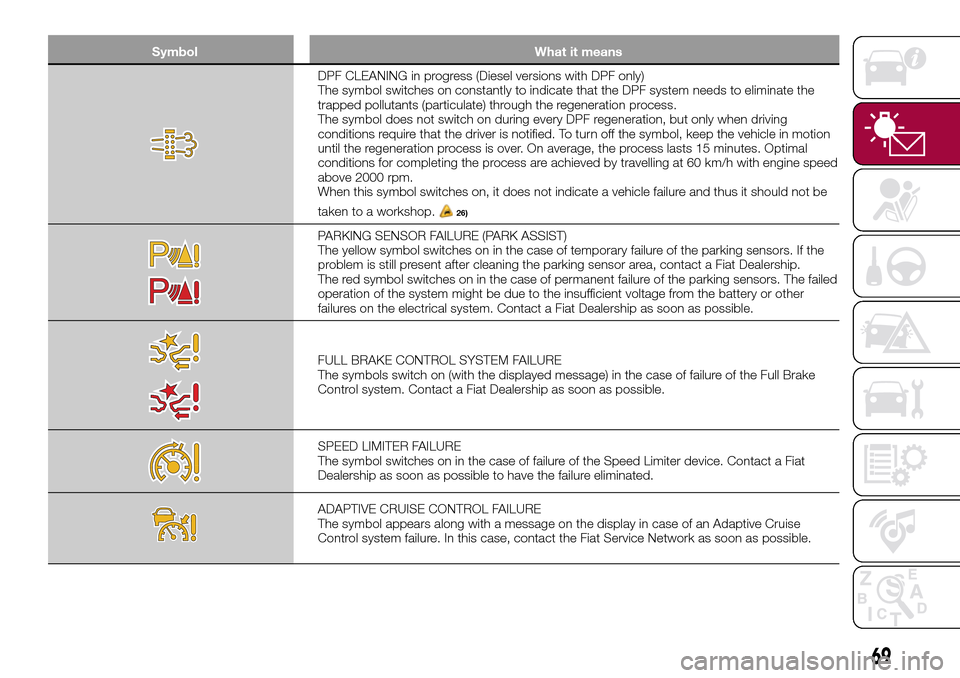
DPF CLEANING in progress (Diesel versions with DPF only)
The symbol switches on constantly to indicate that the DPF system needs to eliminate the
trapped pollutants (particulate) through the regeneration process.
The symbol does not switch on during every DPF regeneration, but only when driving
conditions require that the driver is notified. To turn off the symbol, keep the vehicle in motion
until the regeneration process is over. On average, the process lasts 15 minutes. Optimal
conditions for completing the process are achieved by travelling at 60 km/h with engine speed
above 2000 rpm.
When this symbol switches on, it does not indicate a vehicle failure and thus it should not be
taken to a workshop.
26)
PARKING SENSOR FAILURE (PARK ASSIST)
The yellow symbol switches on in the case of temporary failure of the parking sensors. If the
problem is still present after cleaning the parking sensor area, contact a Fiat Dealership.
The red symbol switches on in the case of permanent failure of the parking sensors. The failed
operation of the system might be due to the insufficient voltage from the battery or other
failures on the electrical system. Contact a Fiat Dealership as soon as possible.
FULL BRAKE CONTROL SYSTEM FAILURE
The symbols switch on (with the displayed message) in the case of failure of the Full Brake
Control system. Contact a Fiat Dealership as soon as possible.
SPEED LIMITER FAILURE
The symbol switches on in the case of failure of the Speed Limiter device. Contact a Fiat
Dealership as soon as possible to have the failure eliminated.
ADAPTIVE CRUISE CONTROL FAILURE
The symbol appears along with a message on the display in case of an Adaptive Cruise
Control system failure. In this case, contact the Fiat Service Network as soon as possible.
69
Page 73 of 264
Symbol What it means
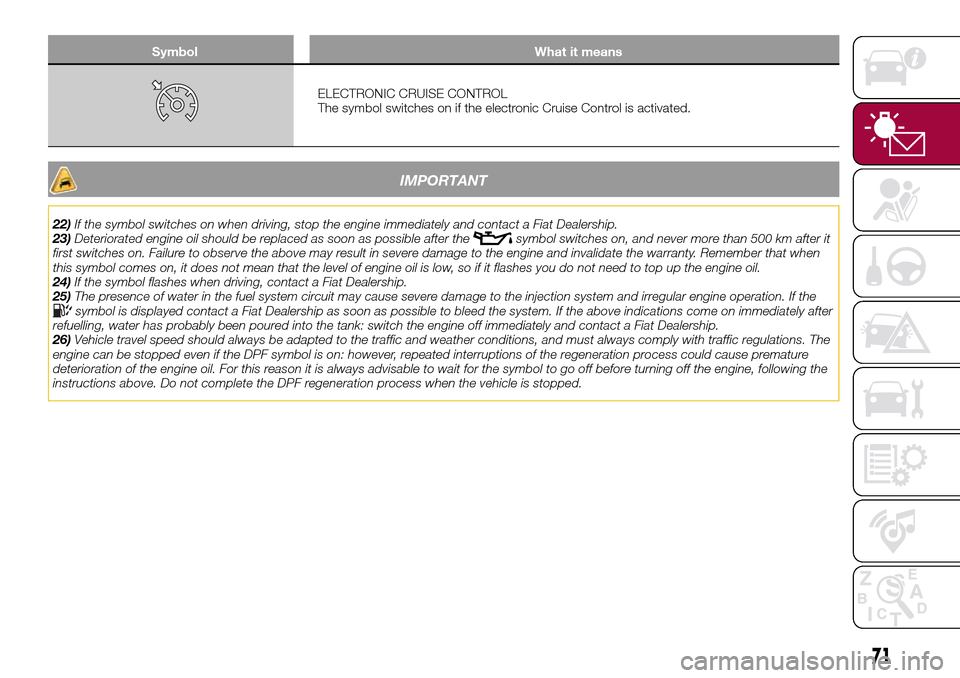
ELECTRONIC CRUISE CONTROL
The symbol switches on if the electronic Cruise Control is activated.
IMPORTANT
22)If the symbol switches on when driving, stop the engine immediately and contact a Fiat Dealership.
23)Deteriorated engine oil should be replaced as soon as possible after thesymbol switches on, and never more than 500 km after it
first switches on. Failure to observe the above may result in severe damage to the engine and invalidate the warranty. Remember that when
this symbol comes on, it does not mean that the level of engine oil is low, so if it flashes you do not need to top up the engine oil.
24)If the symbol flashes when driving, contact a Fiat Dealership.
25)The presence of water in the fuel system circuit may cause severe damage to the injection system and irregular engine operation. If the
symbol is displayed contact a Fiat Dealership as soon as possible to bleed the system. If the above indications come on immediately after
refuelling, water has probably been poured into the tank: switch the engine off immediately and contact a Fiat Dealership.
26)Vehicle travel speed should always be adapted to the traffic and weather conditions, and must always comply with traffic regulations. The
engine can be stopped even if the DPF symbol is on: however, repeated interruptions of the regeneration process could cause premature
deterioration of the engine oil. For this reason it is always advisable to wait for the symbol to go off before turning off the engine, following the
instructions above. Do not complete the DPF regeneration process when the vehicle is stopped.
71
Page 110 of 264
STARTING AND DRIVING
Let’s get to the core of the vehicle:
seeing how you can exploit all of its
potential to the full.
We’ll look at how to drive it safely in any
situation, so that it can be a welcome
companion, with our comfort and our
wallets in mind.STARTING THE ENGINE.......109
PARKING THE VEHICLE........110
PARKING BRAKE............110
USING THE TRANSMISSION. . . .111
STOP/START SYSTEM........111
SPEED LIMITER.............113
ELECTRONIC CRUISE CONTROL .114
ADAPTIVE CRUISE CONTROL
(ACC)....................116
PARKING SENSORS..........123
REAR VIEW CAMERA.........125
TOWING TRAILERS..........127
REFUELLING THE VEHICLE.....128
108
STARTING AND DRIVING
Page 115 of 264
WARNING
113)If the battery needs to be replaced,
always contact a Fiat Dealership. Replace
the battery with a new one of the same
type and specifications.
IMPORTANT
42)If the climate comfort is to be favoured,
the Start&Stop system can be deactivated,
for a continuous operation of the climate
control system.
SPEED LIMITER
DESCRIPTION
This device allows the speed of the
vehicle to be limited to values which
can be set by the driver.
The maximum speed can be set both
with vehicle stationary and in motion.
The minimum speed that can be set is
30 km/h.
When the device is active, the vehicle
speed depends on the pressure at the
accelerator pedal, until the
programmed speed limit is reached
(see "Speed limit programming"
paragraph).
ACTIVATING THE DEVICE
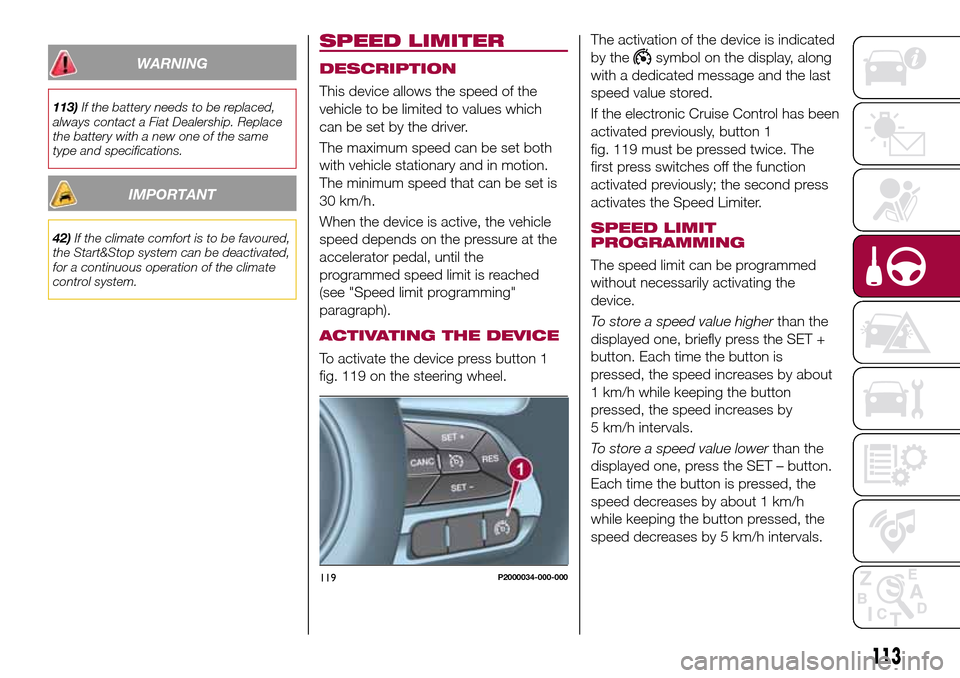
To activate the device press button 1
fig. 119 on the steering wheel.The activation of the device is indicated
by the
symbol on the display, along
with a dedicated message and the last
speed value stored.
If the electronic Cruise Control has been
activated previously, button 1
fig. 119 must be pressed twice. The
first press switches off the function
activated previously; the second press
activates the Speed Limiter.
SPEED LIMIT
PROGRAMMING
The speed limit can be programmed
without necessarily activating the
device.
To store a speed value higherthan the
displayed one, briefly press the SET +
button. Each time the button is
pressed, the speed increases by about
1 km/h while keeping the button
pressed, the speed increases by
5 km/h intervals.
To store a speed value lowerthan the
displayed one, press the SET – button.
Each time the button is pressed, the
speed decreases by about 1 km/h
while keeping the button pressed, the
speed decreases by 5 km/h intervals.
119P2000034-000-000
113
Page 116 of 264
DEVICE ACTIVATION/
DEACTIVATION
Device Activation: press the SET + or
SET – buttons, at a speed between
30 and 130 km/h, to set the current car
speed as the speed limit. Or, press the
RES (Resume) button to set the speed
limit to the value shown on the display. .
The device activation is indicated by the
symbol on the display.
Device deactivation: press the CANC
button. The device deactivation is
indicated by the grey
symbol on the
display.
EXCEEDING THE
PROGRAMMED SPEED
By fully depressing the accelerator
pedal, the programmed speed can be
exceeded even with the device active
(e.g. in the event of overtaking).
The device is disabled until the speed
drops below the set limit, after which it
reactivates automatically.
FLASHING OF
PROGRAMMED SPEED
The programmed speed flashes in the
following cases:
when the accelerator pedal has been
fully depressed and the vehicle has
exceeded the programmed speed;
activating the system after setting a
limit below the effective speed of the
vehicle;
when the device cannot reduce the
speed of the vehicle due to the gradient
of the road, in this case also
accompanied by an acoustic warning;
in the event of sharp acceleration.
DEACTIVATING THE
DEVICE
To deactivate the device press button 1
fig. 119.
IMPORTANT The activation of the
electronic Cruise Control will deactivate
the device.
Automatic deactivation of the
device
The device deactivates automatically in
the event of fault in the system. In this
case, contact a Fiat Dealership.
ELECTRONIC
CRUISE CONTROL
(where provided)
This is an electronically controlled
driving assistance device that allows the
desired vehicle speed to be maintained,
without having to press the accelerator
pedal. This device can be used at a
speed above 30 km/h on long stretches
of dry, straight roads with few variations
(e.g. motorways).
It is therefore not recommended to use
this device on extra-urban roads with
traffic. Do not use it in town.
ACTIVATING THE DEVICE
114) 115) 116)
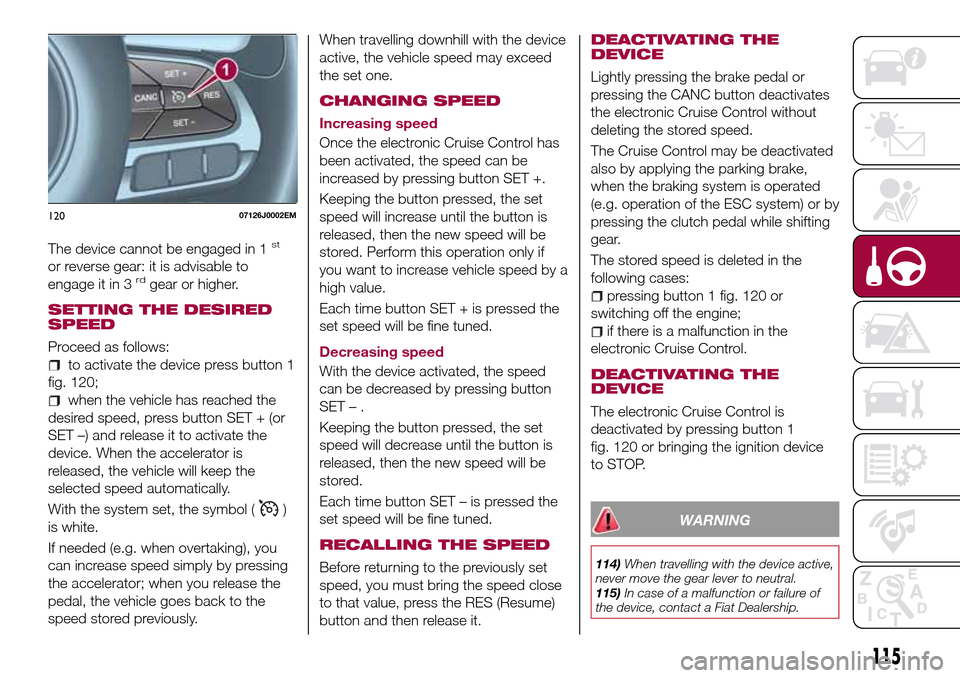
To activate the device press button 1
fig. 120.
The grey symbol
on the instrument
panel switches on to signal that the
device has been activated.
114
STARTING AND DRIVING
Page 117 of 264
The device cannot be engaged in 1st
or reverse gear: it is advisable to
engage it in 3rdgear or higher.
SETTING THE DESIRED
SPEED
Proceed as follows:
to activate the device press button 1
fig. 120;
when the vehicle has reached the
desired speed, press button SET + (or
SET –) and release it to activate the
device. When the accelerator is
released, the vehicle will keep the
selected speed automatically.
With the system set, the symbol (
)
is white.
If needed (e.g. when overtaking), you
can increase speed simply by pressing
the accelerator; when you release the
pedal, the vehicle goes back to the
speed stored previously.When travelling downhill with the device
active, the vehicle speed may exceed
the set one.
CHANGING SPEED
Increasing speed
Once the electronic Cruise Control has
been activated, the speed can be
increased by pressing button SET +.
Keeping the button pressed, the set
speed will increase until the button is
released, then the new speed will be
stored. Perform this operation only if
you want to increase vehicle speed by a
high value.
Each time button SET + is pressed the
set speed will be fine tuned.
Decreasing speed
With the device activated, the speed
can be decreased by pressing button
SET–.
Keeping the button pressed, the set
speed will decrease until the button is
released, then the new speed will be
stored.
Each time button SET – is pressed the
set speed will be fine tuned.
RECALLING THE SPEED
Before returning to the previously set
speed, you must bring the speed close
to that value, press the RES (Resume)
button and then release it.
DEACTIVATING THE
DEVICE
Lightly pressing the brake pedal or
pressing the CANC button deactivates
the electronic Cruise Control without
deleting the stored speed.
The Cruise Control may be deactivated
also by applying the parking brake,
when the braking system is operated
(e.g. operation of the ESC system) or by
pressing the clutch pedal while shifting
gear.
The stored speed is deleted in the
following cases:
pressing button 1 fig. 120 or
switching off the engine;
if there is a malfunction in the
electronic Cruise Control.
DEACTIVATING THE
DEVICE
The electronic Cruise Control is
deactivated by pressing button 1
fig. 120 or bringing the ignition device
to STOP.
WARNING
114)When travelling with the device active,
never move the gear lever to neutral.
115)In case of a malfunction or failure of
the device, contact a Fiat Dealership.
12007126J0002EM
115
Page 118 of 264
116)The electronic Cruise Control can be
dangerous if the system cannot keep a
constant speed. In specific conditions
speed may be excessive, resulting in the
risk of losing control of the vehicle and
causing accidents. Do not use the device
in heavy traffic or on winding, icy, snowy or
slippery roads.ADAPTIVE CRUISE
CONTROL (ACC)
(where provided)
117) 118) 119) 120) 121) 122)
43) 44) 45) 47) 47) 48) 49)
DESCRIPTION
The Adaptive Cruise Control (ACC) is a
driver assist device which combines the
Cruise Control functions with one for
controlling the distance from the vehicle
ahead.
The device allows to hold the vehicle at
the desired speed without needing to
press the accelerator. It also allows to
hold a given distance from the vehicle
ahead (the distance can be set by the
driver).
The Adaptive Cruise Control (ACC) uses
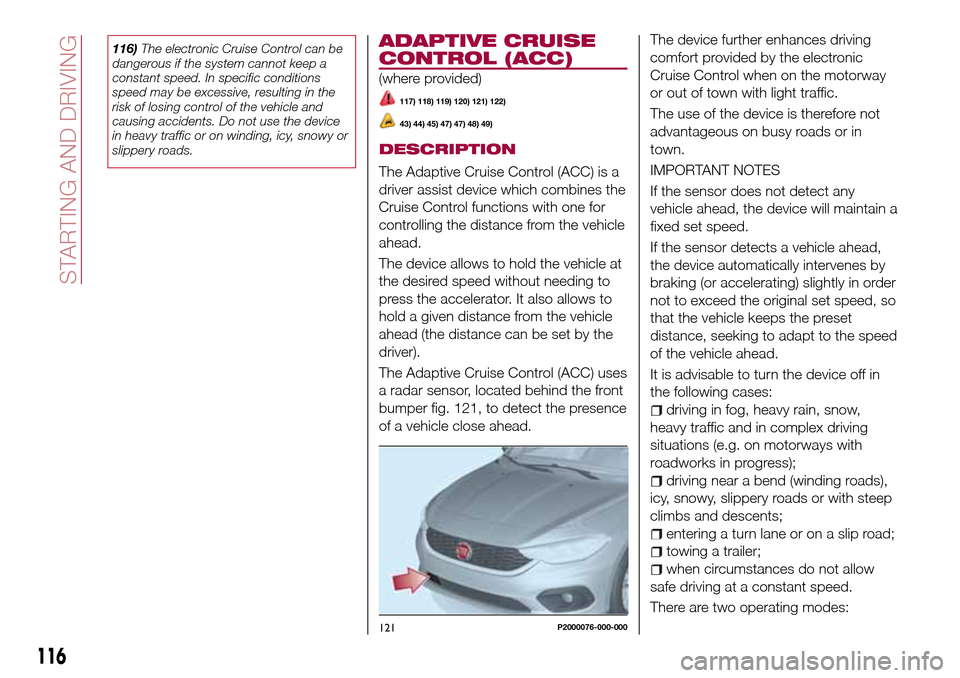
a radar sensor, located behind the front
bumper fig. 121, to detect the presence
of a vehicle close ahead.The device further enhances driving
comfort provided by the electronic
Cruise Control when on the motorway
or out of town with light traffic.
The use of the device is therefore not
advantageous on busy roads or in
town.
IMPORTANT NOTES
If the sensor does not detect any
vehicle ahead, the device will maintain a
fixed set speed.
If the sensor detects a vehicle ahead,
the device automatically intervenes by
braking (or accelerating) slightly in order
not to exceed the original set speed, so
that the vehicle keeps the preset
distance, seeking to adapt to the speed
of the vehicle ahead.
It is advisable to turn the device off in
the following cases:
driving in fog, heavy rain, snow,
heavy traffic and in complex driving
situations (e.g. on motorways with
roadworks in progress);
driving near a bend (winding roads),
icy, snowy, slippery roads or with steep
climbs and descents;
entering a turn lane or on a slip road;
towing a trailer;
when circumstances do not allow
safe driving at a constant speed.
There are two operating modes:
121P2000076-000-000
116
STARTING AND DRIVING
Page 119 of 264
“Adaptive Cruise Control” mode
to hold an appropriate distance
between vehicles (a dedicated message
is shown on the instrument panel
display);
electronic “Cruise Control” mode
to hold the vehicle at a constant
preset speed.
To change the operation mode, use the
button on the steering wheel (see that
described on the following pages).
The "electronic Cruise Control" does
not vary the speed according to the
presence or not of vehicles ahead.
Always adjust the speed according to
traffic conditions.
ADAPTIVE CRUISE
CONTROL ACTIVATION/
DEACTIVATION
Activation
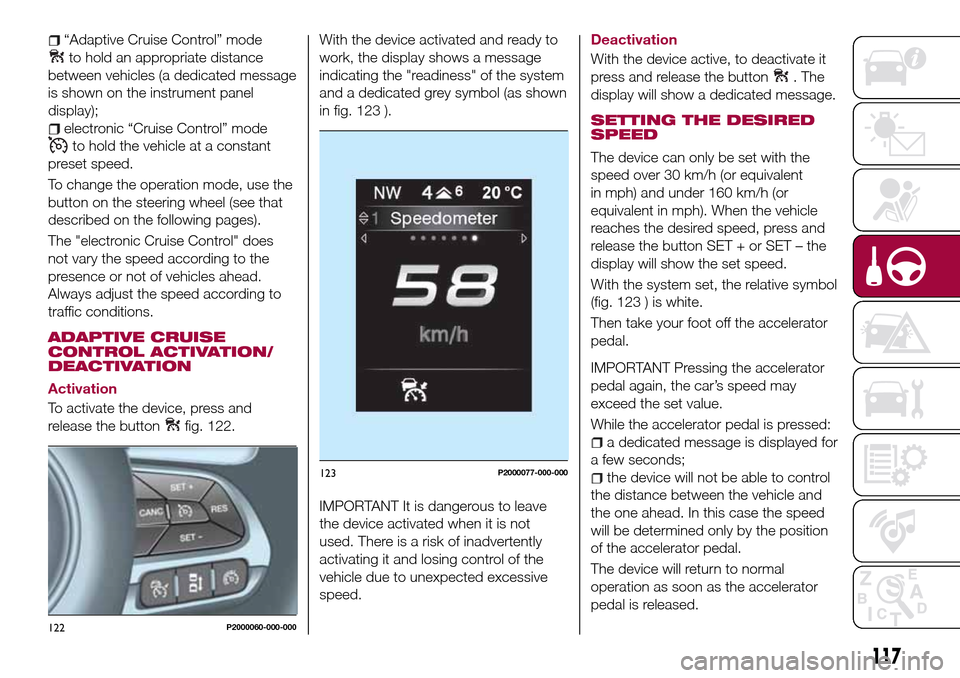
To activate the device, press and
release the button
fig. 122.With the device activated and ready to
work, the display shows a message
indicating the "readiness" of the system
and a dedicated grey symbol (as shown
in fig. 123 ).
IMPORTANT It is dangerous to leave
the device activated when it is not
used. There is a risk of inadvertently
activating it and losing control of the
vehicle due to unexpected excessive
speed.
Deactivation
With the device active, to deactivate it
press and release the button
. The
display will show a dedicated message.
SETTING THE DESIRED
SPEED
The device can only be set with the
speed over 30 km/h (or equivalent
in mph) and under 160 km/h (or
equivalent in mph). When the vehicle
reaches the desired speed, press and
release the button SET + or SET – the
display will show the set speed.
With the system set, the relative symbol
(fig. 123 ) is white.
Then take your foot off the accelerator
pedal.
IMPORTANT Pressing the accelerator
pedal again, the car’s speed may
exceed the set value.
While the accelerator pedal is pressed:
a dedicated message is displayed for
a few seconds;
the device will not be able to control
the distance between the vehicle and
the one ahead. In this case the speed
will be determined only by the position
of the accelerator pedal.
The device will return to normal
operation as soon as the accelerator
pedal is released.
122P2000060-000-000
123P2000077-000-000
117
Page 120 of 264
The systemcannotbe set:
when pressing the brake pedal;
when the manual parking brake has
been operated;
when the brakes are overheated;
when the gear lever is in R (reverse),
neutral or in 1st (first gear engaged);
when the clutch is pressed;
when the vehicle speed is not within
the settable speed range;
when the engine rpm is above a
maximum threshold or below a
minimum threshold;
when the ESC (or ABS or other
stability control systems) are operating
or have just operated;
during automatic braking by the Full
Brake Control system;
when the Speed Limiter is active;
when the electronic Cruise Control is
active;
in case of failure of the device;
when the engine is off;
in case of obstruction of the radar
sensor (in this case the bumper area
where it is located must be cleaned).
In case of system set, the conditions
described above also cause a
cancellation or deactivation of the
system with times that may vary
according to the conditions.
IMPORTANT With the device set, it is
possible to reach speeds higher thanthose set in the system (or equivalent
in mph) by pressing the accelerator
pedal. In this situation, the device does
not turn off automatically, but the
device’s functions are limited: it is
therefore recommended to turn it off.
CHANGING SPEED
Increasing speed
After having set the device, the stored
speed can be stored by holding the
SET + button pressed.
Press the SET + button once, the set
speed will increase by 1 km/h (or the
equivalent in mph). Each subsequent
touch of the button will increase the
speed by 1 km/h (or the equivalent
in mph).
Hold the SET + button down, the set
speed will increase in 10 km/h steps (or
the equivalent in mph) until the button is
released. The set speed increase is
shown on the display.
Decreasing speed
After having set the device, the stored
speed can be reduced by holding the
SET –. button down.
Press the SET – button once, the set
speed will decrease by 1 km/h (or the
equivalent in mph). Each subsequent
touch of the button will reduce the
speed by 1 km/h (or the equivalent
in mph).Hold the SET – button down, the set
speed will decrease in 10 km/h steps
(or the equivalent in mph) until the
button is released. The set speed
decrease is shown on the display.
IMPORTANT NOTES
By keeping the accelerator pedal
depressed, the vehicle can continue to
accelerate beyond the set speed. In this
case, press SET + (or SET–)tosetthe
speed to the current speed of the
vehicle.
When the SET – button is pressed to
reduce the speed, the braking system
intervenes automatically if the engine
brake does not slow the vehicle down
sufficiently to reach the set speed.
The device holds the set speed uphill
and downhill; however a slight variation
is entirely normal, particularly on slight
gradients.
Gears can be shifted during operation
of the device to allow to select the gear
suited to the set speed and keep the
device set. The device is cancelled
when you press and hold the clutch
pedal down or putting the gear lever in
the neutral position for more than a
certain time limit.
The device is switched off while driving
if the brakes overheat.
118
STARTING AND DRIVING