start stop button FIAT TIPO 5DOORS STATION WAGON 2017 1.G Owners Manual
[x] Cancel search | Manufacturer: FIAT, Model Year: 2017, Model line: TIPO 5DOORS STATION WAGON, Model: FIAT TIPO 5DOORS STATION WAGON 2017 1.GPages: 264, PDF Size: 4.53 MB
Page 14 of 264
use a coin to rotate the inspection lid
2 anticlockwise and remove it;
replace battery 3 with a new one
that has the same specifications,
respect polarity;
refit lid 2 rotating it clockwise, then
reclose the rear casing by pressing
gently and make sure it is correctly
locked.
WARNING
1)Press button 2 only with the key away
from your body, especially your eyes and
from objects which could get damaged
(e.g. your clothes). Do not leave the key
unattended to avoid the button being
accidentally pressed while it is being
handled, e.g. by a child.
IMPORTANT
1)The electronic components inside the
key may be damaged if the key is subjected
to strong shocks. In order to ensure
complete efficiency of the electronic
devices inside the key, it should never be
exposed to direct sunlight.
IMPORTANT
1)Used batteries may be harmful to the
environment if not disposed of correctly.
They must be disposed of as specified by
law in the special containers or taken to a
Fiat Dealership, which will take care of their
disposal.
IGNITION DEVICE
OPERATION
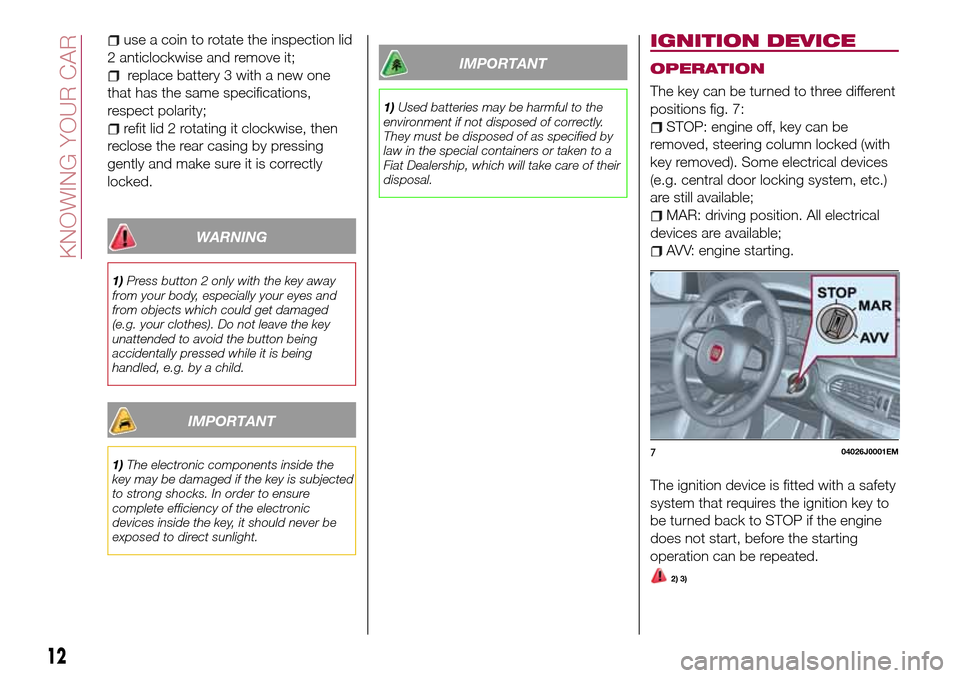
The key can be turned to three different
positions fig. 7:
STOP: engine off, key can be
removed, steering column locked (with
key removed). Some electrical devices
(e.g. central door locking system, etc.)
are still available;
MAR: driving position. All electrical
devices are available;
AVV: engine starting.
The ignition device is fitted with a safety
system that requires the ignition key to
be turned back to STOP if the engine
does not start, before the starting
operation can be repeated.
2) 3)
704026J0001EM
12
KNOWING YOUR CAR
Page 15 of 264
STEERING LOCK
Activation
When the key is in the STOP position,
remove the key and turn the steering
wheel until it locks.
IMPORTANT If the ignition key has been
moved from the MAR to the STOP
position, the steering lock cannot
engage until the key is removed from
the ignition device.
Deactivation
Move the steering wheel slightly and
turn the key to MAR.
4) 5) 6)
WARNING
2)If the ignition device has been tampered
with (e.g. an attempted theft), have it
checked by a Fiat Dealership before driving
again.
3)Always take the key with you when you
leave your vehicle to prevent someone
from accidentally operating the controls.
Remember to engage the parking brake.
Never leave children unattended in the
vehicle.
4)It is absolutely forbidden to carry out any
after-market operation involving steering
system or steering column modifications
(e.g. installation of anti-theft device) that
could adversely affect performance,
invalidate the warranty, cause serious
safety problems and also result in the car
not meeting type-approval requirements.5)Never extract the mechanical key while
the vehicle is moving. The steering wheel
will automatically lock as soon as it is
turned. This holds true for cars being
towed as well.
6)Before exiting the vehicle, ALWAYS
engage the parking brake, steer the
wheels, engage the first gear if uphill and
the reverse if downhill. If the vehicle is
parked on a steep slope, chock the wheels
with wedges or stones. When leaving the
vehicle, always lock all the doors by
pressing the button on the key.
FIAT CODE
The Fiat Code system prevents
unauthorised use of the vehicle,
disabling engine starting.
Operation
Each time the vehicle is started by
turning the ignition key to MAR, the Fiat
Code system control unit sends a
recognition code to the Powertrain
Control Module to deactivate the
immobiliser.
The code is sent only if the Fiat Code
system control unit has acknowledged
the code received from the key.
Each time the ignition key is turned to
STOP, the Fiat Code system
deactivates the functions of the
Powertrain Control Module.
Irregular operation
If, during starting, the key code is not
correctly recognised, the
symbol is
displayed on the instrument panel (see
the instructions in the "Warning lights
and messages" paragraph, "Knowing
the instrument panel" chapter). This
condition leads to the engine switching
off after 2 seconds. In this case, bring
the ignition device to STOP and then to
MAR; if it is still blocked, try with the
other keys provided. If it is still not
13
Page 34 of 264
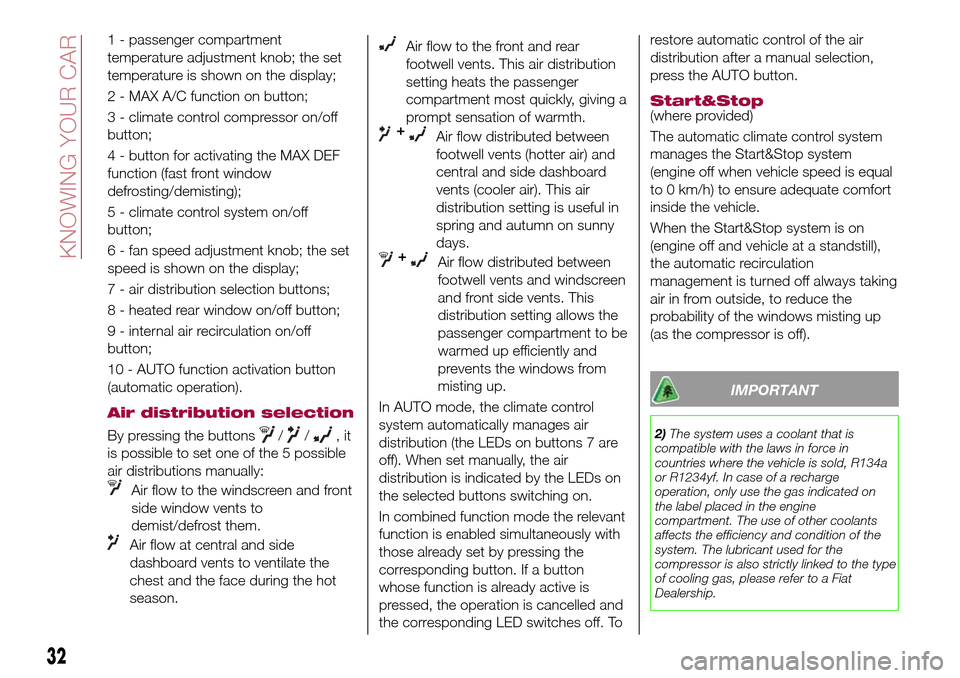
1 - passenger compartment
temperature adjustment knob; the set
temperature is shown on the display;
2 - MAX A/C function on button;
3 - climate control compressor on/off
button;
4 - button for activating the MAX DEF
function (fast front window
defrosting/demisting);
5 - climate control system on/off
button;
6 - fan speed adjustment knob; the set
speed is shown on the display;
7 - air distribution selection buttons;
8 - heated rear window on/off button;
9 - internal air recirculation on/off
button;
10 - AUTO function activation button
(automatic operation).
Air distribution selection
By pressing the buttons//,it
is possible to set one of the 5 possible
air distributions manually:
Air flow to the windscreen and front
side window vents to
demist/defrost them.
Air flow at central and side
dashboard vents to ventilate the
chest and the face during the hot
season.
Air flow to the front and rear
footwell vents. This air distribution
setting heats the passenger
compartment most quickly, giving a
prompt sensation of warmth.
+Air flow distributed between
footwell vents (hotter air) and
central and side dashboard
vents (cooler air). This air
distribution setting is useful in
spring and autumn on sunny
days.
+Air flow distributed between
footwell vents and windscreen
and front side vents. This
distribution setting allows the
passenger compartment to be
warmed up efficiently and
prevents the windows from
misting up.
In AUTO mode, the climate control
system automatically manages air
distribution (the LEDs on buttons 7 are
off). When set manually, the air
distribution is indicated by the LEDs on
the selected buttons switching on.
In combined function mode the relevant
function is enabled simultaneously with
those already set by pressing the
corresponding button. If a button
whose function is already active is
pressed, the operation is cancelled and
the corresponding LED switches off. Torestore automatic control of the air
distribution after a manual selection,
press the AUTO button.
Start&Stop(where provided)
The automatic climate control system
manages the Start&Stop system
(engine off when vehicle speed is equal
to 0 km/h) to ensure adequate comfort
inside the vehicle.
When the Start&Stop system is on
(engine off and vehicle at a standstill),
the automatic recirculation
management is turned off always taking
air in from outside, to reduce the
probability of the windows misting up
(as the compressor is off).
IMPORTANT
2)The system uses a coolant that is
compatible with the laws in force in
countries where the vehicle is sold, R134a
or R1234yf. In case of a recharge
operation, only use the gas indicated on
the label placed in the engine
compartment. The use of other coolants
affects the efficiency and condition of the
system. The lubricant used for the
compressor is also strictly linked to the type
of cooling gas, please refer to a Fiat
Dealership.
32
KNOWING YOUR CAR
Page 36 of 264
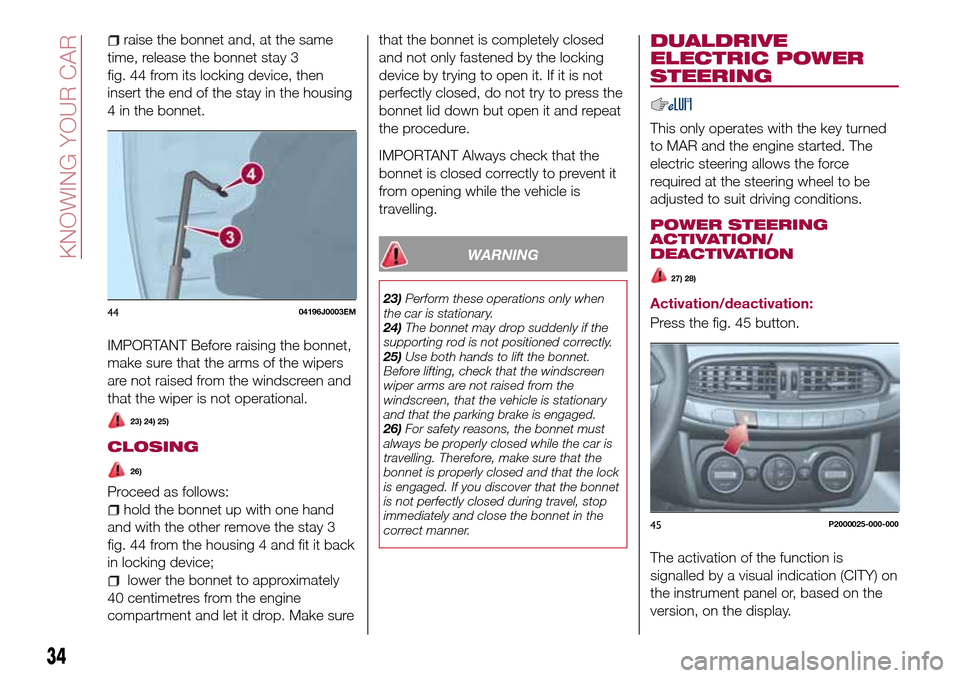
raise the bonnet and, at the same
time, release the bonnet stay 3
fig. 44 from its locking device, then
insert the end of the stay in the housing
4 in the bonnet.
IMPORTANT Before raising the bonnet,
make sure that the arms of the wipers
are not raised from the windscreen and
that the wiper is not operational.
23) 24) 25)
CLOSING
26)
Proceed as follows:
hold the bonnet up with one hand
and with the other remove the stay 3
fig. 44 from the housing 4 and fit it back
in locking device;
lower the bonnet to approximately
40 centimetres from the engine
compartment and let it drop. Make surethat the bonnet is completely closed
and not only fastened by the locking
device by trying to open it. If it is not
perfectly closed, do not try to press the
bonnet lid down but open it and repeat
the procedure.
IMPORTANT Always check that the
bonnet is closed correctly to prevent it
from opening while the vehicle is
travelling.
WARNING
23)Perform these operations only when
the car is stationary.
24)The bonnet may drop suddenly if the
supporting rod is not positioned correctly.
25)Use both hands to lift the bonnet.
Before lifting, check that the windscreen
wiper arms are not raised from the
windscreen, that the vehicle is stationary
and that the parking brake is engaged.
26)For safety reasons, the bonnet must
always be properly closed while the car is
travelling. Therefore, make sure that the
bonnet is properly closed and that the lock
is engaged. If you discover that the bonnet
is not perfectly closed during travel, stop
immediately and close the bonnet in the
correct manner.
DUALDRIVE
ELECTRIC POWER
STEERING
This only operates with the key turned
to MAR and the engine started. The
electric steering allows the force
required at the steering wheel to be
adjusted to suit driving conditions.
POWER STEERING
ACTIVATION/
DEACTIVATION
27) 28)
Activation/deactivation:
Press the fig. 45 button.
The activation of the function is
signalled by a visual indication (CITY) on
the instrument panel or, based on the
version, on the display.4404196J0003EM
45P2000025-000-000
34
KNOWING YOUR CAR
Page 112 of 264
PARKING THE
VEHICLE
When parking and leaving the car,
proceed as follows:
engage a gear (1stgear if facing
uphill or reverse if facing downhill) and
leave the wheels turned;
stop the engine and engage the
handbrake;
always remove the ignition key.
Block the wheels with a wedge or a
stone if the car is parked on a steep
slope.
IMPORTANT NEVER leave the vehicle
with the gearbox in neutral.
PARKING BRAKE
110) 111)
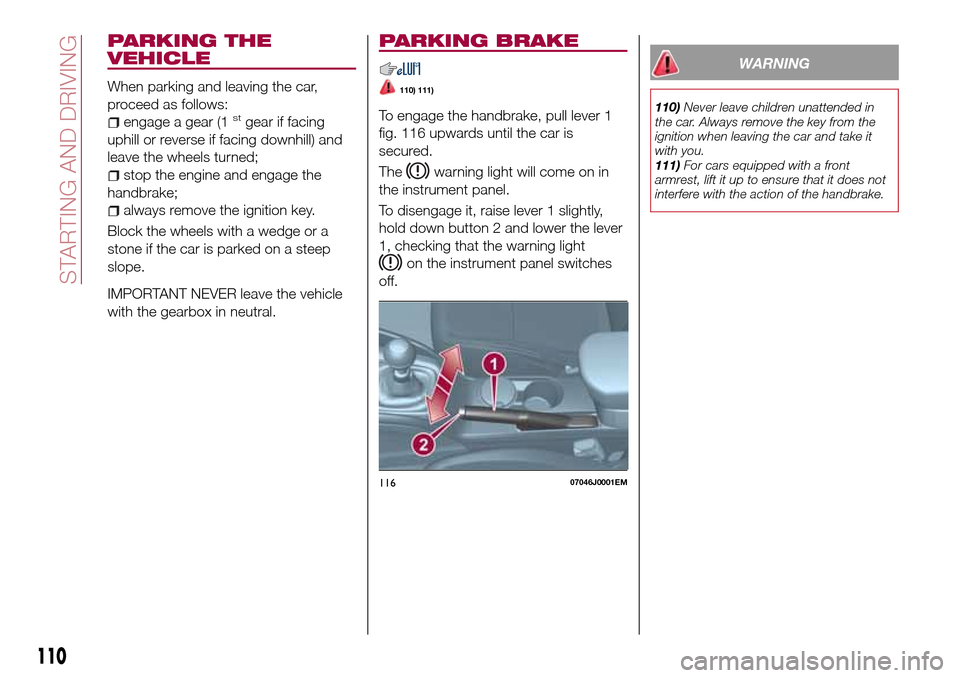
To engage the handbrake, pull lever 1
fig. 116 upwards until the car is
secured.
The
warning light will come on in
the instrument panel.
To disengage it, raise lever 1 slightly,
hold down button 2 and lower the lever
1, checking that the warning light
on the instrument panel switches
off.
WARNING
110)Never leave children unattended in
the car. Always remove the key from the
ignition when leaving the car and take it
with you.
111)For cars equipped with a front
armrest, lift it up to ensure that it does not
interfere with the action of the handbrake.
11607046J0001EM
110
STARTING AND DRIVING
Page 113 of 264
USING THE
TRANSMISSION
112)
41)
To engage the gears, press the clutch
pedal fully and put the gear lever into
the required position (the diagram for
gear engagement is shown on the knob
).
To engage 6
thgear (if present), operate
the lever by pressing it towards the right
in order to avoid engaging 4
thgear by
mistake. The same applies to the shift
from 6
thto 5thgear.
1.3 Multijet 95 HP versions:To
engage reverse gear R from neutral,
press the clutch pedal and
simultaneously move the lever to the
right and then backwards.1.4 95 HP versions: To engage
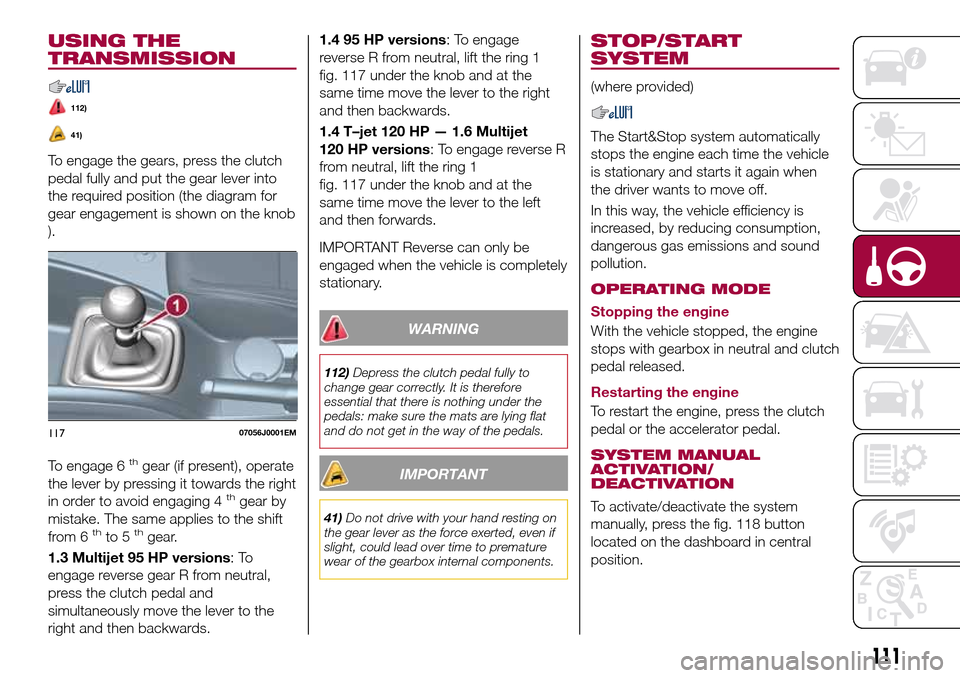
reverse R from neutral, lift the ring 1
fig. 117 under the knob and at the
same time move the lever to the right
and then backwards.
1.4 T–jet 120 HP — 1.6 Multijet
120 HP versions: To engage reverse R
from neutral, lift the ring 1
fig. 117 under the knob and at the
same time move the lever to the left
and then forwards.
IMPORTANT Reverse can only be
engaged when the vehicle is completely
stationary.
WARNING
112)Depress the clutch pedal fully to
change gear correctly. It is therefore
essential that there is nothing under the
pedals: make sure the mats are lying flat
and do not get in the way of the pedals.
IMPORTANT
41)Do not drive with your hand resting on
the gear lever as the force exerted, even if
slight, could lead over time to premature
wear of the gearbox internal components.
STOP/START
SYSTEM
(where provided)
The Start&Stop system automatically
stops the engine each time the vehicle
is stationary and starts it again when
the driver wants to move off.
In this way, the vehicle efficiency is
increased, by reducing consumption,
dangerous gas emissions and sound
pollution.
OPERATING MODE
Stopping the engine
With the vehicle stopped, the engine
stops with gearbox in neutral and clutch
pedal released.
Restarting the engine
To restart the engine, press the clutch
pedal or the accelerator pedal.
SYSTEM MANUAL
ACTIVATION/
DEACTIVATION
To activate/deactivate the system
manually, press the fig. 118 button
located on the dashboard in central
position.
11707056J0001EM
111
Page 115 of 264
WARNING
113)If the battery needs to be replaced,
always contact a Fiat Dealership. Replace
the battery with a new one of the same
type and specifications.
IMPORTANT
42)If the climate comfort is to be favoured,
the Start&Stop system can be deactivated,
for a continuous operation of the climate
control system.
SPEED LIMITER
DESCRIPTION
This device allows the speed of the
vehicle to be limited to values which
can be set by the driver.
The maximum speed can be set both
with vehicle stationary and in motion.
The minimum speed that can be set is
30 km/h.
When the device is active, the vehicle
speed depends on the pressure at the
accelerator pedal, until the
programmed speed limit is reached
(see "Speed limit programming"
paragraph).
ACTIVATING THE DEVICE
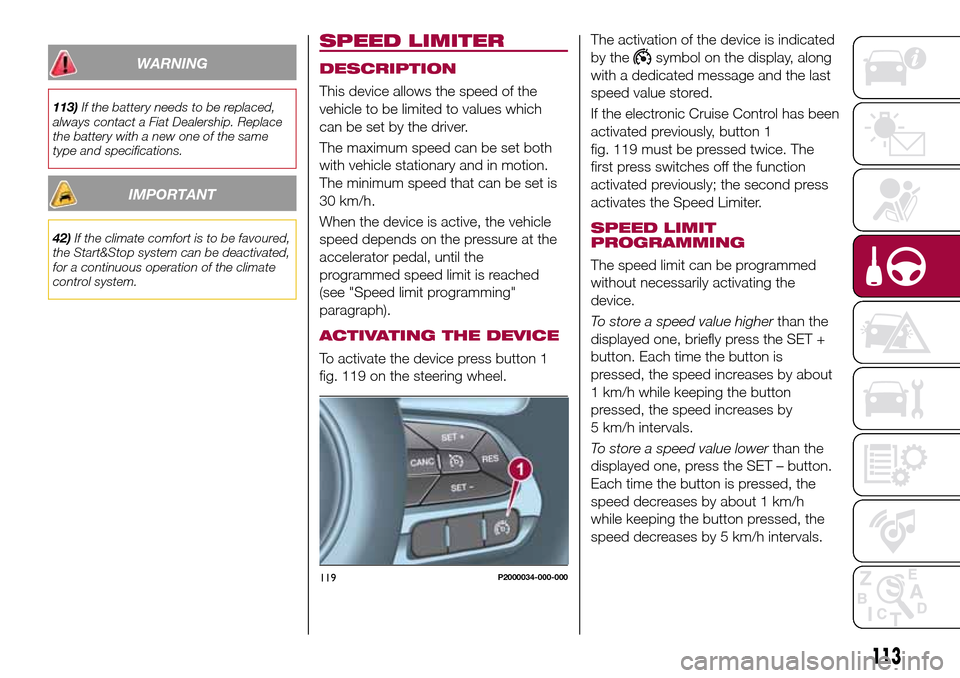
To activate the device press button 1
fig. 119 on the steering wheel.The activation of the device is indicated
by the
symbol on the display, along
with a dedicated message and the last
speed value stored.
If the electronic Cruise Control has been
activated previously, button 1
fig. 119 must be pressed twice. The
first press switches off the function
activated previously; the second press
activates the Speed Limiter.
SPEED LIMIT
PROGRAMMING
The speed limit can be programmed
without necessarily activating the
device.
To store a speed value higherthan the
displayed one, briefly press the SET +
button. Each time the button is
pressed, the speed increases by about
1 km/h while keeping the button
pressed, the speed increases by
5 km/h intervals.
To store a speed value lowerthan the
displayed one, press the SET – button.
Each time the button is pressed, the
speed decreases by about 1 km/h
while keeping the button pressed, the
speed decreases by 5 km/h intervals.
119P2000034-000-000
113
Page 122 of 264
new distance will be stored also after
the system is deactivated and
reactivated.
To decrease the distance
Press and release the
button to
decrease the distance setting.
The distance setting decreases by one
bar (shorter) every time the button is
pressed.
The set speed is held if there are no
vehicles ahead. Once the shortest
distance has been reached, a further
press of the button will set the longest
distance.
If a slower vehicle is detected in the
same lane, it will be shown on the
display in the “Driver Assist” area. The
device will automatically adjust the car’s
speed to maintain the set distance,
independently of the set speed.
The vehicle holds the set distance until:
the vehicle ahead accelerates to a
speed higher than the set speed;
the vehicle ahead leaves the lane or
the detection field of the Adaptive
Cruise Control device sensor;
the distance setting is changed;
the Adaptive Cruise Control device is
deactivated/cancelled.
IMPORTANT The maximum breaking
applied by the device is limited. The
driver may apply the brakes in all cases
if needed.
IMPORTANT If the device predicts that
the braking level is not sufficient to hold
the set distance, the driver is warned by
a message indicating that the vehicle
ahead is too close. An acoustic signal is
also emitted. In this case, it is advisable
to brake immediately as necessary to
hold a safe distance from the vehicle
ahead.
IMPORTANT The driver is responsible
for ensuring that there are no
pedestrians, other vehicles or
objectives along the direction of the
vehicle. Failure to comply with these
precautions may cause serious
accidents and injuries.
IMPORTANT The driver is fully
responsible for holding a safe distance
from the vehicle ahead respecting the
highway code in force in the respective
country.
DEACTIVATION
The device is deactivated and the set
speed is cancelled if:
thebutton is pressed on the
Adaptive Cruise Control;
thebutton is pressed on the
electronic Cruise Control;
the Speed Limiter button is pressed;
the ignition device is in the STOP
position.
The device is cancelled (the set speed
and distance are stored):
when the CANC button is pressed;
when the conditions shown in the
“Setting the desired speed” paragraph
occur;
when the vehicle speed drops under
the minimum set speed (e.g. in
presence of slow vehicles).
If these conditions occur while the
system is decelerating with respect to a
vehicle ahead, the system could
continue the deceleration, if necessary,
also after it is cancelled or deactivated
within the minimum speed settable on
the system.
SYSTEM LIMITED
OPERATION SIGNAL
If the dedicated message is shown on
the display, a condition limiting the
system operation may have occurred.
The possible cause of this limitation is a
failure.
When the conditions limiting the system
functions end, this will go back to
normal and complete operation. Should
the fault persist, contact a Fiat
Dealership.
120
STARTING AND DRIVING
Page 124 of 264
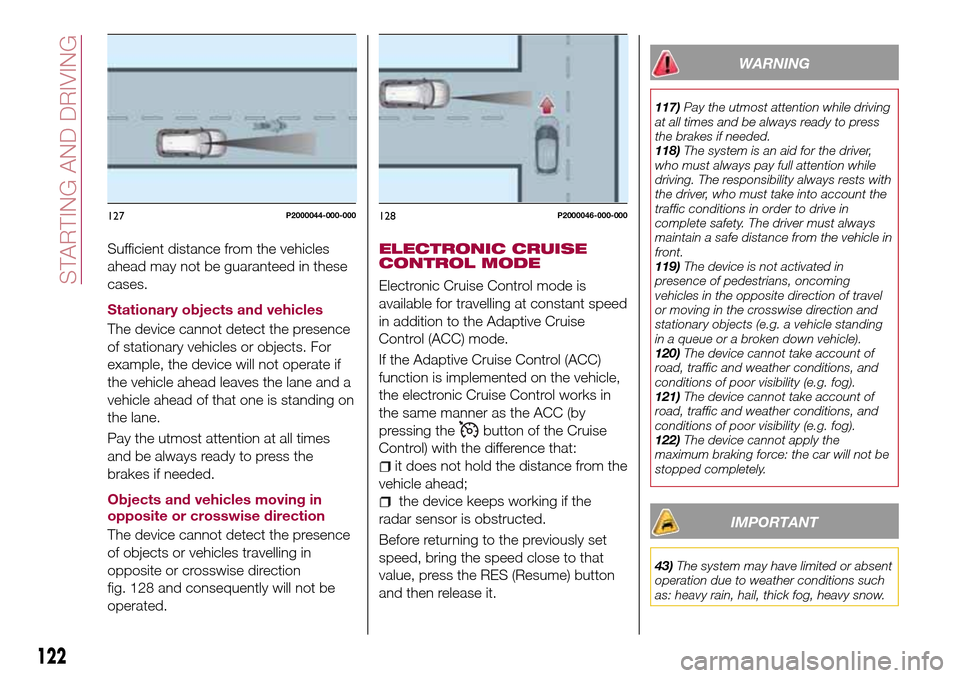
Sufficient distance from the vehicles
ahead may not be guaranteed in these
cases.
Stationary objects and vehicles
The device cannot detect the presence
of stationary vehicles or objects. For
example, the device will not operate if
the vehicle ahead leaves the lane and a
vehicle ahead of that one is standing on
the lane.
Pay the utmost attention at all times
and be always ready to press the
brakes if needed.
Objects and vehicles moving in
opposite or crosswise direction
The device cannot detect the presence
of objects or vehicles travelling in
opposite or crosswise direction
fig. 128 and consequently will not be
operated.ELECTRONIC CRUISE
CONTROL MODE
Electronic Cruise Control mode is
available for travelling at constant speed
in addition to the Adaptive Cruise
Control (ACC) mode.
If the Adaptive Cruise Control (ACC)
function is implemented on the vehicle,
the electronic Cruise Control works in
the same manner as the ACC (by
pressing the
button of the Cruise
Control) with the difference that:
it does not hold the distance from the
vehicle ahead;
the device keeps working if the
radar sensor is obstructed.
Before returning to the previously set
speed, bring the speed close to that
value, press the RES (Resume) button
and then release it.
WARNING
117)Pay the utmost attention while driving
at all times and be always ready to press
the brakes if needed.
118)The system is an aid for the driver,
who must always pay full attention while
driving. The responsibility always rests with
the driver, who must take into account the
traffic conditions in order to drive in
complete safety. The driver must always
maintain a safe distance from the vehicle in
front.
119)The device is not activated in
presence of pedestrians, oncoming
vehicles in the opposite direction of travel
or moving in the crosswise direction and
stationary objects (e.g. a vehicle standing
in a queue or a broken down vehicle).
120)The device cannot take account of
road, traffic and weather conditions, and
conditions of poor visibility (e.g. fog).
121)The device cannot take account of
road, traffic and weather conditions, and
conditions of poor visibility (e.g. fog).
122)The device cannot apply the
maximum braking force: the car will not be
stopped completely.
IMPORTANT
43)The system may have limited or absent
operation due to weather conditions such
as: heavy rain, hail, thick fog, heavy snow.
127P2000044-000-000128P2000046-000-000
122
STARTING AND DRIVING
Page 155 of 264
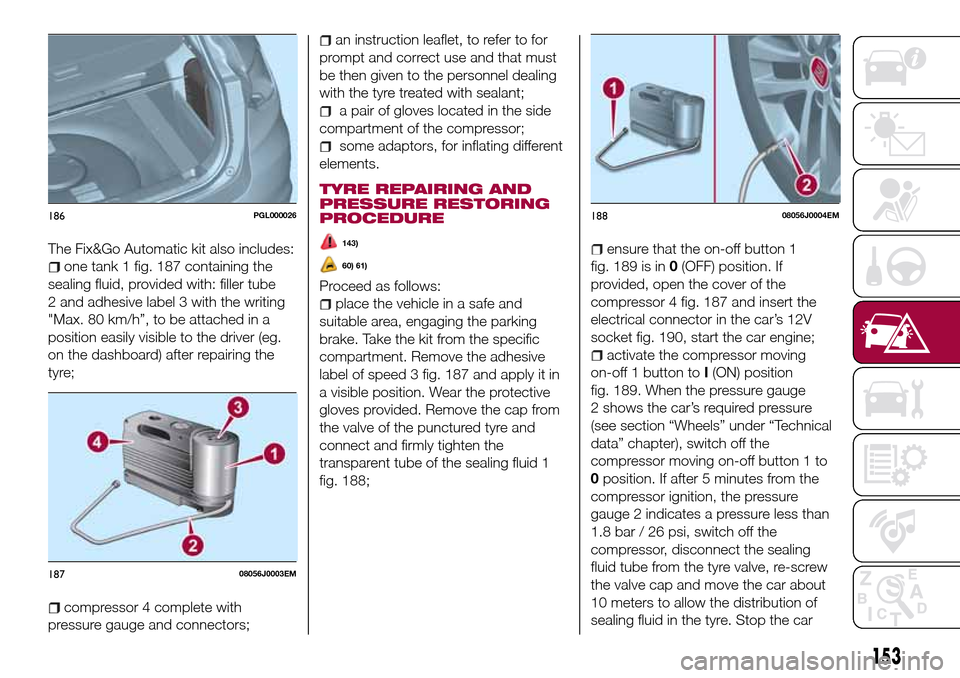
The Fix&Go Automatic kit also includes:
one tank 1 fig. 187 containing the
sealing fluid, provided with: filler tube
2 and adhesive label 3 with the writing
"Max. 80 km/h”, to be attached in a
position easily visible to the driver (eg.
on the dashboard) after repairing the
tyre;
compressor 4 complete with
pressure gauge and connectors;
an instruction leaflet, to refer to for
prompt and correct use and that must
be then given to the personnel dealing
with the tyre treated with sealant;
a pair of gloves located in the side
compartment of the compressor;
some adaptors, for inflating different
elements.
TYRE REPAIRING AND
PRESSURE RESTORING
PROCEDURE
143)
60) 61)
Proceed as follows:
place the vehicle in a safe and
suitable area, engaging the parking
brake. Take the kit from the specific
compartment. Remove the adhesive
label of speed 3 fig. 187 and apply it in
a visible position. Wear the protective
gloves provided. Remove the cap from
the valve of the punctured tyre and
connect and firmly tighten the
transparent tube of the sealing fluid 1
fig. 188;
ensure that the on-off button 1
fig. 189 is in0(OFF) position. If
provided, open the cover of the
compressor 4 fig. 187 and insert the
electrical connector in the car’s 12V
socket fig. 190, start the car engine;
activate the compressor moving
on-off 1 button toI(ON) position
fig. 189. When the pressure gauge
2 shows the car’s required pressure
(see section “Wheels” under “Technical
data” chapter), switch off the
compressor moving on-off button 1 to
0position. If after 5 minutes from the
compressor ignition, the pressure
gauge 2 indicates a pressure less than
1.8 bar / 26 psi, switch off the
compressor, disconnect the sealing
fluid tube from the tyre valve, re-screw
the valve cap and move the car about
10 meters to allow the distribution of
sealing fluid in the tyre. Stop the car
186PGL000026
18708056J0003EM
18808056J0004EM
153