USB FORD B MAX 2012 1.G User Guide
[x] Cancel search | Manufacturer: FORD, Model Year: 2012, Model line: B MAX, Model: FORD B MAX 2012 1.GPages: 256, PDF Size: 19.67 MB
Page 219 of 256
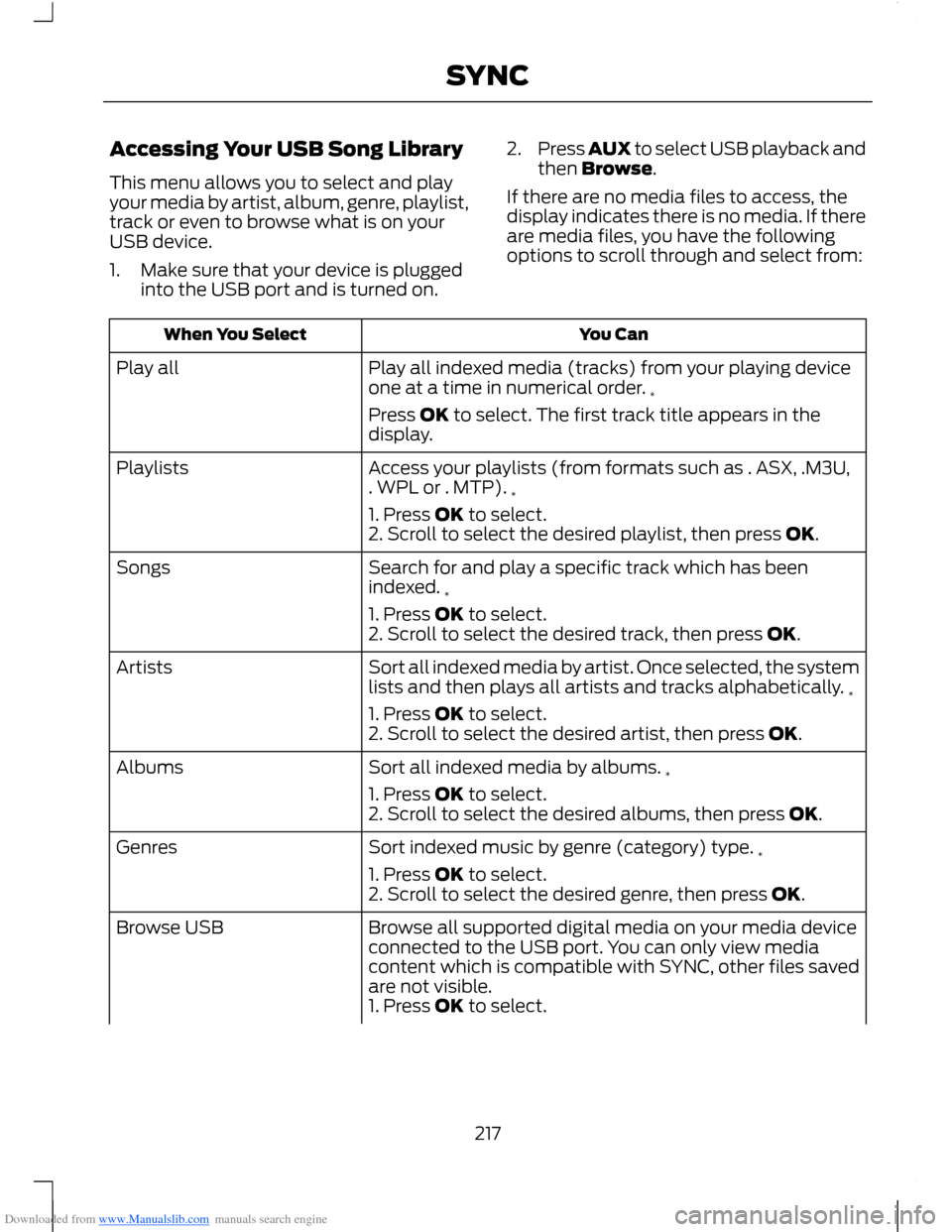
Downloaded from www.Manualslib.com manuals search engine Accessing Your USB Song Library
This menu allows you to select and playyour media by artist, album, genre, playlist,track or even to browse what is on yourUSB device.
1.Make sure that your device is pluggedinto the USB port and is turned on.
2.Press AUX to select USB playback andthen Browse.
If there are no media files to access, thedisplay indicates there is no media. If thereare media files, you have the followingoptions to scroll through and select from:
You CanWhen You Select
Play all indexed media (tracks) from your playing deviceone at a time in numerical order.*
Play all
Press OK to select. The first track title appears in thedisplay.
Access your playlists (from formats such as . ASX, .M3U,. WPL or . MTP).*
Playlists
1. Press OK to select.2. Scroll to select the desired playlist, then press OK.
Search for and play a specific track which has beenindexed.*
Songs
1. Press OK to select.2. Scroll to select the desired track, then press OK.
Sort all indexed media by artist. Once selected, the systemlists and then plays all artists and tracks alphabetically.*
Artists
1. Press OK to select.2. Scroll to select the desired artist, then press OK.
Sort all indexed media by albums.*Albums
1. Press OK to select.2. Scroll to select the desired albums, then press OK.
Sort indexed music by genre (category) type.*Genres
1. Press OK to select.2. Scroll to select the desired genre, then press OK.
Browse all supported digital media on your media deviceconnected to the USB port. You can only view mediacontent which is compatible with SYNC, other files savedare not visible.
Browse USB
1. Press OK to select.
217SYNC
Page 220 of 256
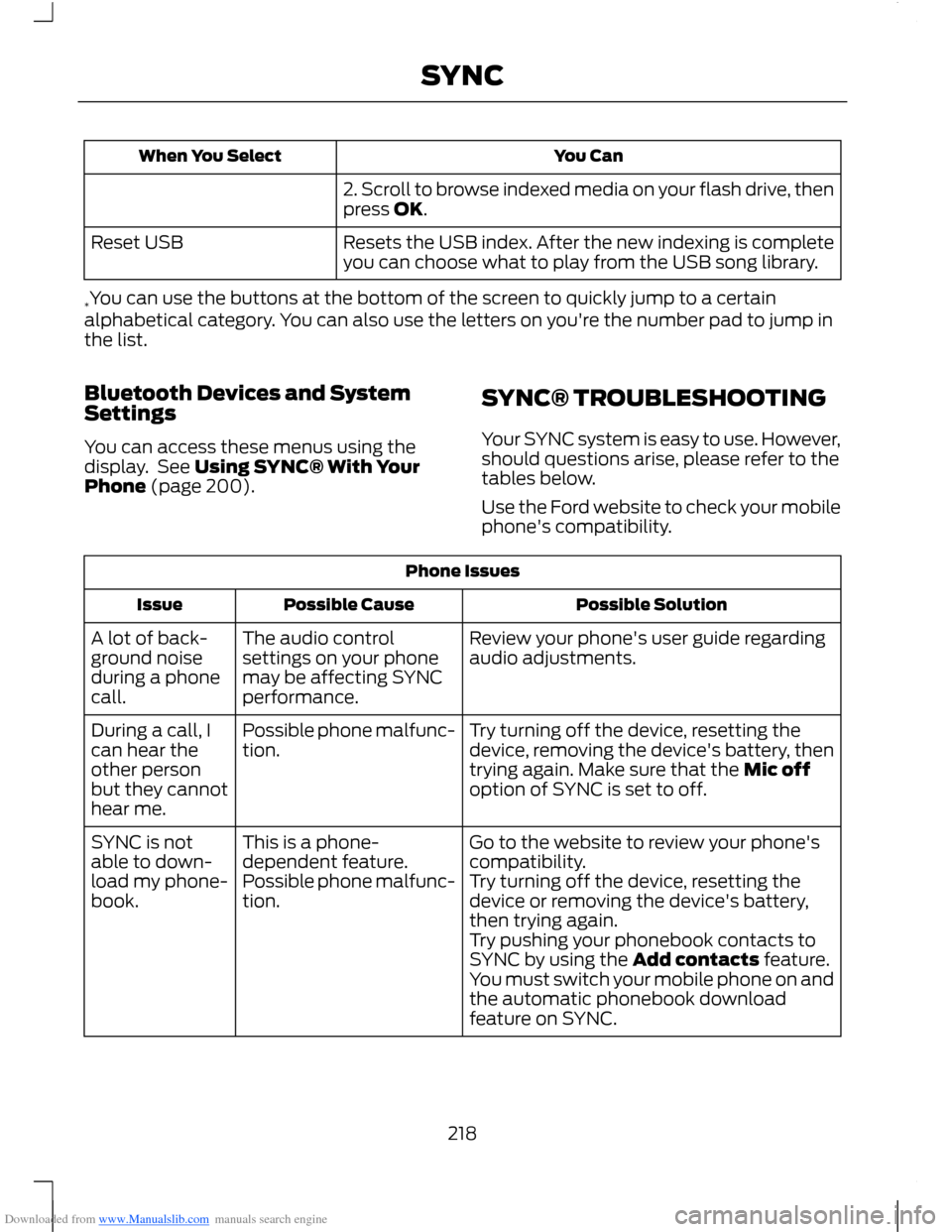
Downloaded from www.Manualslib.com manuals search engine You CanWhen You Select
2. Scroll to browse indexed media on your flash drive, thenpress OK.
Resets the USB index. After the new indexing is completeyou can choose what to play from the USB song library.Reset USB
*You can use the buttons at the bottom of the screen to quickly jump to a certainalphabetical category. You can also use the letters on you're the number pad to jump inthe list.
Bluetooth Devices and SystemSettings
You can access these menus using thedisplay. See Using SYNC® With YourPhone (page 200).
SYNC® TROUBLESHOOTING
Your SYNC system is easy to use. However,should questions arise, please refer to thetables below.
Use the Ford website to check your mobilephone's compatibility.
Phone Issues
Possible SolutionPossible CauseIssue
Review your phone's user guide regardingaudio adjustments.The audio controlsettings on your phonemay be affecting SYNCperformance.
A lot of back-ground noiseduring a phonecall.
Try turning off the device, resetting thedevice, removing the device's battery, thentrying again. Make sure that the Mic offoption of SYNC is set to off.
Possible phone malfunc-tion.During a call, Ican hear theother personbut they cannothear me.
Go to the website to review your phone'scompatibility.This is a phone-dependent feature.SYNC is notable to down-load my phone-book.Try turning off the device, resetting thedevice or removing the device's battery,then trying again.
Possible phone malfunc-tion.
Try pushing your phonebook contacts toSYNC by using the Add contacts feature.You must switch your mobile phone on andthe automatic phonebook downloadfeature on SYNC.
218SYNC
Page 222 of 256
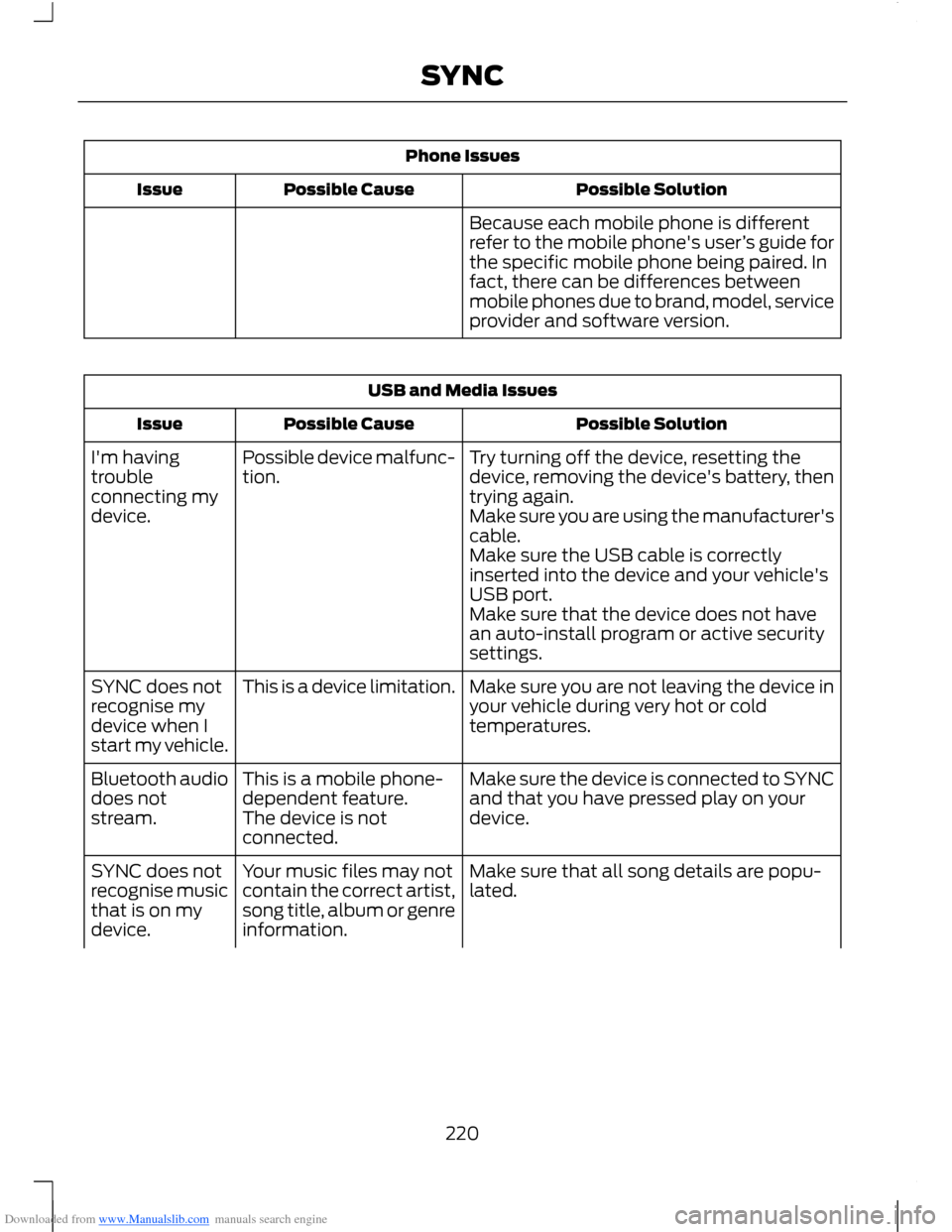
Downloaded from www.Manualslib.com manuals search engine Phone Issues
Possible SolutionPossible CauseIssue
Because each mobile phone is differentrefer to the mobile phone's user’s guide forthe specific mobile phone being paired. Infact, there can be differences betweenmobile phones due to brand, model, serviceprovider and software version.
USB and Media Issues
Possible SolutionPossible CauseIssue
Try turning off the device, resetting thedevice, removing the device's battery, thentrying again.
Possible device malfunc-tion.I'm havingtroubleconnecting mydevice.Make sure you are using the manufacturer'scable.Make sure the USB cable is correctlyinserted into the device and your vehicle'sUSB port.Make sure that the device does not havean auto-install program or active securitysettings.
Make sure you are not leaving the device inyour vehicle during very hot or coldtemperatures.
This is a device limitation.SYNC does notrecognise mydevice when Istart my vehicle.
Make sure the device is connected to SYNCand that you have pressed play on yourdevice.
This is a mobile phone-dependent feature.The device is notconnected.
Bluetooth audiodoes notstream.
Make sure that all song details are popu-lated.Your music files may notcontain the correct artist,song title, album or genreinformation.
SYNC does notrecognise musicthat is on mydevice.
220SYNC
Page 223 of 256
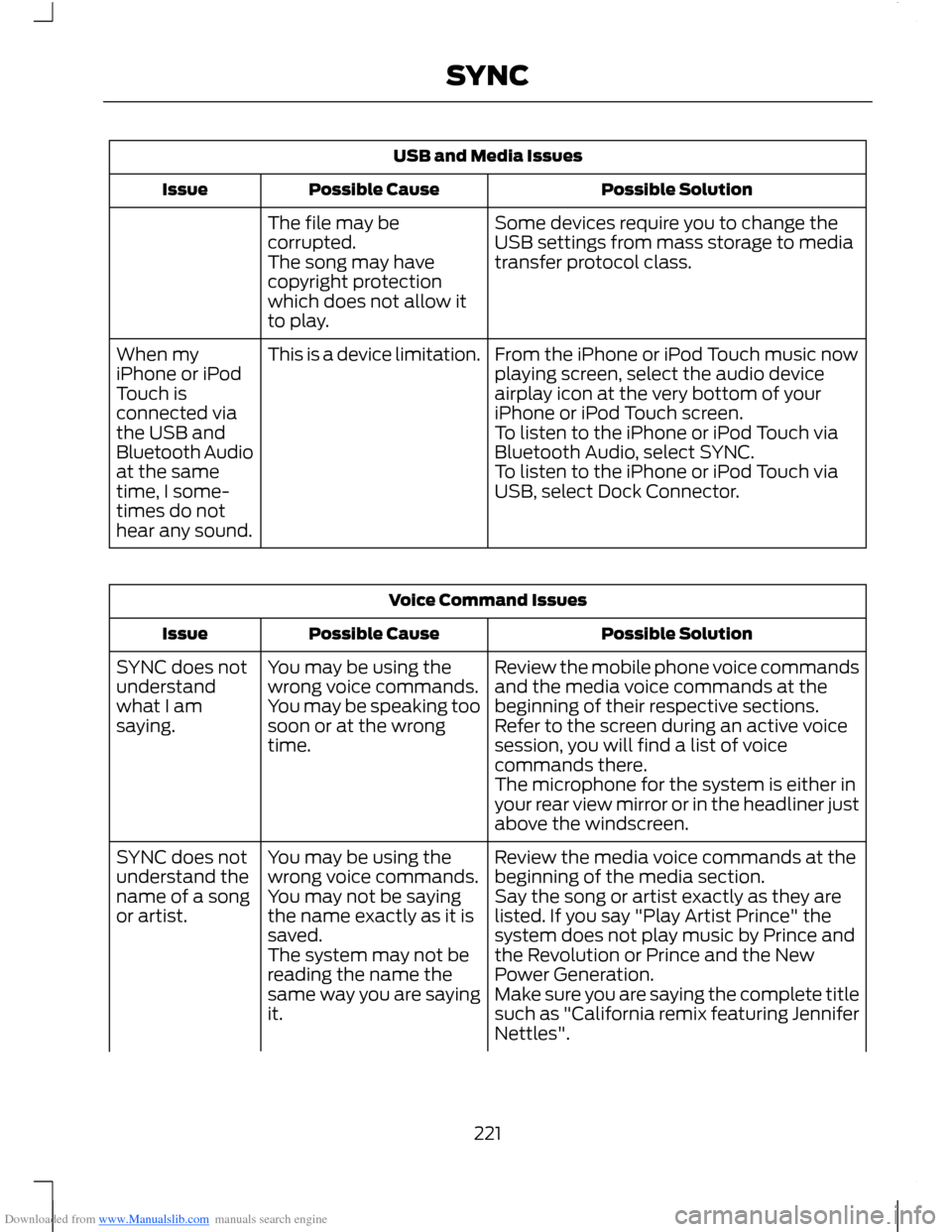
Downloaded from www.Manualslib.com manuals search engine USB and Media Issues
Possible SolutionPossible CauseIssue
Some devices require you to change theUSB settings from mass storage to mediatransfer protocol class.
The file may becorrupted.The song may havecopyright protectionwhich does not allow itto play.
From the iPhone or iPod Touch music nowplaying screen, select the audio deviceairplay icon at the very bottom of youriPhone or iPod Touch screen.
This is a device limitation.When myiPhone or iPodTouch isconnected viathe USB andBluetooth Audioat the sametime, I some-times do nothear any sound.
To listen to the iPhone or iPod Touch viaBluetooth Audio, select SYNC.To listen to the iPhone or iPod Touch viaUSB, select Dock Connector.
Voice Command Issues
Possible SolutionPossible CauseIssue
Review the mobile phone voice commandsand the media voice commands at thebeginning of their respective sections.
You may be using thewrong voice commands.You may be speaking toosoon or at the wrongtime.
SYNC does notunderstandwhat I amsaying.Refer to the screen during an active voicesession, you will find a list of voicecommands there.The microphone for the system is either inyour rear view mirror or in the headliner justabove the windscreen.
Review the media voice commands at thebeginning of the media section.You may be using thewrong voice commands.SYNC does notunderstand thename of a songor artist.Say the song or artist exactly as they arelisted. If you say "Play Artist Prince" thesystem does not play music by Prince andthe Revolution or Prince and the NewPower Generation.
You may not be sayingthe name exactly as it issaved.The system may not bereading the name thesame way you are sayingit.Make sure you are saying the complete titlesuch as "California remix featuring JenniferNettles".
221SYNC
Page 225 of 256
Downloaded from www.Manualslib.com manuals search engine Voice Command Issues
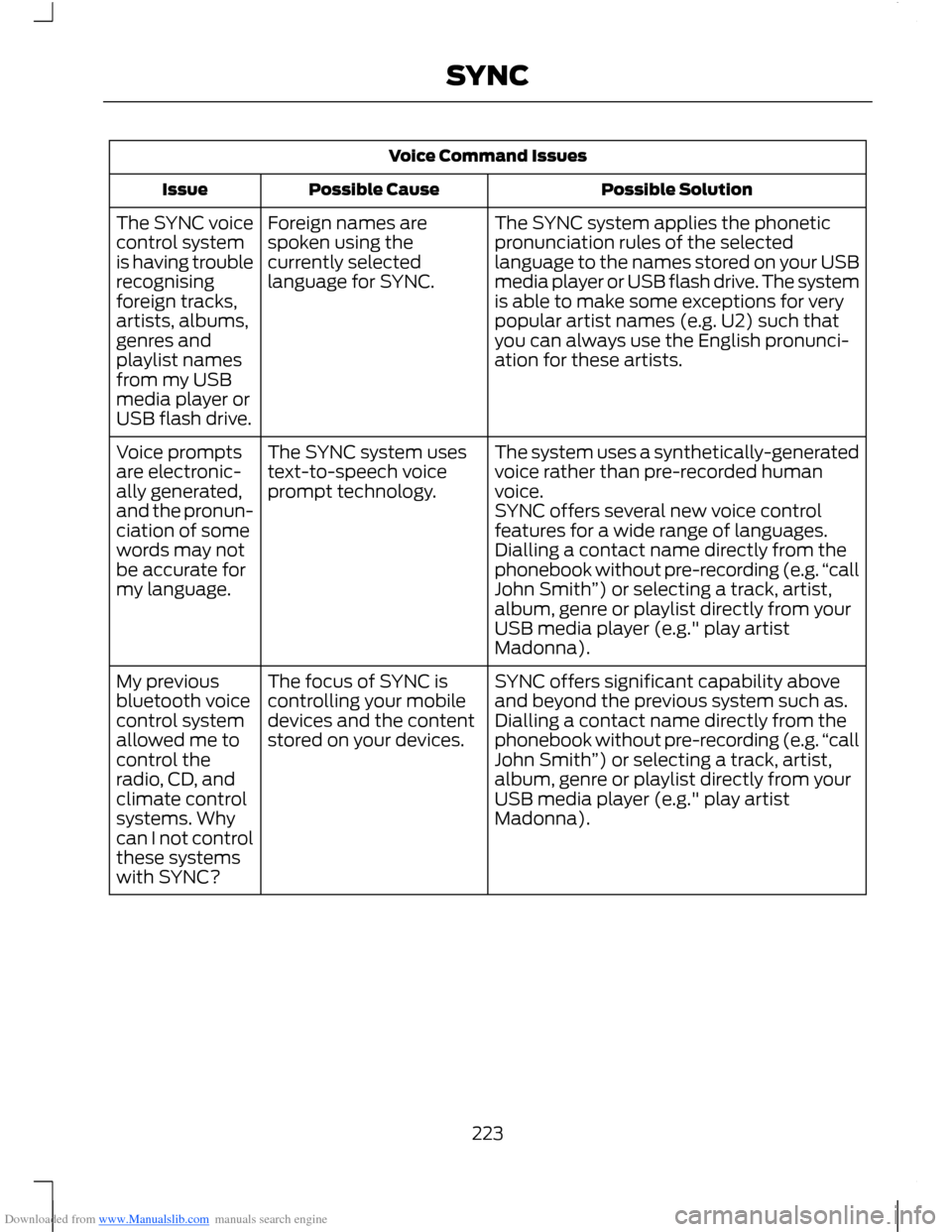
Possible SolutionPossible CauseIssue
The SYNC system applies the phoneticpronunciation rules of the selectedlanguage to the names stored on your USBmedia player or USB flash drive. The systemis able to make some exceptions for verypopular artist names (e.g. U2) such thatyou can always use the English pronunci-ation for these artists.
Foreign names arespoken using thecurrently selectedlanguage for SYNC.
The SYNC voicecontrol systemis having troublerecognisingforeign tracks,artists, albums,genres andplaylist namesfrom my USBmedia player orUSB flash drive.
The system uses a synthetically-generatedvoice rather than pre-recorded humanvoice.
The SYNC system usestext-to-speech voiceprompt technology.
Voice promptsare electronic-ally generated,and the pronun-ciation of somewords may notbe accurate formy language.
SYNC offers several new voice controlfeatures for a wide range of languages.Dialling a contact name directly from thephonebook without pre-recording (e.g.“callJohn Smith”) or selecting a track, artist,album, genre or playlist directly from yourUSB media player (e.g." play artistMadonna).
SYNC offers significant capability aboveand beyond the previous system such as.The focus of SYNC iscontrolling your mobiledevices and the contentstored on your devices.
My previousbluetooth voicecontrol systemallowed me tocontrol theradio, CD, andclimate controlsystems. Whycan I not controlthese systemswith SYNC?
Dialling a contact name directly from thephonebook without pre-recording (e.g.“callJohn Smith”) or selecting a track, artist,album, genre or playlist directly from yourUSB media player (e.g." play artistMadonna).
223SYNC
Page 226 of 256
Downloaded from www.Manualslib.com manuals search engine General
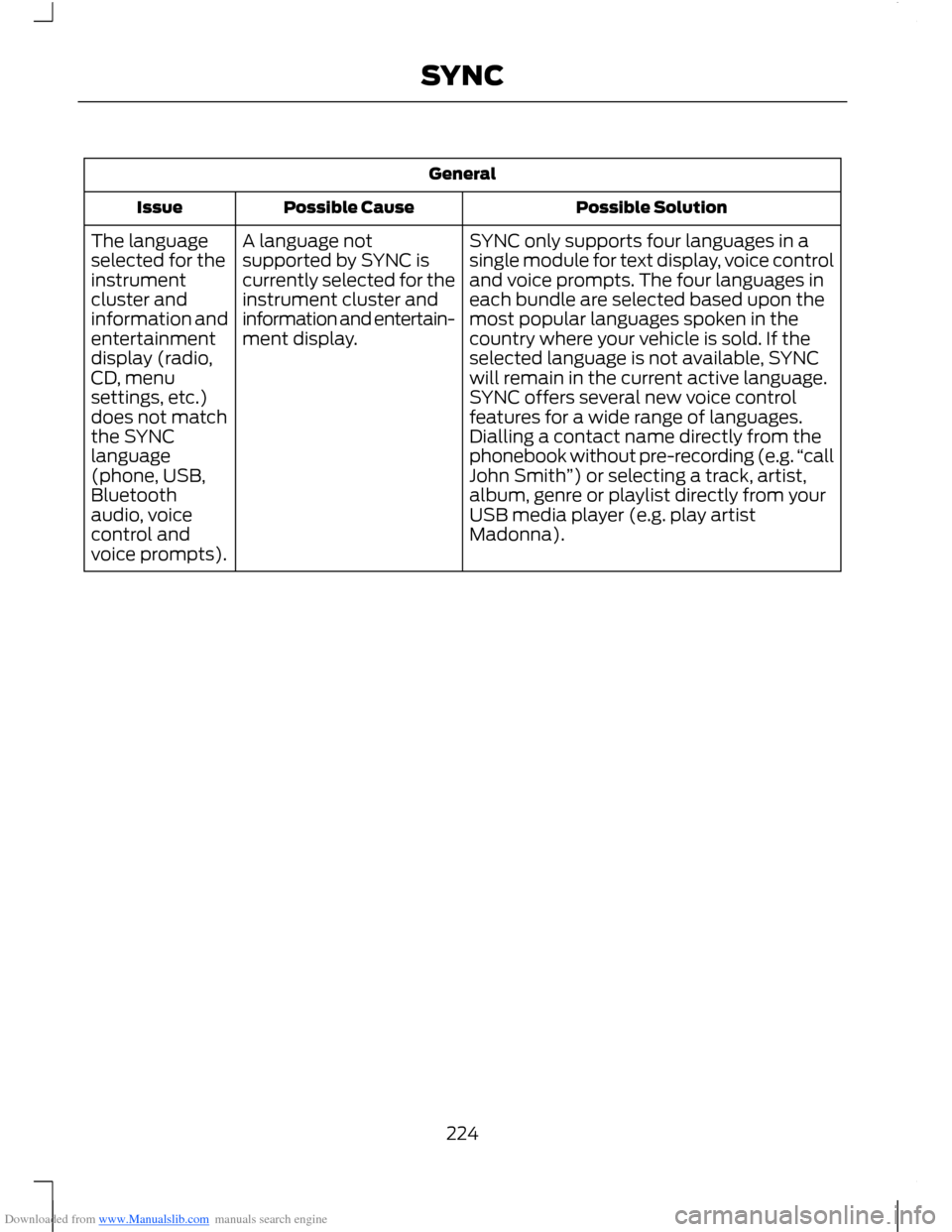
Possible SolutionPossible CauseIssue
SYNC only supports four languages in asingle module for text display, voice controland voice prompts. The four languages ineach bundle are selected based upon themost popular languages spoken in thecountry where your vehicle is sold. If theselected language is not available, SYNCwill remain in the current active language.
A language notsupported by SYNC iscurrently selected for theinstrument cluster andinformation and entertain-ment display.
The languageselected for theinstrumentcluster andinformation andentertainmentdisplay (radio,CD, menuSYNC offers several new voice controlfeatures for a wide range of languages.Dialling a contact name directly from thephonebook without pre-recording (e.g.“callJohn Smith”) or selecting a track, artist,album, genre or playlist directly from yourUSB media player (e.g. play artistMadonna).
settings, etc.)does not matchthe SYNClanguage(phone, USB,Bluetoothaudio, voicecontrol andvoice prompts).
224SYNC
Page 252 of 256
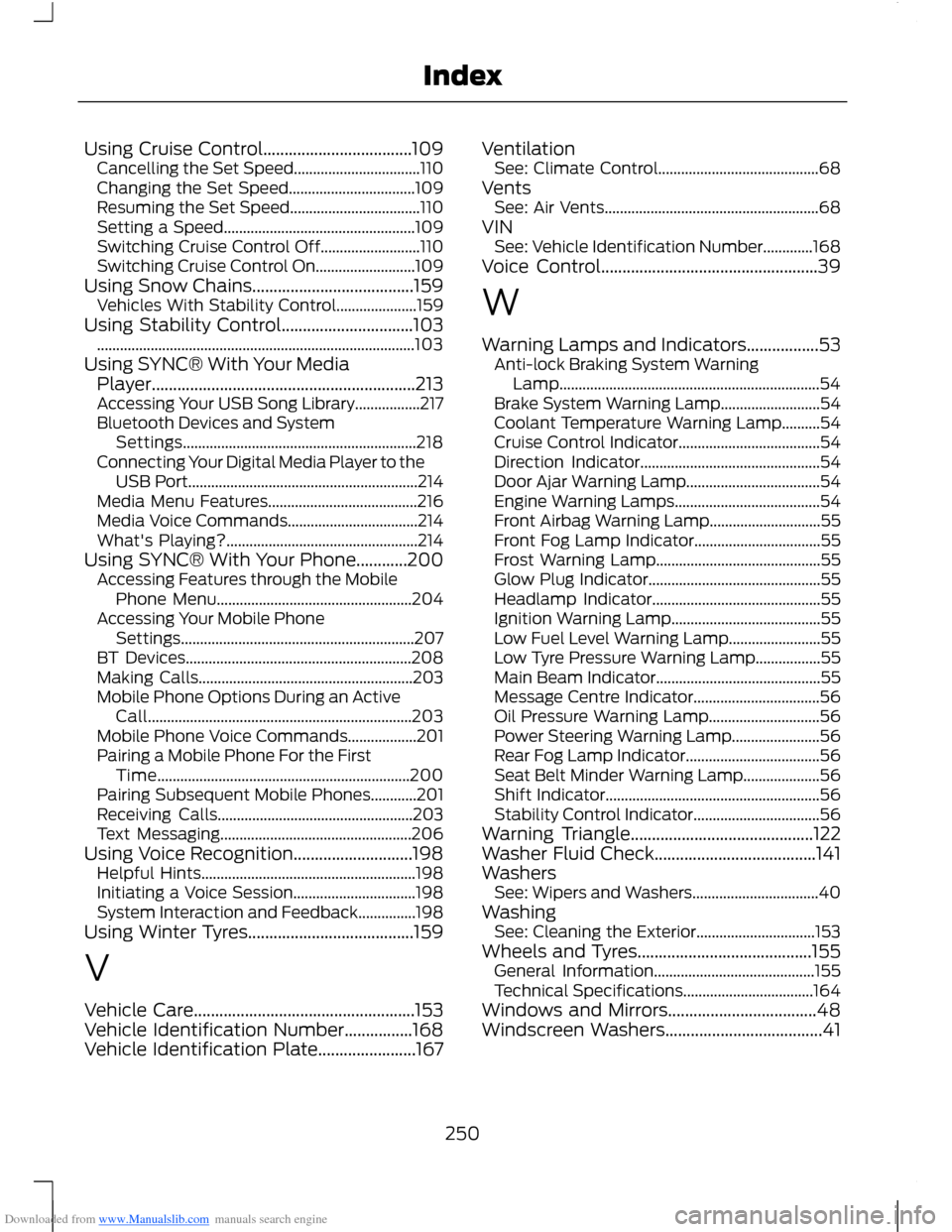
Downloaded from www.Manualslib.com manuals search engine Using Cruise Control...................................109Cancelling the Set Speed.................................110Changing the Set Speed.................................109Resuming the Set Speed..................................110Setting a Speed..................................................109Switching Cruise Control Off..........................110Switching Cruise Control On..........................109Using Snow Chains......................................159Vehicles With Stability Control.....................159Using Stability Control...............................103...................................................................................103Using SYNC® With Your MediaPlayer..............................................................213Accessing Your USB Song Library.................217Bluetooth Devices and SystemSettings.............................................................218Connecting Your Digital Media Player to theUSB Port............................................................214Media Menu Features.......................................216Media Voice Commands..................................214What's Playing?..................................................214Using SYNC® With Your Phone............200Accessing Features through the MobilePhone Menu...................................................204Accessing Your Mobile PhoneSettings.............................................................207BT Devices...........................................................208Making Calls........................................................203Mobile Phone Options During an ActiveCall.....................................................................203Mobile Phone Voice Commands..................201Pairing a Mobile Phone For the FirstTime..................................................................200Pairing Subsequent Mobile Phones............201Receiving Calls...................................................203Text Messaging..................................................206Using Voice Recognition............................198Helpful Hints........................................................198Initiating a Voice Session................................198System Interaction and Feedback...............198Using Winter Tyres.......................................159
V
Vehicle Care....................................................153Vehicle Identification Number................168Vehicle Identification Plate.......................167
VentilationSee: Climate Control..........................................68VentsSee: Air Vents........................................................68VINSee: Vehicle Identification Number.............168Voice Control...................................................39
W
Warning Lamps and Indicators.................53Anti-lock Braking System WarningLamp....................................................................54Brake System Warning Lamp..........................54Coolant Temperature Warning Lamp..........54Cruise Control Indicator.....................................54Direction Indicator...............................................54Door Ajar Warning Lamp...................................54Engine Warning Lamps......................................54Front Airbag Warning Lamp.............................55Front Fog Lamp Indicator.................................55Frost Warning Lamp...........................................55Glow Plug Indicator.............................................55Headlamp Indicator............................................55Ignition Warning Lamp.......................................55Low Fuel Level Warning Lamp........................55Low Tyre Pressure Warning Lamp.................55Main Beam Indicator...........................................55Message Centre Indicator.................................56Oil Pressure Warning Lamp.............................56Power Steering Warning Lamp.......................56Rear Fog Lamp Indicator...................................56Seat Belt Minder Warning Lamp....................56Shift Indicator........................................................56Stability Control Indicator.................................56Warning Triangle...........................................122Washer Fluid Check......................................141WashersSee: Wipers and Washers.................................40WashingSee: Cleaning the Exterior...............................153Wheels and Tyres.........................................155General Information..........................................155Technical Specifications..................................164Windows and Mirrors...................................48Windscreen Washers.....................................41
250Index