automatic transmission FORD B MAX 2012 1.G User Guide
[x] Cancel search | Manufacturer: FORD, Model Year: 2012, Model line: B MAX, Model: FORD B MAX 2012 1.GPages: 256, PDF Size: 19.67 MB
Page 92 of 256
Downloaded from www.Manualslib.com manuals search engine To Re-Start the Engine
Note:The transmission selector lever mustbe in neutral.
Depress the clutch pedal.
The system may automatically restart theengine under certain conditions, forexample:
•Low battery voltage.
•To maintain the interior climate.
90Unique Driving Characteristics
Page 99 of 256
Downloaded from www.Manualslib.com manuals search engine MANUAL TRANSMISSION
Selecting Reverse Gear
Do not engage reverse gear when yourvehicle is moving. This can cause damageto the transmission.
AUTOMATIC TRANSMISSION
WARNING
Always set the parking brake fullyand make sure you move thetransmission selector lever toposition P. Switch the ignition off andremove the key whenever you leave yourvehicle.
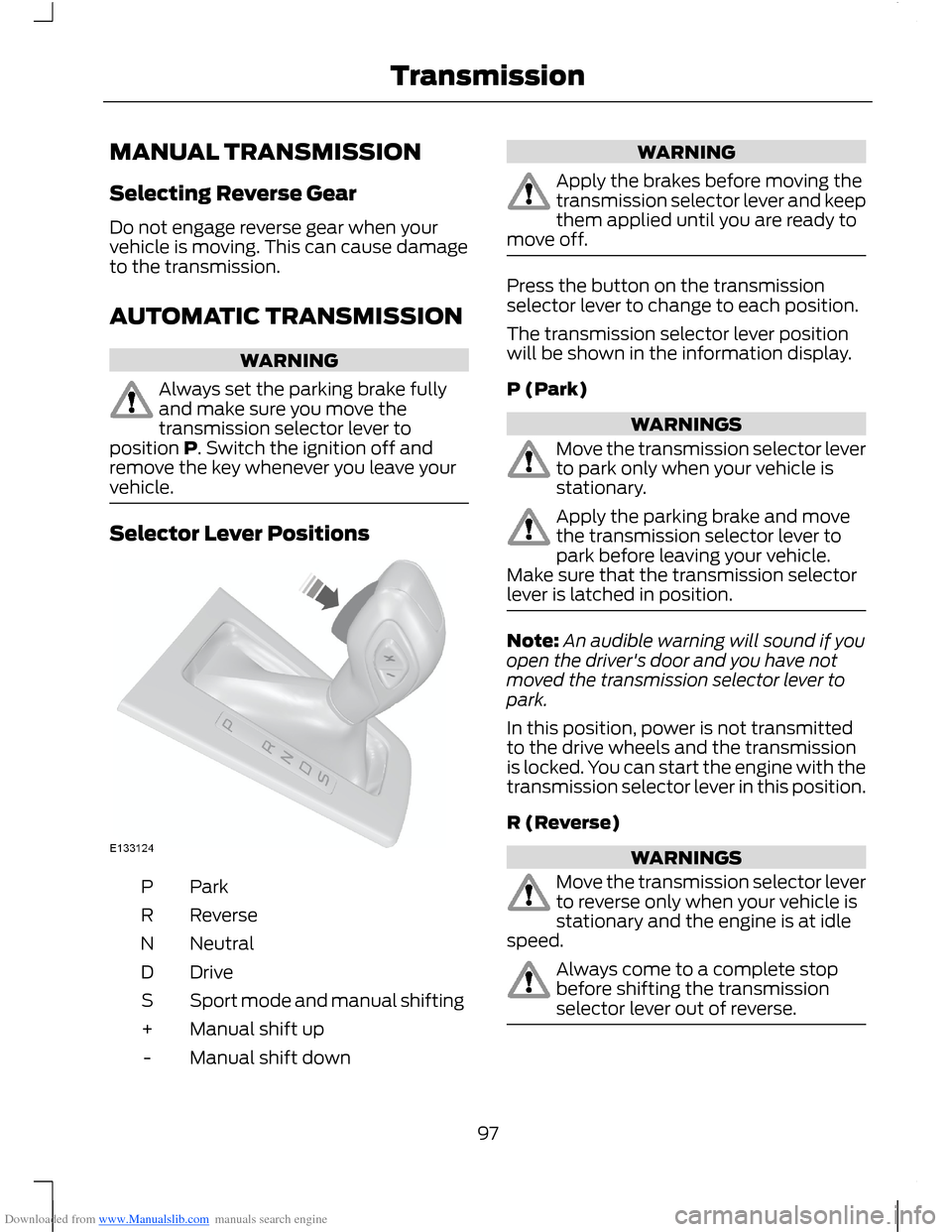
Selector Lever Positions
ParkP
ReverseR
NeutralN
DriveD
Sport mode and manual shiftingS
Manual shift up+
Manual shift down-
WARNING
Apply the brakes before moving thetransmission selector lever and keepthem applied until you are ready tomove off.
Press the button on the transmissionselector lever to change to each position.
The transmission selector lever positionwill be shown in the information display.
P (Park)
WARNINGS
Move the transmission selector leverto park only when your vehicle isstationary.
Apply the parking brake and movethe transmission selector lever topark before leaving your vehicle.Make sure that the transmission selectorlever is latched in position.
Note:An audible warning will sound if youopen the driver's door and you have notmoved the transmission selector lever topark.
In this position, power is not transmittedto the drive wheels and the transmissionis locked. You can start the engine with thetransmission selector lever in this position.
R (Reverse)
WARNINGS
Move the transmission selector leverto reverse only when your vehicle isstationary and the engine is at idlespeed.
Always come to a complete stopbefore shifting the transmissionselector lever out of reverse.
97Transmission
Page 100 of 256
Downloaded from www.Manualslib.com manuals search engine Move the transmission selector lever toreverse to allow your vehicle to movebackward.
N (Neutral)
In this position, power is not transmittedto the drive wheels but the transmission isnot locked. You can start the engine withthe transmission selector lever in thisposition.
D (Drive)
Note:A shift will occur only when yourvehicle speed and the engine speed areappropriate.
Note:You may temporarily override thecurrent gear selected using the + and -buttons.
Select drive to shift automatically throughthe forward gears.
The transmission will select theappropriate gear for optimum performancebased on ambient temperature, roadgradient, vehicle load and your input.
Sport Mode and Manual Shifting
Sport Mode
Note:In sport mode the transmissionoperates as normal but gears are selectedmore quickly and at higher engine speeds.
Note:In sport mode S will be shown in theinformation display.
Switch on sport mode by moving thetransmission selector lever to position S.Sport mode will remain on until either youshift manually up or down the gears using+ and - or move the transmission selectorlever to position D.
Manual Shifting
WARNINGS
Do not hold the buttons permanentlyin - or +.
WARNINGS
The transmission will automaticallydownshift when the engine speed istoo low.
Press the - button to shift down and pressthe + button to shift up.
Gears may be skipped by pressing thebuttons repeatedly at short intervals.
Manual mode also provides a kickdownfunction. See Kickdown.
Hints on Driving With anAutomatic Transmission
WARNING
Do not idle the engine for longperiods of time in drive with thebrakes applied.
Moving Off
1.Release the parking brake.
2.Release the brake pedal and press theaccelerator pedal.
Stopping
1.Release the accelerator pedal andpress the brake pedal.
2.Apply the parking brake.
3.Move the transmission selector leverto N or P.
Kickdown
Press the accelerator pedal fully with thetransmission selector lever in the driveposition to select the next lowest gear foroptimum performance. Release theaccelerator pedal when you no longerrequire kickdown.
98Transmission
Page 102 of 256
Downloaded from www.Manualslib.com manuals search engine WARNINGS
If the engine is revved excessively, orif a malfunction is detected, thesystem will be deactivated.
The system makes it easier to pull awaywhen your vehicle is on a slope without theneed to use the parking brake.
When the system is active, your vehicle willremain stationary on the slope for two tothree seconds after you release the brakepedal. This allows you time to move yourfoot from the brake to the acceleratorpedal. The brakes are releasedautomatically once the engine hasdeveloped sufficient drive to prevent yourvehicle from rolling down the slope. Thisis an advantage when pulling away on aslope, (for example from a car park ramp,traffic lights or when reversing uphill intoa parking space).
The system will activate automatically onany slope which can result in significantvehicle rollback.
Using Hill Start Assist
1.Press the brake pedal to bring yourvehicle to a complete standstill. Keepthe brake pedal pressed.
2.If the sensors detect that your vehicleis on a slope, the system will beactivated automatically.
3.When you remove your foot from thebrake pedal, your vehicle will remainon the slope without rolling away forapproximately two or three seconds.This hold time will automatically beextended if you are in the process ofdriving off.
4.Drive off in the normal manner. Thebrakes will be released automatically.
Switching the System On and Off
Note:The system can only be switched onand off for manual transmissions.
Note:Once you have switched off thesystem, it will remain off until you switch iton again.
Your vehicle comes with the systemalready enabled. If desired, you can disablethe feature: See General Information(page 58).
100Transmission
Page 103 of 256
Downloaded from www.Manualslib.com manuals search engine GENERAL INFORMATION
WARNING
The system does not relieve you ofyour responsibility to drive with duecare and attention.
Note:Occasional brake noise is normal. Ifa metal-to-metal, continuous grinding orcontinuous squeal sound is present, thebrake linings may be worn-out. If the vehiclehas continuous vibration or shudder in thesteering wheel while braking, have yourvehicle checked by an authorised dealer.
Note:Brake dust may accumulate on thewheels, even under normal drivingconditions. Some dust is inevitable as thebrakes wear. See Cleaning the AlloyWheels (page 154).
Wet brakes result in reduced brakingefficiency. Gently press the brake pedal afew times when driving from a car wash orstanding water to dry the brakes.
Emergency Brake Assist
Emergency brake assist detects when youbrake heavily by measuring the rate atwhich you press the brake pedal. Itprovides maximum braking efficiency aslong as you press the pedal. Emergencybrake assist can reduce stopping distancesin critical situations.
Anti-lock Brake System
This system helps you maintain steeringcontrol and vehicle stability duringemergency stops by keeping the brakesfrom locking.
HINTS ON DRIVING WITH
ANTI-LOCK BRAKES
Note:When the system is operating, thebrake pedal will pulse and may travelfurther. Maintain pressure on the brakepedal. You may also hear a noise from thesystem. This is normal.
The ABS will not eliminate the risks when:
•you drive too closely to the vehicle infront of you
•your vehicle is aquaplaning
•you take corners too fast
•the road surface is poor.
PARKING BRAKE
Vehicles With AutomaticTransmission
WARNING
Always set the parking brake fullyand leave your vehicle with thetransmission selector lever inposition P.
Note:If you park your vehicle on a hill andfacing uphill move the transmission selectorlever to position P and turn the steeringwheel away from the kerb.
Note:If you park your vehicle on a hill andfacing downhill move the transmissionselector lever to position P and turn thesteering wheel toward the kerb.
Vehicles With ManualTransmission
Note:If you park your vehicle on a hill andfacing uphill select first gear and turn thesteering wheel away from the kerb.
Note:If you park your vehicle on a hill andfacing downhill select reverse gear and turnthe steering wheel toward the kerb.
101Brakes
Page 107 of 256
Downloaded from www.Manualslib.com manuals search engine Note:If your vehicle sustains damage tothe bumper or fascia, leaving it misalignedor bent, the sensing zone may be alteredcausing inaccurate measurement ofobstacles or false alarms.
The system warns you of obstacles withina certain range of the bumper area.
When receiving a detection warning, theradio volume is reduced to apredetermined level. After the warninggoes away, the radio volume returns to theprevious level.
Rear Sensing System
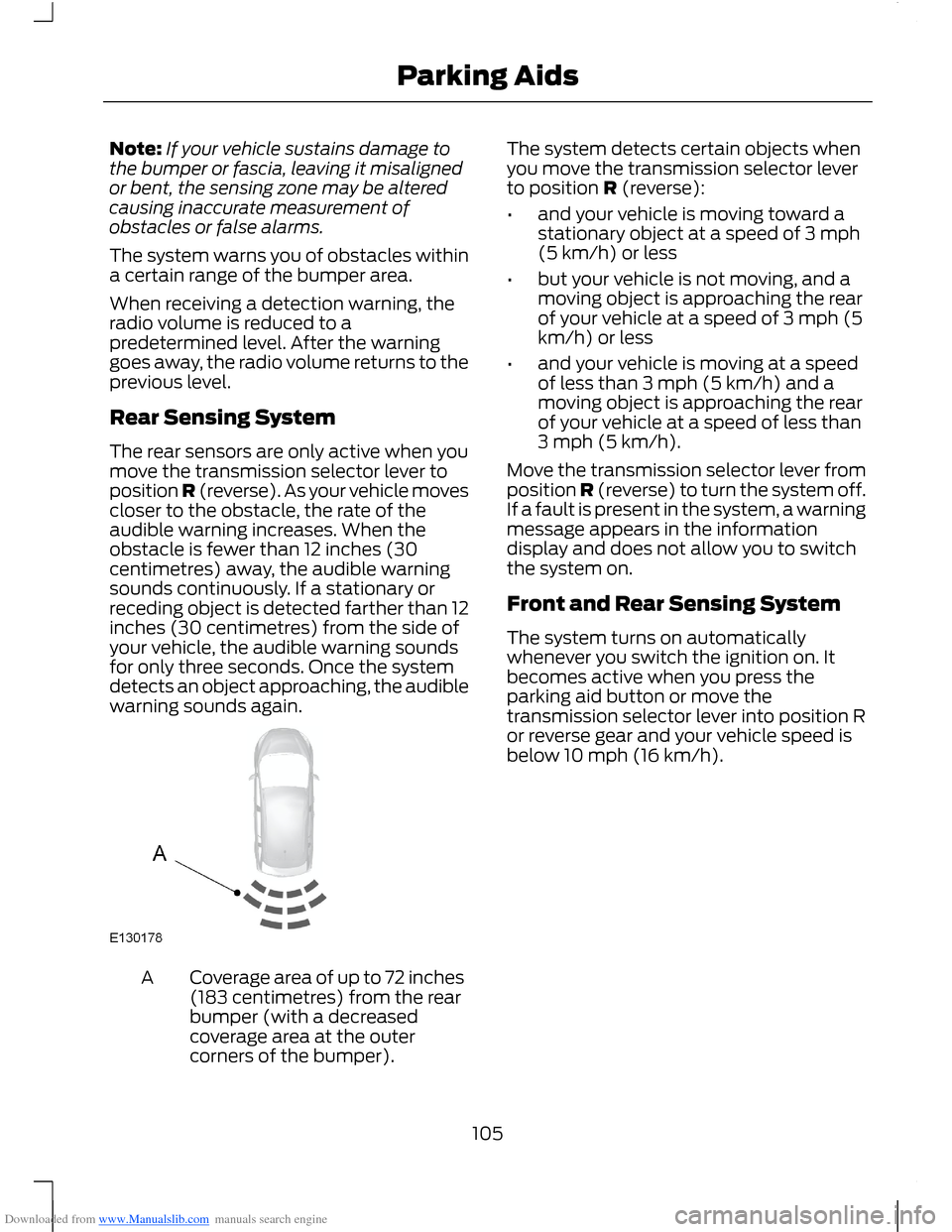
The rear sensors are only active when youmove the transmission selector lever toposition R (reverse). As your vehicle movescloser to the obstacle, the rate of theaudible warning increases. When theobstacle is fewer than 12 inches (30centimetres) away, the audible warningsounds continuously. If a stationary orreceding object is detected farther than 12inches (30 centimetres) from the side ofyour vehicle, the audible warning soundsfor only three seconds. Once the systemdetects an object approaching, the audiblewarning sounds again.
Coverage area of up to 72 inches(183 centimetres) from the rearbumper (with a decreasedcoverage area at the outercorners of the bumper).
A
The system detects certain objects whenyou move the transmission selector leverto position R (reverse):
•and your vehicle is moving toward astationary object at a speed of 3 mph(5 km/h) or less
•but your vehicle is not moving, and amoving object is approaching the rearof your vehicle at a speed of 3 mph (5km/h) or less
•and your vehicle is moving at a speedof less than 3 mph (5 km/h) and amoving object is approaching the rearof your vehicle at a speed of less than3 mph (5 km/h).
Move the transmission selector lever fromposition R (reverse) to turn the system off.If a fault is present in the system, a warningmessage appears in the informationdisplay and does not allow you to switchthe system on.
Front and Rear Sensing System
The system turns on automaticallywhenever you switch the ignition on. Itbecomes active when you press theparking aid button or move thetransmission selector lever into position Ror reverse gear and your vehicle speed isbelow 10 mph (16 km/h).
105Parking Aids
Page 122 of 256
Downloaded from www.Manualslib.com manuals search engine Vehicles With AutomaticTransmission
WARNINGS
If a speed of 12 mph (20 km/h) anda distance of 12 miles (20 kilometres)is to be exceeded the drive wheelsmust be lifted clear of the ground.
It is recommended not to tow withthe drive wheels on the ground.However, if it is required to move yourvehicle from a dangerous location, do nottow your vehicle faster than 12 mph (20km/h) or further than 12 miles (20kilometres).
Do not tow your vehicle backward.
In the event of a mechanical failureof the transmission the drive wheelsmust be lifted clear of the ground.
Do not tow your vehicle if theambient temperature is below 32°F(0°C).
120Towing
Page 129 of 256
Downloaded from www.Manualslib.com manuals search engine Circuits protectedFuse ratingFuse
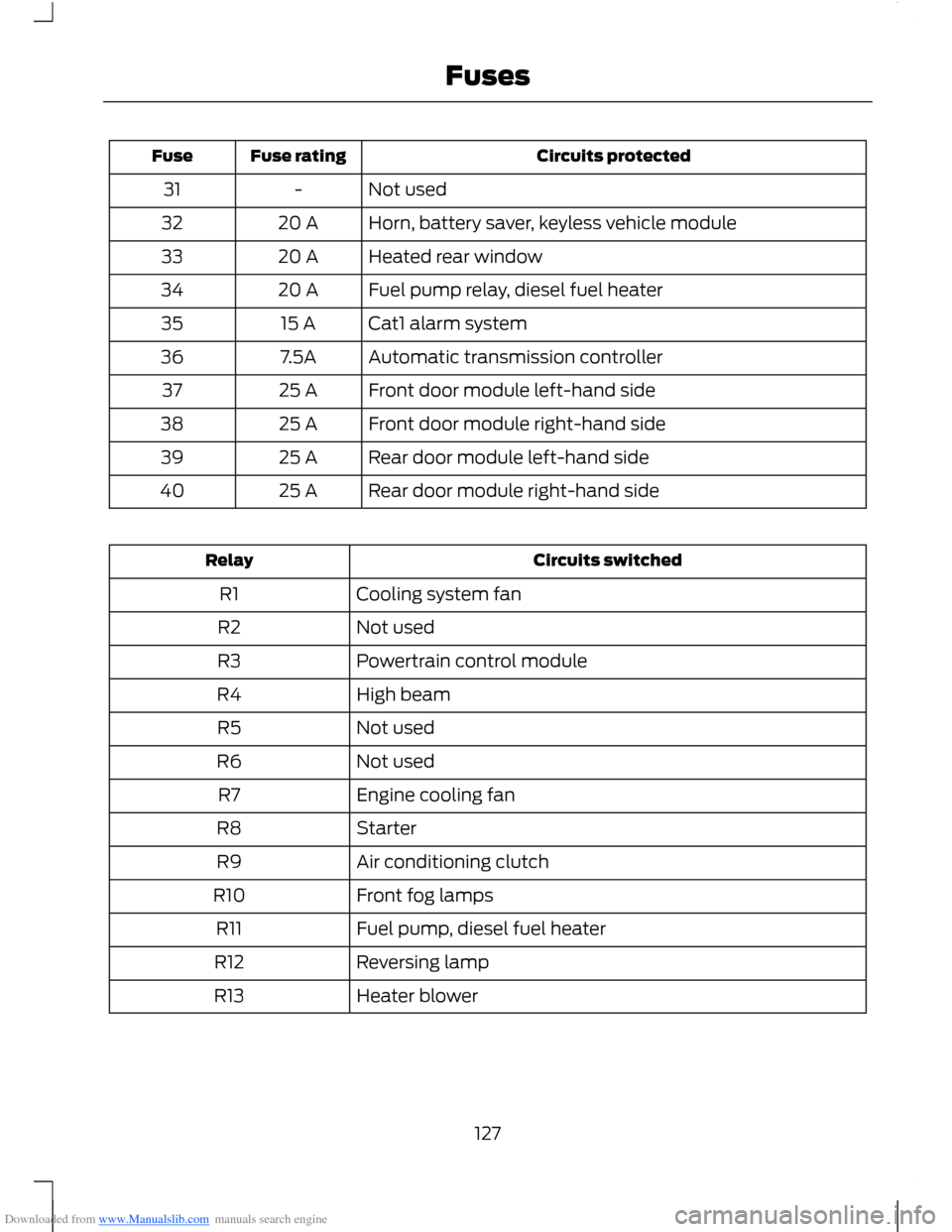
Not used-31
Horn, battery saver, keyless vehicle module20 A32
Heated rear window20 A33
Fuel pump relay, diesel fuel heater20 A34
Cat1 alarm system15 A35
Automatic transmission controller7.5A36
Front door module left-hand side25 A37
Front door module right-hand side25 A38
Rear door module left-hand side25 A39
Rear door module right-hand side25 A40
Circuits switchedRelay
Cooling system fanR1
Not usedR2
Powertrain control moduleR3
High beamR4
Not usedR5
Not usedR6
Engine cooling fanR7
StarterR8
Air conditioning clutchR9
Front fog lampsR10
Fuel pump, diesel fuel heaterR11
Reversing lampR12
Heater blowerR13
127Fuses
Page 165 of 256
Downloaded from www.Manualslib.com manuals search engine Note:Make sure that you pull the wheeltrim remover at right angles to the trim.
Removing a Road Wheel
WARNINGS
Park your vehicle in such a positionthat neither the traffic nor you arehindered or endangered.
Set up a warning triangle.
Make sure that your vehicle is on firm,level ground with the wheels pointingstraight ahead.
Switch the ignition off and apply theparking brake.
If your vehicle has a manualtransmission, move the selector leverto first or reverse gear. If it has anautomatic transmission, move the selectorlever to position (P).
Have the passengers leave yourvehicle.
Secure the diagonally oppositewheel with an appropriate block orwheel chock.
Make sure that the arrows ondirectional tyres point in the directionof rotation when your vehicle ismoving forward. If you have to fit a sparewheel with the arrows pointing in theopposite direction, have the tyre refittedin the correct direction by an authoriseddealer.
Do not work underneath your vehiclewhen it is supported only by a jack.
Make sure that the jack is vertical tothe jacking point and the base is flaton the ground.
Note:Do not lay alloy wheels face downon the ground, this will damage the paint.
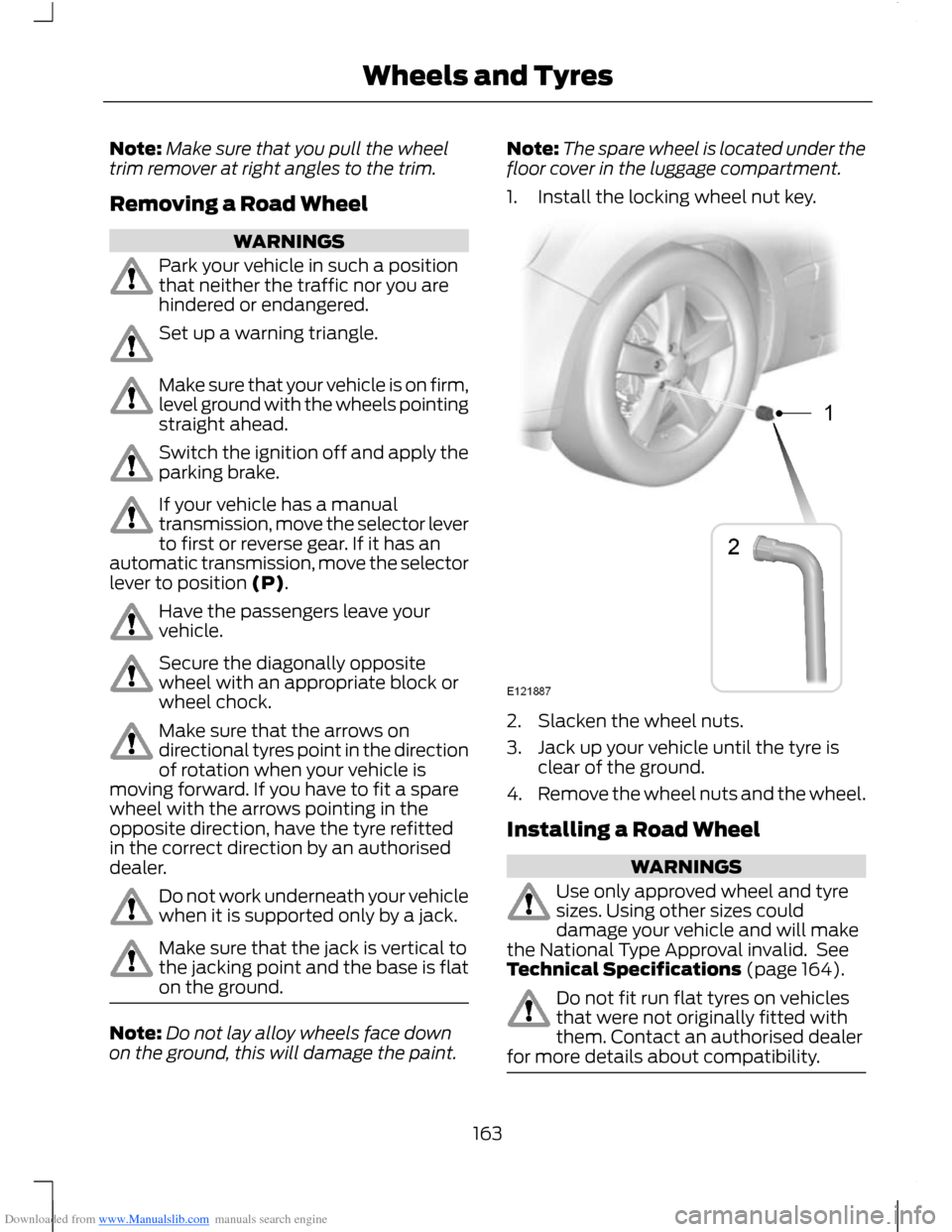
Note:The spare wheel is located under thefloor cover in the luggage compartment.
1.Install the locking wheel nut key.
2.Slacken the wheel nuts.
3.Jack up your vehicle until the tyre isclear of the ground.
4.Remove the wheel nuts and the wheel.
Installing a Road Wheel
WARNINGS
Use only approved wheel and tyresizes. Using other sizes coulddamage your vehicle and will makethe National Type Approval invalid. SeeTechnical Specifications (page 164).
Do not fit run flat tyres on vehiclesthat were not originally fitted withthem. Contact an authorised dealerfor more details about compatibility.
163Wheels and Tyres
Page 188 of 256
Downloaded from www.Manualslib.com manuals search engine Automatic Volume Control
When available, automatic volume controladjusts the volume level to compensatefor engine noise and road speed noise.
1.Press the MENU button and selectAUDIO.
2.Select AVC LEVEL or ADAPTIVEVOL.
3.Use the left or right arrow button toadjust the setting.
4.Press the OK button to confirm yourselection.
5.Press the MENU button to return.
Digital Signal Processing
Digital Signal Processing Occupancy
This feature takes into account thedifferences in distance from the variousspeakers in your vehicle to each seat. Youmust select the correct sitting position forthe audio to be correctly set.
Digital Signal Processing Equaliser
Select the music category that most suitsyour listening preference. The audio outputwill change to enhance the particular styleof music chosen.
Changing the Digital Signal ProcessingSettings
1.Press the MENU button.
2.Select AUDIO or AUDIO SETTINGS.
3.Scroll to the required digital signalprocessing function.
4.Use the up and down arrow buttons toselect the required setting.
5.Press the OK button to confirm yourselection.
6.Press the MENU button to return.
News Broadcasts
Your audio unit may interrupt normalreception to broadcast news bulletins fromstations on the FM waveband, radio datasystem or other enhanced network linkedstations.
The display will indicate there is anincoming announcement, during newsbroadcasts. When the audio unit interruptsfor a news broadcast the preset volumelevel will be the same as trafficannouncements.
1.Press the MENU button.
2.Select AUDIO or AUDIO SETTINGS.
3.Scroll to NEWS and turn on or off withthe OK button.
4.Press the MENU button to return.
Alternative Frequencies
The majority of programs that broadcaston the FM waveband have a programidentification code, it can be recognised byaudio units.
When your vehicle moves from onetransmission area to another with thealternative frequencies tuning switchedon, this function will search for thestrongest station signal.
Under certain conditions, however,alternative frequencies tuning maytemporarily disrupt normal reception.
When selected, the unit continuallyevaluates signal strength and, if a bettersignal becomes available, the unit willswitch to that alternative. It mutes whileit checks a list of alternative frequenciesand if necessary, it will search once acrossthe selected waveband for a genuinealternative frequency.
It will restore radio reception when it findsone or if one is not found, the unit willreturn to the original stored frequency.
186Audio System