tyre pressure FORD B MAX 2012 1.G User Guide
[x] Cancel search | Manufacturer: FORD, Model Year: 2012, Model line: B MAX, Model: FORD B MAX 2012 1.GPages: 256, PDF Size: 19.67 MB
Page 159 of 256
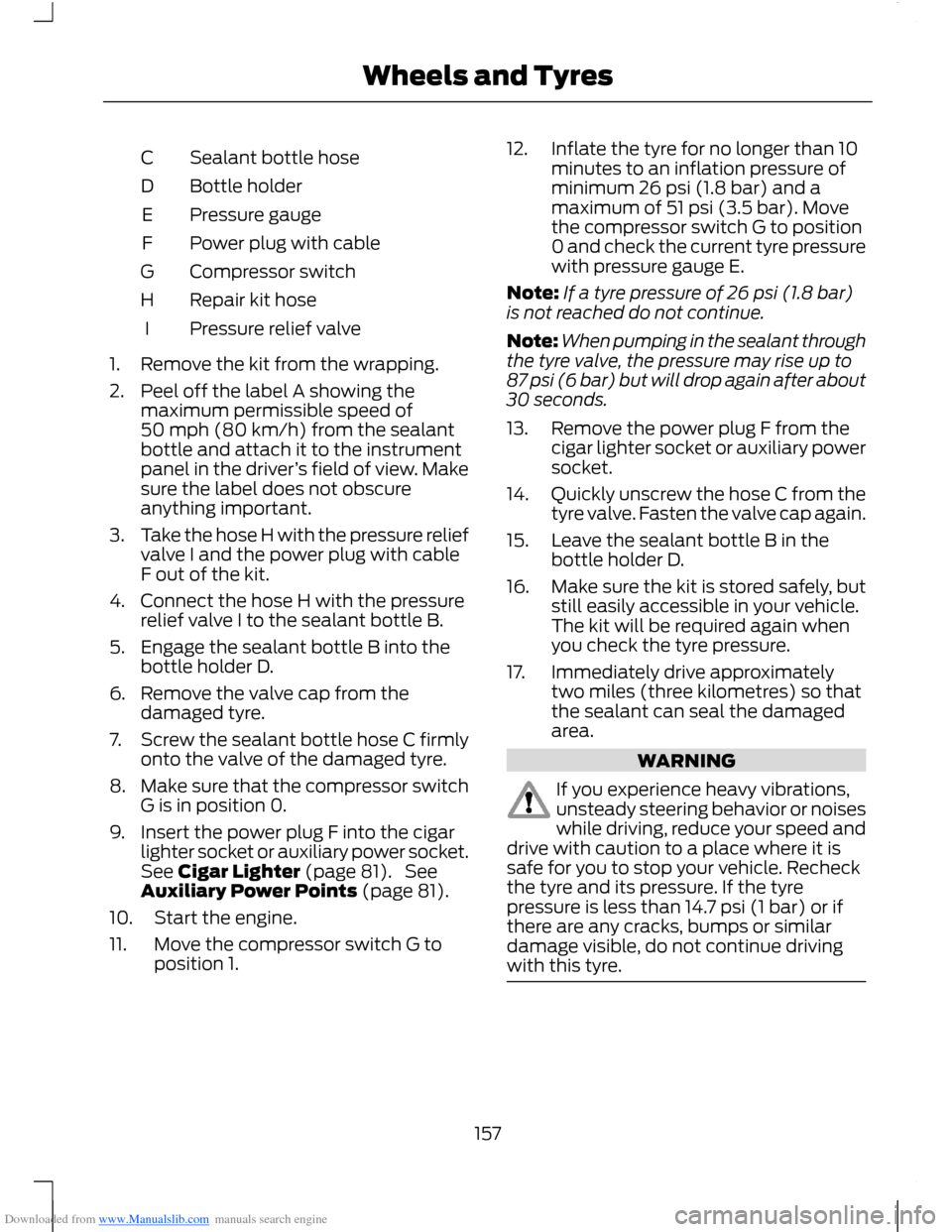
Downloaded from www.Manualslib.com manuals search engine Sealant bottle hoseC
Bottle holderD
Pressure gaugeE
Power plug with cableF
Compressor switchG
Repair kit hoseH
Pressure relief valveI
1.Remove the kit from the wrapping.
2.Peel off the label A showing themaximum permissible speed of50 mph (80 km/h) from the sealantbottle and attach it to the instrumentpanel in the driver’s field of view. Makesure the label does not obscureanything important.
3.Take the hose H with the pressure reliefvalve I and the power plug with cableF out of the kit.
4.Connect the hose H with the pressurerelief valve I to the sealant bottle B.
5.Engage the sealant bottle B into thebottle holder D.
6.Remove the valve cap from thedamaged tyre.
7.Screw the sealant bottle hose C firmlyonto the valve of the damaged tyre.
8.Make sure that the compressor switchG is in position 0.
9.Insert the power plug F into the cigarlighter socket or auxiliary power socket.See Cigar Lighter (page 81). SeeAuxiliary Power Points (page 81).
10.Start the engine.
11.Move the compressor switch G toposition 1.
12.Inflate the tyre for no longer than 10minutes to an inflation pressure ofminimum 26 psi (1.8 bar) and amaximum of 51 psi (3.5 bar). Movethe compressor switch G to position0 and check the current tyre pressurewith pressure gauge E.
Note:If a tyre pressure of 26 psi (1.8 bar)is not reached do not continue.
Note:When pumping in the sealant throughthe tyre valve, the pressure may rise up to87 psi (6 bar) but will drop again after about30 seconds.
13.Remove the power plug F from thecigar lighter socket or auxiliary powersocket.
14.Quickly unscrew the hose C from thetyre valve. Fasten the valve cap again.
15.Leave the sealant bottle B in thebottle holder D.
16.Make sure the kit is stored safely, butstill easily accessible in your vehicle.The kit will be required again whenyou check the tyre pressure.
17.Immediately drive approximatelytwo miles (three kilometres) so thatthe sealant can seal the damagedarea.
WARNING
If you experience heavy vibrations,unsteady steering behavior or noiseswhile driving, reduce your speed anddrive with caution to a place where it issafe for you to stop your vehicle. Recheckthe tyre and its pressure. If the tyrepressure is less than 14.7 psi (1 bar) or ifthere are any cracks, bumps or similardamage visible, do not continue drivingwith this tyre.
157Wheels and Tyres
Page 160 of 256
Downloaded from www.Manualslib.com manuals search engine 18.Stop your vehicle after drivingapproximately two miles (threekilometres). Check, and wherenecessary, adjust the pressure of thedamaged tyre.
19.Attach the kit and read the tyrepressure from the pressure gauge E.
20.Adjust it to the specified pressure.See Technical Specifications(page 164).
21.Once you have inflated the tyre to itscorrect tyre pressure, move thecompressor switch G to position 0,remove the power plug F from thesocket, unscrew the hose C andfasten the valve cap.
22.Leave hose C and H connected to thesealant bottle B and store the kitaway safely.
23.Go to the nearest tyre specialist toget the damaged tyre replaced.Before the tyre is removed from therim, inform your tyre dealer that thetyre contains sealant. You mustrenew the sealant bottle B and hoseC as soon as possible once used.
Note:Remember that emergency roadsidekits only provide temporary mobility.Regulations concerning tyre repair afterusage of the kit may differ from country tocountry. You should consult a tyre specialistfor advice.
WARNING
You must, make sure the tyre isadjusted to the recommendedinflation pressure. See TechnicalSpecifications (page 164). You must,monitor the tyre pressure until the sealedtyre is replaced.
Empty sealant bottles can be disposed oftogether with normal household waste.Return remains of sealant to your dealeror dispose of it in compliance with localwaste disposal regulations.
TYRE CARE
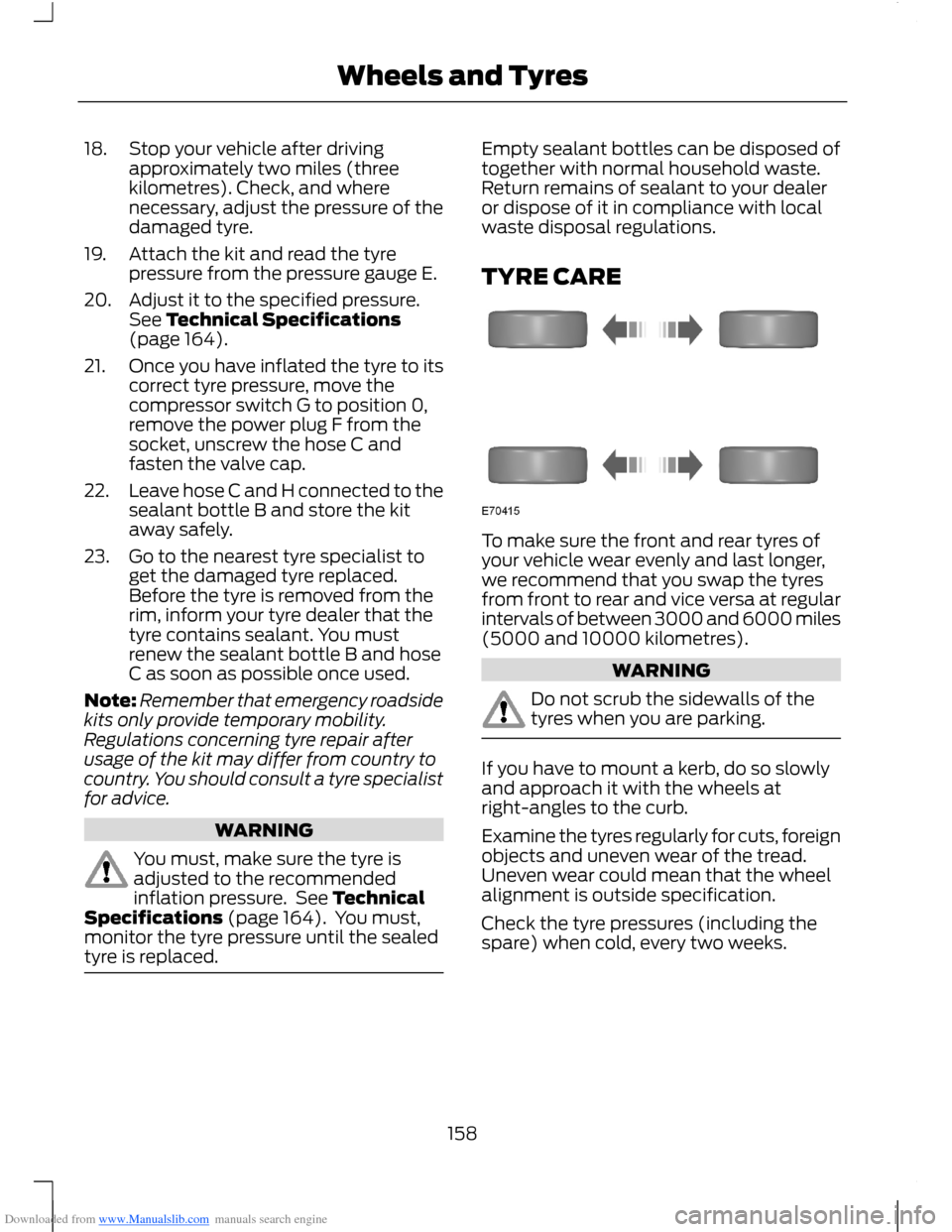
To make sure the front and rear tyres ofyour vehicle wear evenly and last longer,we recommend that you swap the tyresfrom front to rear and vice versa at regularintervals of between 3000 and 6000 miles(5000 and 10000 kilometres).
WARNING
Do not scrub the sidewalls of thetyres when you are parking.
If you have to mount a kerb, do so slowlyand approach it with the wheels atright-angles to the curb.
Examine the tyres regularly for cuts, foreignobjects and uneven wear of the tread.Uneven wear could mean that the wheelalignment is outside specification.
Check the tyre pressures (including thespare) when cold, every two weeks.
158Wheels and Tyres
Page 161 of 256
Downloaded from www.Manualslib.com manuals search engine USING WINTER TYRES
WARNING
When using winter tyres on yourvehicle, you must make sure that youfit the correct type of wheel nuts.
If winter tyres are used, make sure that thetyre pressures are correct. See TechnicalSpecifications (page 164).
USING SNOW CHAINS
WARNINGS
Do not exceed 30 mph (50 km/h).
Do not use snow chains on snow-freeroads.
Only fit snow chains to specifiedtyres. See TechnicalSpecifications (page 164).
If your vehicle has wheel trims,remove them before fitting snowchains.
Note:The anti-lock braking system willcontinue to operate normally.
Only use small link snow chains.
Only use snow chains on the front wheels.
Vehicles With Stability Control
When stability control is on, your vehiclemay exhibit some unusual drivingcharacteristics. To reduce this, switchtraction control off. See Using StabilityControl (page 103).
TYRE PRESSURE
MONITORING SYSTEM
WARNINGS
The system does not relieve you ofyour responsibility to regularly checkthe tyre pressures.
The system will only provide a lowtyre pressure warning. It will notinflate the tyres.
Do not drive on significantlyunder-inflated tyres. This may causethe tyres to overheat and fail.Under-inflation reduces fuel efficiency, tyretread life and may also affect your abilityto drive your vehicle safely.
Do not bend or damage the valveswhen you are inflating the tyres.
Have tyres installed by an authoriseddealer.
The deflation detection system will alertyou if there is a change of air pressure inany tyre. It does this by using the anti-lockbraking sensors to detect the rollingcircumference of the wheels. When thecircumference changes, this indicates lowtyre pressure. A warning message isdisplayed in the information display andthe message indicator will illuminate. SeeInformation Messages (page 62).
If a low pressure warning message isdisplayed in the information display, checkthe tyre pressures as soon as possible andinflate them to the recommendedpressure. See Technical Specifications(page 164).
If this happens frequently, have the causedetermined and rectified as soon aspossible.
159Wheels and Tyres
Page 162 of 256
Downloaded from www.Manualslib.com manuals search engine Apart from a too low tyre pressure or adamaged tyre, the following situations canaffect the rolling circumference:
•Vehicle load is uneven.
•When using a trailer or travelling up anddown an incline.
•Using snow chains.
•Driving on soft surfaces such as snowor mud.
Note:The system will still functioncorrectly, but there may be an increaseddetection time.
System Reset
Note:Do not reset the system when yourvehicle is moving.
Note:You should reset the systemfollowing any adjustment to the tyrepressures or any changing of tyres.
1.Switch the ignition on.
2.Using the information display control,navigate to Menu > Vehicle settings> Deflation detection.
3.Press and hold the OK button untilconfirmation appears.
CHANGING A ROAD WHEEL
Wheel Nuts
You can obtain a replacement lockingwheel nut key and replacement lockingwheel nuts from your dealer using thereference number certificate.
Vehicles With a Spare Wheel
If the spare wheel is exactly the same typeand size as the other fitted road wheels,you can replace the existing road wheelwith the spare wheel and continue to drivein the normal manner.
If the spare wheel is different to the otherroad wheels, it will carry a yellow label withthe appropriate speed limit.
Refer to the following information beforechanging the road wheel.
WARNINGS
Drive the shortest possible distances.
Do not fit more than one spare wheelon your vehicle at any one time.
Do not carry out any tyre repairs ona spare wheel.
Do not drive through an automaticcar wash.
If you are unsure what type of sparewheel you have do not exceed 80km/h (50 mph).
Only fit snow chains to specifiedtyres. See TechnicalSpecifications (page 164).
The ground clearance of your vehiclemay be reduced. Take care whenparking next to a kerb.
Note:Your vehicle may exhibit someunusual driving characteristics.
Vehicle Jack
WARNINGS
The vehicle jack supplied with yourvehicle should only be used whenchanging a wheel in emergencysituations.
Before using the vehicle jack, checkthat it is not damaged or deformedand that the thread is lubricated andfree from foreign matter.
Never place anything between thejack and the ground, or the jack andyour vehicle.
160Wheels and Tyres
Page 166 of 256
Downloaded from www.Manualslib.com manuals search engine WARNING
Do not install alloy wheels usingwheel nuts designed for use withsteel wheels.
Note:The wheel nuts of alloy wheels andspoked steel wheels can also be used forthe steel spare wheel for a short time(maximum two weeks).
Note:Make sure the wheel and hub contactsurfaces are free from foreign matter.
Note:Make sure that the cones on thewheel nuts are against the wheel.
1.Install the wheel.
2.Install the wheel nuts finger tight.
3.Install the locking wheel nut key.
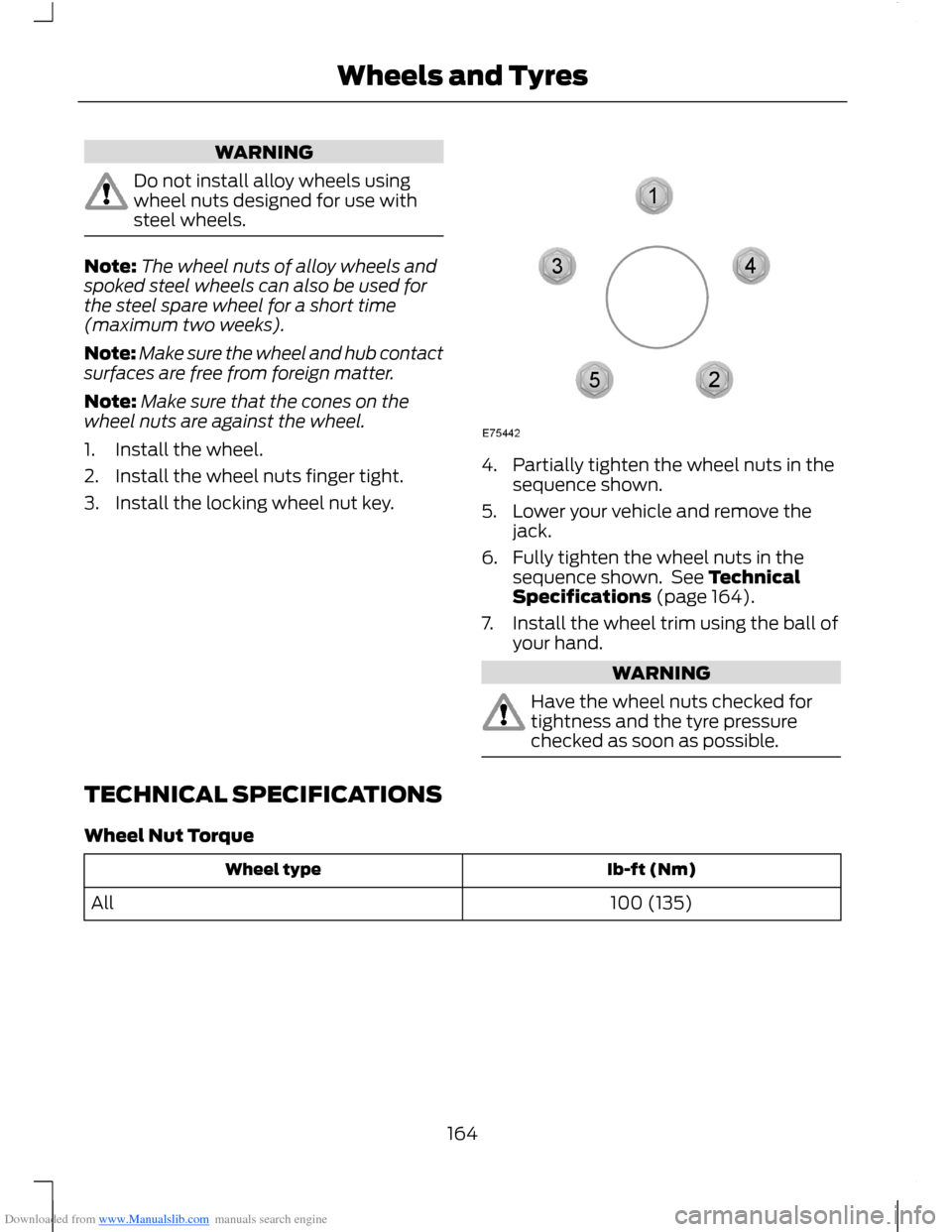
4.Partially tighten the wheel nuts in thesequence shown.
5.Lower your vehicle and remove thejack.
6.Fully tighten the wheel nuts in thesequence shown. See TechnicalSpecifications (page 164).
7.Install the wheel trim using the ball ofyour hand.
WARNING
Have the wheel nuts checked fortightness and the tyre pressurechecked as soon as possible.
TECHNICAL SPECIFICATIONS
Wheel Nut Torque
Ib-ft (Nm)Wheel type
100 (135)All
164Wheels and Tyres
Page 167 of 256
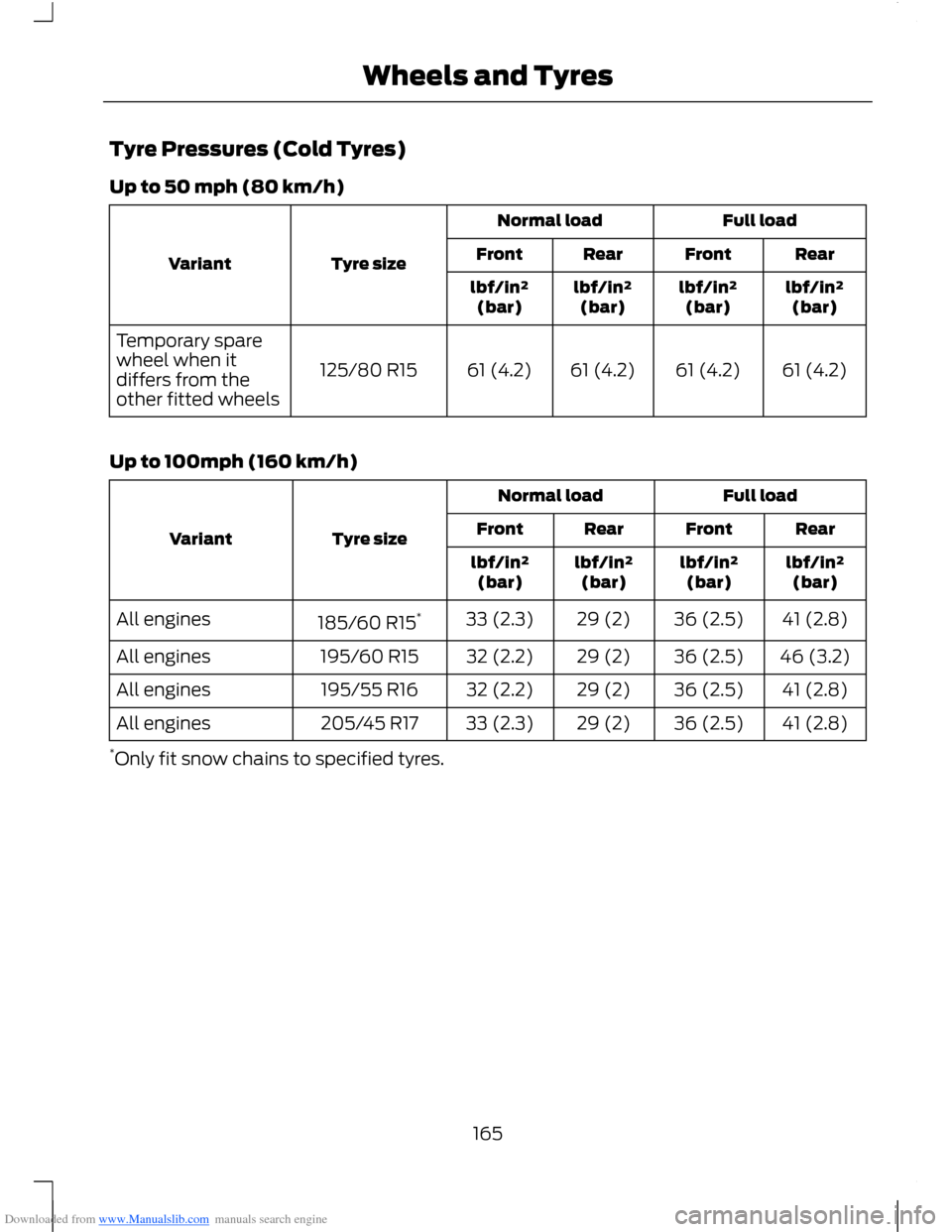
Downloaded from www.Manualslib.com manuals search engine Tyre Pressures (Cold Tyres)
Up to 50 mph (80 km/h)
Full loadNormal load
Tyre sizeVariantRearFrontRearFront
lbf/in²(bar)lbf/in²(bar)lbf/in²(bar)lbf/in²(bar)
61 (4.2)61 (4.2)61 (4.2)61 (4.2)125/80 R15
Temporary sparewheel when itdiffers from theother fitted wheels
Up to 100mph (160 km/h)
Full loadNormal load
Tyre sizeVariantRearFrontRearFront
lbf/in²(bar)lbf/in²(bar)lbf/in²(bar)lbf/in²(bar)
41 (2.8)36 (2.5)29 (2)33 (2.3)185/60 R15*All engines
46 (3.2)36 (2.5)29 (2)32 (2.2)195/60 R15All engines
41 (2.8)36 (2.5)29 (2)32 (2.2)195/55 R16All engines
41 (2.8)36 (2.5)29 (2)33 (2.3)205/45 R17All engines
*Only fit snow chains to specified tyres.
165Wheels and Tyres
Page 251 of 256
Downloaded from www.Manualslib.com manuals search engine Starter SwitchSee: Ignition Switch.............................................83Starting a Diesel Engine..............................86Cold or Hot Engine..............................................86Failure to Start.......................................................87Starting and Stopping the Engine...........83General Information............................................83Starting a Petrol Engine..............................85Cold or Hot Engine...............................................85Engine Idle Speed after Starting....................86Failure to Start......................................................86Flooded Engine.....................................................86Start-Stop........................................................89To Re-Start the Engine......................................90To Stop the Engine..............................................89Using Start-Stop..................................................89Steering Wheel Lock.....................................85Vehicles With Keyless Starting.......................85Vehicles Without Keyless Starting................85Steering Wheel...............................................38Storage Compartments..............................82Supplementary Restraints System.........22Principle of Operation.........................................22Switching Off the Engine............................88Vehicles With a Turbocharger.........................88Symbols Glossary.............................................5SYNC® Applications and Services..........211In the Event of a Collision................................212Setting Emergency Assistance On:...............211SYNC Emergency Assistance..........................211SYNC® Troubleshooting...........................218SYNC.................................................................196General Information..........................................196
T
Technical SpecificationsSee: Capacities and Specifications.............167Temporary Mobility Kit...............................155General Information..........................................155Inflating the Tyre.................................................156Using the Kit.........................................................155
Tow Ball............................................................116Driving With a Trailer...........................................117Driving Without a Trailer...................................118Inserting the Tow Ball Arm...............................117Maintenance.........................................................119Removing the Tow Ball Arm............................118Unlocking the Tow Ball ArmMechanism........................................................117Towing a Trailer..............................................116Steep Gradients...................................................116Towing Points.................................................119Towing the Vehicle on FourWheels............................................................119All Vehicles.............................................................119Vehicles With AutomaticTransmission...................................................120Towing...............................................................116Transmission....................................................97Trip Computer..................................................61......................................................................................61Distance Odometer.............................................62Tyre Care..........................................................158Tyre Inflation When PuncturedSee: Temporary Mobility Kit...........................155Tyre Pressure Monitoring System..........159System Reset.......................................................160Tyre PressuresSee: Technical Specifications........................164Tyre Repair KitSee: Temporary Mobility Kit...........................155TyresSee: Wheels and Tyres.....................................155
U
Under Bonnet Overview - 1.0L EcoBoost(74kW/100PS)/1.0L EcoBoost(90kW/120PS)...........................................136Under Bonnet Overview - 1.4LDuratec-16V (66kW/90PS)/1.6LDuratec-16V Ti-VCT (77kW/105PS) -Sigma..............................................................137Under Bonnet Overview - 1.5LDuratorq-TDCi (55kW/75PS)/1.6LDuratorq-TDCi (70kW/95PS)(T3).................................................................138Unique Driving Characteristics.................89
249Index
Page 252 of 256
Downloaded from www.Manualslib.com manuals search engine Using Cruise Control...................................109Cancelling the Set Speed.................................110Changing the Set Speed.................................109Resuming the Set Speed..................................110Setting a Speed..................................................109Switching Cruise Control Off..........................110Switching Cruise Control On..........................109Using Snow Chains......................................159Vehicles With Stability Control.....................159Using Stability Control...............................103...................................................................................103Using SYNC® With Your MediaPlayer..............................................................213Accessing Your USB Song Library.................217Bluetooth Devices and SystemSettings.............................................................218Connecting Your Digital Media Player to theUSB Port............................................................214Media Menu Features.......................................216Media Voice Commands..................................214What's Playing?..................................................214Using SYNC® With Your Phone............200Accessing Features through the MobilePhone Menu...................................................204Accessing Your Mobile PhoneSettings.............................................................207BT Devices...........................................................208Making Calls........................................................203Mobile Phone Options During an ActiveCall.....................................................................203Mobile Phone Voice Commands..................201Pairing a Mobile Phone For the FirstTime..................................................................200Pairing Subsequent Mobile Phones............201Receiving Calls...................................................203Text Messaging..................................................206Using Voice Recognition............................198Helpful Hints........................................................198Initiating a Voice Session................................198System Interaction and Feedback...............198Using Winter Tyres.......................................159
V
Vehicle Care....................................................153Vehicle Identification Number................168Vehicle Identification Plate.......................167
VentilationSee: Climate Control..........................................68VentsSee: Air Vents........................................................68VINSee: Vehicle Identification Number.............168Voice Control...................................................39
W
Warning Lamps and Indicators.................53Anti-lock Braking System WarningLamp....................................................................54Brake System Warning Lamp..........................54Coolant Temperature Warning Lamp..........54Cruise Control Indicator.....................................54Direction Indicator...............................................54Door Ajar Warning Lamp...................................54Engine Warning Lamps......................................54Front Airbag Warning Lamp.............................55Front Fog Lamp Indicator.................................55Frost Warning Lamp...........................................55Glow Plug Indicator.............................................55Headlamp Indicator............................................55Ignition Warning Lamp.......................................55Low Fuel Level Warning Lamp........................55Low Tyre Pressure Warning Lamp.................55Main Beam Indicator...........................................55Message Centre Indicator.................................56Oil Pressure Warning Lamp.............................56Power Steering Warning Lamp.......................56Rear Fog Lamp Indicator...................................56Seat Belt Minder Warning Lamp....................56Shift Indicator........................................................56Stability Control Indicator.................................56Warning Triangle...........................................122Washer Fluid Check......................................141WashersSee: Wipers and Washers.................................40WashingSee: Cleaning the Exterior...............................153Wheels and Tyres.........................................155General Information..........................................155Technical Specifications..................................164Windows and Mirrors...................................48Windscreen Washers.....................................41
250Index