transmission FORD B MAX 2012 1.G Owner's Manual
[x] Cancel search | Manufacturer: FORD, Model Year: 2012, Model line: B MAX, Model: FORD B MAX 2012 1.GPages: 256, PDF Size: 19.67 MB
Page 108 of 256
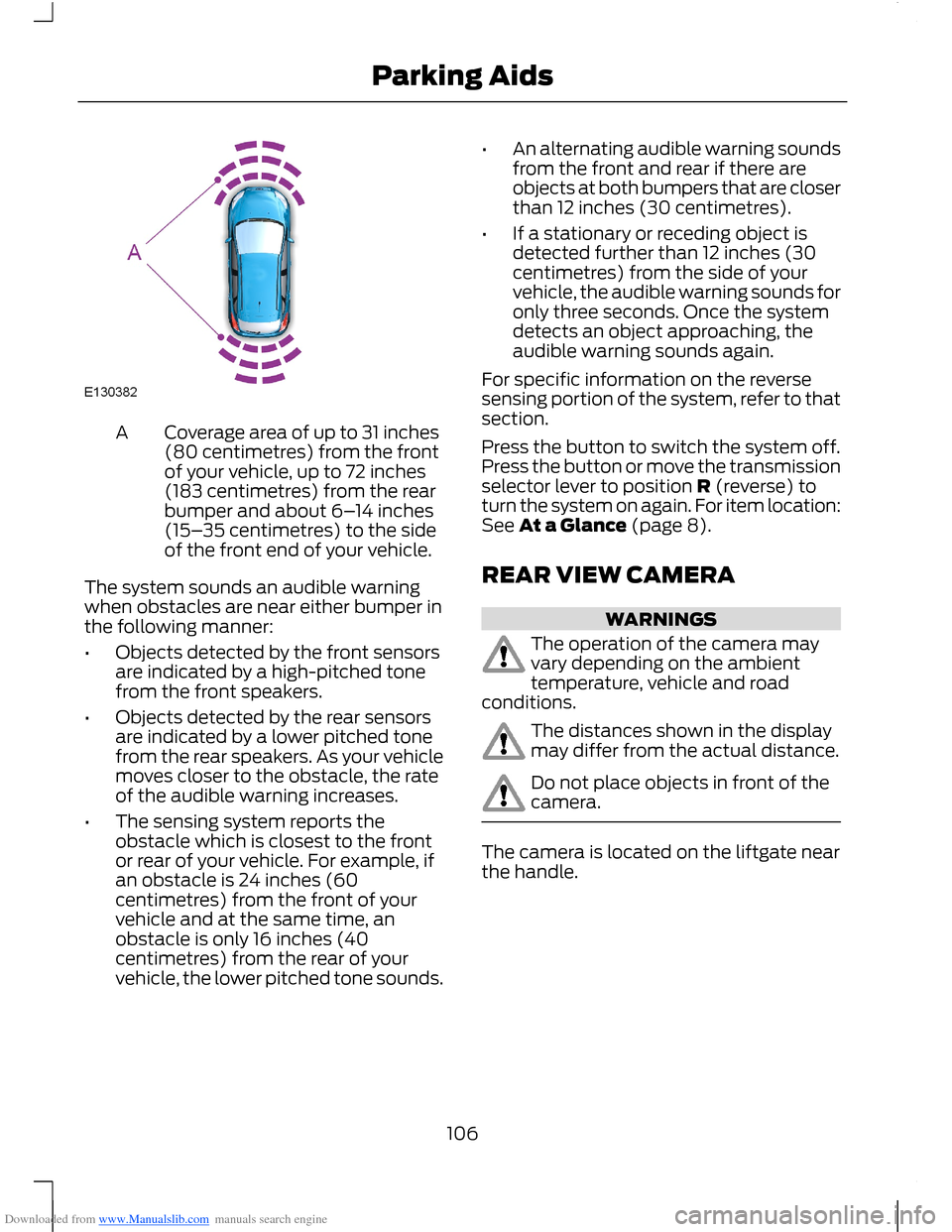
Downloaded from www.Manualslib.com manuals search engine Coverage area of up to 31 inches(80 centimetres) from the frontof your vehicle, up to 72 inches(183 centimetres) from the rearbumper and about 6–14 inches(15–35 centimetres) to the sideof the front end of your vehicle.
A
The system sounds an audible warningwhen obstacles are near either bumper inthe following manner:
•Objects detected by the front sensorsare indicated by a high-pitched tonefrom the front speakers.
•Objects detected by the rear sensorsare indicated by a lower pitched tonefrom the rear speakers. As your vehiclemoves closer to the obstacle, the rateof the audible warning increases.
•The sensing system reports theobstacle which is closest to the frontor rear of your vehicle. For example, ifan obstacle is 24 inches (60centimetres) from the front of yourvehicle and at the same time, anobstacle is only 16 inches (40centimetres) from the rear of yourvehicle, the lower pitched tone sounds.
•An alternating audible warning soundsfrom the front and rear if there areobjects at both bumpers that are closerthan 12 inches (30 centimetres).
•If a stationary or receding object isdetected further than 12 inches (30centimetres) from the side of yourvehicle, the audible warning sounds foronly three seconds. Once the systemdetects an object approaching, theaudible warning sounds again.
For specific information on the reversesensing portion of the system, refer to thatsection.
Press the button to switch the system off.Press the button or move the transmissionselector lever to position R (reverse) toturn the system on again. For item location:See At a Glance (page 8).
REAR VIEW CAMERA
WARNINGS
The operation of the camera mayvary depending on the ambienttemperature, vehicle and roadconditions.
The distances shown in the displaymay differ from the actual distance.
Do not place objects in front of thecamera.
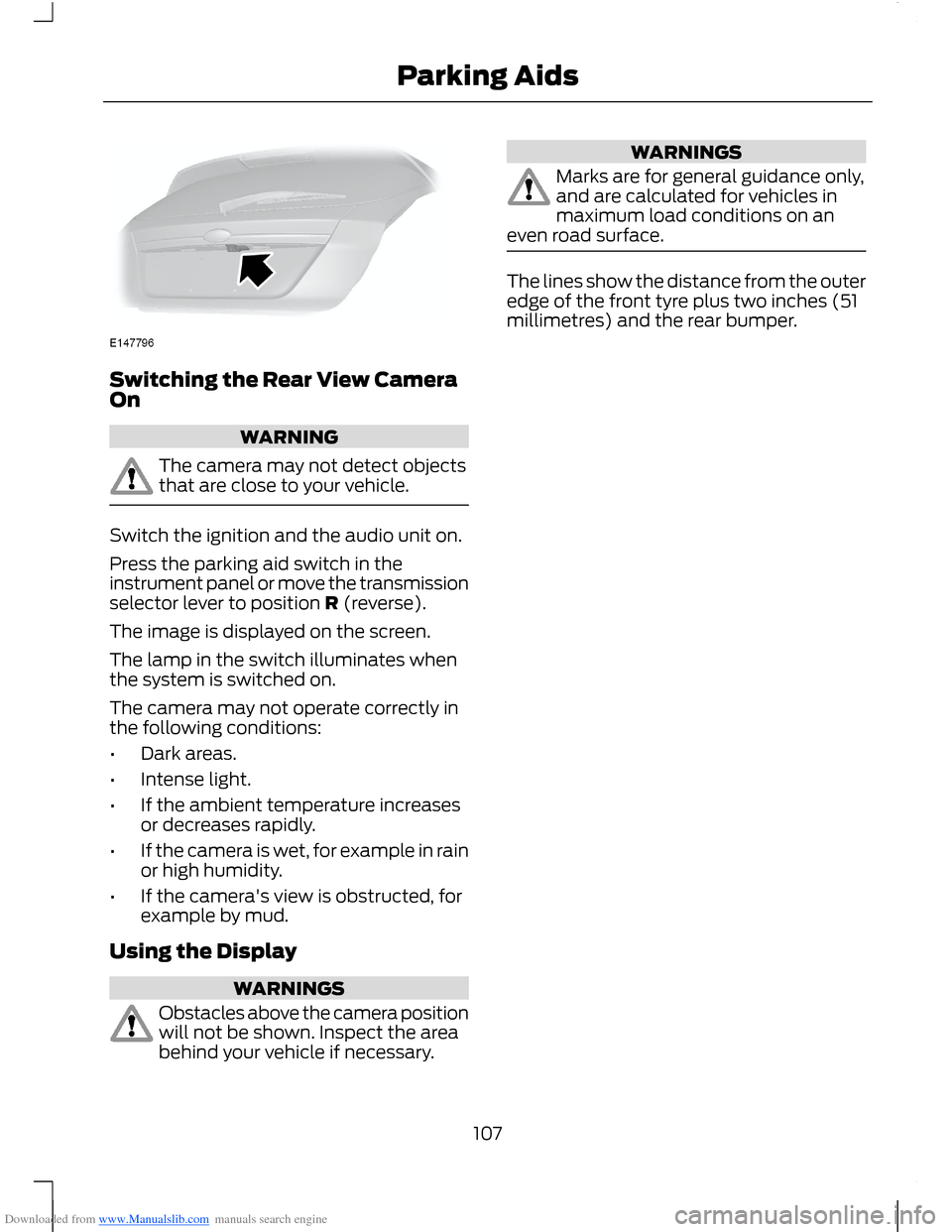
The camera is located on the liftgate nearthe handle.
106Parking Aids
Page 109 of 256
Downloaded from www.Manualslib.com manuals search engine Switching the Rear View CameraOn
WARNING
The camera may not detect objectsthat are close to your vehicle.
Switch the ignition and the audio unit on.
Press the parking aid switch in theinstrument panel or move the transmissionselector lever to position R (reverse).
The image is displayed on the screen.
The lamp in the switch illuminates whenthe system is switched on.
The camera may not operate correctly inthe following conditions:
•Dark areas.
•Intense light.
•If the ambient temperature increasesor decreases rapidly.
•If the camera is wet, for example in rainor high humidity.
•If the camera's view is obstructed, forexample by mud.
Using the Display
WARNINGS
Obstacles above the camera positionwill not be shown. Inspect the areabehind your vehicle if necessary.
WARNINGS
Marks are for general guidance only,and are calculated for vehicles inmaximum load conditions on aneven road surface.
The lines show the distance from the outeredge of the front tyre plus two inches (51millimetres) and the rear bumper.
107Parking Aids
Page 122 of 256
Downloaded from www.Manualslib.com manuals search engine Vehicles With AutomaticTransmission
WARNINGS
If a speed of 12 mph (20 km/h) anda distance of 12 miles (20 kilometres)is to be exceeded the drive wheelsmust be lifted clear of the ground.
It is recommended not to tow withthe drive wheels on the ground.However, if it is required to move yourvehicle from a dangerous location, do nottow your vehicle faster than 12 mph (20km/h) or further than 12 miles (20kilometres).
Do not tow your vehicle backward.
In the event of a mechanical failureof the transmission the drive wheelsmust be lifted clear of the ground.
Do not tow your vehicle if theambient temperature is below 32°F(0°C).
120Towing
Page 129 of 256
Downloaded from www.Manualslib.com manuals search engine Circuits protectedFuse ratingFuse
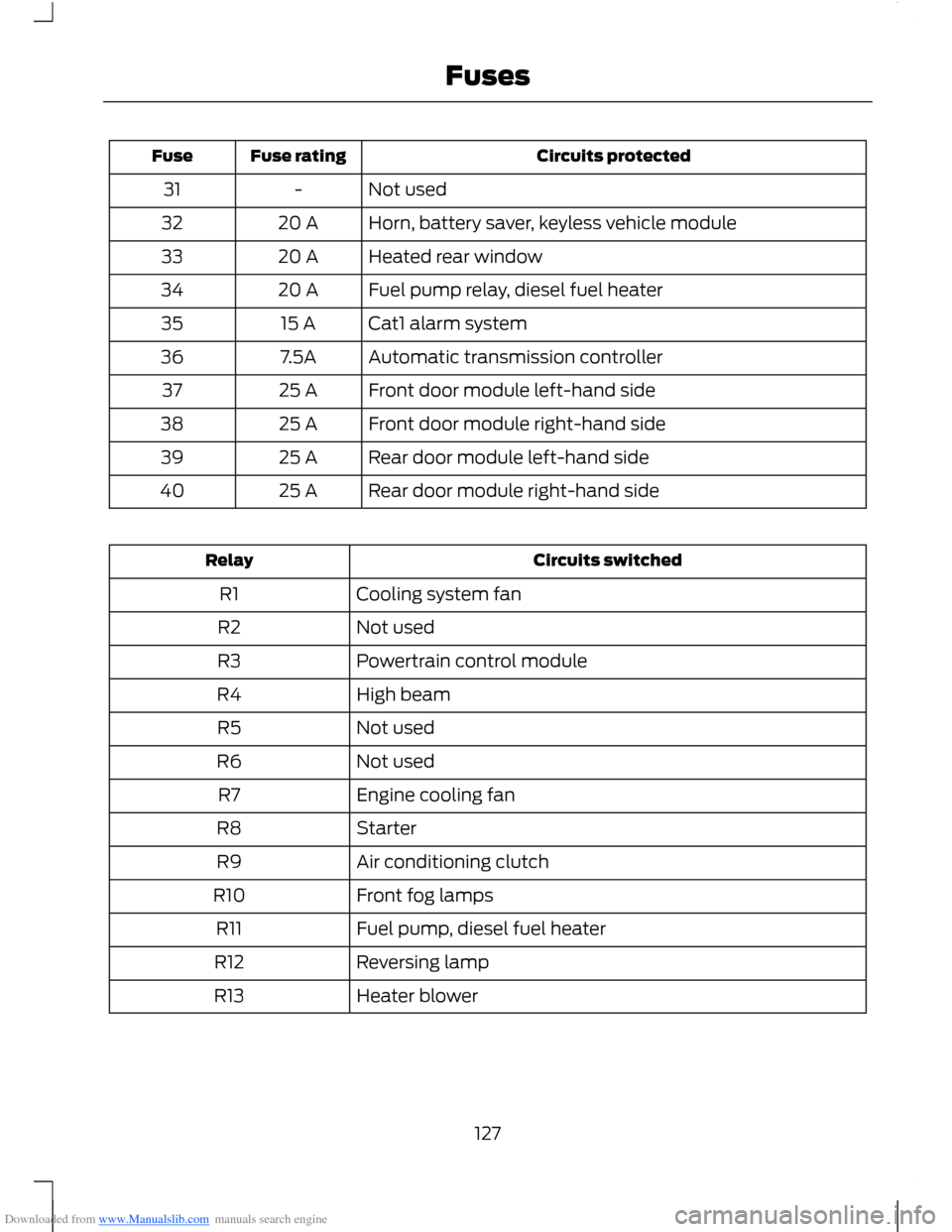
Not used-31
Horn, battery saver, keyless vehicle module20 A32
Heated rear window20 A33
Fuel pump relay, diesel fuel heater20 A34
Cat1 alarm system15 A35
Automatic transmission controller7.5A36
Front door module left-hand side25 A37
Front door module right-hand side25 A38
Rear door module left-hand side25 A39
Rear door module right-hand side25 A40
Circuits switchedRelay
Cooling system fanR1
Not usedR2
Powertrain control moduleR3
High beamR4
Not usedR5
Not usedR6
Engine cooling fanR7
StarterR8
Air conditioning clutchR9
Front fog lampsR10
Fuel pump, diesel fuel heaterR11
Reversing lampR12
Heater blowerR13
127Fuses
Page 131 of 256
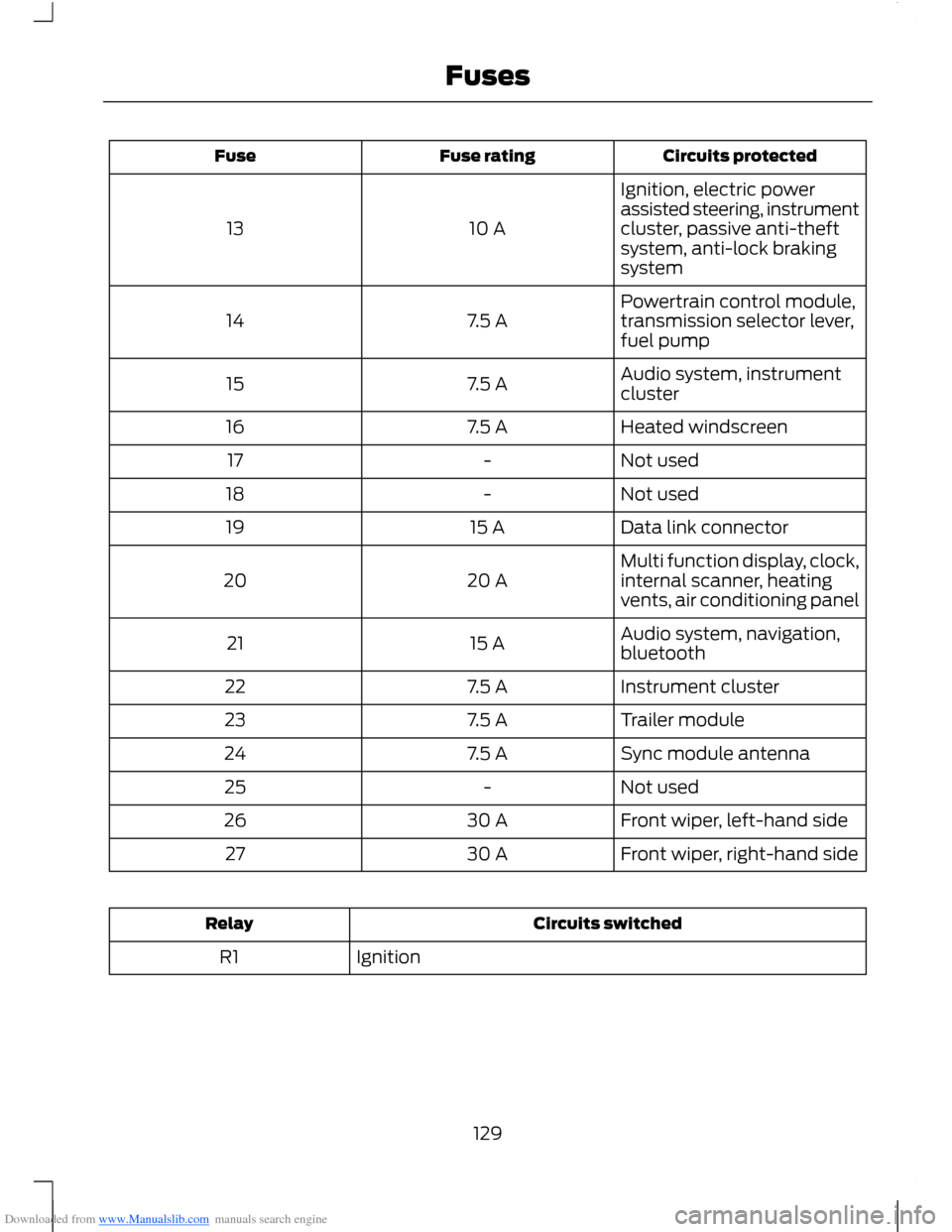
Downloaded from www.Manualslib.com manuals search engine Circuits protectedFuse ratingFuse
Ignition, electric powerassisted steering, instrumentcluster, passive anti-theftsystem, anti-lock brakingsystem
10 A13
Powertrain control module,transmission selector lever,fuel pump7.5 A14
Audio system, instrumentcluster7.5 A15
Heated windscreen7.5 A16
Not used-17
Not used-18
Data link connector15 A19
Multi function display, clock,internal scanner, heatingvents, air conditioning panel20 A20
Audio system, navigation,bluetooth15 A21
Instrument cluster7.5 A22
Trailer module7.5 A23
Sync module antenna7.5 A24
Not used-25
Front wiper, left-hand side30 A26
Front wiper, right-hand side30 A27
Circuits switchedRelay
IgnitionR1
129Fuses
Page 165 of 256
Downloaded from www.Manualslib.com manuals search engine Note:Make sure that you pull the wheeltrim remover at right angles to the trim.
Removing a Road Wheel
WARNINGS
Park your vehicle in such a positionthat neither the traffic nor you arehindered or endangered.
Set up a warning triangle.
Make sure that your vehicle is on firm,level ground with the wheels pointingstraight ahead.
Switch the ignition off and apply theparking brake.
If your vehicle has a manualtransmission, move the selector leverto first or reverse gear. If it has anautomatic transmission, move the selectorlever to position (P).
Have the passengers leave yourvehicle.
Secure the diagonally oppositewheel with an appropriate block orwheel chock.
Make sure that the arrows ondirectional tyres point in the directionof rotation when your vehicle ismoving forward. If you have to fit a sparewheel with the arrows pointing in theopposite direction, have the tyre refittedin the correct direction by an authoriseddealer.
Do not work underneath your vehiclewhen it is supported only by a jack.
Make sure that the jack is vertical tothe jacking point and the base is flaton the ground.
Note:Do not lay alloy wheels face downon the ground, this will damage the paint.
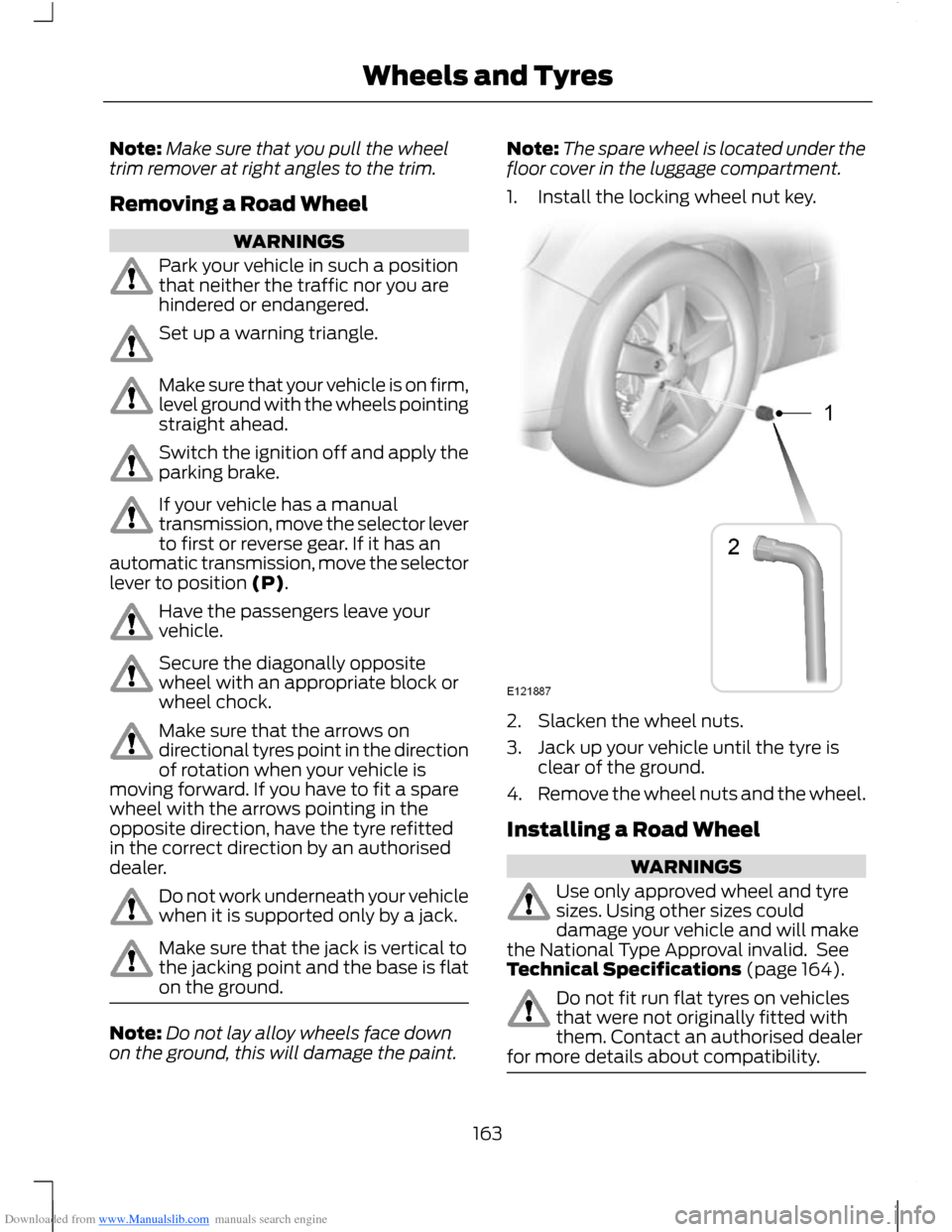
Note:The spare wheel is located under thefloor cover in the luggage compartment.
1.Install the locking wheel nut key.
2.Slacken the wheel nuts.
3.Jack up your vehicle until the tyre isclear of the ground.
4.Remove the wheel nuts and the wheel.
Installing a Road Wheel
WARNINGS
Use only approved wheel and tyresizes. Using other sizes coulddamage your vehicle and will makethe National Type Approval invalid. SeeTechnical Specifications (page 164).
Do not fit run flat tyres on vehiclesthat were not originally fitted withthem. Contact an authorised dealerfor more details about compatibility.
163Wheels and Tyres
Page 173 of 256
Downloaded from www.Manualslib.com manuals search engine GENERAL INFORMATION
Radio Frequencies and ReceptionFactors
WARNING
Radio sound levels can go above85dCB. Listening to sounds about 85decibels can harm the humanauditory system.
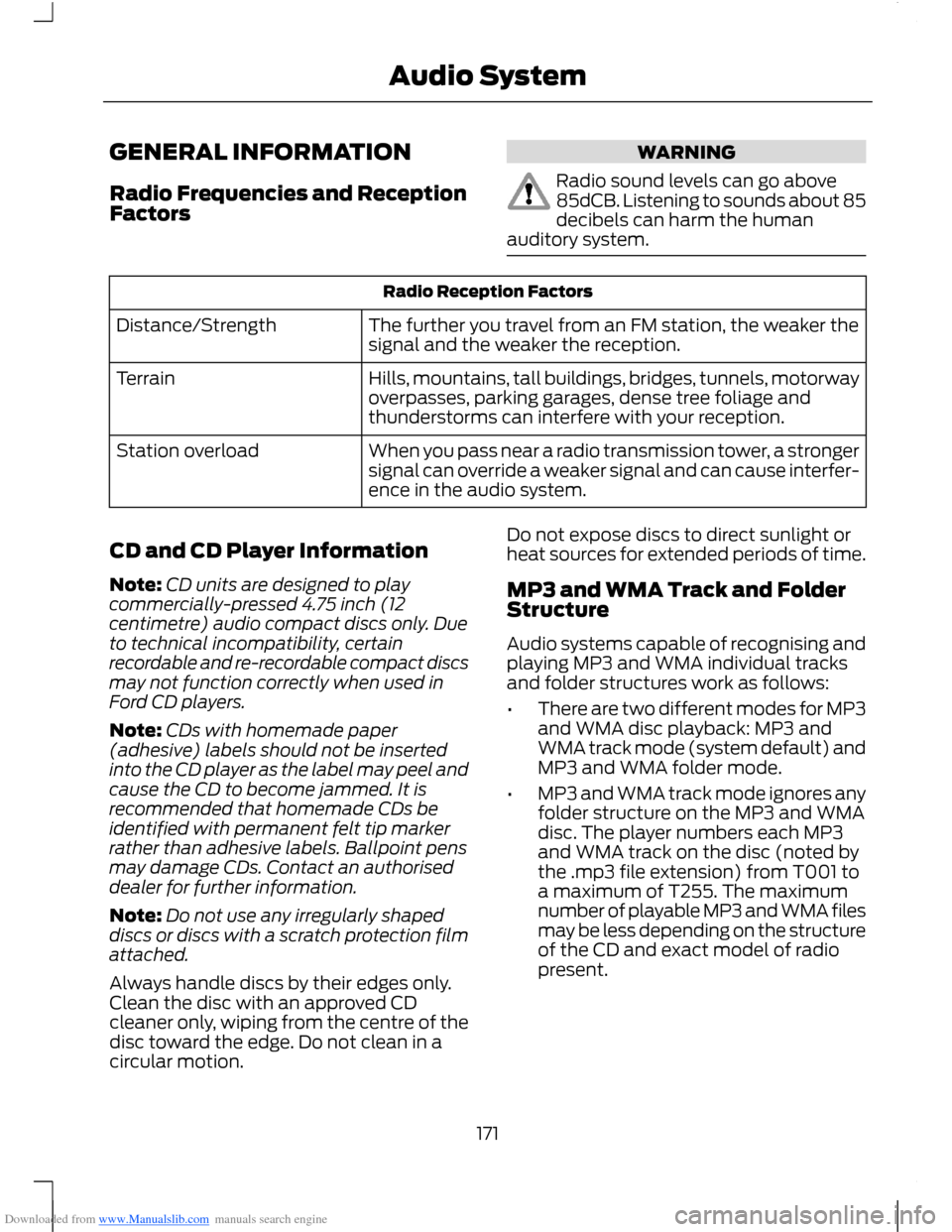
Radio Reception Factors
The further you travel from an FM station, the weaker thesignal and the weaker the reception.Distance/Strength
Hills, mountains, tall buildings, bridges, tunnels, motorwayoverpasses, parking garages, dense tree foliage andthunderstorms can interfere with your reception.
Terrain
When you pass near a radio transmission tower, a strongersignal can override a weaker signal and can cause interfer-ence in the audio system.
Station overload
CD and CD Player Information
Note:CD units are designed to playcommercially-pressed 4.75 inch (12centimetre) audio compact discs only. Dueto technical incompatibility, certainrecordable and re-recordable compact discsmay not function correctly when used inFord CD players.
Note:CDs with homemade paper(adhesive) labels should not be insertedinto the CD player as the label may peel andcause the CD to become jammed. It isrecommended that homemade CDs beidentified with permanent felt tip markerrather than adhesive labels. Ballpoint pensmay damage CDs. Contact an authoriseddealer for further information.
Note:Do not use any irregularly shapeddiscs or discs with a scratch protection filmattached.
Always handle discs by their edges only.Clean the disc with an approved CDcleaner only, wiping from the centre of thedisc toward the edge. Do not clean in acircular motion.
Do not expose discs to direct sunlight orheat sources for extended periods of time.
MP3 and WMA Track and FolderStructure
Audio systems capable of recognising andplaying MP3 and WMA individual tracksand folder structures work as follows:
•There are two different modes for MP3and WMA disc playback: MP3 andWMA track mode (system default) andMP3 and WMA folder mode.
•MP3 and WMA track mode ignores anyfolder structure on the MP3 and WMAdisc. The player numbers each MP3and WMA track on the disc (noted bythe .mp3 file extension) from T001 toa maximum of T255. The maximumnumber of playable MP3 and WMA filesmay be less depending on the structureof the CD and exact model of radiopresent.
171Audio System
Page 178 of 256
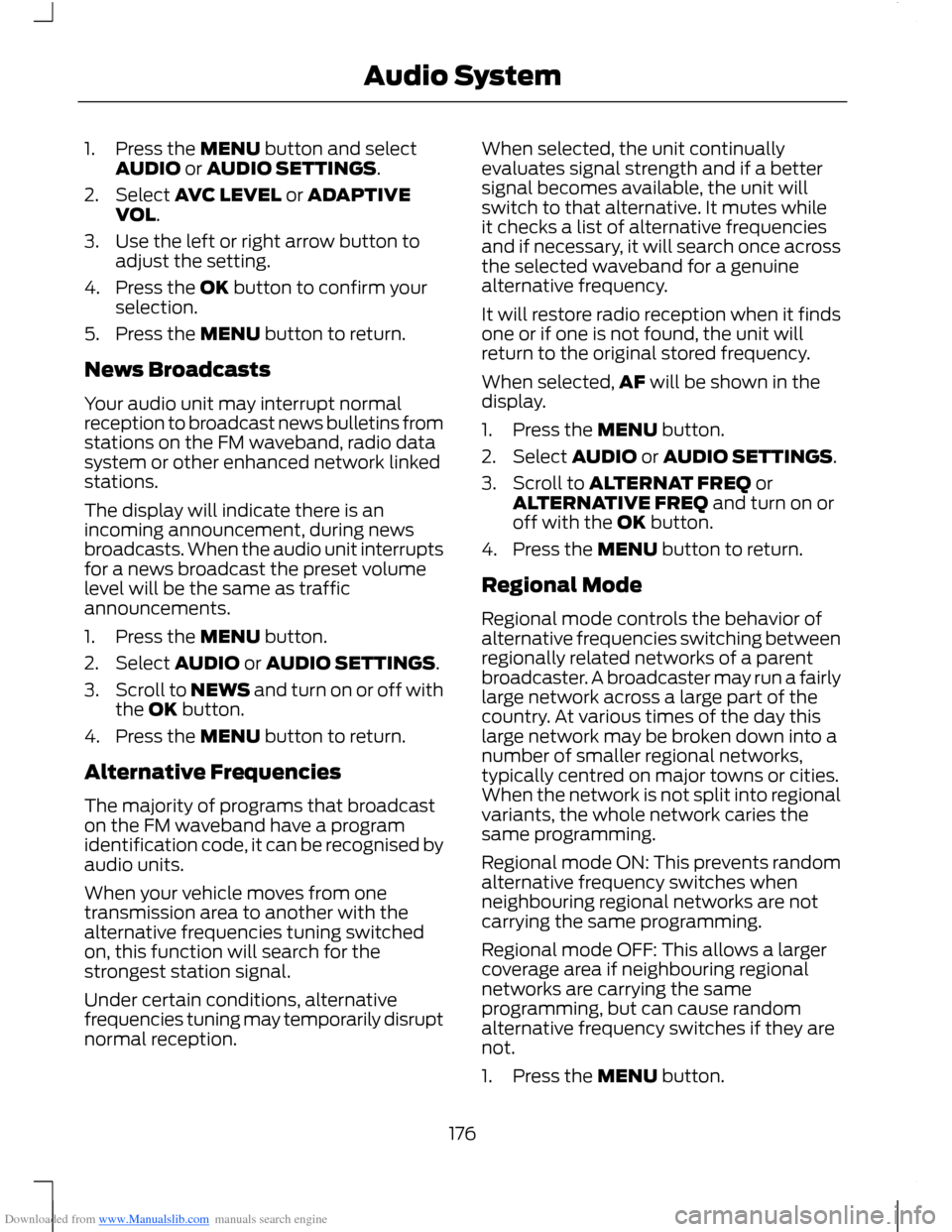
Downloaded from www.Manualslib.com manuals search engine 1.Press the MENU button and selectAUDIO or AUDIO SETTINGS.
2.Select AVC LEVEL or ADAPTIVEVOL.
3.Use the left or right arrow button toadjust the setting.
4.Press the OK button to confirm yourselection.
5.Press the MENU button to return.
News Broadcasts
Your audio unit may interrupt normalreception to broadcast news bulletins fromstations on the FM waveband, radio datasystem or other enhanced network linkedstations.
The display will indicate there is anincoming announcement, during newsbroadcasts. When the audio unit interruptsfor a news broadcast the preset volumelevel will be the same as trafficannouncements.
1.Press the MENU button.
2.Select AUDIO or AUDIO SETTINGS.
3.Scroll to NEWS and turn on or off withthe OK button.
4.Press the MENU button to return.
Alternative Frequencies
The majority of programs that broadcaston the FM waveband have a programidentification code, it can be recognised byaudio units.
When your vehicle moves from onetransmission area to another with thealternative frequencies tuning switchedon, this function will search for thestrongest station signal.
Under certain conditions, alternativefrequencies tuning may temporarily disruptnormal reception.
When selected, the unit continuallyevaluates signal strength and if a bettersignal becomes available, the unit willswitch to that alternative. It mutes whileit checks a list of alternative frequenciesand if necessary, it will search once acrossthe selected waveband for a genuinealternative frequency.
It will restore radio reception when it findsone or if one is not found, the unit willreturn to the original stored frequency.
When selected,AF will be shown in thedisplay.
1.Press the MENU button.
2.Select AUDIO or AUDIO SETTINGS.
3.Scroll to ALTERNAT FREQ orALTERNATIVE FREQ and turn on oroff with the OK button.
4.Press the MENU button to return.
Regional Mode
Regional mode controls the behavior ofalternative frequencies switching betweenregionally related networks of a parentbroadcaster. A broadcaster may run a fairlylarge network across a large part of thecountry. At various times of the day thislarge network may be broken down into anumber of smaller regional networks,typically centred on major towns or cities.When the network is not split into regionalvariants, the whole network caries thesame programming.
Regional mode ON: This prevents randomalternative frequency switches whenneighbouring regional networks are notcarrying the same programming.
Regional mode OFF: This allows a largercoverage area if neighbouring regionalnetworks are carrying the sameprogramming, but can cause randomalternative frequency switches if they arenot.
1.Press the MENU button.
176Audio System
Page 183 of 256
Downloaded from www.Manualslib.com manuals search engine 5.Press the MENU button to return.
News Broadcasts
Your audio unit may interrupt normalreception to broadcast news bulletins fromstations on the FM waveband, radio datasystem or other enhanced network linkedstations.
The display will indicate there is anincoming announcement, during newsbroadcasts. When the audio unit interruptsfor a news broadcast the preset volumelevel will be the same as trafficannouncements.
1.Press the MENU button.
2.Select AUDIO or AUDIO SETTINGS.
3.Scroll to NEWS and turn on or off withthe OK button.
4.Press the MENU button to return.
Alternative Frequencies
The majority of programs that broadcaston the FM waveband have a programidentification code, it can be recognised byaudio units.
When your vehicle moves from onetransmission area to another with thealternative frequencies tuning switchedon, this function will search for thestrongest station signal.
Under certain conditions, alternativefrequencies tuning may temporarily disruptnormal reception.
When selected, the unit continuallyevaluates signal strength and, if a bettersignal becomes available, the unit willswitch to that alternative. It mutes whileit checks a list of alternative frequenciesand if necessary, it will search once acrossthe selected waveband for a genuinealternative frequency.
It will restore radio reception when it findsone or if one is not found, the unit willreturn to the original stored frequency.
When selected, AF will be shown in thedisplay.
1.Press the MENU button.
2.Select AUDIO or AUDIO SETTINGS.
3.Scroll to ALTERNAT FREQ. orALTERNATIVE FREQ. and turn on oroff with the OK button.
4.Press the MENU button to return.
Regional Mode
Regional mode controls the behaviour ofalternative frequencies switching betweenregionally related networks of a parentbroadcaster. A broadcaster may run a fairlylarge network across a large part of thecountry. At various times of the day thislarge network may be broken down into anumber of smaller regional networks,typically centred on major towns or cities.When the network is not split into regionalvariants, the whole network caries thesame programming.
Regional mode ON: This prevents randomalternative frequency switches whenneighbouring regional networks are notcarrying the same programming.
Regional mode OFF: This allows a largercoverage area if neighbouring regionalnetworks are carrying the sameprogramming, but can cause randomalternative frequency switches if they arenot.
1.Press the MENU button.
2.Select AUDIO or AUDIO SETTINGS.
3.Scroll to RDS REGIONAL and turn onor off with the OK button.
4.Press the MENU button to return.
181Audio System
Page 188 of 256
Downloaded from www.Manualslib.com manuals search engine Automatic Volume Control
When available, automatic volume controladjusts the volume level to compensatefor engine noise and road speed noise.
1.Press the MENU button and selectAUDIO.
2.Select AVC LEVEL or ADAPTIVEVOL.
3.Use the left or right arrow button toadjust the setting.
4.Press the OK button to confirm yourselection.
5.Press the MENU button to return.
Digital Signal Processing
Digital Signal Processing Occupancy
This feature takes into account thedifferences in distance from the variousspeakers in your vehicle to each seat. Youmust select the correct sitting position forthe audio to be correctly set.
Digital Signal Processing Equaliser
Select the music category that most suitsyour listening preference. The audio outputwill change to enhance the particular styleof music chosen.
Changing the Digital Signal ProcessingSettings
1.Press the MENU button.
2.Select AUDIO or AUDIO SETTINGS.
3.Scroll to the required digital signalprocessing function.
4.Use the up and down arrow buttons toselect the required setting.
5.Press the OK button to confirm yourselection.
6.Press the MENU button to return.
News Broadcasts
Your audio unit may interrupt normalreception to broadcast news bulletins fromstations on the FM waveband, radio datasystem or other enhanced network linkedstations.
The display will indicate there is anincoming announcement, during newsbroadcasts. When the audio unit interruptsfor a news broadcast the preset volumelevel will be the same as trafficannouncements.
1.Press the MENU button.
2.Select AUDIO or AUDIO SETTINGS.
3.Scroll to NEWS and turn on or off withthe OK button.
4.Press the MENU button to return.
Alternative Frequencies
The majority of programs that broadcaston the FM waveband have a programidentification code, it can be recognised byaudio units.
When your vehicle moves from onetransmission area to another with thealternative frequencies tuning switchedon, this function will search for thestrongest station signal.
Under certain conditions, however,alternative frequencies tuning maytemporarily disrupt normal reception.
When selected, the unit continuallyevaluates signal strength and, if a bettersignal becomes available, the unit willswitch to that alternative. It mutes whileit checks a list of alternative frequenciesand if necessary, it will search once acrossthe selected waveband for a genuinealternative frequency.
It will restore radio reception when it findsone or if one is not found, the unit willreturn to the original stored frequency.
186Audio System