Eco FORD B MAX 2013 1.G User Guide
[x] Cancel search | Manufacturer: FORD, Model Year: 2013, Model line: B MAX, Model: FORD B MAX 2013 1.GPages: 298, PDF Size: 20.63 MB
Page 25 of 298
Downloaded from www.Manualslib.com manuals search engine PRINCIPLE OF OPERATION
WARNINGS
Extreme Hazard! Never use arearward facing child restraint on aseat protected by an active airbag infront of it. Death or serious injury to thechild can occur.
Do not modify the front of yourvehicle in any way. This couldadversely affect deployment of theairbags. Failure to adhere to this warningcould result in serious personal injury ordeath.
Wear a safety belt and keepsufficient distance between yourselfand the steering wheel. Only whenyou use the safety belt correctly, can it holdyou in a position that allows the airbag toachieve its optimum effect. See Sittingin the Correct Position (page 83). Failureto adhere to this warning could result inserious personal injury or death.
Repairs to the steering wheel,steering column, seats, airbags andsafety belts must be carried out byan authorized dealer. Failure to adhere tothis warning could result in seriouspersonal injury or death.
Keep the areas in front of the airbagsfree from obstruction. Do not affixanything to or over the airbag covers.In the event of a crash, hard objects couldcause serious personal injury or death.
Do not puncture the seat with sharpobjects. This could damage andadversely affect deployment of theairbags. Failure to adhere to this warningcould result in serious personal injury ordeath.
Use seat covers designed for seatswith side airbags. Have these fittedby an authorized dealer. Failure toadhere to this warning could result inserious personal injury or death.
Note:You will hear a loud bang and see acloud of harmless powdery residue if anairbag deploys. This is normal.
Note:Only wipe airbag covers with a dampcloth.
DRIVER AIRBAG
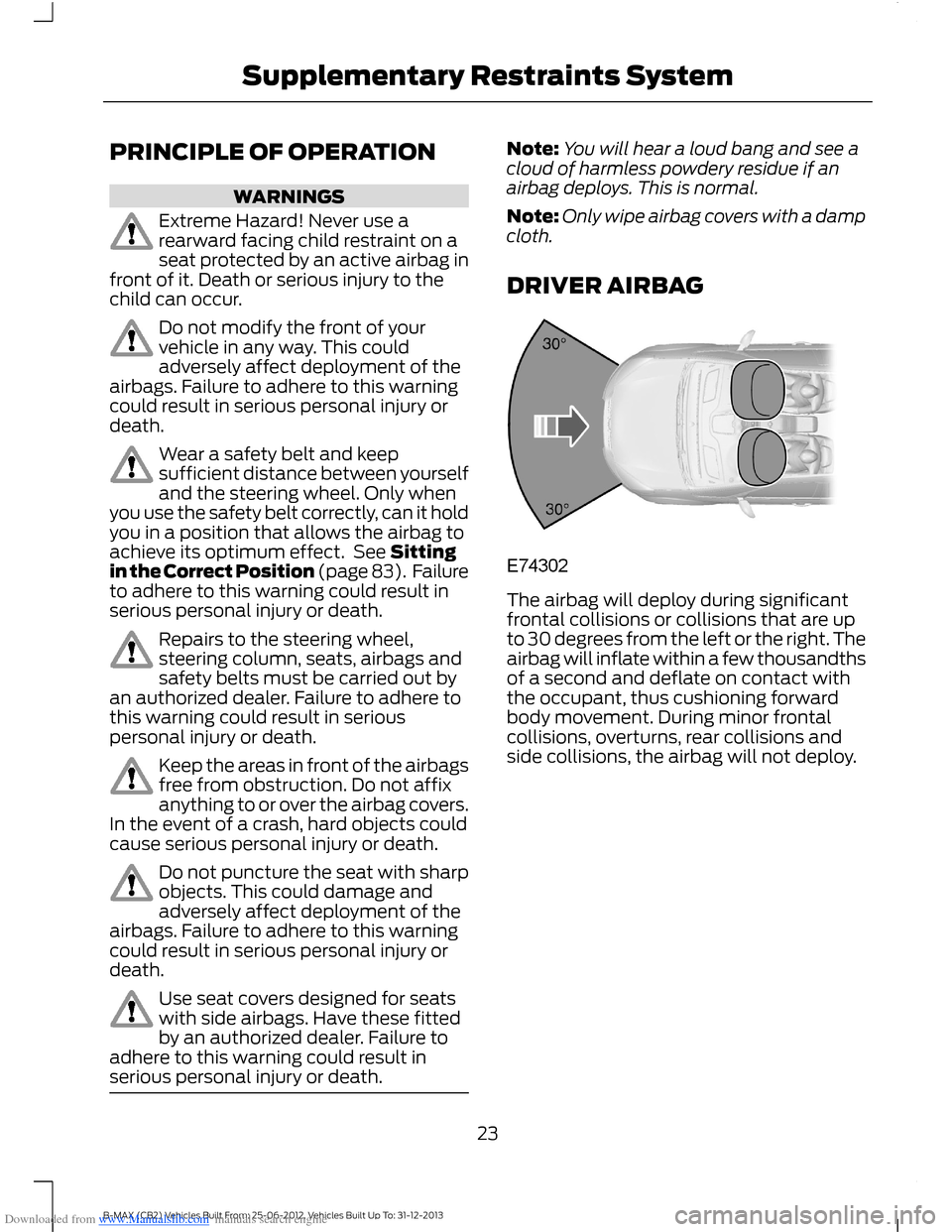
The airbag will deploy during significantfrontal collisions or collisions that are upto 30 degrees from the left or the right. Theairbag will inflate within a few thousandthsof a second and deflate on contact withthe occupant, thus cushioning forwardbody movement. During minor frontalcollisions, overturns, rear collisions andside collisions, the airbag will not deploy.
23B-MAX (CB2) Vehicles Built From: 25-06-2012, Vehicles Built Up To: 31-12-2013Supplementary Restraints System
Page 26 of 298
Downloaded from www.Manualslib.com manuals search engine PASSENGER AIRBAG
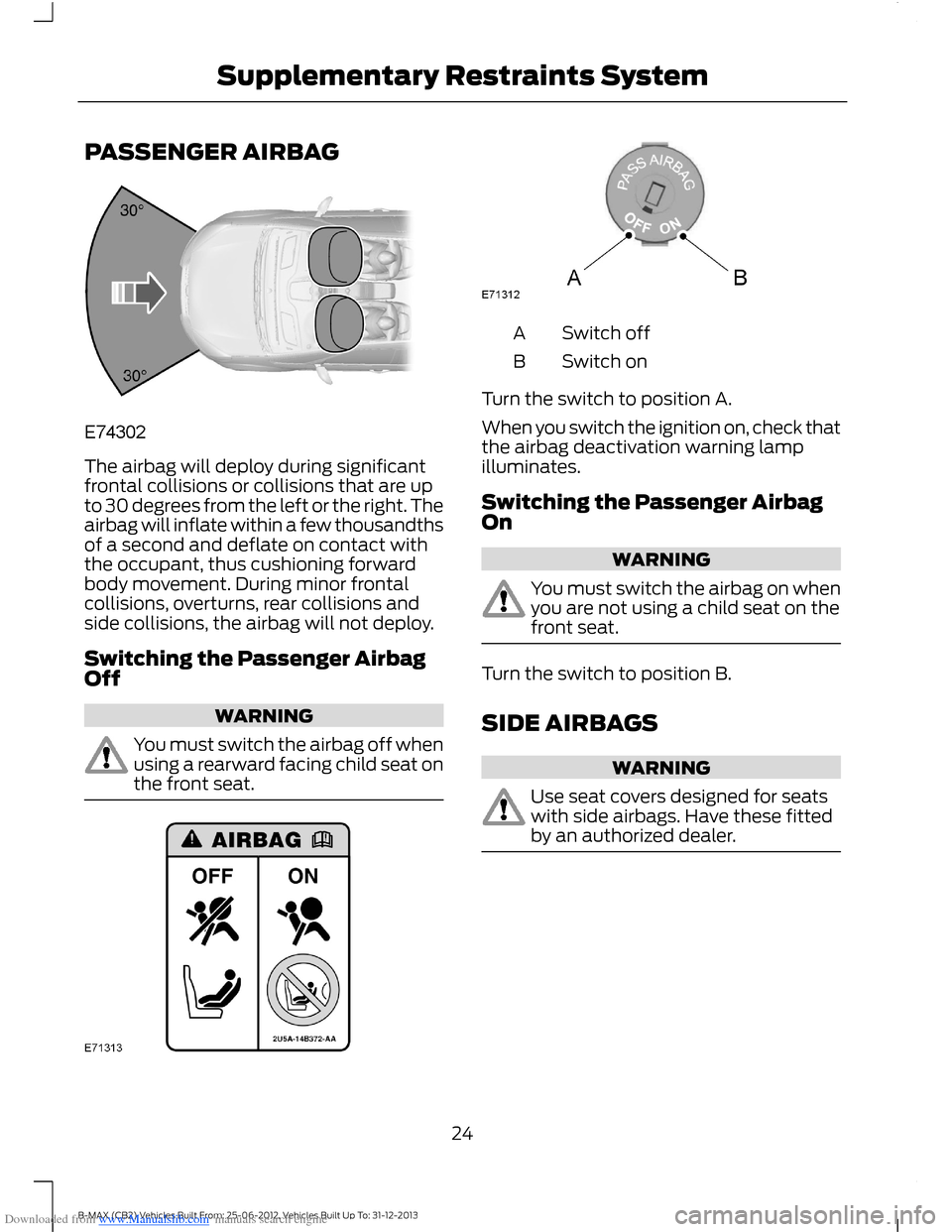
The airbag will deploy during significantfrontal collisions or collisions that are upto 30 degrees from the left or the right. Theairbag will inflate within a few thousandthsof a second and deflate on contact withthe occupant, thus cushioning forwardbody movement. During minor frontalcollisions, overturns, rear collisions andside collisions, the airbag will not deploy.
Switching the Passenger AirbagOff
WARNING
You must switch the airbag off whenusing a rearward facing child seat onthe front seat.
Switch offA
Switch onB
Turn the switch to position A.
When you switch the ignition on, check thatthe airbag deactivation warning lampilluminates.
Switching the Passenger AirbagOn
WARNING
You must switch the airbag on whenyou are not using a child seat on thefront seat.
Turn the switch to position B.
SIDE AIRBAGS
WARNING
Use seat covers designed for seatswith side airbags. Have these fittedby an authorized dealer.
24B-MAX (CB2) Vehicles Built From: 25-06-2012, Vehicles Built Up To: 31-12-2013Supplementary Restraints System
Page 27 of 298
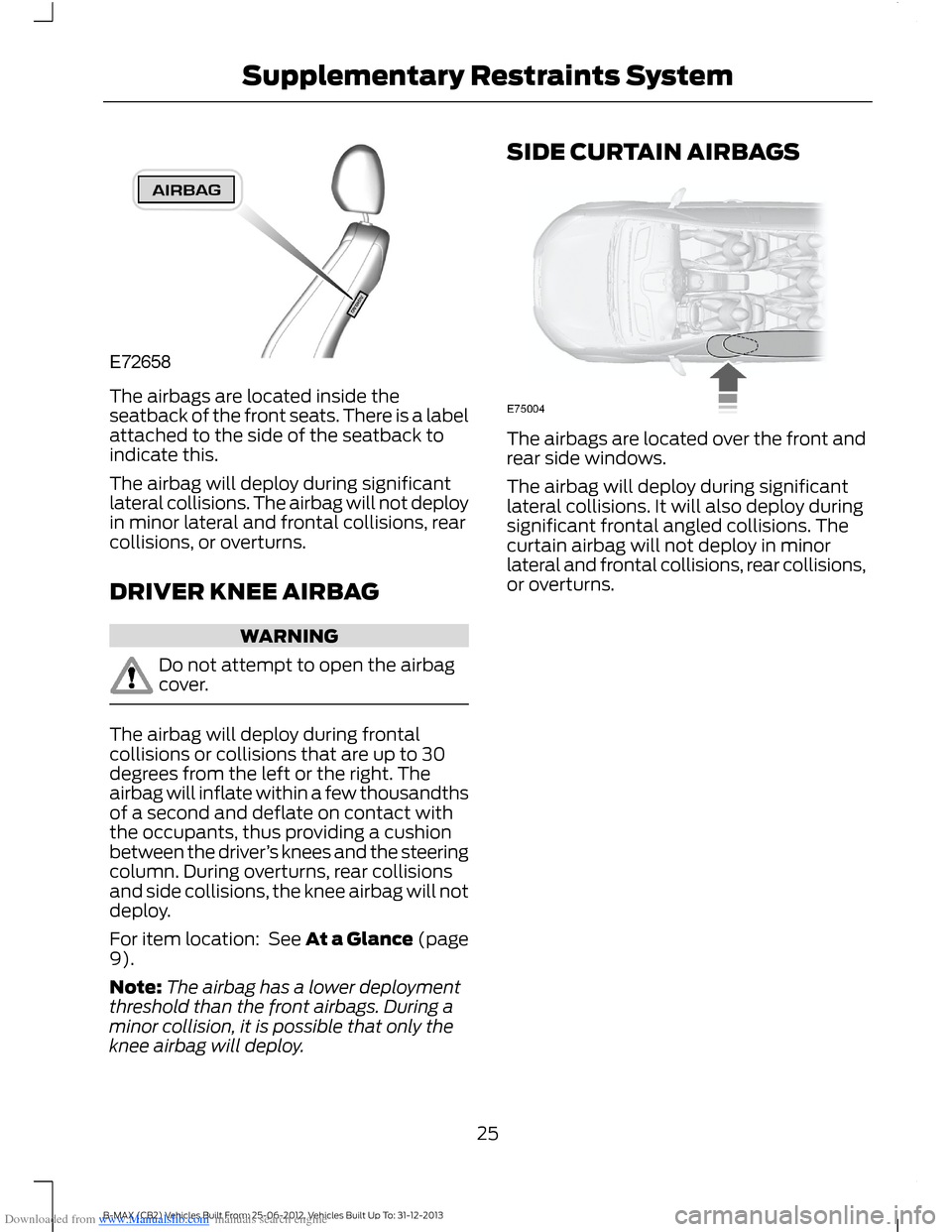
Downloaded from www.Manualslib.com manuals search engine The airbags are located inside theseatback of the front seats. There is a labelattached to the side of the seatback toindicate this.
The airbag will deploy during significantlateral collisions. The airbag will not deployin minor lateral and frontal collisions, rearcollisions, or overturns.
DRIVER KNEE AIRBAG
WARNING
Do not attempt to open the airbagcover.
The airbag will deploy during frontalcollisions or collisions that are up to 30degrees from the left or the right. Theairbag will inflate within a few thousandthsof a second and deflate on contact withthe occupants, thus providing a cushionbetween the driver’s knees and the steeringcolumn. During overturns, rear collisionsand side collisions, the knee airbag will notdeploy.
For item location: See At a Glance (page9).
Note:The airbag has a lower deploymentthreshold than the front airbags. During aminor collision, it is possible that only theknee airbag will deploy.
SIDE CURTAIN AIRBAGS
The airbags are located over the front andrear side windows.
The airbag will deploy during significantlateral collisions. It will also deploy duringsignificant frontal angled collisions. Thecurtain airbag will not deploy in minorlateral and frontal collisions, rear collisions,or overturns.
25B-MAX (CB2) Vehicles Built From: 25-06-2012, Vehicles Built Up To: 31-12-2013Supplementary Restraints System
Page 28 of 298
Downloaded from www.Manualslib.com manuals search engine GENERAL INFORMATION ON
RADIO FREQUENCIES
Note:Changes or modifications notexpressly approved by the party responsiblefor compliance could void the user’sauthority to operate the equipment.
The typical operating range for yourtransmitter is approximately 33 ft (10 m).
A decrease in operating range could becaused by:
•weather conditions
•nearby radio towers
•structures around your vehicle
•other vehicles parked next to yourvehicle.
The radio frequency used by your remotecontrol can also be used by other shortdistance radio transmissions (e.g. amateurradios, medical equipment, wirelessheadphones, remote controls and alarmsystems). If the frequencies are jammed,you will not be able to use your remotecontrol. You can lock and unlock the doorswith the key.
Note:Make sure your vehicle is lockedbefore leaving it unattended.
Note:If you are in range, the remote controlwill operate if you press any buttonunintentionally.
REMOTE CONTROL
You can program a maximum of eightremote controls to your vehicle. Thisincludes any that were supplied with yourvehicle. The remote controls must remaininside your vehicle during the programmingprocedure. Fasten the front safety beltsand close all doors to make sure thatconflicting chimes do not sound duringprogramming.
Programming a New RemoteControl
1.Turn the ignition key from position 0 toposition II four times within sixseconds.
2.Turn the ignition to position 0. A tonesounds to indicate that it is nowpossible to program a remote control.
3.Press any button on a new remotecontrol within 10 seconds. A tone willsound as confirmation.
4.Repeat step three within 10 secondsfor each new remote control. Do notremove the key from the ignition whenpressing the button on the remotecontrol.
5.Switch the ignition back on (positionII) or wait for 10 seconds withoutprogramming another remote controlto end the key programming. Only theremote controls which you have justprogrammed are now able to lock andunlock your vehicle.
Reprogramming the UnlockingFunction
Note:When you press the unlock buttoneither all the doors are unlocked or only thedriver’s door and the liftgate are unlocked.Pressing the unlock button again unlocksall the doors.
Press and hold the unlock and lock buttonson the remote control simultaneously forat least four seconds with the ignition off.The direction indicators will flash twice toconfirm the change.
To return to the original unlocking function,repeat the process.
26B-MAX (CB2) Vehicles Built From: 25-06-2012, Vehicles Built Up To: 31-12-2013Keys and Remote Controls
Page 29 of 298
Downloaded from www.Manualslib.com manuals search engine Changing the Remote ControlBattery
Make sure that you dispose ofold batteries in anenvironmentally friendly way.Seek advice from your local authorityregarding recycling.
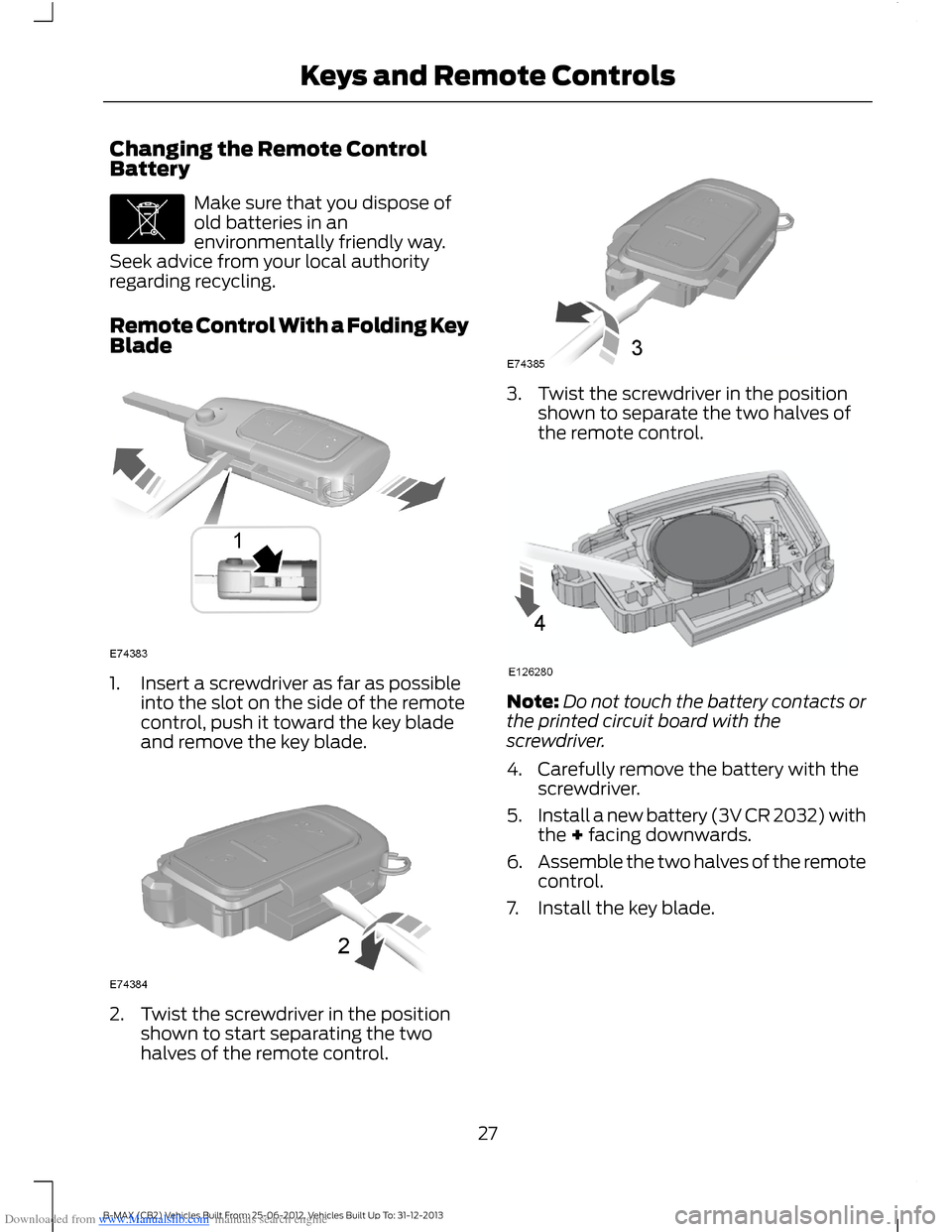
Remote Control With a Folding KeyBlade
1.Insert a screwdriver as far as possibleinto the slot on the side of the remotecontrol, push it toward the key bladeand remove the key blade.
2.Twist the screwdriver in the positionshown to start separating the twohalves of the remote control.
3.Twist the screwdriver in the positionshown to separate the two halves ofthe remote control.
Note:Do not touch the battery contacts orthe printed circuit board with thescrewdriver.
4.Carefully remove the battery with thescrewdriver.
5.Install a new battery (3V CR 2032) withthe + facing downwards.
6.Assemble the two halves of the remotecontrol.
7.Install the key blade.
27B-MAX (CB2) Vehicles Built From: 25-06-2012, Vehicles Built Up To: 31-12-2013Keys and Remote Controls
Page 30 of 298
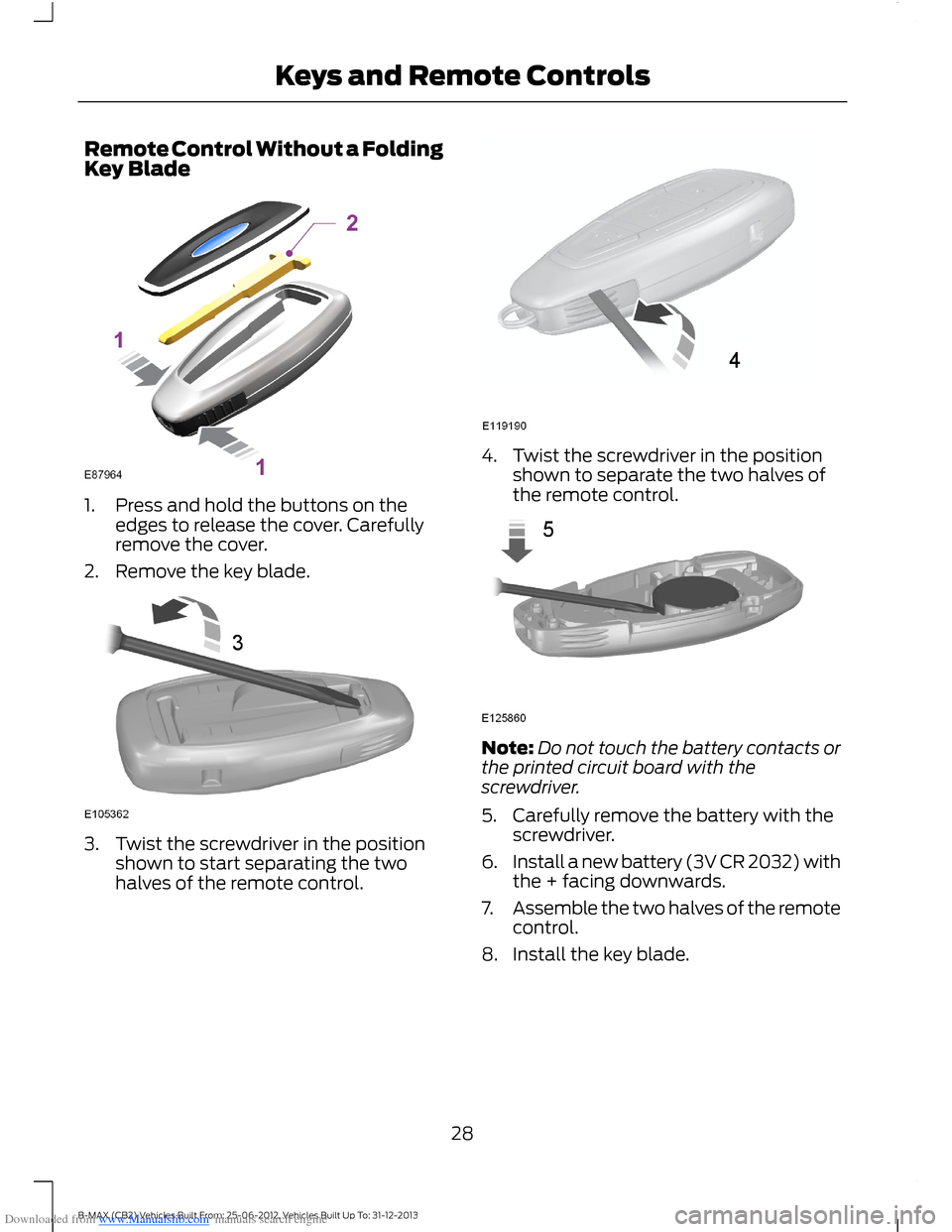
Downloaded from www.Manualslib.com manuals search engine Remote Control Without a FoldingKey Blade
1.Press and hold the buttons on theedges to release the cover. Carefullyremove the cover.
2.Remove the key blade.
3.Twist the screwdriver in the positionshown to start separating the twohalves of the remote control.
4.Twist the screwdriver in the positionshown to separate the two halves ofthe remote control.
Note:Do not touch the battery contacts orthe printed circuit board with thescrewdriver.
5.Carefully remove the battery with thescrewdriver.
6.Install a new battery (3V CR 2032) withthe + facing downwards.
7.Assemble the two halves of the remotecontrol.
8.Install the key blade.
28B-MAX (CB2) Vehicles Built From: 25-06-2012, Vehicles Built Up To: 31-12-2013Keys and Remote Controls
Page 31 of 298
Downloaded from www.Manualslib.com manuals search engine REPLACING A LOST KEY OR
REMOTE CONTROL
Replacement or additional keys or remotecontrols can be purchased from anauthorized dealer. Your dealer can programthe remote controls for your vehicle or youmay be able to program them yourself.See Remote Control (page 26).
To re-program the passive anti-theftsystem see an authorized dealer.
29B-MAX (CB2) Vehicles Built From: 25-06-2012, Vehicles Built Up To: 31-12-2013Keys and Remote Controls
Page 32 of 298
Downloaded from www.Manualslib.com manuals search engine PRINCIPLE OF OPERATION
The system allows you to program keyswith restricted driving modes to promotegood driving habits. You can use all but oneof the keys programmed to your vehiclewith these restricted modes.
Any keys that have not been programmedare referred to as an administrator key oradmin key. These can be used to:
•create a MyKey
•program optional MyKey settings
•clear all MyKey features.
When you have programmed a MyKey, youcan access the following information usingthe information display:
•How many admin keys and MyKeys areprogrammed to your vehicle.
•The total distance your vehicle hastraveled using a MyKey.
Note:Switch the ignition on to use thesystem.
Note:All MyKeys are programmed to thesame settings. You cannot program themindividually.
Standard Settings
The following settings cannot be changed:
•Safety belt minder. You cannot disablethis feature. The audio system willmute when this feature is activated.
•Low fuel level warning. When the fuellevel is low, warnings will be shown inthe display followed by an audibletone.
•Driver assist features, for examplenavigation and parking aids. Thesesystems turn on automaticallywhenever you switch the ignition on.
Optional Settings
You can configure MyKey settings whenyou first create a MyKey. You can alsochange the settings afterward with anadmin key.
The following settings can be configuredusing an admin key:
•Various vehicle speed limits can be set.Warnings will be shown in the displayfollowed by an audible tone when yourvehicle reaches the set speed. Youcannot override the set speed by fullydepressing the accelerator pedal.
•Various vehicle speed reminders canbe set. Warnings will be shown in thedisplay followed by an audible tonewhen the set vehicle speed isexceeded.
•Audio system maximum volume of45%. A message will be shown in thedisplay when you attempt to exceedthe limited volume. Automatic volumecontrol will be disabled.
•Always on setting. When this isselected you will not be able to disableemergency assistance or the do notdisturb feature.
Vehicles with Keyless Entry
If a MyKey and an admin key are present,your vehicle will recognize the admin keyonly.
CREATING A MYKEY
Vehicles without Keyless Starting
1.Insert the key you want to program intothe ignition.
2.Switch the ignition on.
3.Access the main menu using theinformation display. Select MyKey andpress OK or the right arrow button.
30B-MAX (CB2) Vehicles Built From: 25-06-2012, Vehicles Built Up To: 31-12-2013MyKey™
Page 34 of 298
Downloaded from www.Manualslib.com manuals search engine MyKey Distance
Tracks the distance when drivers use aMyKey. The only way to delete theaccumulated distance is by using an adminkey to clear your MyKey. If the distancedoes not accumulate as expected, thenthe intended user is not using the MyKey,or an admin key user recently cleared andthen recreated a MyKey.
Number of MyKeys
Indicates the number of MyKeysprogrammed to your vehicle. Use thisfeature to detect how many MyKeys youhave for your vehicle and determine whena MyKey has been deleted.
Number of Admin Keys
Indicates how many admin keys areprogrammed to your vehicle. Use thisfeature to determine how many adminkeys you have for your vehicle, and detectif an additional MyKey has beenprogrammed.
USING MYKEY WITH REMOTE
START SYSTEMS
MyKey is not compatible with nonFord-approved, aftermarket remote startsystems. If you choose to install a remotestart system, see an authorized dealer fora Ford-approved remote start system.
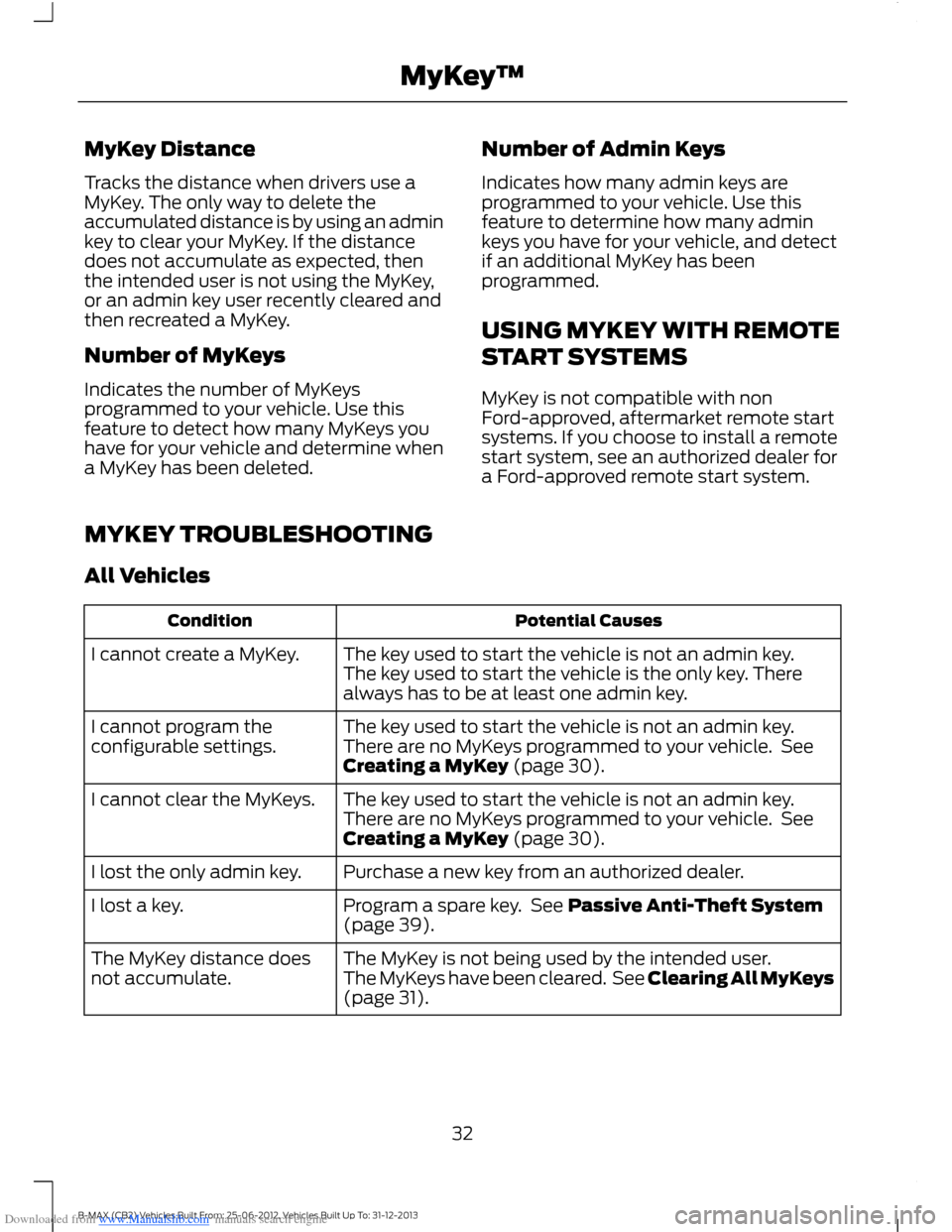
MYKEY TROUBLESHOOTING
All Vehicles
Potential CausesCondition
The key used to start the vehicle is not an admin key.The key used to start the vehicle is the only key. Therealways has to be at least one admin key.
I cannot create a MyKey.
The key used to start the vehicle is not an admin key.There are no MyKeys programmed to your vehicle. SeeCreating a MyKey (page 30).
I cannot program theconfigurable settings.
The key used to start the vehicle is not an admin key.There are no MyKeys programmed to your vehicle. SeeCreating a MyKey (page 30).
I cannot clear the MyKeys.
Purchase a new key from an authorized dealer.I lost the only admin key.
Program a spare key. See Passive Anti-Theft System(page 39).I lost a key.
The MyKey is not being used by the intended user.The MyKeys have been cleared. See Clearing All MyKeys(page 31).
The MyKey distance doesnot accumulate.
32B-MAX (CB2) Vehicles Built From: 25-06-2012, Vehicles Built Up To: 31-12-2013MyKey™
Page 36 of 298
Downloaded from www.Manualslib.com manuals search engine LOCKING AND UNLOCKING
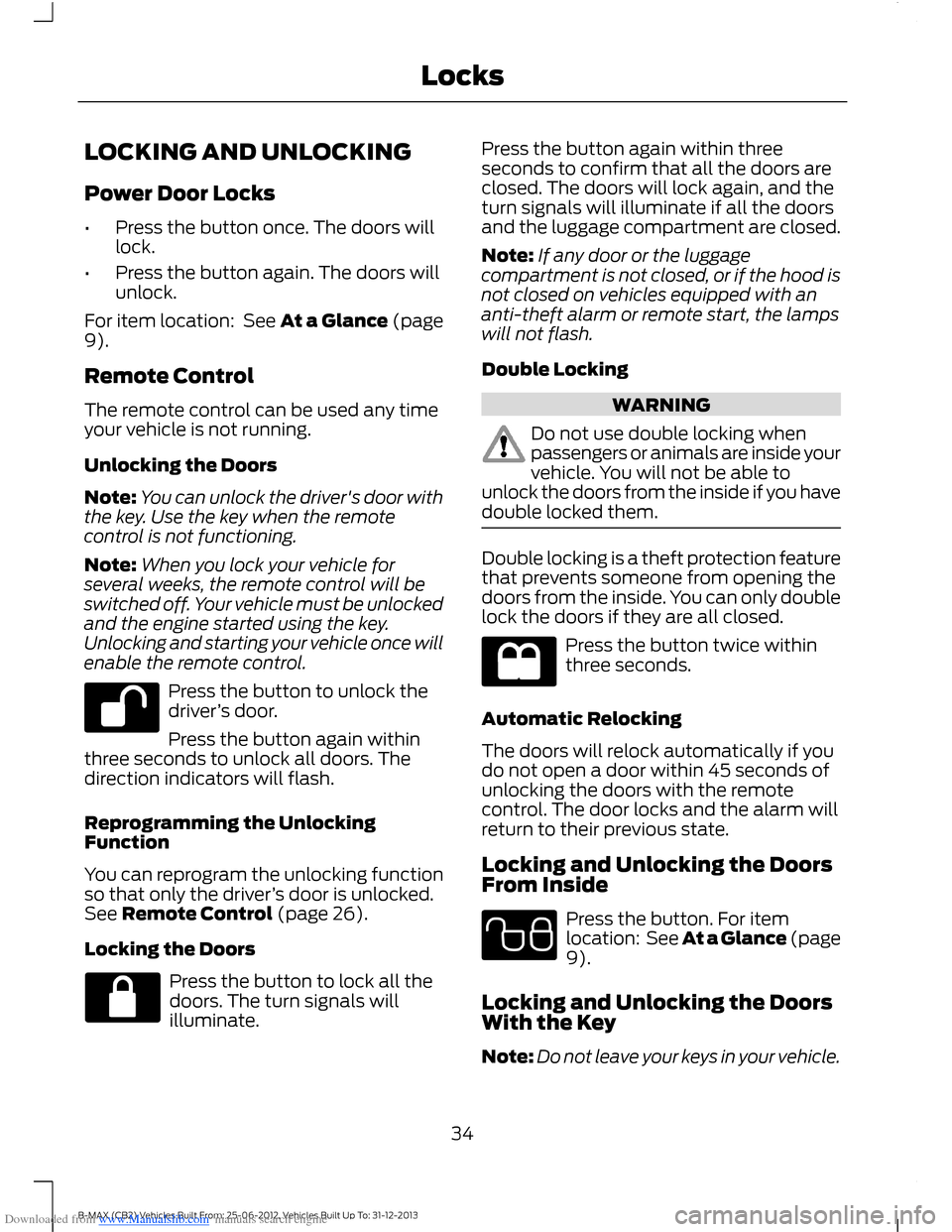
Power Door Locks
•Press the button once. The doors willlock.
•Press the button again. The doors willunlock.
For item location: See At a Glance (page9).
Remote Control
The remote control can be used any timeyour vehicle is not running.
Unlocking the Doors
Note:You can unlock the driver's door withthe key. Use the key when the remotecontrol is not functioning.
Note:When you lock your vehicle forseveral weeks, the remote control will beswitched off. Your vehicle must be unlockedand the engine started using the key.Unlocking and starting your vehicle once willenable the remote control.
Press the button to unlock thedriver’s door.
Press the button again withinthree seconds to unlock all doors. Thedirection indicators will flash.
Reprogramming the UnlockingFunction
You can reprogram the unlocking functionso that only the driver’s door is unlocked.See Remote Control (page 26).
Locking the Doors
Press the button to lock all thedoors. The turn signals willilluminate.
Press the button again within threeseconds to confirm that all the doors areclosed. The doors will lock again, and theturn signals will illuminate if all the doorsand the luggage compartment are closed.
Note:If any door or the luggagecompartment is not closed, or if the hood isnot closed on vehicles equipped with ananti-theft alarm or remote start, the lampswill not flash.
Double Locking
WARNING
Do not use double locking whenpassengers or animals are inside yourvehicle. You will not be able tounlock the doors from the inside if you havedouble locked them.
Double locking is a theft protection featurethat prevents someone from opening thedoors from the inside. You can only doublelock the doors if they are all closed.
Press the button twice withinthree seconds.
Automatic Relocking
The doors will relock automatically if youdo not open a door within 45 seconds ofunlocking the doors with the remotecontrol. The door locks and the alarm willreturn to their previous state.
Locking and Unlocking the DoorsFrom Inside
Press the button. For itemlocation: See At a Glance (page9).
Locking and Unlocking the DoorsWith the Key
Note:Do not leave your keys in your vehicle.
34B-MAX (CB2) Vehicles Built From: 25-06-2012, Vehicles Built Up To: 31-12-2013Locks