airbag FORD B MAX 2013 1.G User Guide
[x] Cancel search | Manufacturer: FORD, Model Year: 2013, Model line: B MAX, Model: FORD B MAX 2013 1.GPages: 298, PDF Size: 20.63 MB
Page 70 of 298
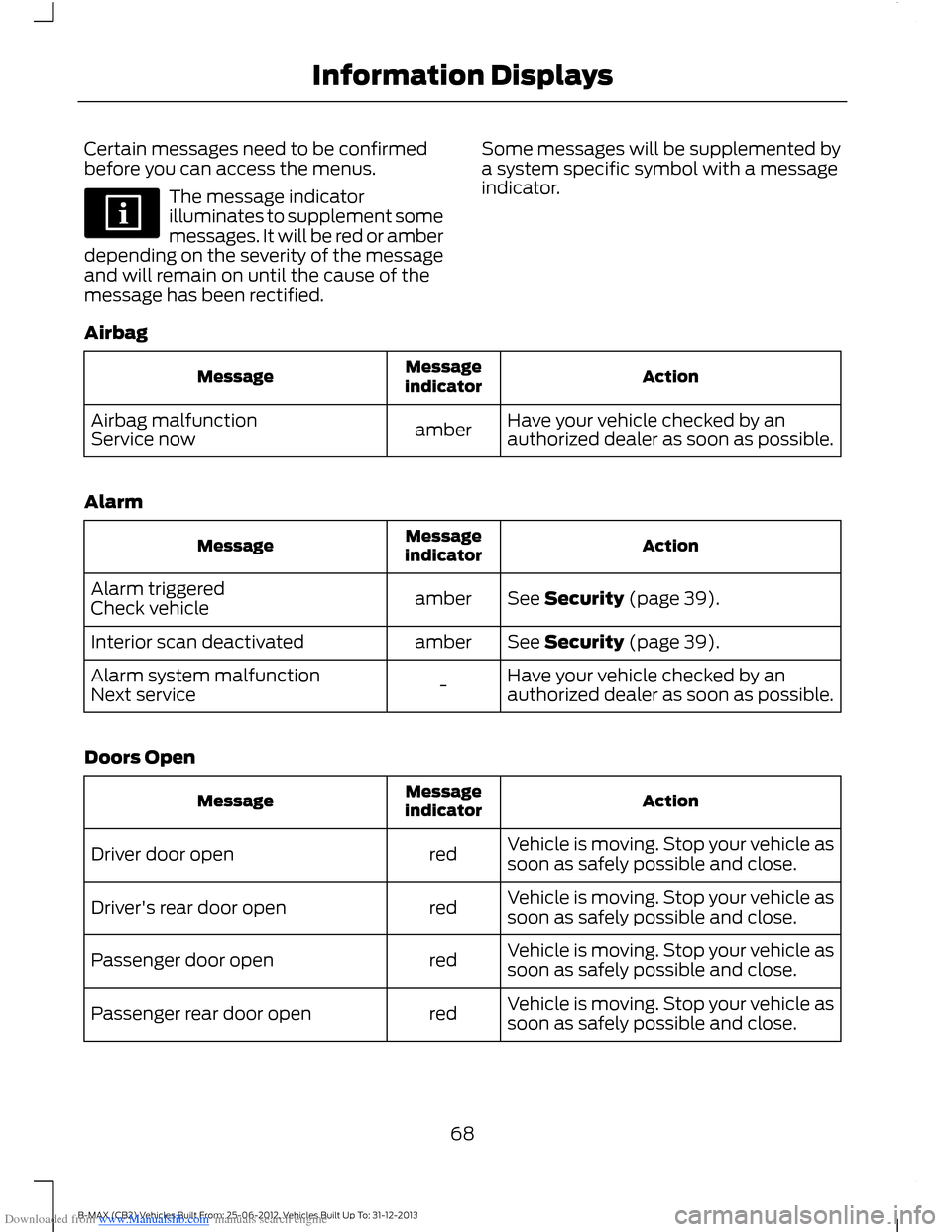
Downloaded from www.Manualslib.com manuals search engine Certain messages need to be confirmedbefore you can access the menus.
The message indicatorilluminates to supplement somemessages. It will be red or amberdepending on the severity of the messageand will remain on until the cause of themessage has been rectified.
Some messages will be supplemented bya system specific symbol with a messageindicator.
Airbag
ActionMessageindicatorMessage
Have your vehicle checked by anauthorized dealer as soon as possible.amberAirbag malfunctionService now
Alarm
ActionMessageindicatorMessage
See Security (page 39).amberAlarm triggeredCheck vehicle
See Security (page 39).amberInterior scan deactivated
Have your vehicle checked by anauthorized dealer as soon as possible.-Alarm system malfunctionNext service
Doors Open
ActionMessageindicatorMessage
Vehicle is moving. Stop your vehicle assoon as safely possible and close.redDriver door open
Vehicle is moving. Stop your vehicle assoon as safely possible and close.redDriver's rear door open
Vehicle is moving. Stop your vehicle assoon as safely possible and close.redPassenger door open
Vehicle is moving. Stop your vehicle assoon as safely possible and close.redPassenger rear door open
68B-MAX (CB2) Vehicles Built From: 25-06-2012, Vehicles Built Up To: 31-12-2013Information Displays
Page 140 of 298
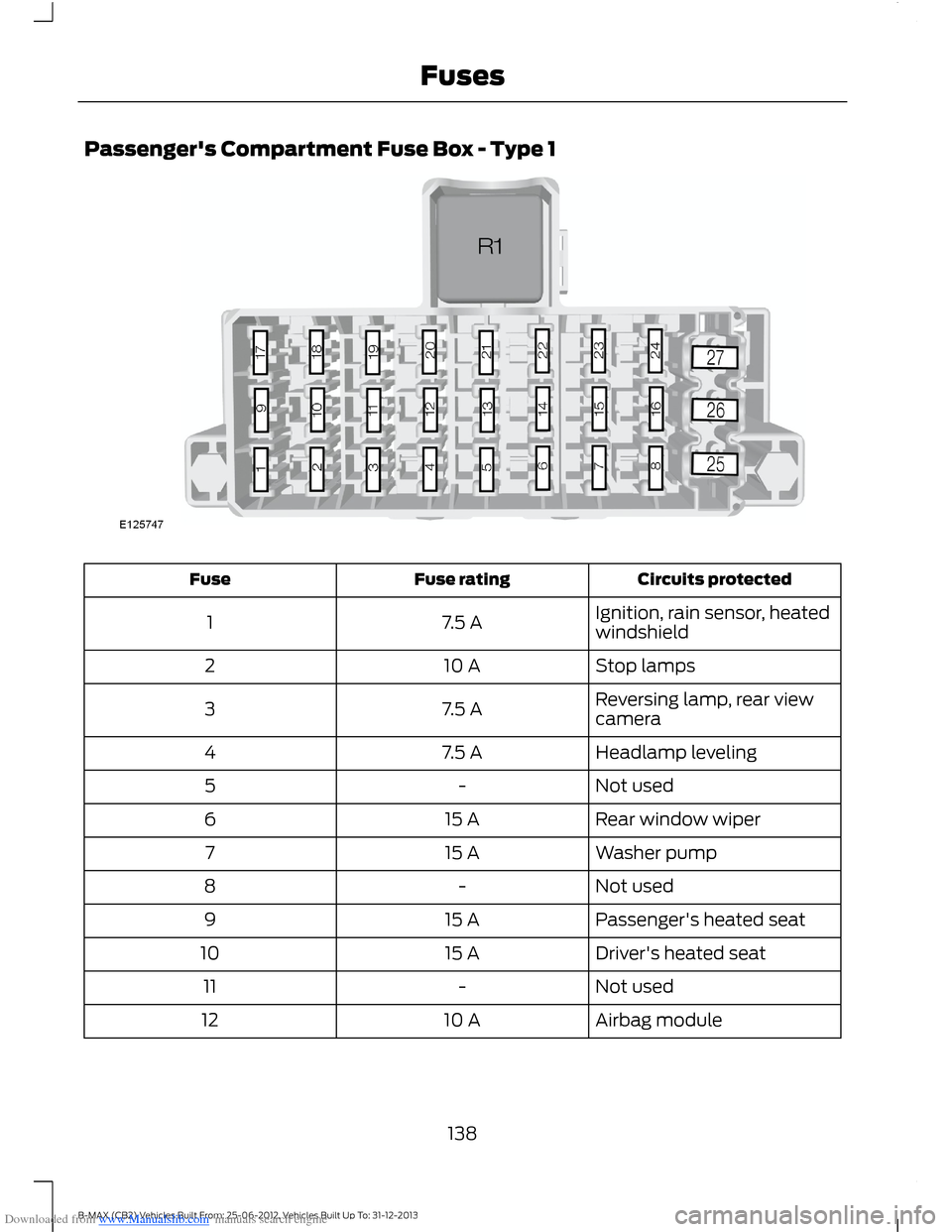
Downloaded from www.Manualslib.com manuals search engine Passenger's Compartment Fuse Box - Type 1
Circuits protectedFuse ratingFuse
Ignition, rain sensor, heatedwindshield7.5 A1
Stop lamps10 A2
Reversing lamp, rear viewcamera7.5 A3
Headlamp leveling7.5 A4
Not used-5
Rear window wiper15 A6
Washer pump15 A7
Not used-8
Passenger's heated seat15 A9
Driver's heated seat15 A10
Not used-11
Airbag module10 A12
138B-MAX (CB2) Vehicles Built From: 25-06-2012, Vehicles Built Up To: 31-12-2013Fuses
Page 143 of 298
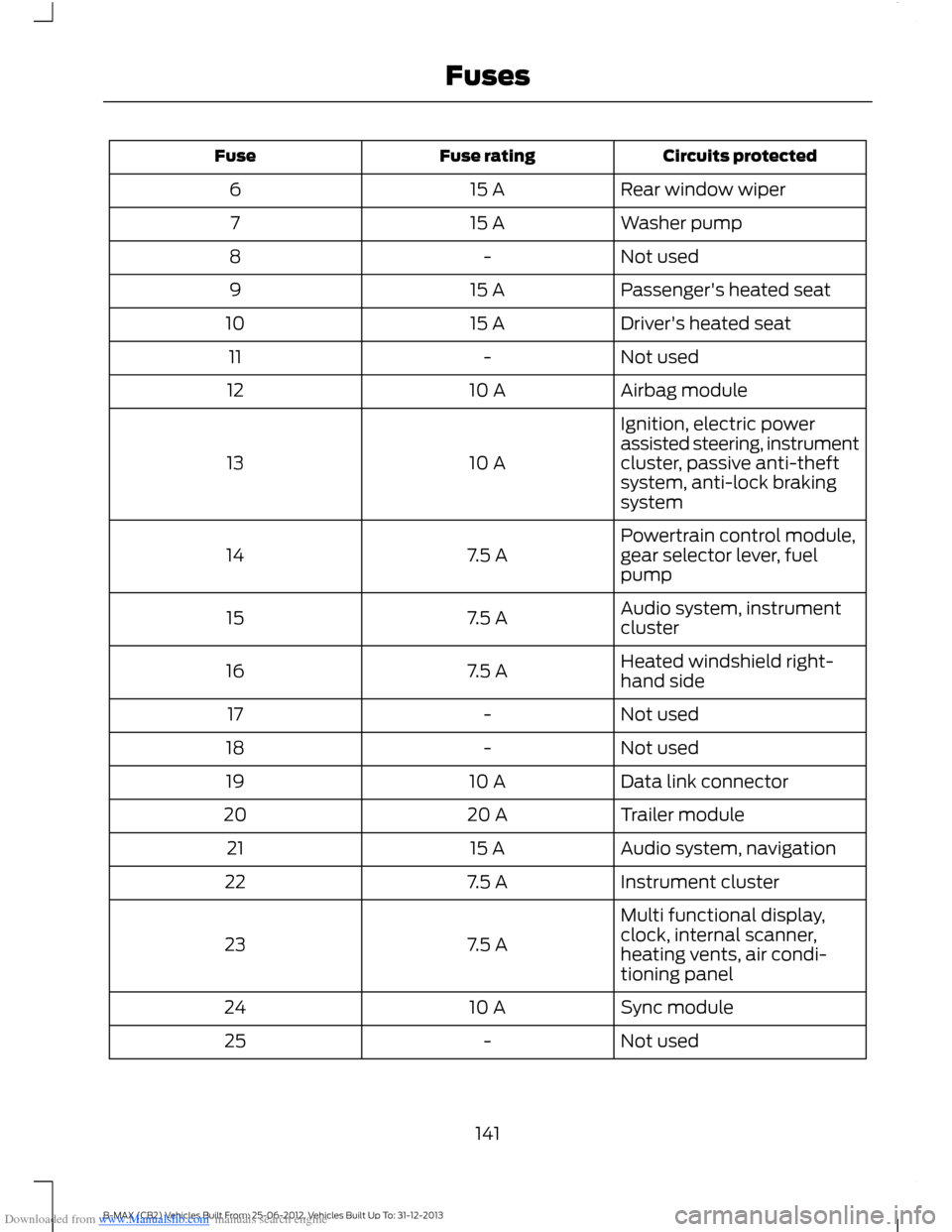
Downloaded from www.Manualslib.com manuals search engine Circuits protectedFuse ratingFuse
Rear window wiper15 A6
Washer pump15 A7
Not used-8
Passenger's heated seat15 A9
Driver's heated seat15 A10
Not used-11
Airbag module10 A12
Ignition, electric powerassisted steering, instrumentcluster, passive anti-theftsystem, anti-lock brakingsystem
10 A13
Powertrain control module,gear selector lever, fuelpump7.5 A14
Audio system, instrumentcluster7.5 A15
Heated windshield right-hand side7.5 A16
Not used-17
Not used-18
Data link connector10 A19
Trailer module20 A20
Audio system, navigation15 A21
Instrument cluster7.5 A22
Multi functional display,clock, internal scanner,heating vents, air condi-tioning panel
7.5 A23
Sync module10 A24
Not used-25
141B-MAX (CB2) Vehicles Built From: 25-06-2012, Vehicles Built Up To: 31-12-2013Fuses
Page 150 of 298
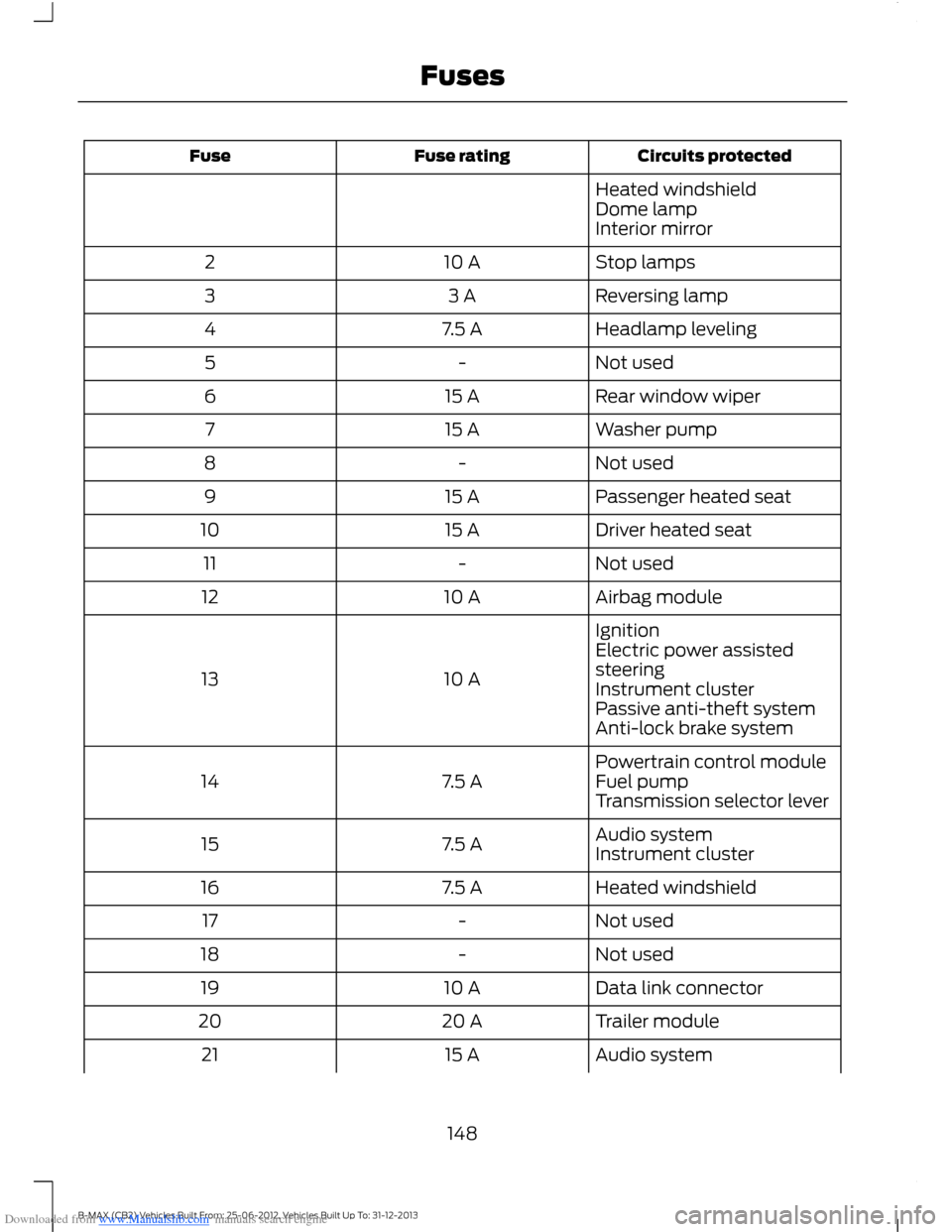
Downloaded from www.Manualslib.com manuals search engine Circuits protectedFuse ratingFuse
Heated windshieldDome lampInterior mirror
Stop lamps10 A2
Reversing lamp3 A3
Headlamp leveling7.5 A4
Not used-5
Rear window wiper15 A6
Washer pump15 A7
Not used-8
Passenger heated seat15 A9
Driver heated seat15 A10
Not used-11
Airbag module10 A12
Ignition
10 A13
Electric power assistedsteeringInstrument clusterPassive anti-theft systemAnti-lock brake system
Powertrain control module7.5 A14Fuel pumpTransmission selector lever
Audio system7.5 A15Instrument cluster
Heated windshield7.5 A16
Not used-17
Not used-18
Data link connector10 A19
Trailer module20 A20
Audio system15 A21
148B-MAX (CB2) Vehicles Built From: 25-06-2012, Vehicles Built Up To: 31-12-2013Fuses
Page 152 of 298
Downloaded from www.Manualslib.com manuals search engine Circuits protectedFuse ratingFuse
Passenger airbag deactiva-tion indicator7.5 A44
Not used-45
Not used-46
Not used-47
Not used-48
Not used-49
Circuits switchedRelay
IgnitionR1
Cigar lighterR2
Not usedR3
Active city stop relayR4
Not usedR5
Keyless entry (accessory)R6
Keyless entry (ignition)R7
Battery saver relayR8
Heated windshield left-hand sideR9
Heated windshield right-hand sideR10
Not usedR11
Not usedR12
CHANGING A FUSE
WARNINGS
Do not modify the electrical systemof your vehicle in any way. Haverepairs to the electrical system andthe replacement of relays and high currentfuses carried out by an authorized dealer.
WARNINGS
Switch the ignition and all electricalequipment off before attempting tochange a fuse.
Always replace a fuse with one thathas the specified amperage rating.Using a fuse with a higher amperagerating can cause severe wire damage andcould start a fire.
150B-MAX (CB2) Vehicles Built From: 25-06-2012, Vehicles Built Up To: 31-12-2013Fuses
Page 256 of 298
Downloaded from www.Manualslib.com manuals search engine Note:When you switch this feature on oroff, that setting applies for all paired cellphones. If you have turned this feature offand a previously paired phone connectswhen you switch on the ignition, either avoice message plays, a display message oricon is shown or both.
Note:Every cell phone operates differently.While this feature works with most cellphones, some cell phones may experiencedifficulties using this feature.
Note:Make sure you are familiar with theinformation about airbag deployment. SeeSupplementary Restraints System (page23).
If a crash deploys an airbag or triggers thefuel pump shut off, the system maycontact emergency services by dialing 112(the wireless emergency number thatworks in most European countries) througha paired and connected cell phone. Formore information about the system andEmergency Assistance, visit the regionalFord website.
Switching Emergency AssistanceOn and Off
1.Press the PHONE button to enter thecell phone menu.
2.Select the Emergency Assistanceoption and press OK.
3.Select the option you require and pressOK.
Display Options
If you switch on this feature, a confirmationmessage appears in the display.
If you switch off this feature, a dialogappears in the display, which allows youto set a voice reminder.
Off with voice reminder provides a displayand voice reminder when your cell phoneconnects and your vehicle starts.
Off without voice reminder provides adisplay reminder only without a voicereminder when your cell phone connects.
To make sure that Emergency Assistanceworks correctly:
•The system must have power and beworking correctly at the time of thecrash and during feature activation anduse.
•You must switch on the feature beforea crash.
•You must have a cell phone connectedto the system.
•In certain countries, it may benecessary to have a valid andregistered SIM card with credit in orderto place and maintain an emergencycall.
•A connected cell phone must have theability to make and maintain anoutgoing call at the time of the crash.
•A connected cell phone must haveadequate network coverage, batterypower and signal strength.
•Your vehicle must have battery power.
Note:This feature only works in a Europeancountry or region where SYNC EmergencyAssistance can call the local emergencyservices. Visit the regional Ford website fordetails.
In the Event of a Crash
Note:Not every crash deploys an airbag ortriggers the fuel pump shut off (which mayturn on Emergency Assistance). However,if Emergency Assistance is triggered thesystem tries to contact the emergencyservices. If a connected cell phone sustainsdamage or loses connection to the system,it searches for and tries to connect to anyavailable previously paired cell phone. Thesystem attempts to dial 112.
254B-MAX (CB2) Vehicles Built From: 25-06-2012, Vehicles Built Up To: 31-12-2013SYNC™
Page 258 of 298
Downloaded from www.Manualslib.com manuals search engine Important Information about theEmergency Assistance Feature
Emergency assistance does not currentlycall emergency services in the followingmarkets: Albania, Belarus, Bosnia andHerzegovina, Macedonia, Netherlands,Ukraine, Moldova and Russia.
Visit the regional Ford website for latestdetails.
Emergency Assistance Privacy Notice
When you switch on EmergencyAssistance, it may disclose to emergencyservices that your vehicle has been in acrash involving the deployment of anairbag or activation of the fuel pump shutoff. This feature has the capability todisclose your location information to theemergency operator or other details aboutyour vehicle or crash to provide the mostappropriate emergency services.
If you do not want to disclose thisinformation, do not switch on the feature.
USING SYNC™ WITH YOUR
MEDIA PLAYER
You can access and play music from yourmedia player through your vehicle'sspeaker system using the system's mediamenu or voice commands. You can alsosort and play your music by specificcategories such as artist or albums.
SYNC is capable of hosting nearly anymedia player including: iPod, Zune, Playsfrom device players, and most USB drives.SYNC also supports audio formats suchas MP3, WMA, WAV and ACC.
Connecting Your Media Player tothe USB Port
Note:If your media player has a powerswitch, make sure you switch on the device.
To Connect Using Voice Commands
1.Plug the device into your vehicle's USBport.
2.Press the voice button and whenprompted, say "USB".
3.You can now play music by saying anyof the appropriate voice commands.Refer to the media voice commands.
To Connect Using the System Menu
1.Plug the device into your vehicle's USBport.
2.Press the AUX button until aninitializing message appears in thedisplay.
3.Depending on how many media filesare on your connected device, anindexing message may appear in thedisplay. When indexing is complete, thescreen returns to the Play menu.
Press Browse. Now you can scroll throughthe list:
•Play all.
•Playlists.
•Songs.
•Artists.
•Albums.
•Genres.
•Browse USB.
•Reset USB.
•Exit.
What's Playing?
At any time during playback, you can pressthe voice button and ask the system whatis playing. The system reads the metadatatags (if populated) of the current track.
256B-MAX (CB2) Vehicles Built From: 25-06-2012, Vehicles Built Up To: 31-12-2013SYNC™
Page 270 of 298
Downloaded from www.Manualslib.com manuals search engine ELECTROMAGNETIC
COMPATIBILITY
WARNINGS
Your vehicle has been tested andcertified to legislations relating toelectromagnetic compatibility(72/245/EEC, UN ECE Regulation 10 orother applicable local requirements). It isyour responsibility to make sure that anyequipment you have fitted complies withapplicable local legislations. Have anyequipment fitted by an authorized dealer.
WARNINGS
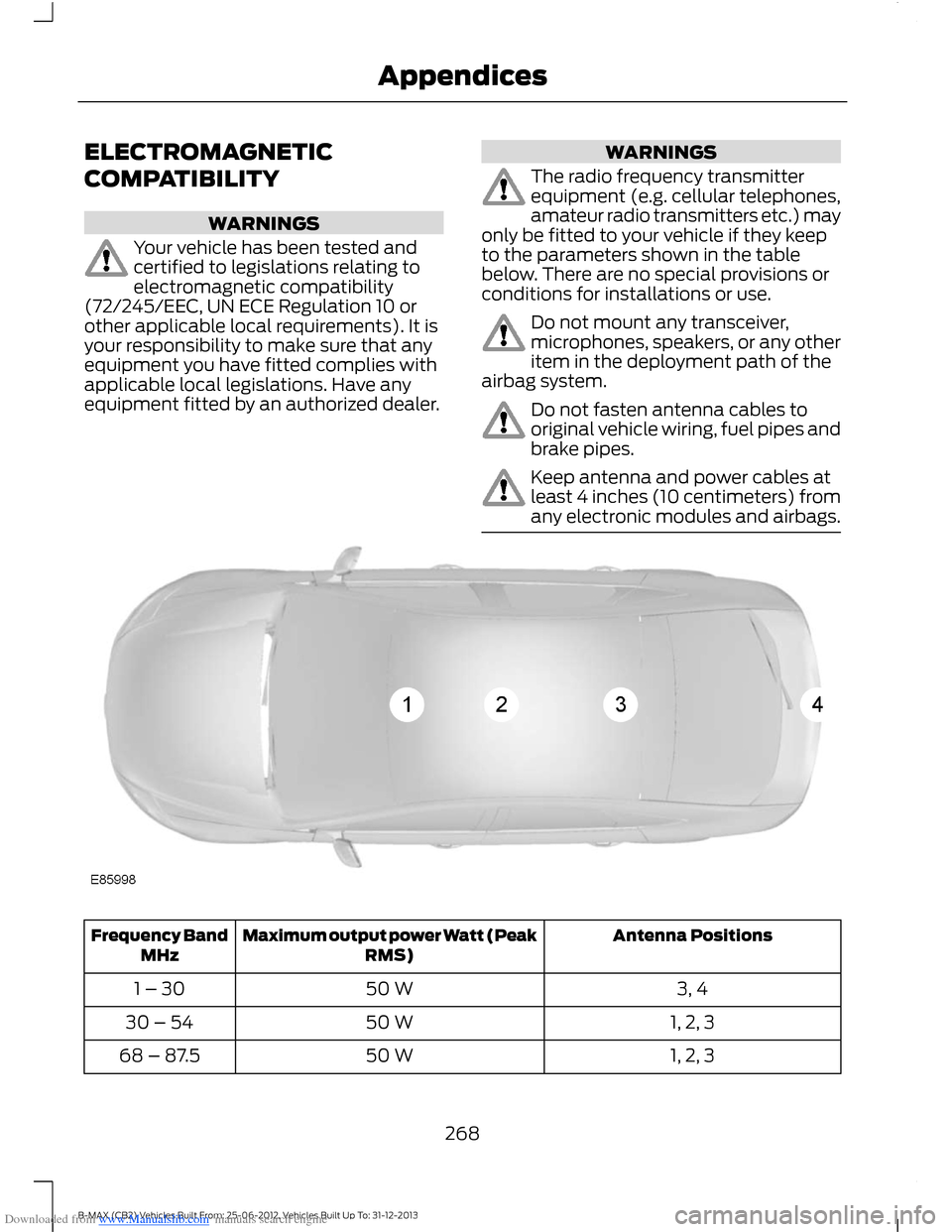
The radio frequency transmitterequipment (e.g. cellular telephones,amateur radio transmitters etc.) mayonly be fitted to your vehicle if they keepto the parameters shown in the tablebelow. There are no special provisions orconditions for installations or use.
Do not mount any transceiver,microphones, speakers, or any otheritem in the deployment path of theairbag system.
Do not fasten antenna cables tooriginal vehicle wiring, fuel pipes andbrake pipes.
Keep antenna and power cables atleast 4 inches (10 centimeters) fromany electronic modules and airbags.
Antenna PositionsMaximum output power Watt (PeakRMS)Frequency BandMHz
3, 450 W1 – 30
1, 2, 350 W30 – 54
1, 2, 350 W68 – 87.5
268B-MAX (CB2) Vehicles Built From: 25-06-2012, Vehicles Built Up To: 31-12-2013Appendices
Page 278 of 298
Downloaded from www.Manualslib.com manuals search engine places you in an unsafe situation, or directsyou into an area that you consider to beunsafe, do not follow such instructions; (c)do not input destinations, or otherwisemanipulate the TeleNav Software, unlessyour vehicle is stationary and parked; (d)do not use the TeleNav Software for anyillegal, unauthorized, unintended, unsafe,hazardous, or unlawful purposes, or in anymanner inconsistent with this Agreement;(e) arrange all GPS and wireless devicesand cables necessary for use of theTeleNav Software in a secure manner inyour vehicle so that they will not interferewith your driving and will not prevent theoperation of any safety device (such as anairbag).
You agree to indemnify and hold TeleNavharmless against all claims resulting fromany dangerous or otherwise inappropriateuse of the TeleNav Software in any movingvehicle, including as a result of your failureto comply with the directions above.
2. Account Information
You agree: (a) when registering theTeleNav Software, to provide TeleNav withtrue, accurate, current, and completeinformation about yourself, and (b) toinform TeleNav promptly of any changesto such information, and to keep it true,accurate, current and complete.
3. Software License
Subject to your compliance with the termsof this Agreement, TeleNav hereby grantsto you a personal, non-exclusive,non-transferable license (except asexpressly permitted below in connectionwith your permanent transfer of theTeleNav Software license), without theright to sublicense, to use the TeleNavSoftware (in object code form only) inorder to access and use the TeleNavSoftware. This license shall terminate upon
any termination or expiration of thisAgreement. You agree that you will use theTeleNav Software only for your personalbusiness or leisure purposes, and not toprovide commercial navigation services toother parties.
3.1 License Limitations
You agree not to do any of the following:(a) reverse engineer, decompile,disassemble, translate, modify, alter orotherwise change the TeleNav Softwareor any part thereof; (b) attempt to derivethe source code, audio library or structureof the TeleNav Software without the priorexpress written consent of TeleNav; (c)remove from the TeleNav Software, oralter, any of TeleNav's or its suppliers'trademarks, trade names, logos, patent orcopyright notices, or other notices ormarkings; (d) distribute, sublicense orotherwise transfer the TeleNav Softwareto others, except as part of your permanenttransfer of the TeleNav Software; or (e)use the TeleNav Software in any mannerthat (i) infringes the intellectual propertyor proprietary rights, rights of publicity orprivacy or other rights of any party, (ii)violates any law, statute, ordinance orregulation, including but not limited to lawsand regulations related to spamming,privacy, consumer and child protection,obscenity or defamation, or (iii) is harmful,threatening, abusive, harassing, tortuous,defamatory, vulgar, obscene, libelous, orotherwise objectionable; and (f) lease, rentout, or otherwise permit unauthorizedaccess by third parties to the TeleNavSoftware without advanced writtenpermission of TeleNav.
276B-MAX (CB2) Vehicles Built From: 25-06-2012, Vehicles Built Up To: 31-12-2013Appendices
Page 289 of 298
Downloaded from www.Manualslib.com manuals search engine Changing the Wiper Blades.....................160Rear Window Wiper Blade.............................160Windshield Wiper Blades................................160Checking MyKey System Status................31MyKey Distance.....................................................32Number of Admin Keys......................................32Number of MyKeys...............................................32Checking the Wiper Blades......................160Childminder Mirror.........................................56Child Safety.......................................................15Child Safety Locks.........................................20Left-Hand Side.....................................................20Right-Hand Side...................................................20Child Seat Positioning...................................18Cigar Lighter.....................................................88Cleaning the Alloy Wheels.........................173Cleaning the Exterior....................................172Body Paintwork Preservation.........................172Cleaning the Chrome Trim...............................172Cleaning the Headlamps..................................172Cleaning the Rear Window..............................172Cleaning the Interior.....................................172Instrument Cluster Screens, LCD Screensand Radio Screens.........................................173Rear Windows......................................................173Safety Belts...........................................................172Clearing All MyKeys........................................31Climate Control...............................................75Principle of Operation.........................................75Clock...................................................................66Type 1........................................................................66Type 2.......................................................................66Cold Weather Precautions........................130Compact Disc Player - Vehicles With:AM/FM/CD/Bluetooth/SonyAM/FM/CD..................................................224CD Text Display Options..................................227Compact Disc Playback..................................224Compact Disc Track Scanning......................225Ending Compact Disc Playback....................227Fast Forward and Reverse..............................225MP3 and WMA Display Options...................227MP3 and WMA File Playback........................225Repeat Compact Disc Tracks........................225Shuffle and Random........................................225Track Selection...................................................225
Compact Disc Player - Vehicles With:AM/FM/CD...................................................221CD Text Display Options.................................224Compact Disc Playback...................................221Compact Disc Track Scanning.......................221Ending Compact Disc Playback...................224Fast Forward and Reverse...............................221MP3 and WMA Display Options...................224MP3 and WMA File Playback........................222Repeat Compact Disc Tracks.........................221Shuffle and Random.........................................221Track Selection....................................................221Coolant CheckSee: Engine Coolant Check............................158Creating a MyKey...........................................30Vehicles with Keyless Starting.........................31Vehicles without Keyless Starting.................30Cruise Control..................................................43Principle of Operation........................................117Cruise controlSee: Using Cruise Control..................................117Cup Holders.....................................................89
D
Daytime Running Lamps............................49Diesel Particulate Filter................................94Regeneration.........................................................94Digital Audio...................................................219...................................................................................219Direction Indicators........................................51Dog Guard........................................................122DPFSee: Diesel Particulate Filter............................94Driver Airbag.....................................................23.....................................................................................23Driver Knee Airbag.........................................25Driving Aids......................................................119Driving Hints...................................................130Driving Through Water...............................130...................................................................................130DRLSee: Daytime Running Lamps.........................49
E
Electromagnetic compatibility..............268
287B-MAX (CB2) Vehicles Built From: 25-06-2012, Vehicles Built Up To: 31-12-2013Index