towing FORD B MAX 2013 1.G User Guide
[x] Cancel search | Manufacturer: FORD, Model Year: 2013, Model line: B MAX, Model: FORD B MAX 2013 1.GPages: 298, PDF Size: 20.63 MB
Page 176 of 298
Downloaded from www.Manualslib.com manuals search engine GENERAL INFORMATION
A decal with tire pressure data is locatedin the driver’s door opening.
Check and set the tire pressure at theambient temperature in which you areintending to drive your vehicle and whenthe tires are cold.
Note:Check your tire pressures regularly tooptimize fuel economy.
Note:Use only approved wheel and tiresizes. Using other sizes could damage yourvehicle and will make the National TypeApproval invalid.
Note:If you change the diameter of the tiresfrom that fitted at the factory, thespeedometer may not display the correctspeed. Take your vehicle to an authorizeddealer to have the engine managementsystem reprogrammed.
Note:If you intend to change the size of thewheels from that fitted at the factory, checkthe suitability with an authorized dealer.
TEMPORARY MOBILITY KIT
Your vehicle may not have a spare tire.Therefore you will have a temporarymobility kit which will only repair onedamaged tire.
The kit is located in the spare wheel well.
General Information
WARNINGS
Depending on the type and extent oftire damage, some tires can only bepartially sealed or not sealed at all.Loss of tire pressure can affect vehiclehandling, leading to loss of vehicle control.
Do not use the kit on a previouslydamaged tire, for example when ithas been driven under inflated.
WARNINGS
Do not use the kit on run flat tires.
Do not try to seal damage to thetire’s sidewall.
The kit seals most tire punctures [with adiameter of up to ¼ inch (six millimeters)]to temporarily restore mobility.
You must observe the following rules whenusing the kit:
•Drive with caution and avoid makingsudden steering or driving manoeuvres,especially if your vehicle is heavilyladen or you are towing a trailer.
•The kit will provide you with anemergency temporary repair, enablingyou to continue your journey to the nextvehicle or tire dealer, or to drive amaximum distance of 125 miles(200 kilometers).
•Do not exceed a maximum speed of50 mph (80 km/h).
•Keep the kit out of the reach ofchildren.
•Only use the kit when the ambienttemperature is between -40°F(–40°C) and +158°F (+70°C).
Using the Kit
WARNINGS
Compressed air can act as anexplosive or propellant.
Never leave the kit unattended whilein use.
Do not keep the compressoroperating for more than 10 minutes.
You must only use the kit for thevehicle with which it was supplied.
174B-MAX (CB2) Vehicles Built From: 25-06-2012, Vehicles Built Up To: 31-12-2013Wheels and Tires
Page 182 of 298
Downloaded from www.Manualslib.com manuals search engine Vehicles With a Spare Wheel
Your vehicle jack, wheel brace, screw-intowing eye and wheel trim remover arelocated in the spare wheel well.
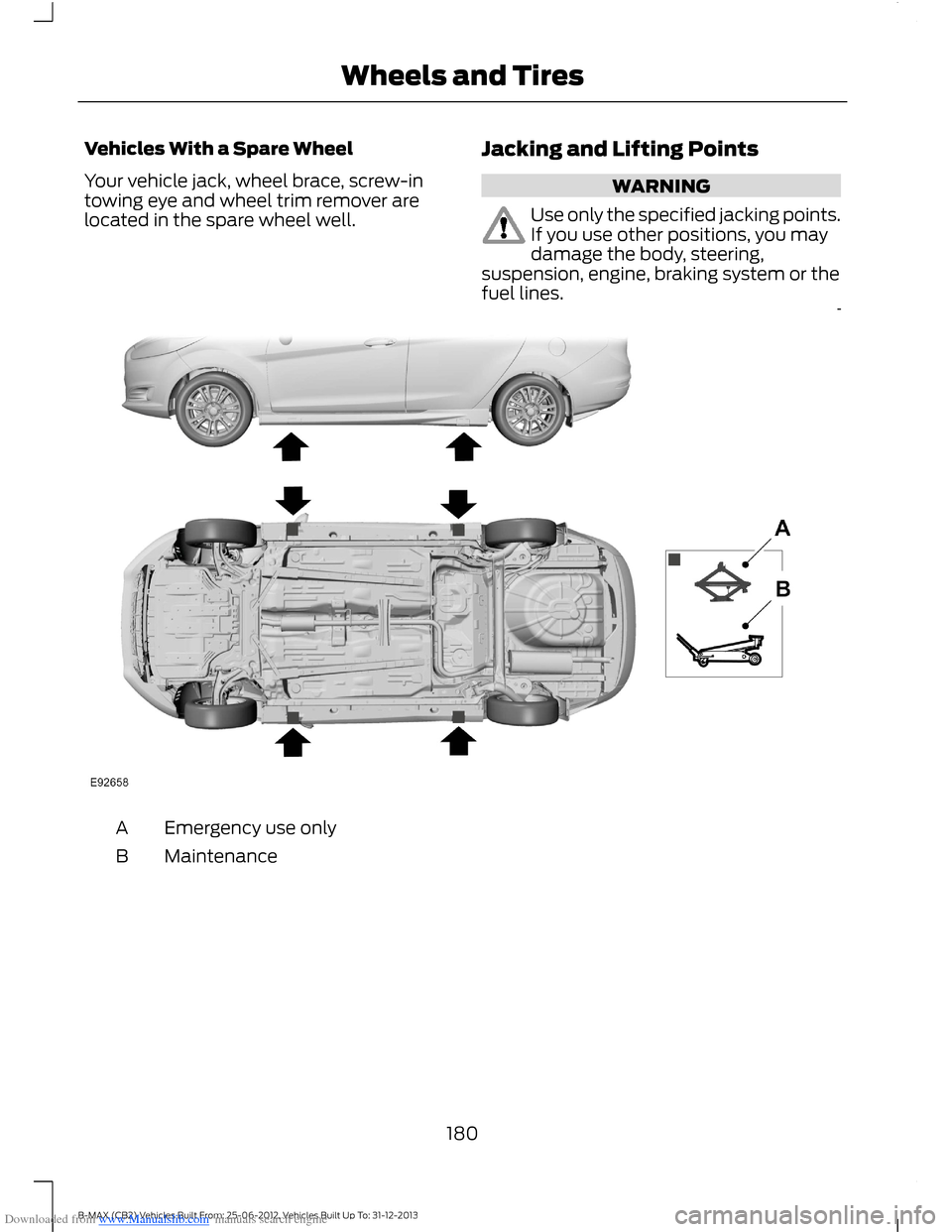
Jacking and Lifting Points
WARNING
Use only the specified jacking points.If you use other positions, you maydamage the body, steering,suspension, engine, braking system or thefuel lines.
Emergency use onlyA
MaintenanceB
180B-MAX (CB2) Vehicles Built From: 25-06-2012, Vehicles Built Up To: 31-12-2013Wheels and Tires
Page 183 of 298
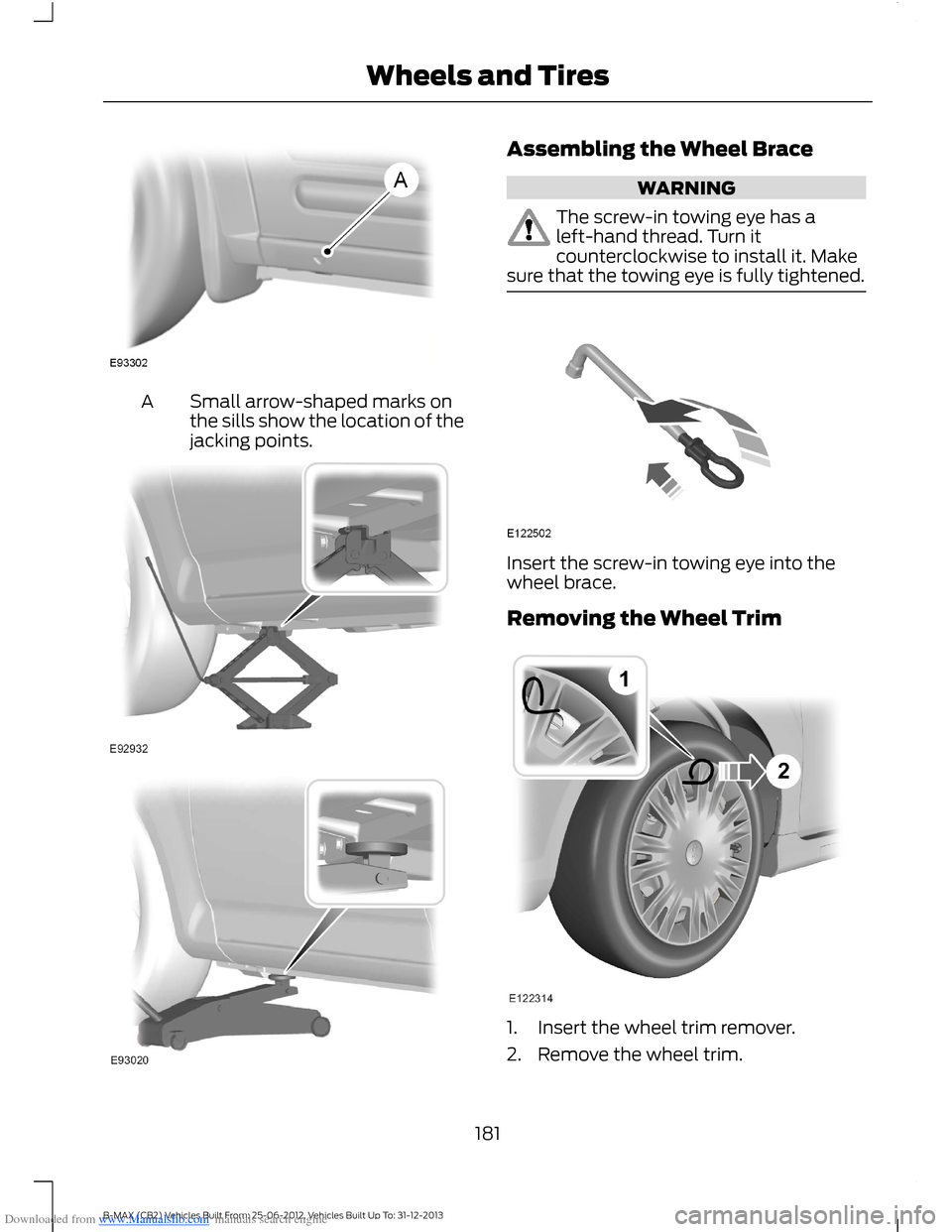
Downloaded from www.Manualslib.com manuals search engine Small arrow-shaped marks onthe sills show the location of thejacking points.
A
Assembling the Wheel Brace
WARNING
The screw-in towing eye has aleft-hand thread. Turn itcounterclockwise to install it. Makesure that the towing eye is fully tightened.
Insert the screw-in towing eye into thewheel brace.
Removing the Wheel Trim
1.Insert the wheel trim remover.
2.Remove the wheel trim.
181B-MAX (CB2) Vehicles Built From: 25-06-2012, Vehicles Built Up To: 31-12-2013Wheels and Tires
Page 190 of 298
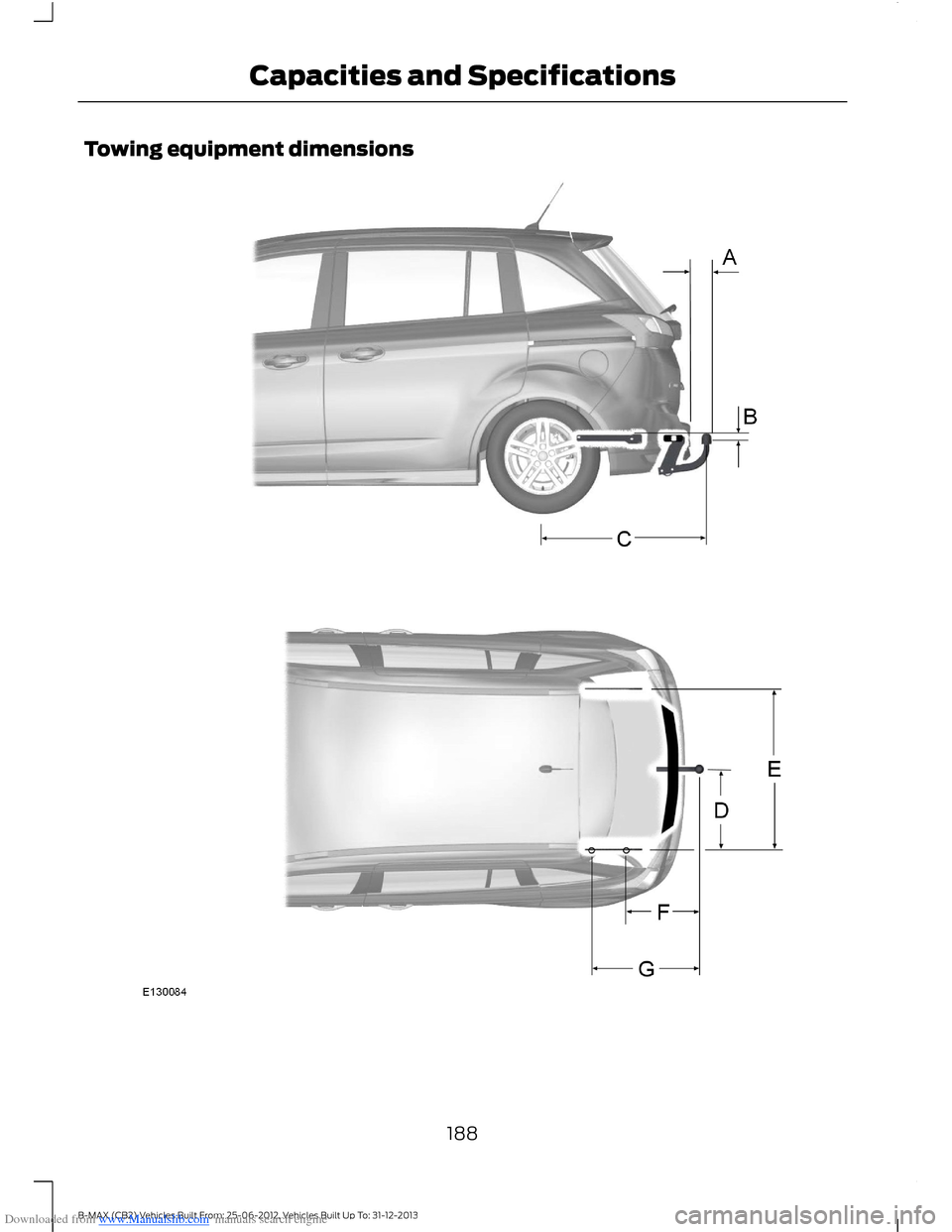
Downloaded from www.Manualslib.com manuals search engine Towing equipment dimensions
188B-MAX (CB2) Vehicles Built From: 25-06-2012, Vehicles Built Up To: 31-12-2013Capacities and Specifications
Page 236 of 298
Downloaded from www.Manualslib.com manuals search engine Fast
This option will calculate your time ofarrival based on a fast drive to thedestination.
Eco Settings
Trailer
Use this feature to change the economysettings of your journey relating to whetheror not you are towing a trailer and if so thesize of trailer being towed.
Roof Box
Use this feature to change the economysettings of your journey relating to the useof a roof box.
Dynamic
When switched on, and if the unit isreceiving a valid traffic message channelsignal, the route will be automaticallyupdated to take into account real timetraffic incidents or congestion.
Note:This feature can be useful in avoidingdelays or hold ups on journeys.
Freeway
When switched off the system will avoidfreeways on your route and automaticallyupdate your route distance and timings.
Tunnel
When switched off the system will avoidtunnels on your route and automaticallyupdate your route distance and timings.
Ferries and Car Trains
When switched off the system will avoidferry crossings and car train facilities onyour route and automatically update yourroute distance and timings.
Toll
When switched off the system will avoidtoll roads on your route and automaticallyupdate your route distance and timings.
Seasonal Roads
When switched off the system will avoidseasonal roads (for example, mountainpasses) on your route and automaticallyupdate your route distance and timings.
Toll Sticker
When switched off the system will avoidtoll routes and automatically update yourroute distance and timings.
Information
Press the information button to viewdetails of your current location or journey.During active route guidance pressing thisbutton will repeat the last navigationinstruction.
Setting Your NavigationPreferences
Select settings for the system to take intoaccount when planning your route.
234B-MAX (CB2) Vehicles Built From: 25-06-2012, Vehicles Built Up To: 31-12-2013Navigation
Page 294 of 298
Downloaded from www.Manualslib.com manuals search engine Supplementary Restraints System.........23Principle of Operation.........................................23Switching Off the Engine............................95Vehicles With a Turbocharger.........................95Symbols Glossary.............................................5SYNC™ Applications andServices........................................................253In the Event of a Crash.....................................254Switching Emergency Assistance On andOff.......................................................................254SYNC Emergency Assistance........................253SYNC™............................................................239General Information.........................................239SYNC™ Troubleshooting.........................260
T
TailgateSee: Manual Liftgate...........................................36Technical SpecificationsSee: Capacities and Specifications.............186Temporary Mobility Kit................................174General Information...........................................174Inflating the Tire...................................................175Using the Kit..........................................................174Tire Care............................................................177Tire Inflation When PuncturedSee: Temporary Mobility Kit............................174Tire Pressure Monitoring System............178System Reset........................................................179Tire Repair KitSee: Temporary Mobility Kit............................174TiresSee: Wheels and Tires.......................................174Tow Ball............................................................125Driving With a Trailer.........................................126Driving Without a Trailer...................................127Inserting the Tow Ball Arm..............................125Maintenance.........................................................127Removing the Tow Ball Arm...........................126Unlocking the Tow Ball ArmMechanism.......................................................125Towing a Trailer.............................................124Trailer Lighting......................................................125When towing a trailer:.......................................124Towing Points.................................................127
Towing the Vehicle on Four Wheels -Vehicles With: AutomaticTransmission...............................................128Emergency Towing.............................................129Towing the Vehicle on Four Wheels -Vehicles With: ManualTransmission...............................................128Towing...............................................................124Transmission..................................................104TransmissionSee: Transmission..............................................104Trip Computer.................................................66....................................................................................66Distance Odometer.............................................67
U
Under Hood Overview - 1.0LEcoBoost™..................................................154Under Hood Overview - 1.4L Duratec-16V(Sigma)/1.6L Duratec-16V Ti-VCT(Sigma).........................................................155Under Hood Overview - 1.5LDuratorq-TDCi/1.6L Duratorq-TDCi(DV) Diesel..................................................156Unique Driving Characteristics.................96Using Cruise Control.....................................117Switching Cruise Control Off..........................118Switching Cruise Control On............................117Using MyKey With Remote StartSystems..........................................................32Using Snow Chains......................................178Vehicles with Stability Control.......................178Using Stability Control..................................111.....................................................................................111Using SYNC™ With Your MediaPlayer............................................................256Accessing Your USB Song Library...............259Bluetooth Devices and SystemSettings............................................................260Connecting Your Media Player to the USBPort....................................................................256Media Menu Features......................................258Media Voice Commands.................................257What's Playing?.................................................256
292B-MAX (CB2) Vehicles Built From: 25-06-2012, Vehicles Built Up To: 31-12-2013Index