ECO mode FORD B MAX 2013 1.G Owner's Manual
[x] Cancel search | Manufacturer: FORD, Model Year: 2013, Model line: B MAX, Model: FORD B MAX 2013 1.GPages: 298, PDF Size: 20.63 MB
Page 223 of 298
Downloaded from www.Manualslib.com manuals search engine Note:Radio stations stored on the presetbuttons may not always be available if youhave left the coverage area. The system willmute when this happens.
Radio Text
You can display extra information. Forexample; artist name. To switch this optionon, select a radio station and pressfunction button 3.
Note:Extra information may not always beavailable.
Service Linking
If you leave the coverage area of a DABradio station the system will automaticallyswitch to the corresponding FM radiostation.
You can switch this feature on and offusing the information display. See GeneralInformation (page 63).
Note:If a DAB radio station has nocorresponding FM radio station, the audiowill mute when attempting to switch.
Note:The system will display the FMsymbol when DAB and FM radio stationslink.
COMPACT DISC PLAYER -
VEHICLES WITH: AM/FM/CD
Compact Disc Playback
Note:During playback, the display indicatesthe disc, track and time that has elapsedsince the start of the track.
During radio reception, press the CD buttononce to start CD playback.
After a disc is loaded, playback will startimmediately.
Track Selection
•Press the seek down button once toreplay the current track. If pressedwithin two seconds of the start of atrack, the previous track will beselected.
•Press the up or down arrow buttons toselect the required track, then pressthe OK button.
Fast Forward and Reverse
Press and hold the seek down or upbuttons to search backward or forwardwithin the tracks on the disc.
Shuffle and Random
Random track playback, also known asshuffle, plays all tracks on the CD inrandom order.
1.Press the MENU button and select CDMODE.
2.Select SHUFFLE. This enables thefunction to be switched on or off.
When an MP3 CD is playing, optionsinclude SHUFFLE for the whole CD, or toplay all the tracks in the folder in a randomorder.
Repeat Compact Disc Tracks
1.Press the MENU button and select CDMODE.
2.Select REPEAT. This enables thefunction to be switched on or off. Thetrack will replay once ended.
When an MP3 or WMA CD is playing,options include REPEAT for the track, orto repeat all the tracks in the folder.
Compact Disc Track Scanning
The SCAN function allows you to previeweach track for approximately five seconds.
221B-MAX (CB2) Vehicles Built From: 25-06-2012, Vehicles Built Up To: 31-12-2013Audio System
Page 224 of 298
Downloaded from www.Manualslib.com manuals search engine Various scan modes are possible,according to the type of CD currentlyplaying.
1.Press the MENU button and select CDMODE.
2.Select SCAN. This enables thefunction to be switched on or off.
Note:When an MP3 or WMA CD is playing,options include SCAN for the CD or just thetracks in the folder.
3.Press the OK button to stop the scanmode.
MP3 and WMA File Playback
MP3 (MPEG 1 Audio Layer-3) or WMA(Windows media audio) is a standardtechnology and format for compressingaudio data. This allows a more efficientuse of the media.
You can play MP3 files recorded onCD-ROM, CD-R and CD-RW formats. Thedisc must be in the ISO 9660 level 1 or level2 format, or Joliet or Romeo in theexpansion format. You can also use a discrecorded in multi session.
ISO 9660 Format
This is the most common internationalstandard for the logical format of files andfolders on a CD-ROM.
There are several specification levels. InLevel 1, file names must be in the 8.3format (no more than eight characters inthe name, no more than three charactersin the extension .MP3 and .WMA) and incapital letters.
Folder names can be no longer than eightcharacters. There can be no more thaneight folder levels (trees). Level 2specifications allow file names up to 31characters long.
Each folder can have up to eight trees.
For Joliet or Romeo in the expansionformat, consider these restrictions whenconfiguring your CD writing software.
Multi Session
This is a recording method that enablesadding of data using the track-at-oncemethod.
Conventional CDs begin at a CD controlarea called the lead-in and end at an areacalled lead-out. A multi session CD is a CDhaving multiple sessions, with eachsegment from lead-in to lead-out regardedas a single session.
CD-Extra: The format that records audio(audio CD data) as tracks on session 1, andrecords data as tracks on session 2.
Mixed CD: In this format, data is recordedas track 1 and audio (audio CD data) isrecorded as track 2.
File Formats
With formats other than ISO 9660 level 1and level 2, folder names or file names maynot be displayed correctly.
When naming, be sure to add the fileextension .MP3 or .WMA to the file name.
If you put the extension .MP3 or .WMA toa file other than MP3 or WMA, the unitcannot recognize the file correctly and willgenerate random noise that could damageyour speakers.
The following discs take a longer time tostart playback.
•A disc recorded with complicated treestructure.
•A disc recorded in multi session.
•A non-finalized disc to which data canbe added.
222B-MAX (CB2) Vehicles Built From: 25-06-2012, Vehicles Built Up To: 31-12-2013Audio System
Page 232 of 298
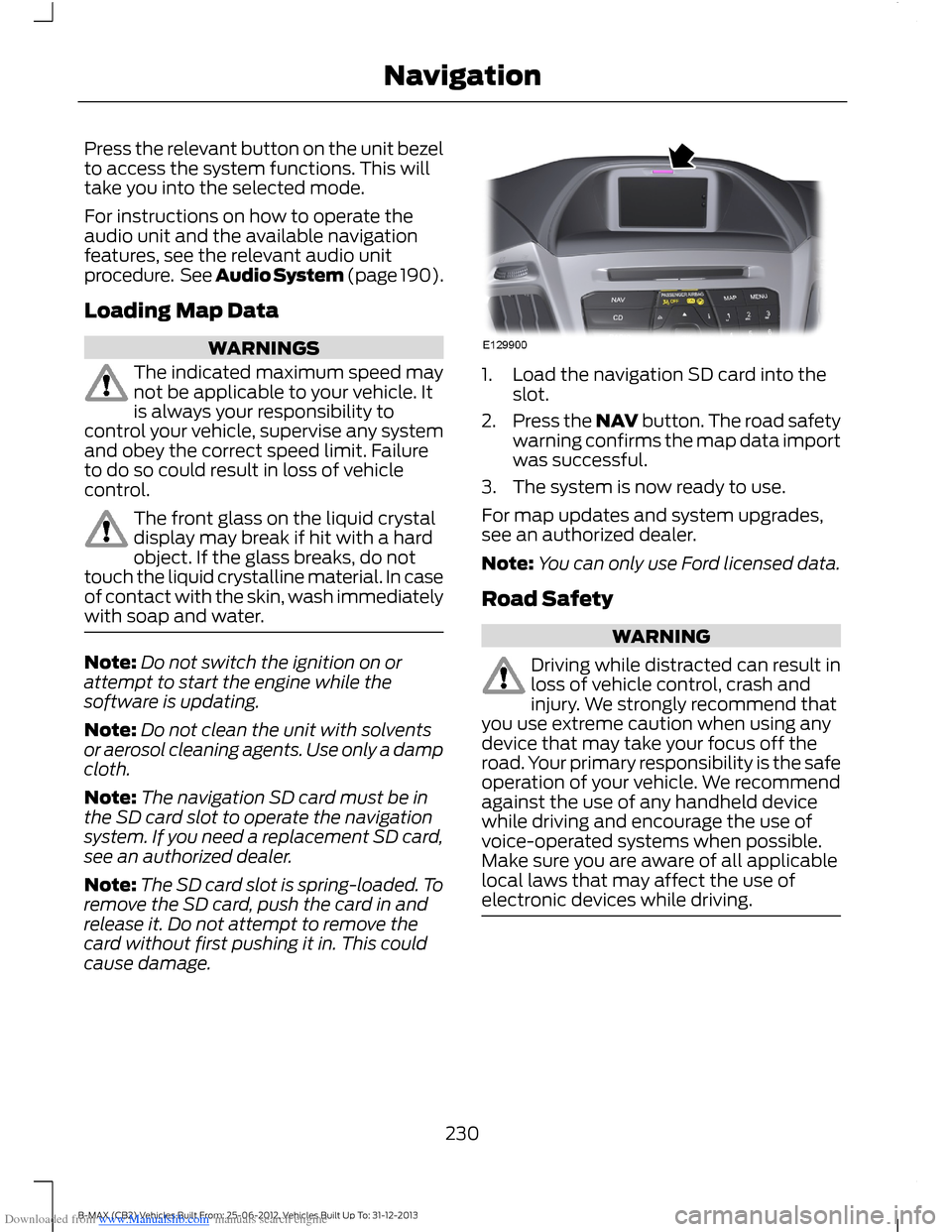
Downloaded from www.Manualslib.com manuals search engine Press the relevant button on the unit bezelto access the system functions. This willtake you into the selected mode.
For instructions on how to operate theaudio unit and the available navigationfeatures, see the relevant audio unitprocedure. See Audio System (page 190).
Loading Map Data
WARNINGS
The indicated maximum speed maynot be applicable to your vehicle. Itis always your responsibility tocontrol your vehicle, supervise any systemand obey the correct speed limit. Failureto do so could result in loss of vehiclecontrol.
The front glass on the liquid crystaldisplay may break if hit with a hardobject. If the glass breaks, do nottouch the liquid crystalline material. In caseof contact with the skin, wash immediatelywith soap and water.
Note:Do not switch the ignition on orattempt to start the engine while thesoftware is updating.
Note:Do not clean the unit with solventsor aerosol cleaning agents. Use only a dampcloth.
Note:The navigation SD card must be inthe SD card slot to operate the navigationsystem. If you need a replacement SD card,see an authorized dealer.
Note:The SD card slot is spring-loaded. Toremove the SD card, push the card in andrelease it. Do not attempt to remove thecard without first pushing it in. This couldcause damage.
1.Load the navigation SD card into theslot.
2.Press the NAV button. The road safetywarning confirms the map data importwas successful.
3.The system is now ready to use.
For map updates and system upgrades,see an authorized dealer.
Note:You can only use Ford licensed data.
Road Safety
WARNING
Driving while distracted can result inloss of vehicle control, crash andinjury. We strongly recommend thatyou use extreme caution when using anydevice that may take your focus off theroad. Your primary responsibility is the safeoperation of your vehicle. We recommendagainst the use of any handheld devicewhile driving and encourage the use ofvoice-operated systems when possible.Make sure you are aware of all applicablelocal laws that may affect the use ofelectronic devices while driving.
230B-MAX (CB2) Vehicles Built From: 25-06-2012, Vehicles Built Up To: 31-12-2013Navigation
Page 235 of 298
Downloaded from www.Manualslib.com manuals search engine Navigation
Fast
TrailerEco settings
Roof box
Dynamic
Motorway
Tunnel
Ferry/motorail
Toll
Seasonal roads
Toll sticker
GPS infoSpecial functions*
System info
Enter position
Demo mode
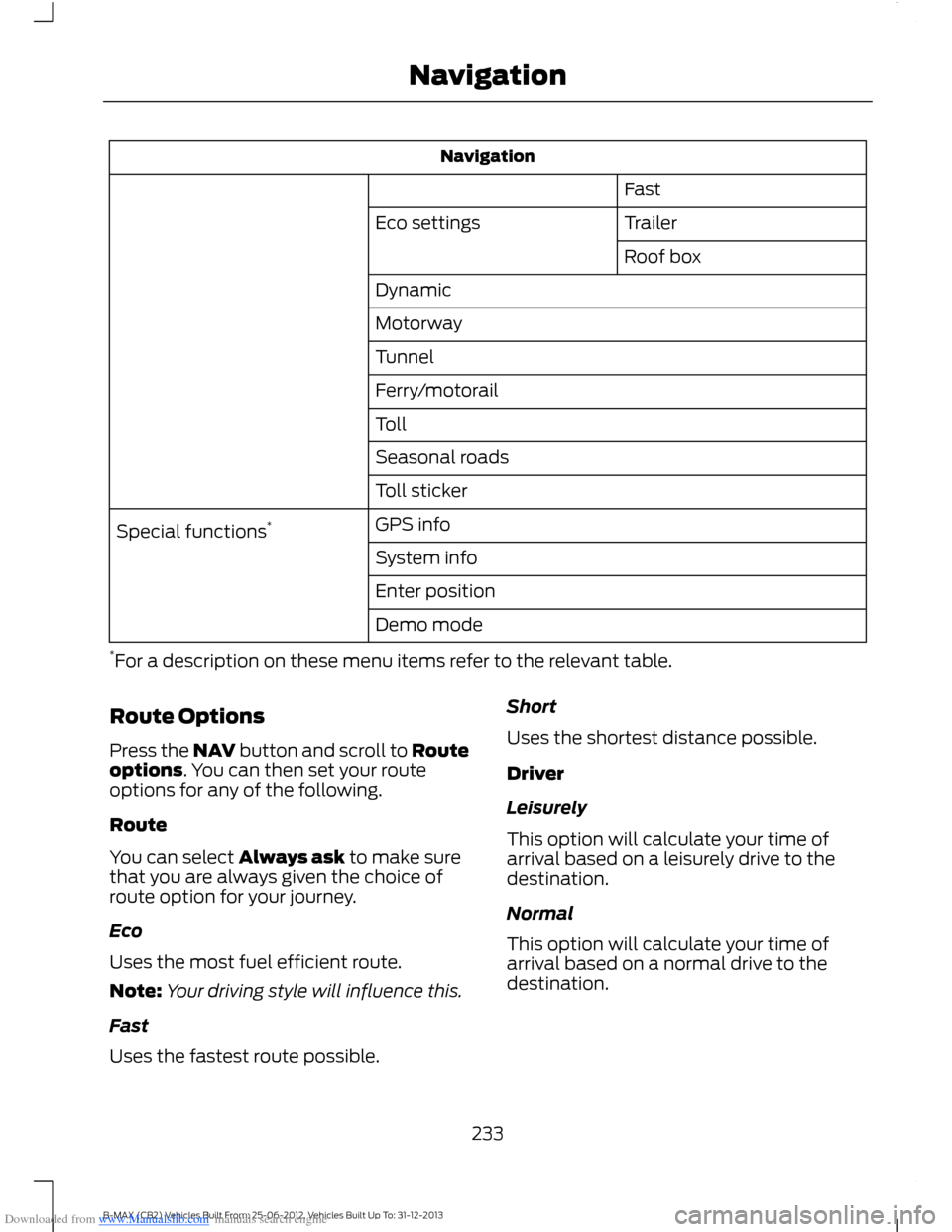
*For a description on these menu items refer to the relevant table.
Route Options
Press the NAV button and scroll to Routeoptions. You can then set your routeoptions for any of the following.
Route
You can select Always ask to make surethat you are always given the choice ofroute option for your journey.
Eco
Uses the most fuel efficient route.
Note:Your driving style will influence this.
Fast
Uses the fastest route possible.
Short
Uses the shortest distance possible.
Driver
Leisurely
This option will calculate your time ofarrival based on a leisurely drive to thedestination.
Normal
This option will calculate your time ofarrival based on a normal drive to thedestination.
233B-MAX (CB2) Vehicles Built From: 25-06-2012, Vehicles Built Up To: 31-12-2013Navigation
Page 243 of 298
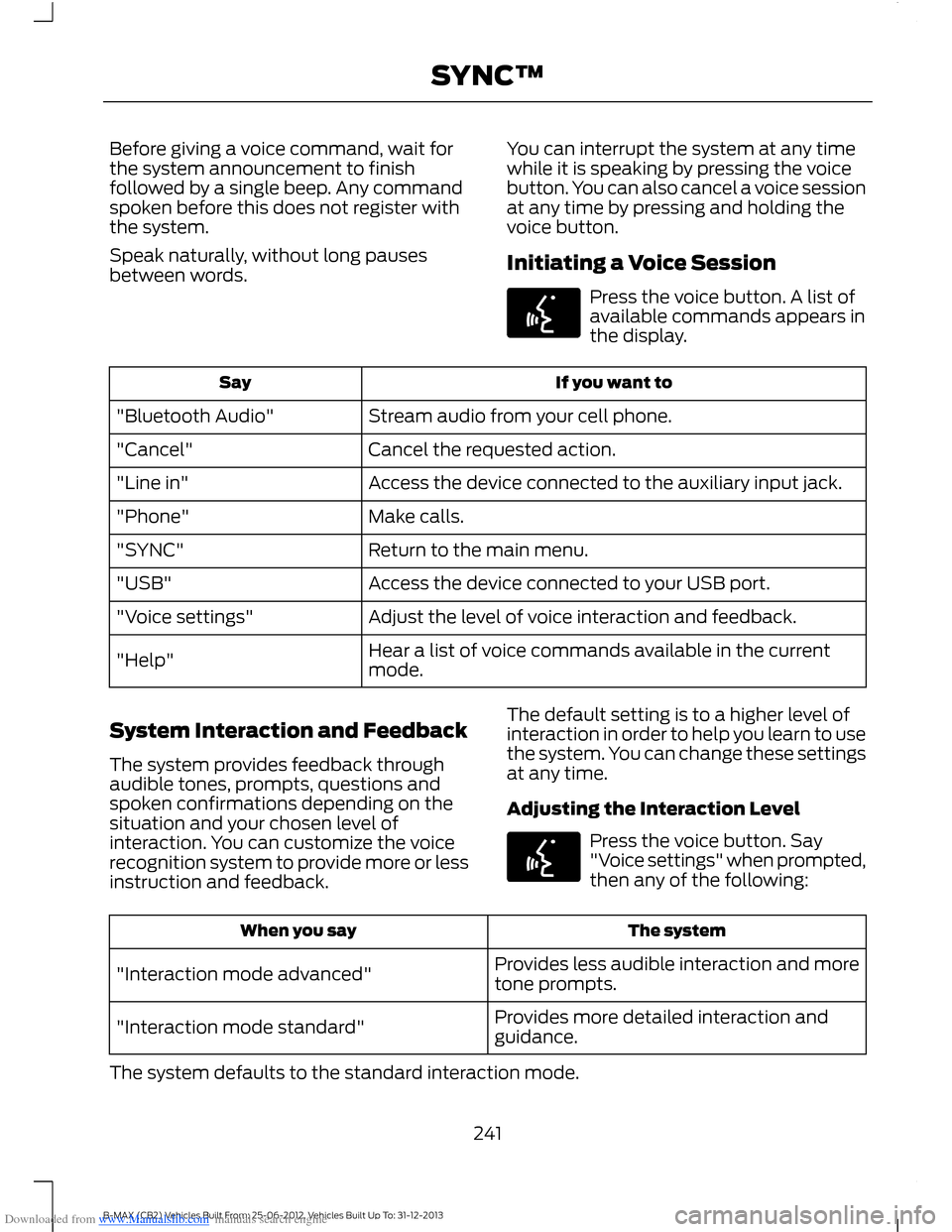
Downloaded from www.Manualslib.com manuals search engine Before giving a voice command, wait forthe system announcement to finishfollowed by a single beep. Any commandspoken before this does not register withthe system.
Speak naturally, without long pausesbetween words.
You can interrupt the system at any timewhile it is speaking by pressing the voicebutton. You can also cancel a voice sessionat any time by pressing and holding thevoice button.
Initiating a Voice Session
Press the voice button. A list ofavailable commands appears inthe display.
If you want toSay
Stream audio from your cell phone."Bluetooth Audio"
Cancel the requested action."Cancel"
Access the device connected to the auxiliary input jack."Line in"
Make calls."Phone"
Return to the main menu."SYNC"
Access the device connected to your USB port."USB"
Adjust the level of voice interaction and feedback."Voice settings"
Hear a list of voice commands available in the currentmode."Help"
System Interaction and Feedback
The system provides feedback throughaudible tones, prompts, questions andspoken confirmations depending on thesituation and your chosen level ofinteraction. You can customize the voicerecognition system to provide more or lessinstruction and feedback.
The default setting is to a higher level ofinteraction in order to help you learn to usethe system. You can change these settingsat any time.
Adjusting the Interaction Level
Press the voice button. Say"Voice settings" when prompted,then any of the following:
The systemWhen you say
Provides less audible interaction and moretone prompts."Interaction mode advanced"
Provides more detailed interaction andguidance."Interaction mode standard"
The system defaults to the standard interaction mode.
241B-MAX (CB2) Vehicles Built From: 25-06-2012, Vehicles Built Up To: 31-12-2013SYNC™
Page 261 of 298
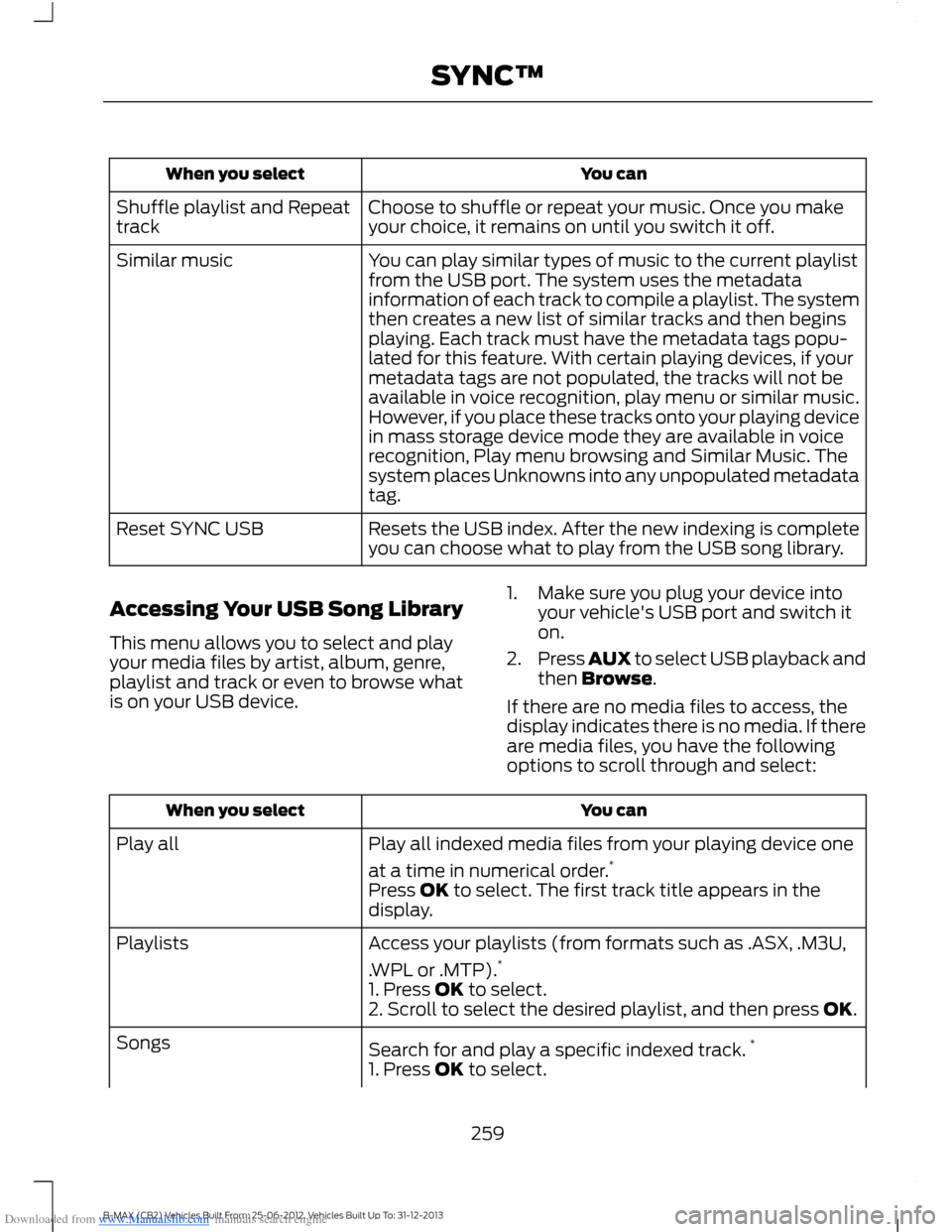
Downloaded from www.Manualslib.com manuals search engine You canWhen you select
Choose to shuffle or repeat your music. Once you makeyour choice, it remains on until you switch it off.Shuffle playlist and Repeattrack
You can play similar types of music to the current playlistfrom the USB port. The system uses the metadatainformation of each track to compile a playlist. The systemthen creates a new list of similar tracks and then beginsplaying. Each track must have the metadata tags popu-lated for this feature. With certain playing devices, if your
Similar music
metadata tags are not populated, the tracks will not beavailable in voice recognition, play menu or similar music.However, if you place these tracks onto your playing devicein mass storage device mode they are available in voicerecognition, Play menu browsing and Similar Music. Thesystem places Unknowns into any unpopulated metadatatag.
Resets the USB index. After the new indexing is completeyou can choose what to play from the USB song library.Reset SYNC USB
Accessing Your USB Song Library
This menu allows you to select and playyour media files by artist, album, genre,playlist and track or even to browse whatis on your USB device.
1.Make sure you plug your device intoyour vehicle's USB port and switch iton.
2.Press AUX to select USB playback andthen Browse.
If there are no media files to access, thedisplay indicates there is no media. If thereare media files, you have the followingoptions to scroll through and select:
You canWhen you select
Play all indexed media files from your playing device one
at a time in numerical order.*Play all
Press OK to select. The first track title appears in thedisplay.
Access your playlists (from formats such as .ASX, .M3U,
.WPL or .MTP).*Playlists
1. Press OK to select.2. Scroll to select the desired playlist, and then press OK.
Search for and play a specific indexed track.*Songs
1. Press OK to select.
259B-MAX (CB2) Vehicles Built From: 25-06-2012, Vehicles Built Up To: 31-12-2013SYNC™
Page 287 of 298
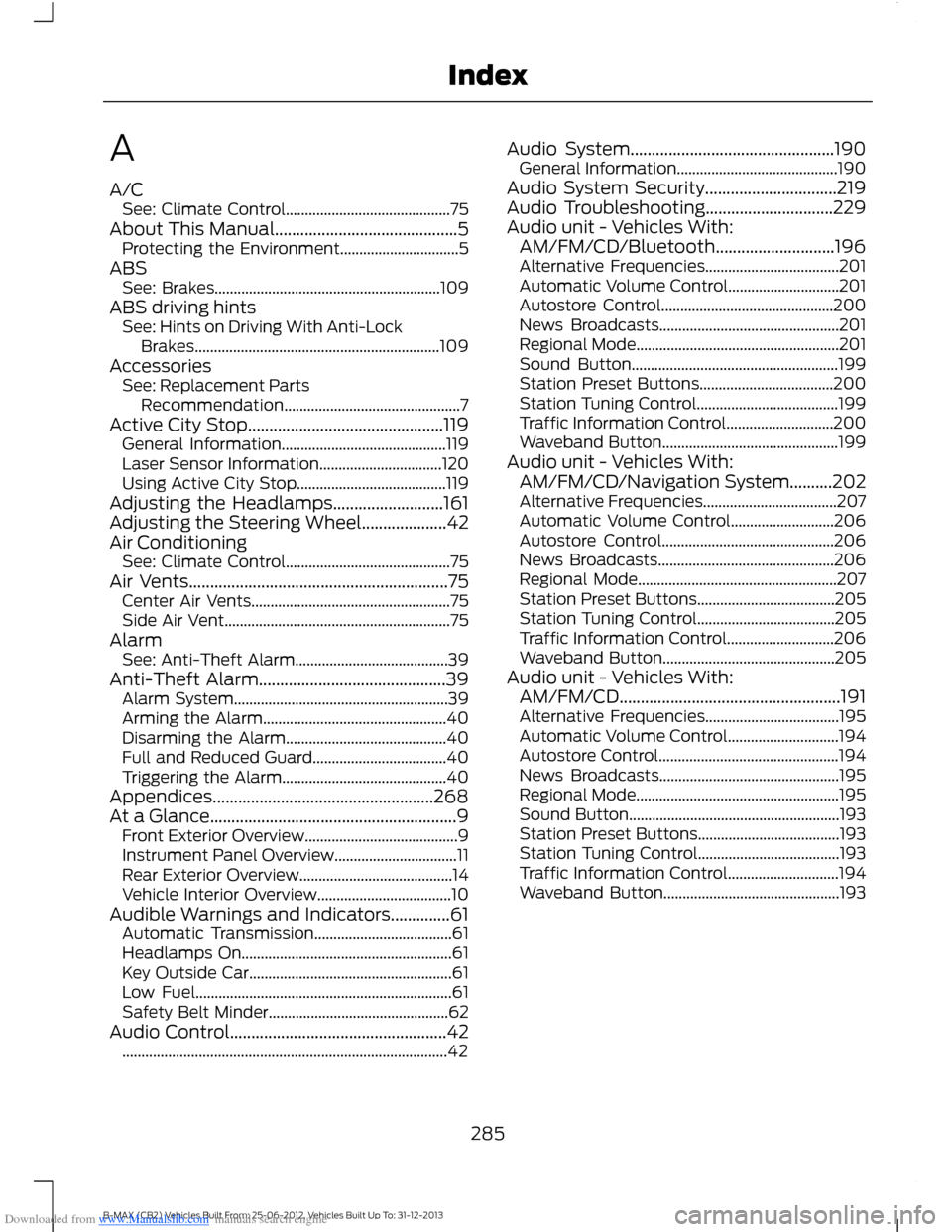
Downloaded from www.Manualslib.com manuals search engine A
A/CSee: Climate Control...........................................75About This Manual...........................................5Protecting the Environment...............................5ABSSee: Brakes...........................................................109ABS driving hintsSee: Hints on Driving With Anti-LockBrakes................................................................109AccessoriesSee: Replacement PartsRecommendation..............................................7Active City Stop..............................................119General Information...........................................119Laser Sensor Information................................120Using Active City Stop.......................................119Adjusting the Headlamps..........................161Adjusting the Steering Wheel....................42Air ConditioningSee: Climate Control...........................................75Air Vents.............................................................75Center Air Vents....................................................75Side Air Vent...........................................................75AlarmSee: Anti-Theft Alarm........................................39Anti-Theft Alarm............................................39Alarm System........................................................39Arming the Alarm................................................40Disarming the Alarm..........................................40Full and Reduced Guard...................................40Triggering the Alarm...........................................40Appendices....................................................268At a Glance..........................................................9Front Exterior Overview........................................9Instrument Panel Overview................................11Rear Exterior Overview........................................14Vehicle Interior Overview...................................10Audible Warnings and Indicators..............61Automatic Transmission....................................61Headlamps On.......................................................61Key Outside Car.....................................................61Low Fuel...................................................................61Safety Belt Minder...............................................62Audio Control...................................................42.....................................................................................42
Audio System................................................190General Information..........................................190Audio System Security...............................219Audio Troubleshooting..............................229Audio unit - Vehicles With:AM/FM/CD/Bluetooth............................196Alternative Frequencies...................................201Automatic Volume Control.............................201Autostore Control.............................................200News Broadcasts...............................................201Regional Mode.....................................................201Sound Button......................................................199Station Preset Buttons...................................200Station Tuning Control.....................................199Traffic Information Control............................200Waveband Button..............................................199Audio unit - Vehicles With:AM/FM/CD/Navigation System..........202Alternative Frequencies...................................207Automatic Volume Control...........................206Autostore Control.............................................206News Broadcasts..............................................206Regional Mode....................................................207Station Preset Buttons....................................205Station Tuning Control....................................205Traffic Information Control............................206Waveband Button.............................................205Audio unit - Vehicles With:AM/FM/CD....................................................191Alternative Frequencies...................................195Automatic Volume Control.............................194Autostore Control...............................................194News Broadcasts...............................................195Regional Mode.....................................................195Sound Button.......................................................193Station Preset Buttons.....................................193Station Tuning Control.....................................193Traffic Information Control.............................194Waveband Button..............................................193
285B-MAX (CB2) Vehicles Built From: 25-06-2012, Vehicles Built Up To: 31-12-2013Index