power steering FORD BRONCO 2022 User Guide
[x] Cancel search | Manufacturer: FORD, Model Year: 2022, Model line: BRONCO, Model: FORD BRONCO 2022Pages: 562, PDF Size: 73 MB
Page 246 of 562
WHAT IS G.O.A.T. MODE
CONTROL
Your vehicle has several goes overany-type of terrain (G.O.A.T.) modes thatyou can select for different drivingconditions. Depending on the mode thatyou select, the system adjusts variousvehicle settings.
HOW DOES G.O.A.T. MODE
CONTROL WORK
Each selectable mode changes variouselectronic and mechanical settings withinyour vehicle to tailor its performance anddriving characteristics to on-road oroff-road driving conditions. The systemmay alter steering feel and effort, tractioncontrol, stability control, chassis controls,powertrain response, transmission shiftpoints, four-wheel driveline setting,exhaust noise level and suspensiondampening to predetermined settings,depending upon the mode that you select.
The system reverts to the normal modeeach time you start your vehicle. At startupthe system also displays a prompt on theinstrument cluster display that gives youthe option to return to the previouslyselected drive mode during the last ignitioncycle. If you select yes, the system returnsto the last selected drive mode and thedefault driveline settings associated withthat mode. If you select no or do not makea selection within a short time, the systemremains in normal mode and the drivelinesettings remain the same as selected inthe prior ignition cycle.
Note:Your vehicle has diagnostic checksthat continuously monitor all systems forproper operation. If a mode is unavailabledue to a system fault, your vehicle defaultsto normal mode and the driveline remainsin the four-wheel drive setting that you lastselected prior to the system fault.
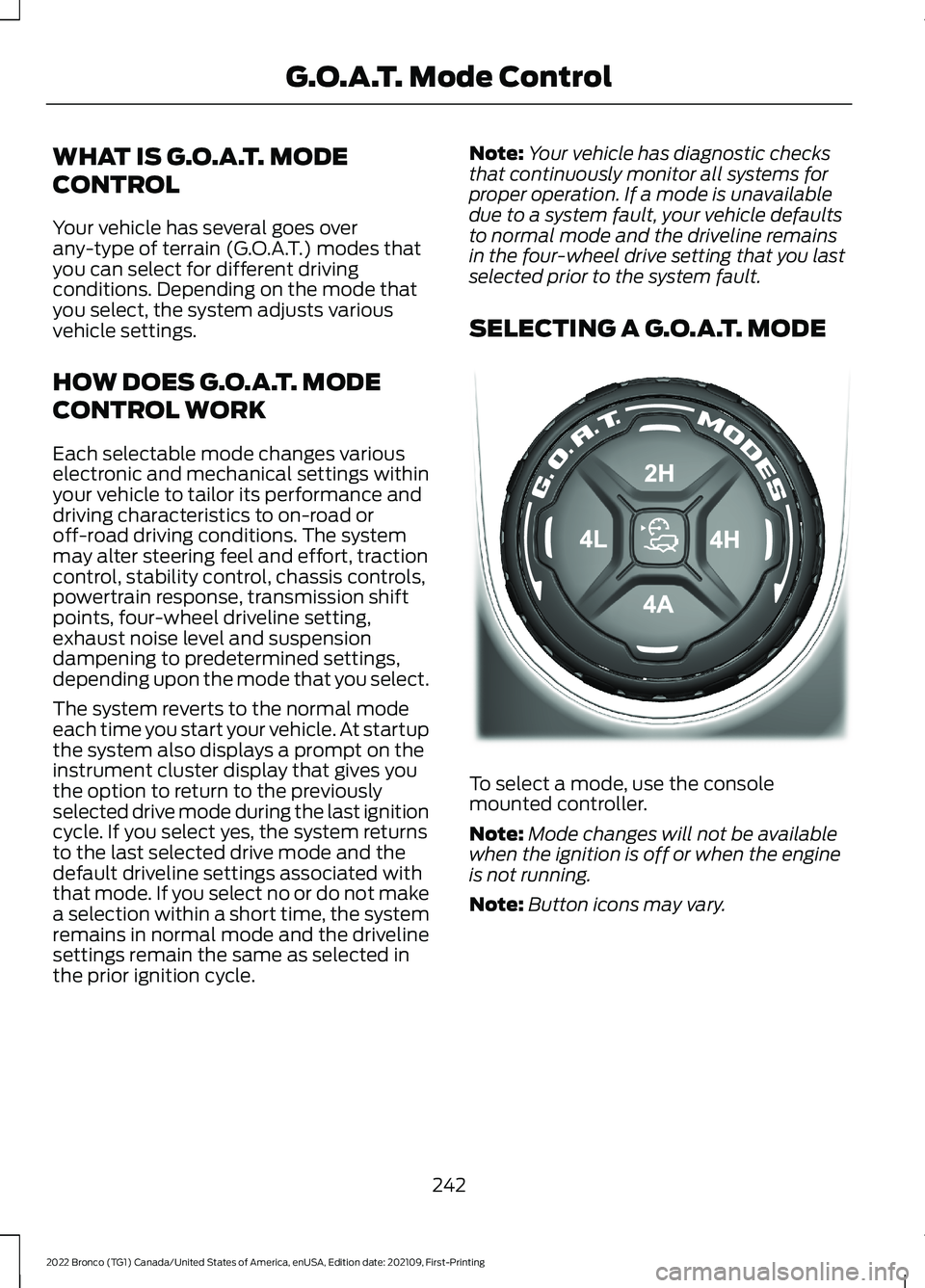
SELECTING A G.O.A.T. MODE
To select a mode, use the consolemounted controller.
Note:Mode changes will not be availablewhen the ignition is off or when the engineis not running.
Note:Button icons may vary.
242
2022 Bronco (TG1) Canada/United States of America, enUSA, Edition date: 202109, First-PrintingG.O.A.T. Mode ControlE324543
Page 249 of 562
SLIPPERY - 4X4 WITH PART TIMEENGAGEMENT
For less than ideal roadconditions, this mode can beused for crossing terrain wherea firm surface is covered with loose orslippery material, such as snow or ice.Slippery mode lowers throttle responseand optimizes shifting for slippery surfaces.
Four-wheel drive high (4H) is the defaultfour-wheel drive mode. All four-wheel drivemodes are selectable in slippery mode.
The front electronic locking differential isavailable below 25 mph (40 km/h) whenin four-wheel drive low (4L). The rearelectronic locking differential is availablebelow 25 mph (40 km/h).
Note:The rear electronic locking differentialis available at any speed when in four-wheeldrive low (4L).
The stabilizer bar disconnect is notavailable in slippery mode.
Note:When using Slippery mode ondry/hard pavement, your vehicle couldexperience vibration, driveline bind up,damage and potential excessive tire andvehicle wear.
SLIPPERY - ADVANCED 4X4 WITH4A MODE
For less than ideal roadconditions, this mode can beused for crossing terrain wherea firm surface is covered with loose orslippery material, such as snow or ice.Slippery mode lowers throttle responseand optimizes shifting for slippery surfaces.
Four-wheel drive auto (4A) is the defaultfour-wheel drive mode. Two-wheel drivehigh (2H) is not selectable in slipperymode.
The front electronic locking differential isavailable below 25 mph (40 km/h) whenin four-wheel drive low (4L). The rearelectronic locking differential is availablebelow 25 mph (40 km/h).
Note:The rear electronic locking differentialis available at any speed when in four-wheeldrive low (4L).
The stabilizer bar disconnect is notavailable in slippery mode.
Note:When using Slippery mode ondry/hard pavement, your vehicle couldexperience vibration, driveline bind up,damage and potential excessive tire andvehicle wear.
SPORT - 4X4 WITH PART TIMEENGAGEMENT
For sporty driving with improvedperformance handling andresponse. This mode increasesaccelerator pedal response and providesa sportier steering feel. The powertrainsystem holds onto lower gears longer,helping your vehicle accelerate faster.
Two-wheel drive high (2H) is the defaultfour-wheel drive mode. Four-wheel drivelow (4L) is not selectable in sport mode.
The front electronic locking differential isnot available in sport mode. The rearelectronic locking differential is availablebelow 25 mph (40 km/h).
The stabilizer bar disconnect is notavailable in sport mode.
245
2022 Bronco (TG1) Canada/United States of America, enUSA, Edition date: 202109, First-PrintingG.O.A.T. Mode ControlE295414 E295414 E246593
Page 250 of 562
SPORT - ADVANCED 4X4 WITH 4AMODE
For sporty driving with improvedperformance handling andresponse. This mode increasesaccelerator pedal response and providesa sportier steering feel. The powertrainsystem holds onto lower gears longer,helping your vehicle accelerate faster.
Four-wheel drive auto (4A) is the defaultfour-wheel drive mode. Four-wheel drivelow (4L) is not selectable in sport mode.
The front electronic locking differential isnot available in sport mode. The rearelectronic locking differential is availablebelow 25 mph (40 km/h).
The stabilizer bar disconnect is notavailable in sport mode.
G.O.A.T. MODE CONTROL –
TROUBLESHOOTING
G.O.A.T. MODE CONTROL –WARNING LAMPS
Some drive modes reducetraction and stability controlperformance and the indicatorilluminates in the instrument cluster.
G.O.A.T. MODE CONTROL – INFORMATION MESSAGES
DetailsMessage
Displays when the system switches tonormal mode to support towing perform-ance.
Changing to Normal Drive Mode forImproved Towing Performance
Displays when you select a drive mode thatis not available. Select a different drivemode.
Drive Mode Not Available
Displays when you select a drive mode thatis not available. Check the four-wheel drivemode, electronic locking differential andstabilizer bar before selecting a drive mode.
Drive Mode Preconditions Not Met
Displays when you select a drive mode thatis not available. Have the system checked.Drive Mode Selection Reduced due toSystem Fault
Displays when you select an off-road drivemode.Off-Road Use Only
246
2022 Bronco (TG1) Canada/United States of America, enUSA, Edition date: 202109, First-PrintingG.O.A.T. Mode ControlE246593 E130458
Page 295 of 562
Look ahead on your route noting upcomingobstacles, surface texture or color changesor any other factors which may indicate achange in available traction. Adjust thevehicle speed and route to avoid a loss intraction. Conditions can change causingthe course to vary day to day. Markobstacles with GPS markers to avoidpotential vehicle damage. Wherenecessary, get out of your vehicle andcheck the terrain.
When driving off-road, if the front or rearsuspension is bottoming-out or excessivecontact with the skid-plates is happening,reduce the vehicle's speed to avoidpotential damage to your vehicle.
If you are driving in a dusty area, be sure toleave ample distance between your vehicleand any other vehicles to allow foradequate vision.
When driving off-road verify that yourwipers and washers are working properlyand reduce your speed for better visibility.
When driving in desert conditions, werecommend driving with your headlampson to help other drivers easily see you.
When convoying with other vehicles, werecommend that communication is used,and the lead vehicle notify other vehiclesof upcoming obstacles.
Keep available ground clearance in mindand pick a route that minimizes the risk ofcatching the underside of the vehicle onan obstacle.
When negotiating low speed obstacles,applying light brake pressure in conjunctionwith the throttle allows you to negotiatethe obstacle in a more controlled manner.
Driving off-road requires a high amount ofconcentration. Even if your local law doesnot prohibit drinking alcohol when drivingoff-road we do not recommend it.
DRIVING OFF-ROAD
Driving In Snow and Ice
WARNING: If you are driving inslippery conditions that require tirechains or cables, then it is critical thatyou drive cautiously. Keep speeds down,allow for longer stopping distances andavoid aggressive steering to reduce thechances of a loss of vehicle controlwhich can lead to serious injury or death.If the rear end of your vehicle slides whilecornering, steer in the direction of theslide until you regain control of yourvehicle.
Four-wheel drive vehicles have advantagesover two-wheel drive vehicles in snow andice but can skid like any other vehicle. Ifyour vehicle slides when driving on snowyor icy roads, turn the steering wheel in thedirection of the slide until you regaincontrol. Avoid sudden applications ofpower and quick changes of direction onsnow and ice. Slowly and steadily applythe accelerator when starting from a fullstop. Avoid sudden braking.
WARNING: Do not becomeoverconfident in the ability of four-wheeldrive vehicles. Although a four-wheeldrive vehicle may accelerate better thana two-wheel drive vehicle in low tractionsituations, it won't stop any faster thantwo-wheel drive vehicles. Always driveat a safe speed.
Make sure you allow sufficient distancebetween your vehicle and other vehiclesfor stopping.
In emergency stopping situations, do notpump the brake pedal, apply the brakefirmly.
291
2022 Bronco (TG1) Canada/United States of America, enUSA, Edition date: 202109, First-PrintingDriving Hints
Page 318 of 562
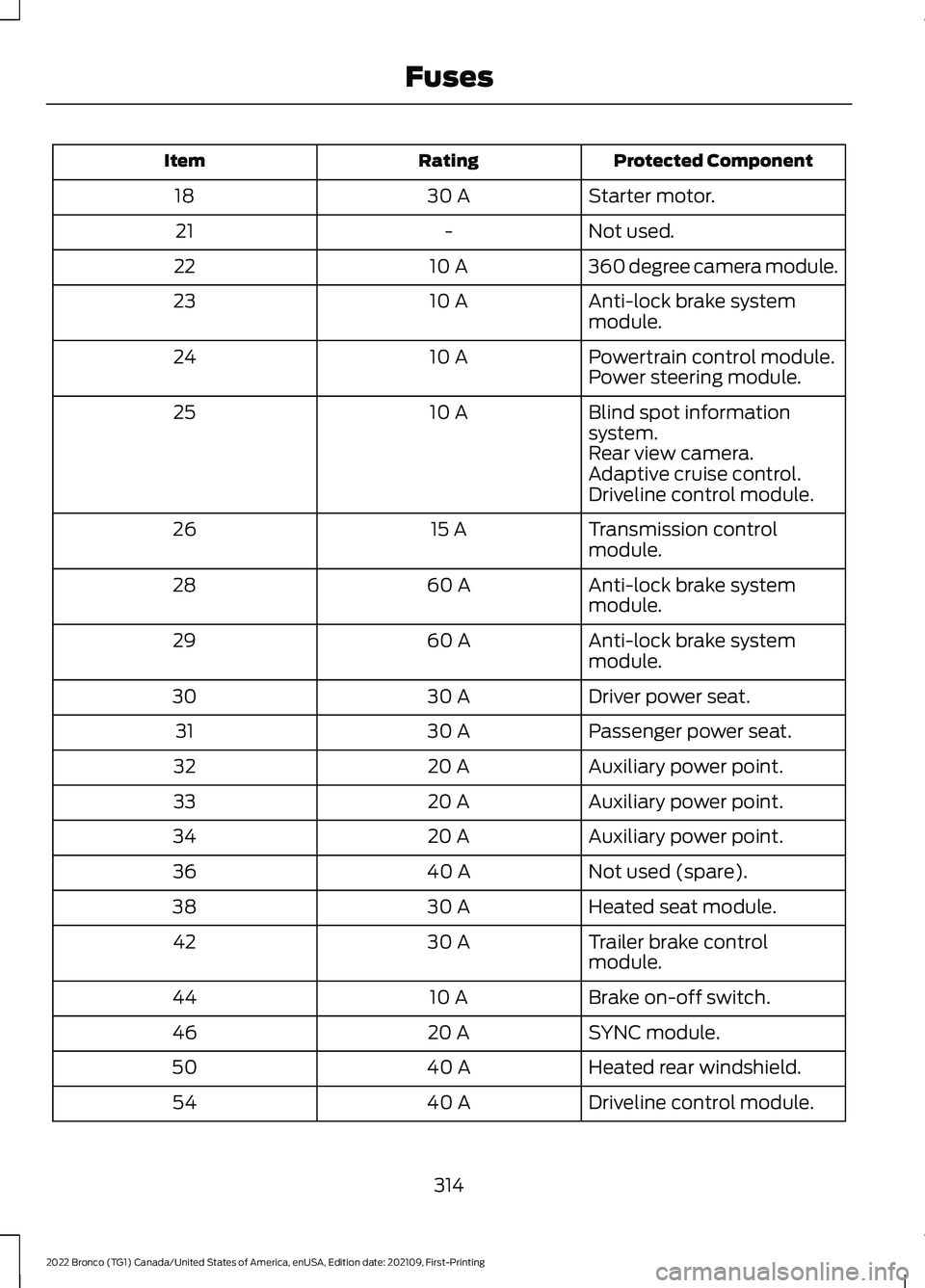
Protected ComponentRatingItem
Starter motor.30 A18
Not used.-21
360 degree camera module.10 A22
Anti-lock brake systemmodule.10 A23
Powertrain control module.10 A24Power steering module.
Blind spot informationsystem.10 A25
Rear view camera.Adaptive cruise control.Driveline control module.
Transmission controlmodule.15 A26
Anti-lock brake systemmodule.60 A28
Anti-lock brake systemmodule.60 A29
Driver power seat.30 A30
Passenger power seat.30 A31
Auxiliary power point.20 A32
Auxiliary power point.20 A33
Auxiliary power point.20 A34
Not used (spare).40 A36
Heated seat module.30 A38
Trailer brake controlmodule.30 A42
Brake on-off switch.10 A44
SYNC module.20 A46
Heated rear windshield.40 A50
Driveline control module.40 A54
314
2022 Bronco (TG1) Canada/United States of America, enUSA, Edition date: 202109, First-PrintingFuses
Page 331 of 562
Continued operation increases the enginetemperature, causing the engine tocompletely shut down. Your steering andbraking effort increases in this situation.
When the engine temperature cools, youcan re-start the engine. Have your vehiclechecked as soon as possible to minimizeengine damage.
When Fail-Safe Mode Is Activated
WARNING: Fail-safe mode is foruse during emergencies only. Operateyour vehicle in fail-safe mode only aslong as necessary to bring your vehicleto rest in a safe location and seekimmediate repairs. When in fail-safemode, your vehicle will have limitedpower, will not be able to maintainhigh-speed operation, and maycompletely shut down without warning,potentially losing engine power, powersteering assist, and power brake assist,which may increase the possibility of acrash resulting in serious injury.
WARNING: Do not remove thecoolant reservoir cap when the engine ison or the cooling system is hot. Wait 10minutes for the cooling system to cooldown. Cover the coolant reservoir capwith a thick cloth to prevent thepossibility of scalding and slowly removethe cap. Failure to follow this instructioncould result in personal injury.
Your vehicle has limited engine powerwhen in the fail-safe mode, drive yourvehicle with caution. Your vehicle does notmaintain high-speed operation and theengine could operate poorly.
Remember that the engine is capable ofautomatically shutting down to preventengine damage. In this situation:
1.Pull off the road as soon as safelypossible and switch the engine off.
2.If you are a member of a roadsideassistance program, we recommendthat you contact your roadsideassistance service provider.
3.If this is not possible, wait for a shortperiod of time for the engine to cool.
4.Check the coolant level. If the coolantlevel is at or below the minimum mark,add prediluted coolant immediately.
5.When the engine temperature cools,you can re-start the engine. Have yourvehicle checked as soon as possible tominimize engine damage.
Note:If you continue to drive your vehiclein fail-safe mode without repairing it, youwill damage your engine.
Engine Coolant TemperatureManagement (If Equipped)
WARNING: To reduce the risk ofcrash and injury, be prepared that thevehicle speed may reduce and thevehicle may not be able to acceleratewith full power until the coolanttemperature reduces.
If you tow a trailer with your vehicle, theengine may temporarily reach a highertemperature during severe operatingconditions, for example ascending a longor steep grade in high ambienttemperatures.
At this time, you may notice the coolanttemperature gauge moves toward the redzone and a message may appear in theinformation display.
327
2022 Bronco (TG1) Canada/United States of America, enUSA, Edition date: 202109, First-PrintingMaintenance
Page 336 of 562
We recommend that you disconnect thenegative battery cable terminal from thebattery if you plan to store your vehicle foran extended period.
Note:If you only disconnect the negativebattery cable terminal, make sure it isisolated or placed away from the batteryterminal to avoid unintended connection orarcing.
To maintain correct operation of thebattery management system, if you addany electrical devices to your vehicle, donot connect the ground connection directlyto the negative battery terminal. Aconnection at the negative battery terminalcan cause inaccurate measurements ofthe battery condition and potentialincorrect system operation.
Note:If you add electrical accessories orcomponents to your vehicle this mayadversely affect battery performance,durability and the performance of otherelectrical systems on your vehicle.
If you replace the battery make sure itmatches the electrical requirements ofyour vehicle.
If you disconnect or replace the batteryand your vehicle has an automatictransmission, it must relearn its adaptivestrategy. Because of this, the transmissionmay shift firmly when first driven. This isnormal operation while the transmissionfully updates its operation to optimumshift feel.
Remove and Reinstall the Battery
To disconnect or remove the battery, dothe following:
1.Apply the parking brake and switch theignition off.
2.Switch all electrical equipment off, forexample lights and radio.
3.Wait a minimum of two minutes beforedisconnecting the battery.
Note:The engine management system hasa power hold function and remains poweredfor a period of time after you switch theignition off. This is to allow diagnostic andadaptive tables to be stored. Disconnectingthe battery without waiting can causedamage not covered by the vehicleWarranty.
4.Disconnect the negative battery cableterminal.
5.Disconnect the positive battery cableterminal.
6.Remove the battery securing clamp.
7.Remove the battery.
8.To install, reverse the removalprocedure.
Note:Before reconnecting the battery,make sure the ignition remains switched off.
Note:Make sure the battery cable terminalsare fully tightened.
Note:After cleaning or replacing thebattery, make sure you reinstall the batterycover or shield.
If you disconnect or replace the vehiclebattery, you must reset the followingfeatures:
•Window bounce-back. See Windows(page 103).
•Clock settings.
•Pre-set radio stations.
•Steering angle sensor.
Note:To calibrate the steering anglesensor, drive the vehicle above 30 mph(50 km/h) for a minimum of 1.2 mi (2 km).Make sure to drive straight ahead for aminimum of 30 seconds. Several vehiclefunctions are disabled and a warning lightcould appear until the sensor is calibrated.
332
2022 Bronco (TG1) Canada/United States of America, enUSA, Edition date: 202109, First-PrintingMaintenance
Page 375 of 562
Note:Do not pressure wash camera lensand sensors.
CLEANING THE HARD TOP
We recommend that you only clean thehard top in the following way:
1.Use a sponge to remove dust and loosedirt on the hard top surface.
2.Wipe the surface with a soft, dampcloth and a mild soap and watersolution. Dry the area with a clean, softcloth.
3.Make sure the surface of your hard topis dry before applying a small amountof conditioner or spray wax.
4.For additional information andassistance, we recommend that youcontact an authorized dealer.
Note:Test any conditioner or spray wax onan inconspicuous area before applyingbroadly.
Note:Do not use alcohol containing cleaneror any type of solvent on the hard topsurface.
Note:Do not use power tools, paste waxor polish on the hard top surface.
CLEANING THE UNDERBODY
Regularly clean the underside of yourvehicle using water. Keep body and doordrain holes free of debris or foreignmaterial.
CLEANING THE INTERIOR
CLEANING THE INSTRUMENTPANEL
WARNING: Do not use chemicalsolvents or strong detergents whencleaning the steering wheel orinstrument panel to avoid contaminationof the airbag system.
We recommend that you only clean theinstrument panel and cluster lens with adamp soft cloth. Dry the area with a clean,soft cloth.
For additional information and assistance,we recommend that you contact anauthorized dealer.
Note:Avoid cleaners or polishes thatincrease the gloss of the upper portion ofthe instrument panel. The dull finish in thisarea helps protect you from undesirablewindshield reflection.
CLEANING PLASTIC
We recommend that you only use a mildsoap and water solution on a soft cloth.Dry the area with a clean, soft cloth.
CLEANING DISPLAYS ANDSCREENS
We recommend that you only use amicrofiber cloth in a circular motion toclean off the fingerprint or dust.
If dirt or fingerprints are still on the screen,apply a small amount of alcohol to thecloth and try to clean it again.
Note:Do not pour or spray alcohol onto thetouchscreen.
Note: Do not use detergent or any type ofsolvent to clean the touchscreen.
371
2022 Bronco (TG1) Canada/United States of America, enUSA, Edition date: 202109, First-PrintingVehicle Care
Page 546 of 562
Driver Alert – Troubleshooting................270Driver Alert – Information Messages..........270Driving Economically.................................299Driving Hints..................................................290Off-Road Driving...............................................290
E
Electric Parking Brake AudibleWarning.........................................................199Electric Parking Brake.................................198Electric Parking Brake –Troubleshooting.............................................199Electric Parking Brake –Troubleshooting........................................199Electric Parking Brake – InformationMessages........................................................200Electric Parking Brake – WarningLamps................................................................199Electric Power Steering..............................219Electric Power Steering Precautions...........219How Does Electric Power SteeringWork....................................................................219Electromagnetic Compatibility..............533Electronic Locking Differential................190Electronic Locking Differential –Troubleshooting.............................................192Electronic Locking DifferentialIndicators.......................................................191Electronic Locking Differential –Troubleshooting.........................................192Electronic Locking Differential –Information Messages.................................192Emergency Call Limitations.......................68Emergency Call Requirements.................68Emergency Call System Data....................25Emergency Towing........................................311Emission Law................................................530Enabling Apps on an AndroidDevice...........................................................444Enabling Apps on an iOS Device...........444Enabling Remote Start................................115End User License Agreement.................505Engine Block Heater....................................153Engine Block Heater Precautions.................153How Does the Engine Block HeaterWork....................................................................153Using the Engine Block Heater......................154
Engine Coolant TemperatureGauge............................................................108Engine Oil Capacity and Specification -2.3L EcoBoost™.......................................405Engine Oil Capacity and Specification -2.7L EcoBoost™.......................................406Engine Oil........................................................323Adding Engine Oil...............................................323Checking the Engine Oil Level.......................323Engine Oil Capacity andSpecification...................................................324Engine Oil Dipstick Overview.........................323Resetting the Engine Oil ChangeReminder..........................................................324Engine Specifications - 2.3LEcoBoost™.................................................401Engine Specifications - 2.7LEcoBoost™.................................................402Evasive Steering Assist.............................266Evasive Steering Assist Limitations............267Switching Evasive Steering Assist On andOff.......................................................................267What Is Evasive Steering Assist...................266Event Data.........................................................23Export Unique Options...............................531Exterior Bulbs................................................334Changing a Rear Lamp Bulb.........................336Exterior Bulb Specification Chart................334Removing a Rear Lamp Assembly..............335Exterior Lamps................................................95Exterior Lamp Audible Warning......................97Exterior Lamp Indicators...................................96Switching the Daytime Running Lamps Onand Off................................................................95Switching the Front Fog Lamps On andOff.........................................................................96Switching the Spot Lamps On andOff.........................................................................96Switching the Turn Signal Lamps On andOff.........................................................................95Exterior Lighting Control.............................94Exterior Lighting.............................................94Autolamps..............................................................95Automatic High Beam Control.......................98Automatic High Beam Control –Troubleshooting............................................100Exterior Lamps......................................................95Exterior Zone Lighting.........................................97
542
2022 Bronco (TG1) Canada/United States of America, enUSA, Edition date: 202109, First-PrintingIndex
Page 552 of 562
Changing the Tire Pressure Unit....................114Personal Safety SystemComponents.................................................58Personal Safety System™..........................58Phone Menu..................................................438Phone...............................................................438Phone Precautions.....................................438Playing Media Using Bluetooth®..........443Playing Media Using the USB Port.........143Playing or Pausing the AudioSource...........................................................422Post-Crash Alert System..........................304How Does the Post-Crash Alert SystemWork..................................................................304Post-Crash Alert SystemLimitations......................................................304Switching the Post-Crash Alert SystemOff......................................................................304What Is the Post-Crash AlertSystem.............................................................304Post Impact Braking..................................304How Does Post Impact BrakingWork..................................................................304Overriding Post Impact Braking...................305Post Impact Braking Indicators....................305Post Impact Braking Limitations.................304Power Outlet Indicators.............................145Power Outlet..................................................145Power Outlet Precautions.........................145Power Seats...................................................130Adjusting the Head Restraint.........................130Adjusting the Lumbar Support......................132Adjusting the Seat Backrest...........................132Adjusting the Seat Cushion.............................132Adjusting the Seat Height................................132Head Restraint Components.........................130Installing the Head Restraint...........................131Moving the Seat Backward andForward..............................................................131Removing the Head Restraint.........................131Pre-Collision Assist Limitations.............263Pre-Collision Assist Precautions............262Pre-Collision Assist.....................................262Automatic Emergency Braking....................266Distance Indication...........................................264Evasive Steering Assist....................................266Pre-Collision Assist –Troubleshooting............................................267
Pre-Collision Assist –Troubleshooting........................................267Pre-Collision Assist – Frequently AskedQuestions........................................................268Pre-Collision Assist – InformationMessages..........................................................267Pre-Collision Assist – WarningLamps................................................................267Preparing Your Vehicle forStorage..........................................................374Programming a MyKey.................................75Programming the Garage Door Openerto Your Garage Door OpenerMotor.............................................................140Programming the Garage Door Openerto Your Gate Opener Motor.....................141Programming the Garage Door Openerto Your Hand-Held Transmitter...........140Programming the Remote Control..........72Properly Adjusting the Driver and FrontPassenger Seats..........................................62PunctureSee: Changing a Flat Tire................................395Push Button Ignition Switch......................151
R
Radio Frequency CertificationLabels............................................................472Blind Spot Information SystemSensors.............................................................472Body Control Module.......................................478Garage Door Opener.........................................481Keys and Remote Controls.............................481Radio Transceiver Module..............................487SYNC......................................................................489Telematics Control Unit..................................495Tire Pressure Monitoring SystemSensors............................................................496Wireless Accessory ChargingModule.............................................................500Rear Axle Fluid Capacity andSpecification...............................................414Rear Cargo Area Anchor Points.............280Locating the Rear Cargo Area AnchorPoints................................................................280Rear Cargo Area Anchor Point LoadCapacities.......................................................280
548
2022 Bronco (TG1) Canada/United States of America, enUSA, Edition date: 202109, First-PrintingIndex