audio FORD BRONCO 2022 Owner's Manual
[x] Cancel search | Manufacturer: FORD, Model Year: 2022, Model line: BRONCO, Model: FORD BRONCO 2022Pages: 562, PDF Size: 73 MB
Page 432 of 562
Listening History
Listening history is a list of recently listenedto SiriusXM content and is shown for theactive listener profile. You can view,manage and reset the listening historyusing the controls on the touchscreen.
Note:Requires a trial or active subscriptionto use.
Listener Settings
Listener settings apply to the activelistener profile.
Note:Requires a trial or active subscriptionto use.
Note:A default profile is available when nolistener profiles are created.
Help and Support
You can contact SiriusXM Customer Caredirectly from SYNC and view informationrequired to manage your SiriusXM account.
428
2022 Bronco (TG1) Canada/United States of America, enUSA, Edition date: 202109, First-PrintingAudio System
Page 433 of 562
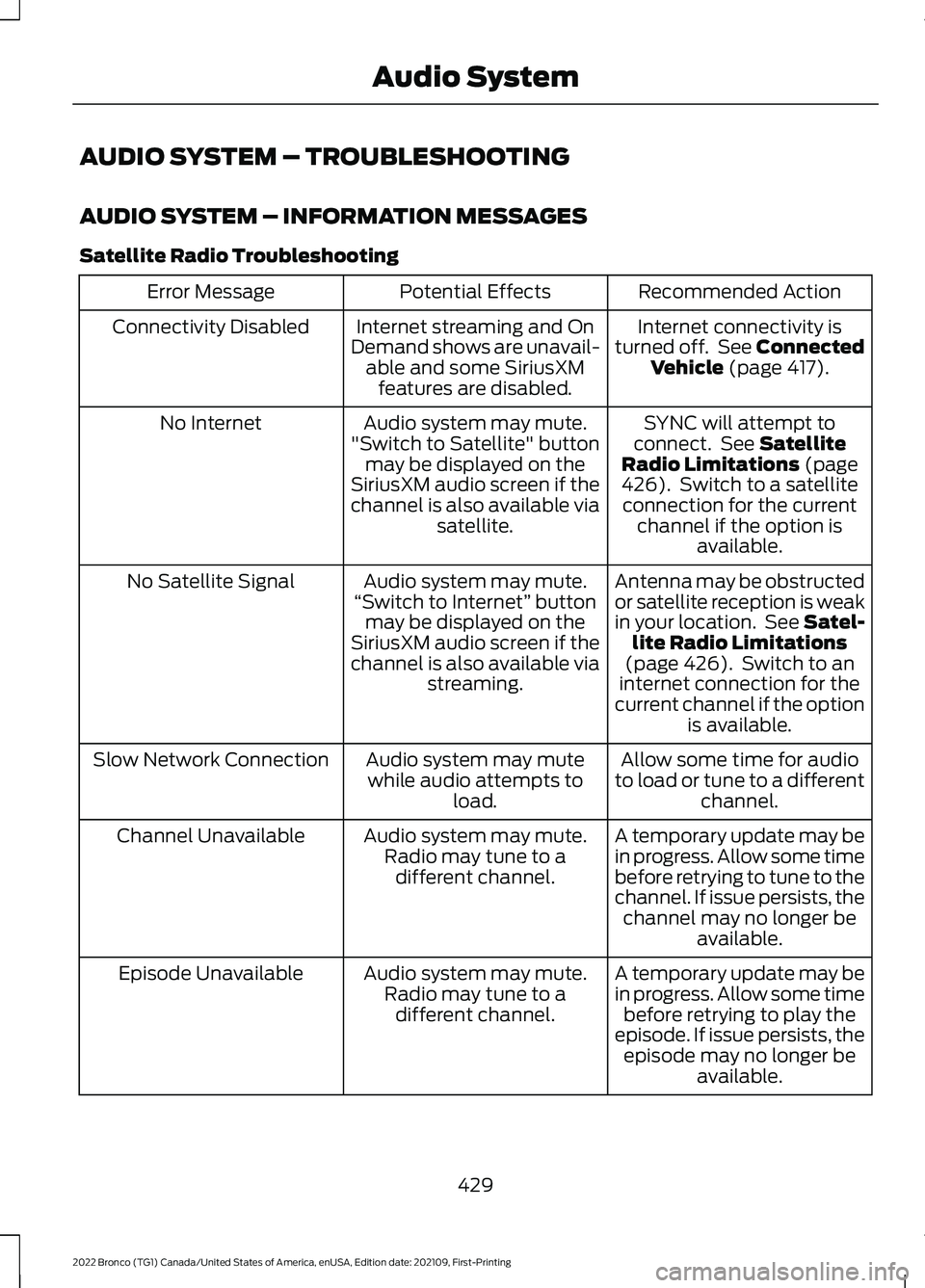
AUDIO SYSTEM – TROUBLESHOOTING
AUDIO SYSTEM – INFORMATION MESSAGES
Satellite Radio Troubleshooting
Recommended ActionPotential EffectsError Message
Internet connectivity isturned off. See ConnectedVehicle (page 417).
Internet streaming and OnDemand shows are unavail-able and some SiriusXMfeatures are disabled.
Connectivity Disabled
SYNC will attempt toconnect. See SatelliteRadio Limitations (page426). Switch to a satelliteconnection for the currentchannel if the option isavailable.
Audio system may mute."Switch to Satellite" buttonmay be displayed on theSiriusXM audio screen if thechannel is also available viasatellite.
No Internet
Antenna may be obstructedor satellite reception is weakin your location. See Satel-lite Radio Limitations(page 426). Switch to aninternet connection for thecurrent channel if the optionis available.
Audio system may mute.“Switch to Internet” buttonmay be displayed on theSiriusXM audio screen if thechannel is also available viastreaming.
No Satellite Signal
Allow some time for audioto load or tune to a differentchannel.
Audio system may mutewhile audio attempts toload.
Slow Network Connection
A temporary update may bein progress. Allow some timebefore retrying to tune to thechannel. If issue persists, thechannel may no longer beavailable.
Audio system may mute.Radio may tune to adifferent channel.
Channel Unavailable
A temporary update may bein progress. Allow some timebefore retrying to play theepisode. If issue persists, theepisode may no longer beavailable.
Audio system may mute.Radio may tune to adifferent channel.
Episode Unavailable
429
2022 Bronco (TG1) Canada/United States of America, enUSA, Edition date: 202109, First-PrintingAudio System
Page 434 of 562
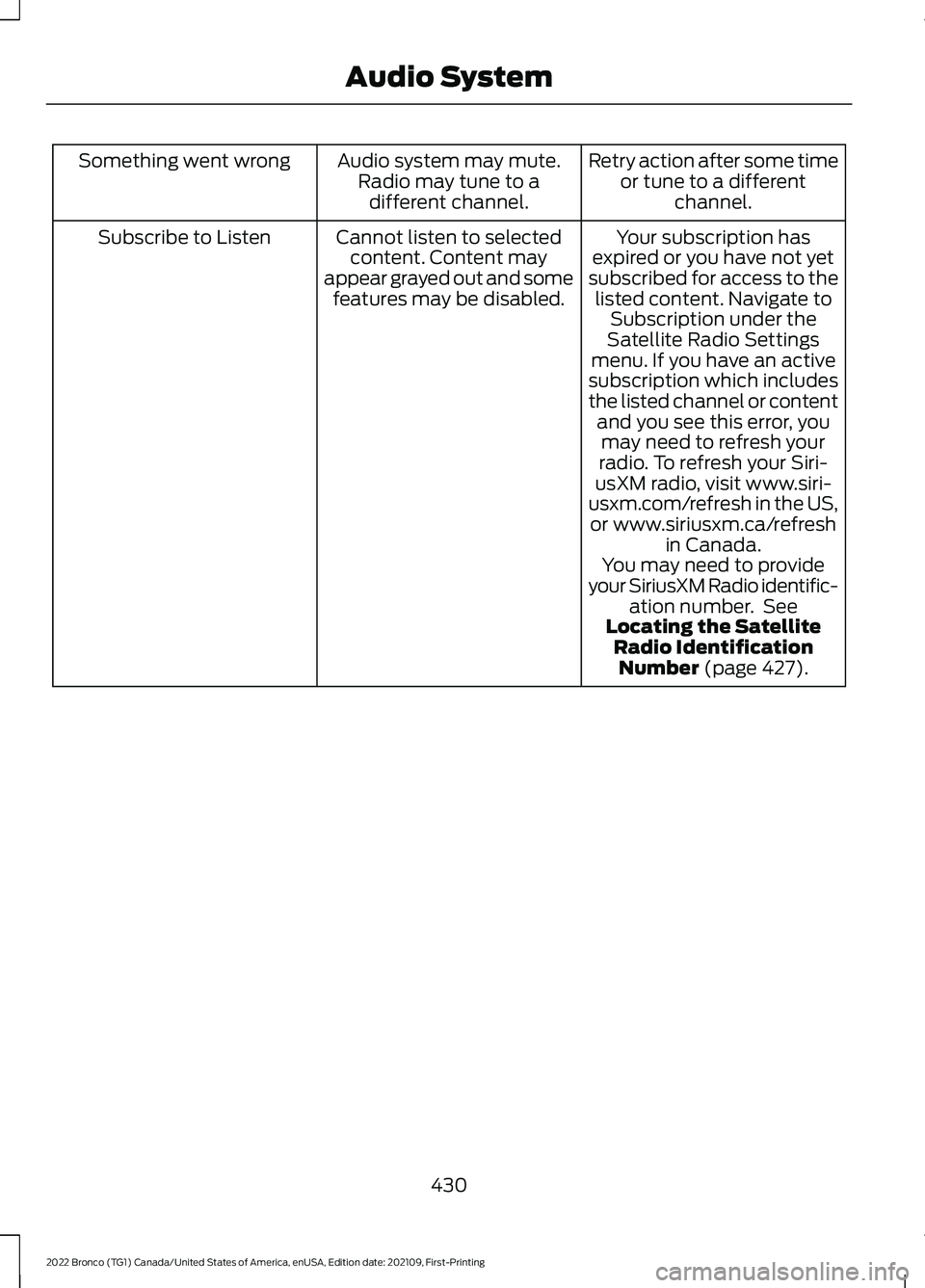
Retry action after some timeor tune to a differentchannel.
Audio system may mute.Radio may tune to adifferent channel.
Something went wrong
Your subscription hasexpired or you have not yetsubscribed for access to thelisted content. Navigate toSubscription under theSatellite Radio Settingsmenu. If you have an activesubscription which includesthe listed channel or contentand you see this error, youmay need to refresh yourradio. To refresh your Siri-usXM radio, visit www.siri-usxm.com/refresh in the US,or www.siriusxm.ca/refreshin Canada.You may need to provideyour SiriusXM Radio identific-ation number. SeeLocating the SatelliteRadio IdentificationNumber (page 427).
Cannot listen to selectedcontent. Content mayappear grayed out and somefeatures may be disabled.
Subscribe to Listen
430
2022 Bronco (TG1) Canada/United States of America, enUSA, Edition date: 202109, First-PrintingAudio System
Page 435 of 562
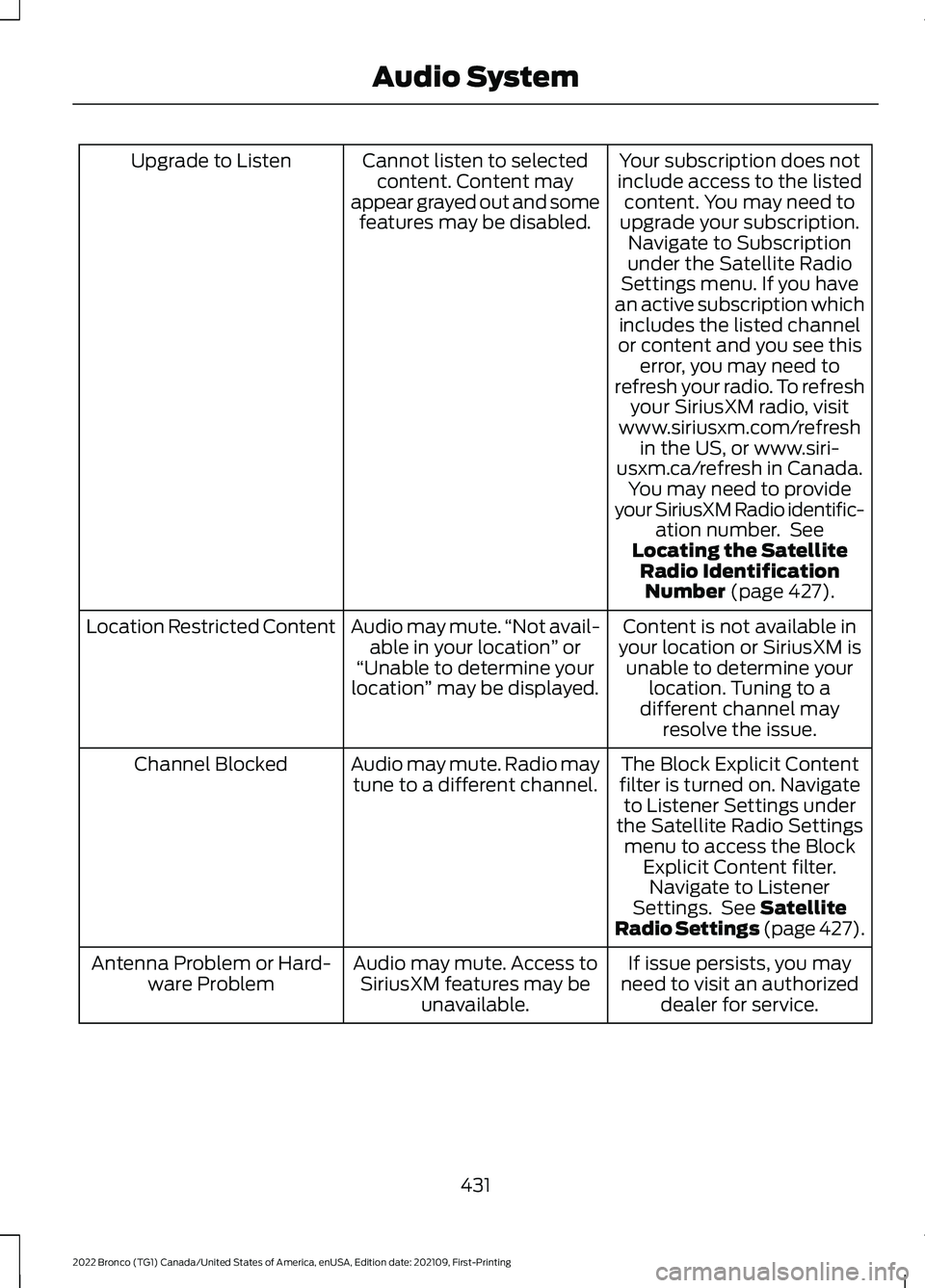
Your subscription does notinclude access to the listedcontent. You may need toupgrade your subscription.Navigate to Subscriptionunder the Satellite RadioSettings menu. If you havean active subscription whichincludes the listed channelor content and you see thiserror, you may need torefresh your radio. To refreshyour SiriusXM radio, visitwww.siriusxm.com/refreshin the US, or www.siri-usxm.ca/refresh in Canada.You may need to provideyour SiriusXM Radio identific-ation number. SeeLocating the SatelliteRadio IdentificationNumber (page 427).
Cannot listen to selectedcontent. Content mayappear grayed out and somefeatures may be disabled.
Upgrade to Listen
Content is not available inyour location or SiriusXM isunable to determine yourlocation. Tuning to adifferent channel mayresolve the issue.
Audio may mute.“Not avail-able in your location” or“Unable to determine yourlocation” may be displayed.
Location Restricted Content
The Block Explicit Contentfilter is turned on. Navigateto Listener Settings underthe Satellite Radio Settingsmenu to access the BlockExplicit Content filter.Navigate to ListenerSettings. See SatelliteRadio Settings (page 427).
Audio may mute. Radio maytune to a different channel.Channel Blocked
If issue persists, you mayneed to visit an authorizeddealer for service.
Audio may mute. Access toSiriusXM features may beunavailable.
Antenna Problem or Hard-ware Problem
431
2022 Bronco (TG1) Canada/United States of America, enUSA, Edition date: 202109, First-PrintingAudio System
Page 436 of 562
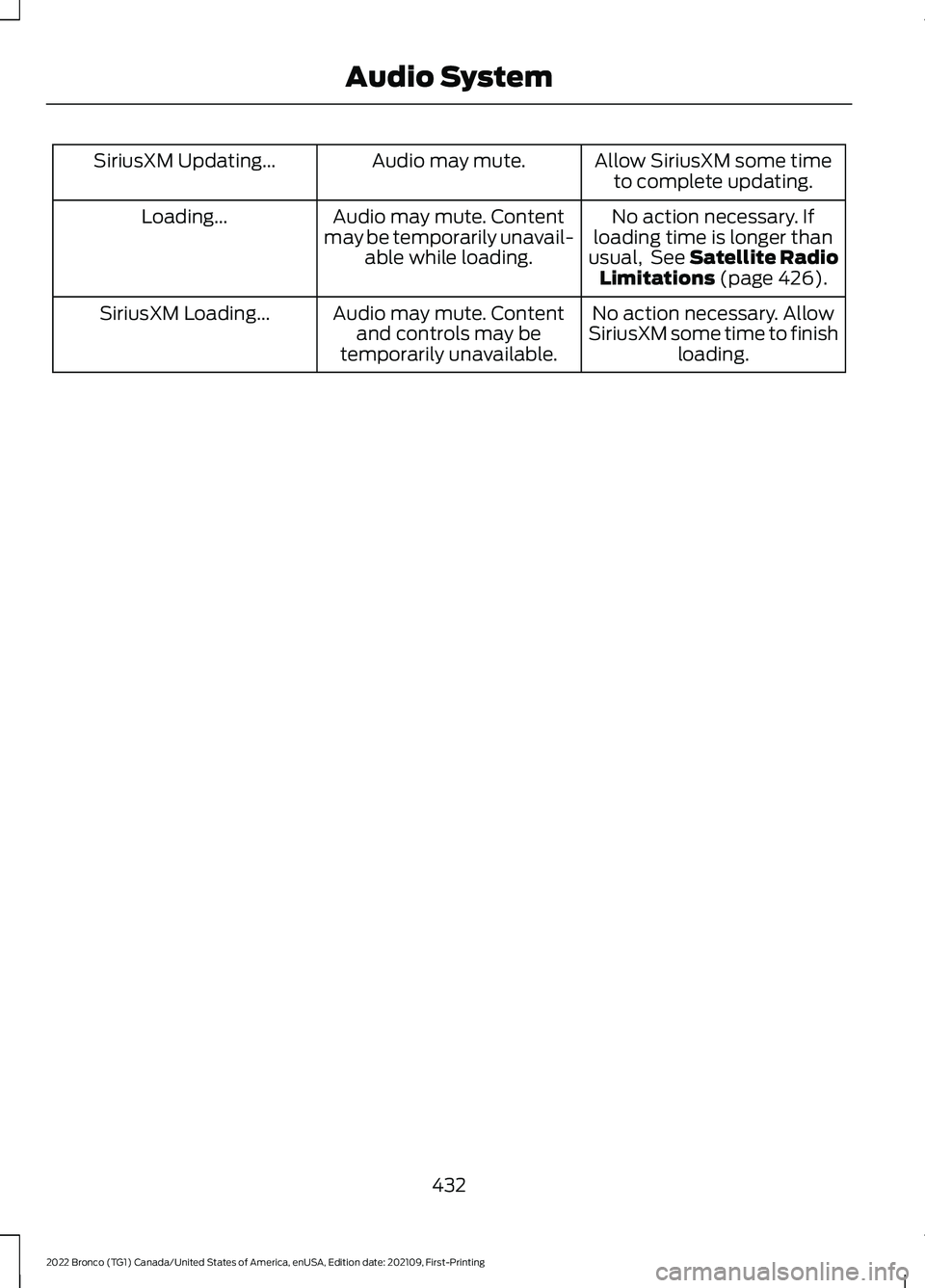
Allow SiriusXM some timeto complete updating.Audio may mute.SiriusXM Updating...
No action necessary. Ifloading time is longer thanusual, See Satellite RadioLimitations (page 426).
Audio may mute. Contentmay be temporarily unavail-able while loading.
Loading...
No action necessary. AllowSiriusXM some time to finishloading.
Audio may mute. Contentand controls may betemporarily unavailable.
SiriusXM Loading...
432
2022 Bronco (TG1) Canada/United States of America, enUSA, Edition date: 202109, First-PrintingAudio System
Page 437 of 562
CENTER DISPLAY
PRECAUTIONS
WARNING: Driving while distractedcan result in loss of vehicle control, crashand injury. We strongly recommend thatyou use extreme caution when using anydevice that may take your focus off theroad. Your primary responsibility is thesafe operation of your vehicle. Werecommend against the use of anyhand-held device while driving andencourage the use of voice-operatedsystems when possible. Make sure youare aware of all applicable local lawsthat may affect the use of electronicdevices while driving.
CENTER DISPLAY
LIMITATIONS
Speed-restricted Features
For your safety, some features are notavailable while the vehicle is in motion ator above 5 mph (8 km/h). Settings thatare not critical while driving your vehicleare shown as restricted on your display.Some of these settings include:
•System updates.
•Personal profiles setup.
•Valet mode setup.
•Driver assistance settings.
Vehicle Settings
•MyKey setup.
•Door keypad code setup.
•Backup start passcode setup.
These restricted features becomeavailable when your vehicle is no longer inmotion.
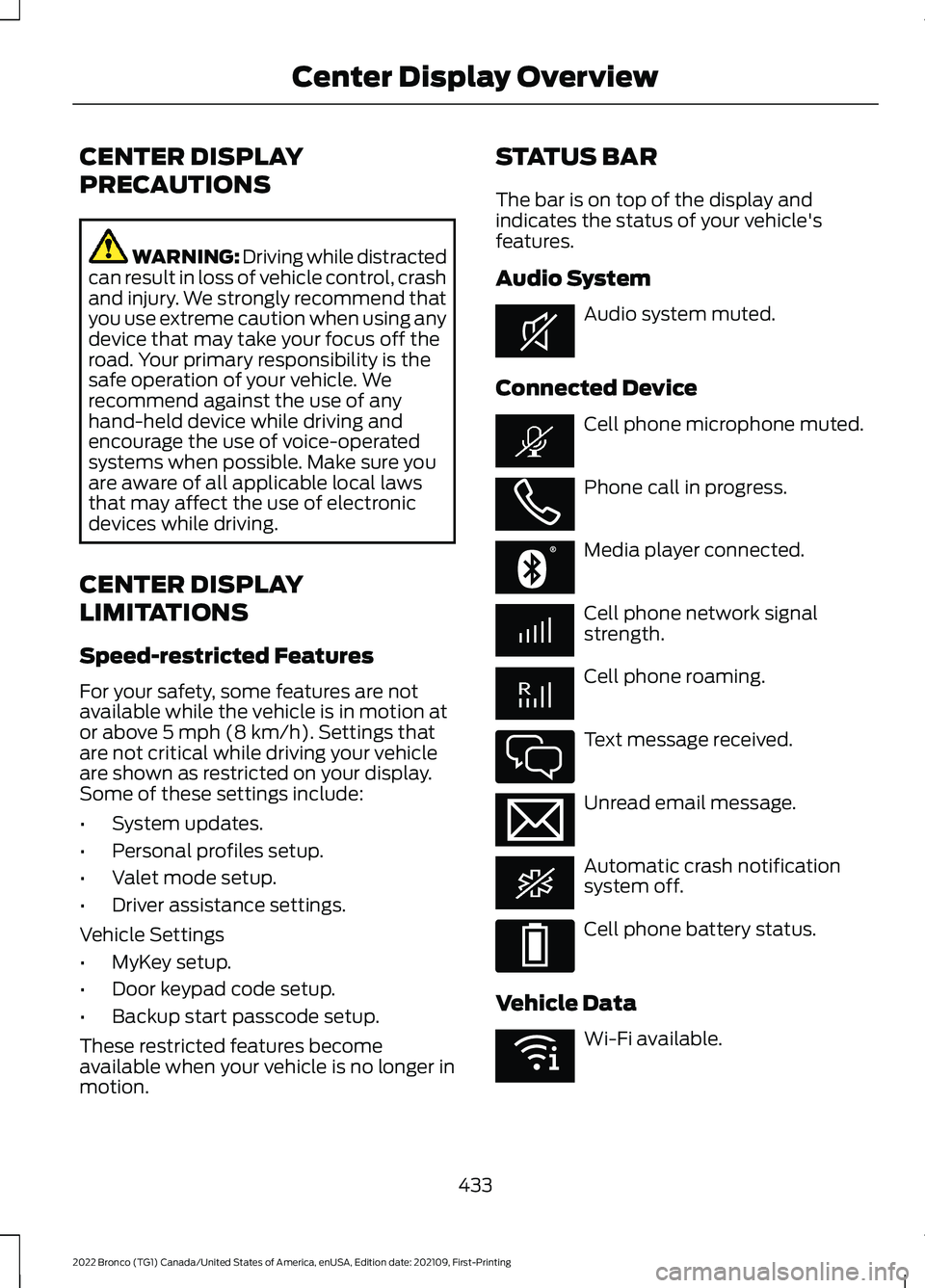
STATUS BAR
The bar is on top of the display andindicates the status of your vehicle'sfeatures.
Audio System
Audio system muted.
Connected Device
Cell phone microphone muted.
Phone call in progress.
Media player connected.
Cell phone network signalstrength.
Cell phone roaming.
Text message received.
Unread email message.
Automatic crash notificationsystem off.
Cell phone battery status.
Vehicle Data
Wi-Fi available.
433
2022 Bronco (TG1) Canada/United States of America, enUSA, Edition date: 202109, First-PrintingCenter Display OverviewE353221 E353213 E353208 E335295 E353216 E335293 E353219
Page 447 of 562
CONNECTING A BLUETOOTH®
DEVICE
1.Make sure Bluetooth® is enabled onyour device.
2.Press Settings on the touchscreen.
3.Press Connectivity.
4.Press Bluetooth.
5.Press Add a Bluetooth Device.
Note:A prompt alerts you to search for yourvehicle on your device.
6.Select your vehicle on your device.
Note:A number appears on your device andon the touchscreen.
7.Confirm that the number on yourdevice matches the number on thetouchscreen.
Note:The touchscreen indicates that youhave successfully paired your device.
The Bluetooth® word mark and logos areregistered trademarks owned by BluetoothSIG, Inc. and any use of such marks byFord Motor Company is under license.Other trademarks and trade names arethose of their respective owners.
PLAYING MEDIA USING
BLUETOOTH®
WARNING: Driving while distractedcan result in loss of vehicle control, crashand injury. We strongly recommend thatyou use extreme caution when using anydevice that may take your focus off theroad. Your primary responsibility is thesafe operation of your vehicle. Werecommend against the use of any
hand-held device while driving andencourage the use of voice-operatedsystems when possible. Make sure youare aware of all applicable local lawsthat may affect the use of electronicdevices while driving.
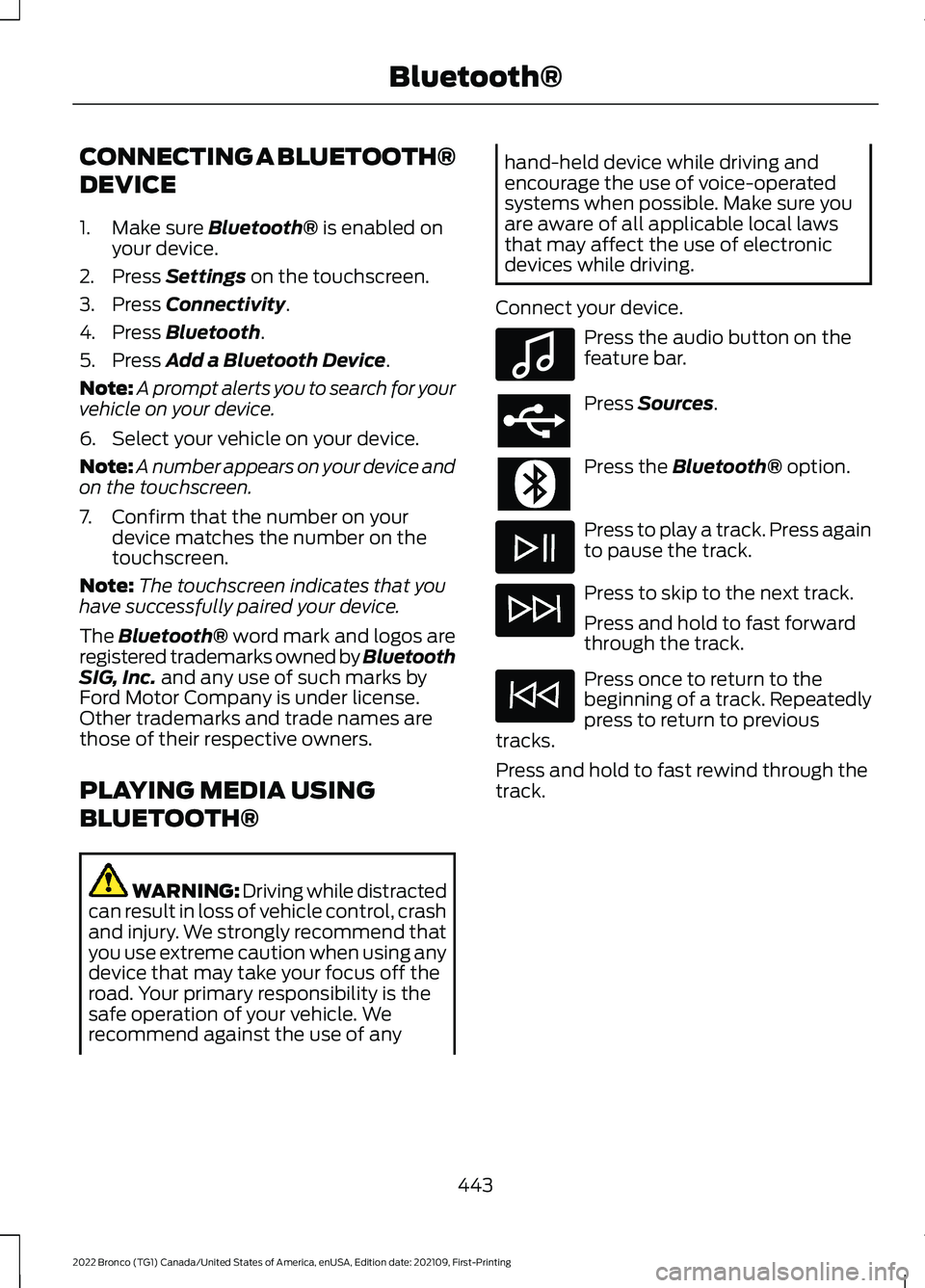
Connect your device.
Press the audio button on thefeature bar.
Press Sources.
Press the Bluetooth® option.
Press to play a track. Press againto pause the track.
Press to skip to the next track.
Press and hold to fast forwardthrough the track.
Press once to return to thebeginning of a track. Repeatedlypress to return to previoustracks.
Press and hold to fast rewind through thetrack.
443
2022 Bronco (TG1) Canada/United States of America, enUSA, Edition date: 202109, First-PrintingBluetooth®E100027
Page 512 of 562
INTELLECTUAL PROPERTY RIGHTS:All title and intellectual property rights inand to the SOFTWARE (including but notlimited to any images, photographs,animations, video, audio, music, text and"applets" incorporated into theSOFTWARE), the accompanying printedmaterials, and any copies of theSOFTWARE, are owned by FORD MOTORCOMPANY, or its affiliates or suppliers. TheSOFTWARE is licensed, not sold. You maynot copy the printed materialsaccompanying the SOFTWARE. All titleand intellectual property rights in and tothe content which may be accessedthrough use of the SOFTWARE is theproperty of the respective content ownerand may be protected by applicablecopyright or other intellectual propertylaws and treaties. This EULA grants you norights to use such content outside itsintended use. All rights not specificallygranted under this EULA are reserved byFORD MOTOR COMPANY, its affiliates,and third party software and serviceproviders and suppliers. Use of any on-lineservices which may be accessed throughthe SOFTWARE may be governed by therespective terms of use relating to suchservices. If this SOFTWARE containsdocumentation that is provided only inelectronic form, you may print one copy ofsuch electronic documentation.
EXPORT RESTRICTIONS: Youacknowledge that the SOFTWARE issubject to U.S. and European Union exportjurisdiction. You agree to comply with allapplicable international and national lawsthat apply to the SOFTWARE, includingthe U.S. Export Administration Regulations,as well as end-user, end-use anddestination restrictions issued by U.S. andother governments.
TRADEMARKS: This EULA does not grantyou any rights in connection with anytrademarks or service marks of FORDMOTOR COMPANY, its affiliates, and thirdparty software and service providers.
PRODUCT SUPPORT: Please refer toFORD MOTOR COMPANY instructionsprovided in the documentation for theDEVICES product support, such as thevehicle owner guide.
Should you have any questions concerningthis EULA, or if you desire to contact FORDMOTOR COMPANY for any other reason,please refer to the address provided in thedocumentation for the DEVICES.
No Liability for Certain Damages:EXCEPT AS PROHIBITED BY LAW, FORDMOTOR COMPANY, ANY THIRD PARTYSOFTWARE OR SERVICES SUPPLIERS,AND THEIR AFFILIATES SHALL HAVE NOLIABILITY FOR ANY INDIRECT, SPECIAL,CONSEQUENTIAL OR INCIDENTALDAMAGES ARISING FROM OR INCONNECTION WITH THE USE ORPERFORMANCE OF THE SOFTWARE. THISLIMITATION SHALL APPLY EVEN IF ANYREMEDY FAILS OF ITS ESSENTIALPURPOSE. THERE ARE NO WARRANTIESOTHER THAN THOSE THAT MAY BEEXPRESSLY PROVIDED FOR YOUR NEWVEHICLE.
SYNC® Automotive Important SafetyInformation Read and followinstructions:
•Before using your SYNC® system, readand follow all instructions and safetyinformation provided in this end usermanual ("Owner Guide".) Notfollowing precautions found in theOwner Guide can lead to an accidentor other serious injuries.
508
2022 Bronco (TG1) Canada/United States of America, enUSA, Edition date: 202109, First-PrintingCustomer Information
Page 518 of 562
2. Account Information
You agree: (a) when registering theTeleNav Software, to provide TeleNav withtrue, accurate, current, and completeinformation about yourself, and (b) toinform TeleNav promptly of any changesto such information, and to keep it true,accurate, current and complete.
3. Software License
•Subject to your compliance with theterms of this Agreement, TeleNavhereby grants to you a personal,non-exclusive, non-transferable license(except as expressly permitted belowin connection with your permanenttransfer of the TeleNav Softwarelicense), without the right tosublicense, to use the TeleNavSoftware (in object code form only) inorder to access and use the TeleNavSoftware. This license shall terminateupon any termination or expiration ofthis Agreement. You agree that you willuse the TeleNav Software only for yourpersonal business or leisure purposes,and not to provide commercialnavigation services to other parties.
3.1 License Limitations
•(a) reverse engineer, decompile,disassemble, translate, modify, alteror otherwise change the TeleNavSoftware or any part thereof; (b)attempt to derive the source code,audio library or structure of theTeleNav Software without the priorexpress written consent of TeleNav;(c) remove from the TeleNavSoftware, or alter, any of TeleNav's orits suppliers' trademarks, trade names,logos, patent or copyright notices, orother notices or markings; (d)
distribute, sublicense or otherwisetransfer the TeleNav Software toothers, except as part of yourpermanent transfer of the TeleNavSoftware; or (e) use the TeleNavSoftware in any manner that
I. infringes the intellectual property orproprietary rights, rights of publicity orprivacy or other rights of any party,
ii. violates any law, statute, ordinance orregulation, including but not limited to lawsand regulations related to spamming,privacy, consumer and child protection,obscenity or defamation, or
iii. is harmful, threatening, abusive,harassing, tortuous, defamatory, vulgar,obscene, libelous, or otherwiseobjectionable; and (f) lease, rent out, orotherwise permit unauthorized access bythird parties to the TeleNav Softwarewithout advanced written permission ofTeleNav.
4. Disclaimers
•To the fullest extent permissiblepursuant to applicable law, in no eventwill TeleNav, its licensors and suppliers,or agents or employees of any of theforegoing, be liable for any decisionmade or action taken by you or anyoneelse in reliance on the informationprovided by the TeleNav Software.TeleNav also does not warrant theaccuracy of the map or other data usedfor the TeleNav Software. Such datamay not always reflect reality due to,among other things, road closures,construction, weather, new roads andother changing conditions. You areresponsible for the entire risk arisingout of your use of the TeleNavSoftware. For example but withoutlimitation, you agree not to rely on theTeleNav Software for criticalnavigation in areas where thewell-being or survival of you or others
514
2022 Bronco (TG1) Canada/United States of America, enUSA, Edition date: 202109, First-PrintingCustomer Information
Page 542 of 562
What Is Alert and Aid Mode............................251Alert Mode.....................................................250Adjusting the Steering Wheel VibrationIntensity.............................................................251How Does Alert Mode Work...........................251What Is Alert Mode...........................................250AM/FM Radio................................................424AM/FM Radio Limitations..............................424Selecting a Radio Station...............................424Ambient Lighting..........................................102Adjusting Ambient Lighting............................102Switching Ambient Lighting On andOff.......................................................................102Anti-Lock Braking System........................194Anti-Lock Braking SystemLimitations.......................................................194Appendices....................................................533Applying the Electric ParkingBrake..............................................................198Applying the Electric Parking Brake in anEmergency...................................................198App Precautions..........................................444App Requirements......................................444Apps.................................................................444Audio System................................................422AM/FM Radio......................................................424Audio System – Troubleshooting................429Digital Radio........................................................425Satellite Radio....................................................426Audio System Precautions.......................422Audio System – Troubleshooting..........429Audio System – InformationMessages.........................................................429Auto-Dimming Interior Mirror..................105Auto-Dimming Interior MirrorLimitations.......................................................105What Is the Auto-Dimming InteriorMirror..................................................................105Autolamps........................................................95Autolamp Settings..............................................95What Are Autolamps..........................................95Autolock.............................................................79Autolock Requirements.....................................79What Is Autolock..................................................79Automatically Releasing the ElectricParking Brake..............................................198
Automatic Crash Shutoff.........................305Automatic Crash ShutoffPrecautions.....................................................305Re-Enabling Your Vehicle...............................305What Is Automatic Crash Shutoff...............305Automatic Emergency Braking..............266Switching Automatic Emergency BrakingOn and Off......................................................266What Is Automatic EmergencyBraking..............................................................266Automatic Engine Stop..............................155How Does Automatic Engine StopWork....................................................................155Overriding Automatic Engine Stop..............156Switching Automatic Engine Stop On andOff.......................................................................156What Is Automatic Engine Stop....................155Automatic High Beam Control.................98Automatic High Beam ControlIndicators...........................................................99Automatic High Beam ControlLimitations.........................................................99Automatic High Beam ControlPrecautions.......................................................98Automatic High Beam ControlRequirements...................................................99How Does Automatic High Beam ControlWork.....................................................................98Overriding Automatic High BeamControl................................................................99Switching Automatic High Beam ControlOn and Off.........................................................99Automatic High Beam Control –Troubleshooting........................................100Automatic High Beam Control –Information Messages................................100Automatic Locking Mode............................54Disengaging Automatic Locking Mode........54Engaging Automatic Locking Mode..............54What Is Automatic Locking Mode.................54Automatic Transmission AudibleWarnings......................................................180Automatic Transmission............................178Automatic Transmission Positions..............178Brake Shift Interlock..........................................180Manually Shifting Gears...................................179Automatic Transmission Fluid Capacityand Specification.......................................412
538
2022 Bronco (TG1) Canada/United States of America, enUSA, Edition date: 202109, First-PrintingIndex