cruise control FORD BRONCO 2022 Owner's Manual
[x] Cancel search | Manufacturer: FORD, Model Year: 2022, Model line: BRONCO, Model: FORD BRONCO 2022Pages: 562, PDF Size: 73 MB
Page 245 of 562
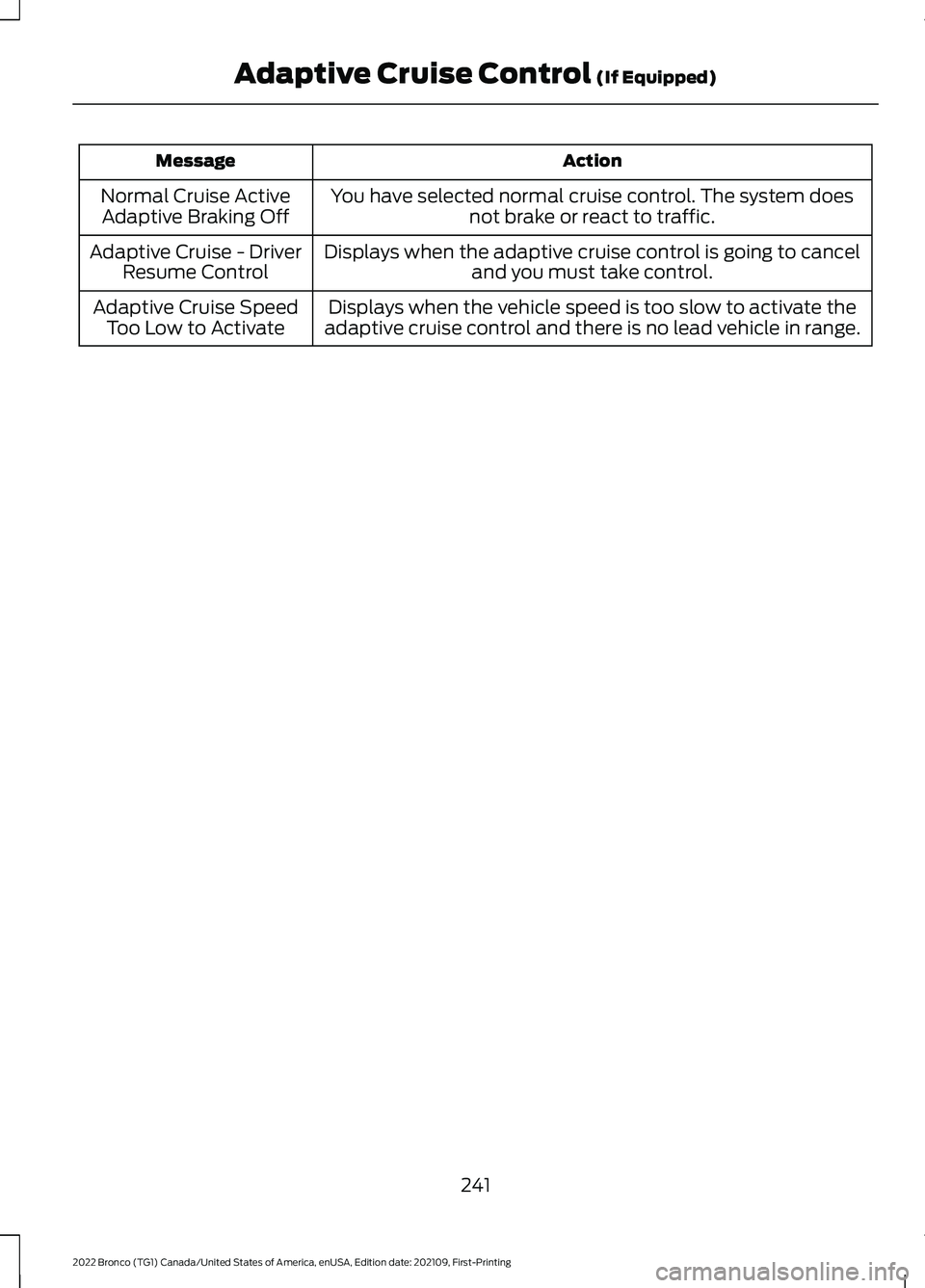
ActionMessage
You have selected normal cruise control. The system doesnot brake or react to traffic.Normal Cruise ActiveAdaptive Braking Off
Displays when the adaptive cruise control is going to canceland you must take control.Adaptive Cruise - DriverResume Control
Displays when the vehicle speed is too slow to activate theadaptive cruise control and there is no lead vehicle in range.Adaptive Cruise SpeedToo Low to Activate
241
2022 Bronco (TG1) Canada/United States of America, enUSA, Edition date: 202109, First-PrintingAdaptive Cruise Control (If Equipped)
Page 256 of 562
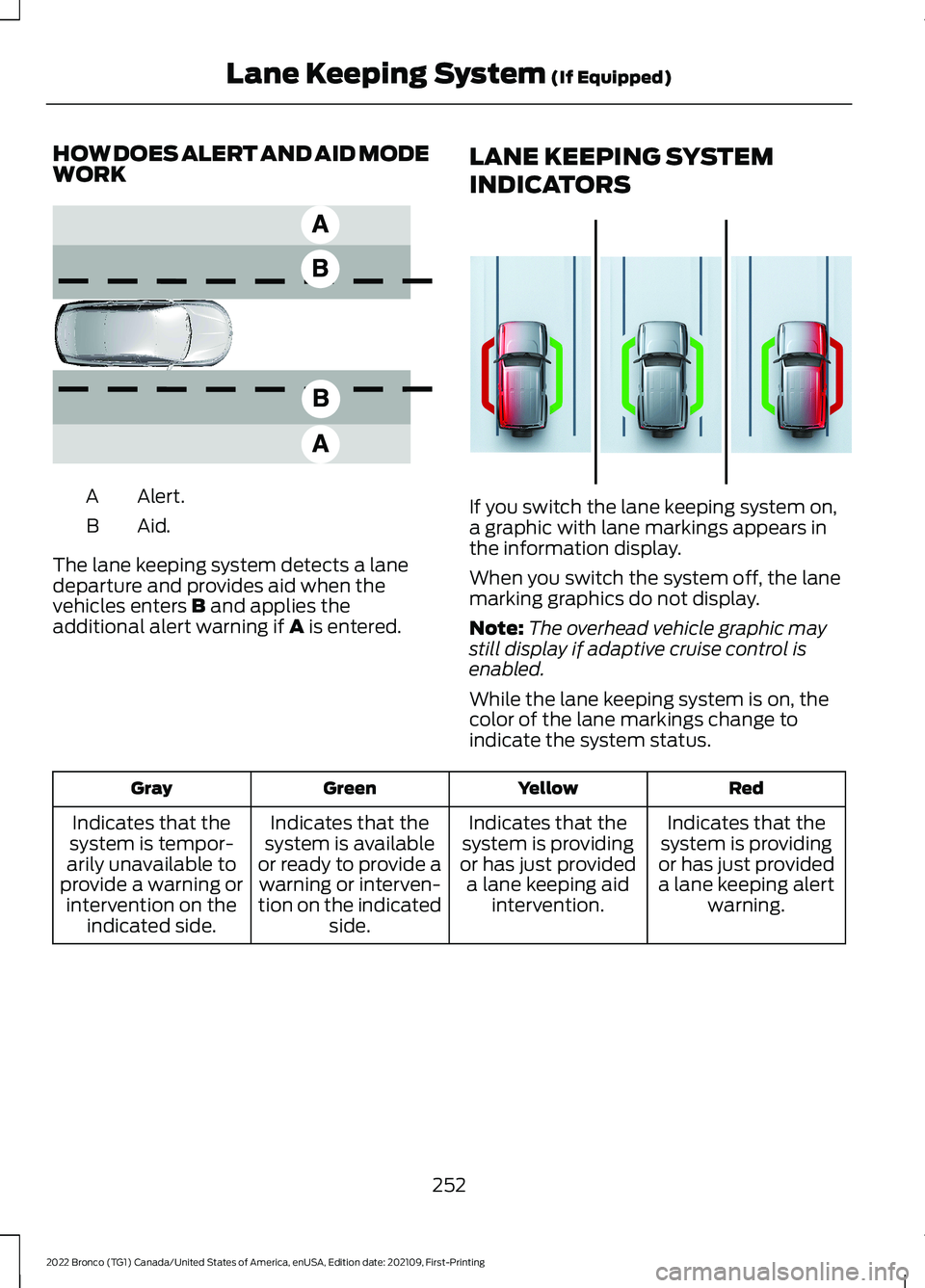
HOW DOES ALERT AND AID MODEWORK
Alert.A
Aid.B
The lane keeping system detects a lanedeparture and provides aid when thevehicles enters B and applies theadditional alert warning if A is entered.
LANE KEEPING SYSTEM
INDICATORS
If you switch the lane keeping system on,a graphic with lane markings appears inthe information display.
When you switch the system off, the lanemarking graphics do not display.
Note:The overhead vehicle graphic maystill display if adaptive cruise control isenabled.
While the lane keeping system is on, thecolor of the lane markings change toindicate the system status.
RedYellowGreenGray
Indicates that thesystem is providingor has just provideda lane keeping alertwarning.
Indicates that thesystem is providingor has just provideda lane keeping aidintervention.
Indicates that thesystem is availableor ready to provide awarning or interven-tion on the indicatedside.
Indicates that thesystem is tempor-arily unavailable toprovide a warning orintervention on theindicated side.
252
2022 Bronco (TG1) Canada/United States of America, enUSA, Edition date: 202109, First-PrintingLane Keeping System (If Equipped)E165517 E358269
Page 267 of 562
WARNING: Take additional care ifyour vehicle is heavily loaded or you aretowing a trailer. These conditions couldresult in reduced performance of thissystem. Failure to follow this instructioncould result in the loss of control of yourvehicle, personal injury or death.
WARNING: The system cannothelp prevent all crashes. Do not rely onthis system to replace driver judgmentand the need to maintain a safe distanceand speed.
WARNING: In situations where thevehicle camera has limited detectioncapability, this may reduce systemperformance. These situations includebut are not limited to direct or lowsunlight, vehicles at night without taillights, unconventional vehicle types,pedestrians with complex backgrounds,running pedestrians, partly obscuredpedestrians, or pedestrians that thesystem cannot distinguish from a group.Failure to take care may result in the lossof control of your vehicle, seriouspersonal injury or death.
PRE-COLLISION ASSIST
LIMITATIONS
Pre-collision assist depends on thedetection ability of its camera and sensors.Any obstructions or damage to these areascan limit detection or prevent the systemfrom functioning. See Locating thePre-Collision Assist Sensors (page 264).
The system is active at speeds above3 mph (5 km/h).
Note:The pre-collision assist systemautomatically disables when you selectfour-wheel drive low, manually disableAdvanceTrac™, or select rock crawl mode.
Note:Brake support and automaticemergency braking are active at speeds upto 80 mph (130 km/h). If your vehicle has aradar sensor included with adaptive cruisecontrol, then brake support and automaticemergency braking are active up to themaximum speed of your vehicle.
Pedestrian Detection Limitations
Pedestrian detection is active at speedsup to 50 mph (80 km/h).
Pedestrian detection operates optimallywhen detected hazards are clearlyidentifiable. System performance mayreduce in situations where pedestrians arerunning, partly obscured, have a complexbackground, or when the system cannotdistinguish pedestrians from a group.
Intersection Assist (If Equipped)
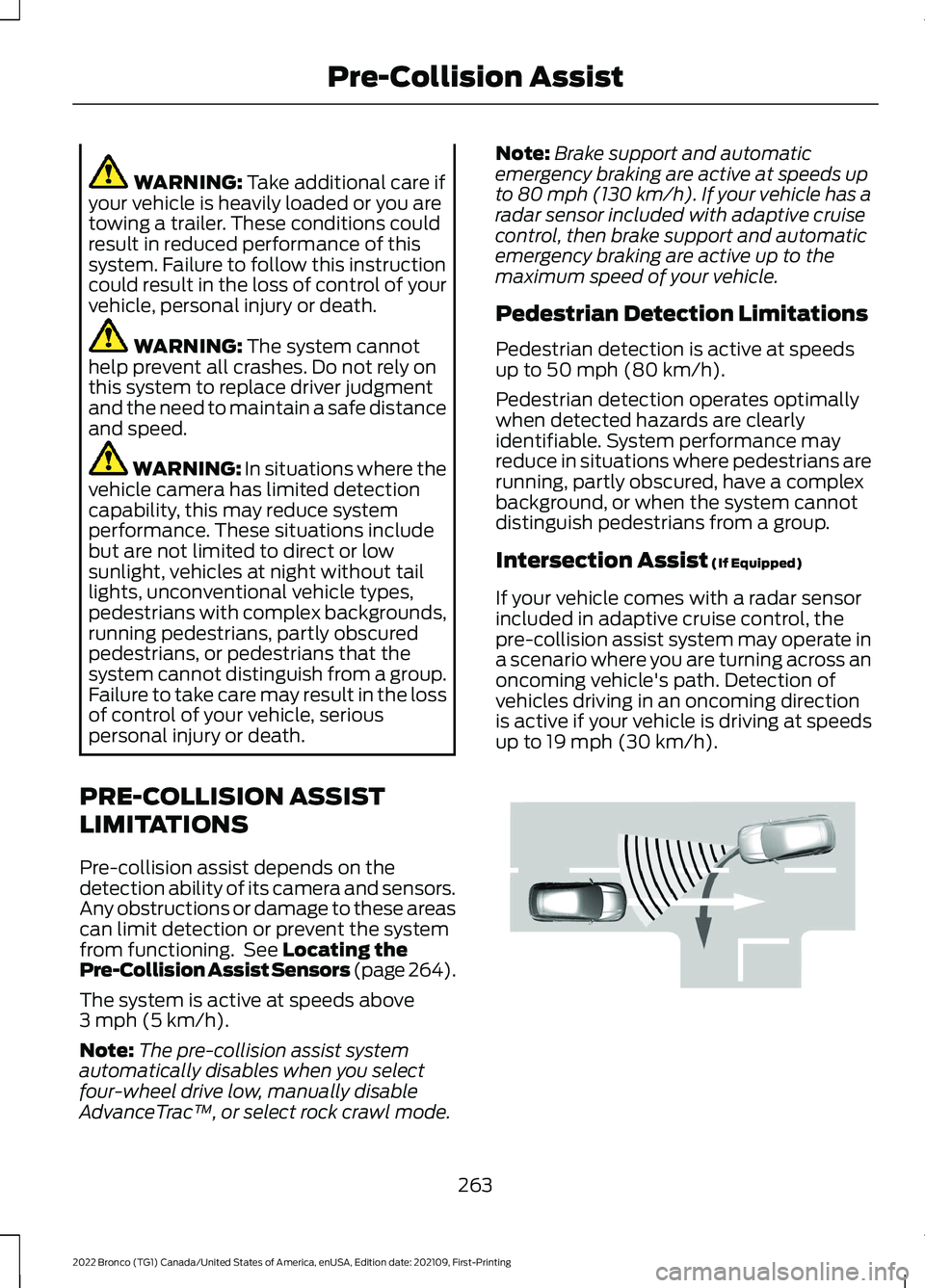
If your vehicle comes with a radar sensorincluded in adaptive cruise control, thepre-collision assist system may operate ina scenario where you are turning across anoncoming vehicle's path. Detection ofvehicles driving in an oncoming directionis active if your vehicle is driving at speedsup to 19 mph (30 km/h).
263
2022 Bronco (TG1) Canada/United States of America, enUSA, Edition date: 202109, First-PrintingPre-Collision AssistE309750
Page 268 of 562
SWITCHING PRE-COLLISION
ASSIST ON AND OFF
To switch the system on or off, use thetouchscreen:
1.Press Features on the touchscreen.
2.Press Driver Assistance.
3.Press Pre-Collision Assist.
4.Switch the feature on or off.
Adjusting the Pre-Collision AssistSettings
You can adjust the following settings byusing the touchscreen controls in thepre-collision assist menu:
•Change alert and distance alertsensitivity to one of three possiblesettings.
•Switch distance indication and alert onor off.
•If required, switch automaticemergency braking on or off.
•If required, switch the entirepre-collision assist feature on or off.
•If required, switch evasive steeringassist on or off.
Note:Automatic emergency braking andevasive steering turn on every time youswitch the ignition on.
Note:If your vehicle has a radar sensor, werecommend that you switch the system offif you install a snow plow or similar objectin such a way that it may block the radarsensor. Your vehicle remembers the selectedsetting across key cycles.
Note:If you switch automatic emergencybraking off, evasive steering assist switchesoff.
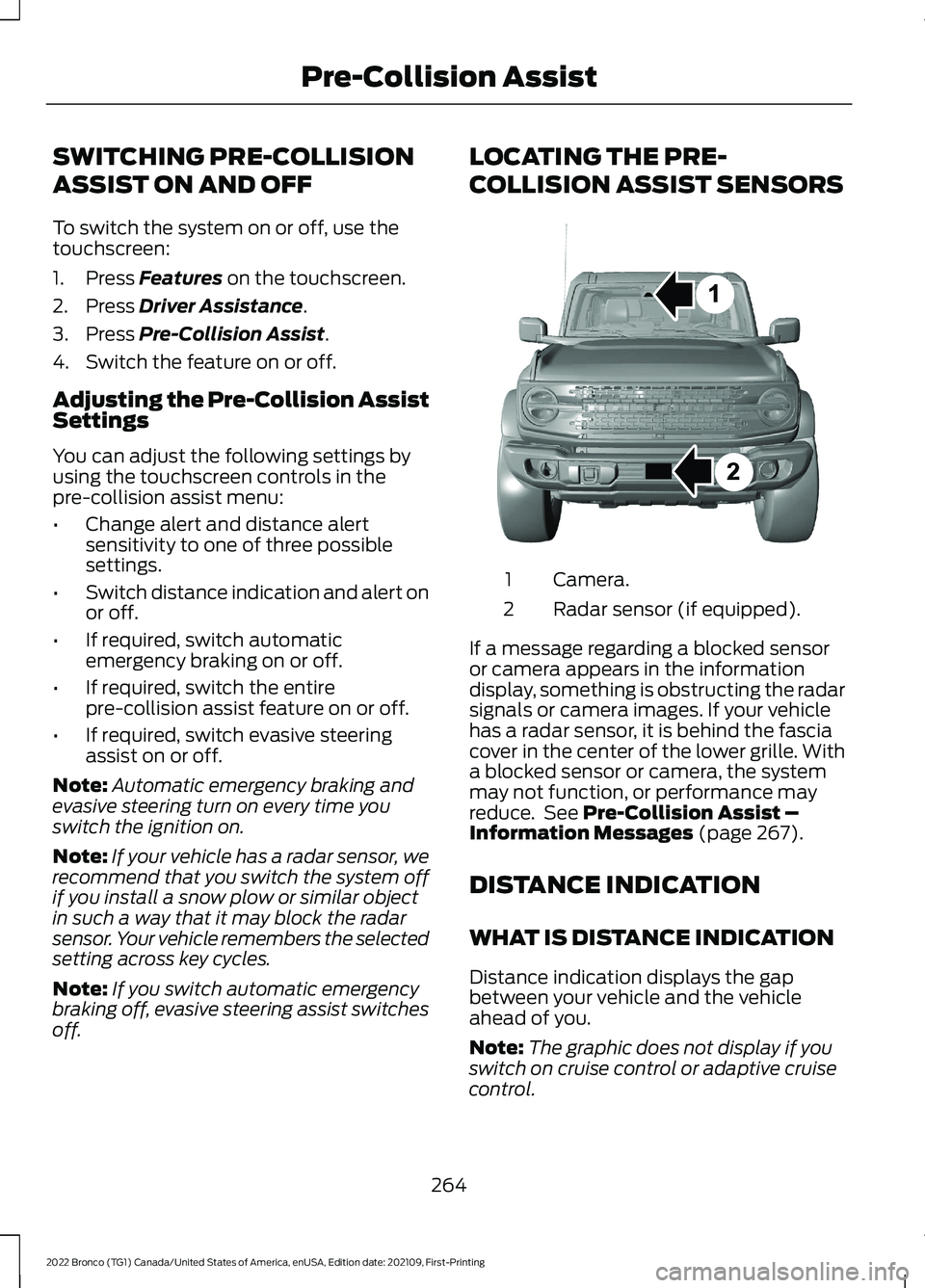
LOCATING THE PRE-
COLLISION ASSIST SENSORS
Camera.1
Radar sensor (if equipped).2
If a message regarding a blocked sensoror camera appears in the informationdisplay, something is obstructing the radarsignals or camera images. If your vehiclehas a radar sensor, it is behind the fasciacover in the center of the lower grille. Witha blocked sensor or camera, the systemmay not function, or performance mayreduce. See Pre-Collision Assist –Information Messages (page 267).
DISTANCE INDICATION
WHAT IS DISTANCE INDICATION
Distance indication displays the gapbetween your vehicle and the vehicleahead of you.
Note:The graphic does not display if youswitch on cruise control or adaptive cruisecontrol.
264
2022 Bronco (TG1) Canada/United States of America, enUSA, Edition date: 202109, First-PrintingPre-Collision AssistE327933
Page 301 of 562
Using the Front and RearDifferential Lock
When engaged, the front and reardifferential lock provides additionaltraction to your vehicle by forcing eitherthe two rear wheels or two front wheels toturn at the same speed.
You can activate and deactivate the frontand rear differential lock on the fly withinthe operating speed range. See ElectronicLocking Differential (page 190).
Using Trail Control
The system works in a similar manner tocruise control in off-road conditions. TrailControl provides you the ability tomaneuver the vehicle without using thethrottle and brake pedals.
Trail Control allows you to set a speedbetween 1 mph (1.6 km/h) to 14 mph(23 km/h) in a forward motion and 1 mph(1.6 km/h) to 5 mph (8 km/h) in reverse.The system controls acceleration andbraking in difficult off-road environments,which allows you to focus on steering. SeeTrail Control (page 207).
Trail Control Performance:
•Manages wheel slip to maximizetraction.
•Removes the need for you to use bothfeet when driving in off-road situations.
•Provides braking to maximize tractionin descents.
•Gives you confidence in difficultenvironments.
Using Trail One Pedal Drive
Trail one pedal drive coordinatespropulsive and braking torque through yourapplication of the accelerator pedal tosimulate a two footed driving technique.
Use this when driving over large obstacles,such as rocks or logs, to help maintain aconstant vehicle speed.
In 4H, the system offers lift pedal brakingand auto hill hold functionality. See WhatIs Trail One Pedal Drive (page 208).
Note:Trail one pedal drive is only availablewhen the vehicle is in 4H or 4L.
Using Trail Turn Assist
The feature reduces the turn radius of thevehicle on off-road surfaces.
The system reduces driver effort tonegotiate difficult off-road terrain byallowing the vehicle to make a tight turnin a single maneuver that might otherwiserequire a three point turn. See Trail TurnAssist (page 212).
Note:Trail turn assist is only available whenthe vehicle is in 4H or 4L.
Note:Trail turn assist cannot activate if therear differential is locked.
What Are Rock Rails (If Equipped)
Rock rails protect the rocker and body sidefrom damage and provide a sliding surfaceto allow the vehicle to cross boulders androck ledges.
Rock rails also can act as a pivot point tosharply turn the vehicle in tight spaces withhigh walls or rocks present.
AFTER DRIVING YOUR VEHICLEOFF-ROAD
WARNING: After off-road use,before returning to the road, check thewheels and tires for damage. Off-roaduse may cause damage to your wheelsand tires that can lead to tire failure, lossof vehicle control, serious injury or death.
297
2022 Bronco (TG1) Canada/United States of America, enUSA, Edition date: 202109, First-PrintingDriving Hints
Page 318 of 562
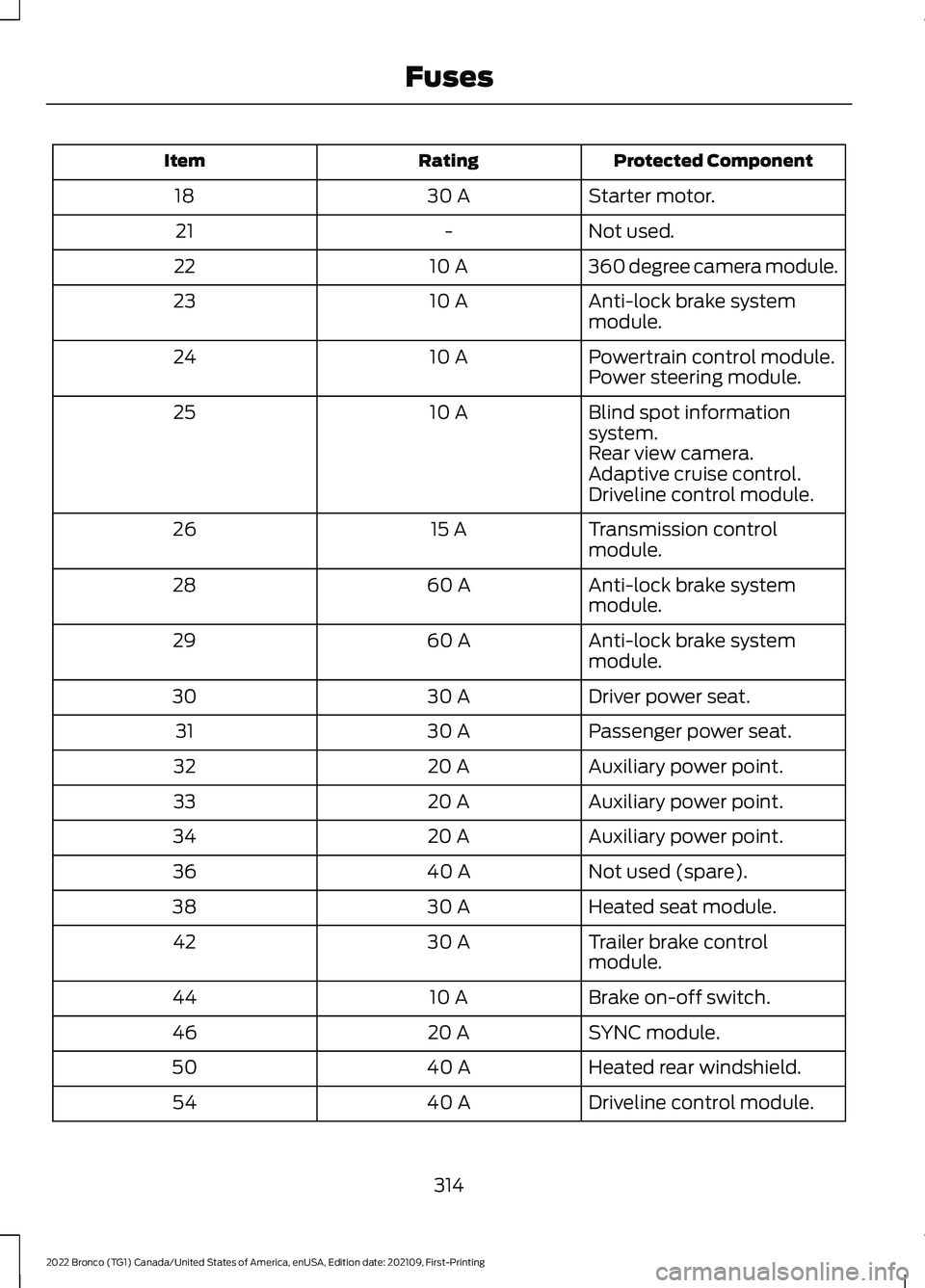
Protected ComponentRatingItem
Starter motor.30 A18
Not used.-21
360 degree camera module.10 A22
Anti-lock brake systemmodule.10 A23
Powertrain control module.10 A24Power steering module.
Blind spot informationsystem.10 A25
Rear view camera.Adaptive cruise control.Driveline control module.
Transmission controlmodule.15 A26
Anti-lock brake systemmodule.60 A28
Anti-lock brake systemmodule.60 A29
Driver power seat.30 A30
Passenger power seat.30 A31
Auxiliary power point.20 A32
Auxiliary power point.20 A33
Auxiliary power point.20 A34
Not used (spare).40 A36
Heated seat module.30 A38
Trailer brake controlmodule.30 A42
Brake on-off switch.10 A44
SYNC module.20 A46
Heated rear windshield.40 A50
Driveline control module.40 A54
314
2022 Bronco (TG1) Canada/United States of America, enUSA, Edition date: 202109, First-PrintingFuses
Page 441 of 562
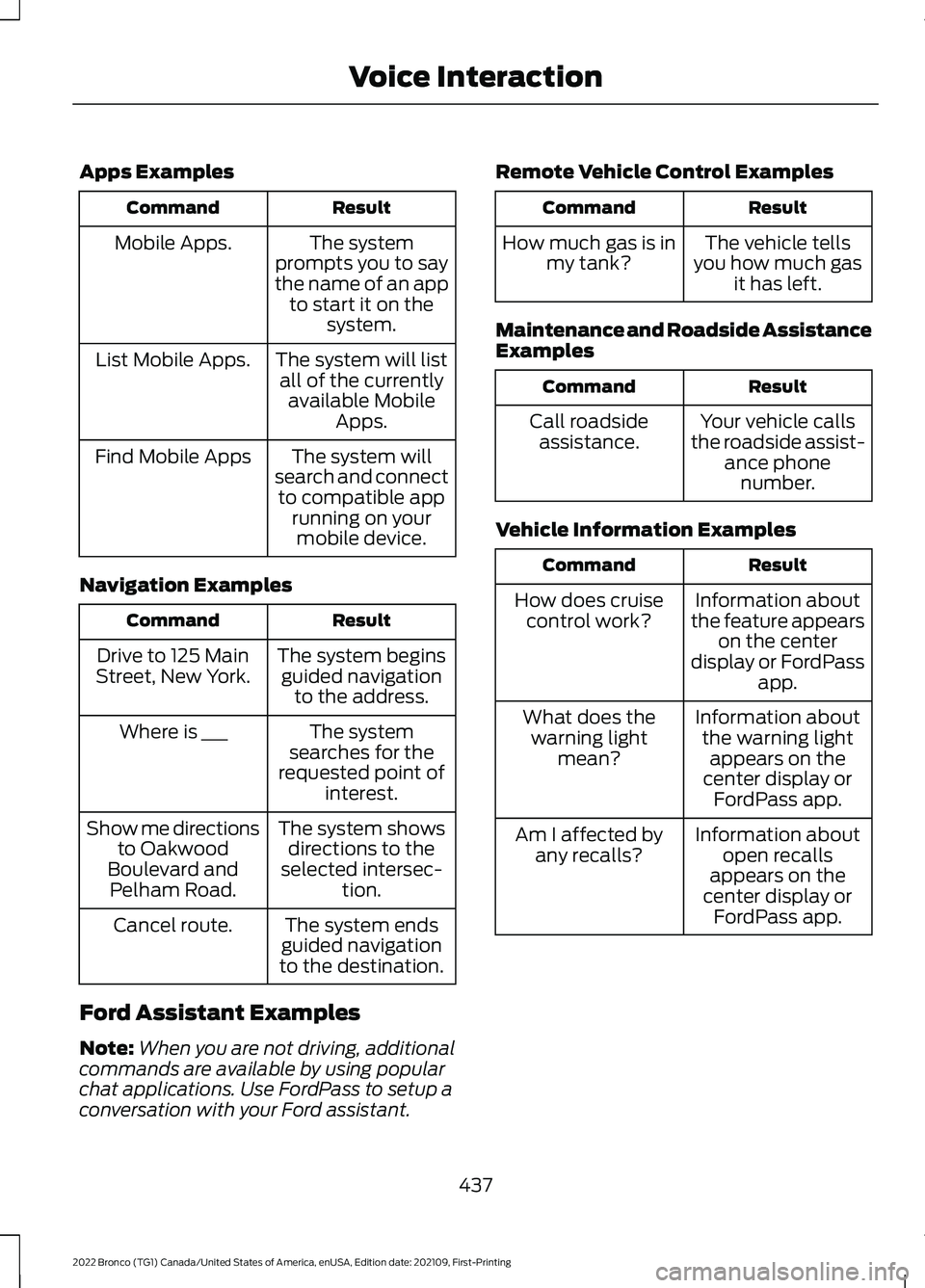
Apps Examples
ResultCommand
The systemprompts you to saythe name of an appto start it on thesystem.
Mobile Apps.
The system will listall of the currentlyavailable MobileApps.
List Mobile Apps.
The system willsearch and connectto compatible apprunning on yourmobile device.
Find Mobile Apps
Navigation Examples
ResultCommand
The system beginsguided navigationto the address.
Drive to 125 MainStreet, New York.
The systemsearches for therequested point ofinterest.
Where is ___
The system showsdirections to theselected intersec-tion.
Show me directionsto OakwoodBoulevard andPelham Road.
The system endsguided navigationto the destination.
Cancel route.
Ford Assistant Examples
Note:When you are not driving, additionalcommands are available by using popularchat applications. Use FordPass to setup aconversation with your Ford assistant.
Remote Vehicle Control Examples
ResultCommand
The vehicle tellsyou how much gasit has left.
How much gas is inmy tank?
Maintenance and Roadside AssistanceExamples
ResultCommand
Your vehicle callsthe roadside assist-ance phonenumber.
Call roadsideassistance.
Vehicle Information Examples
ResultCommand
Information aboutthe feature appearson the centerdisplay or FordPassapp.
How does cruisecontrol work?
Information aboutthe warning lightappears on thecenter display orFordPass app.
What does thewarning lightmean?
Information aboutopen recallsappears on thecenter display orFordPass app.
Am I affected byany recalls?
437
2022 Bronco (TG1) Canada/United States of America, enUSA, Edition date: 202109, First-PrintingVoice Interaction
Page 541 of 562
1
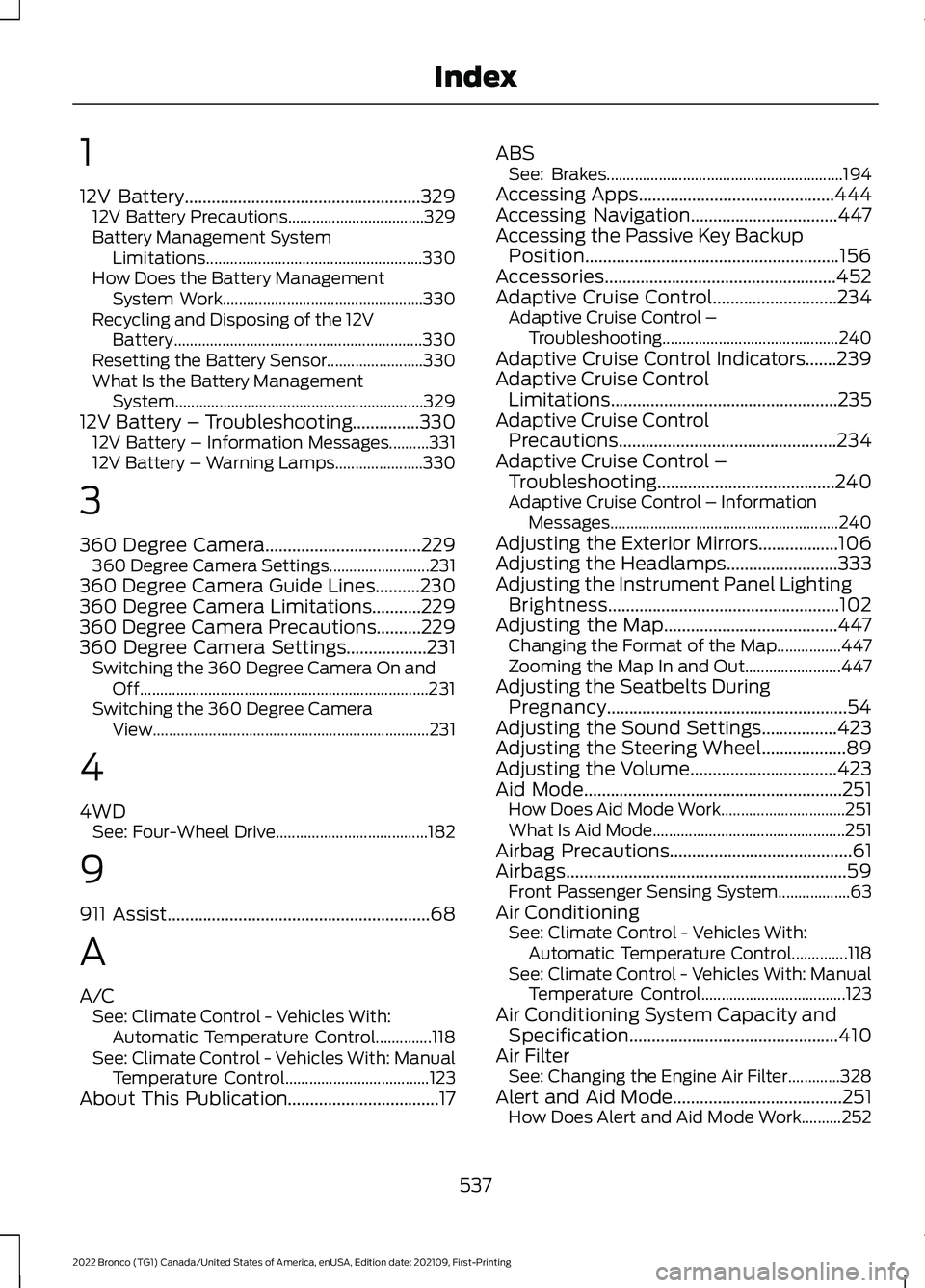
12V Battery.....................................................32912V Battery Precautions..................................329Battery Management SystemLimitations......................................................330How Does the Battery ManagementSystem Work..................................................330Recycling and Disposing of the 12VBattery..............................................................330Resetting the Battery Sensor........................330What Is the Battery ManagementSystem..............................................................32912V Battery – Troubleshooting...............33012V Battery – Information Messages..........33112V Battery – Warning Lamps......................330
3
360 Degree Camera...................................229360 Degree Camera Settings.........................231360 Degree Camera Guide Lines..........230360 Degree Camera Limitations...........229360 Degree Camera Precautions..........229360 Degree Camera Settings..................231Switching the 360 Degree Camera On andOff........................................................................231Switching the 360 Degree CameraView.....................................................................231
4
4WDSee: Four-Wheel Drive......................................182
9
911 Assist...........................................................68
A
A/CSee: Climate Control - Vehicles With:Automatic Temperature Control..............118See: Climate Control - Vehicles With: ManualTemperature Control....................................123About This Publication..................................17
ABSSee: Brakes...........................................................194Accessing Apps............................................444Accessing Navigation.................................447Accessing the Passive Key BackupPosition.........................................................156Accessories....................................................452Adaptive Cruise Control............................234Adaptive Cruise Control –Troubleshooting............................................240Adaptive Cruise Control Indicators.......239Adaptive Cruise ControlLimitations...................................................235Adaptive Cruise ControlPrecautions.................................................234Adaptive Cruise Control –Troubleshooting........................................240Adaptive Cruise Control – InformationMessages.........................................................240Adjusting the Exterior Mirrors..................106Adjusting the Headlamps.........................333Adjusting the Instrument Panel LightingBrightness....................................................102Adjusting the Map.......................................447Changing the Format of the Map................447Zooming the Map In and Out........................447Adjusting the Seatbelts DuringPregnancy......................................................54Adjusting the Sound Settings.................423Adjusting the Steering Wheel...................89Adjusting the Volume.................................423Aid Mode..........................................................251How Does Aid Mode Work...............................251What Is Aid Mode................................................251Airbag Precautions.........................................61Airbags...............................................................59Front Passenger Sensing System..................63Air ConditioningSee: Climate Control - Vehicles With:Automatic Temperature Control..............118See: Climate Control - Vehicles With: ManualTemperature Control....................................123Air Conditioning System Capacity andSpecification...............................................410Air FilterSee: Changing the Engine Air Filter.............328Alert and Aid Mode......................................251How Does Alert and Aid Mode Work..........252
537
2022 Bronco (TG1) Canada/United States of America, enUSA, Edition date: 202109, First-PrintingIndex
Page 545 of 562
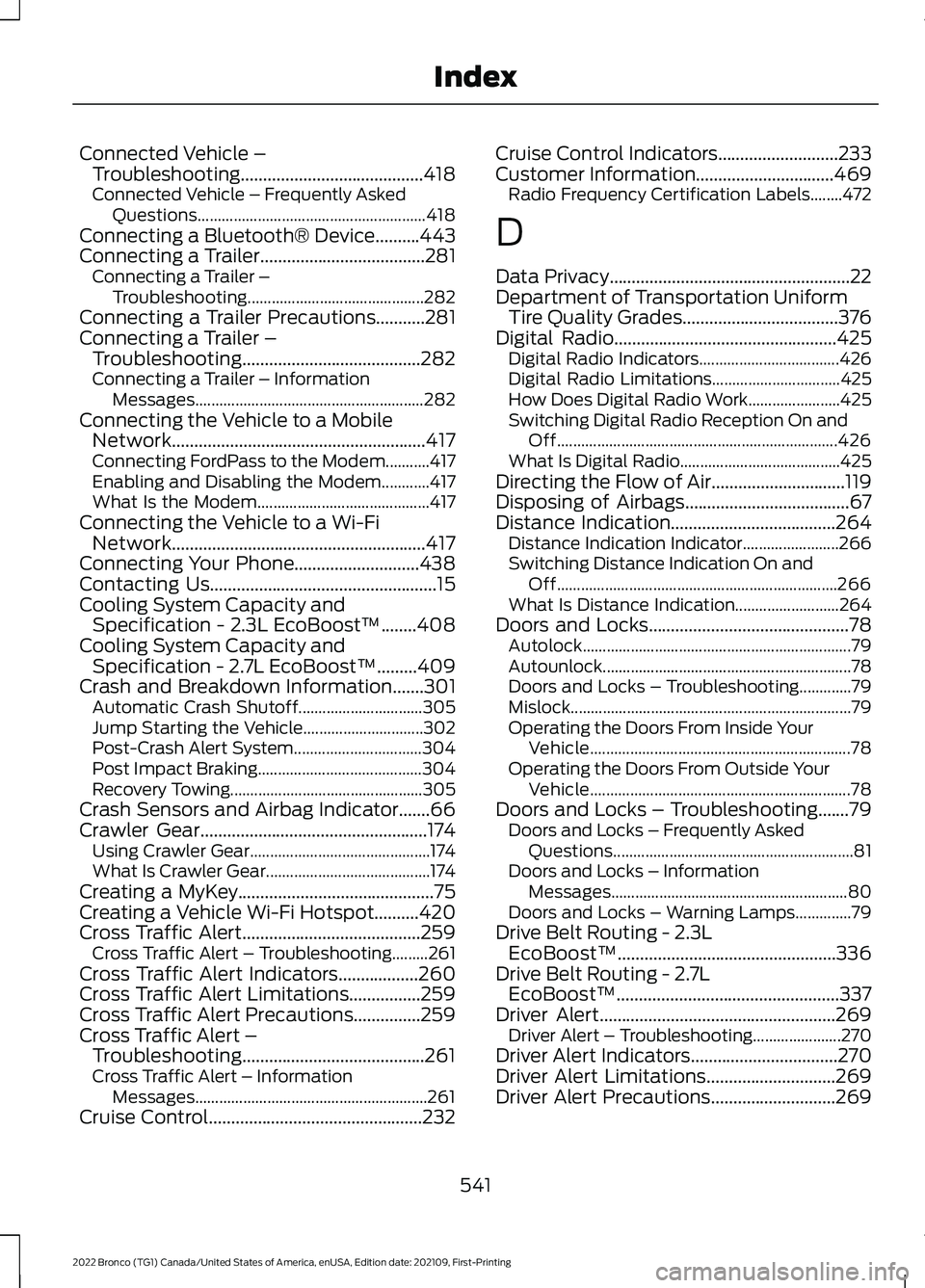
Connected Vehicle –Troubleshooting.........................................418Connected Vehicle – Frequently AskedQuestions.........................................................418Connecting a Bluetooth® Device..........443Connecting a Trailer.....................................281Connecting a Trailer –Troubleshooting............................................282Connecting a Trailer Precautions...........281Connecting a Trailer –Troubleshooting........................................282Connecting a Trailer – InformationMessages.........................................................282Connecting the Vehicle to a MobileNetwork.........................................................417Connecting FordPass to the Modem...........417Enabling and Disabling the Modem............417What Is the Modem...........................................417Connecting the Vehicle to a Wi-FiNetwork.........................................................417Connecting Your Phone............................438Contacting Us...................................................15Cooling System Capacity andSpecification - 2.3L EcoBoost™........408Cooling System Capacity andSpecification - 2.7L EcoBoost™.........409Crash and Breakdown Information.......301Automatic Crash Shutoff...............................305Jump Starting the Vehicle..............................302Post-Crash Alert System................................304Post Impact Braking.........................................304Recovery Towing................................................305Crash Sensors and Airbag Indicator.......66Crawler Gear...................................................174Using Crawler Gear.............................................174What Is Crawler Gear.........................................174Creating a MyKey............................................75Creating a Vehicle Wi-Fi Hotspot..........420Cross Traffic Alert........................................259Cross Traffic Alert – Troubleshooting.........261Cross Traffic Alert Indicators..................260Cross Traffic Alert Limitations................259Cross Traffic Alert Precautions...............259Cross Traffic Alert –Troubleshooting.........................................261Cross Traffic Alert – InformationMessages..........................................................261Cruise Control................................................232
Cruise Control Indicators...........................233Customer Information...............................469Radio Frequency Certification Labels........472
D
Data Privacy......................................................22Department of Transportation UniformTire Quality Grades...................................376Digital Radio..................................................425Digital Radio Indicators...................................426Digital Radio Limitations................................425How Does Digital Radio Work.......................425Switching Digital Radio Reception On andOff......................................................................426What Is Digital Radio........................................425Directing the Flow of Air..............................119Disposing of Airbags.....................................67Distance Indication.....................................264Distance Indication Indicator........................266Switching Distance Indication On andOff......................................................................266What Is Distance Indication..........................264Doors and Locks.............................................78Autolock...................................................................79Autounlock..............................................................78Doors and Locks – Troubleshooting.............79Mislock......................................................................79Operating the Doors From Inside YourVehicle.................................................................78Operating the Doors From Outside YourVehicle.................................................................78Doors and Locks – Troubleshooting.......79Doors and Locks – Frequently AskedQuestions............................................................81Doors and Locks – InformationMessages...........................................................80Doors and Locks – Warning Lamps..............79Drive Belt Routing - 2.3LEcoBoost™.................................................336Drive Belt Routing - 2.7LEcoBoost™..................................................337Driver Alert.....................................................269Driver Alert – Troubleshooting......................270Driver Alert Indicators.................................270Driver Alert Limitations.............................269Driver Alert Precautions............................269
541
2022 Bronco (TG1) Canada/United States of America, enUSA, Edition date: 202109, First-PrintingIndex
Page 548 of 562
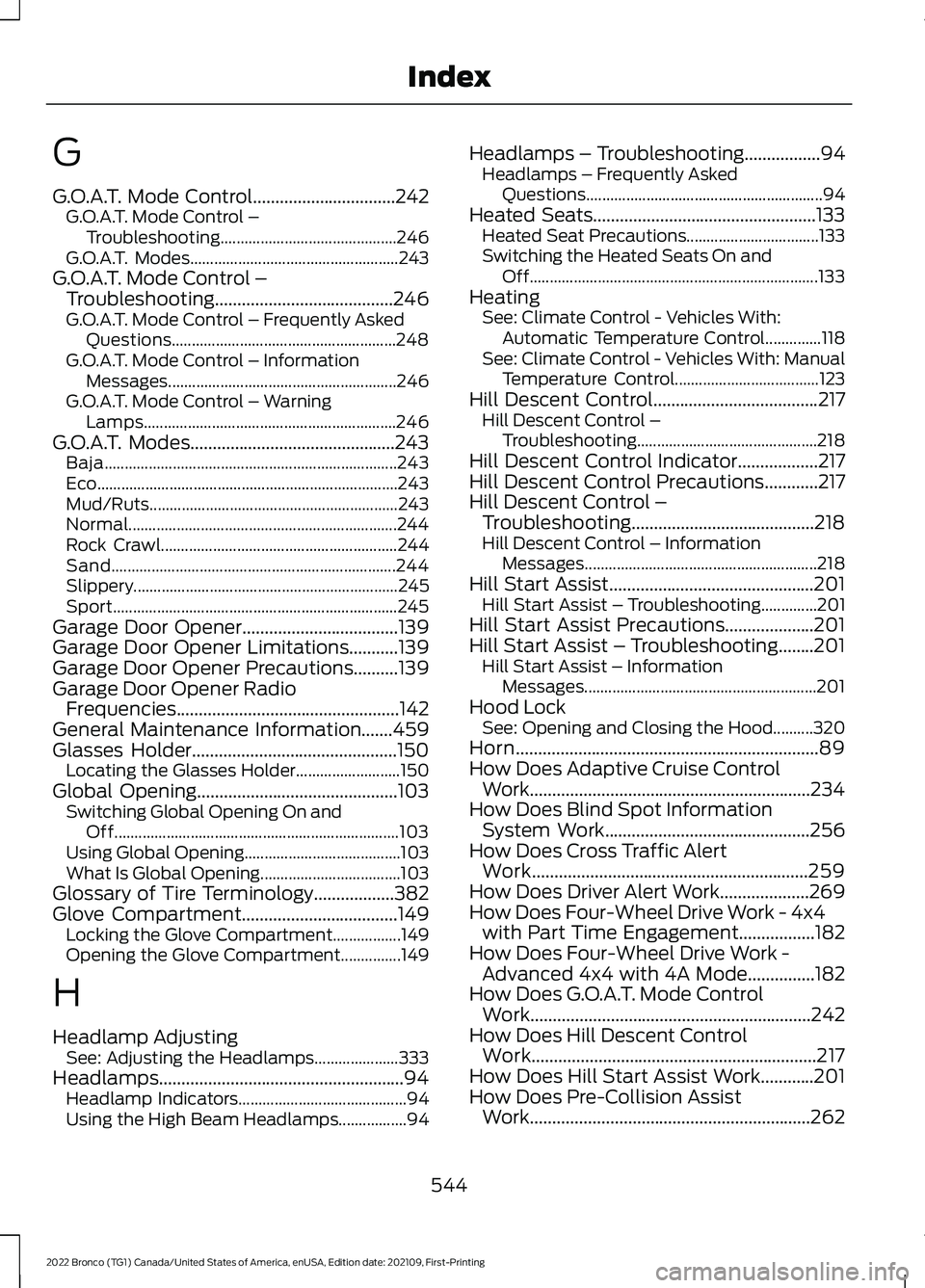
G
G.O.A.T. Mode Control................................242G.O.A.T. Mode Control –Troubleshooting............................................246G.O.A.T. Modes....................................................243G.O.A.T. Mode Control –Troubleshooting........................................246G.O.A.T. Mode Control – Frequently AskedQuestions........................................................248G.O.A.T. Mode Control – InformationMessages.........................................................246G.O.A.T. Mode Control – WarningLamps...............................................................246G.O.A.T. Modes..............................................243Baja.........................................................................243Eco...........................................................................243Mud/Ruts..............................................................243Normal...................................................................244Rock Crawl...........................................................244Sand.......................................................................244Slippery..................................................................245Sport.......................................................................245Garage Door Opener...................................139Garage Door Opener Limitations...........139Garage Door Opener Precautions..........139Garage Door Opener RadioFrequencies..................................................142General Maintenance Information.......459Glasses Holder..............................................150Locating the Glasses Holder..........................150Global Opening.............................................103Switching Global Opening On andOff.......................................................................103Using Global Opening.......................................103What Is Global Opening...................................103Glossary of Tire Terminology..................382Glove Compartment...................................149Locking the Glove Compartment.................149Opening the Glove Compartment...............149
H
Headlamp AdjustingSee: Adjusting the Headlamps.....................333Headlamps.......................................................94Headlamp Indicators..........................................94Using the High Beam Headlamps.................94
Headlamps – Troubleshooting.................94Headlamps – Frequently AskedQuestions...........................................................94Heated Seats..................................................133Heated Seat Precautions.................................133Switching the Heated Seats On andOff........................................................................133HeatingSee: Climate Control - Vehicles With:Automatic Temperature Control..............118See: Climate Control - Vehicles With: ManualTemperature Control....................................123Hill Descent Control.....................................217Hill Descent Control –Troubleshooting.............................................218Hill Descent Control Indicator..................217Hill Descent Control Precautions............217Hill Descent Control –Troubleshooting.........................................218Hill Descent Control – InformationMessages..........................................................218Hill Start Assist..............................................201Hill Start Assist – Troubleshooting..............201Hill Start Assist Precautions....................201Hill Start Assist – Troubleshooting........201Hill Start Assist – InformationMessages..........................................................201Hood LockSee: Opening and Closing the Hood..........320Horn....................................................................89How Does Adaptive Cruise ControlWork...............................................................234How Does Blind Spot InformationSystem Work..............................................256How Does Cross Traffic AlertWork..............................................................259How Does Driver Alert Work....................269How Does Four-Wheel Drive Work - 4x4with Part Time Engagement.................182How Does Four-Wheel Drive Work -Advanced 4x4 with 4A Mode...............182How Does G.O.A.T. Mode ControlWork...............................................................242How Does Hill Descent ControlWork................................................................217How Does Hill Start Assist Work............201How Does Pre-Collision AssistWork...............................................................262
544
2022 Bronco (TG1) Canada/United States of America, enUSA, Edition date: 202109, First-PrintingIndex