warning FORD BRONCO 2022 Owner's Guide
[x] Cancel search | Manufacturer: FORD, Model Year: 2022, Model line: BRONCO, Model: FORD BRONCO 2022Pages: 562, PDF Size: 73 MB
Page 74 of 562
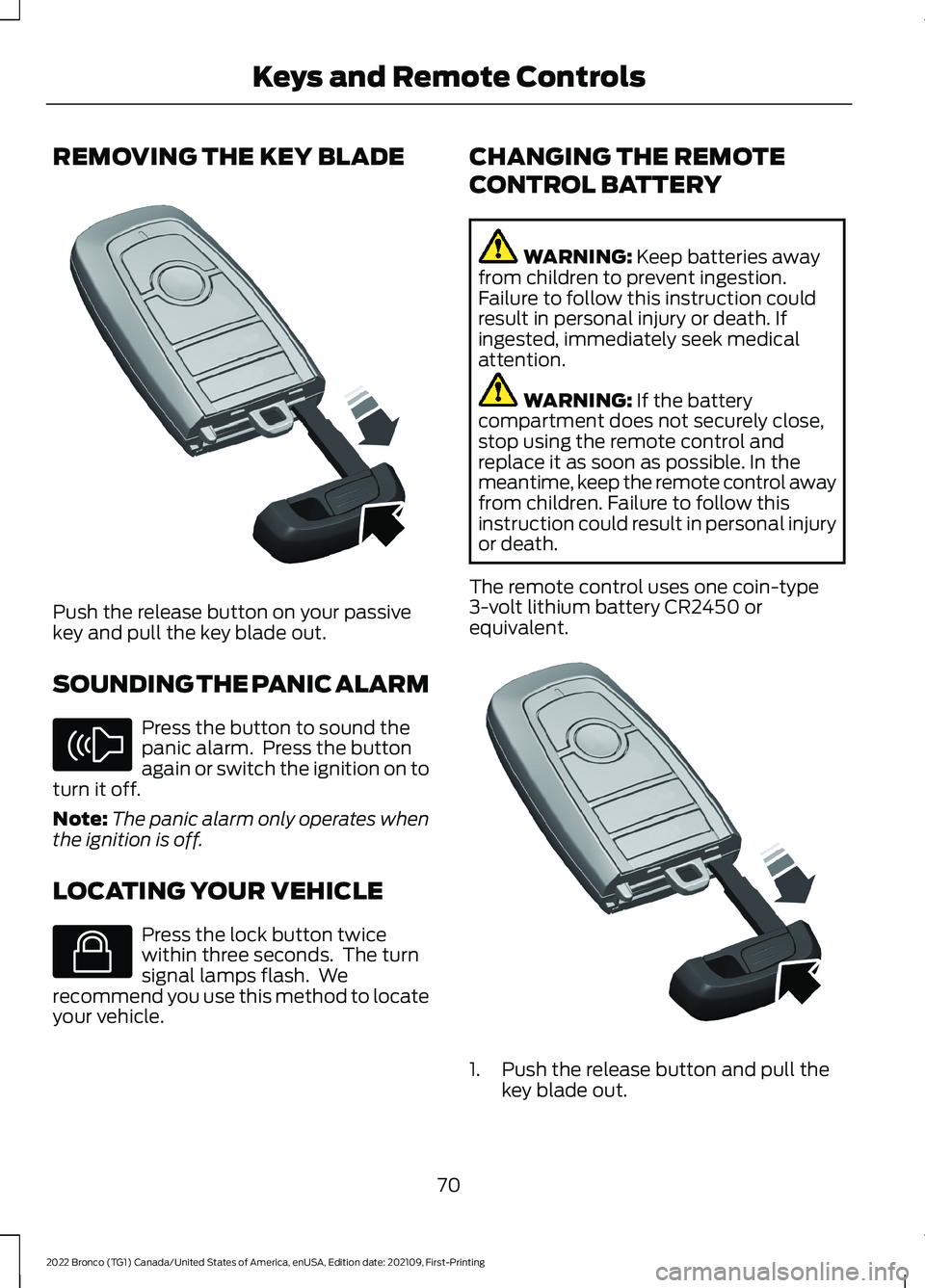
REMOVING THE KEY BLADE
Push the release button on your passivekey and pull the key blade out.
SOUNDING THE PANIC ALARM
Press the button to sound thepanic alarm. Press the buttonagain or switch the ignition on toturn it off.
Note:The panic alarm only operates whenthe ignition is off.
LOCATING YOUR VEHICLE
Press the lock button twicewithin three seconds. The turnsignal lamps flash. Werecommend you use this method to locateyour vehicle.
CHANGING THE REMOTE
CONTROL BATTERY
WARNING: Keep batteries awayfrom children to prevent ingestion.Failure to follow this instruction couldresult in personal injury or death. Ifingested, immediately seek medicalattention.
WARNING: If the batterycompartment does not securely close,stop using the remote control andreplace it as soon as possible. In themeantime, keep the remote control awayfrom children. Failure to follow thisinstruction could result in personal injuryor death.
The remote control uses one coin-type3-volt lithium battery CR2450 orequivalent.
1.Push the release button and pull thekey blade out.
70
2022 Bronco (TG1) Canada/United States of America, enUSA, Edition date: 202109, First-PrintingKeys and Remote ControlsE322866 E138624 E138623 E322866
Page 78 of 562
WHAT IS MYKEY
MyKey allows you to program keys withrestricted driving modes to promote gooddriving habits.
MYKEY SETTINGS
NON-CONFIGURABLE MYKEYSETTINGS
Seatbelt Reminder or Belt-Minder™
MyKey mutes the audio system until thefront seat passengers buckle the front seatbelts.
Note:If your vehicle includes an AM/FMradio or a very basic audio system, then theradio may not mute.
Satellite Radio (If Equipped)
Some Satellite radio channels haverestricted access to adult radio content.
Early Low Fuel
The low fuel level warning lamp turns onearlier.
Driving and Parking Aids
You cannot configure settings for parkingaids, blind spot information system, andcross traffic alert. These systems turn onwhen the vehicle turns on, and you cannotswitch them off with a MyKey.
You cannot configure settings forpre-collision assist and lane keeping. Thesesystems turn on when the vehicle turns on,but you can switch them off with a MyKey.
A new destination in the navigation systemcan only be set using voice commandswhen using a MyKey, and with your vehiclemoving.
Note:MyKey drivers may be able to switchthe lane departure warning feature off, butthis feature turns back on automaticallywith every new key cycle.
CONFIGURABLE MYKEYSETTINGS
You can configure the following settingsafter creating a MyKey. See Creating aMyKey (page 75).
Speed Limit
WARNING: Do not set MyKeymaximum speed limit to a limit that willprevent the driver from maintaining asafe speed considering posted speedlimits and prevailing road conditions. Thedriver is always responsible to drive inaccordance with local laws andprevailing conditions. Failure to do socould result in accident or injury.
You can set a speed limit for your vehicle.Warning messages appear in theinformation display and a tone sounds ifyour vehicle reaches the set speed. Youcannot override the set speed when usinga MyKey.
Speed Minder
You can set a speed reminder for yourvehicle. Warning messages appear in theinformation display and a tone sounds ifyour vehicle exceeds the set speed.
Audio System Volume Limit
The audio system maximum volumereduces. A message appears in theinformation display if you attempt toexceed the volume limit. Automaticvolume control turns off.
74
2022 Bronco (TG1) Canada/United States of America, enUSA, Edition date: 202109, First-PrintingMyKey™
Page 83 of 562
AUTOUNLOCK REQUIREMENTS
Autounlock unlocks all the doors when allof the following occur:
•The ignition is on, all the doors areclosed and your vehicle is moving at aspeed greater than 12 mph (20 km/h).
•Your vehicle comes to a stop.
•You open the driver door within 10minutes of switching the ignition off orto the accessory position.
SWITCHING AUTOUNLOCK ONAND OFF
1.Press Settings on the touchscreen.
2.Press Vehicle Settings.
3.Press Locks.
4.Switch Autounlock on or off.
AUTOLOCK
WHAT IS AUTOLOCK
Autolock is a locking feature that locksyour vehicle doors when you start driving.
AUTOLOCK REQUIREMENTS
Autolock locks all the doors when all of thefollowing occur:
•All doors are closed.
•The ignition is on.
•Your vehicle reaches a speed greaterthan 12 mph (20 km/h).
MISLOCK
WHAT IS MISLOCK
Mislock is a locking feature that warns youif your vehicle has not locked.
MISLOCK LIMITATIONS
When you press the lock button once, theturn signals do not flash if:
•Any door or the tailgate is open.
•The hood is open.
If you switch mislock off, the horn does notsound if you press the lock button on theremote control when a door is open.
SWITCHING MISLOCK ON ANDOFF
1.Press Settings on the touchscreen.
2.Press Vehicle Settings.
3.Press Locks.
4.Switch Mislock Chirp on or off.
DOORS AND LOCKS –
TROUBLESHOOTING
DOORS AND LOCKS – WARNINGLAMPS
Door Ajar Warning Lamp
It illuminates when you switchthe ignition on and remains on ifany door or the hood is open.
79
2022 Bronco (TG1) Canada/United States of America, enUSA, Edition date: 202109, First-PrintingDoors and LocksE249859
Page 90 of 562
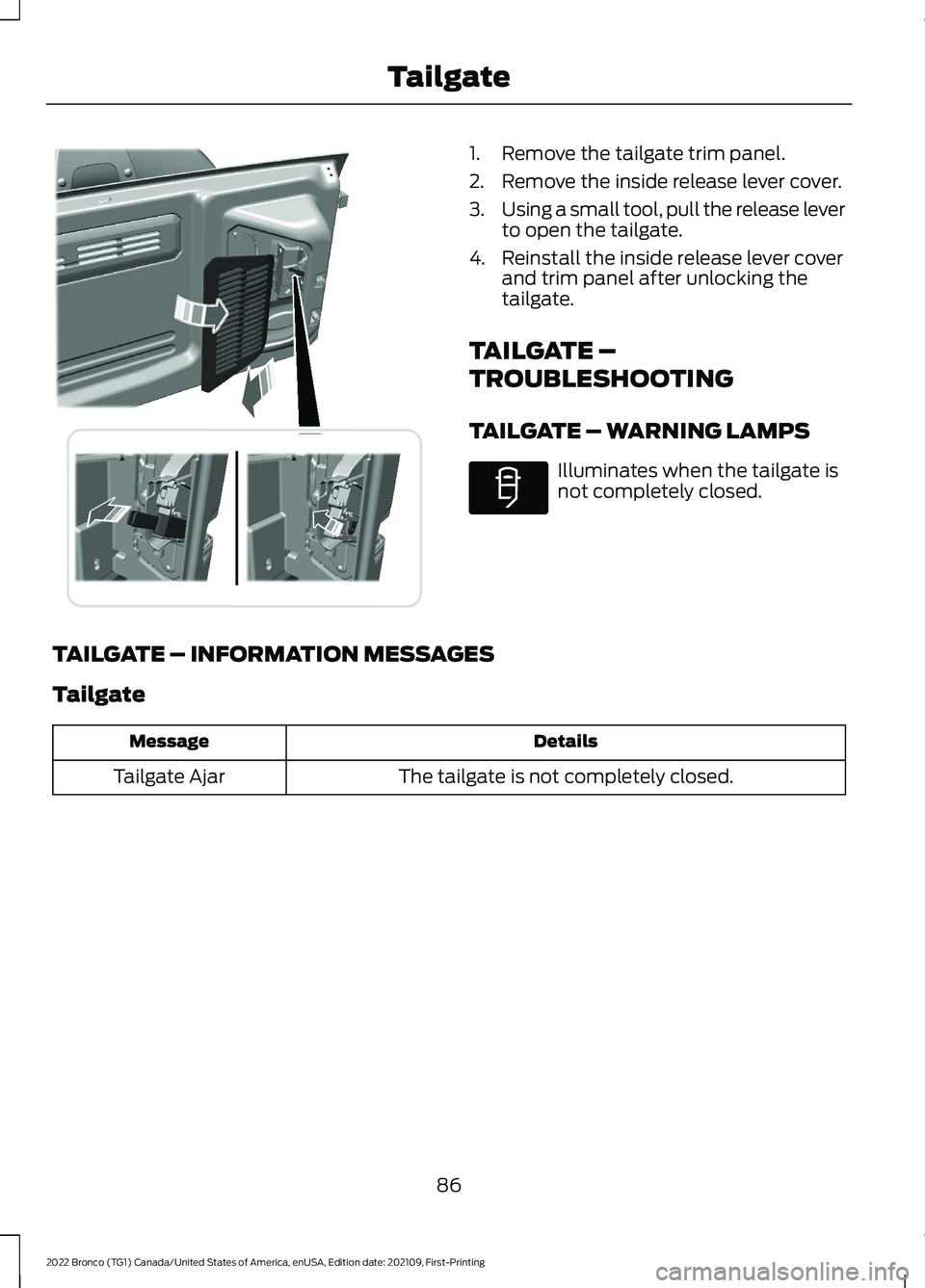
1.Remove the tailgate trim panel.
2.Remove the inside release lever cover.
3.Using a small tool, pull the release leverto open the tailgate.
4.Reinstall the inside release lever coverand trim panel after unlocking thetailgate.
TAILGATE –
TROUBLESHOOTING
TAILGATE – WARNING LAMPS
Illuminates when the tailgate isnot completely closed.
TAILGATE – INFORMATION MESSAGES
Tailgate
DetailsMessage
The tailgate is not completely closed.Tailgate Ajar
86
2022 Bronco (TG1) Canada/United States of America, enUSA, Edition date: 202109, First-PrintingTailgateE342902 E340897
Page 93 of 562
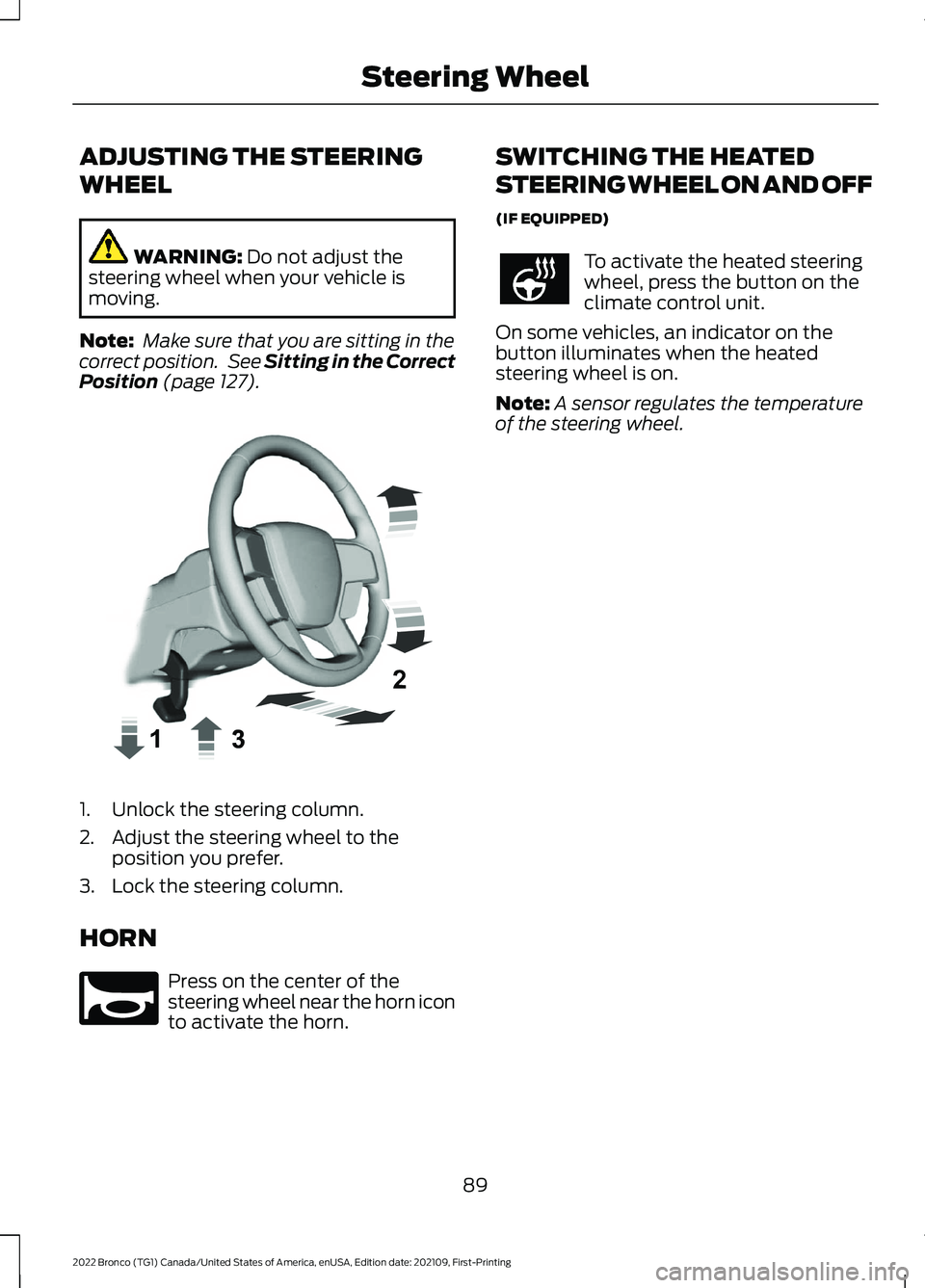
ADJUSTING THE STEERING
WHEEL
WARNING: Do not adjust thesteering wheel when your vehicle ismoving.
Note: Make sure that you are sitting in thecorrect position. See Sitting in the CorrectPosition (page 127).
1.Unlock the steering column.
2.Adjust the steering wheel to theposition you prefer.
3.Lock the steering column.
HORN
Press on the center of thesteering wheel near the horn iconto activate the horn.
SWITCHING THE HEATED
STEERING WHEEL ON AND OFF
(IF EQUIPPED)
To activate the heated steeringwheel, press the button on theclimate control unit.
On some vehicles, an indicator on thebutton illuminates when the heatedsteering wheel is on.
Note:A sensor regulates the temperatureof the steering wheel.
89
2022 Bronco (TG1) Canada/United States of America, enUSA, Edition date: 202109, First-PrintingSteering WheelE359744 E270945
Page 96 of 562
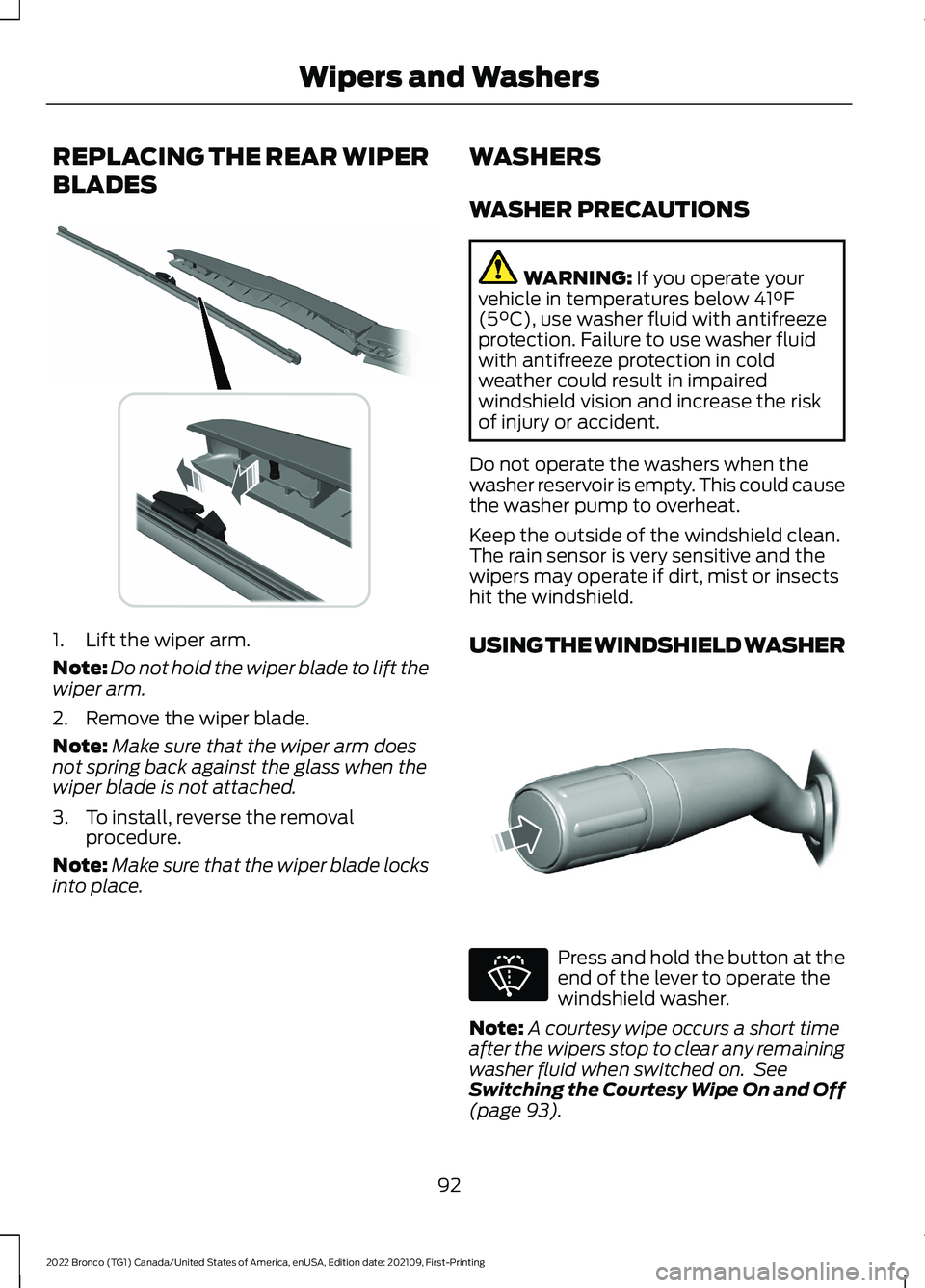
REPLACING THE REAR WIPER
BLADES
1.Lift the wiper arm.
Note:Do not hold the wiper blade to lift thewiper arm.
2.Remove the wiper blade.
Note:Make sure that the wiper arm doesnot spring back against the glass when thewiper blade is not attached.
3.To install, reverse the removalprocedure.
Note:Make sure that the wiper blade locksinto place.
WASHERS
WASHER PRECAUTIONS
WARNING: If you operate yourvehicle in temperatures below 41°F(5°C), use washer fluid with antifreezeprotection. Failure to use washer fluidwith antifreeze protection in coldweather could result in impairedwindshield vision and increase the riskof injury or accident.
Do not operate the washers when thewasher reservoir is empty. This could causethe washer pump to overheat.
Keep the outside of the windshield clean.The rain sensor is very sensitive and thewipers may operate if dirt, mist or insectshit the windshield.
USING THE WINDSHIELD WASHER
Press and hold the button at theend of the lever to operate thewindshield washer.
Note:A courtesy wipe occurs a short timeafter the wipers stop to clear any remainingwasher fluid when switched on. SeeSwitching the Courtesy Wipe On and Off(page 93).
92
2022 Bronco (TG1) Canada/United States of America, enUSA, Edition date: 202109, First-PrintingWipers and Washers E271380 E311291 E270967
Page 97 of 562
SWITCHING THE COURTESY WIPEON AND OFF
1.Press Settings on the touchscreen.
2.Press Vehicle Settings.
3.Press Wipers.
4.Switch Courtesy Wipe on or off.
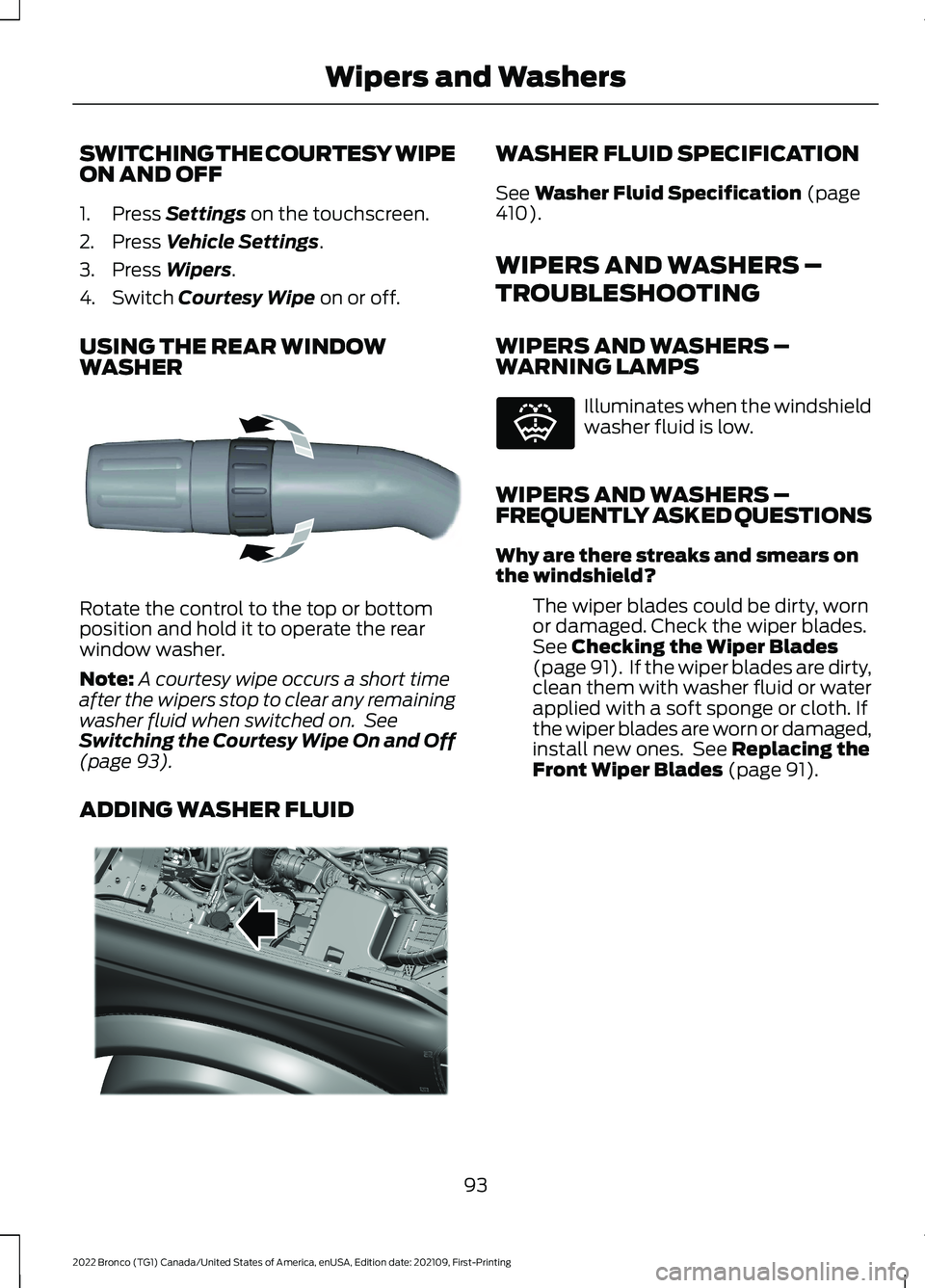
USING THE REAR WINDOWWASHER
Rotate the control to the top or bottomposition and hold it to operate the rearwindow washer.
Note:A courtesy wipe occurs a short timeafter the wipers stop to clear any remainingwasher fluid when switched on. SeeSwitching the Courtesy Wipe On and Off(page 93).
ADDING WASHER FLUID
WASHER FLUID SPECIFICATION
See Washer Fluid Specification (page410).
WIPERS AND WASHERS –
TROUBLESHOOTING
WIPERS AND WASHERS –WARNING LAMPS
Illuminates when the windshieldwasher fluid is low.
WIPERS AND WASHERS –FREQUENTLY ASKED QUESTIONS
Why are there streaks and smears onthe windshield?
The wiper blades could be dirty, wornor damaged. Check the wiper blades.See Checking the Wiper Blades(page 91). If the wiper blades are dirty,clean them with washer fluid or waterapplied with a soft sponge or cloth. Ifthe wiper blades are worn or damaged,install new ones. See Replacing theFront Wiper Blades (page 91).
93
2022 Bronco (TG1) Canada/United States of America, enUSA, Edition date: 202109, First-PrintingWipers and WashersE340280 E340983 E132353
Page 99 of 562
How long may it take for theacceptable condensation to becleared?
Clearing time may take as long as 48hours under dry weather conditions.
How much condensation isunacceptable?
A water puddle inside the lamp.Streaks, drip marks or large dropletspresent on the interior of the lens.
What should I do if unacceptablecondensation is present?
Have your vehicle checked as soon aspossible.
Why do my headlamps turn off when Ihave them switched on when I switchmy vehicle off?
The battery saver turns the headlampsoff after a short period of time afteryou switch your vehicle off.
AUTOLAMPS
WHAT ARE AUTOLAMPS
WARNING: The system does notrelieve you of your responsibility to drivewith due care and attention. You mayneed to override the system if it does notturn the headlamps on in low visibilityconditions, for example daytime fog.
Autolamps turn the headlamps on in lowlight situations or when the windshieldwipers operate.
AUTOLAMP SETTINGS
1.Press Settings on the touchscreen.
2.Press Vehicle Settings.
3.Press Lighting.
4.Press Autolamp Delay.
5.Press a setting.
EXTERIOR LAMPS
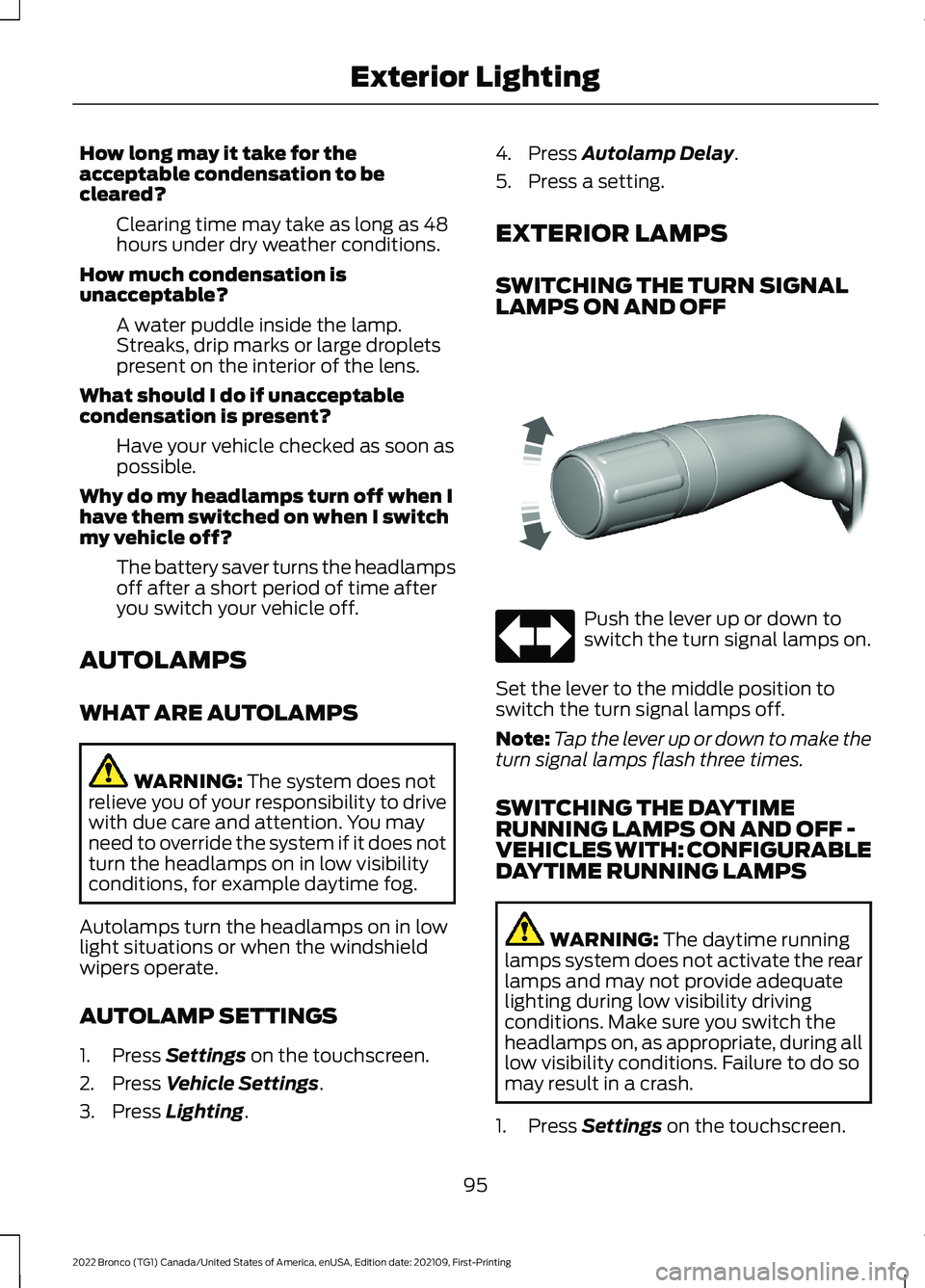
SWITCHING THE TURN SIGNALLAMPS ON AND OFF
Push the lever up or down toswitch the turn signal lamps on.
Set the lever to the middle position toswitch the turn signal lamps off.
Note:Tap the lever up or down to make theturn signal lamps flash three times.
SWITCHING THE DAYTIMERUNNING LAMPS ON AND OFF -VEHICLES WITH: CONFIGURABLEDAYTIME RUNNING LAMPS
WARNING: The daytime runninglamps system does not activate the rearlamps and may not provide adequatelighting during low visibility drivingconditions. Make sure you switch theheadlamps on, as appropriate, during alllow visibility conditions. Failure to do somay result in a crash.
1.Press Settings on the touchscreen.
95
2022 Bronco (TG1) Canada/United States of America, enUSA, Edition date: 202109, First-PrintingExterior LightingE311431
Page 100 of 562
2.Press Vehicle Settings.
3.Press Lighting.
4.Switch Daytime Running Lights on oroff.
The daytime running lamps turn on whenall of the following occur:
•You switch the system on.
•You switch your vehicle on.
•The transmission is not in park (P) forvehicles with automatic transmissionsor you release the parking brake forvehicles with manual transmissions.
•The lighting control is in the autolampsposition.
•The headlamps are off.
Note:Other lighting control positions donot turn on the daytime running lamps.
SWITCHING THE DAYTIMERUNNING LAMPS ON AND OFF -VEHICLES WITH: DAYTIMERUNNING LAMPS (DRL)
WARNING: The daytime runninglamps system does not activate the rearlamps and may not provide adequatelighting during low visibility drivingconditions. Make sure you switch theheadlamps on, as appropriate, during alllow visibility conditions. Failure to do somay result in a crash.
Daytime running lamps are always onunless you switch on the headlamps oryour vehicle is in park (P).
SWITCHING THE FRONT FOGLAMPS ON AND OFF (If Equipped)
The front fog lamp button is on the lightingcontrol.
Press the button to switch thefront fog lamps on or off.
Note:Only switch the front fog lamps onduring reduced visibility.
Note:The brightness of the daytime runninglamps may decrease when the front foglamps are switched on.
Note:When the lighting control is in theautolamps position, you cannot switch thefog lamps on unless the headlamps are on.
SWITCHING THE SPOT LAMPS ONAND OFF (If Equipped)
The spot lamp buttons are near the lightingcontrol.
Press the button to switch on theleft-hand spot lamp.
Press the button to switch on theright-hand spot lamp.
Move the position of the exterior mirrorsto adjust the aim.
Note:The lighting control must be set tothe parking lamp position.
Note:The spot lamps illuminate the areain front of and to the side of your vehicle.
EXTERIOR LAMP INDICATORS
Front Fog Lamp
It illuminates when you switchthe front fog lamps on.
Turn Signal Lamp
It flashes when you switch theturn signal lamps on.
Note:An increase in the rate of flashingwarns of a failed turn signal lamp.
96
2022 Bronco (TG1) Canada/United States of America, enUSA, Edition date: 202109, First-PrintingExterior Lighting E340436 E340437
Page 101 of 562
EXTERIOR LAMP AUDIBLEWARNING
Exterior Lamps On
Sounds when you open the driver door andthe exterior lamps are on.
EXTERIOR ZONE LIGHTING (IF
EQUIPPED)
WHAT IS EXTERIOR ZONELIGHTING
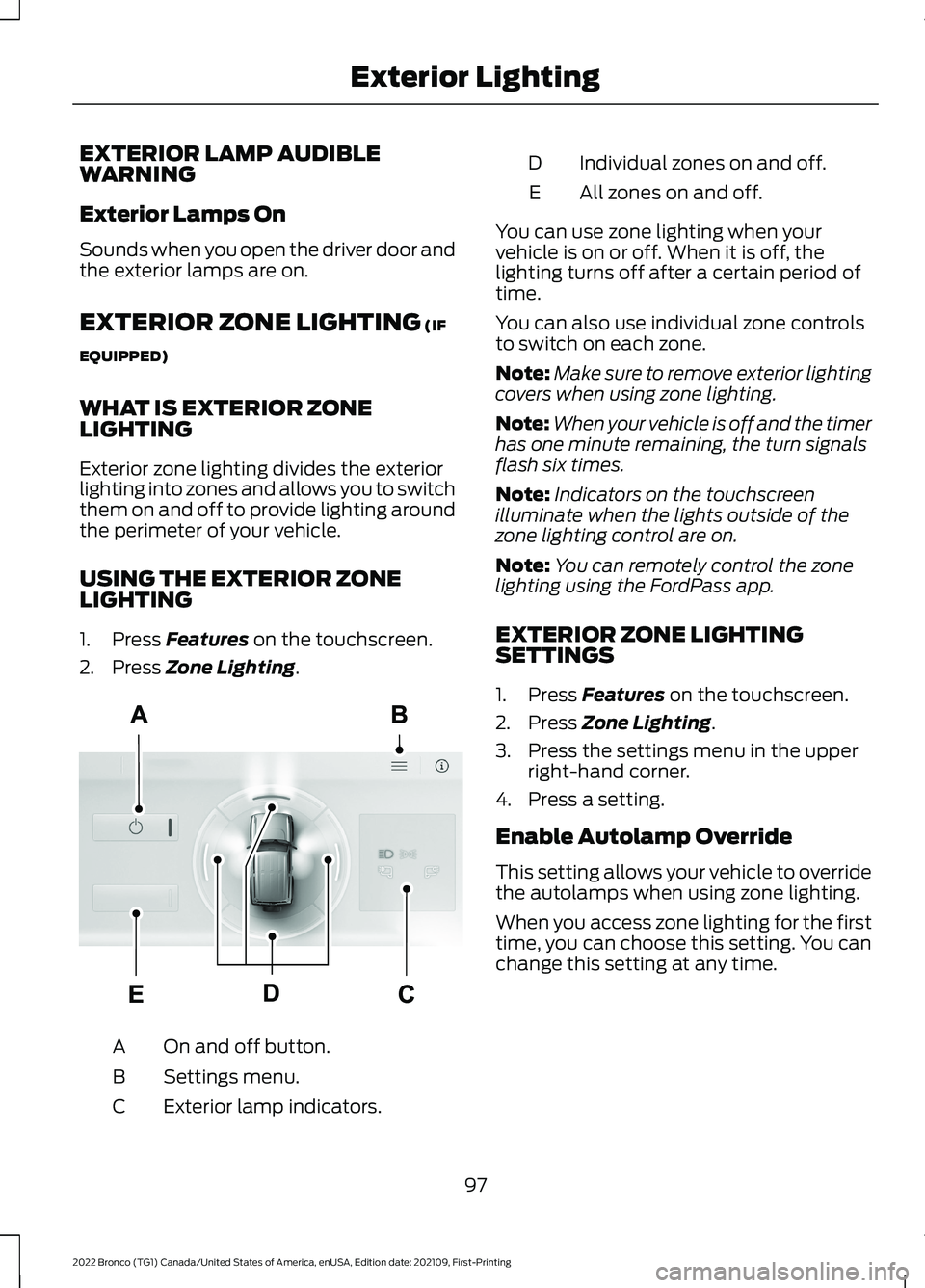
Exterior zone lighting divides the exteriorlighting into zones and allows you to switchthem on and off to provide lighting aroundthe perimeter of your vehicle.
USING THE EXTERIOR ZONELIGHTING
1.Press Features on the touchscreen.
2.Press Zone Lighting.
On and off button.A
Settings menu.B
Exterior lamp indicators.C
Individual zones on and off.D
All zones on and off.E
You can use zone lighting when yourvehicle is on or off. When it is off, thelighting turns off after a certain period oftime.
You can also use individual zone controlsto switch on each zone.
Note:Make sure to remove exterior lightingcovers when using zone lighting.
Note:When your vehicle is off and the timerhas one minute remaining, the turn signalsflash six times.
Note:Indicators on the touchscreenilluminate when the lights outside of thezone lighting control are on.
Note:You can remotely control the zonelighting using the FordPass app.
EXTERIOR ZONE LIGHTINGSETTINGS
1.Press Features on the touchscreen.
2.Press Zone Lighting.
3.Press the settings menu in the upperright-hand corner.
4.Press a setting.
Enable Autolamp Override
This setting allows your vehicle to overridethe autolamps when using zone lighting.
When you access zone lighting for the firsttime, you can choose this setting. You canchange this setting at any time.
97
2022 Bronco (TG1) Canada/United States of America, enUSA, Edition date: 202109, First-PrintingExterior LightingE343474