roof rack FORD BRONCO 2022 Owners Manual
[x] Cancel search | Manufacturer: FORD, Model Year: 2022, Model line: BRONCO, Model: FORD BRONCO 2022Pages: 562, PDF Size: 73 MB
Page 14 of 562
What Is the Maximum Loaded TrailerWeight.........................................................272
What Is the Gross Combined WeightRating..........................................................272
Calculating Payload...................................274
Calculating the Load Limit......................274
Roof Rack.......................................................276
Fender Anchor Points................................279
Rear Cargo Area
Rear Cargo Area Anchor Points............280
Connecting a Trailer
Connecting a Trailer Precautions..........281
Connecting a Trailer....................................281
Connecting a Trailer – Troubleshooting........................................................................282
Towing a Trailer
Towing a Trailer Precautions..................283
Trailer Brake Precautions.........................283
Towing a Trailer Limitations...................284
Loading Your Trailer...................................284
Trailer Towing Hints - ManualTransmission............................................284
Trailer Towing Hints - AutomaticTransmission............................................285
Launching or Retrieving a Boat orPersonal Watercraft..............................286
Towing Weights and Dimensions.........287
Towing a Trailer – Troubleshooting......288
Trailer Sway Control
How Does Trailer Sway Control Work........................................................................289
Trailer Sway Control Precautions.........289
Switching Trailer Sway Control On andOff................................................................289
Driving Hints
Off-Road Driving........................................290
Cold Weather Precautions......................298
Breaking-In...................................................298
Driving Economically................................299
Floor Mats.....................................................299
Crash and BreakdownInformation
Roadside Assistance..................................301
Switching the Hazard Flashers On andOff................................................................302
Jump Starting the Vehicle.......................302
Post-Crash Alert System.........................304
Post Impact Braking.................................304
Automatic Crash Shutoff........................305
Recovery Towing.........................................305
Transporting the Vehicle..........................307
Towing Your Vehicle
Towing Your Vehicle Precautions.........308
Recreationally Towing Your Vehicle -Manual Transmission...........................308
Recreationally Towing Your Vehicle -Automatic Transmission.....................309
Emergency Towing.......................................311
Towing Your Vehicle – Troubleshooting..........................................................................311
Fuses
Fuse Precautions.........................................312
Under Hood Fuse Box................................312
Body Control Module Fuse Box..............316
Identifying Fuse Types...............................319
Fuses – Troubleshooting..........................319
Maintenance
Maintenance Precautions.......................320
Opening and Closing the Hood.............320
Under Hood Overview - 2.3L EcoBoost™.........................................................................321
Under Hood Overview - 2.7L EcoBoost™........................................................................322
10
2022 Bronco (TG1) Canada/United States of America, enUSA, Edition date: 202109, First-PrintingTable of Contents
Page 208 of 562
HOW DOES STABILITY
CONTROL WORK
WARNING: Vehicle modificationsinvolving braking system, aftermarketroof racks, suspension, steering system,tire construction and wheel and tire sizemay change the handling characteristicsof your vehicle and may adversely affectthe performance of the electronicstability control system. In addition,installing any stereo speakers mayinterfere with and adversely affect theelectronic stability control system.Reducing the effectiveness of theelectronic stability control system couldlead to an increased risk of loss of vehiclecontrol, vehicle rollover, personal injuryand death.
WARNING: Remember that evenadvanced technology cannot defy thelaws of physics. It's always possible tolose control of a vehicle due toinappropriate driver input for theconditions. Aggressive driving on anyroad condition can cause you to losecontrol of your vehicle increasing the riskof personal injury or property damage.Activation of the electronic stabilitycontrol system is an indication that atleast some of the tires have exceededtheir ability to grip the road; this couldreduce the operator's ability to controlthe vehicle potentially resulting in a lossof vehicle control, vehicle rollover,personal injury and death.
WARNING: You are responsible forcontrolling your vehicle at all times. Thesystem is designed to be an aid and doesnot relieve you of your responsibility todrive with due care and attention. Failureto follow this instruction could result inthe loss of control of your vehicle,personal injury or death.
If a driving condition activates either thestability control or the traction controlsystem you may experience the followingconditions:
•The stability and traction control lightflashes.
•Your vehicle slows down.
•Reduced engine power.
The stability control system has severalfeatures built into it to help you maintaincontrol of your vehicle:
Electronic Stability Control
Electronic stability control enhances yourvehicle’s ability to prevent skids or lateralslides by applying brakes to one or moreof the wheels individually and, if necessary,reducing engine power.
Roll Stability Control
Roll stability control enhances yourvehicle’s ability to prevent rollovers bydetecting your vehicle’s roll motion andthe rate at which it changes by applyingthe brakes to one or more wheelsindividually.
Curve Control
Curve control enhances your vehicle’sability to follow the road when corneringseverely or avoiding objects in the roadway.Curve control operates by reducing enginepower and, if necessary, applying brakesto one or more of the wheels individually.
204
2022 Bronco (TG1) Canada/United States of America, enUSA, Edition date: 202109, First-PrintingStability Control
Page 275 of 562
LOAD CARRYING
PRECAUTIONS
Keep your loaded vehicle weightwithin its design rating capability,with or without a trailer. Properlyloading your vehicle providesmaximum return of vehicle designperformance. Before you load yourvehicle, become familiar with thefollowing terms for determiningyour vehicle’s weight rating, withor without a trailer, from thevehicle’s Tire and LoadingInformation label or SafetyCompliance Certification label.
WARNING: Theappropriate loading capacity ofyour vehicle can be limited eitherby volume capacity (how muchspace is available) or by payloadcapacity (how much weight thevehicle should carry). Once youhave reached the maximumpayload of your vehicle, do notadd more cargo, even if there isspace available. Overloading orimproperly loading your vehiclecan contribute to loss of vehiclecontrol and vehicle rollover.
WARNING: Exceeding theSafety Compliance Certificationlabel vehicle weight limits canadversely affect theperformance and handling ofyour vehicle, cause vehicledamage and can result in theloss of control of your vehicle,serious personal injury or death.
WARNING: Do not usereplacement tires with lowerload carrying capacities than theoriginal tires because they maylower your vehicle's GVWR andGAWR limitations. Replacementtires with a higher limit than theoriginal tires do not increase theGVWR and GAWR limitations.
WARNING: Do not exceedthe GVWR or the GAWRspecified on the certificationlabel.
WARNING: Exceeding anyvehicle weight rating canadversely affect theperformance and handling ofyour vehicle, cause vehicledamage and can result in theloss of control of your vehicle,serious personal injury or death.
WARNING: When loadingthe roof racks, we recommendyou evenly distribute the load,as well as maintain a low centerof gravity. Loaded vehicles, withhigher centers of gravity, may
271
2022 Bronco (TG1) Canada/United States of America, enUSA, Edition date: 202109, First-PrintingLoad Carrying
Page 280 of 562
The above calculations alsoassume that the loads arepositioned in your vehicle in amanner that does not overloadthe front or the rear gross axleweight rating specified for yourvehicle on the Safety ComplianceCertification label.
ROOF RACK (IF EQUIPPED)
ROOF RACK PRECAUTIONS
WARNING: Read and follow themanufacturer's instructions when youare fitting a roof rack.
WARNING: When loading the roofracks, we recommend you evenlydistribute the load, as well as maintaina low center of gravity. Loaded vehicles,with higher centers of gravity, mayhandle differently than unloadedvehicles. Take extra precautions, suchas slower speeds and increased stoppingdistance, when driving a heavily loadedvehicle.
Note:If you use a roof rack, the fuelconsumption of your vehicle will be higherand you may experience different drivingcharacteristics.
Note:Never place loads directly on the roofpanel. The roof panel is not designed todirectly carry a load.
You must place loads directly on thecrossbars fitted to the roof rack side rails.When using the roof rack system, werecommend that you use genuine Fordaccessory crossbars specifically designedfor your vehicle.
Make sure that you securely fasten theload. Check the tightness of the loadbefore driving and at each fuel stop.
REMOVING AND INSTALLING THEROOF RACK
Removing the Roof Rack (If Equipped)
1.Using the provided T30 tool, removethe front roof rack cover fasteners.
2.Remove the front roof rack covers bypulling upward at the rear edge androtating forward.
3.Using a 10 mm socket, remove the frontroof rack fasteners.
276
2022 Bronco (TG1) Canada/United States of America, enUSA, Edition date: 202109, First-PrintingLoad Carrying12E339405 E339073
Page 281 of 562
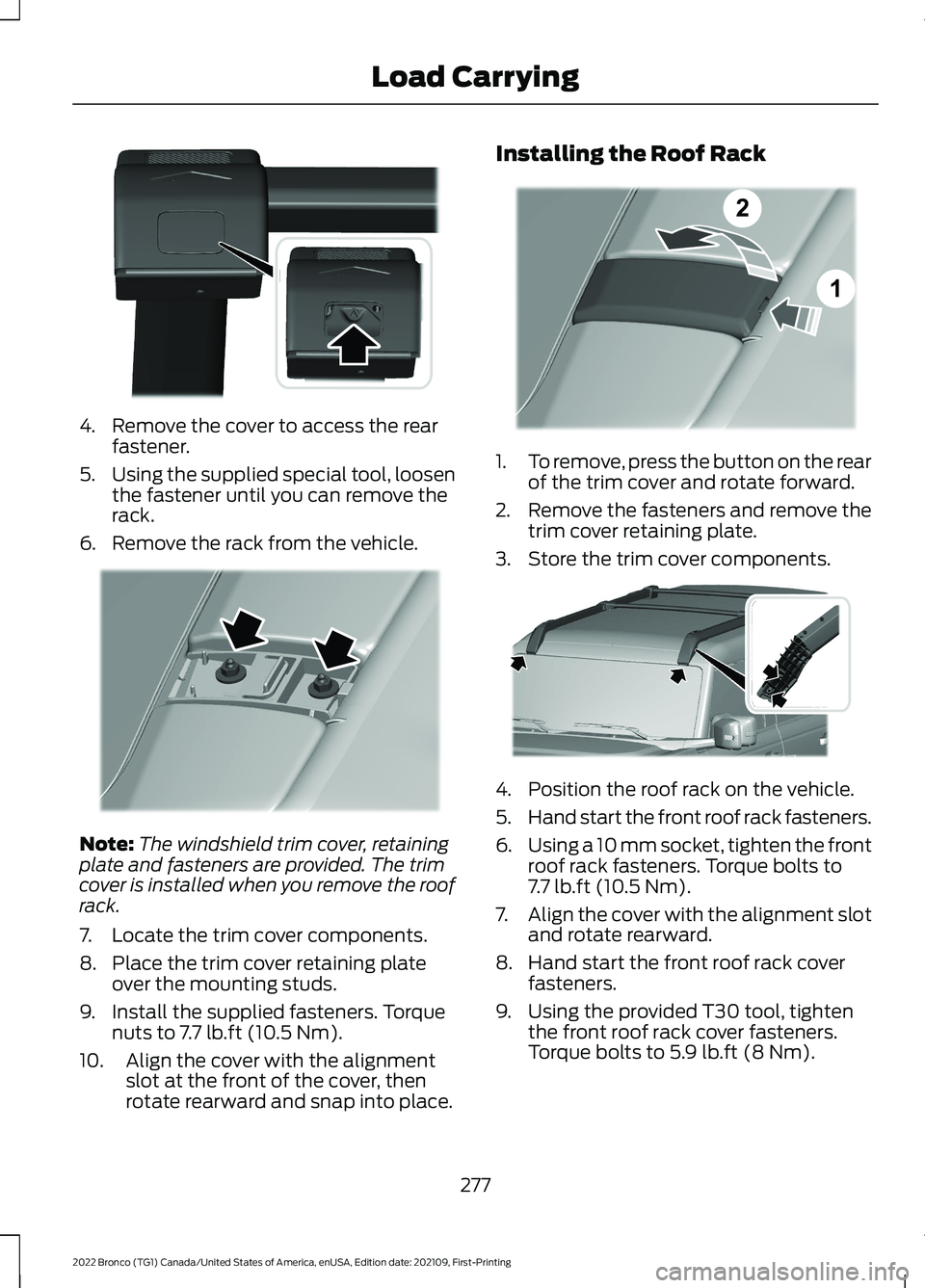
4.Remove the cover to access the rearfastener.
5.Using the supplied special tool, loosenthe fastener until you can remove therack.
6.Remove the rack from the vehicle.
Note:The windshield trim cover, retainingplate and fasteners are provided. The trimcover is installed when you remove the roofrack.
7.Locate the trim cover components.
8.Place the trim cover retaining plateover the mounting studs.
9.Install the supplied fasteners. Torquenuts to 7.7 lb.ft (10.5 Nm).
10.Align the cover with the alignmentslot at the front of the cover, thenrotate rearward and snap into place.
Installing the Roof Rack
1.To remove, press the button on the rearof the trim cover and rotate forward.
2.Remove the fasteners and remove thetrim cover retaining plate.
3.Store the trim cover components.
4.Position the roof rack on the vehicle.
5.Hand start the front roof rack fasteners.
6.Using a 10 mm socket, tighten the frontroof rack fasteners. Torque bolts to7.7 lb.ft (10.5 Nm).
7.Align the cover with the alignment slotand rotate rearward.
8.Hand start the front roof rack coverfasteners.
9.Using the provided T30 tool, tightenthe front roof rack cover fasteners.Torque bolts to 5.9 lb.ft (8 Nm).
277
2022 Bronco (TG1) Canada/United States of America, enUSA, Edition date: 202109, First-PrintingLoad CarryingE339074 E339407 12E339406 E339073
Page 282 of 562
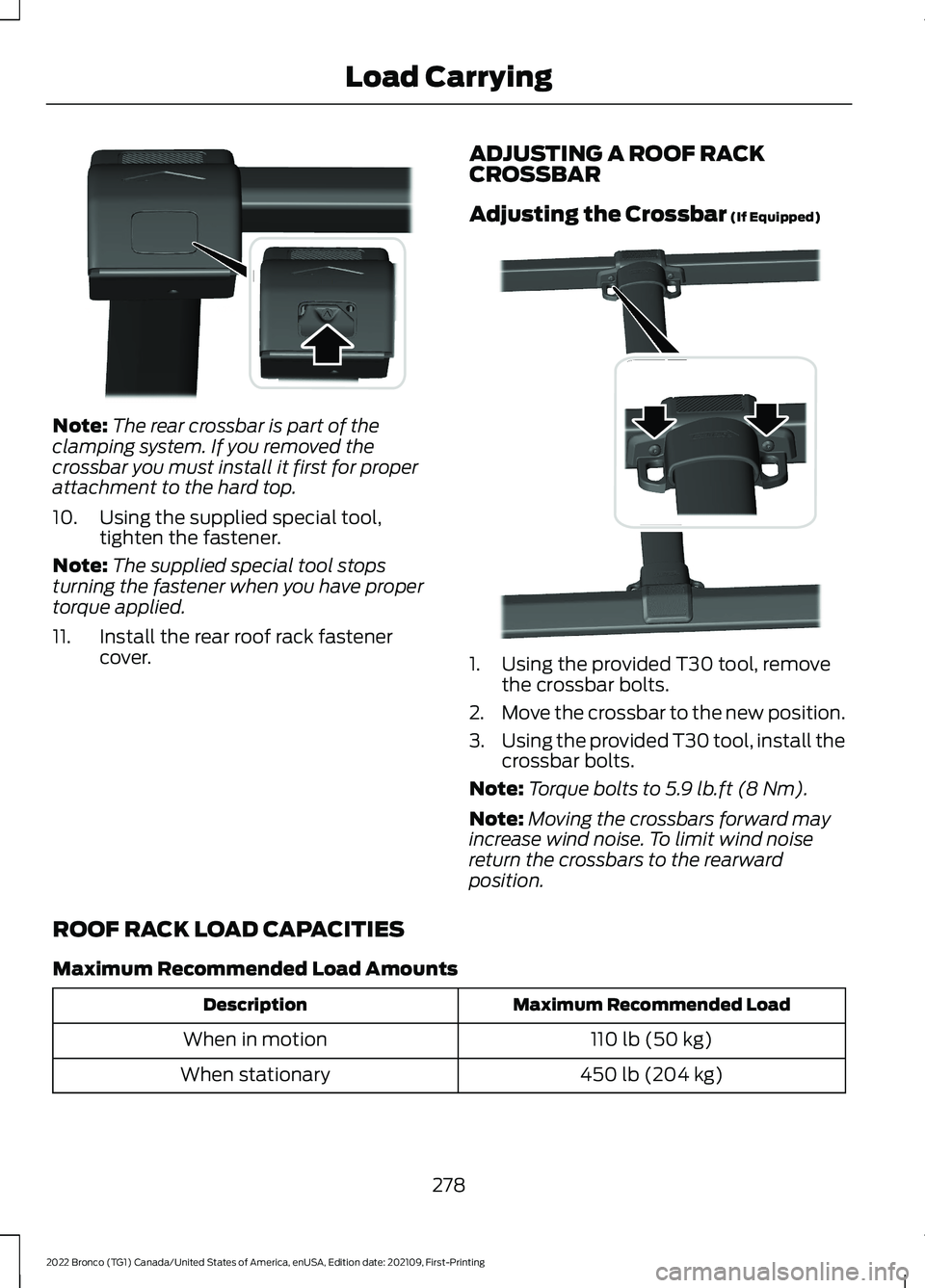
Note:The rear crossbar is part of theclamping system. If you removed thecrossbar you must install it first for properattachment to the hard top.
10.Using the supplied special tool,tighten the fastener.
Note:The supplied special tool stopsturning the fastener when you have propertorque applied.
11.Install the rear roof rack fastenercover.
ADJUSTING A ROOF RACKCROSSBAR
Adjusting the Crossbar (If Equipped)
1.Using the provided T30 tool, removethe crossbar bolts.
2.Move the crossbar to the new position.
3.Using the provided T30 tool, install thecrossbar bolts.
Note:Torque bolts to 5.9 lb.ft (8 Nm).
Note:Moving the crossbars forward mayincrease wind noise. To limit wind noisereturn the crossbars to the rearwardposition.
ROOF RACK LOAD CAPACITIES
Maximum Recommended Load Amounts
Maximum Recommended LoadDescription
110 lb (50 kg)When in motion
450 lb (204 kg)When stationary
278
2022 Bronco (TG1) Canada/United States of America, enUSA, Edition date: 202109, First-PrintingLoad CarryingE339074 E339075
Page 296 of 562
Driving In Sand
When driving over sand, try to keep all fourwheels on the most solid area of the trail.Drive through the terrain without varyingvehicle speed. Apply the accelerator andavoid excessive wheel slip.
Use the vehicle's momentum to maintainforward motion in sand. Avoid coming toa stop on steep sand slopes as the vehiclemay not be able to continue forward afterit has stopped.
Driving In Mud
Be cautious of sudden changes in vehiclespeed or direction when you are driving inmud.
Even four-wheel drive vehicles can losetraction in slick mud. If your vehicle doesslide, steer in the direction of the slide untilyou regain control of your vehicle.
After driving through mud, clean off residuestuck to the wheels and tires and rotatingdriveshafts. Excess mud stuck on thewheels and tires and rotating driveshaftscan cause an imbalance that coulddamage drive components.
Note:The vehicle brakes are less effectivewhen wet or muddy.
Driving Over Rocks and Gravel
Gravel is a constantly changing, low-gripsurface. Driving at slow speeds on gravelreduces the risk of losing traction when youstop, accelerate or turn a corner.
When approaching large rocks, positionthe vehicle so that the tires pass over thelargest obstacle.
Note:Never attempt to straddle a rock thatis large enough to strike your axles orundercarriage.
Note:Never attempt to drive over a rockwhich is large enough to contact the doorsills if your vehicle does not have rock rails.
If you lose traction on your wheels facinguphill, stop and choose a more suitableroute.
Leave a generous gap between yourvehicle and other vehicles to minimize therisk of damage from flying gravel. Avoiddust clouds as they reduce visibility.
Before navigating on uneven ground,secure anything inside the vehicle. Ifpossible, remove any roof-rack items. Usethe lowest gear possible and approach theobstacle at a slow speed.
If your vehicle begins to slide down a slope,steer downhill and gently apply thethrottle. If you lose traction on your uphillwheels, stop immediately and choose amore suitable route.
Approach logs, rocky steps or ditchesdiagonally. Keep at least three wheels onthe ground at all times.
Climbing A Hill
WARNING: Extreme care shouldbe used when steering the vehicle inreverse down a slope so as not to causethe vehicle to swerve out of control.
Although natural obstacles can make itnecessary to travel diagonally up or downa hill or steep incline, try to drive straightup or straight down.
Note: Avoid turning on steep slopes orhills. A danger lies in losing traction, slippingsideways and possible vehicle roll over.
Whenever driving on a hill, you must firstdetermine the route you can use.
When climbing a steep slope or hill, startin a lower gear rather than downshifting toa lower gear from a higher gear. Thisreduces strain on the engine and thepossibility of stalling.
292
2022 Bronco (TG1) Canada/United States of America, enUSA, Edition date: 202109, First-PrintingDriving Hints
Page 303 of 562
DRIVING ECONOMICALLY
The following helps to improve fuelconsumption:
•Drive smoothly, accelerate gently andanticipate the road ahead to avoidheavy braking.
•Regularly check your tire pressures andmake sure that they are inflated to thecorrect pressure.
•Follow the recommended maintenanceschedule and carry out therecommended checks.
•Plan your journey and check the trafficbefore you set off. It is more efficientto combine errands into a single tripwhenever possible.
•Avoid idling the engine in cold weatheror for extended periods. Start theengine only when you are ready to setoff.
•Do not carry unnecessary weight in yourvehicle as extra weight wastes fuel.
•Do not add unnecessary accessoriesto the exterior of your vehicle, forexample running boards. If you use aroof rack, remember to fold it down orremove it when not in use.
•Do not shift into neutral when you arebraking or when your vehicle is slowingdown.
•Shut all windows when driving at highspeeds.
•Switch off all electric systems whennot in use, for example air conditioning.Make sure that you unplug anyaccessories from the auxiliary powerpoints when not in use.
FLOOR MATS
WARNING: Use a floor matdesigned to fit the footwell of yourvehicle that does not obstruct the pedalarea. Failure to follow this instructioncould result in the loss of control of yourvehicle, personal injury or death.
WARNING: Pedals that cannotmove freely can cause loss of vehiclecontrol and increase the risk of seriouspersonal injury.
WARNING: Secure the floor matto both retention devices so that itcannot slip out of position and interferewith the pedals. Failure to follow thisinstruction could result in the loss ofcontrol of your vehicle, personal injury ordeath.
WARNING: Do not place additionalfloor mats or any other covering on topof the original floor mats. This couldresult in the floor mat interfering with theoperation of the pedals. Failure to followthis instruction could result in the loss ofcontrol of your vehicle, personal injury ordeath.
WARNING: Always make sure thatobjects cannot fall into the driver footwell while your vehicle is moving. Objectsthat are loose can become trappedunder the pedals causing a loss ofvehicle control.
299
2022 Bronco (TG1) Canada/United States of America, enUSA, Edition date: 202109, First-PrintingDriving Hints
Page 354 of 562
REMOVABLE ROOF PANELS (IF
EQUIPPED)
REMOVABLE ROOF PANELPRECAUTIONS
WARNING: When opening, closing,removing or installing the removablevehicle components, take care not to getyour fingers or hands caught in themechanism. Failure to follow thisinstruction could result in personal injury.
WARNING: Do not drive yourvehicle with only the center or the rearroof panel removed. Failure to follow thisinstruction could cause unintendedseparation of the roof panels from yourvehicle.
WARNING: Do not drive yourvehicle unless the installed roof panelsare properly secured. Failure to followthis instruction could cause unintendedseparation of the roof panels from yourvehicle.
Note:Do not step or kneel on the centerconsole during roof removal or once roofpanels are removed.
Removal of the center and rear roof panelsrequires two adults.
Do not cut, drill, weld or modify the roofpanels or attach anything other than thefactory-installed roof rack.
If there is any damage to the roof panels,see an authorized dealer.
Make sure the locating pins on the rear roofpanel sit flush in your vehicle wheninstalled.
Failure to follow these instructions couldcause interior water damage, stains ormildew:
•Properly position the hard topassembly to seal the top to your vehicleduring installation. Improperinstallation could cause water to leakinto the vehicle’s interior.
•Properly handle and store theremovable roof panels. Improperhandling and storage could damagethe seals, causing water to leak intothe vehicle’s interior.
•Do not place anything on top of therear roof panel when it is removed fromthe vehicle. This could cause damageto the rear roof panel and its seals.
REMOVING AND INSTALLING THEFRONT ROOF PANEL
Remove the driver side front roof panelbefore removing the passenger side frontroof panel.
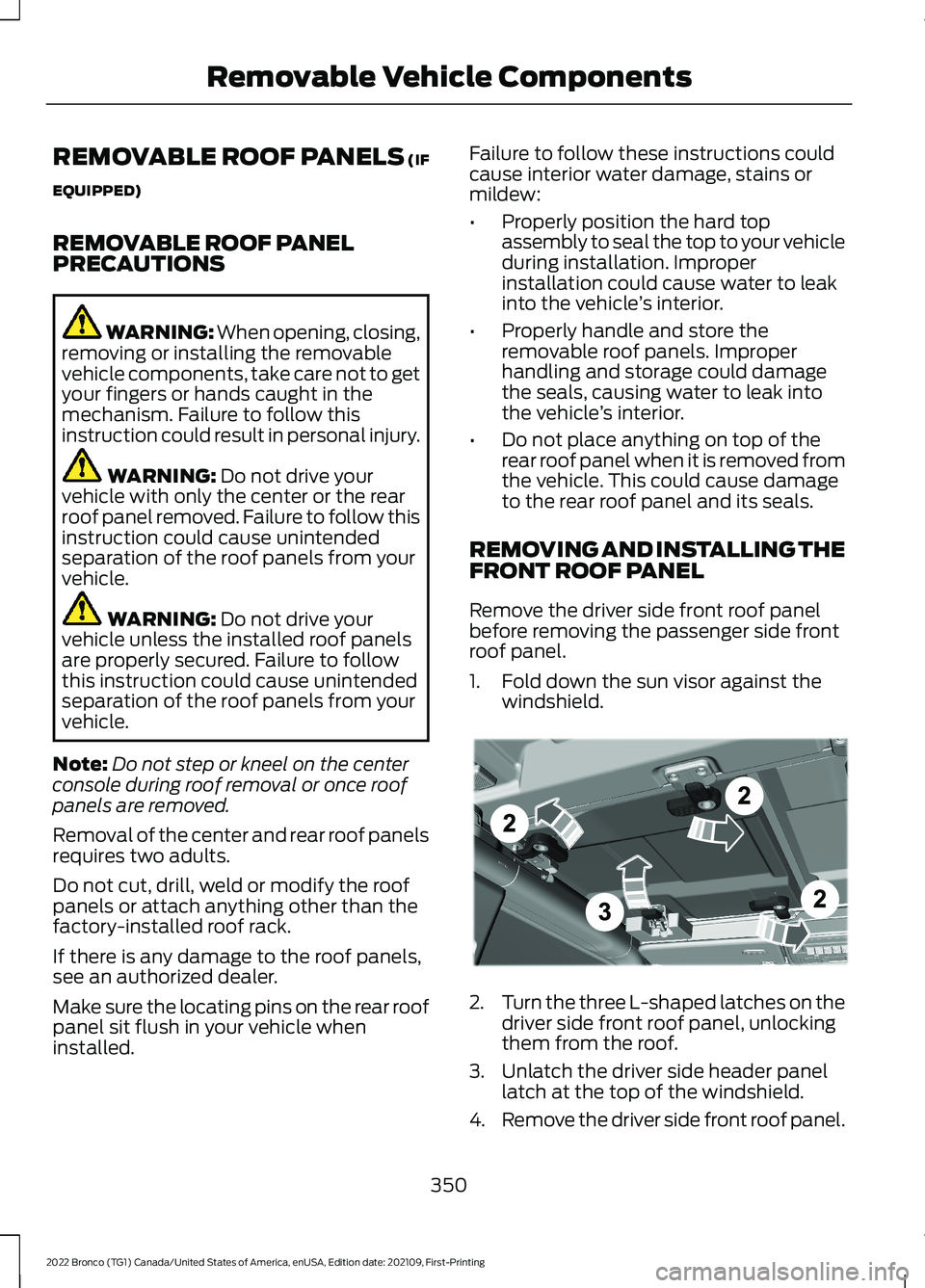
1.Fold down the sun visor against thewindshield.
2.Turn the three L-shaped latches on thedriver side front roof panel, unlockingthem from the roof.
3.Unlatch the driver side header panellatch at the top of the windshield.
4.Remove the driver side front roof panel.
350
2022 Bronco (TG1) Canada/United States of America, enUSA, Edition date: 202109, First-PrintingRemovable Vehicle ComponentsE333995
Page 430 of 562
Depending on the station quality, you couldhear a slight sound change when thestation changes between analog anddigital audio.
You cannot access a saved HD station ifyour vehicle is outside the station’sreception area.
SWITCHING DIGITAL RADIORECEPTION ON AND OFF
1.Press Settings on the touchscreen.
2.Press Radio Settings.
3.Switch AM HD Radio or FM HD Radioon or off.
DIGITAL RADIO INDICATORS
HD Radio Indicator
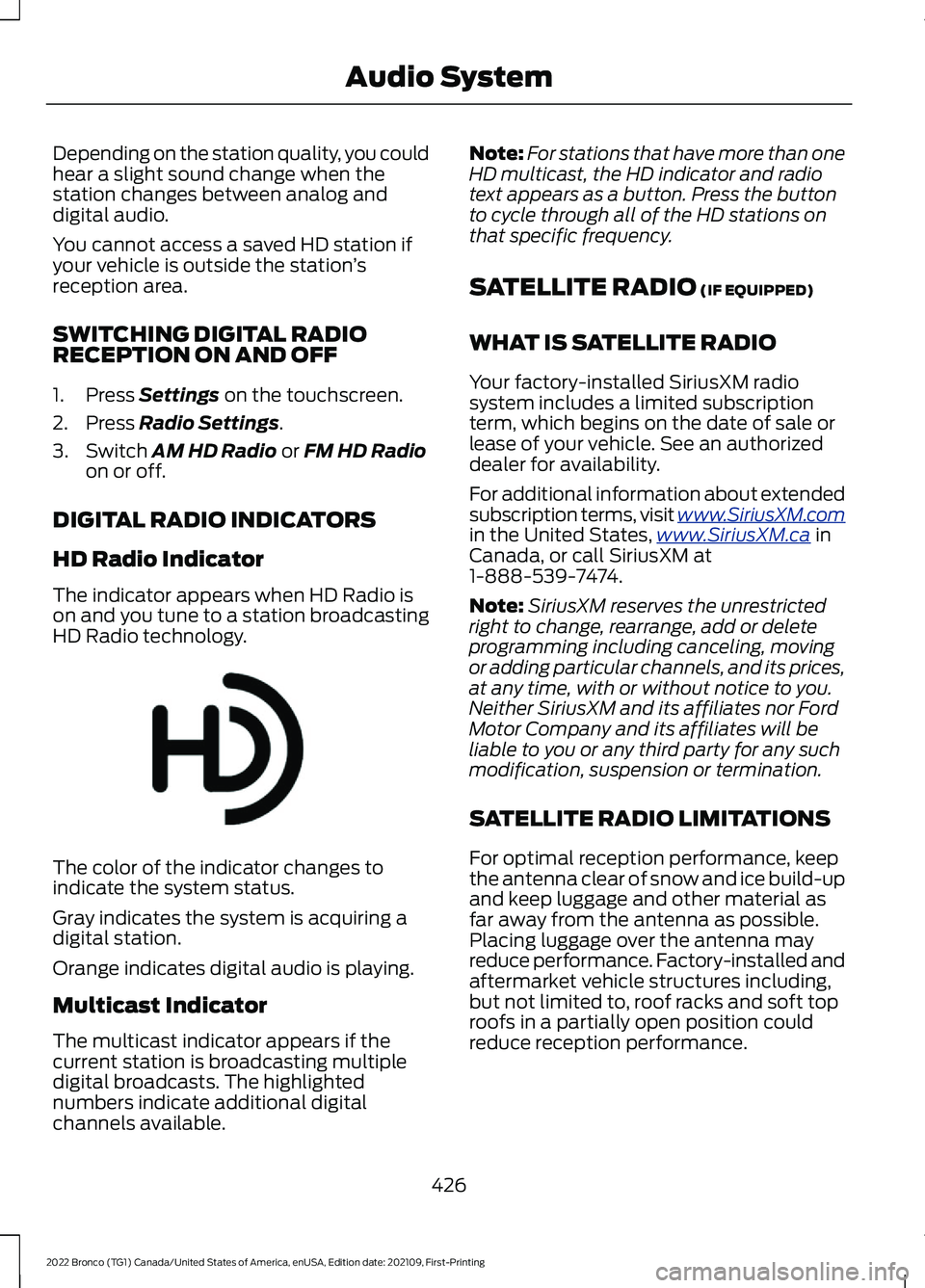
The indicator appears when HD Radio ison and you tune to a station broadcastingHD Radio technology.
The color of the indicator changes toindicate the system status.
Gray indicates the system is acquiring adigital station.
Orange indicates digital audio is playing.
Multicast Indicator
The multicast indicator appears if thecurrent station is broadcasting multipledigital broadcasts. The highlightednumbers indicate additional digitalchannels available.
Note:For stations that have more than oneHD multicast, the HD indicator and radiotext appears as a button. Press the buttonto cycle through all of the HD stations onthat specific frequency.
SATELLITE RADIO (IF EQUIPPED)
WHAT IS SATELLITE RADIO
Your factory-installed SiriusXM radiosystem includes a limited subscriptionterm, which begins on the date of sale orlease of your vehicle. See an authorizeddealer for availability.
For additional information about extendedsubscription terms, visit www.SiriusXM.comin the United States,www.SiriusXM.ca inCanada, or call SiriusXM at1-888-539-7474.
Note:SiriusXM reserves the unrestrictedright to change, rearrange, add or deleteprogramming including canceling, movingor adding particular channels, and its prices,at any time, with or without notice to you.Neither SiriusXM and its affiliates nor FordMotor Company and its affiliates will beliable to you or any third party for any suchmodification, suspension or termination.
SATELLITE RADIO LIMITATIONS
For optimal reception performance, keepthe antenna clear of snow and ice build-upand keep luggage and other material asfar away from the antenna as possible.Placing luggage over the antenna mayreduce performance. Factory-installed andaftermarket vehicle structures including,but not limited to, roof racks and soft toproofs in a partially open position couldreduce reception performance.
426
2022 Bronco (TG1) Canada/United States of America, enUSA, Edition date: 202109, First-PrintingAudio SystemE142616