mirror FORD BRONCO SPORT 2021 User Guide
[x] Cancel search | Manufacturer: FORD, Model Year: 2021, Model line: BRONCO SPORT, Model: FORD BRONCO SPORT 2021Pages: 471, PDF Size: 7 MB
Page 200 of 471
WARNING: The system only warns
of vehicles detected by the radar and
camera sensors. In some cases there
may be no warning or a delayed warning.
Apply the brakes when necessary. Failure
to follow this instruction could result in
personal injury or death. WARNING:
The system may not
detect stationary or slow moving
vehicles below
6 mph (10 km/h). WARNING:
The system does not
detect pedestrians or objects in the road. WARNING:
The system does not
detect oncoming vehicles in the same
lane. WARNING:
The system may not
operate properly if the sensor is blocked.
Keep the windshield free from
obstruction. WARNING:
The sensor may
incorrectly track lane markings as other
structures or objects. This can result in
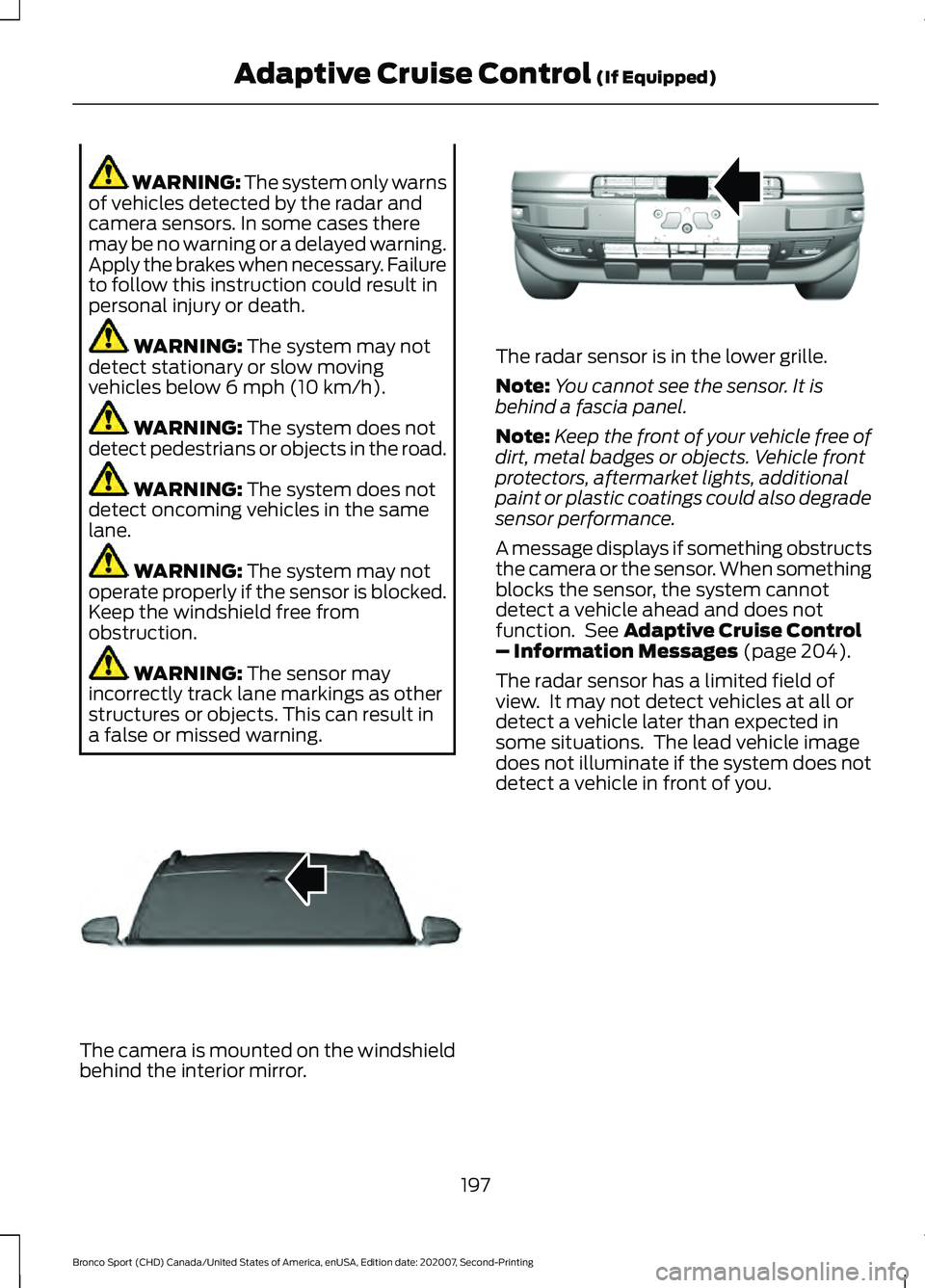
a false or missed warning. The camera is mounted on the windshield
behind the interior mirror. The radar sensor is in the lower grille.
Note:
You cannot see the sensor. It is
behind a fascia panel.
Note: Keep the front of your vehicle free of
dirt, metal badges or objects. Vehicle front
protectors, aftermarket lights, additional
paint or plastic coatings could also degrade
sensor performance.
A message displays if something obstructs
the camera or the sensor. When something
blocks the sensor, the system cannot
detect a vehicle ahead and does not
function. See
Adaptive Cruise Control
– Information Messages (page 204).
The radar sensor has a limited field of
view. It may not detect vehicles at all or
detect a vehicle later than expected in
some situations. The lead vehicle image
does not illuminate if the system does not
detect a vehicle in front of you.
197
Bronco Sport (CHD) Canada/United States of America, enUSA, Edition date: 202007, Second-Printing Adaptive Cruise Control
(If Equipped)E307893 E321483
Page 214 of 471
Why is the feature not available, line markings are gray, when I can see the lane markings
on the road?
Lane width is too narrow or too wide.
The camera has not been calibrated after a windshield replacement.
Driving on tight roads or on uneven roads. Why does the vehicle not come back toward the middle of the lane, as expected, in the
aid or aid + alert mode?
High cross winds are present.
There is a large road crown.
Rough roads, grooves or shoulder drop-offs.
Heavy uneven loading of the vehicle or improper tire inflation pressure.
The tires have been changed, or the suspension has been modified.
BLIND SPOT INFORMATION
SYSTEM WARNING: Do not use the blind
spot information system as a
replacement for using the interior and
exterior mirrors or looking over your
shoulder before changing lanes. The
blind spot information system is not a
replacement for careful driving. WARNING:
The system may not
operate properly during severe weather
conditions, for example snow, ice, heavy
rain and spray. Always drive with due
care and attention. Failure to take care
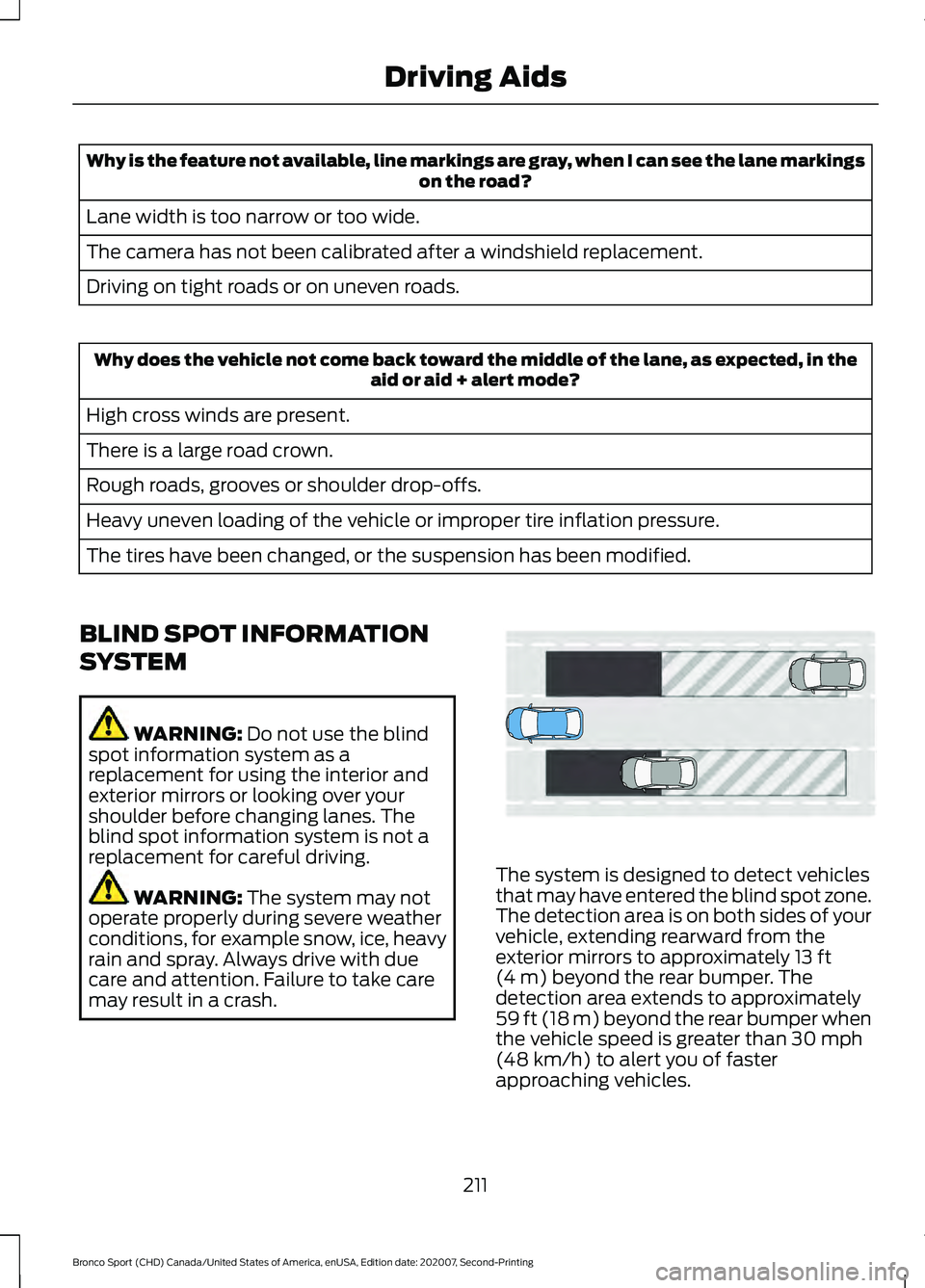
may result in a crash. The system is designed to detect vehicles
that may have entered the blind spot zone.
The detection area is on both sides of your
vehicle, extending rearward from the
exterior mirrors to approximately
13 ft
(4 m) beyond the rear bumper. The
detection area extends to approximately
59 ft (18 m)
beyond the rear bumper when
the vehicle speed is greater than 30 mph
(48 km/h) to alert you of faster
approaching vehicles.
211
Bronco Sport (CHD) Canada/United States of America, enUSA, Edition date: 202007, Second-Printing Driving AidsE255695
Page 215 of 471
Note:
The system does not prevent contact
with other vehicles. It is not designed to
detect parked vehicles, pedestrians, animals
or other infrastructures.
Using the Blind Spot Information
System
Vehicles with Automatic Transmission
The system turns on when all of the
following occur:
• You start your vehicle.
• You shift into drive (D).
• The vehicle speed is greater than
6 mph (10 km/h).
Note: The system does not operate in park
(P) or reverse (R).
Blind Spot Information System
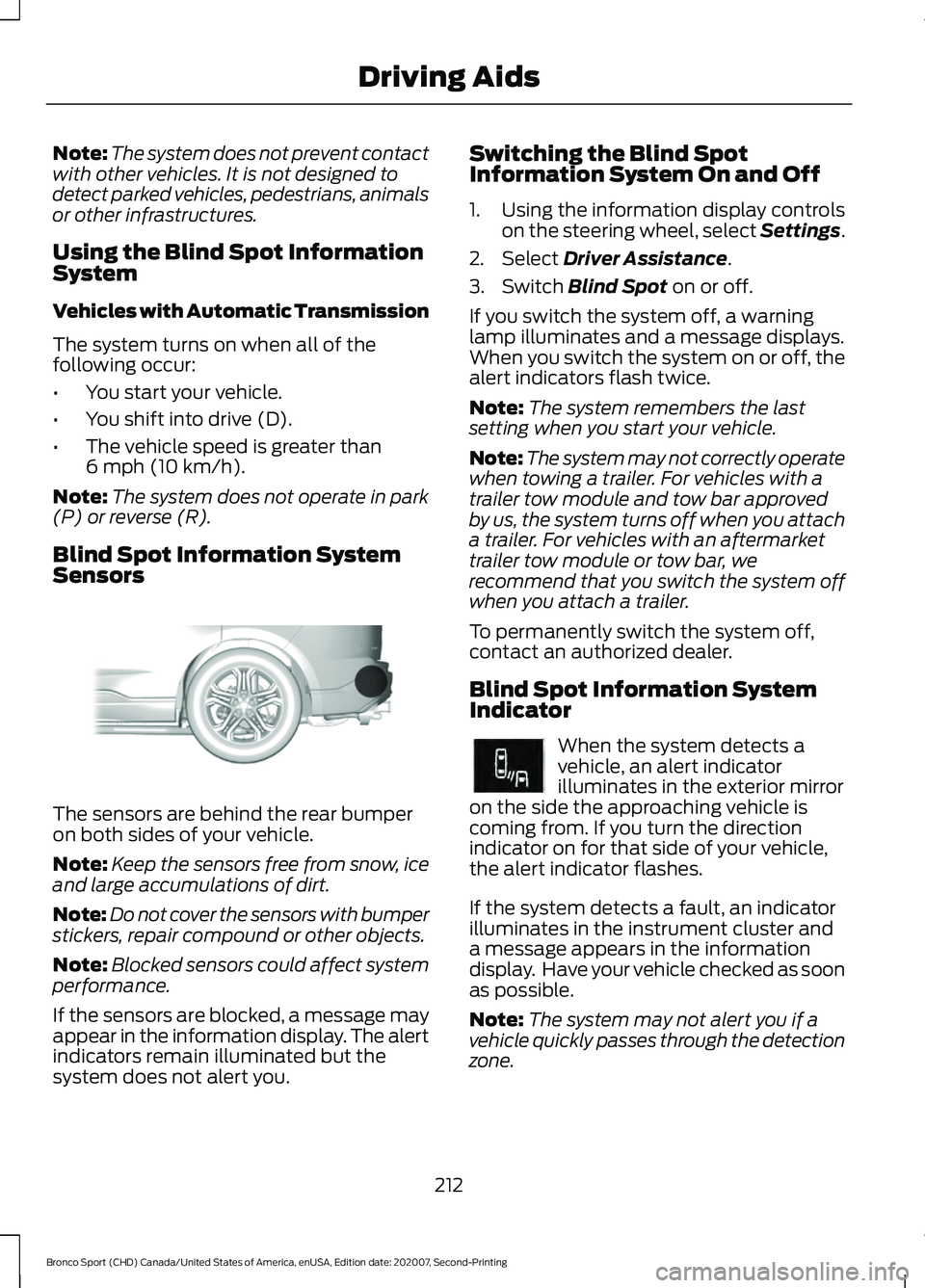
Sensors The sensors are behind the rear bumper
on both sides of your vehicle.
Note:
Keep the sensors free from snow, ice
and large accumulations of dirt.
Note: Do not cover the sensors with bumper
stickers, repair compound or other objects.
Note: Blocked sensors could affect system
performance.
If the sensors are blocked, a message may
appear in the information display. The alert
indicators remain illuminated but the
system does not alert you. Switching the Blind Spot
Information System On and Off
1. Using the information display controls
on the steering wheel, select Settings.
2. Select
Driver Assistance.
3. Switch
Blind Spot on or off.
If you switch the system off, a warning
lamp illuminates and a message displays.
When you switch the system on or off, the
alert indicators flash twice.
Note: The system remembers the last
setting when you start your vehicle.
Note: The system may not correctly operate
when towing a trailer. For vehicles with a
trailer tow module and tow bar approved
by us, the system turns off when you attach
a trailer. For vehicles with an aftermarket
trailer tow module or tow bar, we
recommend that you switch the system off
when you attach a trailer.
To permanently switch the system off,
contact an authorized dealer.
Blind Spot Information System
Indicator When the system detects a
vehicle, an alert indicator
illuminates in the exterior mirror
on the side the approaching vehicle is
coming from. If you turn the direction
indicator on for that side of your vehicle,
the alert indicator flashes.
If the system detects a fault, an indicator
illuminates in the instrument cluster and
a message appears in the information
display. Have your vehicle checked as soon
as possible.
Note: The system may not alert you if a
vehicle quickly passes through the detection
zone.
212
Bronco Sport (CHD) Canada/United States of America, enUSA, Edition date: 202007, Second-Printing Driving AidsE205199 E249861E249861
Page 216 of 471
Blind Spot Information System Information Messages
Action
Message
Displays if the blind spot information system sensors are
blocked.
Blind Spot Not Available
Sensor Blocked See
Manual
Displays if you attach a trailer to your vehicle.
Blis Deactivated Trailer
Attached
The system has detected a fault that requires service. Have
your vehicle checked as soon as possible.
Blind Spot System Fault
CROSS TRAFFIC ALERT WARNING: Do not use the cross
traffic alert system as a replacement for
using the interior and exterior mirrors or
looking over your shoulder before
reversing out of a parking space. The
cross traffic alert system is not a
replacement for careful driving. WARNING:
The system may not
operate properly during severe weather
conditions, for example snow, ice, heavy
rain and spray. Always drive with due
care and attention. Failure to take care
may result in a crash. The system alerts you of vehicles
approaching from the sides behind your
vehicle when you shift into reverse (R).
Using Cross Traffic Alert
The system detects vehicles that approach
at a speed between
4 mph (6 km/h) and
37 mph (60 km/h). Coverage decreases
when the sensors are partially, mostly or
fully obstructed. Slowly reversing helps
increase the coverage area and
effectiveness.
The system turns on when you start the
engine and you shift into reverse (R). The
system turns off when you shift out of
reverse (R).
213
Bronco Sport (CHD) Canada/United States of America, enUSA, Edition date: 202007, Second-Printing Driving Aids
Page 218 of 471
Zone coverage also decreases when
parking at narrow angles. The sensor on
the left-hand side is mostly obstructed and
zone coverage on that side is severely
reduced.
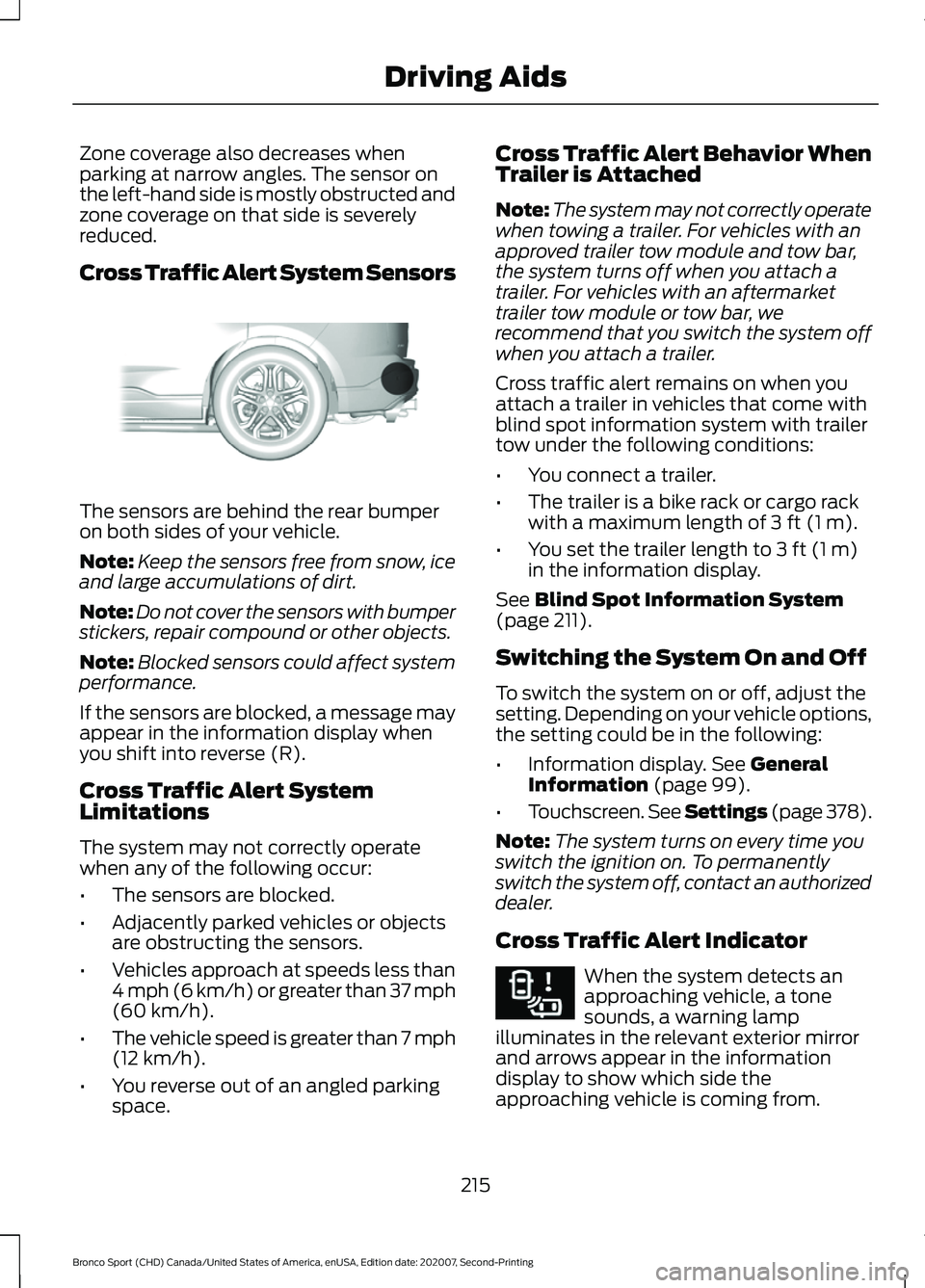
Cross Traffic Alert System Sensors
The sensors are behind the rear bumper
on both sides of your vehicle.
Note:
Keep the sensors free from snow, ice
and large accumulations of dirt.
Note: Do not cover the sensors with bumper
stickers, repair compound or other objects.
Note: Blocked sensors could affect system
performance.
If the sensors are blocked, a message may
appear in the information display when
you shift into reverse (R).
Cross Traffic Alert System
Limitations
The system may not correctly operate
when any of the following occur:
• The sensors are blocked.
• Adjacently parked vehicles or objects
are obstructing the sensors.
• Vehicles approach at speeds less than
4 mph (6 km/h) or greater than 37 mph
(60 km/h).
• The vehicle speed is greater than 7 mph
(12 km/h)
.
• You reverse out of an angled parking
space. Cross Traffic Alert Behavior When
Trailer is Attached
Note:
The system may not correctly operate
when towing a trailer. For vehicles with an
approved trailer tow module and tow bar,
the system turns off when you attach a
trailer. For vehicles with an aftermarket
trailer tow module or tow bar, we
recommend that you switch the system off
when you attach a trailer.
Cross traffic alert remains on when you
attach a trailer in vehicles that come with
blind spot information system with trailer
tow under the following conditions:
• You connect a trailer.
• The trailer is a bike rack or cargo rack
with a maximum length of
3 ft (1 m).
• You set the trailer length to
3 ft (1 m)
in the information display.
See
Blind Spot Information System
(page 211).
Switching the System On and Off
To switch the system on or off, adjust the
setting. Depending on your vehicle options,
the setting could be in the following:
• Information display.
See General
Information (page 99).
• Touchscreen. See Settings (page
378).
Note: The system turns on every time you
switch the ignition on. To permanently
switch the system off, contact an authorized
dealer.
Cross Traffic Alert Indicator When the system detects an
approaching vehicle, a tone
sounds, a warning lamp
illuminates in the relevant exterior mirror
and arrows appear in the information
display to show which side the
approaching vehicle is coming from.
215
Bronco Sport (CHD) Canada/United States of America, enUSA, Edition date: 202007, Second-Printing Driving AidsE205199 E268294
Page 219 of 471
Note:
If arrows do not display, a message
appears in the information display.
If the system malfunctions, a warning lamp
illuminates in the instrument cluster and
a message appears in the information
display. Have your vehicle checked as soon
as possible. Note:
In exceptional conditions, the system
could alert you, even when there is nothing
in the detection zone, for example a vehicle
passing further away from your vehicle.
Cross Traffic Alert Information Messages Action
Message
Displays instead of indication arrows when the system
detects a vehicle. Check for approaching traffic.
Cross Traffic Alert
Indicates blocked cross traffic alert system sensors. Clean
the sensors. If the message continues to appear, have your
vehicle checked as soon as possible.
Cross Traffic Not Avail-
able Sensor Blocked See
Manual
The system has malfunctioned. Have your vehicle checked
as soon as possible.
Cross Traffic System
Fault
Displays if you attach a trailer to your vehicle.
Cross Traffic Alert Deac-
tivated Trailer Attached
SPEED SIGN RECOGNITION (IF
EQUIPPED)
Principle of Operation WARNING: You are responsible for
controlling your vehicle at all times. The
system is designed to be an aid and does
not relieve you of your responsibility to
drive with due care and attention. Failure
to follow this instruction could result in
the loss of control of your vehicle,
personal injury or death. WARNING:
In cold and severe
weather conditions the system may not
function. Rain, snow and spray can all
limit sensor performance. WARNING:
The system may not
operate properly if the sensor is blocked.
Keep the windshield free from
obstruction.
The system is designed to detect speed
limit signs to inform you of the current
speed limit. Detected speed signs appear
in the information display. The sensor is
behind the interior mirror.
Note: Do not carry out windshield repairs
in the immediate area surrounding the
sensor.
Note: Speed sign data provided by the
navigation system contains information
integrated to the data carrier release.
Note: The system may not detect all speed
signs and may incorrectly read signs.
216
Bronco Sport (CHD) Canada/United States of America, enUSA, Edition date: 202007, Second-Printing Driving Aids
Page 269 of 471
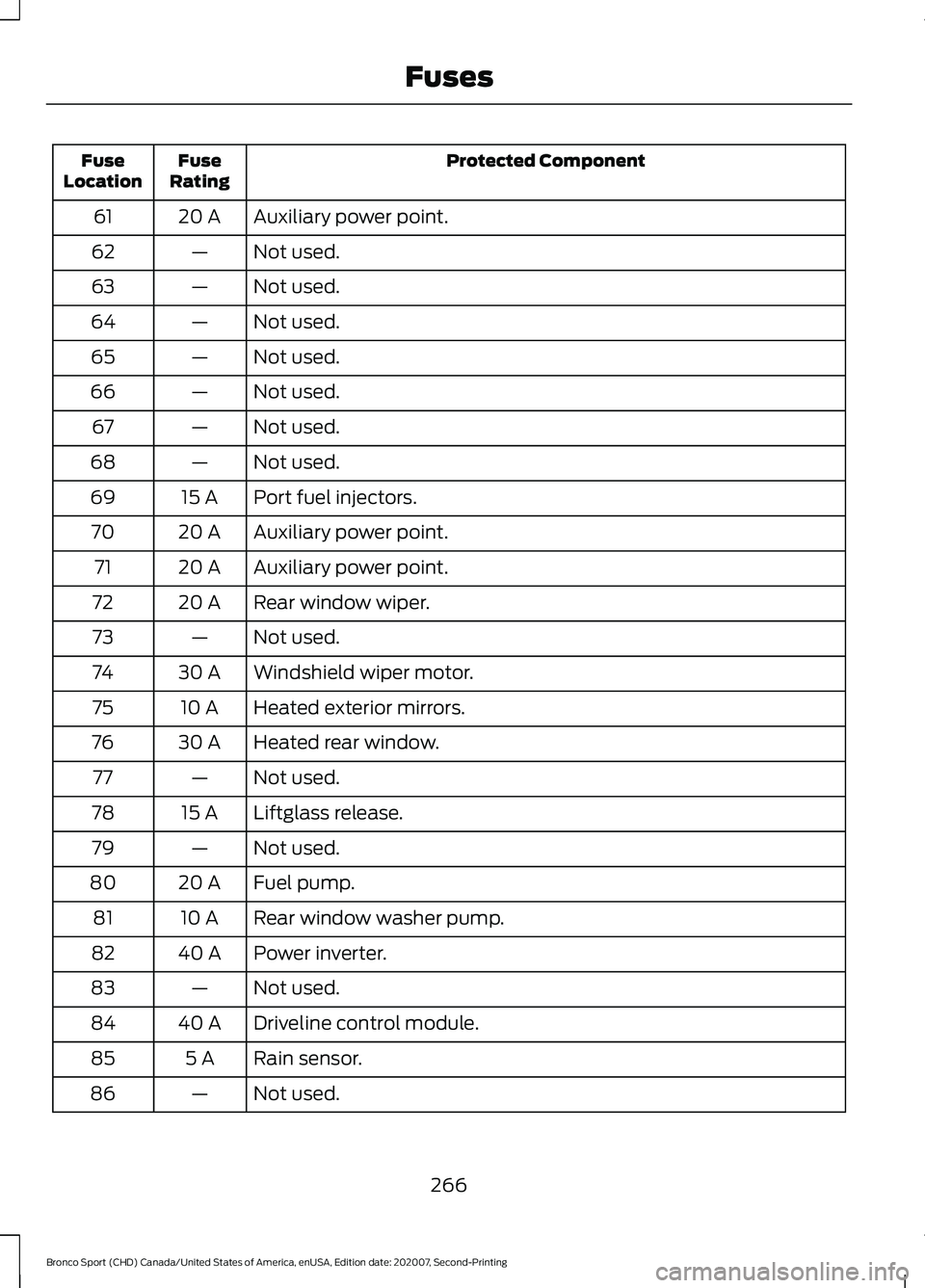
Protected Component
Fuse
Rating
Fuse
Location
Auxiliary power point.
20 A
61
Not used.
—
62
Not used.
—
63
Not used.
—
64
Not used.
—
65
Not used.
—
66
Not used.
—
67
Not used.
—
68
Port fuel injectors.
15 A
69
Auxiliary power point.
20 A
70
Auxiliary power point.
20 A
71
Rear window wiper.
20 A
72
Not used.
—
73
Windshield wiper motor.
30 A
74
Heated exterior mirrors.
10 A
75
Heated rear window.
30 A
76
Not used.
—
77
Liftglass release.
15 A
78
Not used.
—
79
Fuel pump.
20 A
80
Rear window washer pump.
10 A
81
Power inverter.
40 A
82
Not used.
—
83
Driveline control module.
40 A
84
Rain sensor.
5 A
85
Not used.
—
86
266
Bronco Sport (CHD) Canada/United States of America, enUSA, Edition date: 202007, Second-Printing Fuses
Page 271 of 471
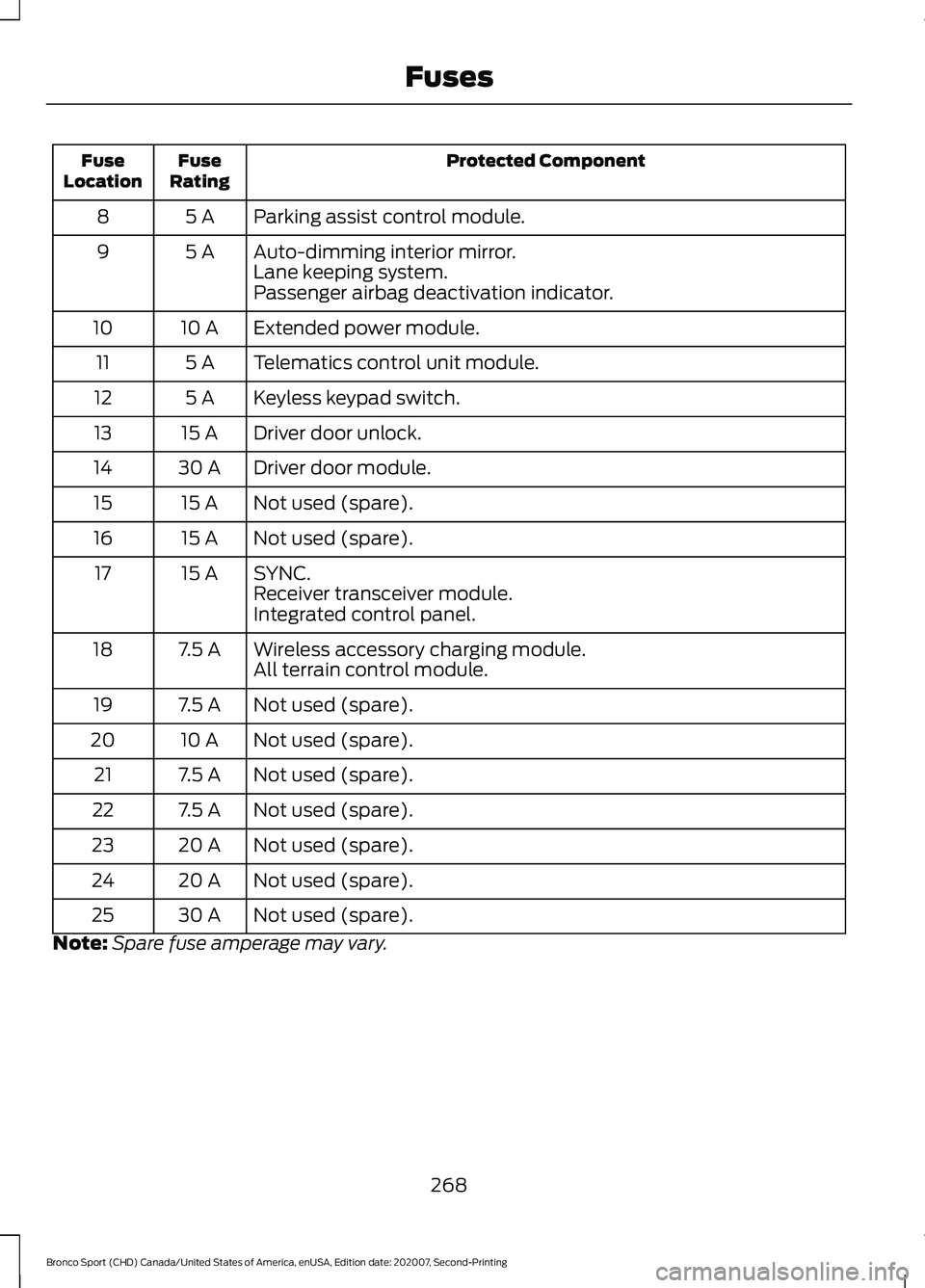
Protected Component
Fuse
Rating
Fuse
Location
Parking assist control module.
5 A
8
Auto-dimming interior mirror.
5 A
9
Lane keeping system.
Passenger airbag deactivation indicator.
Extended power module.
10 A
10
Telematics control unit module.
5 A
11
Keyless keypad switch.
5 A
12
Driver door unlock.
15 A
13
Driver door module.
30 A
14
Not used (spare).
15 A
15
Not used (spare).
15 A
16
SYNC.
15 A
17
Receiver transceiver module.
Integrated control panel.
Wireless accessory charging module.
7.5 A
18
All terrain control module.
Not used (spare).
7.5 A
19
Not used (spare).
10 A
20
Not used (spare).
7.5 A
21
Not used (spare).
7.5 A
22
Not used (spare).
20 A
23
Not used (spare).
20 A
24
Not used (spare).
30 A
25
Note: Spare fuse amperage may vary.
268
Bronco Sport (CHD) Canada/United States of America, enUSA, Edition date: 202007, Second-Printing Fuses
Page 290 of 471
2. Disengage the wiper blade from the
wiper arm.
Note: Make sure that the wiper arm does
not spring back against the glass when the
wiper blade is not attached.
3. To install, reverse the removal procedure.
Note: Make sure that the wiper blade locks
into place.
CHANGING A BULB
Replacing Headlamp Bulbs
Headlamp bulbs are LED and are not
serviceable. See an authorized dealer if
they fail.
Replacing Fog Lamp Bulbs
Fog lamp bulbs are LED and are not
serviceable. See an authorized dealer if
they fail.
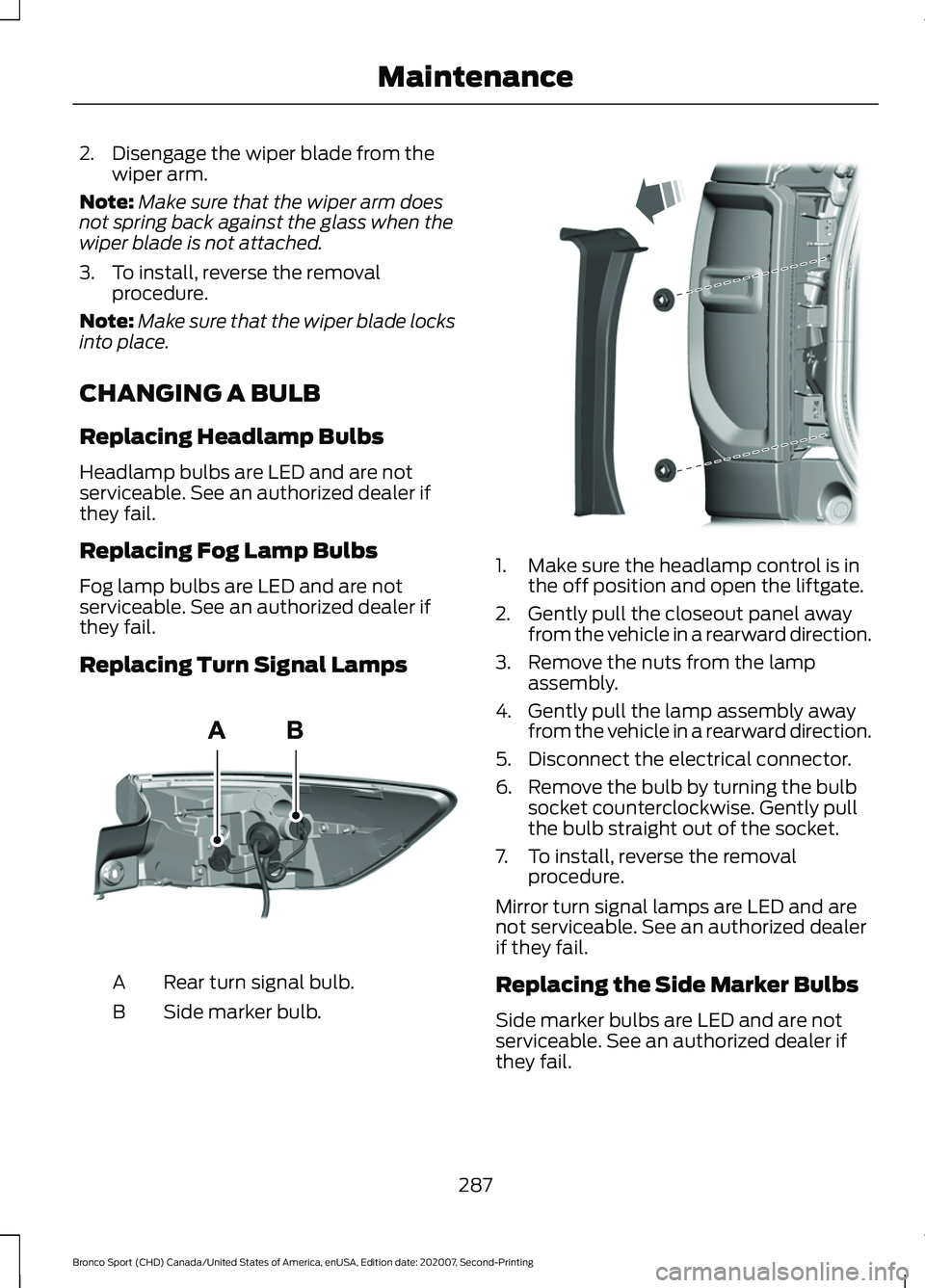
Replacing Turn Signal Lamps Rear turn signal bulb.
A
Side marker bulb.
B 1. Make sure the headlamp control is in
the off position and open the liftgate.
2. Gently pull the closeout panel away from the vehicle in a rearward direction.
3. Remove the nuts from the lamp assembly.
4. Gently pull the lamp assembly away from the vehicle in a rearward direction.
5. Disconnect the electrical connector.
6. Remove the bulb by turning the bulb socket counterclockwise. Gently pull
the bulb straight out of the socket.
7. To install, reverse the removal procedure.
Mirror turn signal lamps are LED and are
not serviceable. See an authorized dealer
if they fail.
Replacing the Side Marker Bulbs
Side marker bulbs are LED and are not
serviceable. See an authorized dealer if
they fail.
287
Bronco Sport (CHD) Canada/United States of America, enUSA, Edition date: 202007, Second-Printing MaintenanceE307885 E321838
Page 294 of 471
•
Use a spray with a 40 degree wide
spray angle pattern.
• Keep the nozzle at a 12 in (305 mm)
distance and 90 degree angle to your
vehicle's surface.
Note: Holding the pressure washer nozzle
at an angle to the vehicle's surface may
damage graphics and cause the edges to
peel away from the vehicle's surface.
Underbody
Regularly clean the underside of your
vehicle using water. Keep body and door
drain holes free of debris or foreign
material.
Under Hood
For removing black rubber marks from
under the hood we recommend Motorcraft
Wheel and Tire Cleaner or Motorcraft Bug
and Tar Remover.
WAXING
Regular waxing is necessary to protect your
car's paint from the elements. We
recommend that you wash and wax the
painted surface once or twice a year.
When washing and waxing, park your
vehicle in a shaded area out of direct
sunlight. Always wash your vehicle before
applying wax.
• Use a quality wax that does not contain
abrasives.
• Follow the manufacturer ’s instructions
to apply and remove the wax.
• Apply a small amount of wax in a
back-and-forth motion, not in circles. •
Do not allow wax to come in contact
with any non-body (low-gloss black)
colored trim. The wax will discolor or
stain the parts over time.
•Roof racks.
• Bumpers.
• Grained door handles.
• Side moldings.
• Mirror housings.
• Windshield cowl area.
• Do not apply wax to glass areas.
• After waxing, your car's paint should
feel smooth, and be free of streaks and
smudges.
CLEANING THE ENGINE
Engines are more efficient when they are
clean because grease and dirt buildup keep
the engine warmer than normal.
When washing:
• Take care when using a power washer
to clean the engine. The high-pressure
fluid could penetrate the sealed parts
and cause damage.
• Do not spray a hot engine with cold
water to avoid cracking the engine
block or other engine components.
• Spray Motorcraft Engine Shampoo and
Degreaser on all parts that require
cleaning and pressure rinse clean. In
Canada, use Motorcraft Engine
Shampoo.
Note: If your vehicle has an engine cover
remove the cover before application of
Motorcraft Engine Shampoo and Degreaser.
Immediately rinse away any over spray.
291
Bronco Sport (CHD) Canada/United States of America, enUSA, Edition date: 202007, Second-Printing Vehicle Care