window FORD BRONCO SPORT 2021 User Guide
[x] Cancel search | Manufacturer: FORD, Model Year: 2021, Model line: BRONCO SPORT, Model: FORD BRONCO SPORT 2021Pages: 471, PDF Size: 7 MB
Page 82 of 471
Front Camera Washer (If Equipped)
Operating the windshield washer also turns
on the front camera washer.
REAR WINDOW WIPER AND
WASHERS
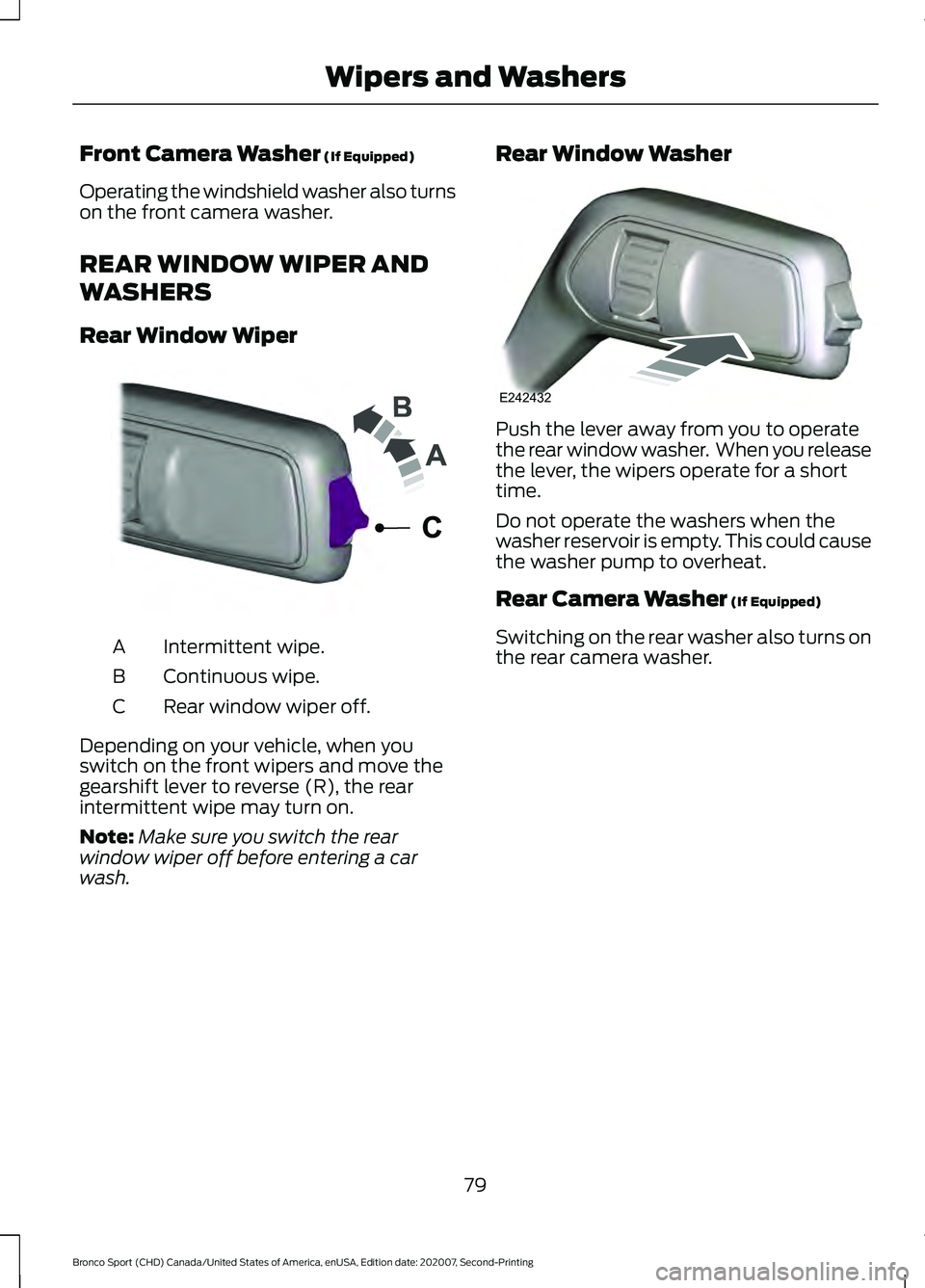
Rear Window Wiper Intermittent wipe.
A
Continuous wipe.
B
Rear window wiper off.
C
Depending on your vehicle, when you
switch on the front wipers and move the
gearshift lever to reverse (R), the rear
intermittent wipe may turn on.
Note: Make sure you switch the rear
window wiper off before entering a car
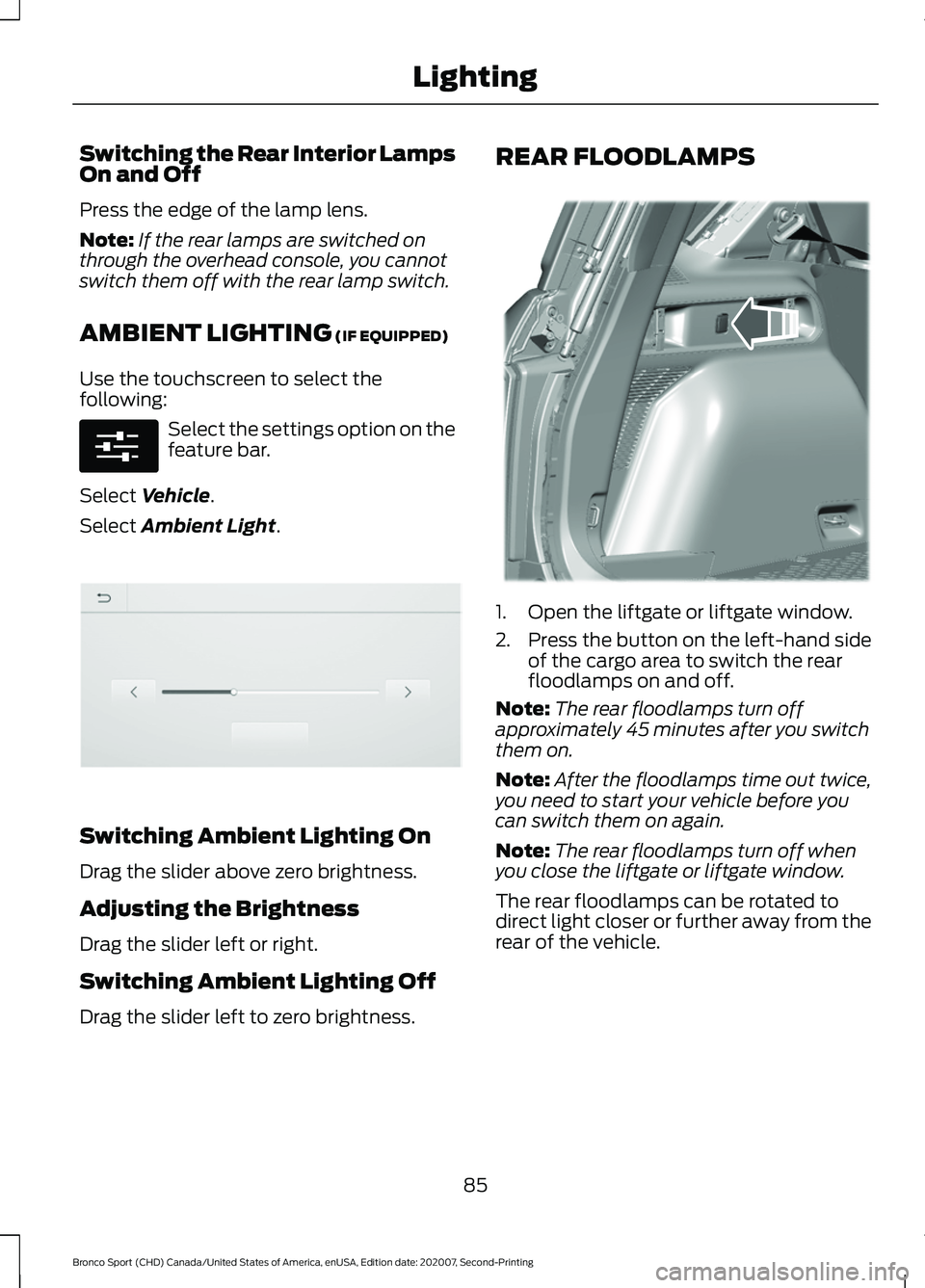
wash. Rear Window Washer Push the lever away from you to operate
the rear window washer. When you release
the lever, the wipers operate for a short
time.
Do not operate the washers when the
washer reservoir is empty. This could cause
the washer pump to overheat.
Rear Camera Washer
(If Equipped)
Switching on the rear washer also turns on
the rear camera washer.
79
Bronco Sport (CHD) Canada/United States of America, enUSA, Edition date: 202007, Second-Printing Wipers and WashersE242324 E242432
Page 88 of 471
Switching the Rear Interior Lamps
On and Off
Press the edge of the lamp lens.
Note:
If the rear lamps are switched on
through the overhead console, you cannot
switch them off with the rear lamp switch.
AMBIENT LIGHTING (IF EQUIPPED)
Use the touchscreen to select the
following: Select the settings option on the
feature bar.
Select
Vehicle.
Select
Ambient Light. Switching Ambient Lighting On
Drag the slider above zero brightness.
Adjusting the Brightness
Drag the slider left or right.
Switching Ambient Lighting Off
Drag the slider left to zero brightness. REAR FLOODLAMPS
1. Open the liftgate or liftgate window.
2. Press the button on the left-hand side
of the cargo area to switch the rear
floodlamps on and off.
Note: The rear floodlamps turn off
approximately 45 minutes after you switch
them on.
Note: After the floodlamps time out twice,
you need to start your vehicle before you
can switch them on again.
Note: The rear floodlamps turn off when
you close the liftgate or liftgate window.
The rear floodlamps can be rotated to
direct light closer or further away from the
rear of the vehicle.
85
Bronco Sport (CHD) Canada/United States of America, enUSA, Edition date: 202007, Second-Printing LightingE280315 E306304 E336624
Page 91 of 471
POWER WINDOWS
WARNING: Do not leave children
unattended in your vehicle and do not
let them play with the power windows.
Failure to follow this instruction could
result in personal injury. WARNING:
When closing the
power windows, verify they are free of
obstruction and make sure that children
and pets are not in the proximity of the
window openings. Press the control to open the
window. Lift the control to close
the window.
To reduce wind noise or pulsing noise when
just one window is open, slightly open the
opposite window.
One-Touch Down
(If Equipped)
Press the switch fully and release it. Press
again or lift it to stop the window.
One-Touch Up
(If Equipped)
Lift the switch fully and release it. Press or
lift it again to stop the window.
Resetting One-Touch Up
Start the engine.
1. Lift and hold the window switch until you fully close the door window.
Continue to hold the switch for a few
seconds after you close the window.
2. Release the window switch.
3. Press and hold the window switch until
you fully open the door window.
4. Release the window switch.
5. Lift and hold the window switch until you fully close the window. 6. Test for correct window operation by
carrying out the one-touch down and
one-touch up features.
Rear Window Lock Press the control to lock or
unlock the rear window controls.
It illuminates when you lock the
rear window controls.
Bounce-Back
(If Equipped)
The window stops and reverses if it detects
an obstruction.
Overriding the Bounce-Back Feature WARNING:
If you override
bounce-back, the window does not
reverse if it detects an obstacle. Take
care when closing the windows to avoid
personal injury or damage to your
vehicle.
Pull up the window switch and hold within
a few seconds of the window reaching the
bounce-back position. The window travels
up with no bounce-back protection. The
window stops if you release the switch
before the window fully closes.
Resetting Bounce-Back WARNING: Bounce-back is off until
you reset the memory. Take care when
closing the windows to avoid personal
injury or damage to your vehicle.
If you have disconnected the battery, you
must reset the bounce-back memory
separately for each window.
1. Lift and hold the switch until the window is fully closed.
2. Release the switch.
88
Bronco Sport (CHD) Canada/United States of America, enUSA, Edition date: 202007, Second-Printing Windows and Mirrors
Page 92 of 471
3.
Lift and hold the switch again for a few
seconds.
4. Release the switch.
5. Lift and hold the switch again for a few
seconds.
6. Release the switch.
7. Press and hold the switch until the window is fully open.
8. Lift and hold the switch until the window is fully closed.
9. Release the switch.
10. Open the window and then try to close it using one-touch close.
Note: Repeat the procedure if the window
does not close when you use one-touch.
Accessory Delay
You can use the window controls for
several minutes after switching off the
ignition or until opening either front door.
GLOBAL OPENING AND
CLOSING (IF EQUIPPED)
You can use the remote control to open
the windows with the ignition off.
Note: You can enable or disable this feature
in the information display or see an
authorized dealer. See
General
Information (page 99).
Note: To operate this feature, accessory
delay must not be active.
Opening the Windows
You can only open the windows for a short
time after you unlock your vehicle with the
remote control. After you unlock your
vehicle, press and hold the remote control
unlock button to open the windows.
Release the button once movement starts.
Press the lock or unlock button to stop
movement. Closing the Windows WARNING:
When closing the
power windows, verify they are free of
obstruction and make sure that children
and pets are not in the proximity of the
window openings.
To close the windows, press and hold the
remote control lock button. Release the
button once movement starts. Press the
lock or unlock button to stop movement.
EXTERIOR MIRRORS
Power Exterior Mirrors WARNING:
Do not adjust the
mirrors when your vehicle is moving. This
could result in the loss of control of your
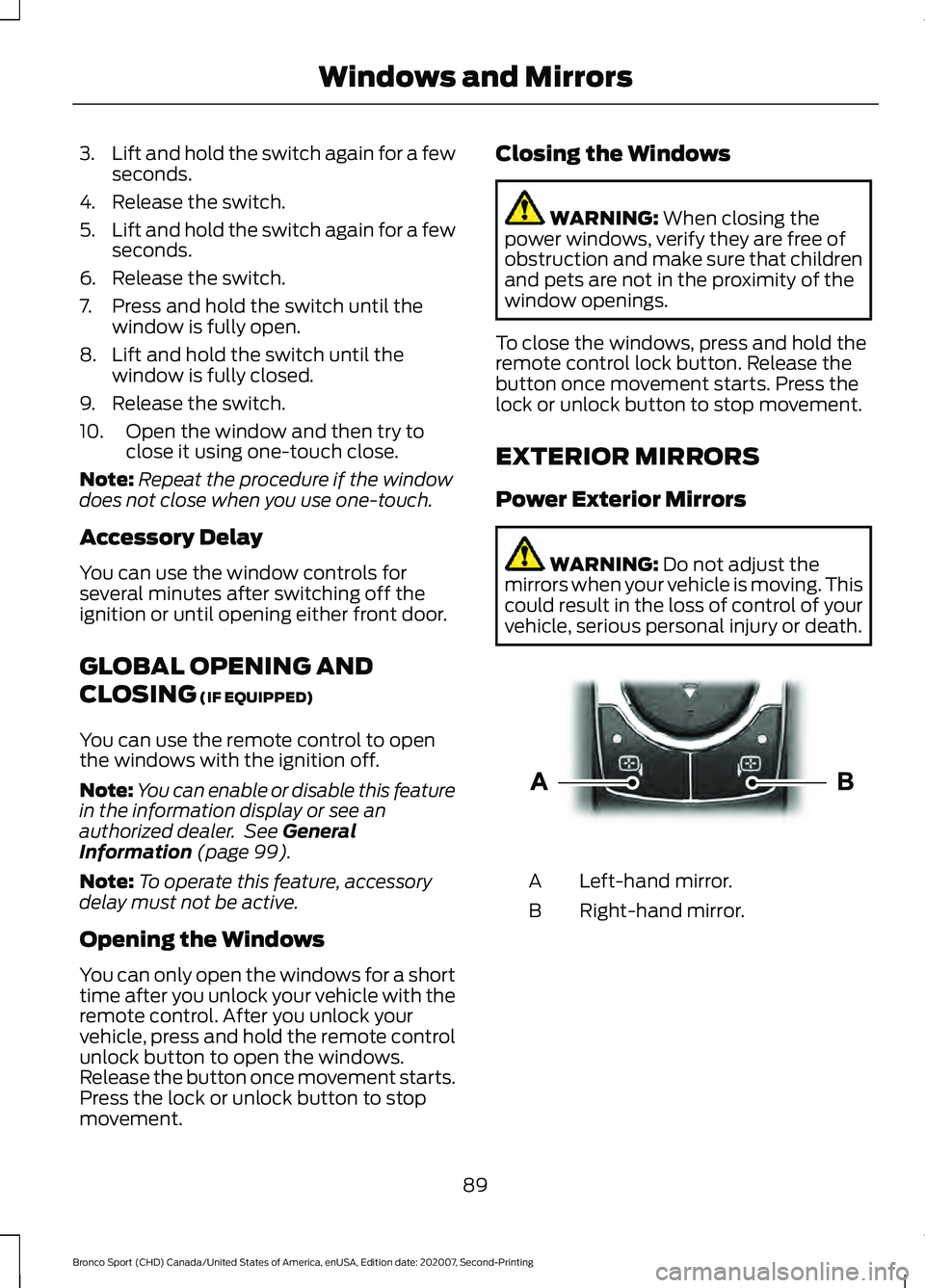
vehicle, serious personal injury or death. Left-hand mirror.
A
Right-hand mirror.
B
89
Bronco Sport (CHD) Canada/United States of America, enUSA, Edition date: 202007, Second-Printing Windows and MirrorsE303926
Page 93 of 471
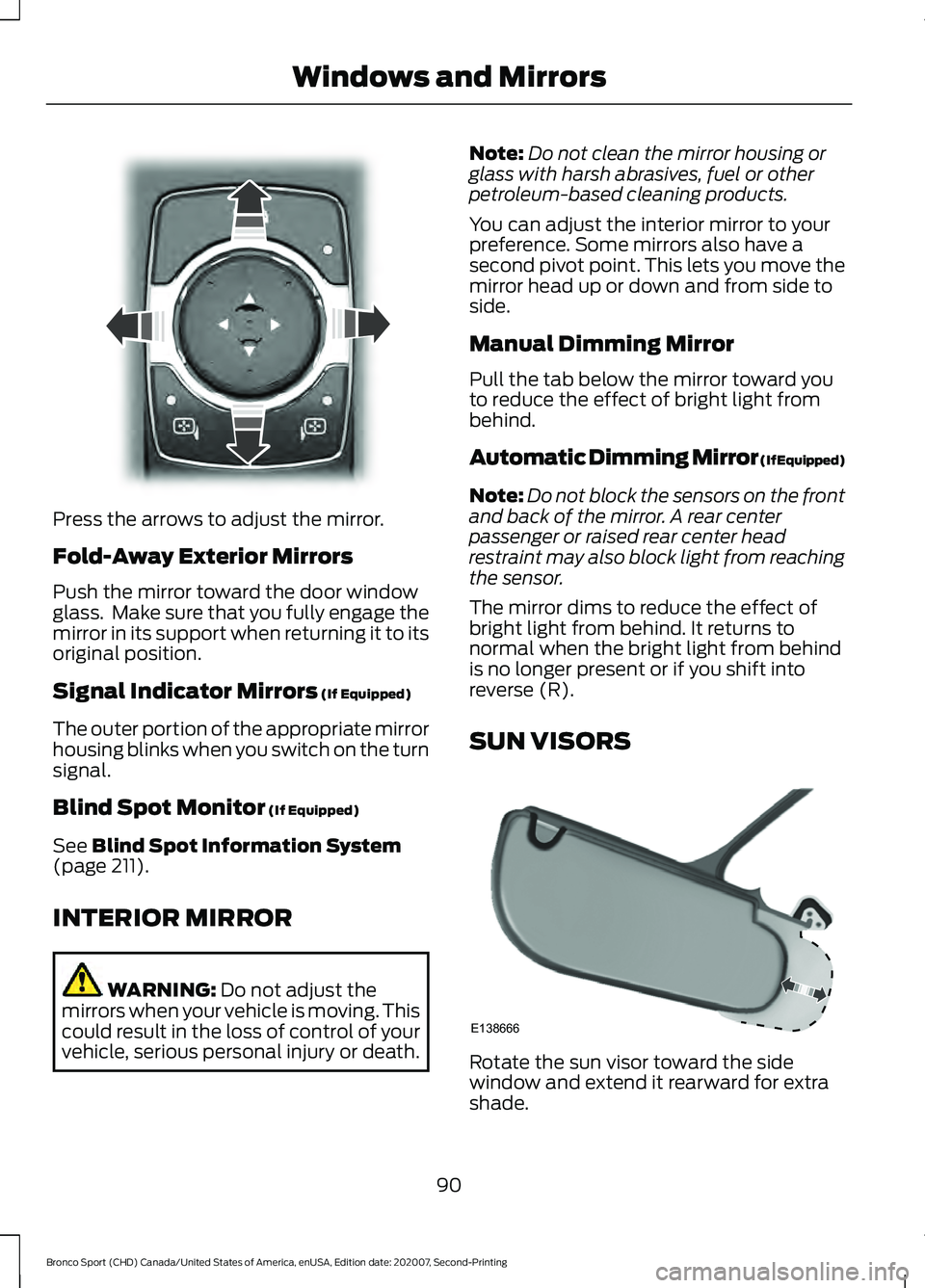
Press the arrows to adjust the mirror.
Fold-Away Exterior Mirrors
Push the mirror toward the door window
glass. Make sure that you fully engage the
mirror in its support when returning it to its
original position.
Signal Indicator Mirrors (If Equipped)
The outer portion of the appropriate mirror
housing blinks when you switch on the turn
signal.
Blind Spot Monitor
(If Equipped)
See
Blind Spot Information System
(page 211).
INTERIOR MIRROR WARNING:
Do not adjust the
mirrors when your vehicle is moving. This
could result in the loss of control of your
vehicle, serious personal injury or death. Note:
Do not clean the mirror housing or
glass with harsh abrasives, fuel or other
petroleum-based cleaning products.
You can adjust the interior mirror to your
preference. Some mirrors also have a
second pivot point. This lets you move the
mirror head up or down and from side to
side.
Manual Dimming Mirror
Pull the tab below the mirror toward you
to reduce the effect of bright light from
behind.
Automatic Dimming Mirror (If Equipped)
Note: Do not block the sensors on the front
and back of the mirror. A rear center
passenger or raised rear center head
restraint may also block light from reaching
the sensor.
The mirror dims to reduce the effect of
bright light from behind. It returns to
normal when the bright light from behind
is no longer present or if you shift into
reverse (R).
SUN VISORS Rotate the sun visor toward the side
window and extend it rearward for extra
shade.
90
Bronco Sport (CHD) Canada/United States of America, enUSA, Edition date: 202007, Second-Printing Windows and MirrorsE303927 E138666
Page 94 of 471
Illuminated Vanity Mirror (If Equipped)
Lift the cover to switch the lamp on.
MOONROOF
(IF EQUIPPED)
WARNING:
Do not leave children
unattended in your vehicle and do not
let them play with the moonroof. Failure
to follow this instruction could result in
personal injury. WARNING:
When closing the
moonroof, verify that it is free of
obstruction and make sure that children
and pets are not in the proximity of the
roof opening.
The moonroof and sunscreen controls are
on the overhead console.
The Moonroof and sunscreen have a
one-touch open and close feature, press
the control all the way down and release.
To stop them during one-touch operation,
press the control a second time. Opening and Closing the Moonroof
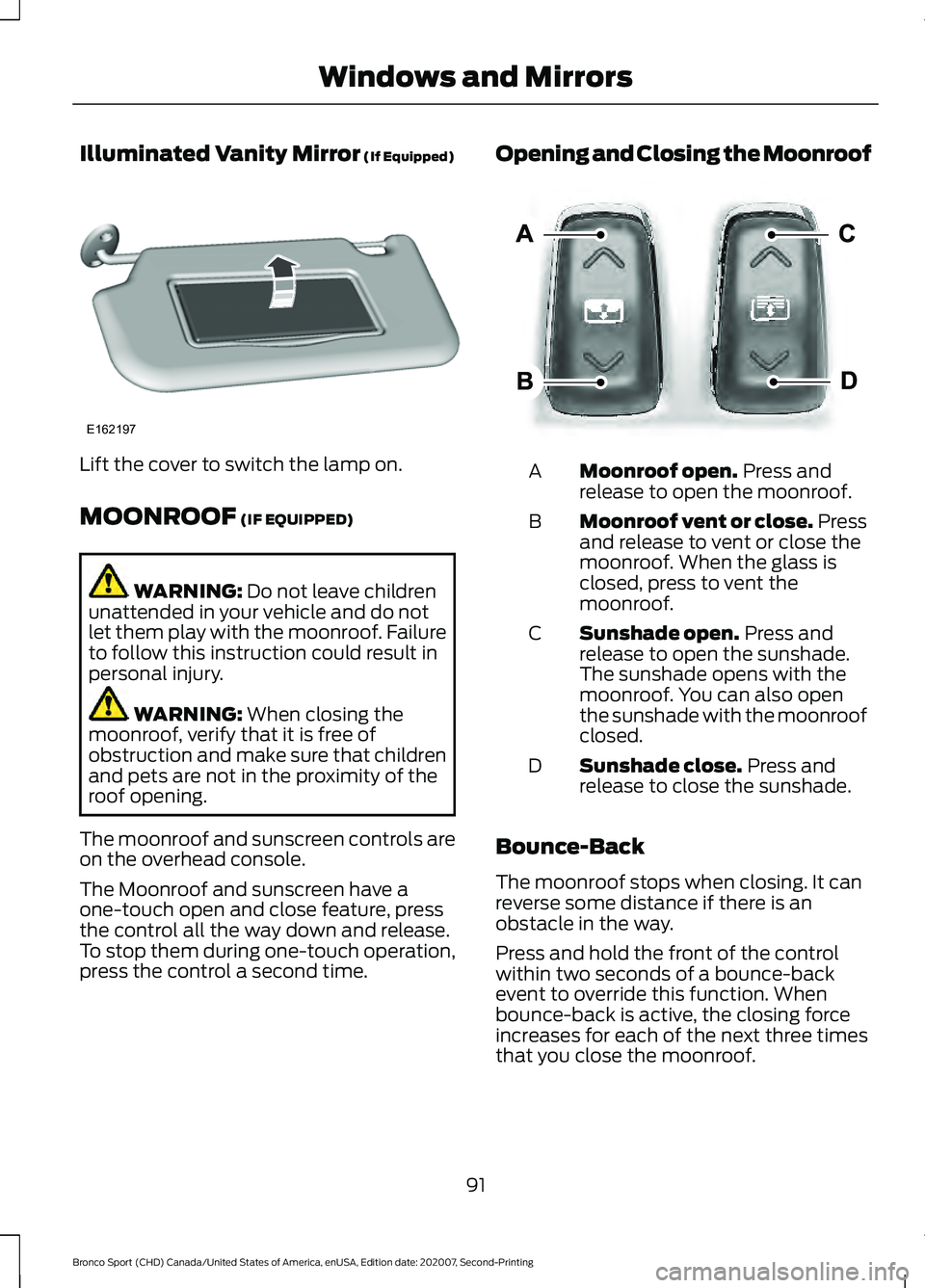
Moonroof open.
Press and
release to open the moonroof.
A
Moonroof vent or close. Press
and release to vent or close the
moonroof. When the glass is
closed, press to vent the
moonroof.
B
Sunshade open.
Press and
release to open the sunshade.
The sunshade opens with the
moonroof. You can also open
the sunshade with the moonroof
closed.
C
Sunshade close.
Press and
release to close the sunshade.
D
Bounce-Back
The moonroof stops when closing. It can
reverse some distance if there is an
obstacle in the way.
Press and hold the front of the control
within two seconds of a bounce-back
event to override this function. When
bounce-back is active, the closing force
increases for each of the next three times
that you close the moonroof.
91
Bronco Sport (CHD) Canada/United States of America, enUSA, Edition date: 202007, Second-Printing Windows and MirrorsE162197 E303933
Page 124 of 471
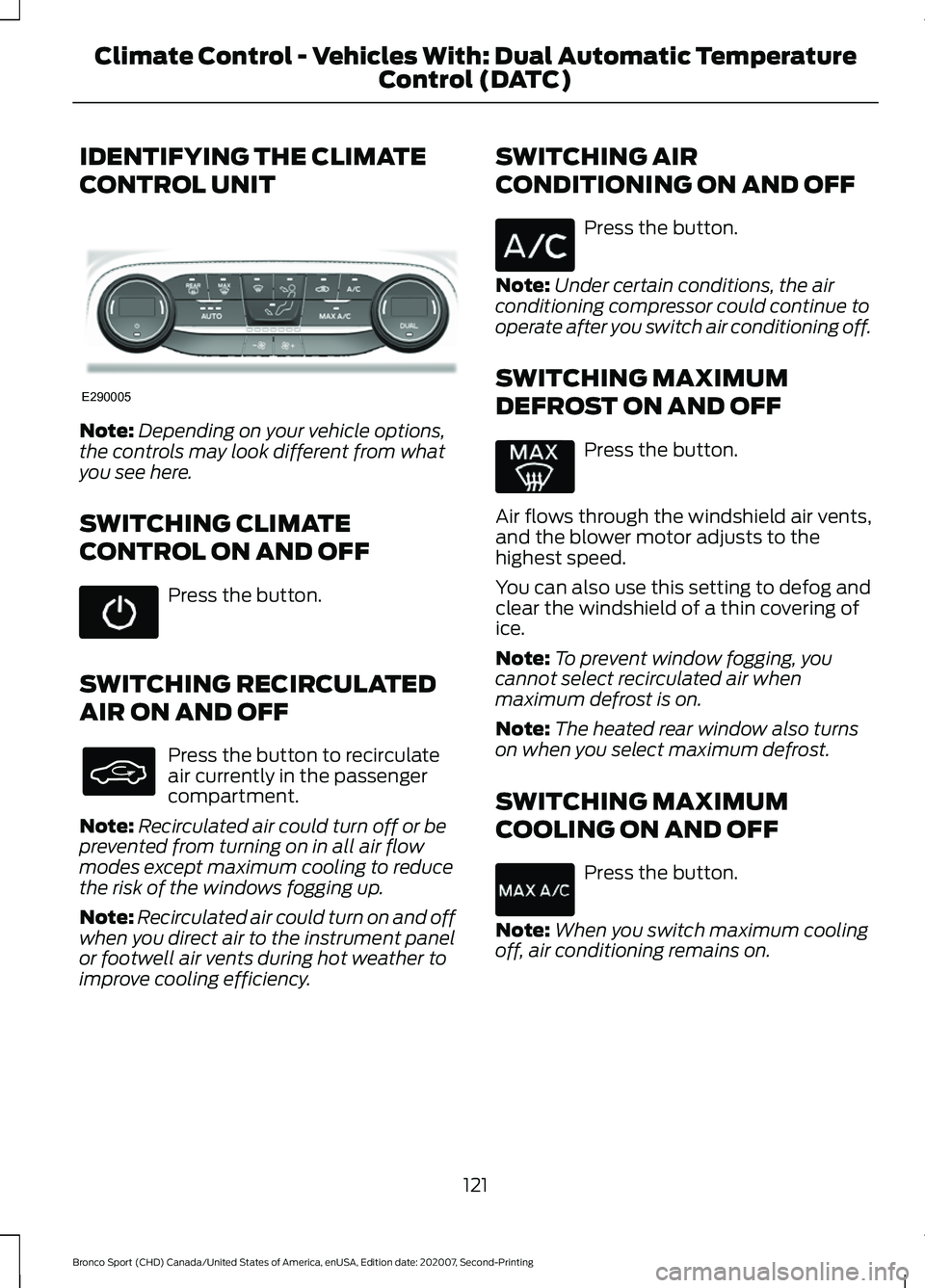
IDENTIFYING THE CLIMATE
CONTROL UNIT
Note:
Depending on your vehicle options,
the controls may look different from what
you see here.
SWITCHING CLIMATE
CONTROL ON AND OFF Press the button.
SWITCHING RECIRCULATED
AIR ON AND OFF Press the button to recirculate
air currently in the passenger
compartment.
Note: Recirculated air could turn off or be
prevented from turning on in all air flow
modes except maximum cooling to reduce
the risk of the windows fogging up.
Note: Recirculated air could turn on and off
when you direct air to the instrument panel
or footwell air vents during hot weather to
improve cooling efficiency. SWITCHING AIR
CONDITIONING ON AND OFF Press the button.
Note: Under certain conditions, the air
conditioning compressor could continue to
operate after you switch air conditioning off.
SWITCHING MAXIMUM
DEFROST ON AND OFF Press the button.
Air flows through the windshield air vents,
and the blower motor adjusts to the
highest speed.
You can also use this setting to defog and
clear the windshield of a thin covering of
ice.
Note: To prevent window fogging, you
cannot select recirculated air when
maximum defrost is on.
Note: The heated rear window also turns
on when you select maximum defrost.
SWITCHING MAXIMUM
COOLING ON AND OFF Press the button.
Note: When you switch maximum cooling
off, air conditioning remains on.
121
Bronco Sport (CHD) Canada/United States of America, enUSA, Edition date: 202007, Second-Printing Climate Control - Vehicles With: Dual Automatic Temperature
Control (DATC)E290005
Page 125 of 471
SWITCHING THE HEATED
WIPER PARK ON AND OFF (IF
EQUIPPED) When you switch the heated rear
window on, the heated wiper
park also turns on.
SWITCHING THE HEATED
REAR WINDOW ON AND OFF Press the button to clear the rear
window of thin ice and fog. The
heated rear window turns off
after a short period of time.
Note: Do not use harsh chemicals, razor
blades or other sharp objects to clean or
remove decals from the inside of the heated
rear window as this could cause damage to
the heated rear window grid lines not
covered by the vehicle Warranty.
SWITCHING THE HEATED
MIRRORS ON AND OFF
(IF
EQUIPPED)
When you switch the heated rear window
on, the heated exterior mirrors turn on.
Note: Do not remove ice from the mirrors
with a scraper or adjust the mirror glass
when it is frozen in place.
Note: Do not clean the mirror housing or
glass with harsh abrasives, fuel or other
petroleum-based cleaning products. The
vehicle warranty may not cover damage
caused to the mirror housing or glass. SETTING THE BLOWER MOTOR
SPEED Note:
Lights on the control illuminate to
indicate the blower motor speed.
Note: When you switch the blower motor
off, air conditioning turns off and the
windows could fog up.
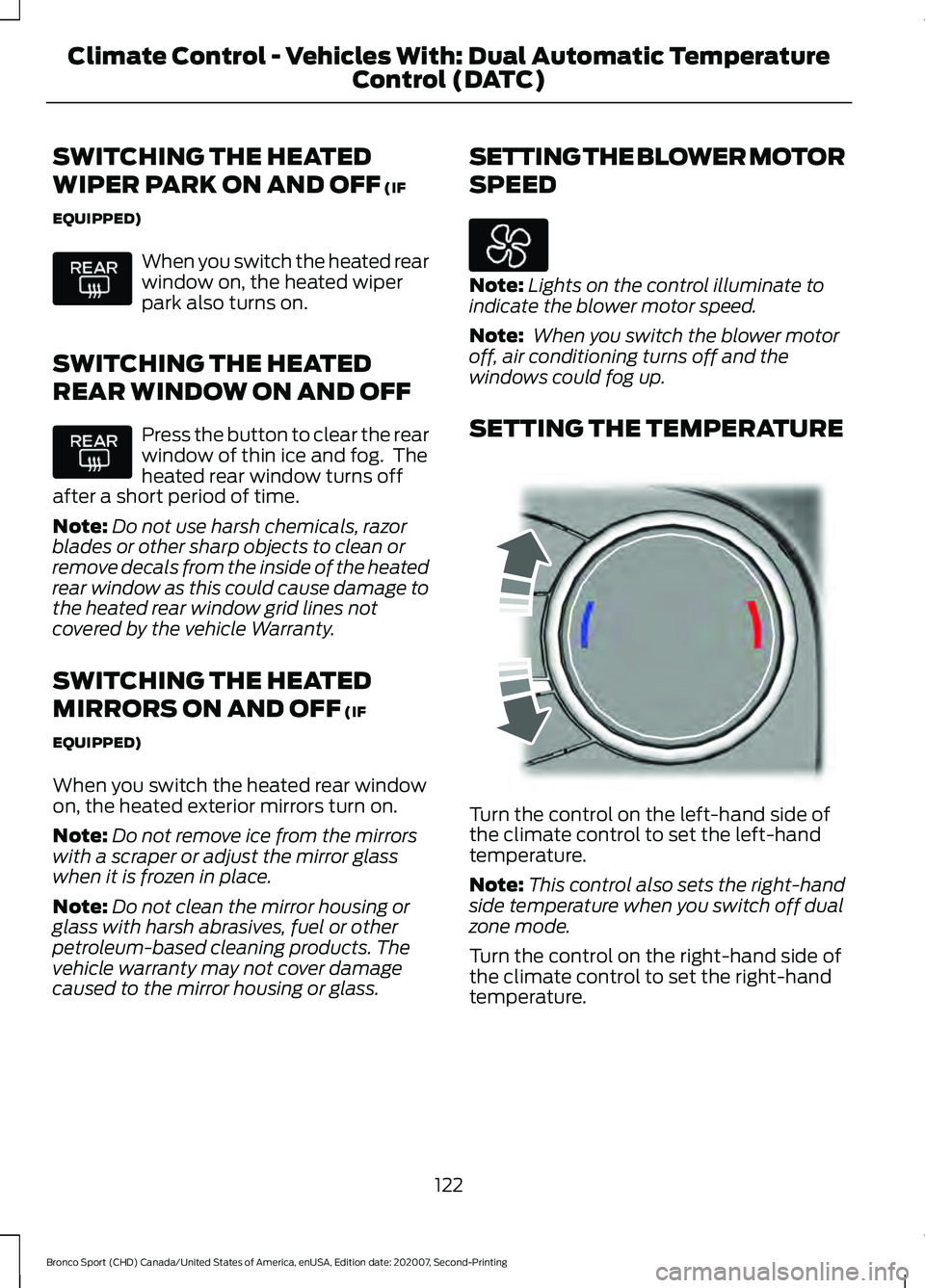
SETTING THE TEMPERATURE Turn the control on the left-hand side of
the climate control to set the left-hand
temperature.
Note:
This control also sets the right-hand
side temperature when you switch off dual
zone mode.
Turn the control on the right-hand side of
the climate control to set the right-hand
temperature.
122
Bronco Sport (CHD) Canada/United States of America, enUSA, Edition date: 202007, Second-Printing Climate Control - Vehicles With: Dual Automatic Temperature
Control (DATC) E244115
Page 127 of 471
Switching Dual Mode On and Off
Press the button.
CLIMATE CONTROL –
TROUBLESHOOTING
Climate Control – Frequently
Asked Questions
Why is the volume of air to the rear
passenger compartment limited ? Objects may obstruct the air direction
to the rear passenger compartment.
Make sure objects have not been
placed under the front seats.
Why is the volume of air from the air
vents reduced? The air intake area at the base of the
windshield could be obstructed. Make
sure the air intake area is free from any
snow, ice or leaves.
What are the recommended settings
for heating the interior? Auto mode on and instrument panel
and side air vents fully open.
How can I quickly heat the interior? Select the highest blower motor
speed, highest temperature and direct
the air to the footwell air vents.
What are the recommended settings
for cooling the interior? Auto mode on.
How can I quickly cool the interior? Switch maximum cooling on, switch
recirculated air on and drive with the
windows open until you feel cold air
through the air vents. How can I reduce the humidity build-up
inside my vehicle?
Do not drive with the system off or
with recirculated air on.
How can I defog the side windows? Switch maximum defrost on.
How can I defog or clear the windshield
of thin ice? Switch maximum defrost on.
Why do I feel air from the footwell air
vents regardless of the air
distribution? This is normal operation. You may feel
a small amount of air from the
footwell air vents regardless of the air
distribution.
What happens if I switch auto mode on
when the outside temperature and
in-vehicle temperature is high? The system temporarily selects
recirculated air to maximize cooling.
What happens if I switch auto mode on
when the outside temperature is low
and the engine is cold? Air is directed to the windshield and
the outer instrument panel air vents.
124
Bronco Sport (CHD) Canada/United States of America, enUSA, Edition date: 202007, Second-Printing Climate Control - Vehicles With: Dual Automatic Temperature
Control (DATC)E265280
Page 128 of 471
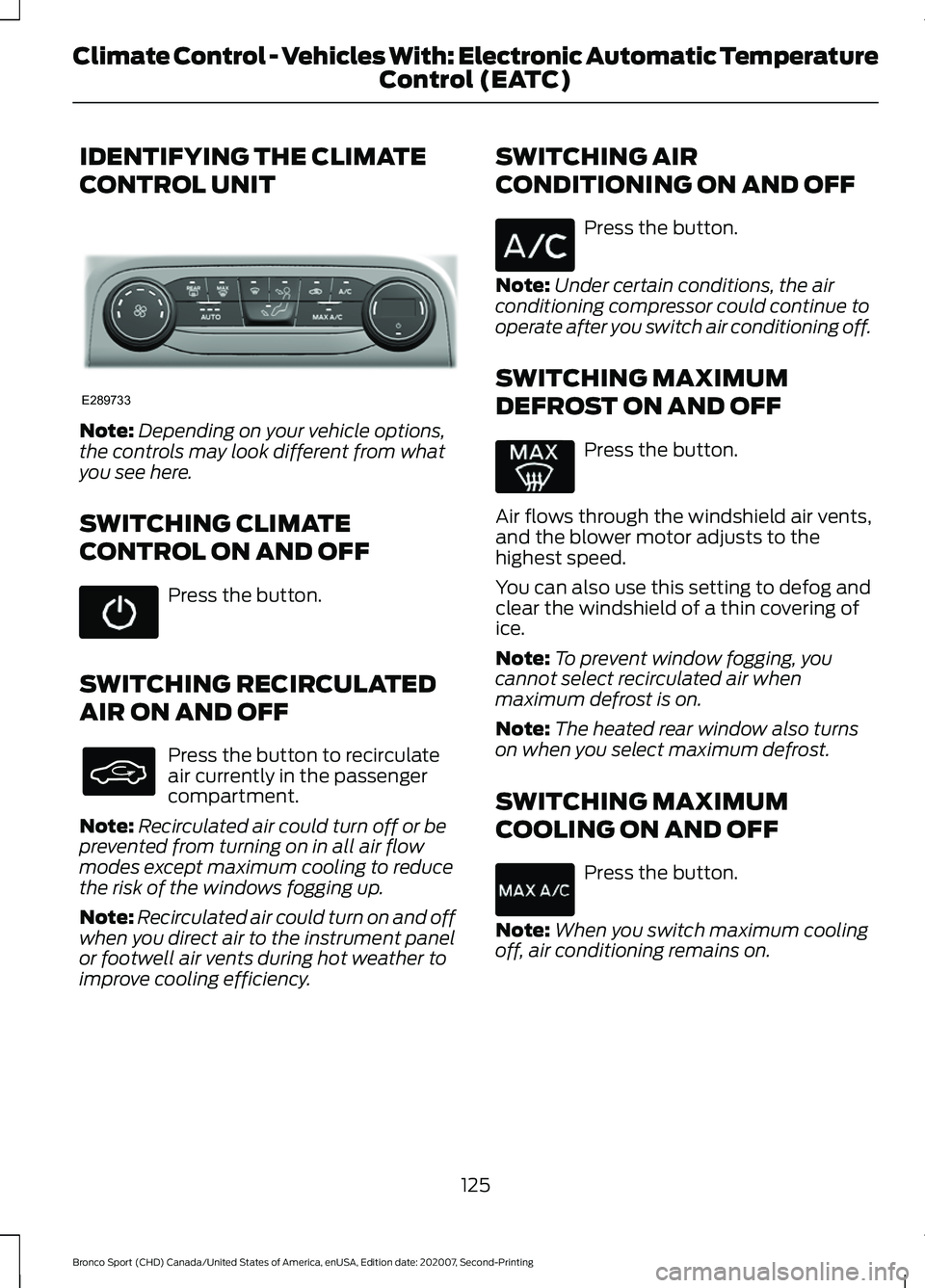
IDENTIFYING THE CLIMATE
CONTROL UNIT
Note:
Depending on your vehicle options,
the controls may look different from what
you see here.
SWITCHING CLIMATE
CONTROL ON AND OFF Press the button.
SWITCHING RECIRCULATED
AIR ON AND OFF Press the button to recirculate
air currently in the passenger
compartment.
Note: Recirculated air could turn off or be
prevented from turning on in all air flow
modes except maximum cooling to reduce
the risk of the windows fogging up.
Note: Recirculated air could turn on and off
when you direct air to the instrument panel
or footwell air vents during hot weather to
improve cooling efficiency. SWITCHING AIR
CONDITIONING ON AND OFF Press the button.
Note: Under certain conditions, the air
conditioning compressor could continue to
operate after you switch air conditioning off.
SWITCHING MAXIMUM
DEFROST ON AND OFF Press the button.
Air flows through the windshield air vents,
and the blower motor adjusts to the
highest speed.
You can also use this setting to defog and
clear the windshield of a thin covering of
ice.
Note: To prevent window fogging, you
cannot select recirculated air when
maximum defrost is on.
Note: The heated rear window also turns
on when you select maximum defrost.
SWITCHING MAXIMUM
COOLING ON AND OFF Press the button.
Note: When you switch maximum cooling
off, air conditioning remains on.
125
Bronco Sport (CHD) Canada/United States of America, enUSA, Edition date: 202007, Second-Printing Climate Control - Vehicles With: Electronic Automatic Temperature Control (EATC)E289733