ignition FORD BRONCO SPORT 2021 Owner's Manual
[x] Cancel search | Manufacturer: FORD, Model Year: 2021, Model line: BRONCO SPORT, Model: FORD BRONCO SPORT 2021Pages: 471, PDF Size: 7 MB
Page 92 of 471
3.
Lift and hold the switch again for a few
seconds.
4. Release the switch.
5. Lift and hold the switch again for a few
seconds.
6. Release the switch.
7. Press and hold the switch until the window is fully open.
8. Lift and hold the switch until the window is fully closed.
9. Release the switch.
10. Open the window and then try to close it using one-touch close.
Note: Repeat the procedure if the window
does not close when you use one-touch.
Accessory Delay
You can use the window controls for
several minutes after switching off the
ignition or until opening either front door.
GLOBAL OPENING AND
CLOSING (IF EQUIPPED)
You can use the remote control to open
the windows with the ignition off.
Note: You can enable or disable this feature
in the information display or see an
authorized dealer. See
General
Information (page 99).
Note: To operate this feature, accessory
delay must not be active.
Opening the Windows
You can only open the windows for a short
time after you unlock your vehicle with the
remote control. After you unlock your
vehicle, press and hold the remote control
unlock button to open the windows.
Release the button once movement starts.
Press the lock or unlock button to stop
movement. Closing the Windows WARNING:
When closing the
power windows, verify they are free of
obstruction and make sure that children
and pets are not in the proximity of the
window openings.
To close the windows, press and hold the
remote control lock button. Release the
button once movement starts. Press the
lock or unlock button to stop movement.
EXTERIOR MIRRORS
Power Exterior Mirrors WARNING:
Do not adjust the
mirrors when your vehicle is moving. This
could result in the loss of control of your
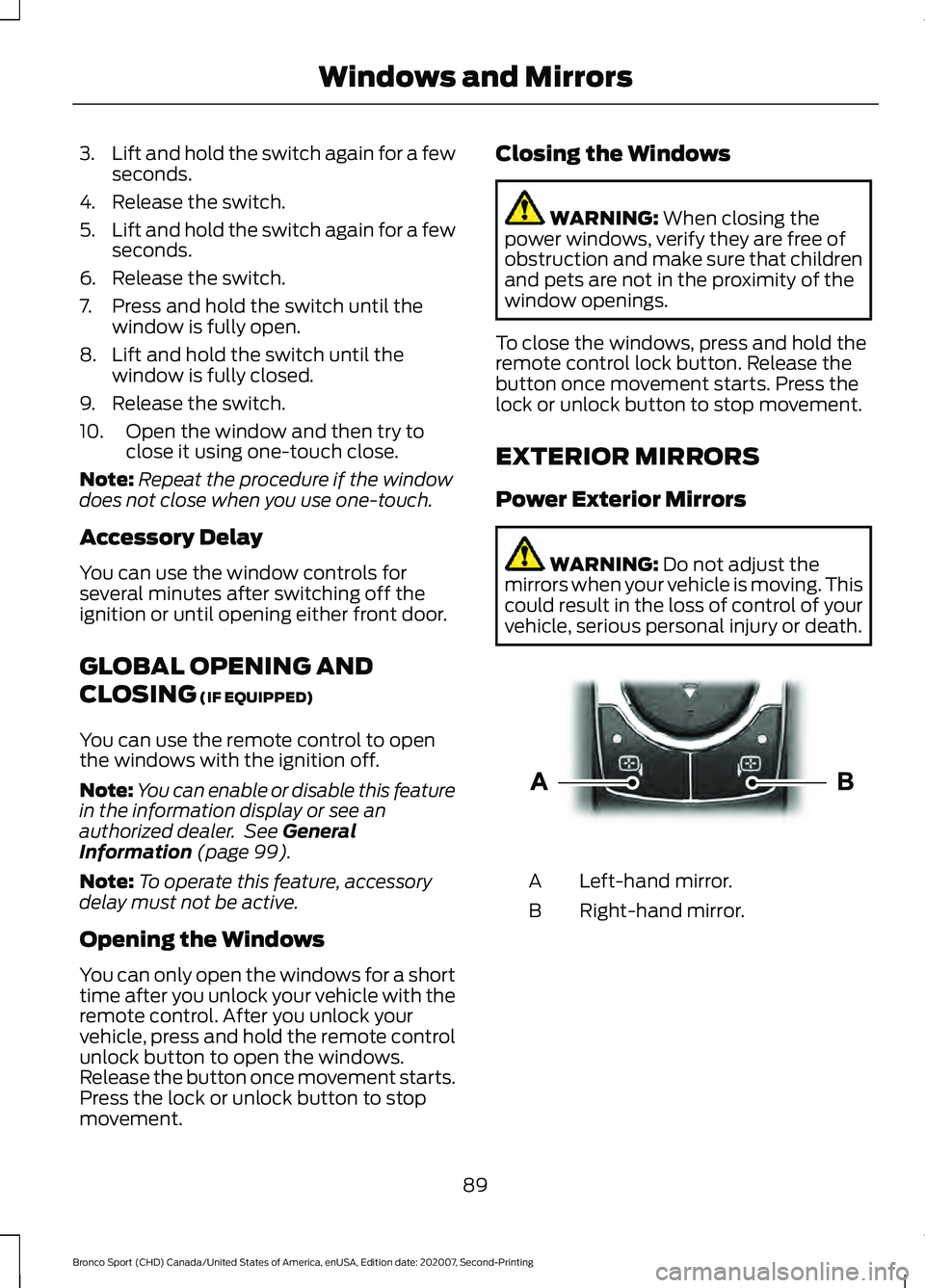
vehicle, serious personal injury or death. Left-hand mirror.
A
Right-hand mirror.
B
89
Bronco Sport (CHD) Canada/United States of America, enUSA, Edition date: 202007, Second-Printing Windows and MirrorsE303926
Page 99 of 471
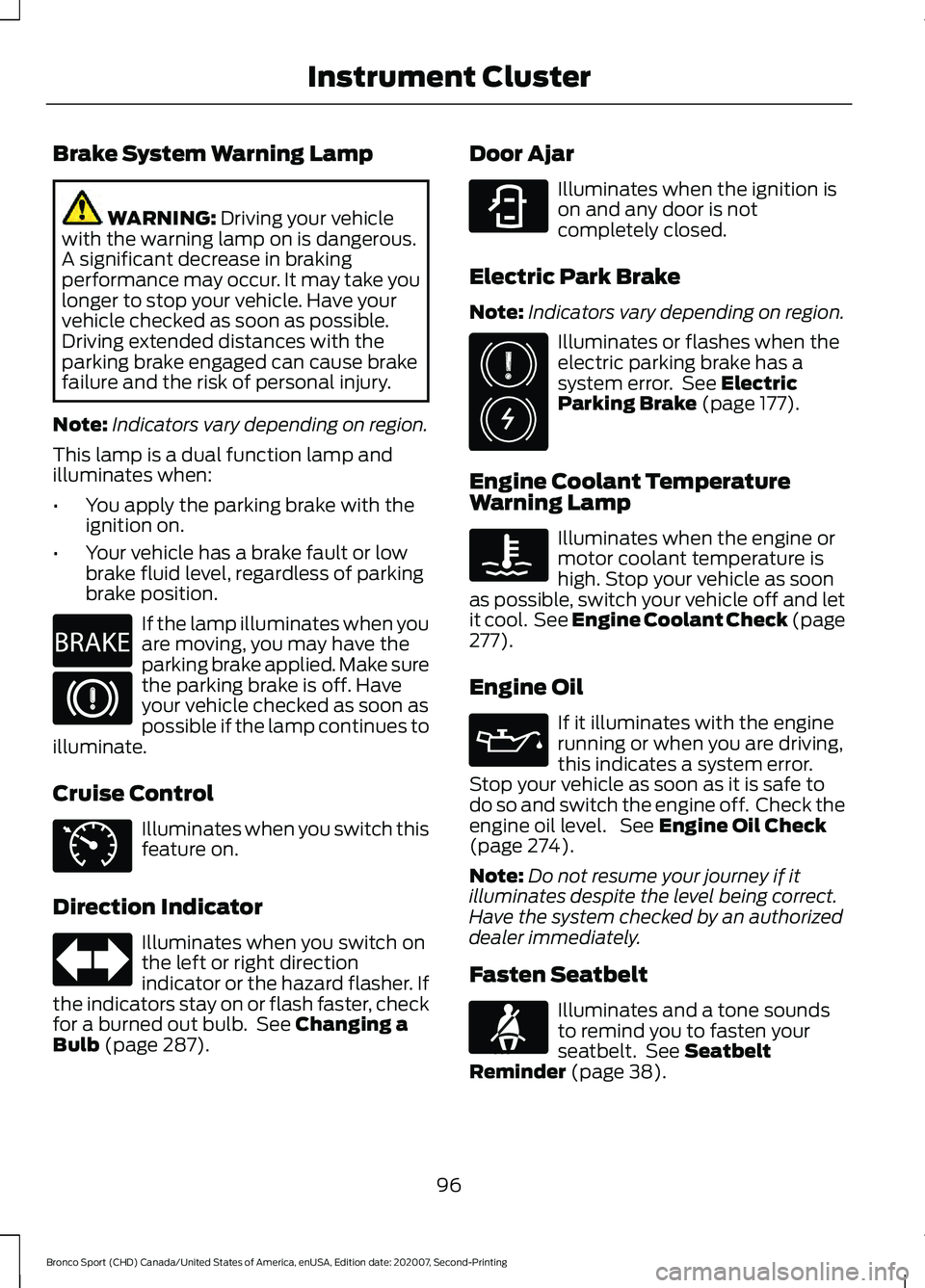
Brake System Warning Lamp
WARNING: Driving your vehicle
with the warning lamp on is dangerous.
A significant decrease in braking
performance may occur. It may take you
longer to stop your vehicle. Have your
vehicle checked as soon as possible.
Driving extended distances with the
parking brake engaged can cause brake
failure and the risk of personal injury.
Note: Indicators vary depending on region.
This lamp is a dual function lamp and
illuminates when:
• You apply the parking brake with the
ignition on.
• Your vehicle has a brake fault or low
brake fluid level, regardless of parking
brake position. If the lamp illuminates when you
are moving, you may have the
parking brake applied. Make sure
the parking brake is off. Have
your vehicle checked as soon as
possible if the lamp continues to
illuminate.
Cruise Control Illuminates when you switch this
feature on.
Direction Indicator Illuminates when you switch on
the left or right direction
indicator or the hazard flasher. If
the indicators stay on or flash faster, check
for a burned out bulb. See
Changing a
Bulb (page 287). Door Ajar Illuminates when the ignition is
on and any door is not
completely closed.
Electric Park Brake
Note: Indicators vary depending on region. Illuminates or flashes when the
electric parking brake has a
system error. See
Electric
Parking Brake (page 177).
Engine Coolant Temperature
Warning Lamp Illuminates when the engine or
motor coolant temperature is
high. Stop your vehicle as soon
as possible, switch your vehicle off and let
it cool. See Engine Coolant Check (page
277
).
Engine Oil If it illuminates with the engine
running or when you are driving,
this indicates a system error.
Stop your vehicle as soon as it is safe to
do so and switch the engine off. Check the
engine oil level. See
Engine Oil Check
(page 274).
Note: Do not resume your journey if it
illuminates despite the level being correct.
Have the system checked by an authorized
dealer immediately.
Fasten Seatbelt Illuminates and a tone sounds
to remind you to fasten your
seatbelt. See
Seatbelt
Reminder (page 38).
96
Bronco Sport (CHD) Canada/United States of America, enUSA, Edition date: 202007, Second-Printing Instrument ClusterE270480 E71340 E323451 E325775 E71880
Page 100 of 471
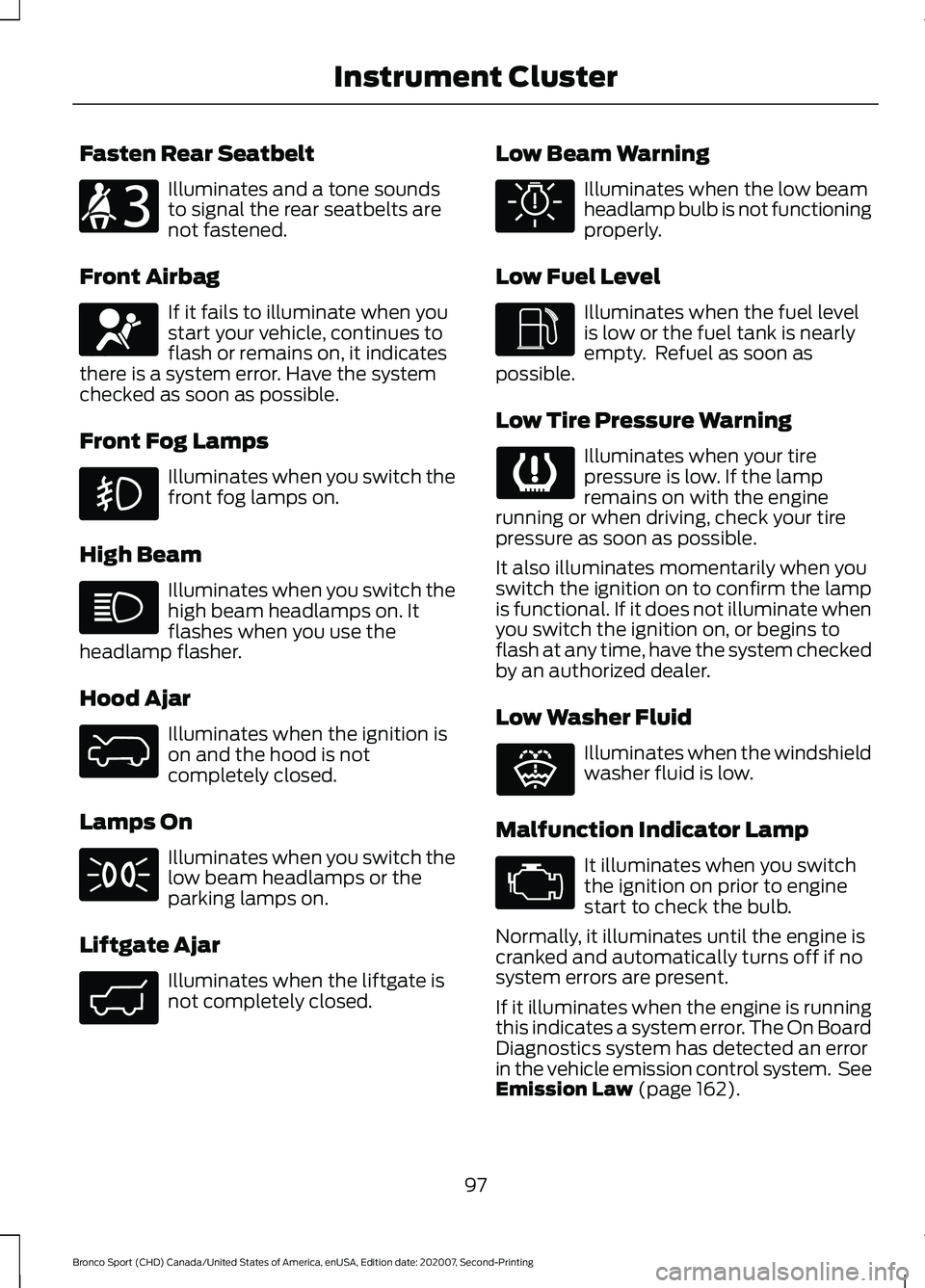
Fasten Rear Seatbelt
Illuminates and a tone sounds
to signal the rear seatbelts are
not fastened.
Front Airbag If it fails to illuminate when you
start your vehicle, continues to
flash or remains on, it indicates
there is a system error. Have the system
checked as soon as possible.
Front Fog Lamps Illuminates when you switch the
front fog lamps on.
High Beam Illuminates when you switch the
high beam headlamps on. It
flashes when you use the
headlamp flasher.
Hood Ajar Illuminates when the ignition is
on and the hood is not
completely closed.
Lamps On Illuminates when you switch the
low beam headlamps or the
parking lamps on.
Liftgate Ajar Illuminates when the liftgate is
not completely closed. Low Beam Warning Illuminates when the low beam
headlamp bulb is not functioning
properly.
Low Fuel Level Illuminates when the fuel level
is low or the fuel tank is nearly
empty. Refuel as soon as
possible.
Low Tire Pressure Warning Illuminates when your tire
pressure is low. If the lamp
remains on with the engine
running or when driving, check your tire
pressure as soon as possible.
It also illuminates momentarily when you
switch the ignition on to confirm the lamp
is functional. If it does not illuminate when
you switch the ignition on, or begins to
flash at any time, have the system checked
by an authorized dealer.
Low Washer Fluid Illuminates when the windshield
washer fluid is low.
Malfunction Indicator Lamp It illuminates when you switch
the ignition on prior to engine
start to check the bulb.
Normally, it illuminates until the engine is
cranked and automatically turns off if no
system errors are present.
If it illuminates when the engine is running
this indicates a system error. The On Board
Diagnostics system has detected an error
in the vehicle emission control system. See
Emission Law (page 162).
97
Bronco Sport (CHD) Canada/United States of America, enUSA, Edition date: 202007, Second-Printing Instrument ClusterE206718 E67017 E325774 E323454 E325579 E325771 E132353
Page 101 of 471
If it flashes, engine misfire may be
occurring. Continuing to drive your vehicle
may cause reduced power or the engine
to stop. Failure to respond to the warning
lamp may cause component damage not
covered by the vehicle warranty. Have your
vehicle checked as soon as possible.
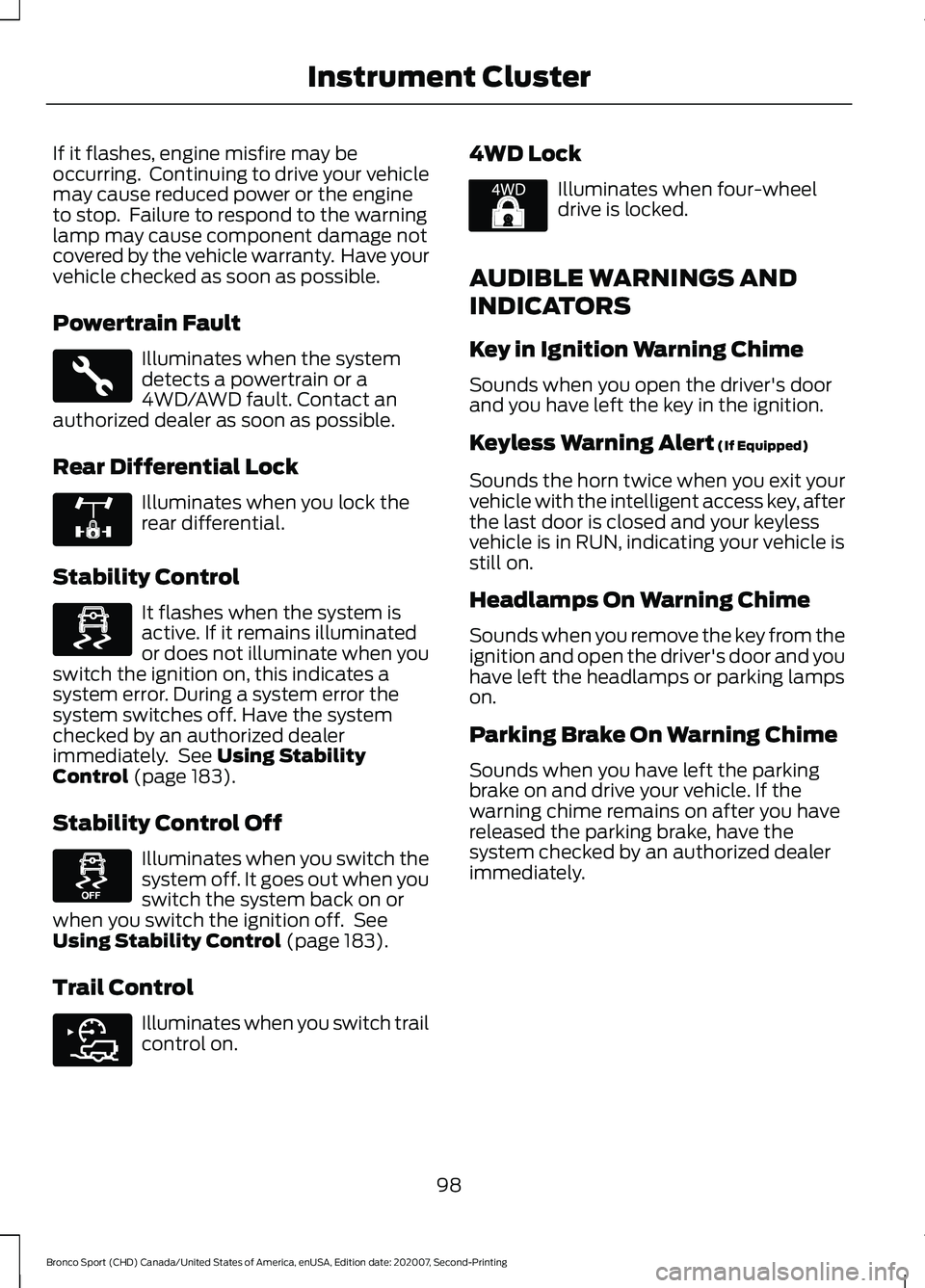
Powertrain Fault
Illuminates when the system
detects a powertrain or a
4WD/AWD fault. Contact an
authorized dealer as soon as possible.
Rear Differential Lock Illuminates when you lock the
rear differential.
Stability Control It flashes when the system is
active. If it remains illuminated
or does not illuminate when you
switch the ignition on, this indicates a
system error. During a system error the
system switches off. Have the system
checked by an authorized dealer
immediately. See Using Stability
Control (page 183).
Stability Control Off Illuminates when you switch the
system off. It goes out when you
switch the system back on or
when you switch the ignition off. See
Using Stability Control
(page 183).
Trail Control Illuminates when you switch trail
control on. 4WD Lock Illuminates when four-wheel
drive is locked.
AUDIBLE WARNINGS AND
INDICATORS
Key in Ignition Warning Chime
Sounds when you open the driver's door
and you have left the key in the ignition.
Keyless Warning Alert
(If Equipped)
Sounds the horn twice when you exit your
vehicle with the intelligent access key, after
the last door is closed and your keyless
vehicle is in RUN, indicating your vehicle is
still on.
Headlamps On Warning Chime
Sounds when you remove the key from the
ignition and open the driver's door and you
have left the headlamps or parking lamps
on.
Parking Brake On Warning Chime
Sounds when you have left the parking
brake on and drive your vehicle. If the
warning chime remains on after you have
released the parking brake, have the
system checked by an authorized dealer
immediately.
98
Bronco Sport (CHD) Canada/United States of America, enUSA, Edition date: 202007, Second-Printing Instrument ClusterE323455 E325779 E323869 E323870 E318506 E325580
Page 109 of 471
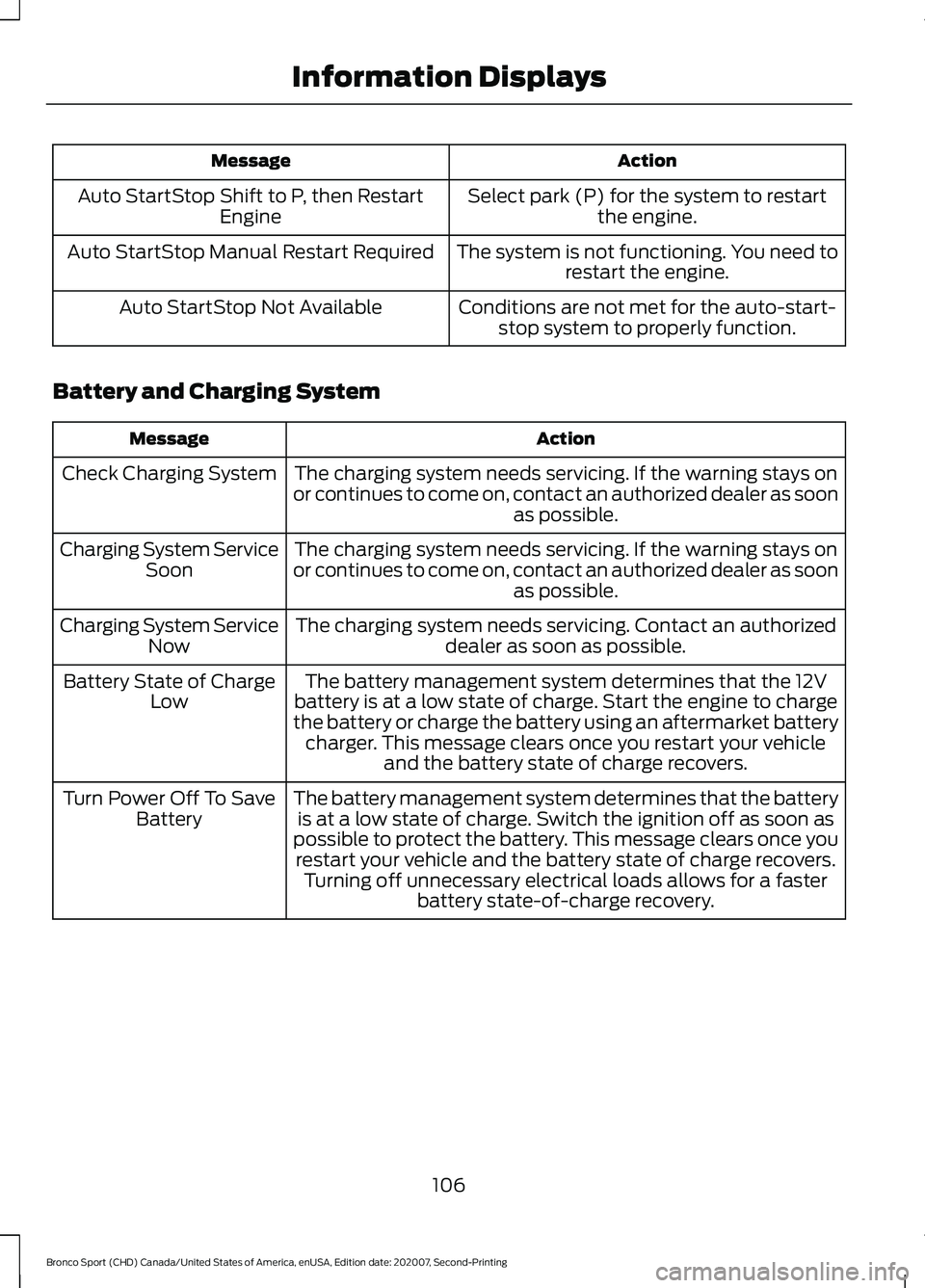
Action
Message
Select park (P) for the system to restartthe engine.
Auto StartStop Shift to P, then Restart
Engine
The system is not functioning. You need torestart the engine.
Auto StartStop Manual Restart Required
Conditions are not met for the auto-start-stop system to properly function.
Auto StartStop Not Available
Battery and Charging System Action
Message
The charging system needs servicing. If the warning stays on
or continues to come on, contact an authorized dealer as soon as possible.
Check Charging System
The charging system needs servicing. If the warning stays on
or continues to come on, contact an authorized dealer as soon as possible.
Charging System Service
Soon
The charging system needs servicing. Contact an authorized dealer as soon as possible.
Charging System Service
Now
The battery management system determines that the 12V
battery is at a low state of charge. Start the engine to charge
the battery or charge the battery using an aftermarket battery charger. This message clears once you restart your vehicle and the battery state of charge recovers.
Battery State of Charge
Low
The battery management system determines that the batteryis at a low state of charge. Switch the ignition off as soon as
possible to protect the battery. This message clears once you restart your vehicle and the battery state of charge recovers. Turning off unnecessary electrical loads allows for a faster battery state-of-charge recovery.
Turn Power Off To Save
Battery
106
Bronco Sport (CHD) Canada/United States of America, enUSA, Edition date: 202007, Second-Printing Information Displays
Page 113 of 471
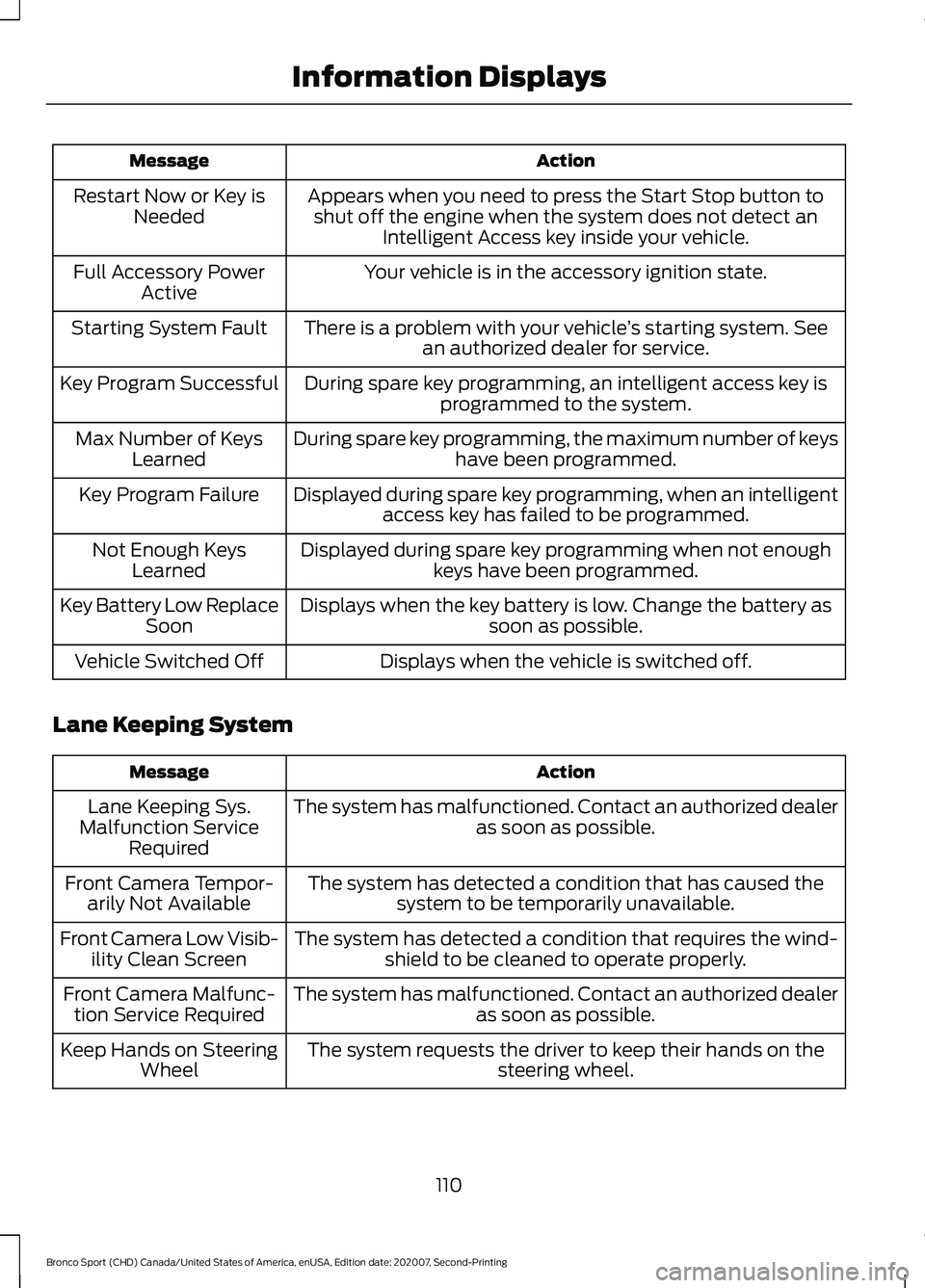
Action
Message
Appears when you need to press the Start Stop button toshut off the engine when the system does not detect an Intelligent Access key inside your vehicle.
Restart Now or Key is
Needed
Your vehicle is in the accessory ignition state.
Full Accessory Power
Active
There is a problem with your vehicle ’s starting system. See
an authorized dealer for service.
Starting System Fault
During spare key programming, an intelligent access key isprogrammed to the system.
Key Program Successful
During spare key programming, the maximum number of keyshave been programmed.
Max Number of Keys
Learned
Displayed during spare key programming, when an intelligentaccess key has failed to be programmed.
Key Program Failure
Displayed during spare key programming when not enoughkeys have been programmed.
Not Enough Keys
Learned
Displays when the key battery is low. Change the battery as soon as possible.
Key Battery Low Replace
Soon
Displays when the vehicle is switched off.
Vehicle Switched Off
Lane Keeping System Action
Message
The system has malfunctioned. Contact an authorized dealer as soon as possible.
Lane Keeping Sys.
Malfunction Service Required
The system has detected a condition that has caused thesystem to be temporarily unavailable.
Front Camera Tempor-
arily Not Available
The system has detected a condition that requires the wind-shield to be cleaned to operate properly.
Front Camera Low Visib-
ility Clean Screen
The system has malfunctioned. Contact an authorized dealeras soon as possible.
Front Camera Malfunc-
tion Service Required
The system requests the driver to keep their hands on thesteering wheel.
Keep Hands on Steering
Wheel
110
Bronco Sport (CHD) Canada/United States of America, enUSA, Edition date: 202007, Second-Printing Information Displays
Page 119 of 471
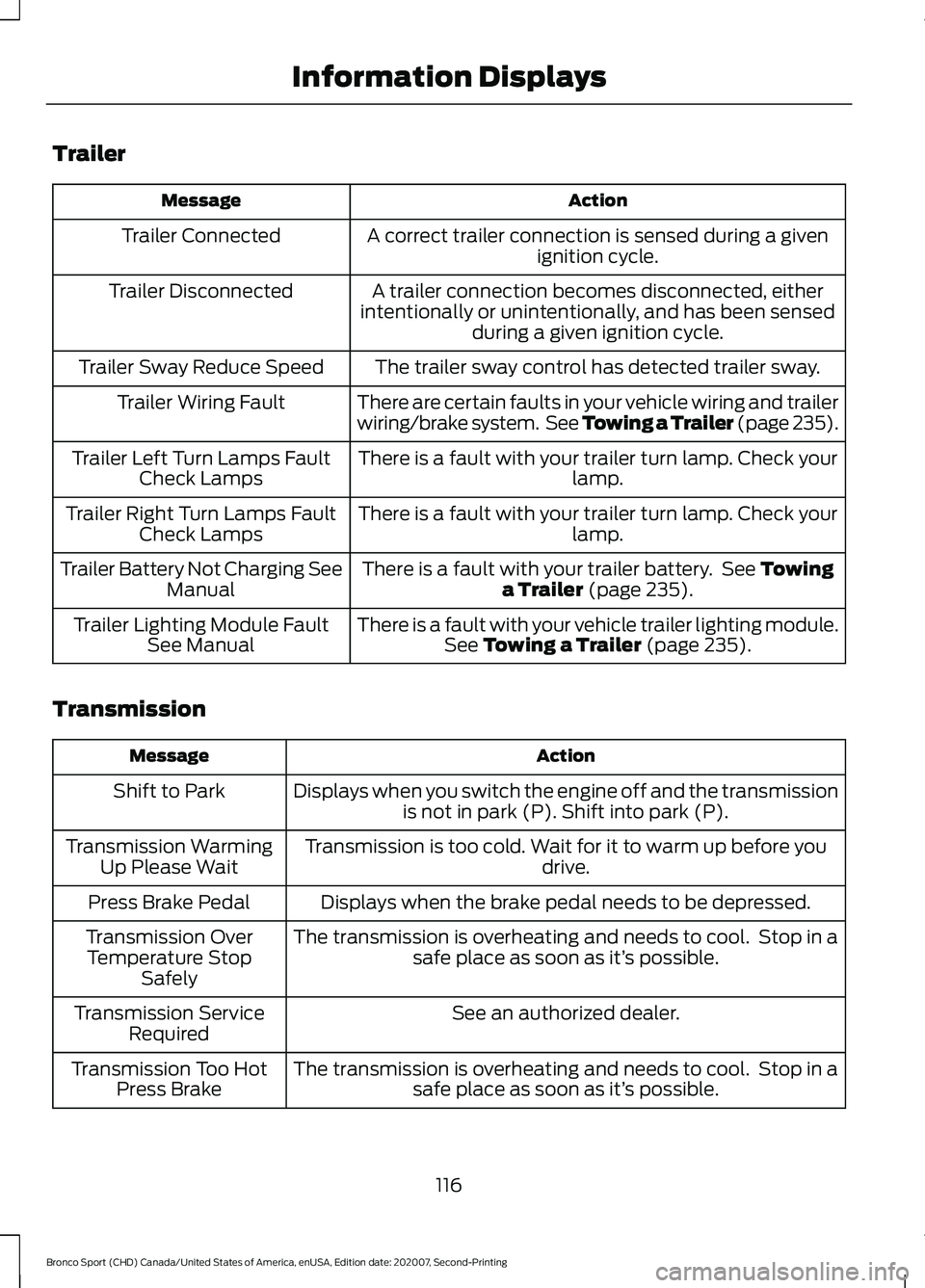
Trailer
Action
Message
A correct trailer connection is sensed during a givenignition cycle.
Trailer Connected
A trailer connection becomes disconnected, either
intentionally or unintentionally, and has been sensed during a given ignition cycle.
Trailer Disconnected
The trailer sway control has detected trailer sway.
Trailer Sway Reduce Speed
There are certain faults in your vehicle wiring and trailer
wiring/brake system. See Towing a Trailer (page 235).
Trailer Wiring Fault
There is a fault with your trailer turn lamp. Check yourlamp.
Trailer Left Turn Lamps Fault
Check Lamps
There is a fault with your trailer turn lamp. Check yourlamp.
Trailer Right Turn Lamps Fault
Check Lamps
There is a fault with your trailer battery. See
Towing
a Trailer (page 235).
Trailer Battery Not Charging See
Manual
There is a fault with your vehicle trailer lighting module.See
Towing a Trailer (page 235).
Trailer Lighting Module Fault
See Manual
Transmission Action
Message
Displays when you switch the engine off and the transmissionis not in park (P). Shift into park (P).
Shift to Park
Transmission is too cold. Wait for it to warm up before you drive.
Transmission Warming
Up Please Wait
Displays when the brake pedal needs to be depressed.
Press Brake Pedal
The transmission is overheating and needs to cool. Stop in asafe place as soon as it’ s possible.
Transmission Over
Temperature Stop Safely
See an authorized dealer.
Transmission Service
Required
The transmission is overheating and needs to cool. Stop in asafe place as soon as it’ s possible.
Transmission Too Hot
Press Brake
116
Bronco Sport (CHD) Canada/United States of America, enUSA, Edition date: 202007, Second-Printing Information Displays
Page 120 of 471
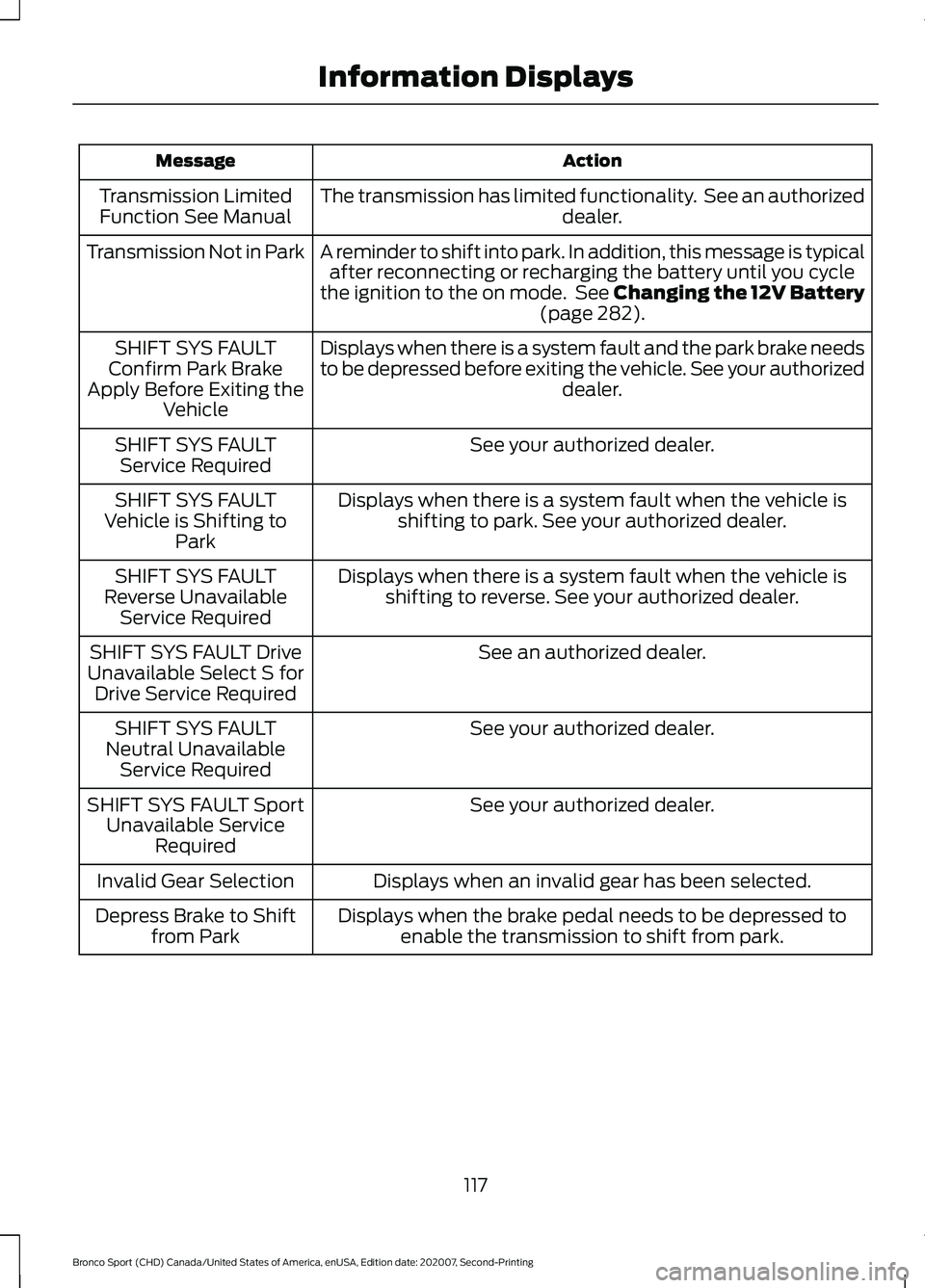
Action
Message
The transmission has limited functionality. See an authorized dealer.
Transmission Limited
Function See Manual
A reminder to shift into park. In addition, this message is typicalafter reconnecting or recharging the battery until you cycle
the ignition to the on mode. See Changing the 12V Battery (page 282).
Transmission Not in Park
Displays when there is a system fault and the park brake needs
to be depressed before exiting the vehicle. See your authorized dealer.
SHIFT SYS FAULT
Confirm Park Brake
Apply Before Exiting the Vehicle
See your authorized dealer.
SHIFT SYS FAULT
Service Required
Displays when there is a system fault when the vehicle isshifting to park. See your authorized dealer.
SHIFT SYS FAULT
Vehicle is Shifting to Park
Displays when there is a system fault when the vehicle isshifting to reverse. See your authorized dealer.
SHIFT SYS FAULT
Reverse Unavailable Service Required
See an authorized dealer.
SHIFT SYS FAULT Drive
Unavailable Select S for Drive Service Required
See your authorized dealer.
SHIFT SYS FAULT
Neutral Unavailable Service Required
See your authorized dealer.
SHIFT SYS FAULT Sport
Unavailable Service Required
Displays when an invalid gear has been selected.
Invalid Gear Selection
Displays when the brake pedal needs to be depressed toenable the transmission to shift from park.
Depress Brake to Shift
from Park
117
Bronco Sport (CHD) Canada/United States of America, enUSA, Edition date: 202007, Second-Printing Information Displays
Page 121 of 471
WHAT IS REMOTE START
The system allows you to remotely start
your vehicle and to adjust the interior
temperature according to the settings that
you chose.
REMOTE START
PRECAUTIONS
WARNING: Do not start the engine
in a closed garage or in other enclosed
areas. Exhaust fumes are toxic. Always
open the garage door before you start
the engine. Failure to follow this
instruction could result in personal injury
or death.
REMOTE START LIMITATIONS
Remote start does not work under the
following conditions:
• The alarm horn is sounding.
• The hood is open.
• The transmission is not in park (P).
• The ignition is on.
• The battery voltage is below the
minimum operating voltage.
Note: Do not use remote start if your fuel
level is low.
Note: You can use remote start with
FordPass. See Connecting the Vehicle to
a Wi-Fi Network (page 337).
ENABLING REMOTE START
1. Press
Settings on the touchscreen.
2. Press
Vehicle.
3. Press
Remote Start Setup.
4. Switch
System on. Note:
To use remote start, make sure that
the modem is enabled.
See Connected
Vehicle (page 337).
REMOTELY STARTING AND
STOPPING THE VEHICLE
Remotely Starting the Vehicle Press the button on the remote
control.
Within three seconds, press the
button on the remote control.
Within three seconds, press the
button again.
Note: You can also use FordPass to start
the vehicle.
Note: The turn signal lamps flash twice.
Note: The parking lamps turn on when the
vehicle is running.
Note: The horn sounds if the system fails
to start.
Note: All other vehicle systems remain off
when you have remotely started the vehicle.
Note: The vehicle remains secured when
you have remotely started the vehicle. A
valid key must be inside your vehicle to
switch the ignition on and drive your vehicle.
Remotely Stopping the Vehicle Within three seconds, press the
button on the remote control.
Within three seconds, press the
button again.
EXTENDING THE REMOTE
START DURATION
To extend the remote start duration during
remote start, do the following:
118
Bronco Sport (CHD) Canada/United States of America, enUSA, Edition date: 202007, Second-Printing Remote Start
(If Equipped)E138623 E138625 E138625
Page 122 of 471
Press the button on the remote
control.
Within three seconds, press the
button on the remote control.
Within three seconds, press the
button again.
If the duration is set to 15 minutes, the
duration extends by another 15 minutes.
This provides a total of 30 minutes.
Note: Remote start can only be extended
once.
Note: A maximum of two remote starts, or
one remote start with an extension, are
allowed. To reset the restart procedure
switch the vehicle to on, then to off.
REMOTE START REMOTE
CONTROL INDICATORS
Remote Control Feedback
An LED on the remote control provides
status feedback of remote start or stop
commands. Status
LED
Remote startsuccessful.
Solid green.
Remote stopsuccessful.
Solid red.
Request failed or
status not received.
Blinking red.
Status incomplete.
Blinking green.
REMOTE START SETTINGS
Switching Climate Control Auto
Mode On and Off
1. Press Settings on the touchscreen. 2. Press
Remote Start Setup.
3. Press
Climate Control.
4. Select
Vehicle.
5. Switch
Auto on or off.
Note: If you switch the auto mode on, the
system attempts to heat or cool the interior
to
72°F (22°C).
Note: When you switch the ignition on, the
climate control system returns to the last
used settings.
Switching Climate Control Last
Settings On and Off
1. Press
Settings on the touchscreen.
2. Press
Vehicle.
3. Press
Remote Start Setup.
4. Switch
Last settings on.
Note: If you switch the last settings on, the
system remembers the last used settings.
Switching the Heated Seat
Settings On and Off
1. Press
Settings on the touchscreen.
2. Press
Vehicle.
3. Press
Remote Start Setup.
4. Press
Seats.
5. Switch
Auto on or off.
Note: If you switch the heated seat settings
on, the heated seats turn on during cold
weather.
Switching the Heated Steering
Wheel Settings On and Off
1. Press
Settings on the touchscreen.
2. Press
Vehicle.
3. Press
Remote Start Setup.
4. Press
Seats and Steering Wheel.
119
Bronco Sport (CHD) Canada/United States of America, enUSA, Edition date: 202007, Second-Printing Remote Start
(If Equipped)E138623 E138625