audio FORD BRONCO SPORT 2021 Service Manual
[x] Cancel search | Manufacturer: FORD, Model Year: 2021, Model line: BRONCO SPORT, Model: FORD BRONCO SPORT 2021Pages: 471, PDF Size: 7 MB
Page 387 of 471
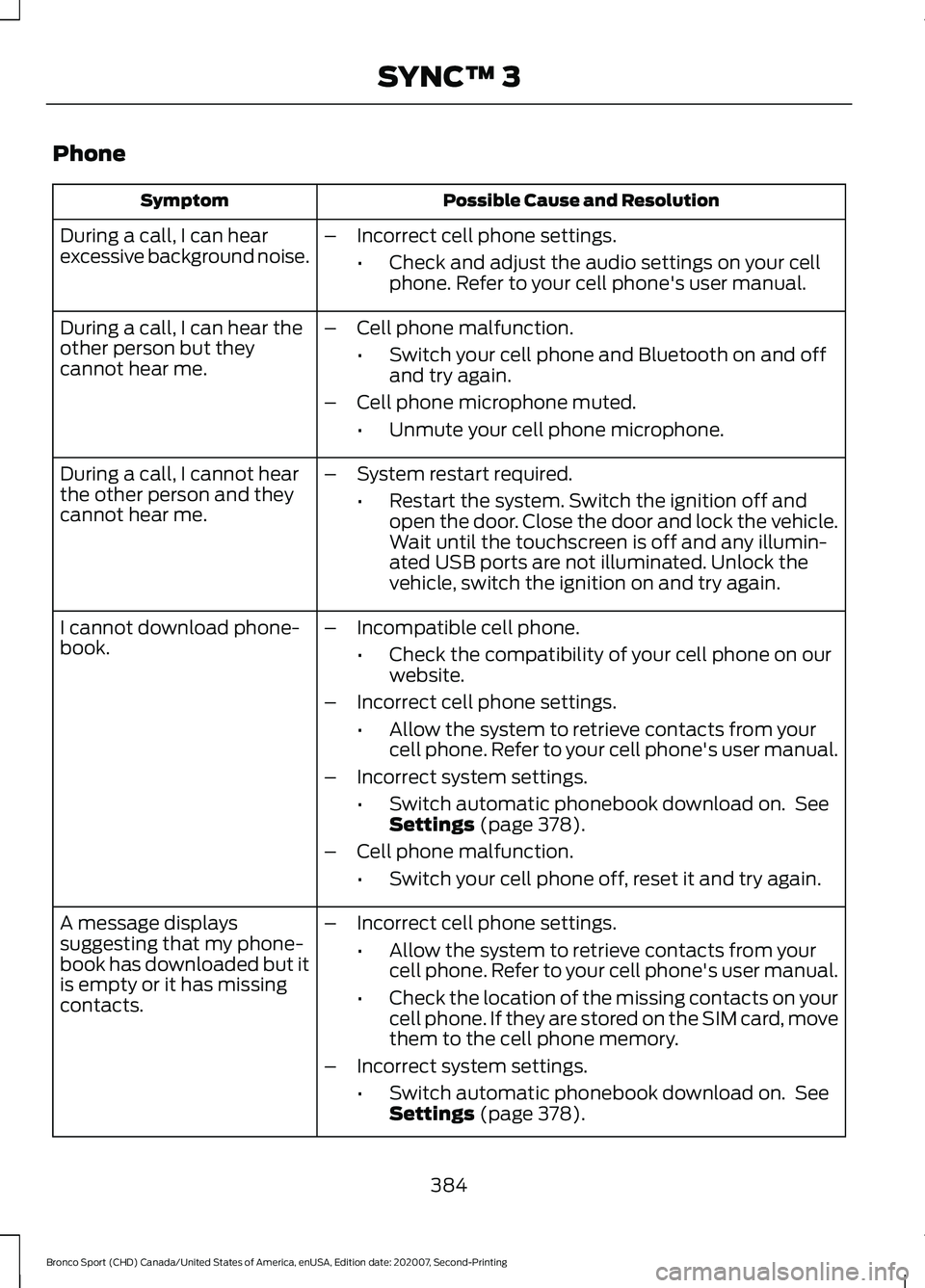
Phone
Possible Cause and Resolution
Symptom
During a call, I can hear
excessive background noise. –
Incorrect cell phone settings.
•Check and adjust the audio settings on your cell
phone. Refer to your cell phone's user manual.
– Cell phone malfunction.
•Switch your cell phone and Bluetooth on and off
and try again.
– Cell phone microphone muted.
•Unmute your cell phone microphone.
During a call, I can hear the
other person but they
cannot hear me.
During a call, I cannot hear
the other person and they
cannot hear me.
–
System restart required.
•Restart the system. Switch the ignition off and
open the door. Close the door and lock the vehicle.
Wait until the touchscreen is off and any illumin-
ated USB ports are not illuminated. Unlock the
vehicle, switch the ignition on and try again.
I cannot download phone-
book. –
Incompatible cell phone.
•Check the compatibility of your cell phone on our
website.
– Incorrect cell phone settings.
•Allow the system to retrieve contacts from your
cell phone. Refer to your cell phone's user manual.
– Incorrect system settings.
•Switch automatic phonebook download on. See
Settings (page 378).
– Cell phone malfunction.
•Switch your cell phone off, reset it and try again.
– Incorrect cell phone settings.
•Allow the system to retrieve contacts from your
cell phone. Refer to your cell phone's user manual.
• Check the location of the missing contacts on your
cell phone. If they are stored on the SIM card, move
them to the cell phone memory.
– Incorrect system settings.
•Switch automatic phonebook download on. See
Settings
(page 378).
A message displays
suggesting that my phone-
book has downloaded but it
is empty or it has missing
contacts.
384
Bronco Sport (CHD) Canada/United States of America, enUSA, Edition date: 202007, Second-Printing SYNC™ 3
Page 395 of 471
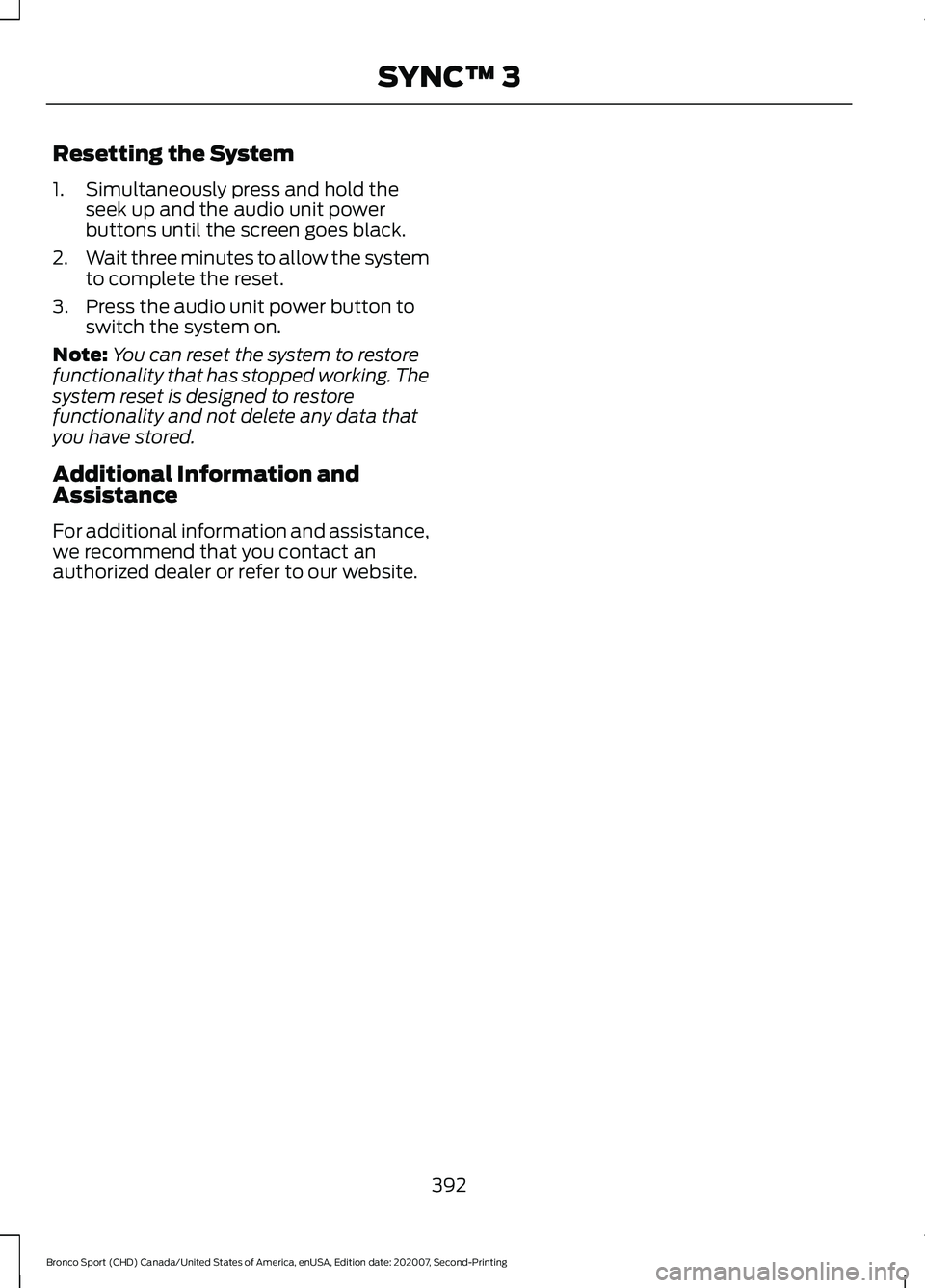
Resetting the System
1. Simultaneously press and hold the
seek up and the audio unit power
buttons until the screen goes black.
2. Wait three minutes to allow the system
to complete the reset.
3. Press the audio unit power button to switch the system on.
Note: You can reset the system to restore
functionality that has stopped working. The
system reset is designed to restore
functionality and not delete any data that
you have stored.
Additional Information and
Assistance
For additional information and assistance,
we recommend that you contact an
authorized dealer or refer to our website.
392
Bronco Sport (CHD) Canada/United States of America, enUSA, Edition date: 202007, Second-Printing SYNC™ 3
Page 413 of 471
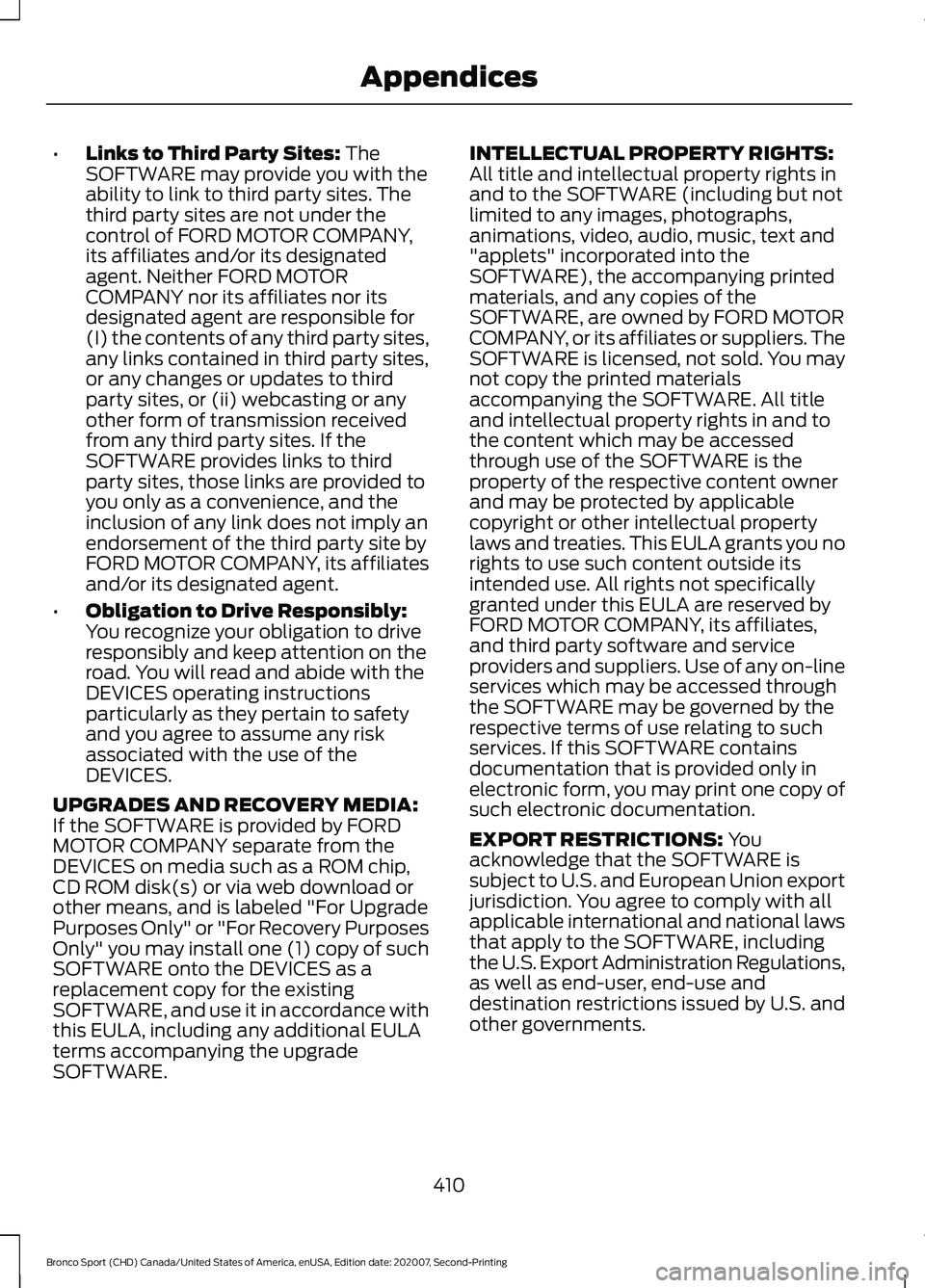
•
Links to Third Party Sites: The
SOFTWARE may provide you with the
ability to link to third party sites. The
third party sites are not under the
control of FORD MOTOR COMPANY,
its affiliates and/or its designated
agent. Neither FORD MOTOR
COMPANY nor its affiliates nor its
designated agent are responsible for
(I) the contents of any third party sites,
any links contained in third party sites,
or any changes or updates to third
party sites, or (ii) webcasting or any
other form of transmission received
from any third party sites. If the
SOFTWARE provides links to third
party sites, those links are provided to
you only as a convenience, and the
inclusion of any link does not imply an
endorsement of the third party site by
FORD MOTOR COMPANY, its affiliates
and/or its designated agent.
• Obligation to Drive Responsibly:
You recognize your obligation to drive
responsibly and keep attention on the
road. You will read and abide with the
DEVICES operating instructions
particularly as they pertain to safety
and you agree to assume any risk
associated with the use of the
DEVICES.
UPGRADES AND RECOVERY MEDIA:
If the SOFTWARE is provided by FORD
MOTOR COMPANY separate from the
DEVICES on media such as a ROM chip,
CD ROM disk(s) or via web download or
other means, and is labeled "For Upgrade
Purposes Only" or "For Recovery Purposes
Only" you may install one (1) copy of such
SOFTWARE onto the DEVICES as a
replacement copy for the existing
SOFTWARE, and use it in accordance with
this EULA, including any additional EULA
terms accompanying the upgrade
SOFTWARE. INTELLECTUAL PROPERTY RIGHTS:
All title and intellectual property rights in
and to the SOFTWARE (including but not
limited to any images, photographs,
animations, video, audio, music, text and
"applets" incorporated into the
SOFTWARE), the accompanying printed
materials, and any copies of the
SOFTWARE, are owned by FORD MOTOR
COMPANY, or its affiliates or suppliers. The
SOFTWARE is licensed, not sold. You may
not copy the printed materials
accompanying the SOFTWARE. All title
and intellectual property rights in and to
the content which may be accessed
through use of the SOFTWARE is the
property of the respective content owner
and may be protected by applicable
copyright or other intellectual property
laws and treaties. This EULA grants you no
rights to use such content outside its
intended use. All rights not specifically
granted under this EULA are reserved by
FORD MOTOR COMPANY, its affiliates,
and third party software and service
providers and suppliers. Use of any on-line
services which may be accessed through
the SOFTWARE may be governed by the
respective terms of use relating to such
services. If this SOFTWARE contains
documentation that is provided only in
electronic form, you may print one copy of
such electronic documentation.
EXPORT RESTRICTIONS:
You
acknowledge that the SOFTWARE is
subject to U.S. and European Union export
jurisdiction. You agree to comply with all
applicable international and national laws
that apply to the SOFTWARE, including
the U.S. Export Administration Regulations,
as well as end-user, end-use and
destination restrictions issued by U.S. and
other governments.
410
Bronco Sport (CHD) Canada/United States of America, enUSA, Edition date: 202007, Second-Printing Appendices
Page 419 of 471
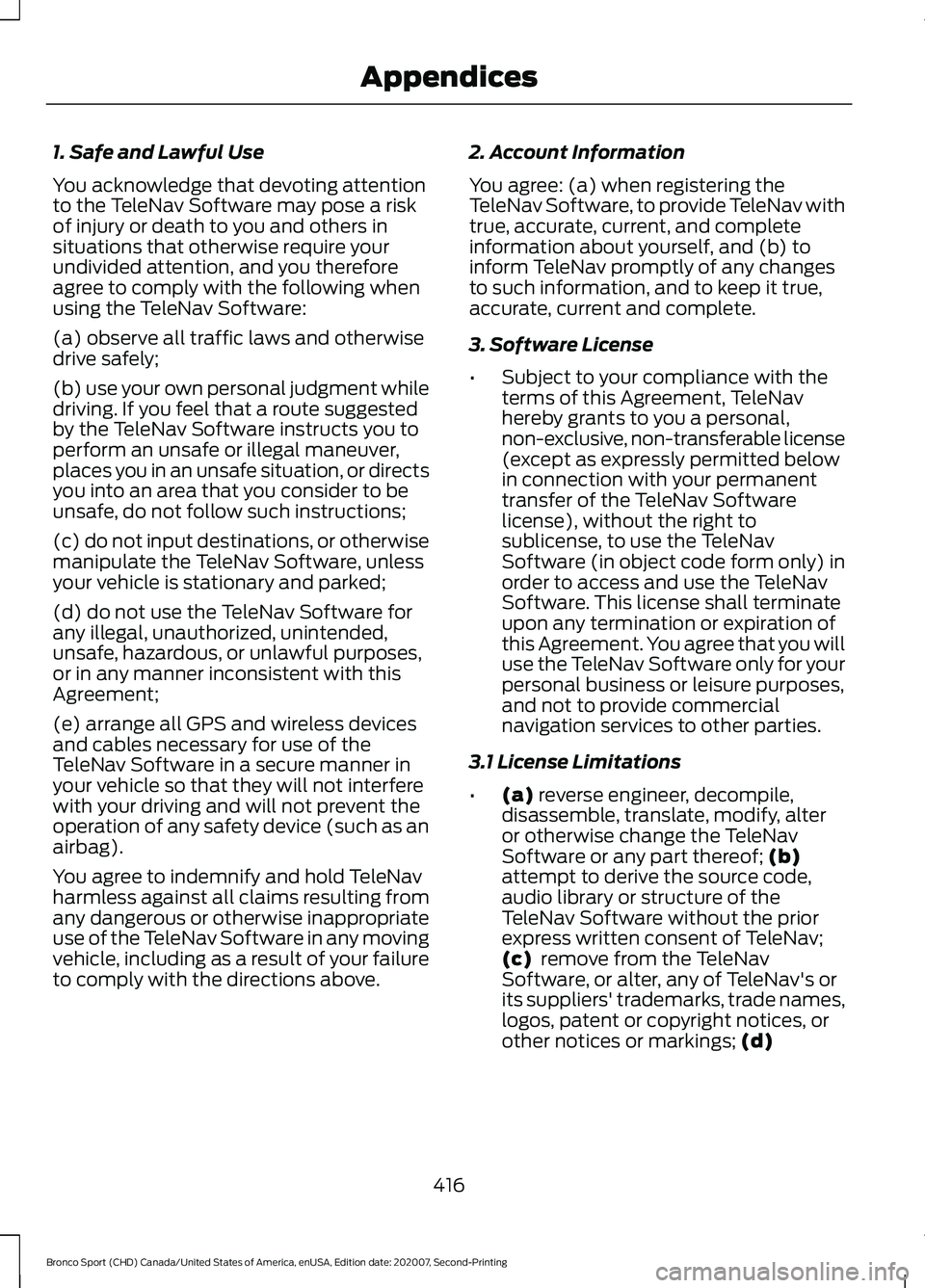
1. Safe and Lawful Use
You acknowledge that devoting attention
to the TeleNav Software may pose a risk
of injury or death to you and others in
situations that otherwise require your
undivided attention, and you therefore
agree to comply with the following when
using the TeleNav Software:
(a) observe all traffic laws and otherwise
drive safely;
(b) use your own personal judgment while
driving. If you feel that a route suggested
by the TeleNav Software instructs you to
perform an unsafe or illegal maneuver,
places you in an unsafe situation, or directs
you into an area that you consider to be
unsafe, do not follow such instructions;
(c) do not input destinations, or otherwise
manipulate the TeleNav Software, unless
your vehicle is stationary and parked;
(d) do not use the TeleNav Software for
any illegal, unauthorized, unintended,
unsafe, hazardous, or unlawful purposes,
or in any manner inconsistent with this
Agreement;
(e) arrange all GPS and wireless devices
and cables necessary for use of the
TeleNav Software in a secure manner in
your vehicle so that they will not interfere
with your driving and will not prevent the
operation of any safety device (such as an
airbag).
You agree to indemnify and hold TeleNav
harmless against all claims resulting from
any dangerous or otherwise inappropriate
use of the TeleNav Software in any moving
vehicle, including as a result of your failure
to comply with the directions above.
2. Account Information
You agree: (a) when registering the
TeleNav Software, to provide TeleNav with
true, accurate, current, and complete
information about yourself, and (b) to
inform TeleNav promptly of any changes
to such information, and to keep it true,
accurate, current and complete.
3. Software License
•
Subject to your compliance with the
terms of this Agreement, TeleNav
hereby grants to you a personal,
non-exclusive, non-transferable license
(except as expressly permitted below
in connection with your permanent
transfer of the TeleNav Software
license), without the right to
sublicense, to use the TeleNav
Software (in object code form only) in
order to access and use the TeleNav
Software. This license shall terminate
upon any termination or expiration of
this Agreement. You agree that you will
use the TeleNav Software only for your
personal business or leisure purposes,
and not to provide commercial
navigation services to other parties.
3.1 License Limitations
• (a) reverse engineer, decompile,
disassemble, translate, modify, alter
or otherwise change the TeleNav
Software or any part thereof;
(b)
attempt to derive the source code,
audio library or structure of the
TeleNav Software without the prior
express written consent of TeleNav;
(c)
remove from the TeleNav
Software, or alter, any of TeleNav's or
its suppliers' trademarks, trade names,
logos, patent or copyright notices, or
other notices or markings;
(d)
416
Bronco Sport (CHD) Canada/United States of America, enUSA, Edition date: 202007, Second-Printing Appendices
Page 457 of 471
Disarming the Alarm...........................................
73
Appendices...................................................405
Apps..................................................................376 SiriusXM Traffic and Travel Link.................... 377
Using Apps on an Android Device................377
Using Apps on an iOS Device........................ 376
Using Mobile Navigation on an Android Device................................................................. 377
At a Glance.......................................................20
Audible Warnings and Indicators.............98
Headlamps On Warning Chime..................... 98
Key in Ignition Warning Chime........................ 98
Keyless Warning Alert........................................ 98
Parking Brake On Warning Chime.................98
Audio Control
...................................................74
You can operate the following functions
with the control:............................................... 74
Audio System
................................................342
General Information......................................... 342
Audio Unit.......................................................342 Adjusting the Volume....................................... 343
Changing Radio Stations................................ 343
Muting the Audio............................................... 343
Pausing or Playing Media............................... 343
Switching the Audio Unit On and Off........343
Switching the Display On and Off...............343
Using Seek, Fast Forward and Reverse............................................................. 343
Auto Hold
.........................................................179
Auto Hold Indicator........................................... 180
Switching Auto Hold On and Off.................. 179
Using Auto Hold.................................................. 180
Autolamps
.........................................................81
Windshield Wiper Activated
Headlamps......................................................... 81
Automatic High Beam Control.................86
Automatic High Beam Control Indicators.......................................................86
Automatic Transmission
...........................166
Automatic Return to Park............................... 168
Drive (D)................................................................. 167
If Your Vehicle Gets Stuck in Mud or Snow.................................................................... 171
Low(L)..................................................................... 167
Manual (M)........................................................... 167
Manual Park Release........................................ 169
Neutral (N)............................................................ 167
Park (P).................................................................. 167Reverse (R)............................................................
167
SelectShift............................................................. 167
Stay in Neutral Mode........................................ 168
Understanding the Shift Positions of Your Automatic Transmission............................ 166
Automatic Transmission Fluid Check.............................................................281
Auto Mode.......................................................123 Auto Mode Indicators........................................ 123
Switching Auto Mode On and Off................123
Switching Dual Mode On and Off................124
Auto-Start-Stop............................................153 Disabling Auto-Start-Stop............................. 154
Enabling Auto-Start-Stop............................... 153
Autowipers........................................................77 Autowipers Settings............................................ 78
B
Battery See: Changing the 12V Battery..................... 282
Blind Spot Information System................211 Blind Spot Information System
Indicator............................................................. 212
Blind Spot Information System Information Messages.......................................................... 213
Blind Spot Information System Sensors.............................................................. 212
Switching the Blind Spot Information System On and Off........................................ 212
Using the Blind Spot Information System............................................................... 212
BLIS See: Blind Spot Information System............211
Bonnet Lock See: Opening and Closing the Hood............271
Booster Seats..................................................28 Types of Booster Seats...................................... 29
Brake Fluid Check.........................................281 Brake Fluid Service Interval............................ 282
Brake Fluid Specification..........................335
Brakes................................................................176 General Information........................................... 176
Breaking-In.....................................................248 Brakes and Clutch............................................. 248
Tires........................................................................\
248
Bulb Specification Chart...........................326
454
Bronco Sport (CHD) Canada/United States of America, enUSA, Edition date: 202007, Second-Printing Index
Page 466 of 471
Satellite Radio..............................................346
Satellite Radio Electronic Serial Number
(ESN)................................................................. 347
Satellite Radio Reception Factors...............347
SiriusXM Satellite Radio Service.................. 347
Troubleshooting ................................................. 348
Scheduled Maintenance..........................396
Seatbelt Extensions......................................40
Seatbelt Height Adjustment......................37
Seatbelt Reminder........................................38
Seatbelt Status..................................................... 39
Seatbelts...........................................................34 Principle of Operation........................................ 34
Seatbelt Warning Lamp and Indicator Chime..............................................................38
Conditions of operation..................................... 38
Seats..................................................................133
Security
...............................................................72
Selecting a Drive Mode - 1.5L EcoBoost™.................................................223
Selecting a Drive Mode - 2.0L EcoBoost™.................................................224
Settings...........................................................378 911 Assist............................................................... 379
Ambient Lighting............................................... 379
Audio....................................................................... 378
Automatic Updates........................................... 379
Bluetooth.............................................................. 378
Charge Settings.................................................. 379
Clock....................................................................... 378
Display.................................................................... 379
Driver Assist......................................................... 379
FordPass................................................................ 379
General.................................................................. 379
Message Center.................................................. 379
Mobile Apps......................................................... 379
Multi Contour Seats.......................................... 379
Navigation ............................................................. 379
Personal Profiles................................................ 379
Phone..................................................................... 378
Seats....................................................................... 379
Sound..................................................................... 378
Valet Mode........................................................... 379
Vehicle.................................................................... 379
Voice Control....................................................... 379
Setting the Adaptive Cruise Control Gap................................................................200
Following a Vehicle.......................................... 200Setting the Adaptive Cruise Control
Speed.............................................................199
Manually Changing the Set Speed..............199
Setting the Adaptive Cruise Speed from a Complete Stop............................................... 199
Setting the Blower Motor Speed............122
Setting the Cruise Control Speed..........193 Changing the Set Speed.................................. 193
Setting the Temperature
............................122
Setting the Trail Control Speed..............184
Side Airbags
.....................................................46
Sitting in the Correct Position..................133
Snow Chains See: Using Snow Chains.................................. 312
Spare Wheel See: Changing a Road Wheel........................ 316
Special Notices
................................................16
New Vehicle Limited Warranty........................ 16
Notice to Owners of Pickup Trucks and Utility Type Vehicles......................................... 17
On Board Diagnostics Data Link Connector............................................................ 17
Special Instructions............................................. 16
Using Your Vehicle as an Ambulance.............17
Using Your Vehicle With a Snowplow............17
Special Operating Conditions Scheduled Maintenance..............................................402
Exceptions........................................................... 403
Speed Control See: Cruise Control............................................ 193
Speed Sign Recognition
.............................216
Principle of Operation....................................... 216
Using Speed Sign Recognition....................... 217
Stability Control............................................182 Principle of Operation....................................... 182
Starter Switch See: Ignition Switch........................................... 148
Starting a Gasoline Engine.......................149 Automatic Engine Shutdown........................ 150
Failure to Start..................................................... 150
Guarding Against Exhaust Fumes.................151
Important Ventilating Information................151
Stopping the Engine When Your Vehicle is Moving................................................................. 151
Stopping the Engine When Your Vehicle is Stationary.......................................................... 151
Vehicles with an Ignition Key......................... 149
Vehicles with Keyless Start............................. 149
463
Bronco Sport (CHD) Canada/United States of America, enUSA, Edition date: 202007, Second-Printing Index
Page 467 of 471
Starting and Stopping the Engine.........148
General Information.......................................... 148
Steering............................................................218 Electric Power Steering.................................... 218
Steering Wheel
................................................74
Storage.............................................................146 Cup Holders.......................................................... 146
Glasses Holder.................................................... 146
Map Pocket........................................................... 146
Under Seat Storage........................................... 146
Sunroof See: Moonroof........................................................ 91
Sun Visors.........................................................90 Illuminated Vanity Mirror.................................... 91
Supplementary Restraints System
.........42
Principle of Operation......................................... 42
Switching Adaptive Cruise Control On and Off
..........................................................198
Automatic Cancellation or
Deactivation.................................................... 199
Switching Adaptive Cruise Control Off....................................................................... 199
Switching Adaptive Cruise Control On........................................................................\
199
Switching Air Conditioning On and Off.....................................................................121
Switching Automatic High Beam Control On and Off.....................................................86
Activating the Automatic High Beam Control................................................................ 86
Switching Climate Control On and Off.....................................................................121
Switching Cruise Control On and Off...................................................................193
Switching Cruise Control Off.......................... 193
Switching Cruise Control On.......................... 193
Switching From Adaptive Cruise Control to Cruise Control
.......................................202
Switching Intelligent Mode On and Off..................................................................203
Changing the Set Speed with Intelligent Adaptive Cruise Control............................. 204
Switching Lane Centering On and Off..................................................................202
Activating Lane Centering.............................. 203
System Alerts and Automatic Cancellation................................................... 203Switching Maximum Cooling On and
Off.....................................................................121
Switching Maximum Defrost On and Off.....................................................................121
Switching Rear Occupant Alert System On and Off...................................................140
Semiannual Reminder..................................... 140
Switching Recirculated Air On and Off.....................................................................121
Switching the Heated Mirrors On and Off
....................................................................122
Switching the Heated Rear Window On and Off
...........................................................122
Switching the Heated Steering Wheel On and Off.....................................................76
Switching the Heated Wiper Park On and Off
....................................................................122
Switching Trail Control On and Off.......184
Symbols Glossary
.............................................9
SYNC™ 3........................................................350
General Information......................................... 350
SYNC™ 3 Troubleshooting.....................380 Additional Information and
Assistance....................................................... 392
Apps........................................................................\
387
Navigation............................................................ 386
Personal Profiles............................................... 390
Phone..................................................................... 384
Resetting the System....................................... 392
USB and Bluetooth Audio............................... 381
Voice Recognition............................................. 380
Wi-Fi Connectivity............................................. 389
T
Technical Specifications See: Capacities and Specifications............323
The Better Business Bureau (BBB) Auto Line Program (U.S. Only).......................257
Tire Care..........................................................299 Glossary of Tire Terminology........................ 300
Information About Uniform Tire Quality Grading............................................................. 299
Information Contained on the Tire Sidewall............................................................ 301
Temperature A B C........................................... 300
Traction AA A B C.............................................. 299
Treadwear............................................................ 299
464
Bronco Sport (CHD) Canada/United States of America, enUSA, Edition date: 202007, Second-Printing Index
Page 468 of 471
Tire Pressure Monitoring System............312
Changing Tires With a Tire Pressure
Monitoring System........................................ 314
Understanding Your Tire Pressure Monitoring System ....................................... 314
Tires See: Wheels and Tires...................................... 297
Towing a Trailer.............................................235
Load Placement................................................. 235
Towing Points
................................................254
Towing the Vehicle on Four Wheels.........................................................240
Emergency Towing........................................... 240
Recreational Towing - All-Wheel and Four-Wheel Drive Vehicles....................... 240
Recreational Towing - Front-Wheel Drive Vehicles............................................................ 240
Recreational Towing - Rear-Wheel Drive Vehicles............................................................ 240
Towing..............................................................235
Traction Control
.............................................181
Principle of Operation........................................ 181
Trail Control Indicators
...............................185
Trail Control....................................................184
Trail Control – Troubleshooting.................... 185
Trail Control – Troubleshooting..............185 Trail Control – Information
Messages.......................................................... 185
Trailer Sway Control
...................................236
Transmission..................................................166
Transporting the Vehicle
...........................253
Type Approvals............................................434 Radio Frequency Certifications for Blind
Spot Information System.......................... 434
Radio Frequency Certifications for Body Control Module.............................................. 435
Radio Frequency Certifications for Cruise Control Module............................................. 436
Radio Frequency Certifications for Integrated Keyhead Transmitter.............436
Radio Frequency Certifications for Passive Anti-Theft System........................................ 437
Radio Frequency Certifications for Passive Key...................................................................... 437
Radio Frequency Certifications for Radio Transceiver Module..................................... 445
Radio Frequency Certifications for SYNC3.2............................................................ 441Radio Frequency Certifications for
Telematics Control Unit.............................. 447
Radio Frequency Certifications for Tire Pressure Monitoring Sensor(s)...............448
Radio Frequency Certifications for Wireless Accessory Charging Module...................... 451
U
Under Hood Overview - 1.5L EcoBoost™..................................................272
Under Hood Overview - 2.0L EcoBoost™..................................................273
Under Seat Storage.....................................146 Locating the Under Seat Storage
Compartment................................................. 146
Unique Driving Characteristics................153
USB Port
.........................................................349
Locating the USB Ports................................... 349
Using Four-Wheel Drive
..............................172
Driving in Special Conditions With
Four-Wheel Drive........................................... 173
Four-Wheel Drive Lock...................................... 174
Maintenance and Modifications.................... 175
Rear Differential Lock........................................ 174
Using MyKey With Remote Start Systems..........................................................62
Using Snow Chains
......................................312
Using Stability Control...............................183
Using Traction Control
.................................181
Switching the System Off................................ 181
System Indicator Lights and Messages........................................................... 181
Using a Switch...................................................... 181
Using the Information Display Controls.............................................................. 181
Using Voice Recognition...........................352 Audio Voice Commands................................. 353
Climate Voice Commands............................. 354
Mobile App Voice Commands...................... 357
Navigation Voice Commands....................... 356
Phone Voice Commands................................ 354
SiriusXM Traffic and Travel Link Voice Commands..................................................... 358
Voice Settings Commands............................ 358
Utilizing the Mediation/Arbitration Program (Canada Only)........................258
465
Bronco Sport (CHD) Canada/United States of America, enUSA, Edition date: 202007, Second-Printing Index