Rear View Camera FORD BRONCO SPORT 2021 Owners Manual
[x] Cancel search | Manufacturer: FORD, Model Year: 2021, Model line: BRONCO SPORT, Model: FORD BRONCO SPORT 2021Pages: 471, PDF Size: 7 MB
Page 8 of 471
Engine Emission Control
Emission Law
................................................162
Catalytic Converter .....................................
163
Transmission
Automatic Transmission ..........................
166
Four-Wheel Drive
Principle of Operation ................................
172
Using Four-Wheel Drive .............................
172
Brakes
General Information ...................................
176
Hints on Driving With Anti-Lock Brakes ........................................................................\
.
176
Electric Parking Brake .................................
177
Hill Start Assist .............................................
178
Auto Hold ........................................................
179
Traction Control
Principle of Operation .................................
181
Using Traction Control ................................
181
Stability Control
Principle of Operation ................................
182
Using Stability Control ..............................
183
Trail Control
What Is Trail Control ..................................
184
Switching Trail Control On and Off ......
184
Setting the Trail Control Speed .............
184
Canceling the Set Speed ..........................
185
Trail Control Indicators ..............................
185
Trail Control – Troubleshooting .............
185
Parking Aids
Principle of Operation ...............................
186
Rear Parking Aid ...........................................
187
Rear View Camera ......................................
188180 Degree Camera
.....................................
191
Cruise Control
What Is Cruise Control ...............................
193
Switching Cruise Control On and Off ........................................................................\
.
193
Setting the Cruise Control Speed .........
193
Canceling the Set Speed ..........................
194
Resuming the Set Speed ..........................
194
Cruise Control Indicators ..........................
194
Adaptive Cruise Control
How Does Adaptive Cruise Control With Stop and Go Work ..................................
195
What Is Adaptive Cruise Control With Lane Centering .........................................
195
What Is Intelligent Adaptive Cruise Control .........................................................
195
Adaptive Cruise Control Precautions ........................................................................\
.
195
Adaptive Cruise Control Limitations ........................................................................\
196
Switching Adaptive Cruise Control On and Off ........................................................
198
Setting the Adaptive Cruise Control Speed ..........................................................
199
Setting the Adaptive Cruise Control Gap .......................................................................
200
Canceling the Set Speed ..........................
201
Resuming the Set Speed ..........................
201
Overriding the Set Speed .........................
201
Adaptive Cruise Control Indicators .......
201
Switching From Adaptive Cruise Control to Cruise Control .....................................
202
Switching Lane Centering On and Off ........................................................................\
202
Switching Intelligent Mode On and Off ........................................................................\
203
Adjusting the Set Speed Tolerance ......
204
Adaptive Cruise Control – Troubleshooting .....................................
204
5
Bronco Sport (CHD) Canada/United States of America, enUSA, Edition date: 202007, Second-Printing Table of Contents
Page 191 of 471
If your vehicle remains stationary for two
seconds the audible warning turns off. If
your vehicle moves backward the tone
sounds again.
Note:
If the detected object is 12 in (30 cm)
or less from the rear bumper, the audible
warning does not turn off.
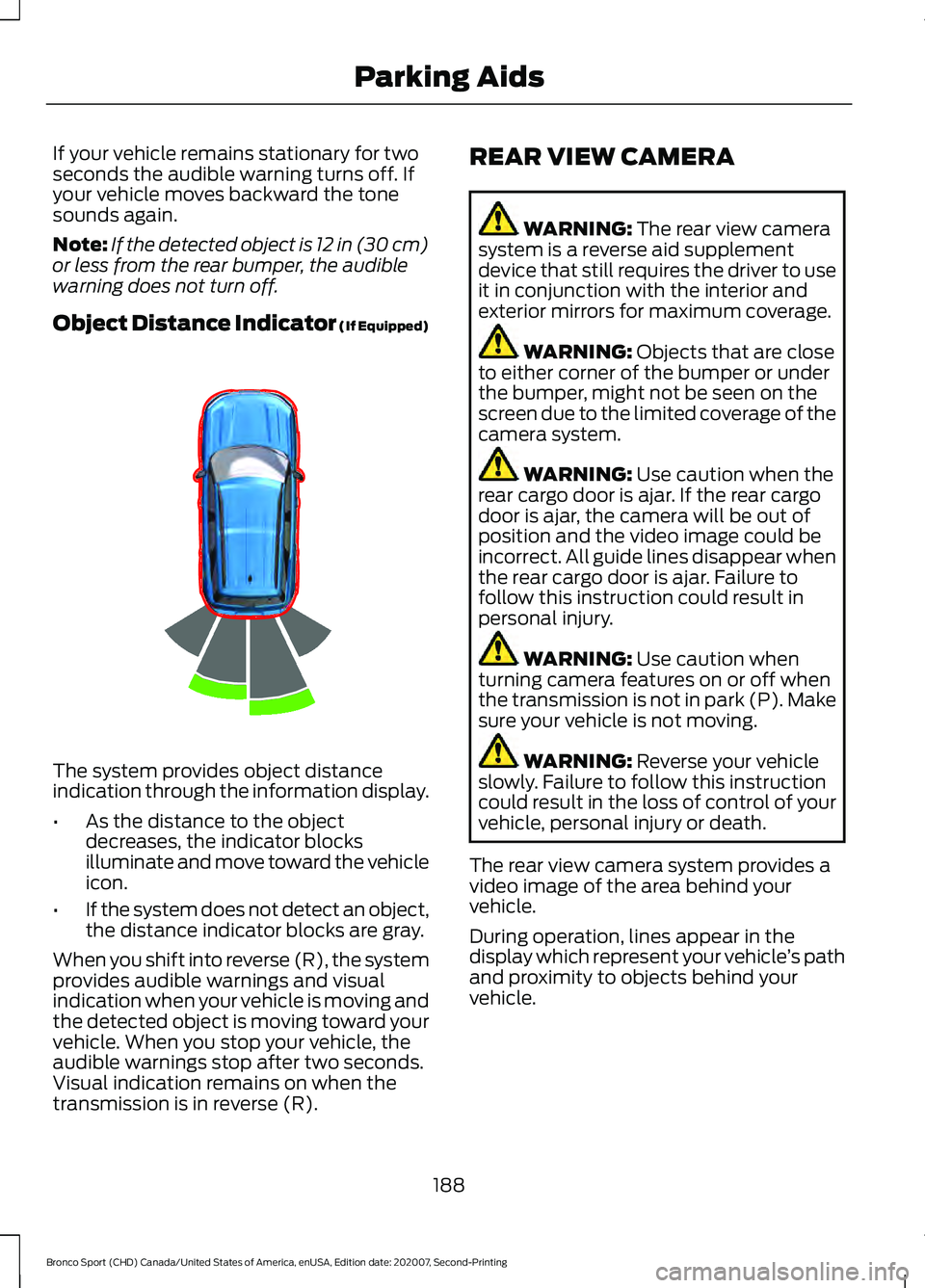
Object Distance Indicator (If Equipped) The system provides object distance
indication through the information display.
•
As the distance to the object
decreases, the indicator blocks
illuminate and move toward the vehicle
icon.
• If the system does not detect an object,
the distance indicator blocks are gray.
When you shift into reverse (R), the system
provides audible warnings and visual
indication when your vehicle is moving and
the detected object is moving toward your
vehicle. When you stop your vehicle, the
audible warnings stop after two seconds.
Visual indication remains on when the
transmission is in reverse (R). REAR VIEW CAMERA WARNING: The rear view camera
system is a reverse aid supplement
device that still requires the driver to use
it in conjunction with the interior and
exterior mirrors for maximum coverage. WARNING:
Objects that are close
to either corner of the bumper or under
the bumper, might not be seen on the
screen due to the limited coverage of the
camera system. WARNING:
Use caution when the
rear cargo door is ajar. If the rear cargo
door is ajar, the camera will be out of
position and the video image could be
incorrect. All guide lines disappear when
the rear cargo door is ajar. Failure to
follow this instruction could result in
personal injury. WARNING:
Use caution when
turning camera features on or off when
the transmission is not in park (P). Make
sure your vehicle is not moving. WARNING:
Reverse your vehicle
slowly. Failure to follow this instruction
could result in the loss of control of your
vehicle, personal injury or death.
The rear view camera system provides a
video image of the area behind your
vehicle.
During operation, lines appear in the
display which represent your vehicle ’s path
and proximity to objects behind your
vehicle.
188
Bronco Sport (CHD) Canada/United States of America, enUSA, Edition date: 202007, Second-Printing Parking AidsE322352
Page 192 of 471
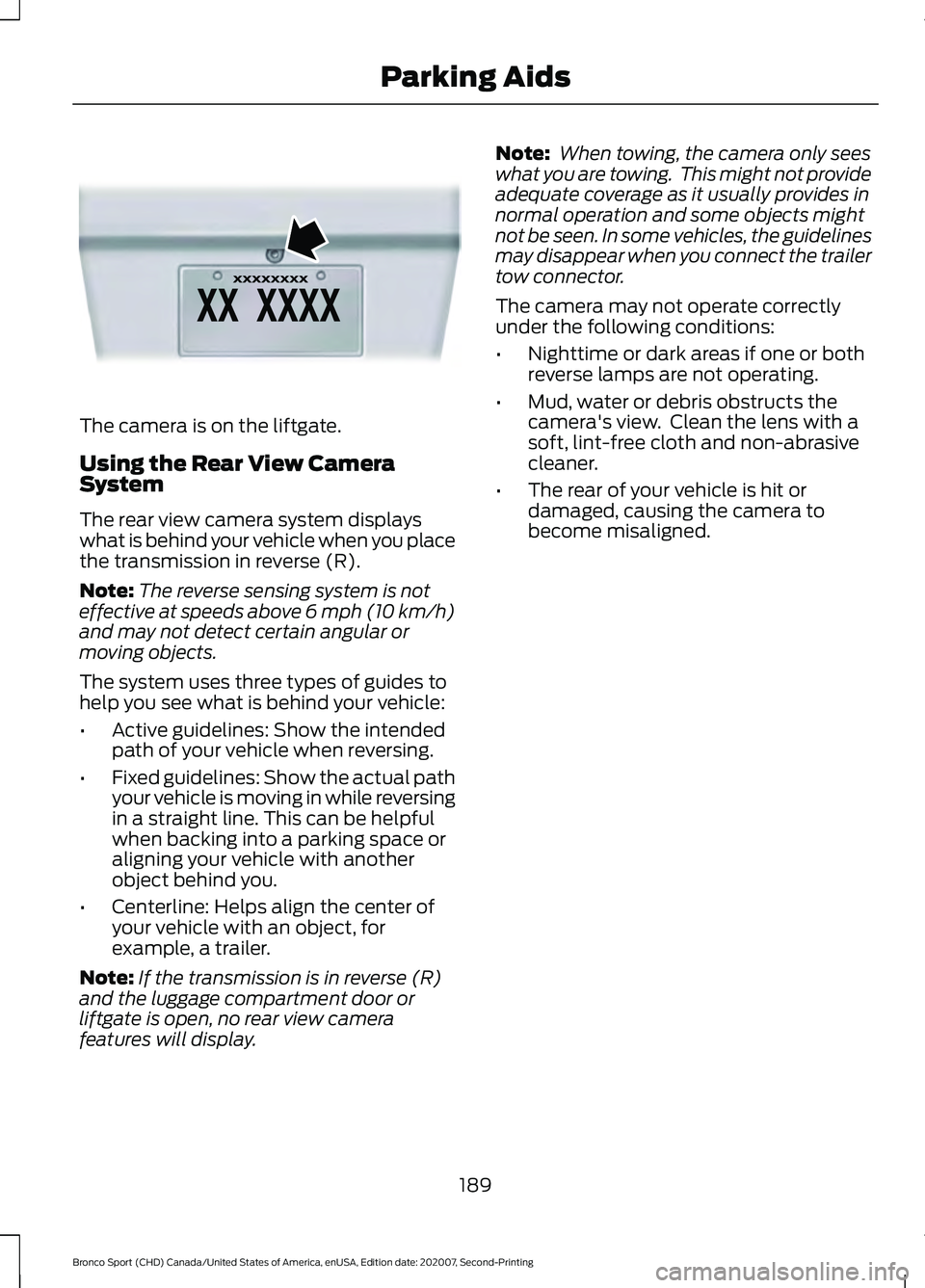
The camera is on the liftgate.
Using the Rear View Camera
System
The rear view camera system displays
what is behind your vehicle when you place
the transmission in reverse (R).
Note:
The reverse sensing system is not
effective at speeds above 6 mph (10 km/h)
and may not detect certain angular or
moving objects.
The system uses three types of guides to
help you see what is behind your vehicle:
• Active guidelines: Show the intended
path of your vehicle when reversing.
• Fixed guidelines: Show the actual path
your vehicle is moving in while reversing
in a straight line. This can be helpful
when backing into a parking space or
aligning your vehicle with another
object behind you.
• Centerline: Helps align the center of
your vehicle with an object, for
example, a trailer.
Note: If the transmission is in reverse (R)
and the luggage compartment door or
liftgate is open, no rear view camera
features will display. Note:
When towing, the camera only sees
what you are towing. This might not provide
adequate coverage as it usually provides in
normal operation and some objects might
not be seen. In some vehicles, the guidelines
may disappear when you connect the trailer
tow connector.
The camera may not operate correctly
under the following conditions:
• Nighttime or dark areas if one or both
reverse lamps are not operating.
• Mud, water or debris obstructs the
camera's view. Clean the lens with a
soft, lint-free cloth and non-abrasive
cleaner.
• The rear of your vehicle is hit or
damaged, causing the camera to
become misaligned.
189
Bronco Sport (CHD) Canada/United States of America, enUSA, Edition date: 202007, Second-Printing Parking AidsE142435
Page 193 of 471
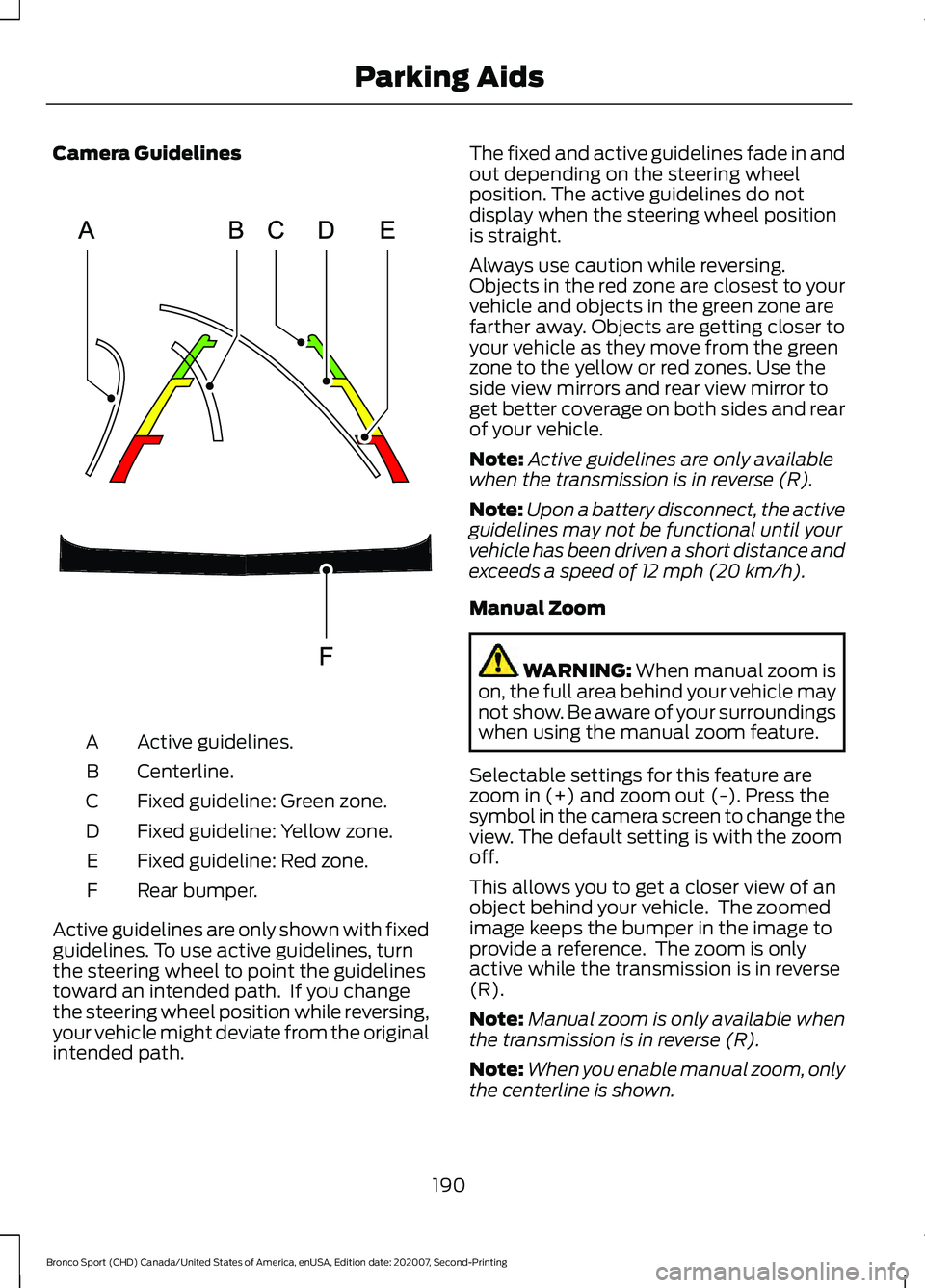
Camera Guidelines
Active guidelines.
A
Centerline.
B
Fixed guideline: Green zone.
C
Fixed guideline: Yellow zone.
D
Fixed guideline: Red zone.
E
Rear bumper.
F
Active guidelines are only shown with fixed
guidelines. To use active guidelines, turn
the steering wheel to point the guidelines
toward an intended path. If you change
the steering wheel position while reversing,
your vehicle might deviate from the original
intended path. The fixed and active guidelines fade in and
out depending on the steering wheel
position. The active guidelines do not
display when the steering wheel position
is straight.
Always use caution while reversing.
Objects in the red zone are closest to your
vehicle and objects in the green zone are
farther away. Objects are getting closer to
your vehicle as they move from the green
zone to the yellow or red zones. Use the
side view mirrors and rear view mirror to
get better coverage on both sides and rear
of your vehicle.
Note:
Active guidelines are only available
when the transmission is in reverse (R).
Note: Upon a battery disconnect, the active
guidelines may not be functional until your
vehicle has been driven a short distance and
exceeds a speed of 12 mph (20 km/h).
Manual Zoom WARNING:
When manual zoom is
on, the full area behind your vehicle may
not show. Be aware of your surroundings
when using the manual zoom feature.
Selectable settings for this feature are
zoom in (+) and zoom out (-). Press the
symbol in the camera screen to change the
view. The default setting is with the zoom
off.
This allows you to get a closer view of an
object behind your vehicle. The zoomed
image keeps the bumper in the image to
provide a reference. The zoom is only
active while the transmission is in reverse
(R).
Note: Manual zoom is only available when
the transmission is in reverse (R).
Note: When you enable manual zoom, only
the centerline is shown.
190
Bronco Sport (CHD) Canada/United States of America, enUSA, Edition date: 202007, Second-Printing Parking AidsE306774
Page 194 of 471
Camera System Settings
The rear view camera system settings can
be accessed through the display screen.
See General Information (page 99).
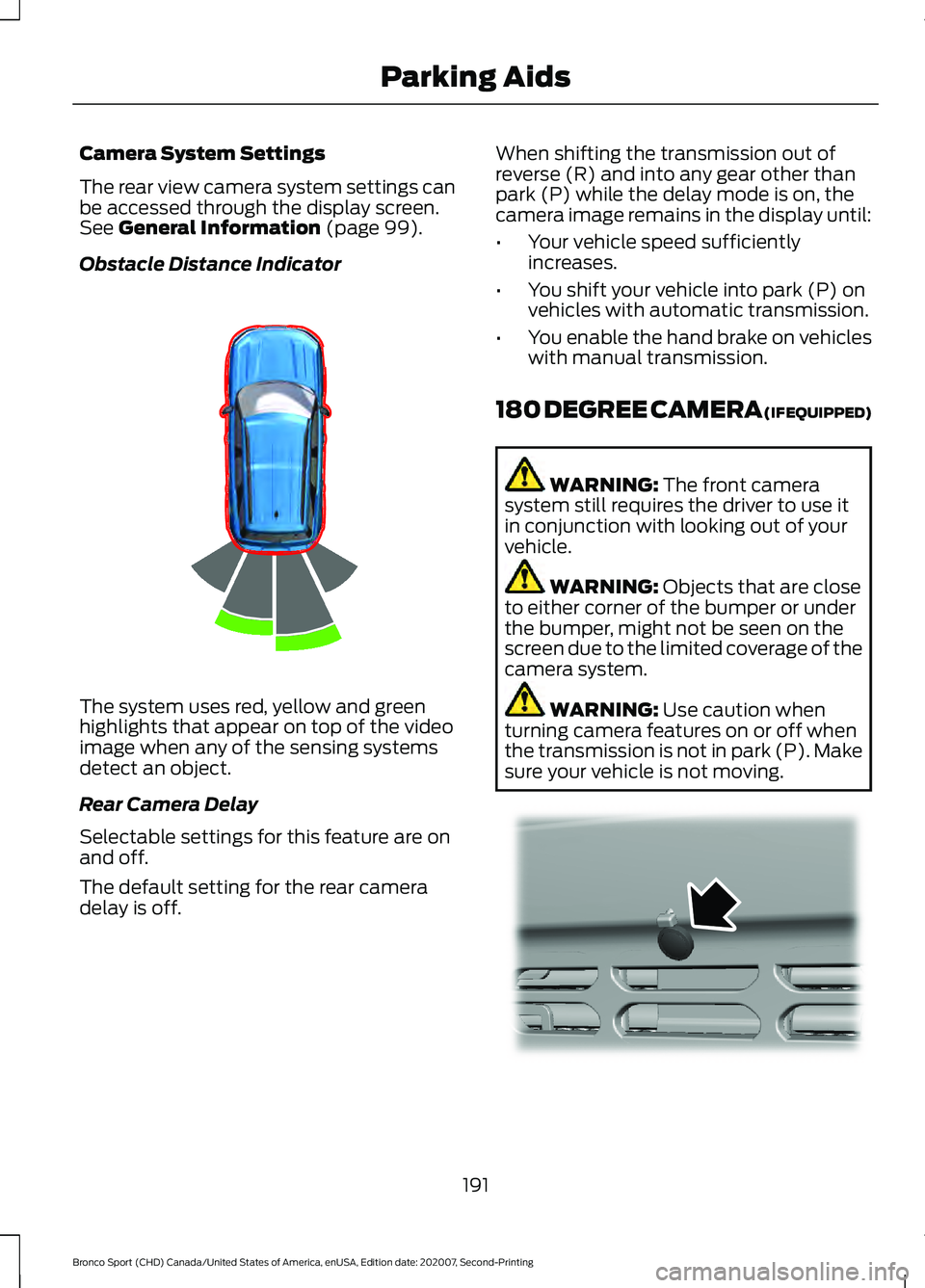
Obstacle Distance Indicator The system uses red, yellow and green
highlights that appear on top of the video
image when any of the sensing systems
detect an object.
Rear Camera Delay
Selectable settings for this feature are on
and off.
The default setting for the rear camera
delay is off. When shifting the transmission out of
reverse (R) and into any gear other than
park (P) while the delay mode is on, the
camera image remains in the display until:
•
Your vehicle speed sufficiently
increases.
• You shift your vehicle into park (P) on
vehicles with automatic transmission.
• You enable the hand brake on vehicles
with manual transmission.
180 DEGREE CAMERA (IF EQUIPPED) WARNING:
The front camera
system still requires the driver to use it
in conjunction with looking out of your
vehicle. WARNING:
Objects that are close
to either corner of the bumper or under
the bumper, might not be seen on the
screen due to the limited coverage of the
camera system. WARNING:
Use caution when
turning camera features on or off when
the transmission is not in park (P). Make
sure your vehicle is not moving. 191
Bronco Sport (CHD) Canada/United States of America, enUSA, Edition date: 202007, Second-Printing Parking AidsE322352 E321541
Page 195 of 471
The front view camera is located in the
grille. The camera provides a video image
of the area in front of your vehicle.
Note:
The area displayed on the screen may
vary according to your vehicle's orientation
or road condition.
Note: The front view camera switches off
if your vehicle speed exceeds 6 mph
(10 km/h). You have to switch the system
back on by using the camera system button
once below the speed threshold.
Note: The front camera system will switch
on when you are in mud/ruts, rock crawl or
sand mode and your speed is less than
15 mph (24 km/h)
. If you exceed 15 mph
(24 km/h) the camera shuts off until your
vehicle speed is below 12 mph (20 km/h).
Using the System
The 180 degree camera system consists
of front and rear cameras. The system:
• Allows you to see what is directly in
front or behind your vehicle.
• Provides cross traffic view in front and
behind your vehicle.
• Provides visibility during parking
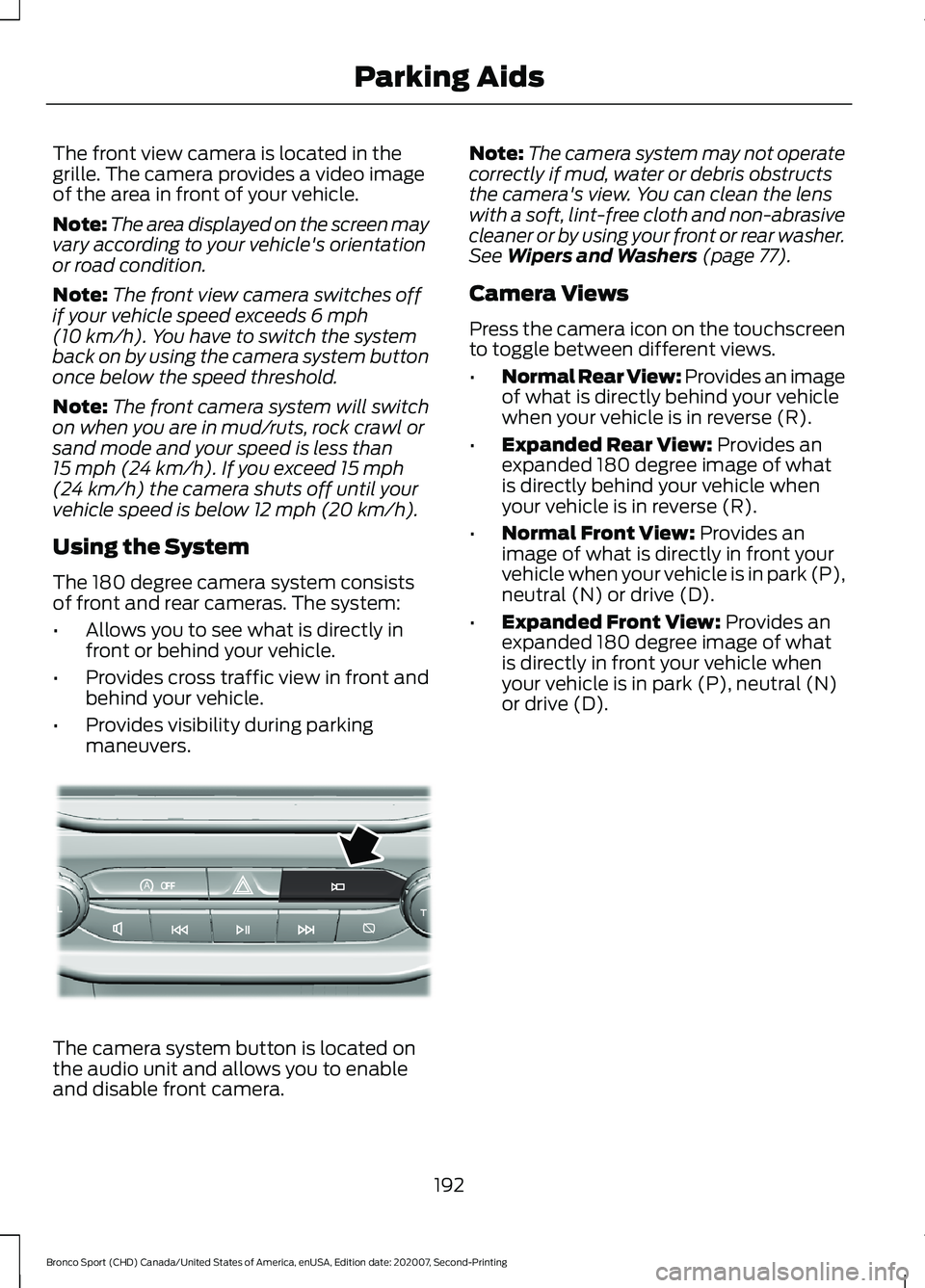
maneuvers. The camera system button is located on
the audio unit and allows you to enable
and disable front camera. Note:
The camera system may not operate
correctly if mud, water or debris obstructs
the camera's view. You can clean the lens
with a soft, lint-free cloth and non-abrasive
cleaner or by using your front or rear washer.
See
Wipers and Washers (page 77).
Camera Views
Press the camera icon on the touchscreen
to toggle between different views.
• Normal Rear View: Provides an image
of what is directly behind your vehicle
when your vehicle is in reverse (R).
• Expanded Rear View:
Provides an
expanded 180 degree image of what
is directly behind your vehicle when
your vehicle is in reverse (R).
• Normal Front View:
Provides an
image of what is directly in front your
vehicle when your vehicle is in park (P),
neutral (N) or drive (D).
• Expanded Front View:
Provides an
expanded 180 degree image of what
is directly in front your vehicle when
your vehicle is in park (P), neutral (N)
or drive (D).
192
Bronco Sport (CHD) Canada/United States of America, enUSA, Edition date: 202007, Second-Printing Parking AidsAoE321477
Page 249 of 471
Crossing A Ravine, Gully, Ditch,
Washout Or Rut
Review the path ahead before attempting
to cross any obstacle. Review the obstacle
from outside the vehicle for an
understanding of the terrain condition in
front of and behind the obstacle. Approach
obstacles slowly and inch the vehicle over.
Ditches and washouts should be crossed
at a 45 degree angle when possible.
Driving Over Logs
Review the path ahead before attempting
to cross any obstacle. Review the obstacle
from outside the vehicle for an
understanding of the terrain condition in
front of and behind the obstacle.
Approach obstacles slowly and inch the
vehicle over, approaching at a 15 degree
angle.
Note:
It is best to have a front tire on top of
the log when the other begins to climb over.
If a large obstacle near the log such as a
rock cannot be avoided, choose a path that
places the rock directly under the tire
rather than the undercarriage of the
vehicle. This helps prevent damage to the
vehicle.
Driving Through Water Limitations Maximum Wading
Depth
Model
17.7 in (450 mm)
Base
23.6 in (600 mm)
Badlands
When you are driving though water do not
exceed 4 mph (7 km/h). Off-Road Driving Aids
Selecting an Off-Road Drive Mode
Using the appropriate drive mode increases
your vehicle's control.
See What Is Drive
Mode Control (page 223).
Using the Cameras Off-Road
Use the 180 degree camera to enhance
your off-road experience. See 180 Degree
Camera
(page 191).
Using Four-Wheel Drive Lock
Increases four wheel drive performance by
preventing the front and rear axles from
disconnecting. You can activate and
deactivate the four wheel drive lock on the
fly. See
Using Four-Wheel Drive (page
172).
Using Rear Differential Lock
The rear differential lock provides
additional traction to your vehicle when
stuck.
You can activate and deactivate the rear
differential lock on the fly within the
operating speed range.
The rear differential locker disengages
when the vehicle speed exceeds a set
value and it re-engages when the vehicle
speed goes below a set value. See
Using
Four-Wheel Drive (page 172).
Using Trail Control
The system works in a similar manner to
cruise control in off-road conditions. Trail
Control provides you the ability to
maneuver the vehicle without using the
throttle and brake pedals.
246
Bronco Sport (CHD) Canada/United States of America, enUSA, Edition date: 202007, Second-Printing Driving Hints
Page 267 of 471
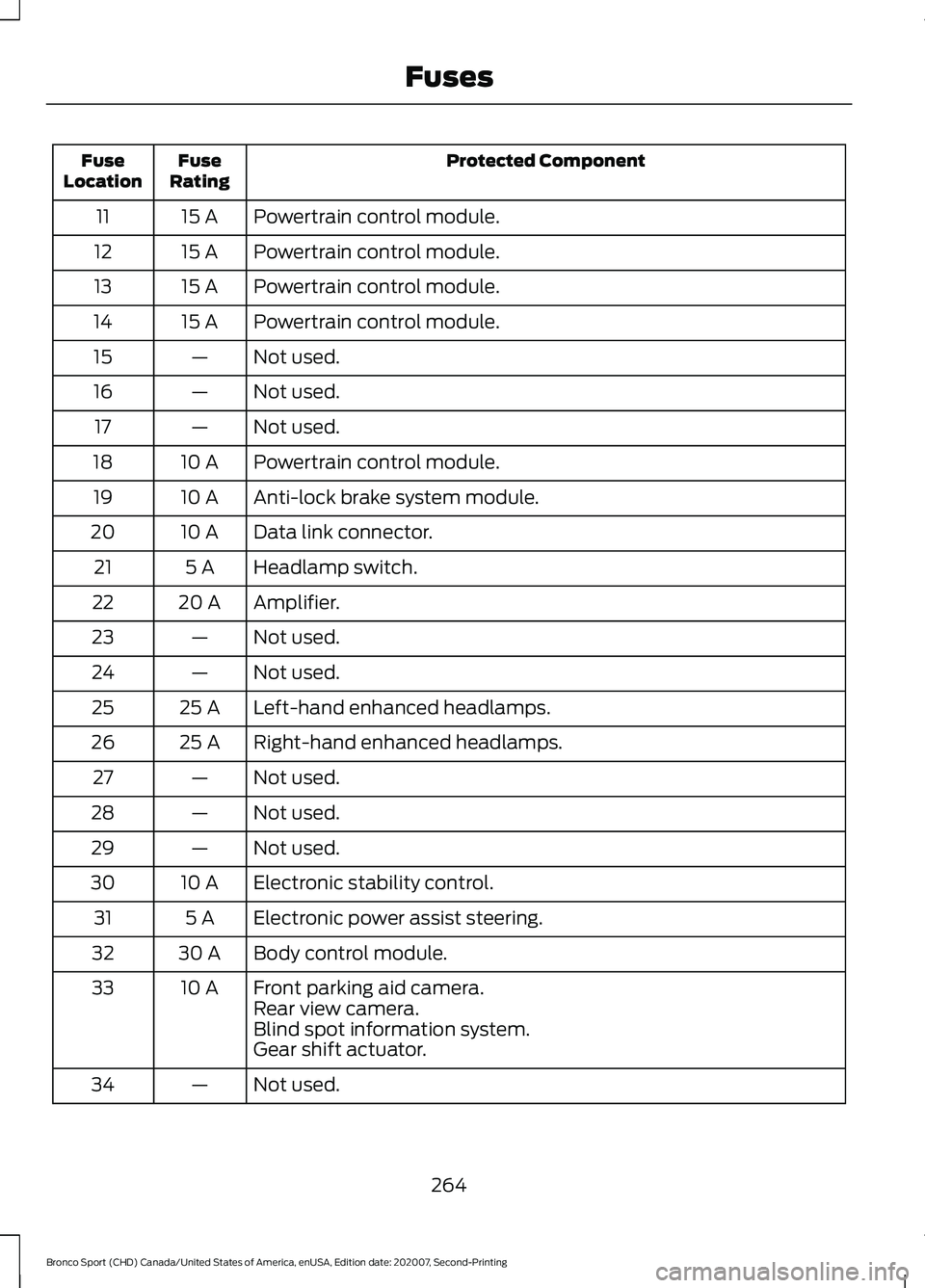
Protected Component
Fuse
Rating
Fuse
Location
Powertrain control module.
15 A
11
Powertrain control module.
15 A
12
Powertrain control module.
15 A
13
Powertrain control module.
15 A
14
Not used.
—
15
Not used.
—
16
Not used.
—
17
Powertrain control module.
10 A
18
Anti-lock brake system module.
10 A
19
Data link connector.
10 A
20
Headlamp switch.
5 A
21
Amplifier.
20 A
22
Not used.
—
23
Not used.
—
24
Left-hand enhanced headlamps.
25 A
25
Right-hand enhanced headlamps.
25 A
26
Not used.
—
27
Not used.
—
28
Not used.
—
29
Electronic stability control.
10 A
30
Electronic power assist steering.
5 A
31
Body control module.
30 A
32
Front parking aid camera.
10 A
33
Rear view camera.
Blind spot information system.
Gear shift actuator.
Not used.
—
34
264
Bronco Sport (CHD) Canada/United States of America, enUSA, Edition date: 202007, Second-Printing Fuses
Page 465 of 471
Rear Occupant Alert System Audible
Warnings........................................................141
Rear Occupant Alert System Indicators.......................................................141
Rear Occupant Alert System Limitations...................................................140
Rear Occupant Alert System Precautions.................................................140
Rear Occupant Alert System...................140
Rear Parking Aid............................................187
Object Distance Indicator............................... 188
Rear Seats
.......................................................138
Folding the Seat Backrest............................... 138
Unfolding the Seat Backrest.......................... 139
Rear View Camera.......................................188 Using the Rear View Camera System.........189
Rear View Camera See: Rear View Camera................................... 188
Rear Window Wiper and Washers...........79 Rear Camera Washer.......................................... 79
Rear Window Washer......................................... 79
Rear Window Wiper............................................. 79
Rear Wiper Blades See: Changing the Rear Wiper Blades.......286
Recommended Towing Weights...........236
Refueling..........................................................158 Refueling System Overview........................... 158
Refueling System Warning............................. 159
Refueling Your Vehicle...................................... 158
Remote Control..............................................53 Car Finder................................................................ 57
Integrated Keyhead Transmitter..................... 53
Passive Key............................................................. 54
Replacing the Battery......................................... 55
Sounding a Panic Alarm..................................... 57
Remotely Starting and Stopping the Vehicle............................................................118
Remotely Starting the Vehicle........................ 118
Remotely Stopping the Vehicle..................... 118
Remote Start Limitations...........................118
Remote Start Precautions.........................118
Remote Start Remote Control Indicators.......................................................119
Remote Control Feedback............................... 119
Remote Start..................................................118 Remote Start Settings....................................... 119
Remote Start Settings.................................119 Setting the Remote Start Duration.............120 Switching Climate Control Auto Mode On
and Off................................................................ 119
Switching Climate Control Last Settings On and Off ......................................................... 119
Switching the Heated Seat Settings On and Off........................................................................\
119
Switching the Heated Steering Wheel Settings On and Off....................................... 119
Repairing Minor Paint Damage
..............294
Replacement Parts Recommendation........................................16
Collision Repairs.................................................... 16
Scheduled Maintenance and Mechanical Repairs................................................................. 16
Warranty on Replacement Parts.................... 16
Replacing a Lost Key or Remote Control............................................................58
Replacing the Cabin Air Filter...................132
Reporting Safety Defects (Canada Only).............................................................260
Reporting Safety Defects (U.S. Only).............................................................260
Resuming the Set Speed...........................194 Resuming the Set Speed from a Complete
Stop.................................................................... 201
Roadside Assistance
..................................250
Vehicles Sold in Canada: Getting Roadside
Assistance........................................................ 251
Vehicles Sold in the United States: Getting Roadside Assistance................................... 250
Vehicles Sold in the United States: Using Roadside Assistance................................... 250
Roadside Emergencies..............................250
Roof Racks and Load Carriers.................227 Maximum Roof Load Amounts..................... 227
Running-In See: Breaking-In................................................. 248
Running Out of Fuel....................................156 Adding Fuel From a Portable Fuel
Container........................................................... 157
Filling a Portable Fuel Container.................. 156
S
Safety Canopy ™
............................................48
Safety Precautions.......................................155
462
Bronco Sport (CHD) Canada/United States of America, enUSA, Edition date: 202007, Second-Printing Index